
MAYFLASH F300 Arcade Fight Stick
4.5Editor score
Wide platform compatibility range
Supports Sanwa customization parts
Affordable entry level pricing
This guide compares the top arcade fight stick for Switch 2 options available today, evaluating connectivity, button quality, and compatibility for competitive
Finding the right arcade fight stick for Switch 2 is essential for players who want precise control and authentic arcade experiences at home. These devices replicate the feel of classic cabinets, offering tactile buttons and joysticks that enhance gameplay significantly.
We evaluated ten leading models based on compatibility, build quality, connection options, and customization features. Each product was assessed for its ability to work seamlessly with the Switch 2 ecosystem while maintaining durability and responsive input for fighting games.
Our selections highlight key strengths and trade-offs to help you choose the best fit for your setup. Prices and availability can change frequently, so verify details on the retailer site before making a purchase decision for your gaming needs.
4.5Editor score
4.7Editor score

4.6Editor score
Below is a side by side comparison of all ten models reviewed in this guide. This table highlights key specifications and connection types to help you quickly identify the right stick for your needs.




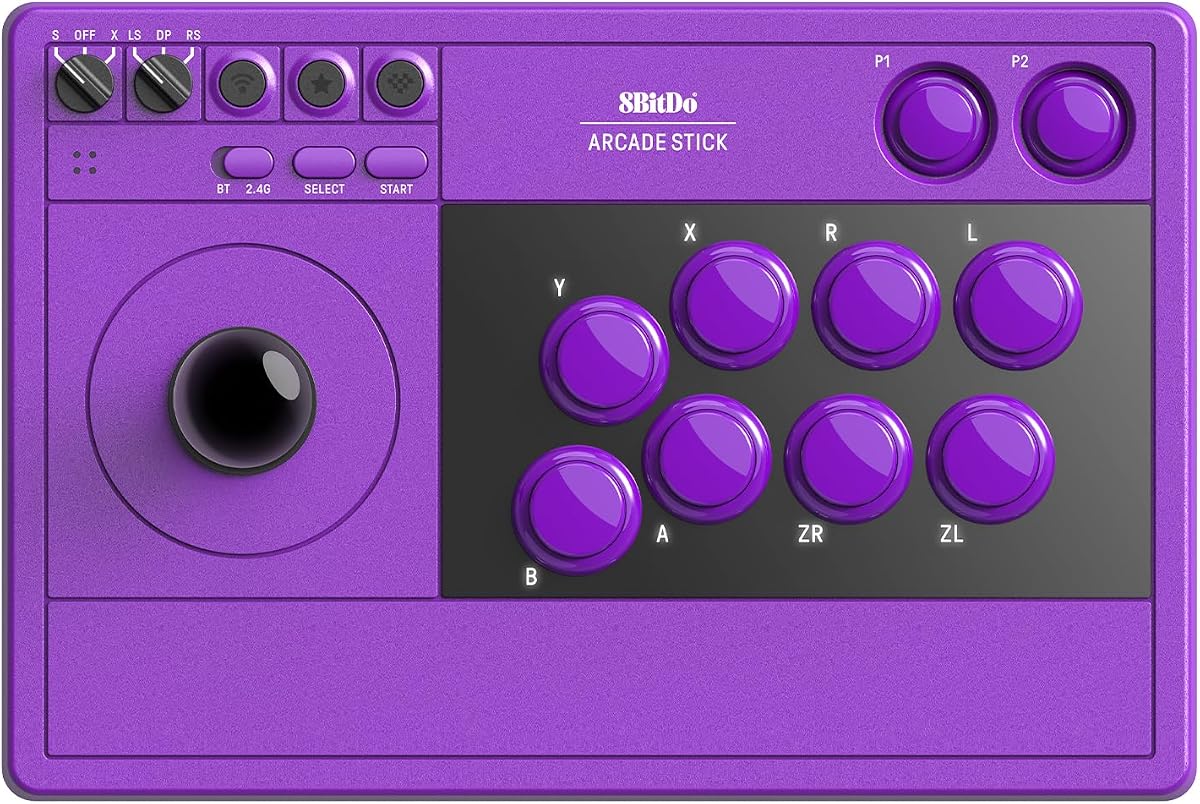
The 8Bitdo Arcade Stick for Switch 2 stands out as the top choice for players seeking premium performance and modern features. With a 4.7 rating, it delivers responsive controls and a sleek design that enhances both aesthetics and functionality.
We may earn a commission when you buy through this link, at no additional cost to you.
Its dynamic button layout automatically adjusts visual labels when switching between Switch and PC modes, reducing confusion during gameplay. The tempered glass faceplate adds a premium feel while resisting scratches during intense sessions. Ultimate software allows deep customization for macros and button mapping.
While the price is higher than budget alternatives, the build quality and feature set justify the investment for serious fighters. The hidden compartment for the 2.4G receiver keeps the setup tidy and protects the adapter from damage during storage or transport.
This stick is ideal for competitive players who value precision and reliability. Whether playing Street Fighter or Tekken, the responsive inputs and stable connection ensure consistent performance. It is the recommended pick for those ready to invest in a high end experience.
The dynamic button layout feature changes visual indicators based on active mode to prevent input errors during gameplay.
Tempered glass and robust internal components ensure longevity and a smooth tactile feel over extended use.
We may earn a commission when you buy through this link, at no additional cost to you.
The MAYFLASH F300 offers exceptional value for beginners or casual players looking for an entry level fight stick. Its 4.5 rating reflects solid performance and broad compatibility with Switch 2 and other gaming systems.
We may earn a commission when you buy through this link, at no additional cost to you.
It supports Sanwa Denshi components, allowing users to upgrade parts over time for improved feel. The XINPUT and DINPUT modes ensure flexibility on PC. Turbo functions enable quick repeated inputs for combos without complex software setup.
While it lacks premium features like glass faceplates, the sturdy construction holds up well to regular use. The main trade-off is fewer customization options compared to higher end models, but the price makes it accessible for most budgets.
This model is perfect for those testing the waters of arcade fighting games. It provides a reliable platform to learn mechanics without a large financial commitment. Consider upgrading parts later as skills improve and preferences become clearer.
Compatible with Sanwa parts allows for future upgrades to enhance responsiveness and tactile feedback as needed.
Supports Switch 2, PS4, Xbox, and PC ensuring you can use one stick across multiple gaming ecosystems seamlessly.
We may earn a commission when you buy through this link, at no additional cost to you.
The MAYFLASH F700 Elite delivers tournament grade performance with premium Sanwa buttons and a precision four way joystick. Its 4.6 rating confirms reliability and responsiveness for competitive play on Switch 2 and other platforms.
We may earn a commission when you buy through this link, at no additional cost to you.
Designed specifically for fighting games, it ensures every input registers accurately. The anti-slip mat keeps the stick firmly in place during aggressive play. Wired and wireless options provide flexibility for both home and on the go setups.
The focus on fighting titles means it may not suit casual gamers playing other genres. The price reflects the quality of components, which are known for longevity and consistent performance over years of use.
This stick is the choice for serious competitors who demand top tier hardware. If you play Street Fighter 6 or Tekken 8 regularly, the investment pays off in reduced input lag and improved muscle memory development.
Sanwa components ensure high speed actuation and return to center for fast and accurate combo execution.
Anti-slip mat prevents sliding during intense matches ensuring consistent positioning for repeated sessions.
We may earn a commission when you buy through this link, at no additional cost to you.
The 8Bitdo Arcade Stick for Switch offers versatile connectivity and software features that suit diverse gaming environments. With a 4.6 rating, it provides reliable performance across Switch and Windows systems with robust customization options.
We may earn a commission when you buy through this link, at no additional cost to you.
Dynamic button layout ensures clarity when switching modes. Ultimate software enables macro creation and detailed button mapping for tailored controls. The universal mount plate supports various arcade components, allowing users to modify hardware easily.
The hidden receiver compartment is a thoughtful design element that protects the 2.4G adapter. While setup can require some time to configure macros, the flexibility gained makes it worthwhile for enthusiasts who enjoy tweaking settings.
This stick is excellent for those who want adaptability across platforms. Whether using Bluetooth for wireless convenience or wired for latency reduction, it handles both well. It bridges the gap between console and PC arcade play effectively.
Ultimate software allows deep customization of macros and button maps to suit individual play styles.
Universal mounting plate supports Sanwa and other arcade components for easy future hardware modifications.
We may earn a commission when you buy through this link, at no additional cost to you.
The 8Bitdo Retro Wireless Arcade Fight Stick emphasizes endurance with up to 40 hours of play on 2.4G connection. Its 4.5 rating highlights reliability and long term usability for extended gaming sessions without frequent recharging.
We may earn a commission when you buy through this link, at no additional cost to you.
Dedicated macro buttons allow instant access to complex combos. Profile switching makes it easy to adapt to different games. The universal mount plate ensures compatibility with standard arcade parts for potential customization upgrades later.
While the internal battery adds weight, it eliminates the need for disposable cells. The charging time is reasonable and fits most schedules. For players who game for long periods, the convenience outweighs the extra heft.
This stick is ideal for portable or home setups where cable management matters. Whether playing on Switch 2 or PC, the wireless freedom enhances comfort. It balances performance and endurance for consistent daily use.
High capacity battery supports marathon gaming sessions without interruption or need for constant power source access.
Dedicated P1 P2 buttons provide quick combo execution during intense competitive matches without menu navigation.
We may earn a commission when you buy through this link, at no additional cost to you.
The Saitake Wireless Arcade Fight Stick stands out with unique features like a display screen and 3.5mm audio jack. With a 4.6 rating, it offers robust functionality for audio monitoring and macro recording across multiple platforms.
We may earn a commission when you buy through this link, at no additional cost to you.
The display shows settings and battery status clearly. You can plug headphones directly into the stick for chat and music on supported systems. Macro recording captures keystrokes for custom commands, enabling complex strategies without extra software.
Some users may find the interface slightly complex at first. However, the flexibility it provides is unmatched in this category. The 1000mAh battery ensures extended use without interruption for continuous gameplay needs.
This model suits players who value audio integration and customization. For those who enjoy streaming or chatting while gaming, the audio jack is a significant advantage. It offers practical tools that enhance immersion and utility during play.
Built-in 3.5mm jack allows direct headset connection for clear communication and sound output during online matches.
Onboard display provides real-time status and settings adjustments without needing external software or menus.
We may earn a commission when you buy through this link, at no additional cost to you.
The MAYFLASH F700 delivers broad compatibility with Switch 2, PS5, and PC. Its 4.5 rating reflects strong performance for fighting titles while supporting diverse input methods for flexible connectivity options.
We may earn a commission when you buy through this link, at no additional cost to you.
Firmware updates ensure continued support as systems evolve. Sanwa compatibility allows for part upgrades. The hidden receiver keeps your setup clean and protects the adapter from damage during storage and transportation.
PS5 users should note it works best for fighting games. The focus on specific genres ensures optimized inputs for competitive play. Xbox users may need alternative models for full support across all modes.
This stick is well suited for households with multiple consoles. Whether playing on Switch 2 or PC, it maintains consistent performance. It is a reliable choice for those who play across different platforms regularly.
Regular firmware updates keep compatibility current with new system updates and platform requirements.
Sanwa compatible design allows users to swap parts as needed to suit personal tactile preferences.
We may earn a commission when you buy through this link, at no additional cost to you.
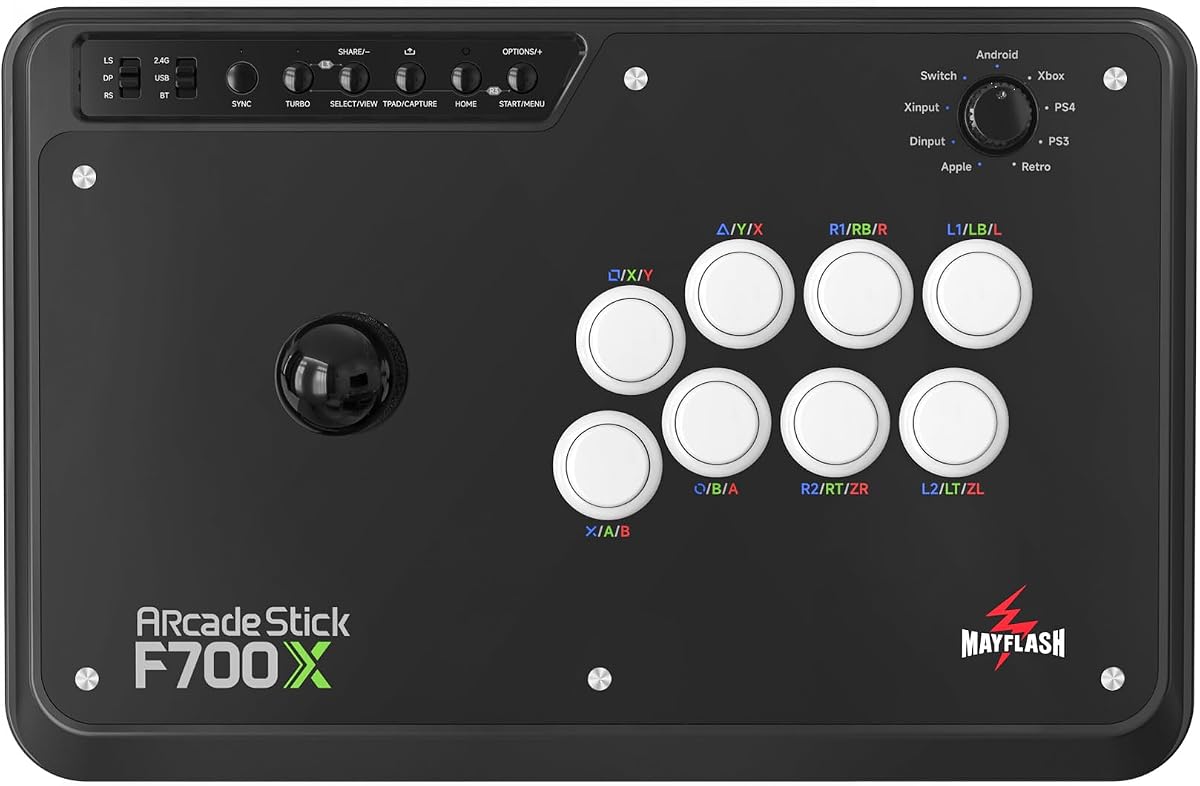
The MAYFLASH F700X targets Xbox Series users with full wireless and wired support. Its 4.2 rating indicates solid performance for Xbox fighting games and PC with tailored Xbox Series connectivity features.
We may earn a commission when you buy through this link, at no additional cost to you.
It supports wired headsets for background music and chat on Xbox. The Sanwa component compatibility ensures easy customization. The hidden receiver protects the adapter and keeps cable management simple during regular use.
Note that PS5 is not supported on this model. Xbox players gain full functionality while others may need different options. The design prioritizes Xbox integration for better native system performance and support.
This stick is essential for dedicated Xbox fighting game fans. If you primarily play on Xbox Series X or S, it provides a robust platform for arcade titles. It bridges console and PC gaming with reliable inputs.
Designed specifically for Xbox Series systems to ensure full wireless functionality and native compatibility features.
Headset support allows clear communication and audio feedback without external adapters or cables.
We may earn a commission when you buy through this link, at no additional cost to you.
The POWER A Fusion Wireless Arcade Stick is officially licensed for Switch, offering trust and warranty support. With a 4.1 rating, it provides solid build quality and customization options for Switch and Switch 2 players.
We may earn a commission when you buy through this link, at no additional cost to you.
A printable face card lets you personalize the look. Metal base ensures stability during intense matches. The front storage area holds the USB cable neatly for tournament ready setups.
It uses AA batteries which adds ongoing cost but allows instant power swaps. No Switch 2 specific claims exist, but compatibility is implied via Switch support. This remains a safe choice for licensed hardware.
This model suits those who value official branding and warranty. If you prefer certified peripherals and custom aesthetics, it delivers. Consider battery costs over time when deciding versus rechargeable alternatives for long term use.
Officially licensed status guarantees compliance with Nintendo standards and includes a warranty for reliability.
Printable face card template allows users to design and apply custom artwork for unique aesthetics.
We may earn a commission when you buy through this link, at no additional cost to you.
The 8Bitdo V3 Edition combines modern design with practical features for Switch 2 and Windows. With a 4.0 rating, it balances performance with customization, offering reliable inputs and robust battery life for extended play.
We may earn a commission when you buy through this link, at no additional cost to you.
Tempered glass faceplate resists wear during frequent use. Profile management lets you switch modes quickly. The 1000mAh battery supports long sessions, and wired USB-C ensures low latency when needed.
It is slightly newer so reviews are still emerging. The value lies in its mix of premium materials and useful software tools. For users who switch between devices often, profile management saves time.
This stick works well for those seeking balance. If you want a rechargeable, stylish stick with strong software support, it is a viable option. Check firmware updates for latest compatibility with Switch 2 and games.
Save and switch between custom profiles instantly to adapt to different games without manual reconfiguration.
Tempered glass faceplate provides a scratch resistant surface that maintains appearance after extensive use.
We may earn a commission when you buy through this link, at no additional cost to you.
Selecting the right fight stick involves understanding connection types, build quality, and customization needs. This section outlines key factors to consider before purchasing.
Ensure the stick supports Switch 2 directly or via firmware. Some models require adapters for full functionality on new consoles.
Choose sticks explicitly listing Switch 2 in compatibility lists to avoid issues.
Wired connections offer the lowest latency but limit mobility. Wireless options provide convenience but may introduce slight delays.
Look for models with Bluetooth, 2.4G, and USB-C for flexibility.
High quality buttons reduce mushiness and increase responsiveness. Sanwa Denshi components are industry standard for durability.
Consider replaceable parts if you want future customization options.
Four-way joysticks provide better direction accuracy for fighting games. Eight-way sticks allow diagonal inputs but may be less precise.
Choose based on your preferred play style and game requirements.
Software that allows macro creation and button mapping increases versatility. Dedicated macro buttons can speed up combo execution.
Evaluate software ease of use and compatibility across systems.
Rechargeable batteries reduce long-term costs and waste. AA battery models offer immediate swaps but add ongoing expenses.
Check battery hours for wireless modes to match your usage.
Rubber mats or weighted bases prevent sliding during intense gameplay. A sturdy base ensures consistent positioning over time.
Inspect base materials to ensure they grip surfaces effectively.
Official licensed products often come with better warranty terms. Check support responsiveness for firmware updates or repairs.
Prioritize brands with clear support channels and documentation.
Begin by connecting the stick to your Switch 2 using USB-C, Bluetooth, or the 2.4G adapter. Ensure firmware is updated via the manufacturer app for best compatibility.
Test each button and joystick movement to confirm input recognition. Adjust sensitivity or macro settings if provided by the software tool.
Store the device in a dry place and keep the hidden receiver compartment closed when not in use to prevent loss and damage.
Not all sticks are natively compatible. Many work but may require adapters or firmware updates. Always check the product page for Switch 2 confirmation.
Wired connections provide the lowest latency which is ideal for competitive play. Wireless offers convenience but ensure low latency modes are available.
Most modern sticks allow button remapping via software. Some models have dedicated macro buttons. Higher end ones support physical part swaps.
Sanwa Denshi components are industry standard arcade buttons and joysticks known for durability and precision. Many sticks support upgrades to these parts.
Download the manufacturer app or tool on PC or mobile. Connect the stick via USB and follow the on-screen instructions to apply updates.
Many models use modular parts that can be replaced. Sanwa components are widely available and easy to install with basic tools.
It is a small slot on the stick to store the wireless adapter when not in use. This keeps it safe and prevents loss during travel.
Most listed models support PC via XINPUT or DINPUT modes. Verify system requirements and driver needs for specific games on your setup.
The 8Bitdo Arcade Stick for Switch 2 leads with premium features and dynamic layout technology. The MAYFLASH F300 offers great value for beginners while the F700 Elite suits competitive players.
Prioritize connection type and customization features that fit your play style. Build stability and button quality ensure long term satisfaction and consistent performance.
Prices and availability change quickly so review current listings before buying. Use this guide to find the best fit for your Switch 2 arcade experience.