
ORICO 5.25 Trayless Hot Swap Mobile Rack
4.1Editor score
Fits 3.5 inch drives
Tool-free mounting process
Stainless steel construction
Finding the right Hot Swap SATA Mobile Rack is essential for system administrators and tech enthusiasts who need quick access to storage drives without shutting down systems. These devices allow you to easily install or remove hard drives and SSDs from external bays while the computer remains running. This capability saves time and reduces downtime during maintenance or data recovery tasks significantly.
We evaluated ten leading models based on build quality, drive compatibility, cooling solutions, and ease of use. Our analysis includes trayless designs, multi-bay enclosures, and specific support for SATA and SAS interfaces. We looked at user reviews and technical specifications to ensure each recommendation meets high standards for reliability and performance in professional environments.
Each pick in this list highlights specific strengths like budget friendliness, premium features, or exceptional durability. You will find detailed reviews and a comparison table to help you decide which rack fits your server or workstation needs. Keep in mind that product availability and pricing can change over time so verify details before purchasing.
4.1Editor score

4.4Editor score

5.0Editor score
As an Amazon Associate we earn from qualifying purchases.
The following table provides a side-by-side overview of key specifications for each of the ten top-rated hot swap mobile racks to help you compare capacity and features quickly.




The StarTech 3.5in SATA Trayless Mobile Rack stands out as a reliable choice for those needing quick access to a single hard drive. With a rating of 4.4 stars it offers a robust solution for technicians who need to swap drives without tools or opening the chassis. Its trayless design allows for immediate insertion and removal making it highly efficient for routine maintenance tasks.
We may earn a commission when you buy through this link, at no additional cost to you.
Key strengths include its solid aluminum construction and internal rubber shock absorbers which protect the drive during transit or vibration. The 50,000+ insertion rating ensures longevity even with frequent use. A lockable drive bay adds an extra layer of security which is crucial for environments where physical access must be controlled. This unit fits standard 5.25 inch bays seamlessly.
While it lacks a built-in fan the aluminum body helps dissipate heat passively. The only trade-off is that it supports only one drive at a time which might limit scalability for users needing more storage capacity. However for a single bay solution this is a minor drawback compared to its ease of use and durability.
This rack is ideal for IT professionals and server administrators who prioritize reliability and quick access. If you need a simple effective way to manage a single 3.5 inch SATA drive in a 5.25 bay this model is a strong recommendation. It balances performance and protection well making it a top contender in this category.
The internal rubber shock absorbers and aluminum housing work together to minimize vibration and impact on the drive which is critical for data integrity.
The lockable drive bay ensures that only authorized personnel can remove or insert drives adding physical security to your storage setup.
We may earn a commission when you buy through this link, at no additional cost to you.
The ICY DOCK Dual 2 Bay 2.5 SSD & HDD Dock offers a versatile solution for docking smaller form factor drives. Rated 4.3 stars it supports both 2.5 inch SSDs and HDDs making it suitable for modern high-speed storage needs. The tool-less design means you can swap drives without screws or trays saving valuable time during setup or maintenance.
We may earn a commission when you buy through this link, at no additional cost to you.
Standout features include individual drive eject buttons and activity indicator lights for each bay. Active Power Technology ensures power is only supplied when a drive is detected which helps with energy efficiency. It supports SATA 3.0 and SAS 3.0 allowing flexibility in drive choice. The door-less design further speeds up the hot swapping process.
A potential limitation is that it requires a 3.5 inch bay which might not be available in all cases. Additionally it is limited to two drives which may not suffice for larger storage arrays. However for users needing a compact dual drive dock this model provides excellent functionality and reliability within its design constraints.
This dock is perfect for systems requiring easy hot-swap capabilities such as mobile computers or small server racks. If you work with 2.5 inch drives and need a reliable docking solution this ICY DOCK model delivers on performance and convenience. It is a solid choice for those valuing speed and simplicity.
APT technology powers individual LEDs and only activates when a drive is installed reducing unnecessary power draw and heat generation.
Supports both SATA and SAS interfaces giving you the flexibility to use different drive types without needing multiple adapters.
We may earn a commission when you buy through this link, at no additional cost to you.
This StarTech mobile rack backplane turns a single 3.5 inch bay into a hot-swappable interface for up to two 2.5 inch SATA drives. With a 4.1 rating it offers a straightforward way to expand storage without opening the chassis. The trayless design and dedicated front eject buttons make drive management intuitive and quick for any user.
We may earn a commission when you buy through this link, at no additional cost to you.
The open-top design and vented slot divider promote passive heat dissipation which helps maintain optimal temperatures for your drives. It is compatible with SATA I/II/III SSDs and HDDs without needing extra drivers or software. The included screw kit and SATA cables ensure you have everything needed for installation right out of the box.
However the open-top design means dust could accumulate over time so it is best suited for clean environments. There is no lock to secure the drives physically which might be a concern in shared spaces. Despite these trade-offs the functionality and ease of use make it a practical choice for many scenarios.
Ideal for technicians and IT professionals this backplane provides maximum compatibility and optimal temperature control. If you need to fit two smaller drives in a single bay this model is an effective solution. It balances cost and performance well for users who prioritize access and thermal management.
The vented slot divider and open-top design allow air to flow freely around the drives preventing overheating during intense usage.
Includes all necessary cables and screws so you can install the unit immediately without searching for extra components.
We may earn a commission when you buy through this link, at no additional cost to you.
The Kingwin Tray-Less Hot Swap Mobile Rack Cage is designed to accommodate two 2.5 inch drives in a single 3.5 inch bay. It has achieved a high rating of 4.5 stars due to its robust build and flexible drive options. The patented non-scratch SATA connector supports up to 50,000 insertions ensuring long-term reliability for frequent users.
We may earn a commission when you buy through this link, at no additional cost to you.
One of its main advantages is the key lock feature which keeps data safe from unauthorized physical access. The mix of high-quality ABS and metal material helps maintain ideal operating temperatures and provides excellent heat dissipation. LED indicators for power and HDD activity help you monitor status at a glance without opening software.
While it does not include a fan the material quality supports passive cooling adequately for most uses. The design is straightforward which some may find lacking in premium features compared to higher-end models. However the functionality and security features make it a strong contender for budget-conscious buyers.
This cage is perfect for enterprise systems and desktop PCs where secure and easy access to drives is required. If you need a reliable enclosure that supports both SATA and SAS drives at a reasonable price this is a top choice. Its balance of features and durability makes it highly recommended.
The built-in key lock ensures that your hard drives are secure from unauthorized removal adding a layer of physical security to your setup.
Supports up to 6Gbps data transfer speeds ensuring your drives perform at their maximum potential without bottlenecks from the rack.
We may earn a commission when you buy through this link, at no additional cost to you.
The ICY DOCK MB326SP-1B 6-Bay rack is a powerhouse for users needing significant storage capacity in a single bay. With a perfect 5.0 rating it supports up to six 2.5 inch drives making it ideal for dense storage environments. The ExpressTray system allows tool-less installation while maintaining the stability of tray-based designs.
We may earn a commission when you buy through this link, at no additional cost to you.
It features Active Power Technology which ensures drives are only powered when present improving efficiency. Dual user-upgradeable fans provide effective cooling with three-speed control to manage noise and temperature. Individual blue LEDs help identify drive status quickly. The unit accommodates various drive heights from 5mm to 9.5mm offering flexibility.
The main downside is its larger physical footprint and higher cost compared to smaller options. It requires a 5.25 inch bay which might not be available in all setups. However the capacity and cooling features justify the investment for professionals who need robust and expandable storage solutions.
This rack is best suited for data centers and rackmount server systems where space and reliability are critical. If you need to consolidate multiple drives into a single bay with top-tier cooling and management features this is the premier choice. It sets the standard for high capacity mobile racks.
Dual 40mm fans with speed control ensure optimal thermal management even when all six bays are occupied with high-performance drives.
Accommodates 2.5 inch drives with 5mm 7mm and 9.5mm heights allowing you to use various SSD and HDD types without adapters.
We may earn a commission when you buy through this link, at no additional cost to you.
The ICY DOCK ExpressCage MB324SP-1B 4 Bay enclosure supports up to four 2.5 inch drives in a single 5.25 inch bay. Rated 4.6 stars it offers a balanced mix of capacity and build quality. The ExpressTray system simplifies installation with tool-less removable trays that maintain stability even under heavy use.
We may earn a commission when you buy through this link, at no additional cost to you.
Its durable metal enclosure with heavy-duty ABS trays ensures longevity and protection. The locking latch design for connectors keeps connections secure during vibration. Three-speed fan control allows you to balance cooling performance with noise levels. Individual blue LEDs provide clear visual status for each drive bay.
While it does require a 5.25 inch bay the space is well utilized to fit four drives. Some users might find the unit bulky compared to smaller racks. However the security features and build quality make it a reliable option for professional use where stability is key.
This model is ideal for servers and workstations needing more than two drives but fewer than six. If you need a sturdy secure way to manage multiple 2.5 inch drives this rack delivers on performance and durability. It is a solid middle-ground choice for expanding storage efficiently.
Locking latches on both SATA power and data connectors prevent accidental disconnection ensuring your data remains accessible during operation.
Fan speed control lets you adjust airflow based on your needs helping reduce noise when full cooling is not necessary.
We may earn a commission when you buy through this link, at no additional cost to you.
The ORICO 5.25 Trayless Hot Swap Mobile Rack is a budget-friendly option for users needing a simple drive bay solution. With a 4.1 rating it fits standard 3.5 inch SATA hard drives into a 5.25 inch bay easily. The tool-free mounting process makes installation quick without requiring any special tools or screws.
We may earn a commission when you buy through this link, at no additional cost to you.
Its durable stainless steel construction provides superior heat dissipation and protects against wear. An on/off button on the front allows you to switch between connection and sleep mode without shutting down the PC. It supports SATA III with data rates up to 6Gbps ensuring fast access to your storage.
While it only holds one drive and lacks advanced cooling the price makes it attractive for basic needs. The absence of extra features like lights or fans keeps the cost down but may limit utility in heavy-duty environments. For occasional use it offers great value and simplicity.
This rack is perfect for home users or small offices needing a single extra drive bay. If you want an affordable and durable way to access a 3.5 inch drive quickly this ORICO model is an excellent pick. It provides essential functionality without unnecessary expense.
The front on/off button lets you control power to the drive directly which is handy for turning off the drive when not in use.
Stainless steel construction ensures the rack resists corrosion and handles the heat generated by the drive effectively.
We may earn a commission when you buy through this link, at no additional cost to you.
The Rosewill Internal Hard Drive Enclosure converts three 5.25 inch bays into four 3.5 inch drive slots offering significant expansion. With a 4.3 rating it is engineered for optimal cooling with a rear 120mm exhaust fan that ensures effective airflow. It supports SATA I/II/III and SAS HDDs giving you versatile storage options.
We may earn a commission when you buy through this link, at no additional cost to you.
Its rugged design made of durable steel and ABS materials ensures years of reliable use in demanding environments. The hot-swap support allows convenient drive replacement without shutting down the system. This makes it a great choice for servers where uptime is critical. It fits specific Rosewill cases seamlessly.
One limitation is the space requirement of three contiguous optical drive bays which may not be available in smaller cases. Installation might be complex for some users due to the multiple drive connections. However the capacity and cooling make it a strong contender for high-performance storage setups.
This enclosure is ideal for server computer systems and cloud computing storage needing multiple large drives. If you have the space and need a reliable way to house four 3.5 inch drives this model offers excellent capacity and thermal management. It is a robust solution for professional environments.
The dedicated rear exhaust fan pulls hot air out of the cage keeping drives cool even under continuous heavy load.
Includes SAS compatibility allowing you to use higher performance SAS drives alongside standard SATA options.
We may earn a commission when you buy through this link, at no additional cost to you.
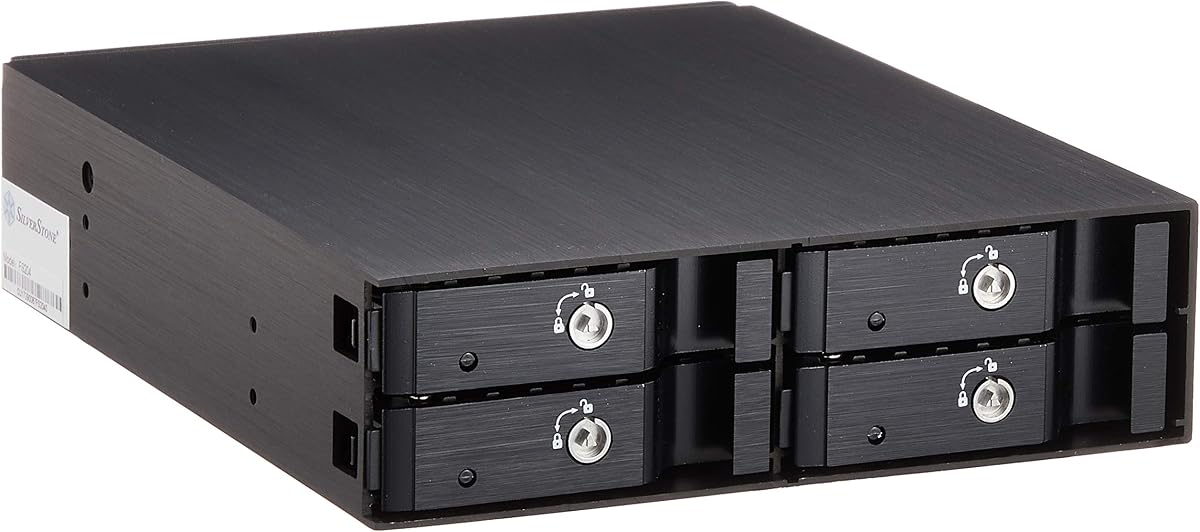
The Silverstone SST-FS204B fits four 2.5 inch drives in one 5.25 inch bay with a premium aluminium design. Rated 4.2 stars it offers a beautiful hairline brushed finish that enhances the look of any workstation. Individual metal key locks for each drive provide extra security which is rare in this category.
We may earn a commission when you buy through this link, at no additional cost to you.
An all aluminium body with a built-in cooling fan ensures excellent heat dissipation. Independent drive status LEDs help you monitor activity at a glance. It supports 6Gbit/s drives ensuring performance is not bottlenecked. This model is ideal for environments where both security and aesthetics matter.
The main trade-off is the higher price point and lack of optional trays for drive stability. Some might prefer a tray design for frequent removal but this unit is very sturdy. If you want a high-quality secure enclosure with superior cooling this is a top choice.
This rack is best for professional setups where data security and design are prioritized. If you need to store multiple drives in a secure and stylish manner this Silverstone model delivers. It combines functionality with premium build quality to meet high standards.
Each drive slot has its own metal key lock preventing unauthorized access to specific drives within the enclosure.
The aluminium construction and built-in fan work together to keep drives at safe operating temperatures even under load.
We may earn a commission when you buy through this link, at no additional cost to you.
The LYNICESHOP 5-Bay Mobile Rack Backplane is designed to fit five drives in three contiguous optical drive bays. With a perfect 5.0 rating it offers a unique space-saving solution for users needing high capacity. The aluminum alloy construction ensures durability and resistance to corrosion making it a long-lasting choice.
We may earn a commission when you buy through this link, at no additional cost to you.
It supports both SATA and SAS interfaces meeting diverse storage needs. Dual power supplies make operation safer and more stable by providing redundancy. A built-in fan with excellent heat dissipation capability ensures your drives run cool. This model is versatile for use in drawers or stand-alone boxes.
The requirement for three bays is a trade-off for the 5-bay capacity. Some users might find availability limited compared to major brands. However the features and reliability make it a top option for those who can accommodate the physical space requirements.
This rack is ideal for custom builds and professional setups needing a balanced storage solution. If you want to maximize drive count in a limited area this model offers excellent value and performance. It is a robust and flexible choice for storage expansion.
Dual power inputs ensure stable operation and provide a backup power source to keep drives running if one supply fails.
Uses three contiguous bays to house five drives offering more capacity in less space than standard racks.
We may earn a commission when you buy through this link, at no additional cost to you.
Selecting the right Hot Swap SATA Mobile Rack involves considering drive size compatibility capacity and security features to match your specific system needs.
Ensure the rack supports the specific drive sizes you own such as 2.5 inch or 3.5 inch. Most racks are designed for one size but some convert a 3.5 bay to hold multiple 2.5 drives. Check whether your drives are SATA or SAS as not all racks support both interfaces.
Choose a model that matches your drive form factor to avoid needing adapters or additional hardware.
Decide how many drives you need to store in a single bay. Options range from single drive racks to models holding up to six or more. If you need high capacity in limited space look for models that convert optical drive bays into multiple storage slots.
Prioritize higher capacity models if you expect to expand storage over time to avoid replacing the rack later.
Look for racks made from durable materials like aluminum or steel which dissipate heat better than plastic. Check the insertion rating which indicates how many times you can insert and remove drives before wear sets in. A higher rating means longer lifespan for frequent users.
Opt for metal construction and high insertion ratings to ensure the rack withstands regular use without failure.
Effective cooling is critical to prevent drive overheating especially if the rack holds multiple drives. Some models come with built-in fans while others rely on passive cooling through aluminum bodies. Check if there are vents or slots that allow airflow around the drives.
Choose a rack with active or passive cooling appropriate for your environment to maintain drive health.
Physical security is often overlooked but vital for sensitive data. Some racks include key locks for drive bays or connectors. Ensure that the locks are sturdy and cannot be easily bypassed if physical access control is needed.
Select a model with key locks if you manage data in shared or public environments.
Tool-less designs allow you to swap drives without screws or trays saving significant time. Look for models with dedicated eject buttons or trays that slide smoothly. This feature is especially useful for systems that require frequent maintenance or testing.
Prioritize tool-less designs to streamline your workflow and reduce maintenance time.
Verify that the SATA power and data connectors are compatible with your system cables. Some racks include connectors but others may require you to source your own. Latching connectors help keep connections secure during vibration or movement.
Ensure the connectors match your system cables to avoid extra costs or connection issues.
Prices vary widely based on capacity and features. Budget models may lack cooling or locks but offer essential functionality. Premium models often include fans and enhanced security but cost more. Balance your needs with your available budget to find the best value.
Set a budget range before shopping to narrow down options and avoid overspending on unnecessary features.
Install the rack into an available 5.25 or 3.5 inch bay following the mounting instructions provided. Ensure the rack is seated securely before connecting any power or data cables to prevent vibration or loosening.
Insert drives carefully by aligning them with the connectors and sliding them in until they click into place. Avoid forcing drives in as this can damage the connectors. Use eject buttons if available to remove drives safely.
Regularly clean dust from the rack and vents to maintain proper airflow and cooling. Monitor drive activity LEDs to ensure drives are operating correctly. If you notice unusual noise or heat consider checking the cooling fans or power connections.
A Hot Swap SATA Mobile Rack allows you to quickly install or remove hard drives without shutting down your computer. It is used for efficient data management testing and backup operations in servers and workstations.
Yes most modern hot swap racks support both SATA and SAS SSDs and HDDs. Just ensure the rack matches your drive size such as 2.5 inch or 3.5 inch for proper fit.
No most mobile racks do not require additional drivers. They function as standard SATA devices and are automatically detected by operating systems like Windows and Linux.
Look for racks with built-in fans or aluminum bodies for passive cooling. Ensure your case has good airflow to prevent heat buildup around the drives during extended use.
Some racks support both SATA and SAS interfaces while others support only SATA. Check the product specifications carefully to ensure SAS compatibility if your drives require it.
You need a case with an available 5.25 or 3.5 inch drive bay depending on the rack model. Measure your bays before purchasing to ensure physical fit.
You can remove the failed drive and insert a new one without shutting down the system. This minimizes downtime and allows for quick replacement during maintenance.
Yes some racks include lockable bays and key locks to prevent unauthorized access to drives. This is useful for protecting sensitive data in shared environments.
Choosing the best Hot Swap SATA Mobile Rack depends on your specific needs for capacity and security. The StarTech 3.5in trayless model offers excellent reliability for single drive needs. The ICY DOCK 6-Bay provides premium capacity for advanced users.
Prioritize models with sturdy construction and effective cooling to ensure long-term performance. Security features like locks are essential if you manage sensitive data in shared spaces. Match the rack size to your available drive bays to avoid compatibility issues.
Verify product details and availability before purchasing as features may change over time. Use the comparison table to identify which model fits your system requirements best. Investing in the right rack will streamline your workflow and protect your storage.