
NETGEAR GS348
4.8Editor score
Simple plug and play setup
Energy efficient operation mode
Flexible mounting options available
This guide compares the top 48 Port Gigabit Managed Switch models for performance, features, and value to help you build a reliable network infrastructure
Selecting the right network infrastructure is critical for modern businesses requiring reliable connectivity across dozens of devices. A high quality switch ensures data flows smoothly without bottlenecks or security vulnerabilities that could compromise operations.
We analyzed ten leading models based on port count, management capabilities, power options, and user feedback. Our evaluation focuses on devices that offer robust control while maintaining ease of use for IT administrators of all skill levels.
Each pick highlights specific strengths such as PoE support or cloud management. Note that availability and pricing vary by retailer and region. Always verify current stock and warranty details before making a final purchase decision for your facility.
4.8Editor score

4.7Editor score

4.4Editor score
The following table provides a side by side overview of key specifications for all ten reviewed models. This allows you to quickly identify which device meets your specific networking needs regarding speed, power, and management style.




The TP-Link SG2452LP stands out as a top contender for organizations needing robust network control without excessive complexity. With a high user rating, it delivers reliable performance through its Omada platform integration.
We may earn a commission when you buy through this link, at no additional cost to you.
Its standout feature is the centralized management capability via the Omada Cloud, allowing administrators to configure and monitor multiple sites from a single dashboard. The fanless design ensures it operates silently even under heavy load, making it ideal for quiet office environments.
While the advanced features offer great flexibility, they do require a learning curve for those unfamiliar with SDN concepts. Additionally, full cloud benefits rely on internet connectivity, which may be a consideration for isolated networks.
This switch is perfect for businesses aiming to scale their infrastructure with professional tools. If you need a balance of power and manageability, the SG2452LP is a highly recommended choice.
The Omada platform allows you to manage the switch alongside other network devices like APs and gateways from one interface.
The fanless design ensures the switch runs quietly, making it suitable for shared workspaces or conference rooms.
We may earn a commission when you buy through this link, at no additional cost to you.
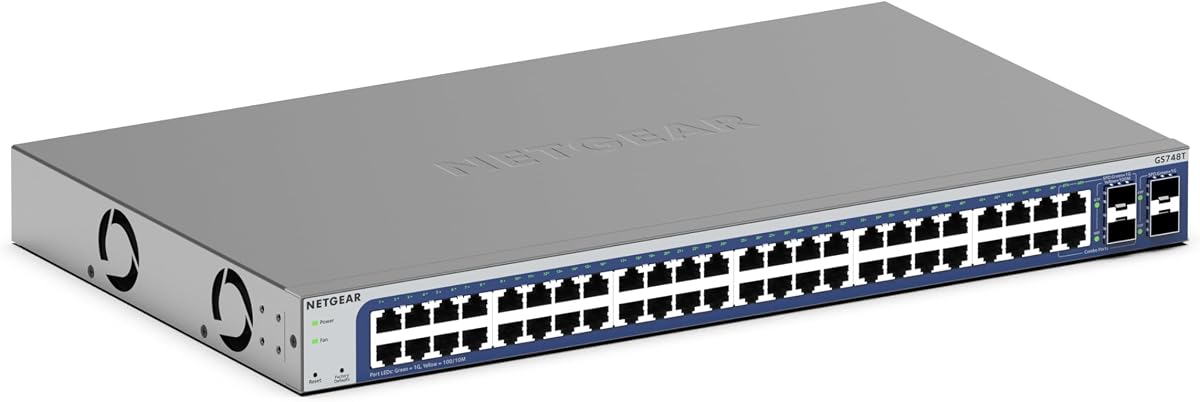
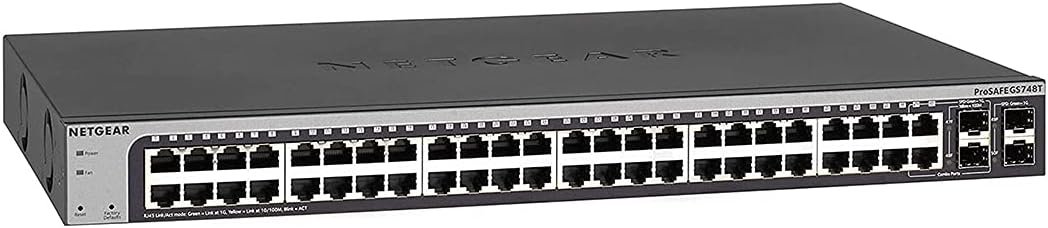
The NETGEAR GS748T offers a strong balance of connectivity and management features for mid size businesses. Its smart software interface simplifies configuration while providing essential tools for network security and monitoring.
We may earn a commission when you buy through this link, at no additional cost to you.
With 48 Gigabit ports and 4 SFP slots, it supports high-speed fiber uplinks. The included one year NETGEAR Insight subscription allows remote management, which is valuable for distributed teams or IT pros managing multiple locations.
The fanless design is generally quiet but may generate warmth under full load. Some users find the software features limiting compared to fully managed enterprise gear, but it suits most smart managed needs well.
This model is ideal for offices needing fiber uplinks and remote management without full enterprise complexity. If you value ease of use and reliable Gigabit performance, this is a solid choice.
Four SFP ports allow you to connect to fiber optic networks for long distance or high bandwidth uplinks.
The included Insight subscription lets you manage the switch from anywhere using a web portal or mobile app.
We may earn a commission when you buy through this link, at no additional cost to you.
The Omada SG3452 is designed for networks that require advanced Layer 2 plus capabilities and scalability. It integrates seamlessly with the Omada SDN platform, allowing centralized control over your entire infrastructure.
We may earn a commission when you buy through this link, at no additional cost to you.
Key strengths include static routing for efficient internal traffic and robust security features like 802.1X and port security. The ability to manage via web, CLI, or cloud provides flexibility for different IT workflows.
Users should ensure their devices have compatible SDN firmware before deployment. While powerful, the setup process can be technical for non experts, requiring careful planning for VLAN and routing configurations.
This switch is best for organizations building a cohesive SDN environment. If you need advanced routing and centralized control, the SG3452 offers great value and longevity.
The switch works with Omada controllers to unify management of switches, access points, and gateways.
Built in static routing helps manage internal traffic flow more efficiently without a separate router.
We may earn a commission when you buy through this link, at no additional cost to you.
This version of the NETGEAR GS748T is popular for its lifetime limited warranty, which provides peace of mind for long term deployments. It offers essential smart managed features in a compact design.
We may earn a commission when you buy through this link, at no additional cost to you.
The four SFP ports (two shared) support fiber connections. Smart software allows basic security and access control. The energy efficient design reduces power costs while maintaining full Gigabit performance.
Limited SFP sharing may constrain uplink flexibility compared to models with fully independent ports. However, for small to medium offices, this limitation is often negligible given the cost benefits.
Ideal for businesses prioritizing durability and support, this switch is a reliable workhorse. If you want a proven device with strong warranty backing, it is a top consideration.
The lifetime limited hardware warranty covers defects and ensures long term support without extra costs.
Small footprint allows desktop or rack mounting, fitting easily into tight network closets.
We may earn a commission when you buy through this link, at no additional cost to you.
The TP-Link TL-SG3452P is an excellent choice for powering IP cameras, VoIP phones, and access points with robust management. It offers 48 PoE plus ports with a substantial 384W budget.
We may earn a commission when you buy through this link, at no additional cost to you.
Integration with the Omada SDN platform provides centralized control. The PoE auto recovery feature ensures devices restart automatically if they freeze, reducing manual intervention needs.
While it is priced higher than non-PoE models, the power savings from not needing separate injectors make it cost effective. Some users note it can generate slight noise under high load.
This switch is perfect for environments needing many powered devices. If you need reliable PoE management, the SG3452P delivers strong performance and features.
Each port can deliver up to 30W, supporting high power devices like PTZ cameras and high speed APs.
If a connected device hangs, the switch can detect and power cycle the port to restore functionality.
We may earn a commission when you buy through this link, at no additional cost to you.
The NETGEAR GS348 is perfect for simple networks needing plug and play functionality without configuration. It provides 48 Gigabit ports for straightforward connectivity without complex software.
We may earn a commission when you buy through this link, at no additional cost to you.
Its fanless design ensures silent operation. The compact metal build supports desktop or rack placement. It is an affordable option for expanding port count without advanced control.
Lacking management features means you cannot segment traffic or prioritize bandwidth. For simple office extensions, this is not a problem, but it limits future scaling flexibility.
This switch is ideal for home offices or small retail setups. If you just need more ports without configuration hassle, the GS348 is a top budget pick.
No configuration is required. Simply plug in cables and the switch handles traffic automatically.
IEEE 802.3az support reduces power use based on link status and cable length.
We may earn a commission when you buy through this link, at no additional cost to you.
The renewed version of the NETGEAR GS748T offers the same smart features at a lower cost. It includes 48 ports and 4 SFP slots for fiber uplinks.
We may earn a commission when you buy through this link, at no additional cost to you.
Renewed products are tested and restored to good condition. This option is great for IT managers comfortable with refurbished hardware to save budget.
Some users may prefer brand new units for peace of mind. Check the warranty details thoroughly to ensure coverage matches expectations.
Ideal for cost conscious businesses needing reliable management, this is a strong value. If you trust certified refurbished gear, it offers great features.
Buying renewed allows access to premium smart managed features at a fraction of the new price.
Includes standard Netgear smart managed software for security and remote monitoring capabilities.
We may earn a commission when you buy through this link, at no additional cost to you.
The EdgeSwitch Lite delivers strong non-blocking throughput for demanding network environments. With 48 Gigabit ports and SFP/SFP+ uplinks, it handles high traffic volumes smoothly.
We may earn a commission when you buy through this link, at no additional cost to you.
Its 140 Gbps switching capacity ensures fast data flow. The dual SFP options provide flexibility for fiber connectivity. It fits wall or rack mounting scenarios effectively.
It lacks PoE, so powered devices need separate injectors. Also, Ubiquiti devices often work best within their own ecosystem, limiting cross brand flexibility.
This switch is great for high bandwidth networks needing SFP plus. If you prioritize speed and lack PoE needs, it is a powerful choice.
The switch can handle full speed on all ports simultaneously without data loss or congestion.
SFP and SFP+ slots allow connection to different fiber types for versatile uplink options.
We may earn a commission when you buy through this link, at no additional cost to you.
The YuanLey managed switch offers premium L3 features and massive PoE budget. It delivers 460W across 48 ports, ideal for powering many high draw devices.
We may earn a commission when you buy through this link, at no additional cost to you.
Six 10G SFP+ slots allow fiber backbone connectivity. L3 management includes advanced routing and security protocols like ACL and SSL. The fanless design ensures quiet performance.
It requires some setup knowledge to utilize L3 features. While powerful, the brand is less common than major names, so verify support channels before purchase.
This is a top choice for advanced networks needing high power and 10G uplinks. If you need robust features, the YuanLey offers excellent value.
Layer 3 capabilities allow dynamic routing and VLAN control for complex network topologies.
Six slots support 10G fiber connections for high speed data transfer between switches or servers.
We may earn a commission when you buy through this link, at no additional cost to you.
The GS348TPv2 adds 4 extra Gigabit ports for a total of 52 while keeping 48 PoE plus ports. It offers reliable smart managed features and strong performance.
We may earn a commission when you buy through this link, at no additional cost to you.
With a 380W budget, it supports most PoE devices well. The smart software interface simplifies management for security and monitoring. Users report high satisfaction with its stability.
It lacks dedicated SFP ports for fiber uplinks, relying on Ethernet. This may limit uplink speed for fiber networks. However, it suits Gigabit edge deployments well.
Ideal for needing a few extra ports, this switch offers solid utility. If you need 52 ports and PoE without fiber uplinks, it is a strong pick.
The extra 4 non-PoE ports provide flexibility for devices that do not need power.
Netgear smart software offers easy setup and control for security and access.
We may earn a commission when you buy through this link, at no additional cost to you.
Choosing the right switch involves assessing your specific needs regarding power, management, and scalability. This guide outlines key factors to consider before making a purchase.
Ensure the switch has enough ports for all devices. Check if ports are Gigabit or faster and whether you need SFP slots for fiber uplinks.
Look for switches offering the exact number of ports you need to avoid waste and optimize cabling.
Managed switches offer control over VLANs, security, and monitoring. Unmanaged switches are plug and play but lack configuration options.
Choose managed if you need traffic control. Select unmanaged for simple connectivity without setup.
If powering IP cameras or phones, verify PoE support and total wattage. Ensure each port provides enough power for your devices.
Calculate total power needs to avoid overloading the switch budget. Choose PoE+ if devices require more than 15W.
Consider how you will configure the switch. Web GUIs are easier. CLI offers deep control. Some support cloud dashboards for remote access.
Pick an interface that matches your team skills. Cloud managed options are great for remote oversight.
Look for features like 802.1X, ACLs, and port security. These protect your network from unauthorized access and threats.
Ensure the switch supports necessary security protocols. Robust features help safeguard sensitive data.
Switches with fans may be loud. Fanless designs are quieter but may run warmer under load. Consider placement in sensitive areas.
If placement is near offices, a fanless model is preferable. Ensure adequate airflow for heat dissipation.
Check warranty length and support channels. Some brands offer lifetime warranties. Others provide limited years with tech support.
Longer warranties reduce risk. Verify support availability before buying to ensure help when needed.
Balance cost with features. Higher priced models often have better support or advanced features. Ensure you pay for what you need.
Avoid overspending on unused features. A mid-range model often suits most small to medium businesses best.
Start by placing the switch in a ventilated area to prevent overheating. Connect it to your router using a high-speed cable for internet access.
Access the management interface via a web browser. Use default credentials to log in and immediately change passwords for security.
Regularly update firmware to patch vulnerabilities. Monitor traffic through the dashboard to ensure performance remains stable.
For most home offices, an unmanaged switch is sufficient. If you need VLANs to separate guest and work traffic, a basic managed switch helps. Check your specific networking needs before buying.
Power over Ethernet delivers electricity through network cables to devices like cameras. If you have no PoE devices, you do not need this feature. It simplifies wiring by removing separate power sources.
Many models include SFP slots for fiber connections. Check the specs to confirm SFP availability. Fiber is useful for long distances or high speed uplinks between buildings.
Most switches have a reset button to restore factory settings. Hold the button for ten seconds to reset. You will lose configurations, so backup settings if possible.
Yes, switches generally work with any Ethernet device. However, advanced features may need a controller from the same brand. Standard Ethernet works universally regardless of vendor.
Cat5e or Cat6 cables support Gigabit speeds. Ensure all cables are in good condition. Damaged cables can reduce speed or cause connection drops.
Fanless switches use passive cooling without moving parts. This reduces noise but may require better airflow. It is ideal for quiet environments like offices.
Quality switches last many years with proper care. Dust buildup can cause overheating. Regular cleaning and firmware updates extend device life.
We reviewed ten models ranging from simple unmanaged units to advanced PoE switches. Each offers distinct benefits for different business needs.
Prioritize PoE if you power many devices. Choose cloud managed if you need remote control. Consider warranty and support for long-term reliability.
Prices and availability change frequently. Check current stock and verify specifications before purchase to ensure the switch meets your requirements.