
HP Chromebook 14 Laptop
4.4Editor score
Intel Celeron N4000 Processor
4 GB RAM Memory
Dual Microphone Audio
Finding a cheap laptop for recording music requires balancing budget constraints with essential audio processing power. Musicians need reliable hardware to run digital audio workstations without frustrating lag or crashes during critical sessions.
We analyzed ten affordable models focusing on processor speed, RAM capacity, and connectivity options. Our guide highlights machines capable of handling multi-track recording, virtual instruments, and real-time effects processing within a modest price range.
Each pick showcases specific strengths like low latency performance or expandable storage for project files. Remember that prices fluctuate frequently so verify current deals before making your final purchase decision today.
4.4Editor score
4.3Editor score

5.0Editor score
As an Amazon Associate we earn from qualifying purchases.
This side-by-side comparison evaluates all ten affordable laptops across key performance metrics essential for audio production tasks and general computing needs.


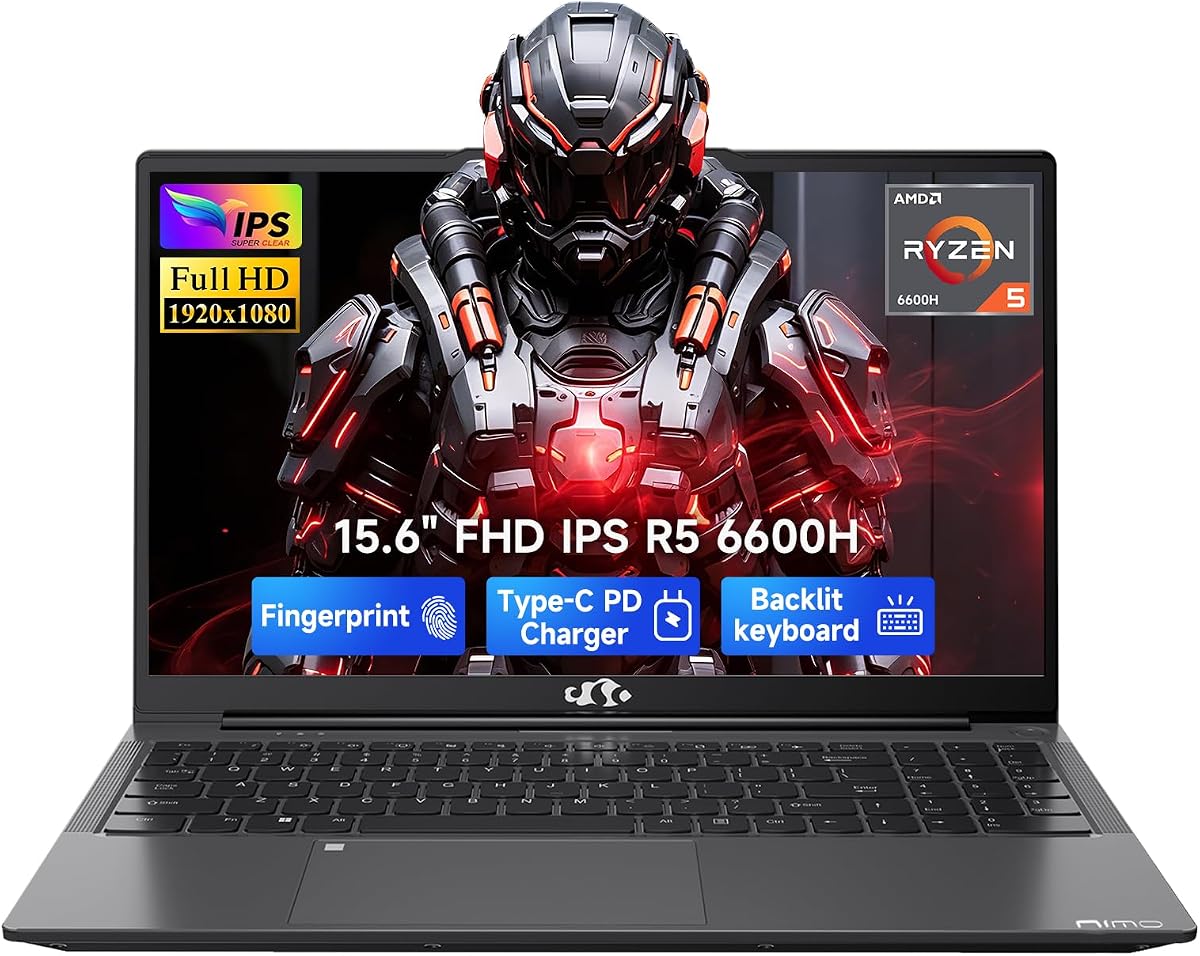
The NIMO 15.6 AI Creator Laptop earns our Editor's Choice for delivering robust performance at an accessible price point for musicians needing reliable audio workstation capabilities.
We may earn a commission when you buy through this link, at no additional cost to you.
Its AMD Ryzen 5 6600H processor with 12 threads handles multiple audio tracks and virtual instruments without the stutter common in cheaper laptops. The 16GB DDR5 RAM ensures smooth switching between your digital audio workstation and reference apps.
While the 512GB SSD is generous, you may need external storage for large sample libraries over time. The integrated Radeon 660M graphics are sufficient for audio but not for heavy video work.
Buy this if you need a laptop that grows with your music production skills. Its upgradeability and strong core performance make it a smart long-term investment for home studio creators.
The six-core architecture allows parallel processing of audio effects and synthesis plugins without latency issues during live recording sessions.
Dual SO-DIMM slots let you upgrade RAM to 64GB later as your projects require handling more simultaneous tracks and samples.
We may earn a commission when you buy through this link, at no additional cost to you.
The HP Chromebook 14 offers an entry-level solution for basic music tasks and idea capture despite its Chrome OS limitations restricting traditional DAW installation.
We may earn a commission when you buy through this link, at no additional cost to you.
Its Intel Celeron processor handles lightweight audio web apps and note-taking effectively while dual microphones help with quick voice memos and demo recordings on the go.
Cloud storage integration is key since local space is minimal. You can use cloud-based audio tools but must manage files carefully to avoid filling the 32 GB quickly.
Choose this for travel sketching rather than full production. Its portability and battery life are unmatched in this price range for musicians needing a secondary device.
Battery life supports up to 13 hours of streaming and light tasks so you can sketch melodies anywhere without hunting for power outlets.
Dual digital microphones capture clear voice input without external gear making quick demos and vocal ideas possible immediately on the device.
We may earn a commission when you buy through this link, at no additional cost to you.
This 15.6 laptop earns a top spot for its unusual 12GB RAM configuration that exceeds typical entry-level specs enabling better multitasking for audio work.
We may earn a commission when you buy through this link, at no additional cost to you.
The built-in M.2 SSD slot allows adding significant storage later which is crucial for sound libraries and project files that quickly exceed the base 128GB capacity.
While the Pentium Gold processor handles basic tasks well it may struggle with heavy plugin chains. This device suits editing and lighter mixing rather than complex live tracking.
Get this if you want upgrade potential at a budget price. The extra RAM headroom provides smoother performance than most competitors in this sub category.
Twelve gigabytes of memory let you run your DAW alongside browser research and email without constant reloading windows during workflow.
The internal M.2 slot supports upgrading storage to one terabyte giving you room to archive projects and install more instruments easily.
We may earn a commission when you buy through this link, at no additional cost to you.
This model mirrors the specs of the top pick with 12GB RAM and a solid display making it a strong contender for students needing an audio capable device.
We may earn a commission when you buy through this link, at no additional cost to you.
Its full-function USB-C port simplifies connecting external audio interfaces while the anti-glare screen reduces eye strain during long mixing sessions in various lighting.
Performance remains tied to the Pentium Gold chip so complex productions may face limitations. However for basic recording and editing tasks it provides smooth responsive performance.
Consider this for students balancing music and coursework. The privacy slider adds security and the high RAM supports keeping multiple research tabs open while working.
Multiple USB ports including full-function USB-C allow direct connection to audio interfaces and hard drives without needing extra dongles.
The anti-glare coating on the display helps maintain focus on waveforms and mixer levels by reducing reflections from overhead lights.
We may earn a commission when you buy through this link, at no additional cost to you.
BLUEING offers a sleek 14-inch option with decent connectivity options for musicians prioritizing portability during on-the-go composition and editing tasks.
We may earn a commission when you buy through this link, at no additional cost to you.
The USB-C charging adds modern convenience while the 100% sRGB display provides accurate color for any multimedia projects alongside your audio work.
Eight gigabytes of RAM is the minimum standard for entry-level audio production meaning you might close other apps to maintain performance stability.
Ideal for traveling songwriters needing a light machine. The screen quality and modern ports are highlights though you may need external drives for project storage.
USB-C charging allows using standard power bricks which reduces the bulk of the travel kit when working from cafes or studios.
The 1080p display with sRGB coverage ensures media visuals look true to life if you produce video with audio tracks.
We may earn a commission when you buy through this link, at no additional cost to you.
This 2026 model balances storage and memory well by providing 256GB base SSD which reduces immediate need for external drives when storing project files.
We may earn a commission when you buy through this link, at no additional cost to you.
The 12GB RAM ensures you can keep your DAW open alongside reference tracks and sample libraries without constant reloading that disrupts creative flow.
The Pentium Gold CPU remains a bottleneck for heavy effects chains but works well for tracking and basic mixing tasks in a focused environment.
Select this for balanced general use. The larger drive space and high RAM make it practical for managing larger projects compared to base models.
256GB of internal storage holds more projects and samples out of the box reducing early reliance on external hard drive purchases.
Twelve gigabytes of RAM supports running modern digital audio workstations smoothly even with multiple browser tabs open for sound research.
We may earn a commission when you buy through this link, at no additional cost to you.
This device mirrors key specs of the top choices with ample RAM and storage for a balanced experience when running music creation software.
We may earn a commission when you buy through this link, at no additional cost to you.
The 170-degree hinge allows flexible viewing angles which helps when connecting external monitors to see more of your track layout while working.
Battery life clocks around six hours which is decent but requires keeping a charger nearby for longer studio sessions or travel workflows.
Choose this for solid general performance. It offers a mix of RAM and storage that prevents bottlenecks for basic to intermediate production tasks.
The 170-degree hinge lets you tilt the screen for comfortable viewing on desks or when using multiple monitors for mixing sessions.
Two USB-C ports allow simultaneous charging and data transfer to external drives or audio interfaces without switching cables constantly.
We may earn a commission when you buy through this link, at no additional cost to you.
This model focuses on display quality which is important when visualizing waveforms and editing tracks on a larger screen comfortably.
We may earn a commission when you buy through this link, at no additional cost to you.
The 256GB SSD provides enough space for your DAW and common samples though you may need external storage for large sound packs.
Eight gigabytes of RAM may feel tight if you run many background apps alongside your music software but remains adequate for focused tasks.
Good for visual-heavy workflow on a budget. The screen quality helps reduce eye strain during long hours of audio editing and mixing.
The FHD IPS screen renders detailed waveforms and interface elements clearly aiding precise editing of audio clips without strain.
An ergonomic keyboard layout supports comfortable typing of track names and plugin parameters during long production sessions at home.
We may earn a commission when you buy through this link, at no additional cost to you.
This laptop features a fanless design that ensures absolute silent operation making it ideal for recording in noise-sensitive environments without cooling noise.
We may earn a commission when you buy through this link, at no additional cost to you.
At 3.3 lbs it is extremely portable so you can easily carry it to locations for inspiration or remote recording setups when needed.
Performance is limited by the Celeron N4020 which restricts you to basic note-taking or very light audio apps rather than full production.
Perfect for capturing ideas silently. The fanless operation ensures it does not interfere with microphone input during voice or instrument recording.
The fanless design ensures zero internal noise so microphones do not pick up laptop hum during quiet vocal or instrument recordings.
Type-C PD charging allows quick power-ups between uses without needing a heavy traditional power adapter during travel or gigs.
We may earn a commission when you buy through this link, at no additional cost to you.
This model offers a lightweight chassis at 1.63kg which helps reduce fatigue when carrying your equipment for mobile recording sessions and travel.
We may earn a commission when you buy through this link, at no additional cost to you.
The expandable storage slot supports adding a TF card up to 512GB which helps overcome the base storage limitation for archiving project files.
Six gigabytes of RAM is on the lower side for modern digital audio workstations so closing background apps is essential during active use.
Choose this for travel ease. The light weight makes it practical for students and musicians moving between locations regularly for practice and work.
The 1.63kg chassis is easy to slip into any bag for transport to rehearsals or remote recording sessions without added strain.
A TF card slot allows adding up to 512GB of external storage to keep your library and projects organized without external drives.
We may earn a commission when you buy through this link, at no additional cost to you.
Selecting the right hardware requires understanding which specs impact audio workflow most and how to balance cost with long term usability.
The CPU handles all audio processing including virtual instruments and effects so look for models with multiple cores to avoid audio dropouts during live tracking.
Prioritize multi-core processors like Ryzen or higher-end Intel chips to ensure stable playback of multiple tracks without latency issues.
Random Access Memory determines how many samples and tracks you can load simultaneously so aim for at least 8GB to avoid constant reloading.
For comfortable music production choose 12GB or more if possible to allow background apps like browsers and email to run smoothly.
Solid State Drives provide the fast data access needed to load audio files and system programs quickly so avoid older mechanical hard drives.
Look for NVMe or PCIe SSDs to ensure quick boot times and snappy file access for your audio project libraries.
You need USB ports to connect your audio interface and MIDI controllers so check that the laptop has enough slots or functional USB-C.
Ensure the presence of full-size USB and USB-C ports to connect peripherals directly without needing adapters during your recording workflow.
A sharp Full HD screen allows you to see detailed waveforms and mixer controls clearly which reduces eye strain during long editing sessions.
Opt for an IPS panel for consistent colors and viewing angles so you can share the screen with collaborators comfortably during production.
Long battery life ensures you can work from different locations without constant power hunting which is crucial for musicians on the go.
Choose models with at least six hours of endurance to support mobile sessions at coffee shops or rehearsal spaces easily.
Windows and macOS support the widest range of audio software so avoid niche operating systems that limit your plugin and DAW options.
Ensure your chosen laptop runs a standard OS that supports all the digital audio workstations and VST plugins you plan to use.
Check if RAM and storage slots are accessible because upgrading these parts later can extend the laptop life as your production needs grow.
Prioritize models with open memory slots or M.2 interfaces so you can increase capacity without replacing the entire device.
Install audio drivers immediately after setup to ensure low latency performance and proper interface communication.
Organize your sample files into clear folders on the SSD to keep projects tidy and prevent accidental file deletions.
Keep the laptop in a dry cool place and avoid direct sunlight to prolong battery health and prevent thermal throttling.
Yes basic to mid-range laptops can handle most production tasks if they meet minimum RAM and CPU requirements. Focus on core specs rather than price alone for reliable performance.
Eight gigabytes is the minimum for entry-level work but 12GB to 16GB offers smoother handling of multiple tracks and plugins during production.
Chrome OS has limitations for traditional desktop DAWs so it is better suited for cloud-based tools rather than full professional studio workflows.
SSDs load audio files and system data much faster than mechanical drives which reduces latency and prevents audio dropouts during playback.
Yes for low latency recording you need an audio interface that connects via USB to ensure high quality input and output for your tracks.
Update your audio drivers set the buffer size appropriately and close unnecessary background apps to free up CPU resources for better performance.
Many allow upgrades but check specific model details first since some ultra-thin units have soldered memory that cannot be expanded later.
The NIMO 15.6 AI Creator Laptop offers the best balance of core performance and upgradeability for home music production under typical budget ranges.
Our top picks demonstrate that affordable machines can support serious music creation when they prioritize core specs like multi-core CPUs and ample RAM.
Focus on processor power and storage speed over brand names since reliable hardware ensures you can build your library and tracks without frustration.
Prices for these models vary so check current listings before buying to get the best value for your specific music production workflow needs.