
KPXOS OSU3X Custom Gaming Keyboard
3.4Editor score
Rapid trigger technology
Magnetic switches
Customizable interface
Discover the best keyboard for Geometry Dash players in October 2026. This guide compares top magnetic switch models for rapid trigger performance and
Finding the right keyboard for Geometry Dash can transform your gameplay experience. Precision timing is crucial in this rhythm platformer, and standard mechanical switches often lack the responsiveness needed for high-level play.
We evaluated ten top-rated models focusing on rapid trigger technology, magnetic switches, and customizable actuation points. Our analysis includes detailed specifications, user feedback, and performance metrics relevant to rhythm gaming enthusiasts.
Each selection highlights specific strengths tailored to different player needs and budgets. Prices fluctuate frequently so check current listings before purchasing. This guide ensures you find the optimal tool to master every level.
3.4Editor score
4.7Editor score

4.5Editor score
This comparison table summarizes key specifications across all ten models. Use it to quickly identify which features align with your specific gameplay requirements and technical preferences.





This keyboard stands out for its dedicated support of rapid trigger technology essential for rhythm games like Geometry Dash. With a 4.7 star rating users praise its responsiveness and unique screen interface that visualizes key actions.
We may earn a commission when you buy through this link, at no additional cost to you.
The Hall magnetic linear switches offer adjustable actuation allowing players to set trigger points as low as needed for precision. The IPS color screen displays key counts and status helping track performance during intense sessions.
While it requires calibration before first use the benefits outweigh the setup time. Some users note a learning curve for macros but once configured the device streamlines gameplay significantly.
Competitive players seeking speed and customization will find this model ideal. The combination of hardware speed and software flexibility makes it a top recommendation for Geometry Dash enthusiasts.
The magnetic switches eliminate physical contact ensuring consistent actuation without wear over time.
Real-time key travel visualization helps players refine timing and track inputs accurately.
We may earn a commission when you buy through this link, at no additional cost to you.
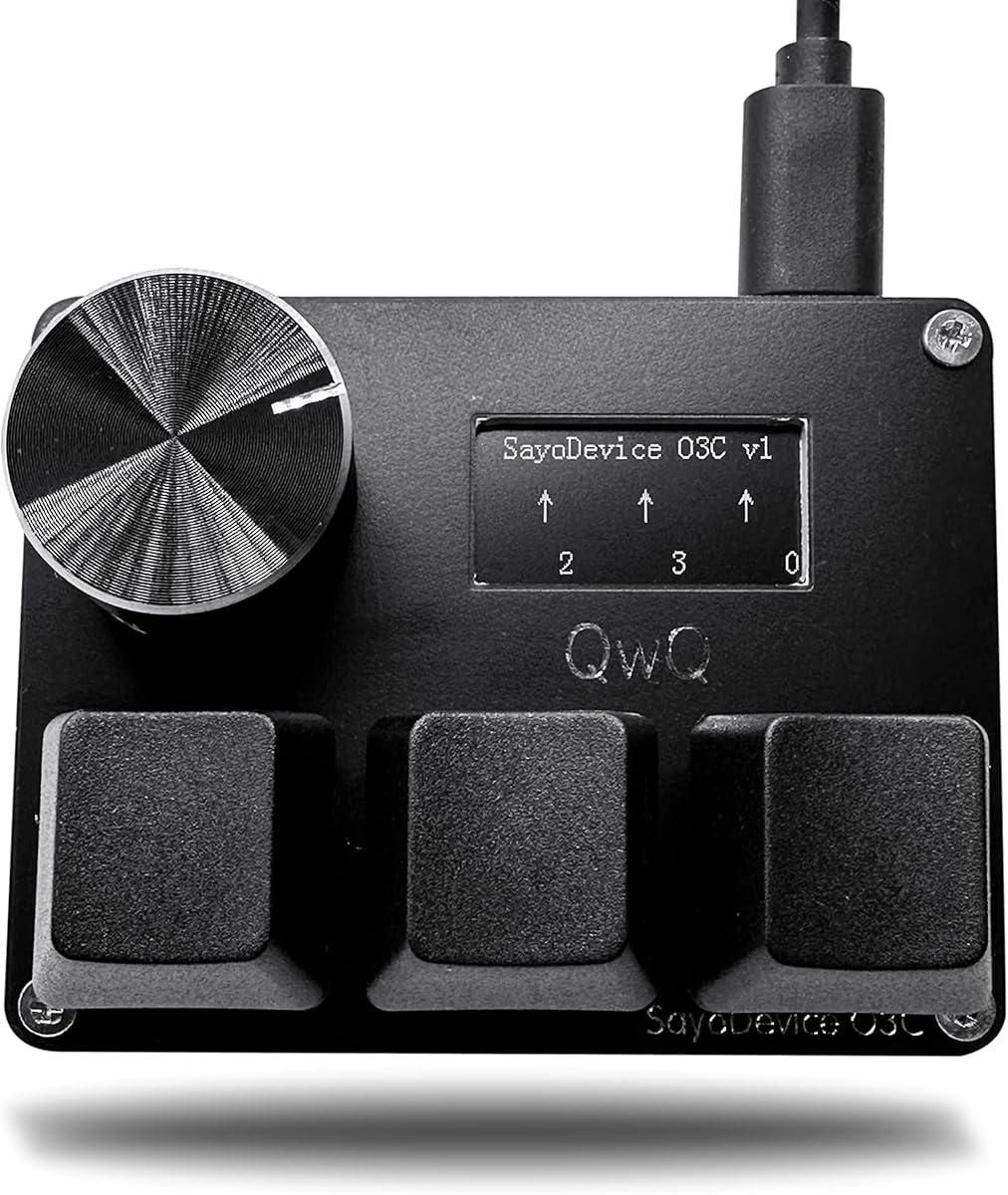
Designed specifically for OSU and Geometry Dash this keyboard offers essential rapid trigger features at a budget-friendly cost. It includes magnetic switches that allow adjustable trigger distances for personalized sensitivity.
We may earn a commission when you buy through this link, at no additional cost to you.
The interface supports customization enabling users to adjust startup screens and device names. While less polished than premium models it delivers core functionality for players needing speed without high expenses.
Calibration is straightforward and compatible with various magnetic poles. However the 3.4 star rating suggests some users may encounter inconsistencies compared to higher-rated alternatives.
Ideal for beginners or those prioritizing value this keyboard provides a solid entry into magnetic switch technology. It balances cost with performance for casual competitive play.
Users gain access to magnetic switch benefits without the premium price tag.
Personalization features allow minor tweaks to suit individual user preferences easily.
We may earn a commission when you buy through this link, at no additional cost to you.
This model shares the same high specifications as the top-rated version ensuring reliability and performance. It features three Hall magnetic switches with an IPS screen for visualizing key actions and status.
We may earn a commission when you buy through this link, at no additional cost to you.
The compact mini keypad design saves desk space while retaining essential programmable keys. Users can customize the screen text for ID display or other quick reference needs during gameplay.
While the small size may limit traditional typing it focuses on efficiency for gaming tasks. Calibration ensures consistent performance though users should follow instructions carefully for optimal results.
Players needing a space-saving solution with top-tier speed will appreciate this keyboard. Its balance of features and form factor makes it a strong contender for setup optimization.
The mini keypad footprint maximizes mouse movement area for better aiming control.
Custom macros and copy-paste functions streamline repetitive actions during gameplay.
We may earn a commission when you buy through this link, at no additional cost to you.
This keyboard emphasizes deep customization with support for custom animations and adjustable trigger release up to 4mm. It features three Hall magnetic switches and a screen displaying key range details.
We may earn a commission when you buy through this link, at no additional cost to you.
Users can program keys and knobs for complex combinations like ctrl/alt/shift plus any key. The hot-swappable design allows easy replacement of switches without soldering for personalization.
Calibration is necessary for accuracy and may be required after firmware updates. While powerful the small key count limits general typing but suits focused gaming sessions well.
Tinkerers seeking control over every aspect of their keyboard will love this model. The flexibility in trigger settings and key mapping supports advanced gameplay strategies effectively.
Adjustable release settings allow fine-tuning for specific game mechanics or preferences.
Custom animations on the screen enhance user interface engagement and status tracking.
We may earn a commission when you buy through this link, at no additional cost to you.
This keyboard features advanced magnetic switches designed for ultra-fast response with an 8000Hz polling rate. It delivers 0.02mm rapid trigger steps ensuring lightning-fast input for competitive titles.
We may earn a commission when you buy through this link, at no additional cost to you.
The 60% compact layout saves significant desk space while maintaining essential functionality. A web-based driver simplifies customization without needing bulky software installations for remapping and macros.
RGB lighting adds visual flair with 16.8 million colors and PBT keycaps for durability. While Mac users may find limitations the performance and convenience are top-tier for PC gamers.
Gamers prioritizing raw speed and modern software integration will find this model exceptional. The web-based customization approach streamlines setup making advanced features accessible to all users.
The 8000Hz rate minimizes latency allowing immediate execution of player commands.
Cloud-driven settings mean you can adjust macros from any device with internet access.
We may earn a commission when you buy through this link, at no additional cost to you.
This keyboard offers triple mode connectivity including wireless 2.4G and Bluetooth with an 8000mAh battery supporting long usage without frequent charging. A large 1.14 inch TFT screen provides extensive visual feedback options.
We may earn a commission when you buy through this link, at no additional cost to you.
The gasket mount design ensures a comfortable typing feel with shock absorption. Hot-swappable switches allow users to experiment with different switches without soldering for personalized feel.
While it lacks rapid trigger focus its high battery and screen customization support general gaming needs well. The programmable software enables deep customization for macros and RGB effects.
Users prioritizing wireless freedom and multimedia features will appreciate this robust device. The balance of battery life and customization makes it versatile for gaming and work tasks.
Switch seamlessly between Bluetooth wireless and wired modes for different environments.
The 8000mAh battery provides extended usage times even with RGB lighting active.
We may earn a commission when you buy through this link, at no additional cost to you.
This keyboard integrates advanced features like DKS and SOCD which optimize inputs for competitive gaming. The Hall Effect switches support rapid trigger technology with adjustable actuation as precise as 0.01mm.
We may earn a commission when you buy through this link, at no additional cost to you.
The gasket structure reduces vibrations providing a refined acoustic experience. PBT keycaps ensure durability while allowing vibrant RGB illumination through the shine-through design.
A web-based driver simplifies customization though Mac support may be limited. Pre-lubed switches ensure smooth travel right out of the box without additional maintenance.
Players needing precise input control and advanced game features will find this model superior. The combination of hardware quality and software flexibility supports high-performance gaming needs.
These features ensure consistent directional inputs improving control during fast movements.
The gasket mount and dampening foam reduce noise for quiet focused gaming.
We may earn a commission when you buy through this link, at no additional cost to you.
This keyboard focuses on speed with an 8000Hz polling rate and adjustable actuation down to 0.02mm. It supports rapid trigger for fast resets ensuring responsive input during competitive play.
We may earn a commission when you buy through this link, at no additional cost to you.
The web-based driver allows full customization of keys macros and lighting without downloads. It retains arrow keys in a compact 60% layout maximizing desk space for mouse movement.
While Mac support is limited the performance and speed suit PC gamers well. RGB backlight with 16.8 million colors adds aesthetic appeal to the functional design.
Users seeking a portable yet high-performance keyboard will appreciate this model. The web driver simplifies setup ensuring easy access to advanced features.
Arrow keys and essential functions are kept despite the compact footprint.
14 preset effects and customizable colors allow personal expression.
We may earn a commission when you buy through this link, at no additional cost to you.
This white variant offers the same core features as the black version with a clean aesthetic. It includes rapid trigger support and an IPS screen for visualizing key actions.
We may earn a commission when you buy through this link, at no additional cost to you.
The customizable interface allows users to personalize the startup screen and device name. Plug-and-play setup ensures quick connectivity without complex driver installation.
Users may find the lower rating reflects some functional limitations compared to premium options. However the compact form factor and magnetic switches still provide a solid gaming foundation.
Ideal for those seeking visual customization without sacrificing essential gaming tech. The white finish suits clean setups while maintaining performance for rhythm games.
The white color option helps match lighter desk setups and peripherals.
Plug-and-play compatibility reduces the time needed before gameplay.
We may earn a commission when you buy through this link, at no additional cost to you.
This keyboard emphasizes ease of use with a plug-and-play setup that requires minimal configuration. It features magnetic switches with an 8000Hz polling rate for fast response.
We may earn a commission when you buy through this link, at no additional cost to you.
Users can customize the boot interface and device name via software. The screen displays key travel and status enhancing interaction during gameplay sessions.
The 2-meter data cable offers flexibility in setup placement. While the rating is modest the core features remain relevant for specific gaming needs.
Casual players or those prioritizing simplicity will find this model sufficient. The balance of speed and setup ease makes it a convenient choice.
Minimal configuration required allows immediate use after connection.
Visual status updates help track input counts during gaming.
We may earn a commission when you buy through this link, at no additional cost to you.
Choosing the right keyboard involves evaluating multiple technical factors that directly impact gameplay performance and comfort. Use these criteria to find a model that matches your play style.
Rapid trigger allows keys to reset instantly upon release without physical travel. This reduces input delay and is critical for fast-paced games like Geometry Dash.
Prioritize keyboards with rapid trigger support to ensure your inputs register as quickly as possible.
Magnetic switches use Hall Effect sensors to detect key presses eliminating physical contact. This results in consistent actuation and faster response times compared to traditional mechanical switches.
Look for keyboards with magnetic switches to benefit from reduced wear and higher precision.
Adjustable actuation allows you to set the distance required to register a key press. Lower actuation points can increase speed but may lead to accidental inputs if set too low.
Ensure the keyboard offers customizable actuation points so you can fine-tune sensitivity to your needs.
Polling rate measures how often the keyboard sends data to the computer per second. Higher rates like 8000Hz reduce latency ensuring smoother input transmission.
Select a keyboard with a high polling rate to minimize delays during intense gaming moments.
Compact layouts like 60% save desk space and free up room for mouse movement. Full-size keyboards offer more keys but may restrict arm positioning.
Choose a form factor that balances functionality with the space available on your desk.
Customization software allows you to remap keys, create macros, and adjust lighting. Some models offer web-based drivers while others require installed software.
Check the software options to ensure they are accessible and user-friendly for your setup.
Solid construction ensures durability and a stable typing experience. Look for features like gasket mounts or metal plates that enhance rigidity.
Invest in a model with robust build quality to withstand frequent and intense use.
Wired connections generally provide the most stable performance for gaming. Wireless options offer convenience but may introduce latency or battery concerns.
Determine if wired stability or wireless freedom is more important for your gaming environment.
Always calibrate your magnetic switches before first use to ensure accurate actuation points. Follow the manufacturer's instructions to set trigger distances that suit your playing style.
Clean the keyboard regularly using compressed air to remove dust and debris from keycaps. Avoid using harsh chemicals that could damage the surface or internal components.
Update the firmware and software drivers when available to maintain compatibility and performance. Regular updates often include bug fixes and feature enhancements for better stability.
Yes, magnetic switches generally provide faster response times and more consistent actuation than mechanical switches. They eliminate physical contact which reduces wear and improves precision for rapid inputs.
Rapid trigger allows a key to reset instantly upon release regardless of physical travel. This reduces the time needed between key presses enabling faster gameplay reactions.
While no keyboard is exclusively designed for Geometry Dash many models support rapid trigger and adjustable actuation which are beneficial for the game. Look for keyboards marketed for rhythm games.
Calibrate your keyboard initially and whenever you notice inconsistent inputs. Firmware upgrades may also require recalibration to maintain optimal performance and sensitivity.
Modern wireless keyboards have improved significantly but wired connections still offer lower latency. For competitive play a wired keyboard is generally recommended to eliminate any potential input lag.
Most models come with software that allows remapping keys and creating macros. Customization features vary by model so check the product details for specific capabilities.
The top picks highlight the best balance of speed and customization for geometry Dash players. Magnetic switches and rapid trigger technology are essential features to prioritize.
Focus on models with high polling rates and adjustable actuation to match your precise needs. A compact design can also improve your setup ergonomics significantly.
Check current listings for pricing and availability as these details change often. Choosing the right tool will enhance your performance and overall gaming experience.