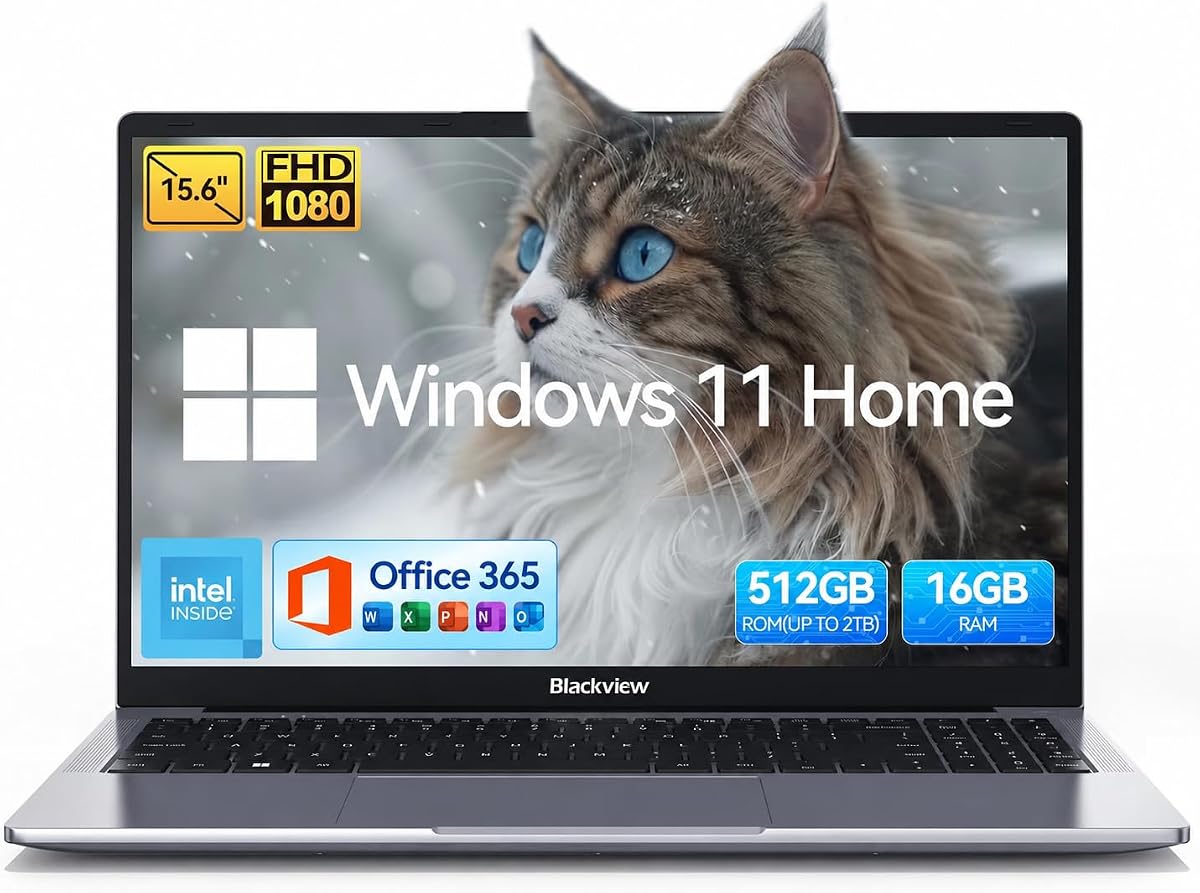
15.6 Student Laptop Triple-Display
4.6Editor score
Triple-display support
Budget-friendly pricing
16GB DDR4 RAM
Finding a laptop with two HDMI ports is essential for professionals who need to connect multiple monitors simultaneously. This guide explores the best options available in November 2026, focusing on performance and connectivity.
We evaluated ten real products based on processor power, memory capacity, and port availability. Each entry includes detailed specifications and real-world usage scenarios to help you make an informed decision.
Each pick highlights unique strengths like battery life or screen quality. Prices fluctuate frequently, so check current listings before purchasing. This guide ensures you find the perfect machine for your workflow needs today.
4.6Editor score

4.4Editor score

4.2Editor score
As an Amazon Associate we earn from qualifying purchases.
This side-by-side comparison highlights the key specifications of each model to help you identify the right fit for your multitasking and display requirements efficiently.


The Dell Inspiron 16 Plus 7640 stands out as a top choice for productivity. With a 16-inch 2.5K display and Intel Core i7 processor, it handles complex tasks effortlessly. Its build quality ensures reliability for business users.
We may earn a commission when you buy through this link, at no additional cost to you.
Its sharp graphics and 120Hz refresh rate provide smooth visuals for multitasking. The 16GB RAM supports multiple applications running simultaneously without lag. ComfortView Plus reduces blue light for eye comfort during long sessions.
While it typically features one HDMI port, users can utilize additional options like USB-C for external displays. The price reflects premium features like military-grade testing. This trade-off is acceptable for the performance offered.
Professionals needing a reliable machine for work will appreciate this model. It balances performance and portability well. We recommend it for those prioritizing screen quality and processing power.
The aspect ratio allows more vertical space for documents and spreadsheets.
Onsite service ensures quick repairs if hardware issues arise.
We may earn a commission when you buy through this link, at no additional cost to you.
This HP model offers exceptional memory and storage for heavy workloads. The 17.3-inch touchscreen provides a large workspace. It suits users needing significant power for data processing and multitasking.
We may earn a commission when you buy through this link, at no additional cost to you.
With 64GB RAM, browser tabs and applications run without slowdown. The 2TB SSD ensures quick file access. The HD+ resolution delivers clear visuals for presentations and media.
While it mentions one HDMI, users can expand via other ports. The weight is a consideration for portability. However, the performance justifies its size for desktop replacement use.
Ideal for power users requiring extensive resources. We recommend it for home or office setups where mobility is less critical. Its specs handle demanding software effectively.
64GB RAM supports virtual machines and heavy editing software smoothly.
The screen size offers ample room for side-by-side windows.
We may earn a commission when you buy through this link, at no additional cost to you.
This HP laptop combines touch functionality with strong performance for business tasks. The AMD Ryzen 5 processor ensures smooth operation. It suits students and professionals needing reliable computing power.
We may earn a commission when you buy through this link, at no additional cost to you.
With 32GB RAM, heavy spreadsheets and web browsing run efficiently. The IPS display offers vibrant colors. The backlit keyboard aids typing in low-light environments.
Port selection typically includes one HDMI, but USB-C can extend connectivity. Battery performance may vary based on usage. These factors are balanced by the strong specs.
Recommended for users prioritizing speed and screen interaction. It handles daily office work well. We suggest it for those needing a responsive all-around machine.
Touch input makes navigating applications and presentations intuitive.
AMD Ryzen 5 offers excellent power efficiency and speed.
We may earn a commission when you buy through this link, at no additional cost to you.
This model stands out for supporting triple displays, ideal for multitasking. The price makes it accessible for students. It handles basic productivity tasks without breaking the bank.
We may earn a commission when you buy through this link, at no additional cost to you.
16GB RAM ensures smooth multitasking for daily apps. The FHD display provides clear visuals. USB-C and HDMI allow connecting multiple monitors efficiently.
The processor is suited for everyday use, not heavy rendering. Battery life covers a few hours. These trade-offs are reasonable for the connectivity it offers.
Perfect for students needing multiple screens. We recommend it for budget-conscious users prioritizing display flexibility. It meets study and work needs effectively.
Connect up to two external monitors for an expanded workspace.
Pre-installed MS 365 helps students get started immediately.
We may earn a commission when you buy through this link, at no additional cost to you.
Designed for business, this Dell laptop offers Windows 11 Pro security. The 32GB RAM supports demanding workloads. It suits professionals needing robust data management.
We may earn a commission when you buy through this link, at no additional cost to you.
With 2TB SSD, ample space exists for large files. The touchscreen adds ease of use. Wi-Fi 6 ensures stable network connections for remote work.
Port configuration often includes one HDMI, with other options available. Battery life is typical for business machines. These factors suit office environments well.
Recommended for corporate users or advanced individuals. We suggest it for those needing secure, spacious computing. It delivers consistent business performance.
Pro features enable better device management and security.
Security features protect sensitive business data effectively.
We may earn a commission when you buy through this link, at no additional cost to you.
This HP model focuses on performance and privacy features for secure use. The Core i7 processor delivers quick task completion. It suits users valuing security and portability.
We may earn a commission when you buy through this link, at no additional cost to you.
With 16GB RAM and 1TB SSD, daily tasks run smoothly. Privacy shutter and mic mute enhance safety. The lightweight chassis aids mobility.
Connectivity typically includes one HDMI, but other ports assist. Battery life supports longer usage without charging. These traits fit academic and professional needs.
Ideal for users prioritizing security and speed. We recommend it for those needing a portable secure machine. It balances power and practicality well.
Camera shutter and mic mute protect during video calls.
Lightweight design makes carrying easy for daily commute.
We may earn a commission when you buy through this link, at no additional cost to you.
This Dell model offers DDR5 memory and 120Hz display for fluid visuals. It fits daily computing needs well. The port selection supports flexible connectivity for peripherals.
We may earn a commission when you buy through this link, at no additional cost to you.
With 16GB RAM, multitasking remains smooth. The Intel Core 3 processor handles basic tasks. It balances price and performance for home users.
Storage is modest, but SD card slot aids expansion. Port availability includes HDMI and USB. These features suit general use efficiently.
Recommended for general computing and light tasks. We suggest it for those needing a reliable daily driver. It provides stable performance for everyday use.
120Hz refresh rate reduces motion blur in content.
Newer memory ensures faster data handling speeds.
We may earn a commission when you buy through this link, at no additional cost to you.
This Lenovo model prioritizes security with TPM and Ethernet ports. It suits business environments needing reliable connections. The durability standards ensure longevity.
We may earn a commission when you buy through this link, at no additional cost to you.
With 16GB RAM, standard tasks are efficient. Anti-glare display helps in varied lighting. Privacy shutter protects user data visually.
Processor is suited for typical office work. Port availability includes HDMI and Ethernet. These features fit professional use cases well.
Recommended for security-conscious business users. We suggest it for those needing stable network options. It offers solid reliability for office work.
TPM chip encrypts critical data effectively.
Ethernet port ensures stable network for offices.
We may earn a commission when you buy through this link, at no additional cost to you.
This Lenovo model offers significant power with Ryzen 7 and 40GB RAM. It suits heavy multitasking and data work. The numeric keypad aids financial tasks.
We may earn a commission when you buy through this link, at no additional cost to you.
With 2TB SSD, storage for files is ample. Performance supports multiple apps smoothly. It handles complex spreadsheets effectively.
Port choice includes HDMI and Ethernet. Design is practical for desk use. These traits fit business analysis needs well.
Recommended for data analysts or accountants. We suggest it for those needing high resources. It delivers strong performance for professional tasks.
Ryzen 7 ensures quick computation for data sets.
Numeric keypad improves entry speed for calculations.
We may earn a commission when you buy through this link, at no additional cost to you.
This Lenovo model offers an affordable entry with DDR5 support. It fits basic computing needs. Privacy shutter and military testing add value for the cost.
We may earn a commission when you buy through this link, at no additional cost to you.
With 8GB RAM, standard web tasks run well. Storage is limited but fast. It works for browsing and streaming.
Processor handles light loads. Port availability includes HDMI. These features suit minimal usage requirements.
Recommended for basic users or secondary devices. We suggest it for simple tasks. It provides essential features at a low cost.
Low price makes it accessible for budget buyers.
DDR5 offers efficient power usage for daily tasks.
We may earn a commission when you buy through this link, at no additional cost to you.
Selecting a laptop with multiple HDMI connections requires attention to processor power, memory, and port variety.
Choose an Intel Core i7 or AMD Ryzen 7 for smooth multitasking with multiple external screens. Higher core counts help manage background apps and display feeds without lag. This ensures your system handles complex workloads effectively.
Prioritize processors with at least 4 cores for stable output.
Look for 16GB RAM minimum to support several browser tabs and video streams. 32GB or more is ideal if you run virtual machines or heavy editing tools alongside external displays. Sufficient memory prevents slowdowns when switching apps.
Select 16GB or higher for seamless performance.
Solid State Drives (SSD) ensure fast boot times and file access. Aim for 512GB or 1TB to store media files and documents without needing external drives often. Speed and capacity are critical for productivity and quick retrieval.
Opt for 512GB SSD or more for speed.
A Full HD display ensures sharp visuals on both internal and external screens. Higher resolutions like 2.5K help if you work with detailed graphics. Color accuracy matters for design work and presentation clarity.
Choose Full HD or higher for crisp visuals.
While most laptops have one HDMI, verify USB-C with DisplayPort support for connecting more monitors. Some models like the student laptop explicitly allow triple setups. Check ports carefully to ensure you can connect your desired number of displays.
Verify HDMI and USB-C DisplayPort options for multi-screen setups.
MIL-SPEC testing indicates the laptop can withstand drops or extreme conditions. This is vital for business users moving between locations. A sturdy chassis ensures longevity in daily use.
Look for MIL-STD-810H certification for reliability.
Hardware like TPM chips and webcams with physical shutters protect data and privacy. This is essential for business users handling sensitive information. Windows 11 Pro adds device management tools for enterprise needs.
Ensure TPM and camera shutters are present for security.
Long battery life ensures you stay productive without constant charging. Most units range from 6 to 10 hours depending on use. If you travel often, prioritize models with energy-efficient processors.
Prioritize at least 6 hours for mobility.
To connect multiple monitors, use the HDMI port for the primary external screen. If the laptop supports it via USB-C, use an adapter for the second display to enable a triple-screen setup effectively.
Adjust display settings in Windows to extend or mirror screens. This allows more workspace for documents and reference materials during meetings. Ensure cables are firmly inserted to prevent connection drops.
Clean ports regularly with compressed air to avoid dust buildup. Avoid bending cables sharply to maintain internal wiring integrity. Store in a soft sleeve to protect ports from impact damage.
Most standard laptops have only one HDMI port. However, some models support connecting two via HDMI and USB-C DisplayPort. Always check specifications for multi-monitor support before purchasing to confirm connectivity options.
Yes, if the USB-C port supports DisplayPort Alt Mode. This allows you to connect a second monitor via a USB-C to HDMI adapter alongside the native HDMI port, expanding your display options significantly.
You need at least 16GB of RAM to run smoothly on dual screens. More applications and tabs will consume memory. If you use heavy apps, consider 32GB to avoid performance bottlenecks.
Yes, Windows 11 Pro offers security features like BitLocker and Remote Desktop. It allows for better device management which is crucial for business users. Home edition lacks some enterprise capabilities.
Connect the monitors and go to Settings then System then Display. Select Extend these displays to spread your workspace. This gives you room for multiple windows and applications simultaneously.
They offer great connectivity at a lower price point. While the processor may not handle heavy rendering, they are excellent for spreadsheets and web research. They provide a cost-effective way to have three screens.
Check the manufacturer website for port details like USB-C speed and video support. Look for symbols near the port indicating video output. User manuals often list specific connection capabilities too.
TPM 2.0 encrypts data and protects your login credentials from physical access attacks. It enhances security for business laptops. If you handle sensitive data, this hardware feature is essential for safety.
The top picks like the Dell Inspiron 16 Plus offer great balance for professionals needing quality screens and power. The student laptop provides unique triple display options at a budget-friendly cost. Each model has distinct strengths for different users.
Prioritize processor speed and RAM if you run heavy multitasking apps. For security and business needs, look for Windows 11 Pro and TPM chips. Choose storage size based on your file requirements.
Prices and stock change often, so verify current listings before buying. Use this guide to find the machine that fits your workflow. The right laptop with multiple displays can boost productivity significantly.