
Thibault Aluminum Laptop Stand
4.6Editor score
Sturdy aluminum alloy
Ventilated design
Easy assembly
Overheating laptops can slow down performance, damage internal components, and shorten the lifespan of your valuable device. Finding the right cooling solution ensures your machine runs smoothly whether you are gaming, working, or streaming content for long periods without interruptions.
We compared ten highly rated cooling pads and stands based on fan performance, build quality, ergonomic design, and user feedback. Each product was selected for its ability to dissipate heat efficiently while maintaining a quiet and comfortable workspace environment for various laptop sizes.
Every pick highlights specific strengths like portability, adjustable angles, or extra USB hubs to meet diverse needs. Remember that prices and availability can change frequently, so check current listings before making your final decision to ensure you get the best value available today.
4.6Editor score
4.4Editor score

4.4Editor score
As an Amazon Associate we earn from qualifying purchases.
The following table provides a side-by-side comparison of all ten selected products, highlighting key specifications like fan count, size compatibility, and unique features to help you quickly identify the best match for your specific laptop model and usage needs.


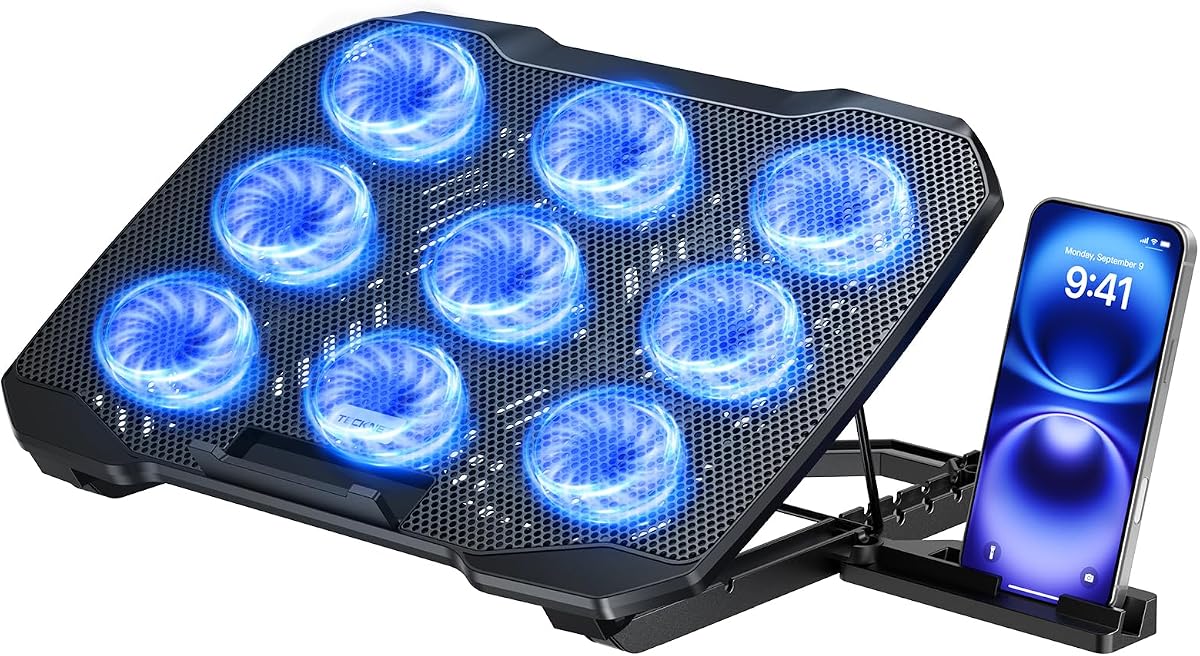
The TECKNET Laptop Cooling Pad with Phone Stand stands out as a top performer with its nine high-performance fans and 360-degree airflow design. Users praise its ability to keep laptops cool during intense gaming or work sessions while maintaining a whisper-quiet operation that keeps noise under 40 dB.
We may earn a commission when you buy through this link, at no additional cost to you.
Its five-level height adjustment allows you to tilt the laptop up to 34 degrees for optimal ergonomic positioning, reducing strain on your neck and wrists. The integrated phone holder keeps your mobile device within sight, ensuring you never miss notifications while your computer runs efficiently.
Although it is slightly heavier than some basic pads, the sturdy alloy material mesh ensures excellent heat dissipation and stability. The anti-slip baffle firmly secures your laptop, preventing any unwanted movement even when adjusting angles during use.
This cooling pad is ideal for gamers and professionals who need reliable thermal management without sacrificing comfort. Its dual USB ports allow extra devices to stay connected without occupying your laptop's built-in ports.
The 360-degree surround airflow ensures heat is quickly dissipated from all sides, preventing overheating and lag during long sessions.
Adjusting the height and angle helps maintain a healthy posture, reducing fatigue during extended use for work or entertainment.
We may earn a commission when you buy through this link, at no additional cost to you.
The Targus 17 Inch Dual Fan Lap Chill Mat offers a unique combination of comfort and cooling, designed specifically for users who work directly on their laps. Its soft neoprene bottom provides cushioned comfort, making it ideal for long work sessions or casual use on the couch.
We may earn a commission when you buy through this link, at no additional cost to you.
Equipped with dual fans powered by a standard USB-A connection, this mat effectively moves air away from your laptop's surface to prevent overheating. The open mesh top ensures constant cooling flow, while four rubber stops keep your laptop stable and prevent slipping during typing.
While it lacks height adjustments found on other stands, its ergonomic tilt makes typing easier on your hands and wrists. The lightweight design allows you to carry it easily wherever you need extra cooling comfort without adding bulk to your bag.
This mat is perfect for students or remote workers who prefer using laptops on their laps frequently. It balances thermal protection with physical comfort better than most rigid pads available today.
The neoprene base cushions your legs while the cooling fans protect your device, making it a dual-purpose solution for comfort and performance.
Just plug the USB cable into your laptop and start cooling immediately without any complex assembly or power adapters needed.
We may earn a commission when you buy through this link, at no additional cost to you.
The Thibault Aluminum Laptop Stand delivers exceptional value by combining a sleek minimalist design with effective passive cooling capabilities. Made from robust aluminum alloy, it elevates your laptop to allow efficient airflow beneath the exhaust fans, keeping your device cool without using electricity.
We may earn a commission when you buy through this link, at no additional cost to you.
Its ventilated design ensures that air circulates freely around your device, which is crucial for maintaining performance during long work or gaming sessions. The soft rubber pads protect your desk and laptop from scratches while providing a stable typing experience that reduces vibrations.
Assembly is effortless, requiring no complicated instructions, so you can have the perfect ergonomic solution ready in moments. The stand is compatible with laptops ranging from 13 to 15.6 inches and fits most major brands including Apple, HP, and Dell.
If you are looking for an affordable way to improve airflow and ergonomics without active fans, this stand is an excellent choice. It enhances office efficiency and reduces neck pain by raising your laptop to a comfortable viewing height.
By lifting the laptop, the stand naturally improves air circulation, which helps dissipate heat effectively without needing power-consuming fans.
The aluminum alloy build ensures durability and strength, providing a reliable base that can hold your device securely for years.
We may earn a commission when you buy through this link, at no additional cost to you.
The havit HV-F2056 is designed for those who prioritize silence alongside cooling performance. Its three ultra-quiet fans create a noise-free environment, allowing you to focus on work or entertainment without distractions from humming fans.
We may earn a commission when you buy through this link, at no additional cost to you.
This cooling pad doubles as an ergonomic stand with two adjustable height settings, offering a comfortable viewing angle while you type. The metal mesh provides a stable surface for carrying your laptop, ensuring it stays secure whether you are at home or traveling.
Its ultra-portable design makes it light and easy to carry in your bag wherever you go. The extra USB port allows you to connect more USB devices, which is convenient if your laptop's ports are occupied by other peripherals.
Ideal for users with 15.6 to 17-inch laptops who need a reliable quiet cooler, this pad balances functionality with simplicity. It protects your investment and improves comfort without adding noise to your workspace.
The ultra-quiet fans ensure you can enjoy your device without background noise, making it perfect for quiet offices or home environments.
Adjusting the height helps align the screen with your eye level, reducing neck strain during extended work sessions.
We may earn a commission when you buy through this link, at no additional cost to you.
The TECKNET Portable Slim cooling pad is a versatile solution that fits laptops ranging from 12 to 17 inches. Its three powerful fans operate at 1200 RPM to pull in cool air from the bottom, preventing overheating during extended use or intense gaming.
We may earn a commission when you buy through this link, at no additional cost to you.
Powered directly by your laptop's USB port, the fans operate quietly and feature a dedicated on/off switch, so no external power adapter is needed. The double USB ports allow one port to power the cooler while the other connects to external devices like keyboards or mice.
Blue LED indicators confirm that the fans are running, giving you peace of mind about its status. Integrated rubber pads on the surface and base keep your laptop securely in place, preventing any unwanted sliding or scratching.
This pad is perfect for travelers and students who need reliable cooling across different device sizes. Its wide compatibility includes MacBooks, HP, and ASUS models, making it a universal choice for most users.
The 1200 RPM fans ensure strong airflow to quickly cool down your device even during heavy workloads.
Rubber pads provide a non-slip surface that protects your laptop and keeps it stable during use.
We may earn a commission when you buy through this link, at no additional cost to you.
The Kootek Laptop Cooling Pad stands out with its five built-in fans and six adjustable height settings, offering a high degree of customization. The fans operate in whisper-quiet mode, creating a noise-free environment so you can focus on work without distraction.
We may earn a commission when you buy through this link, at no additional cost to you.
Its enhanced cooling performance is achieved through a combination of big and small fans, all featuring blue LEDs. Two On/Off switches enable simultaneous control of all five fans and LEDs, allowing you to select the perfect cooling mode for your current needs.
The dual USB hub lets you connect additional USB devices to your laptop, providing extra connectivity options for peripherals. The cooling stand also serves as an ergonomic stand, enabling you to customize the angle for optimal comfort during gaming or movie watching.
This product is ideal for users who want flexibility in both cooling intensity and viewing angle. Its design prevents laptops from slipping with front stoppers, keeping 12 to 17-inch models secure and cool during use.
With five fans and switches, you can adjust how much airflow you need based on your laptop's temperature.
Six height settings allow you to find the exact ergonomic angle for your specific height and seating position.
We may earn a commission when you buy through this link, at no additional cost to you.
The KeiBn Gaming Cooler is designed to keep laptops cool quickly with two strong fans and a metal mesh surface. It effectively avoids overheating during long-time use, making it suitable for gaming or work at home or in the office.
We may earn a commission when you buy through this link, at no additional cost to you.
Five adjustable heights allow you to put the stand up or flat, holding your laptop in a suitable position for comfortable typing. Two baffles prevent your laptop from sliding down or falling off, ensuring stability during active use.
A hidden mobile phone holder on the side releases your hand while keeping your phone accessible. Two USB 2.0 ports let you connect other devices like keyboards or mice without occupying your laptop's own ports.
This pad is best for smaller laptops up to 15.6 inches that need lightweight cooling. Its portability meets the needs of travelers who want a compact solution to prevent overheating on the go.
Even with a smaller footprint, the strong fans provide adequate airflow to prevent overheating for smaller devices.
The hidden phone holder lets you multitask easily without needing a separate stand for your mobile device.
We may earn a commission when you buy through this link, at no additional cost to you.
The AIMIUZI laptop cooler features a honeycomb style metal mesh and five quiet fans to ensure optimal airflow. The setup includes one small central fan and two big fans on each side, providing more airflow to keep your laptop cool down effectively.
We may earn a commission when you buy through this link, at no additional cost to you.
At the back, a switch wheel allows you to turn fans on and off, giving you control over noise and cooling intensity. The metal bar for ergonomic design at the bottom elevates the laptop, creating room for better heat dissipation and lowering temperature.
It offers five adjustable stand height settings, adding more room between your laptop and the desk. This compatibility extends to various brands like Apple, HP, and Dell, making it a versatile choice for many users.
This stand is ideal for those who want a balance of cooling power and ergonomic adjustment. The included USB cable and lifetime friendly customer service ensure you have support if you encounter any issues.
The mix of fan sizes ensures air reaches all critical areas of the laptop for even cooling.
Five settings let you find the right angle for viewing and typing comfort throughout the day.
We may earn a commission when you buy through this link, at no additional cost to you.
The TECKNET Laptop Cooling Pad is designed for lap use with a flat base that isolates heat between your computer and your legs. Its targeted cooling design uses two large fans and an internal channel to direct cool air to the center where the CPU is hottest.
We may earn a commission when you buy through this link, at no additional cost to you.
Fans are adjustable from 0 to maximum, so you can choose quiet operation for daily use or maximum speed for gaming. The USB C and A dual ports let you use the cooler on MacBooks or most laptops, while the extra port powers devices like phones.
Its ultra-portable design is thin and lightweight, allowing you to carry it in your laptop bag without damaging your computer. The smooth surface prevents scratches, enabling you to game or work anytime, anywhere comfortably.
This cooler is ideal for students and office workers who use laptops on their laps frequently. It maintains high efficiency at work and helps focus on games throughout the day with its wide compatibility.
Internal channels direct air directly to the hottest parts of your laptop for efficient cooling.
The flat base ensures the pad sits comfortably on your lap without discomfort during use.
We may earn a commission when you buy through this link, at no additional cost to you.
The Hagibis Ergonomic Laptop Stand is a minimalist solution designed to elevate your laptop for comfortable typing and operation. It uses physical heat dissipation by enhancing bottom air circulation, reducing laptop temperature to achieve the purpose of heat dissipation effectively.
We may earn a commission when you buy through this link, at no additional cost to you.
The magnetic design makes it easy to connect, with Nd-Fe-B magnets providing durable and strong suction that is readily adsorbable. The two stands weigh about 1.76 ounces, making them small and exquisite enough to be put into pants pockets or bags easily.
High-quality silica gel pads ensure that your laptop or iPad will not be scratched, while the bottom pads prevent your device from sliding. This combination of quality materials ensures a stable typing experience that reduces vibrations and enhances office efficiency.
This is perfect for users who want a sleek, invisible way to improve ergonomics and cooling without bulky fans. It is compatible with MacBook Pro and other computers, making it a versatile accessory for modern workspaces.
Strong magnets ensure the stand stays securely attached to your laptop for consistent ergonomic support.
Lightweight and small enough to carry anywhere, this stand is ideal for travelers needing quick setup.
We may earn a commission when you buy through this link, at no additional cost to you.
Selecting the right cooling solution depends on several factors that affect how well it protects your device and improves your comfort.
Ensure the cooling pad or stand can support your specific laptop size. Most products range from 12 to 17 inches, but checking the dimensions ensures stability and proper airflow coverage.
Choose a size that matches your device to avoid instability or poor heat dissipation.
Active coolers use fans to pull air through the laptop. Look for models with high RPM and adjustable speeds to match your cooling needs while keeping noise levels low for quiet environments.
Prioritize whisper-quiet fans if you work in shared spaces or prefer a peaceful workspace.
An ergonomic stand or adjustable cooling pad helps improve posture. Models with multiple height settings reduce neck and wrist strain during long work sessions.
Select options with adjustable angles for a comfortable typing position.
If you travel frequently, look for lightweight and slim designs. Heavy stands may be durable but less convenient for commuting or working in different locations.
Balance durability with portability based on your usage habits.
Materials like aluminum alloys or metal meshes offer better heat dissipation and durability. Plastic models may be cheaper but often retain heat more than metal alternatives.
Invest in metal-based designs for better long-term cooling performance.
Some cooling pads offer extra USB ports to connect peripherals. This feature is useful if your laptop has limited ports and you need to connect a mouse or keyboard.
Look for dual USB hubs to avoid losing port availability.
Decide between active cooling with fans and passive cooling with stands. Active fans provide stronger cooling for heavy use, while passive stands offer ergonomic benefits and quiet operation.
Match the type to your typical usage intensity and noise tolerance.
Budget options like aluminum stands are affordable, while fan-based coolers vary in price. Check for warranties to ensure you have protection against defects.
Choose a product that offers a balance of features and financial protection.
Place your laptop on the cooling pad or stand ensuring it sits evenly and securely. If using a fan-based model, connect the USB cable to your laptop to power the fans.
Clean the surface of the pad regularly using a soft cloth to remove dust that might block airflow. For metal stands, wipe down with a dry cloth to prevent scratches.
Adjust the height or angle settings according to your comfort needs. Periodically check that the stand remains stable and the fans run smoothly without obstruction.
Yes, laptop cooling pads work by improving airflow around the device to prevent overheating. Active coolers with fans draw heat away efficiently, while passive stands raise the laptop for natural convection cooling.
Check your laptop's dimensions and choose a cooling pad that fits within the stated size range. Most models cover 12 to 17 inches, so select one that matches your device to ensure stability.
It depends on your needs. Stands are quiet and improve ergonomics, while fans provide stronger cooling for heavy workloads. Both improve airflow and can extend device lifespan effectively.
Most active cooling pads are powered via USB from your laptop. Passive stands require no power. Always check product details to confirm if an adapter is included or needed for your setup.
Yes, cooling pads are especially useful for gaming as they prevent overheating during intense sessions. Look for models with high fan speeds and adjustable angles for optimal performance.
Use a soft, dry cloth to wipe the surface and remove dust. For fans, compressed air can help clear debris. Avoid liquids that might damage electronic components inside the device.
Choosing the right cooling solution protects your laptop from overheating and improves your overall comfort. Whether you prefer the robust cooling of a fan-based pad or the sleek ergonomic design of a stand, the options above cover various needs.
Prioritize factors like compatibility, noise level, and build quality when making your decision. Balancing performance with portability ensures you get the best value for your specific usage scenario.
Prices and availability can change frequently, so check current listings to confirm details before purchasing. Investing in a reliable cooling solution today can save you from costly repairs tomorrow.