
RedThunder One Handed
4.4Editor score
35 Anti-Ghosting Keys
Macro Recording Support
Portable Ergonomic Design
This guide compares the top gaming keypads for 2026, evaluating performance, ergonomics, and customization to help you choose the best one-handed controller
Gaming keypads offer a specialized alternative to full keyboards, focusing on essential keys for faster access and reduced clutter. They are ideal for gamers who want to maximize mouse movement space while keeping critical commands within easy reach of their non-dominant hand.
We evaluated ten top models based on switch type, programmability, ergonomic design, and build quality. Our analysis covers wired and wireless options, from budget-friendly membrane switches to premium Hall Effect magnetic technology designed for competitive precision and long-term comfort.
Each pick highlights unique strengths like macro support, RGB lighting, or thumbstick integration to suit different gaming genres. While prices fluctuate due to sales or stock levels, our ratings reflect current performance standards to help you find the best value for your specific needs.
4.4Editor score

4.3Editor score

4.2Editor score
The following comparison table breaks down the core specifications of every model to help you quickly identify the right fit for your gaming style and budget constraints.




The Razer Tartarus V2 stands out as the top choice for gamers seeking a blend of comfort and customization. It combines membrane durability with mechanical-like tactility, making it comfortable for long sessions. The analog thumbpad is a unique feature that appeals to console gamers transitioning to PC setups.
We may earn a commission when you buy through this link, at no additional cost to you.
Its 32 programmable keys are ideal for complex ability rotations in MMOs or RPGs. Razer Synapse software allows for deep customization, including Chroma RGB sync with other peripherals. The mecha-membrane switches reduce fatigue while maintaining a responsive feel that competitive players appreciate.
While it is more expensive than budget options, the build quality justifies the cost. Some users might find the software dependency a minor hurdle if they prefer plug-and-play simplicity. However, the flexibility it offers makes these trade-offs acceptable for most enthusiasts.
Buyers who value ergonomics and ecosystem integration will love this model. It is perfect for those who spend hours gaming daily and need reliable inputs. We recommend it as the best overall choice for serious gamers wanting premium features.
The 8-way directional thumbpad replaces traditional movement keys, allowing for smoother analog inputs that mimic console controller experiences.
Chroma sync lets your lighting match in-game events or partner devices, creating an immersive visual environment around your desk.
We may earn a commission when you buy through this link, at no additional cost to you.
The Redragon K585 offers a tactical layout that is highly effective for MOBA and strategy gamers. Its 42 keys provide ample space for macros without feeling cramped. The mechanical switches deliver a crisp feedback that appeals to users who prefer a clicky response.
We may earn a commission when you buy through this link, at no additional cost to you.
One of its standout features is the ability to swap switches without soldering. This modularity allows users to tune the feel to their preference easily. The USB pass-through port helps keep the desk organized by centralizing connections near the hand.
Although it lacks wireless connectivity, the wired design ensures zero latency which is crucial for competitive play. The included wrist rest adds comfort, though it might feel bulky for smaller desks. For the price, the feature set is hard to beat.
This model is ideal for gamers who want mechanical feel without the high cost of premium brands. It serves well for those needing extensive hotkeys for gaming or creative tasks. We recommend it for budget-conscious users who still demand quality.
Users can replace stock switches with almost any 3-pin or 5-pin switch, allowing for a highly customizable typing experience.
Seven onboard macro keys allow binding complex commands to single presses, reducing the need for multiple key combinations.
We may earn a commission when you buy through this link, at no additional cost to you.
This wireless version of the K585 brings freedom to your setup without sacrificing the mechanical feel. It connects via Bluetooth or 2.4GHz, giving you flexibility in how you place it on your desk. The battery life supports extended sessions comfortably.
We may earn a commission when you buy through this link, at no additional cost to you.
It maintains the same layout and macro capabilities as the wired model. The ability to detach the wrist rest helps save space when not in use. RGB lighting ensures it still looks vibrant and matches the rest of your gaming station.
Wireless input is generally reliable but can be slightly more prone to interference compared to wired. However, for most casual and semi-competitive users, the convenience outweighs this minor drawback. The charging mechanism is straightforward and easy to manage.
Buyers who hate cable clutter will find this appealing. It is great for those who switch between multiple devices or want a cleaner desk. We recommend it as the top wireless choice for mechanical lovers.
Connectivity options include Bluetooth and 2.4GHz wireless, allowing you to choose the most stable signal for your environment.
The detachable magnetic wrist rest allows you to use a smaller footprint when desk space is tight.
We may earn a commission when you buy through this link, at no additional cost to you.
The AZERON Cyborg ll is a revolutionary device that merges a keypad with an analog thumbstick. It is designed for righties who want to keep their mouse on the right while having full keyboard control on the left. This setup allows for unique control schemes.
We may earn a commission when you buy through this link, at no additional cost to you.
Hall Effect technology ensures no stick drift, a common issue with traditional thumbsticks. The software allows deep customization of dead zones and sensitivity to match your playstyle. It is a powerful tool for FPS and simulation enthusiasts.
The 3D printed design offers a customized fit, which is rare in mass-produced gear. However, the price is significantly higher than others, and it requires time to configure effectively. It is an investment for dedicated gamers.
This is perfect for those seeking a competitive edge through unique hardware. If you are tired of standard layouts and want to innovate your control scheme, this is the one. We recommend it for tinkerers and pros willing to pay top dollar.
Magnetic sensors eliminate physical contact wear, ensuring long-term accuracy without drift or dead zone degradation.
Adjustable parts let you fine-tune the angle and fit to reduce strain and increase comfort during long play.
We may earn a commission when you buy through this link, at no additional cost to you.
For those on a tight budget, the RedThunder One Handed delivers solid performance at a very low cost. It features 35 keys with anti-ghosting, which is sufficient for most games. The macro recording is done via key shortcuts without needing drivers.
We may earn a commission when you buy through this link, at no additional cost to you.
Its portable design makes it easy to toss in a bag for LAN parties. The wrist rest is fixed but provides decent comfort for short sessions. RGB lighting is simple but adds a nice visual touch to your desk.
While the switches are not mechanical, they function reliably for casual gaming. Some users might miss the tactile click of higher-end models. However, for the price, it is a fantastic entry point into one-handed gaming setups.
This is best for students or gamers testing if a keypad suits their needs. It is a great secondary device for specific titles that rely on many hotkeys. We recommend it as the ultimate budget buy for beginners.
Plug and play functionality means no extra software is needed to start using macros or lighting right away.
Two distinct macro recording keys allow quick capture of command sequences for repeated use in-game.
We may earn a commission when you buy through this link, at no additional cost to you.
The Keychron C0 HE brings competitive-grade tech to the one-handed market. Its Hall Effect switches support Rapid Trigger, allowing keys to reset instantly when lifted. This is a game-changer for fast-paced titles like Valorant or CS2.
We may earn a commission when you buy through this link, at no additional cost to you.
A web-based configurator makes setup easy across Windows and Mac without installing software. This cross-platform support is a huge plus for users with multiple systems. The 8K polling rate ensures minimal latency during intense moments.
Though it lacks the wireless freedom of some rivals, the performance benefit of wired connection justifies the trade-off. The build feels sturdy and premium. It is designed for users who want raw speed and precision above all else.
Buyers looking for esports-level features will love this. It suits those who want the latest tech in their control scheme. We recommend it for competitive players prioritizing speed and customization over portability.
Magnetic sensors detect key lift instantly, allowing for faster resets than mechanical switches can physically achieve.
Settings are managed through a web page, ensuring compatibility across operating systems without driver bloat.
We may earn a commission when you buy through this link, at no additional cost to you.
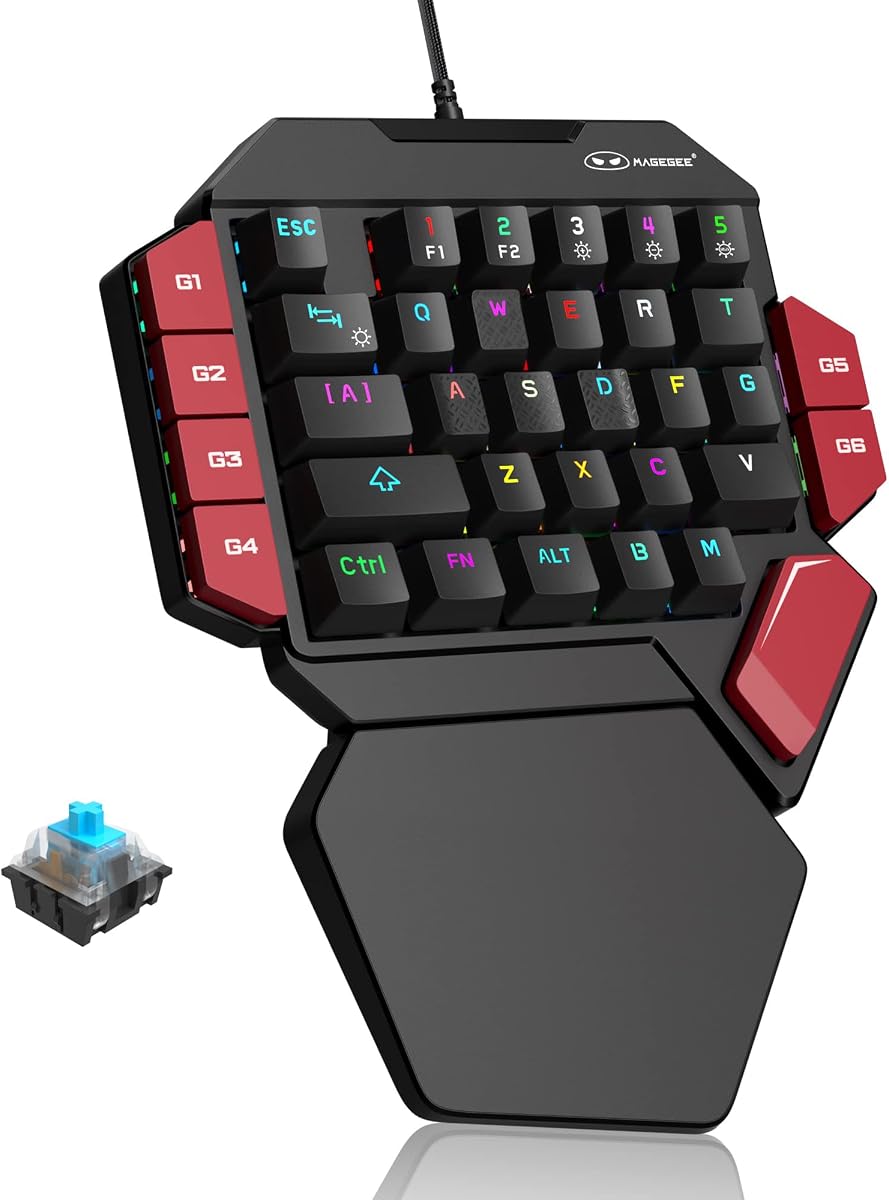
The MageGee model offers genuine mechanical switches at a budget-friendly price. The blue switches provide a loud, tactile click that many typists and gamers enjoy. It is a great option if you prefer that distinct feedback over soft membranes.
We may earn a commission when you buy through this link, at no additional cost to you.
It includes six macro keys that are easy to program via function shortcuts. The RGB lighting is decent and helps visibility in dark rooms. The palm rest adds ergonomic value, making it comfortable for extended use.
The noise level might be a drawback in shared spaces, so consider this if you game late at night. Otherwise, the performance is solid. It bridges the gap between cheap membrane models and expensive keyboards.
This is perfect for users who want mechanical quality without spending too much. It is a strong contender for those who value the clicky feel. We recommend it for gamers seeking tactile feedback on a budget.
Blue switches offer a pronounced click and bump, providing immediate feedback for every key press.
Six dedicated macro keys allow you to map complex commands for quick access during gameplay.
We may earn a commission when you buy through this link, at no additional cost to you.
The AJAZZ AK029 packs advanced Hall Effect tech into a tight 29-key chassis. This saves significant desk space while offering tournament-grade performance. The magnetic switches ensure accurate inputs without physical wear or debounce delays.
We may earn a commission when you buy through this link, at no additional cost to you.
It uses a web driver for settings, keeping your system clean. The aluminum reinforcement plate adds a premium feel and improves stability. RGB modes are plentiful and easy to toggle via software.
While the reduced key count might limit extensive macro setups, it is ideal for those who need core commands only. The build quality is impressive for the price point. It is a great option for FPS gamers needing a smaller footprint.
Buyers wanting high-end tech in a small size will love this. It is perfect for those who value precision over quantity of keys. We recommend it for competitive users looking for Hall Effect speed.
The compact 29-key layout frees up room for your mouse, ideal for low-sensitivity aiming styles.
Hall sensors detect inputs without physical contact, ensuring zero dead zone for immediate response.
We may earn a commission when you buy through this link, at no additional cost to you.
This model is similar to the top pick but is often sold as a different bundle or SKU. It maintains the same high-quality mecha-membrane switches and thumbpad design. It is a solid choice if you find this specific version on sale.
We may earn a commission when you buy through this link, at no additional cost to you.
The software support remains excellent, allowing deep customization for complex workflows. The ergonomic layout is proven and comfortable for long sessions. It is a safe bet for Razer loyalists.
The price can vary, but it usually sits higher than budget alternatives. Users should check if the specific benefits of this version are needed compared to the standard. Otherwise, it offers the same proven performance.
It is best for those who prefer to buy direct or find deals on specific bundles. It serves well for users already invested in the ecosystem. We recommend it if it fits your budget.
Razer is a known manufacturer of gaming peripherals, ensuring quality control and customer support.
Extensive software features allow for detailed customization of lighting and key assignments.
We may earn a commission when you buy through this link, at no additional cost to you.
The RM104 is a full-size wireless keyboard that offers a unique knob for volume control. It supports Bluetooth, 2.4GHz, and wired modes. While not a dedicated one-handed keypad, it serves well for those wanting wireless flexibility.
We may earn a commission when you buy through this link, at no additional cost to you.
The 4000mAh battery ensures it lasts a long time without charging. The programmable software lets you customize macros similar to keypad models. It is a versatile tool for users who switch between multiple devices.
It might be too big for those seeking a small one-handed device. However, the convenience of wireless and the useful knob make it a strong contender. It is a great primary keyboard alternative.
This is perfect for users needing multi-device support. It is ideal for those who value a dedicated volume knob. We recommend it as a wireless keyboard for general users.
The multifunction knob adjusts volume and RGB modes, adding convenience for media management.
A 4000mAh battery supports days of use before needing a recharge, reducing downtime.
We may earn a commission when you buy through this link, at no additional cost to you.
Choosing the right gaming keypad involves evaluating several factors to match your play style and budget. This guide breaks down the essential elements you should consider before purchasing.
The switch type determines how your inputs feel and react. Mechanical switches offer tactile feedback and durability, while membrane switches are softer and quieter. Hall Effect switches use magnets for adjustable actuation and zero wear.
Choose based on whether you prefer tactile click, soft press, or magnetic precision.
Key count varies from 29 to 42 keys. A larger layout offers more programmable options but takes up space. Compact models save desk real estate for better mouse movement.
Consider your desk size and how many macros you actually need for your games.
Wired models offer zero latency and constant power. Wireless models provide freedom from cables but require charging. Tri-mode connectivity allows switching between devices easily.
Competitive gamers often prefer wired, while casual users may like wireless convenience.
Check if the keypad supports macro recording and software customization. Some require drivers for complex setups while others use onboard memory. Look for features like onboard profiles for portability.
Ensure the software is user-friendly and compatible with your operating system.
Comfort features like wrist rests, palm rests, or thumbpads reduce strain. Adjustable angles and modular builds help fit different hand sizes. Long gaming sessions demand supportive designs.
Prioritize physical comfort to prevent fatigue during extended use.
Materials matter for longevity. Aluminum plates and double-shot keycaps ensure durability. Plastic-only builds might feel cheap but are lighter. Check reviews for sturdiness feedback.
Invest in quality materials to ensure the device lasts through heavy gaming.
Lighting can be purely aesthetic or functional. Per-key RGB allows distinct zones for different commands. Synchronization with games adds immersion.
Decide if you want visual flair or just functional backlighting for dark rooms.
Prices range from budget to premium. Higher cost often brings advanced tech like Hall Effect or wireless. Value models provide essential features without frills.
Balance your budget with the features you actually need for your specific games.
Start by identifying the keys you use most in your games and map them to the programmable keys. Use the provided software to record macros that reduce complex sequences to single presses.
Keep your keypad clean by using a compressed air can to remove dust from key switches. Wipe the surface with a dry microfiber cloth to avoid moisture damage to electronics.
For wireless models, ensure you recharge the battery before it drains completely to extend its lifespan. For wired models, check the cable for kinks or damage to maintain consistent signal.
Yes, they are worth it for gamers who need quick access to many hotkeys. They also free up desk space for larger mouse movements which is crucial for FPS games.
Most keypads work with any software that accepts keyboard input. You can use them for photo editing or programming by mapping common shortcuts to the keys.
Modern wireless tech has low latency and is suitable for most competitive games. However, wired is still the safest choice if you want absolute zero lag.
Most games require between 29 and 42 keys. If you play MMOs, more keys are better. For shooters, fewer keys save space.
Many models support multiple onboard profiles. This lets you save different layouts for different games without reloading software.
Hall Effect switches offer higher precision and adjustability. They eliminate physical wear which improves long-term performance compared to traditional switches.
The Razer Tartarus V2 remains our top choice for its balance of features and ergonomics. RedThunder offers the best value for those on a tight budget. Keychron brings cutting-edge tech for competitive players.
When selecting a keypad, prioritize your play style and comfort needs. Whether you need analog movement or pure key count, there is an option that fits your workflow.
Prices fluctuate often so always check the current listings before purchasing. Use our comparison table to find the right model quickly for your needs.