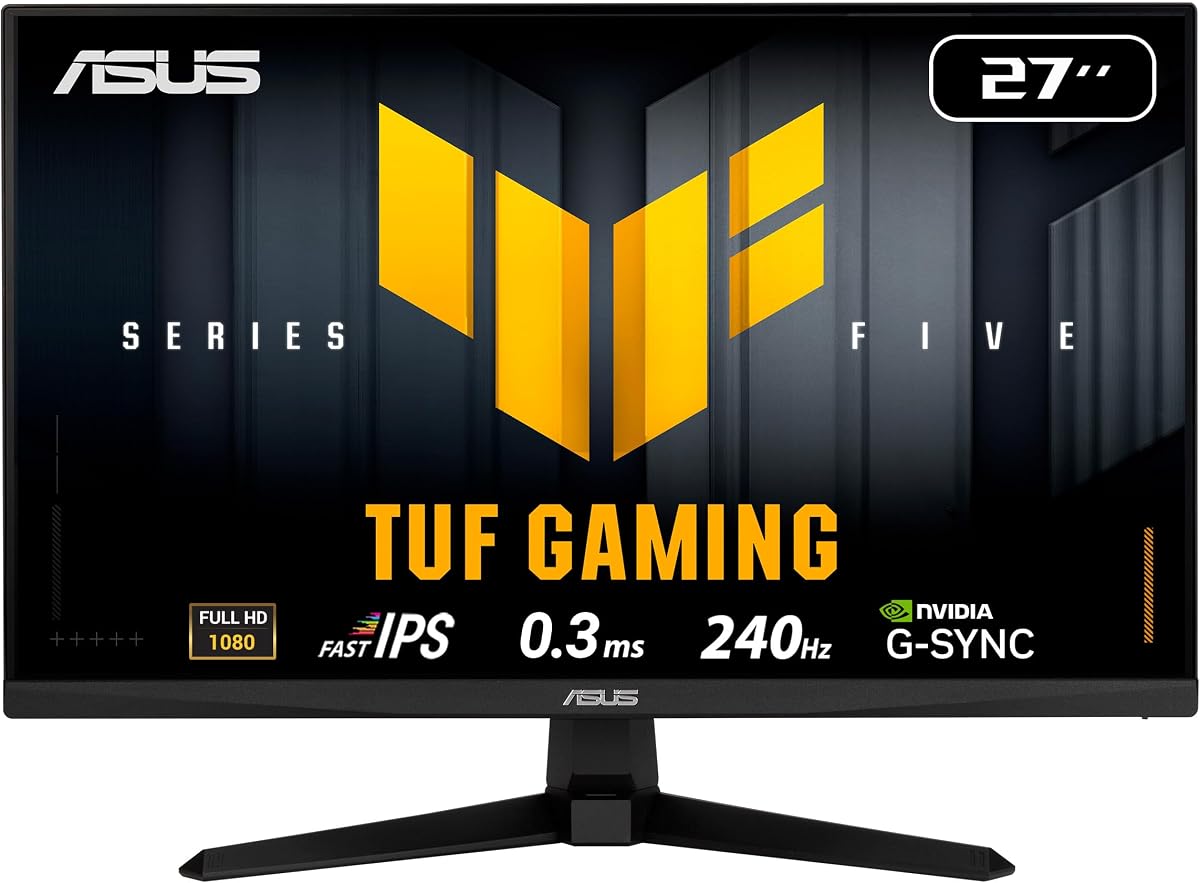
ASUS TUF VG279QM5A
4.5Editor score
Fast IPS technology
G-Sync compatible
3-year warranty
Competitive Valorant demands precise aim and split-second reactions, making your display choice critical for success. A high refresh rate monitor ensures smooth motion tracking, allowing you to spot enemies instantly without motion blur. Choosing the right screen can significantly improve your performance in intense ranked sessions.
We evaluated ten leading 240Hz monitors based on panel technology, response times, and gaming features essential for FPS players. Our analysis considers color accuracy, adaptive sync support, and ergonomic designs to ensure comfort during long practice hours. Each product was selected for its ability to deliver consistent frame rates.
Each pick highlights specific strengths like Fast IPS panels or curved designs tailored for immersion. Note that prices fluctuate frequently, so verify current deals before purchasing. We aim to provide clear insights so you can invest confidently in hardware that supports your climb to Radiant.
4.5Editor score

4.7Editor score

4.6Editor score
As an Amazon Associate we earn from qualifying purchases.
Compare all ten models side by side to find the perfect balance of speed and visual clarity for your setup.



The Dell 24 240Hz Gaming Monitor stands out as a top contender for competitive Valorant players seeking reliability. With a 4.7 rating, it delivers smooth visuals essential for tracking enemies quickly across the map. Its Fast IPS panel ensures accurate colors without sacrificing speed.
We may earn a commission when you buy through this link, at no additional cost to you.
Key strengths include the 0.5ms response time which minimizes ghosting during rapid movements like peeking corners. The 99% sRGB coverage provides vivid imagery helping you distinguish enemies in dim areas. Adaptive Sync ensures smooth gameplay without tearing when your GPU fluctuates.
While it lacks height adjustment, the tilt options allow for ergonomic positioning. The TÜV certification reduces eye strain during long ranked sessions. This trade-off is acceptable given its strong performance and reasonable cost for a 24 inch display.
Competitive players prioritizing speed and color accuracy should consider this model. It offers a balanced mix of features perfect for climbing ranks. Verify current stock before purchasing as high demand may affect availability.
The 240Hz refresh rate updates the screen frequently reducing blur during fast flicks and tracking. This clarity helps you land shots accurately even when enemies move unpredictably across the map.
With 99% sRGB coverage the monitor renders colors true to life. This ensures smoke flashes and enemy outlines remain distinct preventing missed shots due to poor visibility in low light.
We may earn a commission when you buy through this link, at no additional cost to you.
The AOC 27 Gaming Monitor QHD offers a larger canvas with 2560×1440 resolution ideal for spotting distant targets. Rated 4.6 it blends high pixel density with a 240Hz refresh rate. The overclocked 260Hz mode pushes performance further for competitive edge.
We may earn a commission when you buy through this link, at no additional cost to you.
Its G-Sync support guarantees tear-free visuals when paired with NVIDIA cards. The IPS panel delivers vibrant colors across wide angles ensuring teammates see the same image. Enhanced gaming features like Shadow Control help reveal enemies in dark shadows.
The higher resolution demands a powerful GPU to maintain high FPS in Valorant. However the clarity gained is worth the investment for serious players. The frameless design also makes it easy to fit into multi-monitor setups.
Ideal for gamers wanting detail without sacrificing speed. If your rig can drive QHD at high FPS this monitor enhances situational awareness. Check your GPU capabilities before buying to ensure smooth performance.
Quad HD resolution provides more screen real estate than FHD allowing you to see further down long sightlines. This extra detail helps identify enemy positions earlier giving you time to react quickly.
G-Sync compatibility syncs the refresh rate with your GPU output eliminating stutter and tearing. This stability is crucial during clutch moments where every frame counts for survival.
We may earn a commission when you buy through this link, at no additional cost to you.
The SANSUI 24.5 Inch Monitor delivers impressive specs at a budget friendly price. With a 4.5 rating it supports up to 300Hz refresh rates. The Fast IPS panel ensures good color performance typical of higher end screens.
We may earn a commission when you buy through this link, at no additional cost to you.
Features like CrossHair assistants and dynamic luminous control help optimize visual settings for FPS games. The sRGB 120% coverage makes colors pop helping distinguish characters and abilities clearly. It includes multiple ports for flexible connectivity options.
While the brand is less recognized than others the warranty offers peace of mind. The stand is basic but functional for most setups. This value proposition is hard to beat for players on a tight budget.
Great for those seeking high Hz performance without breaking the bank. It provides necessary competitive features effectively. Ensure your PC can output high frames to utilize the full refresh range.
The 300Hz capability significantly reduces latency between mouse input and on screen movement. This responsiveness is critical in Valorant where split second reactions determine the outcome of duels.
Pre set game modes tailor the display to FPS needs adjusting brightness and contrast automatically. This simplifies setup saving time so you can focus on improving your aim and strategies.
We may earn a commission when you buy through this link, at no additional cost to you.
The Amzfast 24 Curved Gaming Monitor brings a unique immersive experience with its 1500R curve. Rated well for its price it supports 240Hz refresh rates for smooth visuals. The ultra slim base helps save desk space significantly.
We may earn a commission when you buy through this link, at no additional cost to you.
Curved screens wrap the view around you enhancing focus during intense rounds. The black level adjustment allows finer tuning to see details in dark shadows. The OSD joystick makes changing settings instant without leaving the game.
Curved displays can be divisive but offer immersion for many players. The HDR and high contrast ratio enhance visual depth though primarily for movies and games. It remains a solid choice for those wanting a different form factor.
Ideal for gamers valuing immersion alongside speed. The slim design suits smaller desks well. Verify if curved screens suit your play style before committing to this model.
The curve directs your eyes naturally across the screen keeping you centered on the action. This reduces head movement allowing for quicker reactions to peripheral threats appearing on the edges.
The five way joystick allows instant access to settings like crosshair calibration and refresh rate. This convenience lets you adjust your experience on the fly during practice sessions.
We may earn a commission when you buy through this link, at no additional cost to you.
The ASUS TUF VG279QM5A utilizes Fast IPS technology to achieve an impressive 0.3ms response time. With a 4.5 rating it delivers sharp visuals vital for competitive play. The 27 inch screen offers ample space for viewing the game.
We may earn a commission when you buy through this link, at no additional cost to you.
ELMB SYNC technology enables motion blur reduction alongside variable refresh rate. This dual capability eliminates ghosting while maintaining smooth frames. The 99% sRGB coverage ensures accurate colors for creative tasks too.
The higher resolution might limit detail on a 27 inch panel compared to QHD. However the speed is paramount for Valorant. The three year warranty reflects ASUS confidence in durability.
Perfect for FPS enthusiasts prioritizing raw speed. The AI features add subtle enhancements to gameplay. Ensure you have the horsepower to sustain high FPS at this size.
With a 0.3ms response time pixel transitions are nearly instant. This reduces trails behind moving objects helping you track targets accurately during rapid strafing and shooting.
ELMB SYNC removes the need to choose between blur reduction and adaptive sync. This means you enjoy clear motion without sacrificing the smoothness provided by variable refresh rate technology.
We may earn a commission when you buy through this link, at no additional cost to you.
The MSI MAG 274CF stands out with AI Vision technology enhancing details in dark areas. Rated 4.8 it combines a VA panel with 240Hz refresh for balanced performance. The high contrast ratio provides deep blacks suitable for shadow heavy environments.
We may earn a commission when you buy through this link, at no additional cost to you.
AI Vision boosts brightness and saturation effectively helping reveal enemies in darker corners. The 0.5ms response time ensures responsive gameplay suitable for FPS titles. FreeSync Premium ensures smooth visuals with AMD GPUs.
VA panels may show slightly more ghosting than IPS during fast motion. However the color depth and contrast often outweigh this for many users. It is a robust choice for immersive gaming sessions.
Ideal for gamers wanting strong contrast and AI enhancements. Verify if VA panel motion performance meets your expectations. It remains a solid option for budget conscious buyers seeking quality.
AI Vision analyzes the scene to enhance details in dark areas. This helps you spot enemies hiding in shadows without overexposing bright areas of the map.
The VA panel offers high contrast making dark areas look truly black. This depth adds to the visual quality making the game look more cinematic and realistic during play.
We may earn a commission when you buy through this link, at no additional cost to you.
The AOC 27 FHD offers an overclocked 260Hz refresh rate at a competitive price. With a 4.6 rating it balances speed and affordability effectively. The IPS panel ensures vibrant colors across the full screen.
We may earn a commission when you buy through this link, at no additional cost to you.
NVIDIA G-Sync compatibility ensures tear-free gameplay when using RTX or GTX cards. The frameless design complements modern gaming setups nicely. Flicker free technology helps reduce eye fatigue during long sessions.
While it lacks advanced ergonomic adjustments it remains a strong performance contender. The power efficiency is a bonus for energy conscious setups. It is perfect for those needing speed without paying premium prices.
Great for mid range builds seeking high refresh performance. The 260Hz option gives a slight edge in competitive scenarios. Check port availability to ensure compatibility with your existing cables.
Pushing refresh to 260Hz provides extra fluidity compared to standard 240Hz screens. This marginal gain can improve tracking smoothness during fast paced gunfights.
Eco mode keeps power usage low without compromising performance. This helps reduce energy bills while maintaining the high quality visuals needed for gaming.
We may earn a commission when you buy through this link, at no additional cost to you.
The SANSUI 24 Curved brings immersion to a smaller footprint. Rated 4.4 it delivers 240Hz speeds suitable for competitive titles. The 1500R curve enhances the feeling of being inside the game.
We may earn a commission when you buy through this link, at no additional cost to you.
Color gamut coverage reaches 124% sRGB ensuring vibrant visuals. The high contrast ratio helps distinguish targets in varying lighting conditions. Black level adjustment allows fine tuning for dark environments.
Its compact size fits well in smaller rooms or shared spaces. While it lacks advanced ergonomics the tilt function helps align the screen correctly. It is a solid choice for players prioritizing space.
Perfect for limited desk setups wanting immersive features. The high contrast and color performance are notable at this size. Ensure your desk can accommodate the curve before purchase.
The 24 inch size keeps the screen close reducing eye strain. The curve wraps the view around you creating a tighter focus on the action.
Wide color gamut ensures distinct and lively visuals. This helps differentiate enemy teams and abilities clearly during chaotic team fights.
We may earn a commission when you buy through this link, at no additional cost to you.
The ASUS TUF VG249QML5A combines speed with ergonomic flexibility. Rated 4.4 it features a height adjustable stand for optimal viewing angles. The Fast IPS panel ensures quick response times for competitive gaming.
We may earn a commission when you buy through this link, at no additional cost to you.
Free G-Sync compatibility provides smooth tear-free visuals. The Adobe subscription adds value for content creators besides gaming. This model balances hardware performance with practical usability.
The adjustable stand helps reduce neck strain during extended practice. It may cost more than non adjustable models. However the ergonomic benefits are crucial for long term comfort.
Ideal for players prioritizing health and posture. The balance of performance and adjustability makes it versatile. Confirm cable requirements to connect properly with your GPU.
The ability to adjust height keeps the screen at eye level. This reduces strain during long ranked sessions allowing you to focus on gameplay.
Included Adobe subscription offers tools for content creation and editing. This adds extra utility beyond gaming for those looking to stream or create clips.
We may earn a commission when you buy through this link, at no additional cost to you.
The ASUS TUF VG259QM5A sits at a professional grade level with strong specs. Rated 4.6 it features a 25 inch panel offering a sweet spot between 24 and 27 inches. The 0.3ms response ensures crisp visuals.
We may earn a commission when you buy through this link, at no additional cost to you.
Color accuracy is high with 99% sRGB making it suitable for design work too. The three year warranty reflects strong reliability. Creative cloud access adds value for content creators.
Premium pricing might deter budget buyers but the quality is evident. The balanced size avoids the pixel density issues of larger FHD panels. It is a robust choice for those seeking stability.
Perfect for pros seeking reliability and speed. The warranty offers long term peace of mind. Verify current stock to secure the best deal before purchase.
A 25 inch screen provides ample viewing without requiring excessive head movement. This size helps maintain focus on the center of the screen during competitive matches.
Three year warranty protects against defects. This ensures reliability for years giving you confidence in your investment for competitive gaming.
We may earn a commission when you buy through this link, at no additional cost to you.
Choosing the right monitor requires understanding several key factors that impact gameplay experience and comfort.
Refresh rate dictates how many frames the screen shows per second. Higher rates like 240Hz reduce motion blur making tracking enemies easier. Response time measures how quickly pixels change colors. Lower times reduce ghosting and improve clarity during fast movements.
Prioritize a high refresh rate with fast response times to maintain a competitive edge. These specs ensure your view updates instantly to your actions.
IPS panels offer better color accuracy and viewing angles. VA panels provide deeper blacks and higher contrast. TN panels are fastest but often suffer from poor colors. For Valorant, IPS offers a balanced mix of speed and quality.
Choose Fast IPS for the best combination of speed and visual fidelity. This ensures clear colors without sacrificing responsiveness.
Adaptive Sync technologies like G-Sync and FreeSync match monitor refresh to GPU output. This prevents screen tearing and stuttering which can disrupt aim. Check compatibility with your graphics card before buying.
Ensure your GPU supports the sync tech on the monitor for smooth visuals. This feature is essential for consistent frame delivery.
Long gaming sessions require comfort. Look for height adjustment, tilt, and swivel features. A proper stand helps align the screen at eye level reducing neck strain. VESA mount compatibility allows for arm mounting if needed.
Prioritize stands with height adjustment to maintain good posture. Proper ergonomics prevent fatigue during extended ranked matches.
Modern monitors require DisplayPort for high refresh rates like 240Hz. HDMI may not support top speeds on some models. Check available ports to ensure your PC connects correctly without bottlenecks.
Verify that the monitor has DisplayPort 1.4 for full speed support. This ensures you can utilize the maximum refresh rate available.
High sRGB coverage ensures colors look true to life. This helps distinguish enemy team colors and abilities clearly. Poor color accuracy can lead to missed shots in low light.
Look for monitors with 99% sRGB or higher for best visibility. This ensures you see every detail clearly.
Monitors can develop dead pixels or issues over time. A strong warranty covers these defects. Check the manufacturer's reputation for customer service and support responsiveness.
Choose brands known for reliable support. A good warranty protects your investment and ensures longevity.
Prices vary based on features and brand. Determine your max spend while ensuring essential specs are met. Sometimes spending a bit more gets better long term value.
Balance cost with performance. The best value often lies in the middle tier models.
Connect using DisplayPort to ensure full 240Hz refresh is enabled. Adjust OS settings to confirm the correct frequency is active for best performance.
Calibrate brightness and contrast to match your environment. Too bright can strain eyes too dim hides details. Use game modes to optimize for competitive FPS visuals.
Clean the screen gently with a microfiber cloth avoiding harsh chemicals. Dust buildup can degrade image quality over time. Regular care extends the monitor's life significantly.
Yes 240Hz significantly improves visibility of fast moving targets. It reduces motion blur helping you track enemies more accurately. This is crucial for competitive ranked play where every millisecond counts.
Most competitive players prefer 1080p because it allows higher FPS on most hardware. While QHD offers detail 1080p prioritizes speed and frame rates essential for high level play.
Adaptive Sync is helpful if your GPU output fluctuates. It prevents screen tearing which can distract during aiming. Ensure it matches your GPU brand for best results.
Most modern monitors require DisplayPort for full 240Hz support. HDMI may be limited to lower refresh rates on many models check specs carefully.
Use monitor settings like Game Mode to minimize processing. Ensure your system drivers are updated. Disable unnecessary overlays that may slow input response.
Larger screens offer better visibility but require more head movement. Most pros use 24 to 25 inch for optimal focus. Bigger can lead to slower reaction times.
ELMB SYNC reduces motion blur while maintaining adaptive sync. It keeps gameplay smooth without ghosting. This feature is ideal for fast action shooters like Valorant.
We reviewed ten top models offering diverse options for different needs and budgets. The Dell 24 leads overall with balanced performance while AOC offers great value at lower prices.
Prioritize response times and adaptive sync over unnecessary features to maximize your competitive edge. Comfort and ergonomics also play a vital role in long practice sessions.
Prices fluctuate frequently so check current deals before making a final decision. Investing in the right hardware can make a significant difference in your ranked climb.