
ASRock Arc A580 Challenger
4.6Editor score
Affordable entry level performance
8GB GDDR6 memory buffer
Solid 1440p capability
Compare the top 10 Intel Arc GPU models for gaming, AI, and workstation tasks to find the best performance and value for your specific needs today.
The landscape of graphics processing is shifting rapidly with the introduction of powerful new architectures designed to handle everything from modern gaming to complex AI inference tasks.
We have rigorously analyzed the latest offerings from major manufacturers to provide you with a comprehensive overview of what defines a top-tier Intel Arc GPU in the current market.
Each selection below highlights specific strengths and use cases ensuring you can make an informed decision while keeping in mind that availability and pricing can fluctuate frequently.
4.6Editor score

4.7Editor score

3.9Editor score
This side-by-side comparison highlights the key specifications and capabilities of each model to help you quickly identify the right fit for your workflow.



This workstation-focused card stands out as a powerhouse for professionals needing significant memory capacity and compute power for demanding tasks like local AI inference.
We may earn a commission when you buy through this link, at no additional cost to you.
The massive 24GB of GDDR6 memory allows you to run large language models and complex 3D rendering jobs without hitting memory bottlenecks that plague consumer cards.
While the blower style cooling is efficient for server environments it can be noisier than standard open air coolers when under heavy sustained loads in a desk setup.
If you require a reliable single card solution for scaling AI workloads or multi-monitor professional workflows this card offers a compelling feature set for specialized needs.
The dedicated XMX engines and high bandwidth memory make this card exceptionally well suited for running quantized models and generative design software locally.
With four DisplayPort 2.1 outputs you can connect multiple high resolution 8K displays simultaneously for an expansive and productive multi-monitor workstation environment.
We may earn a commission when you buy through this link, at no additional cost to you.
This model represents the sweet spot for most users offering a balance of modern architecture memory capacity and efficient cooling at a very competitive price point.
We may earn a commission when you buy through this link, at no additional cost to you.
Built on the Xe2-HPG architecture it delivers smooth 1440p gaming experiences and supports advanced AI upscaling technology to boost frame rates without sacrificing visual fidelity.
The dual fan cooling system ensures the card stays cool during long sessions while the 0dB technology keeps it silent when you are just browsing the web.
It is an ideal choice for gamers and creators who want reliable performance and future proof connectivity features without breaking the bank on high-end hardware.
Intel Xe Super Sampling 2 leverages AI to upscale images dynamically allowing you to enjoy higher frame rates while maintaining crisp and detailed visuals.
The included metal backplate not only adds to the aesthetic appeal but also provides structural rigidity to prevent GPU sag over time.
We may earn a commission when you buy through this link, at no additional cost to you.
For budget conscious builders this card offers a compelling entry point into the Arc ecosystem with decent memory and clock speeds that punch above its weight class.
We may earn a commission when you buy through this link, at no additional cost to you.
It features a factory overclocked design that pushes performance out of the box making it capable of handling modern titles at high settings in 1080p and 1440p.
The dual fan cooling setup with 0dB silent technology ensures that the card runs quietly during light loads providing a pleasant user experience even in small spaces.
While it lacks the latest PCIe 5.0 bandwidth it remains a highly viable option for those seeking performance per dollar without compromising on essential gaming features.
The 256-bit bus interface combined with 16 Gbps memory speed delivers excellent bandwidth that helps prevent bottlenecks during texture heavy gaming scenarios.
Striped axial fans and an ultra-fit heatpipe work together to dissipate heat efficiently allowing for sustained performance during intensive creative or gaming sessions.
We may earn a commission when you buy through this link, at no additional cost to you.
This version offers a slightly higher VRAM capacity compared to the standard Challenger which can be beneficial for creators who need a bit more buffer for textures.
We may earn a commission when you buy through this link, at no additional cost to you.
The OC edition pushes the clock speed up to 2760 MHz providing a tangible performance bump that helps squeeze out extra frames in demanding modern gaming titles.
Torn Cooling 2.0 ensures that the higher clock speeds do not lead to thermal throttling keeping the GPU running within safe temperatures during extended play sessions.
It is a great option for those who want a bit more headroom than the base model provides without stepping up to the much more expensive high-end workstation cards.
The factory overclocked boost clock of 2760 MHz allows for faster rendering times in content creation tasks and smoother frame pacing in competitive gaming.
The blue breathing light and metal backplate add a touch of style to your build while maintaining a professional and sturdy appearance.
We may earn a commission when you buy through this link, at no additional cost to you.
This specialized card combines two Arc Pro B60 GPUs to deliver a massive 48GB of VRAM making it uniquely capable of running large AI models entirely locally.
We may earn a commission when you buy through this link, at no additional cost to you.
The dual GPU architecture allows for flexible task assignment and high concurrency which is essential for developers running multiple inference tasks or complex dialogues.
The Turbo cooling system with a blower fan and large vapor chamber is designed to handle the heat of sustained inference workloads in server-like environments.
If you are a developer or researcher looking to deploy large language models like DeepSeek or Qwen on-premise this card removes the need for costly multi-card setups.
With 48GB of memory you can run 70B-class quantized models locally which is a significant advantage for privacy and latency in professional AI applications.
The PCIe 5.0 x8 + x8 configuration allows for full bandwidth on consumer platforms when paired with a motherboard that supports lane bifurcation.
We may earn a commission when you buy through this link, at no additional cost to you.
Another variant in the 48GB series this card focuses on delivering exceptional parallel processing power through a dual-GPU design that simplifies multi-card workflows.
We may earn a commission when you buy through this link, at no additional cost to you.
The massive memory pool provides ample headroom for large-scale rendering and complex visual computing tasks that would otherwise require enterprise grade hardware.
Its dual-slot form factor is surprisingly compact for the amount of power it packs allowing it to fit into standard cases without taking up excessive space.
This solution is tailored for engineers and professionals who need robust acceleration for machine learning and visual computing without the complexity of managing separate GPUs.
By combining two GPUs into one card the system overhead is reduced allowing for more efficient task assignment and better overall system resource utilization.
The single large-diameter turbo fan efficiently exhausts heat out of the chassis ensuring stable temperatures even during sustained heavy workloads.
We may earn a commission when you buy through this link, at no additional cost to you.
This bundle offers an all-in-one solution for gamers building a new system by pairing the powerful B570 GPU with a reliable high efficiency power supply unit.
We may earn a commission when you buy through this link, at no additional cost to you.
The included 650W 80 PLUS Gold PSU ensures stable and clean power delivery which is crucial for maintaining peak performance and longevity of your components.
With 10GB of VRAM and advanced AI upscaling support this setup is perfectly tuned for smooth 1440p gaming experiences on modern high refresh rate monitors.
It simplifies the buying process significantly removing the guesswork about power requirements and offering a cost effective path to high performance gaming rigs.
By including a high quality PSU the bundle ensures that your system has the necessary power headroom to run games at high settings without instability.
The dual striped axial fan design and 0dB silent cooling ensure effective heat dissipation while keeping noise levels low during light usage or idle states.
We may earn a commission when you buy through this link, at no additional cost to you.
This low profile card is a rare find that combines a slim single slot design with significant memory capacity making it perfect for small form factor workstations.
We may earn a commission when you buy through this link, at no additional cost to you.
It delivers up to 170 TOPS of INT8 compute power which is impressive for a card that does not require any external PCIe power connectors for operation.
The 16GB of GDDR6 memory on a 128-bit bus allows you to load larger AI models and complex 3D scenes without hitting memory limitations common in low profile cards.
If you need to upgrade a mini-tower or edge workstation without sacrificing professional compute capabilities this card is an excellent and efficient choice to consider.
Powered by the Intel Xe2 architecture with 16 Xe-cores and 128 XMX engines it accelerates AI inference and parallel processing tasks efficiently.
The 167x69x18.4mm slim design fits into tiny cases while the metal shroud and turbo fan ensure reliable heat dissipation in tight spaces.
We may earn a commission when you buy through this link, at no additional cost to you.
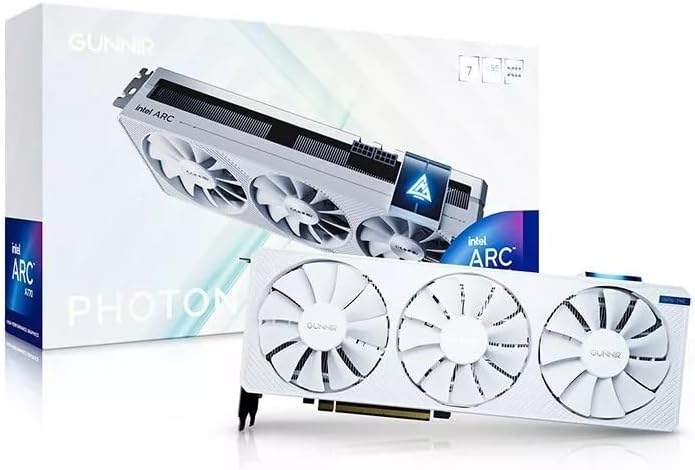
This white themed card stands out visually while providing a solid gaming experience with triple fan cooling that keeps temperatures low during intense sessions.
We may earn a commission when you buy through this link, at no additional cost to you.
It is capable of handling demanding graphics workloads including 4K content rendering thanks to its robust cooling and stable factory overclocked clock speeds.
The triple fan design ensures that the card remains whisper quiet even under load which is a great feature for users who prioritize a quiet home office or studio.
While it is based on the slightly older architecture it remains a very capable card for those who want a specific aesthetic that matches a white themed build.
Designed to handle demanding workloads with ease this card unlocks seamless gameplay and crisp visuals that look great on modern high resolution displays.
With support for PCIe HDMI and DisplayPort this GPU is ready to connect to the latest displays and peripherals for a versatile workflow.
We may earn a commission when you buy through this link, at no additional cost to you.
This card is designed for specialized use cases requiring multiple display outputs and low power consumption making it ideal for multi-monitor setups or light media tasks.
We may earn a commission when you buy through this link, at no additional cost to you.
With four HDMI outputs you can easily connect multiple screens without needing complex adapters which is a great feature for digital signage or light office work.
Its single fan and single slot configuration keeps it incredibly compact allowing it to fit into small cases while maintaining a very low power draw for efficiency.
While it is not built for heavy gaming it serves as an excellent entry level card for users who need reliable video output and basic acceleration without high costs.
The unique 4x HDMI display output allows for easy connection of multiple monitors which is useful for productivity or specialized display configurations.
With a 50W TBP and single fan configuration this card offers an energy efficient solution that generates very little heat and noise in your system.
We may earn a commission when you buy through this link, at no additional cost to you.
Selecting the right graphics card involves balancing performance needs memory capacity and power requirements to ensure your system meets your specific goals.
Video RAM is critical for loading high resolution textures and running large AI models without stuttering. Aim for at least 8GB for gaming and 16GB+ for AI or 3D work.
More VRAM future proofs your card against growing software demands and helps maintain consistent performance in complex workloads.
Newer architectures like Xe2-HPG offer better efficiency and improved AI features compared to older Xe HPG models. Check the generation to ensure you get the latest features.
Prioritize the latest generation for better long term value and support for emerging standards like XeSS 2.
Look for models with dual or triple fan designs if you want silent operation. Blower fans are great for multi GPU setups but can be louder.
Efficient cooling ensures stable clock speeds and longer card life by preventing overheating under sustained loads.
Verify your power supply has enough wattage and connectors. High end cards may require multiple 8-pin connectors while low profile cards might not need any.
Always match your PSU to the TBP of the GPU to avoid instability and ensure reliable system operation.
Higher bandwidth allows faster data transfer between the GPU and VRAM. This is vital for high resolution gaming and complex compute tasks.
Cards with wider buses and faster memory speeds will generally deliver better performance in demanding scenarios.
Ensure the card has the right outputs for your monitors. DisplayPort 2.1 and HDMI 2.1a are essential for high refresh rate and high resolution displays.
If you need multiple screens check the number and type of ports to avoid needing extra adapters.
Check for ISV certification if you use professional software like CAD or Adobe. This ensures stability and optimized performance for specific applications.
Regular driver updates are also key to unlocking new features and improving compatibility over time.
Measure your case before buying. Low profile or single slot cards are necessary for small builds while others require significant space and clearance.
Verify dimensions and slot requirements to ensure a physical fit before placing your order.
Install the latest drivers directly from the official manufacturer site to ensure you have access to the newest game profiles and performance optimizations available.
Use monitoring software to keep an eye on temperatures and fan speeds during heavy loads to maintain system stability and longevity over time.
Keep your PC in a well ventilated area and clean dust filters regularly to prevent overheating and ensure your card runs efficiently for years.
Yes many newer Intel Arc GPUs feature XMX engines designed specifically for accelerating AI tasks like inference and upscaling. Models with higher VRAM are particularly well suited for running large language models locally.
Most mid-range cards require a standard power supply with enough wattage and at least one 8-pin connector. High end models may need more power so check the recommended PSU in the product specs.
The Arc B570 and B580 models are excellent choices for 1440p gaming offering a balance of memory and clock speeds that deliver smooth performance at that resolution.
Yes they support hardware encoding for AV1 H.264 and HEVC which is great for streamers and content creators looking to reduce load on their CPU during recording.
Driver stability has improved significantly since launch. Most users now report solid day-to-day performance but checking game-specific profiles is still recommended for peak performance.
Absolutely. Many Arc GPUs support OpenVINO acceleration which can speed up effects in editing software. Look for models with high memory capacity for 4K workflows.
We have highlighted the top options available ranging from budget friendly gamers to high performance workstation cards that offer significant memory for specialized tasks.
Prioritize your specific needs whether it is VRAM for AI or cooling for gaming to find the model that fits your workflow best.
Always double check current availability and pricing on vendor sites as these figures can change frequently depending on demand and stock levels.