
Amazon Basics AC-Powered Computer Speakers
4.3Editor score
Wall outlet power source
Front volume control knob
Built-in headphone jack
Finding the right audio setup is crucial for an immersive computing experience. AC powered speakers deliver consistent performance without draining your device's battery. They offer robust sound that fills your workspace with clarity and depth for any task.
We evaluated ten top models based on power output, frequency response, connectivity options, and build quality. Our analysis focuses on real-world performance for music, gaming, and video calls across various budget ranges.
Each pick highlights unique strengths like bass response, portability, or premium audio processing. Prices and availability fluctuate frequently so verify current listings before purchasing your preferred model today.
4.3Editor score

4.6Editor score

4.6Editor score
As an Amazon Associate we earn from qualifying purchases.
This side-by-side comparison highlights key specifications across all ten selected models to help you find the perfect audio solution for your desktop or laptop setup.


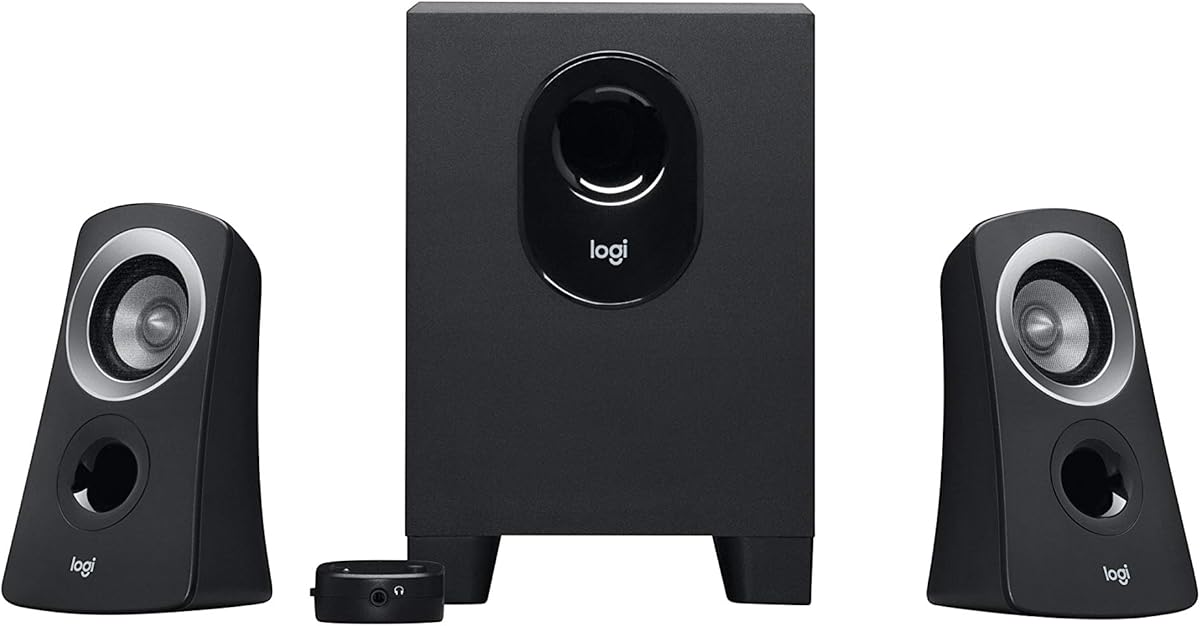


This Amazon Basics model offers straightforward audio amplification for any desktop setup. With a 4.3 rating it delivers reliable performance for everyday tasks like watching videos or joining calls without breaking the bank.
We may earn a commission when you buy through this link, at no additional cost to you.
The AC power design ensures consistent volume levels without draining laptop batteries. Users appreciate the simple front panel volume knob that doubles as an on standby switch for easy operation during work hours.
While the sound lacks deep bass it remains clear for speech and media playback. The frequency range handles most content well but might feel underwhelming for high fidelity music listening sessions at home.
Anyone needing basic audio on a tight budget should consider this option. It provides essential features like a headphone jack and direct power that make it a solid starter choice for new office setups.
Plugging directly into a wall outlet guarantees maximum power output without depending on USB ports or internal battery reserves from your computer hardware.
The front mounted volume dial allows quick adjustments without navigating software menus or hunting for hidden switches on the back panel of the device.
We may earn a commission when you buy through this link, at no additional cost to you.
The Bose Companion 20 stands out for its exceptional audio clarity and wide soundstage. Rated 4.6 by users it reproduces natural sound that feels immersive even from just two sleek speakers placed on a desk.
We may earn a commission when you buy through this link, at no additional cost to you.
Its TrueSpace stereo digital processing creates a spacious listening environment that fills the room effectively. Active electronic equalization balances frequencies so voices and instruments remain distinct and crisp during movie watching or music streaming.
The control pod offers convenient volume and mute adjustments plus a headphone jack for private listening. While it lacks a dedicated bass module the active drivers deliver enough low end for most casual listeners and professionals alike.
This system is ideal for users seeking premium sound without cluttering their desk. It strikes a perfect balance between audio fidelity and space saving design making it a top recommendation for quality conscious buyers.
TrueSpace technology digitally expands the stereo image so you experience a wider soundstage than typical two speaker setups usually provide in a compact form factor.
The slim profile complements modern computer monitors while eliminating the need for a bulky external subwoofer unit that would consume valuable desk space.
We may earn a commission when you buy through this link, at no additional cost to you.
These Edifier speakers bring studio monitor quality to any home office with their silk dome tweeters and full range units. The 4.6 rating reflects their ability to reproduce natural sound that satisfies audiophiles and casual users alike.
We may earn a commission when you buy through this link, at no additional cost to you.
The wood effect vinyl finish adds a touch of elegance to your workspace while minimizing acoustic resonance. Side panel knobs let you fine tune bass and treble to match your personal listening preferences without software.
Dual AUX inputs mean you can connect a phone and computer simultaneously without constant cable swapping. A remote control lets you adjust volume from your chair which enhances comfort during long work or gaming sessions.
Investors in sound quality will appreciate these speakers for their rich detail and dynamic range. They are perfect for those who value aesthetics and acoustic performance over minimalistic plastic designs found in cheaper models.
The 13mm silk dome tweeter and 4 inch full range unit work together to deliver clear highs and balanced mids that reveal subtle details in your favorite tracks.
Connecting two devices via the dual inputs eliminates the need to unplug cables when switching between a laptop for work and a phone for music.
We may earn a commission when you buy through this link, at no additional cost to you.
The Bose Companion 2 Series III delivers consistent performance with sound that stays clear even at high volumes. Its 4.6 rating highlights the brand reputation for quality that stands the test of time.
We may earn a commission when you buy through this link, at no additional cost to you.
You can easily connect your iPhone or iPad via the auxiliary input to enjoy the same performance across devices. The right speaker houses the volume control and headphone jack for immediate access to audio adjustments.
This model lacks a remote control but the physical knobs are straightforward to use during daily tasks. It remains a dependable choice for users who prioritize brand reliability and straightforward functionality over modern features.
Anyone upgrading from built in laptop speakers will notice a significant improvement in clarity. It works well for both work and entertainment where consistent audio delivery matters more than flashy design elements.
The auxiliary input allows you to plug in external sources like tablets or phones so you can play content from multiple devices using the same speaker pair.
Engineered to maintain clarity at all levels this system prevents distortion even when you need to turn up the volume for calls in noisy environments.
We may earn a commission when you buy through this link, at no additional cost to you.
The Bose Companion 2 Series II aims to provide a clearer and more realistic experience for movies and gaming. While it holds a 4.1 rating it still benefits from Bose engineering standards and durable construction.
We may earn a commission when you buy through this link, at no additional cost to you.
Dual inputs allow you to connect both your computer and another audio source simultaneously. This feature ensures you do not miss notifications or calls while listening to music or watching media on the main device.
The elegant and contemporary appearance fits well with various desktop setups without looking out of place. However it might lack some of the refinement found in newer series models regarding sound precision.
It serves as a solid option for those who want a proven name in audio without spending on the latest tech. If you need simple and reliable sound for general use this system meets basic expectations adequately.
Having dual inputs simplifies your setup by letting you keep a secondary device connected for quick access without physical cable changes every time.
The tuning prioritizes natural sound reproduction so dialogue and music sound authentic rather than artificially boosted or colored for entertainment.
We may earn a commission when you buy through this link, at no additional cost to you.
These Edifier speakers offer a powerful 24W RMS output in a compact package suitable for smaller desks. The 4.6 rating indicates that users are satisfied with the immersive sound quality they produce for music and movies.
We may earn a commission when you buy through this link, at no additional cost to you.
The 100 percent wooden enclosures help minimize acoustic resonance for a cleaner listening experience. All necessary cables including RCA and 3.5mm are included so you can start listening immediately after unboxing.
Dual AUX inputs provide the same flexibility found in the larger R1280T model. While the bass reflex port is flared to enhance low end the fixed design means you cannot adjust EQ manually.
They are ideal for users wanting a balance of performance and price without sacrificing build quality. The wooden finish adds a premium feel while the included cables make the setup process effortless.
With 24W total power output these speakers can fill a moderate sized room with rich audio that overcomes typical laptop or monitor speakers.
The flared bass reflex port in the front helps extend low frequency response and improves the overall depth of the sound without distortion.
We may earn a commission when you buy through this link, at no additional cost to you.
The CA-2014 model is designed for small workspaces where every inch counts. Rated 4.2 by users it delivers clear stereo sound for music and voice applications without occupying much desk real estate.
We may earn a commission when you buy through this link, at no additional cost to you.
Its compact design fits neatly on workstations or limited setups making it perfect for dorm rooms or small offices. The front panel includes power volume control and a headphone jack for easy daily access.
Powered by an AC adapter it ensures consistent performance without draining your computer power. While the 4W output is modest it is sufficient for clear dialogue and casual media consumption in quiet environments.
This is a practical choice for anyone needing reliable audio on a strict budget. If your primary goal is clarity over deep bass and you have limited space this system fulfills those needs well.
Front facing buttons mean you do not have to turn the speakers around to adjust volume or power them on during a busy work session.
The 3.5mm audio jack connects to virtually any device including Chromebooks and laptops making it a versatile solution for mixed device environments.
We may earn a commission when you buy through this link, at no additional cost to you.
This 2.1 system brings deeper bass to your desktop with its compact subwoofer and satellite speakers. The 4.4 rating shows satisfaction with the loud 25 Watts RMS output that delivers impactful sound for action movies.
We may earn a commission when you buy through this link, at no additional cost to you.
A convenient control pod sits on your desk so you can manage volume without reaching behind the speakers. The subwoofer is compact enough to fit under a desk but still provides significant low end power.
It lacks Bluetooth or auxiliary inputs for multiple devices making it a dedicated PC solution. However the power and control features make it a strong choice for gamers who need punchy audio effects.
Choose this if you prioritize bass impact and power over wireless convenience. It transforms your listening experience from flat audio to something more cinematic and dynamic for entertainment.
The subwoofer adds a physical low end that standard 2.0 systems cannot match making explosions and music beats feel much more visceral.
The control pod brings essential audio settings to your fingertips so you can adjust levels instantly during a game or movie.
We may earn a commission when you buy through this link, at no additional cost to you.
These speakers offer versatile connectivity with both Bluetooth 5.0 and an AUX input for flexible setups. The 4.2 rating suggests they deliver cleaner highs and fuller mids than many USB powered options for desktop use.
We may earn a commission when you buy through this link, at no additional cost to you.
Powered by a 14W RMS AC adapter they produce loud sound that outperforms built in laptop speakers. A dedicated button lets you switch between EQ modes quickly without needing to download or use any software.
Four ambient lighting modes add visual flair to your setup although they can be turned off to maintain focus during work. Physical buttons and a volume knob provide intuitive control that is easy to operate quickly.
Gamer and casual users looking for a feature rich package will find this appealing. It combines audio with visual customization so it suits those who want a modern and dynamic desk aesthetic.
Bluetooth 5.0 support allows you to stream music from your phone wirelessly ensuring a stable connection without extra cables cluttering your desk.
RGB lights enhance your environment during gaming sessions and can be disabled completely if you prefer a distraction free workspace.
We may earn a commission when you buy through this link, at no additional cost to you.
The LITTOAK speakers boast 30W total power delivering room filling sound perfect for gaming setups or large desks. A 4.2 rating reflects user satisfaction with the powerful output and customizable features available in this package.
We may earn a commission when you buy through this link, at no additional cost to you.
Tailor your audio instantly with three EQ presets for music movie and gaming scenarios. Six customizable lighting modes enhance immersion during media consumption making the desk setup feel alive and vibrant.
All controls are accessible on the front panel with a power button that activates sessions quickly. While it includes a USB port mainly for power Bluetooth and AUX ensure compatibility with a wide range of devices.
It suits users who want a comprehensive entertainment hub on their desk. With strong performance and visual customization it offers a complete package for those who value both sound and style.
Two 15W drivers produce powerful stereo sound that fills a room easily making it ideal for large desktop setups where volume matters.
Dedicated EQ presets let you optimize sound for movies or games without manual tweaking ensuring perfect audio for every specific use case.
We may earn a commission when you buy through this link, at no additional cost to you.
Choosing the right speakers involves balancing power, connectivity, and design to fit your specific desktop environment and audio needs.
Look for speakers with sufficient RMS wattage to fill your room without distortion. AC power ensures you get consistent volume levels regardless of your device's battery status or USB limitations.
Higher wattage generally means louder and more dynamic sound but ensure your desk space can accommodate the speakers without clutter.
Ensure the speakers support the connection types your devices use such as 3.5mm AUX Bluetooth or USB. Multiple inputs allow you to switch between a computer and phone seamlessly.
Wired connections like 3.5mm typically offer more stable audio quality than Bluetooth which may suffer from occasional dropouts or latency.
Check for frequency response ranges and driver materials like silk tweeters for clear highs and detailed mids. Reviews often mention clarity at different volumes which helps gauge performance.
Prioritize balanced sound that keeps dialogue clear and music natural rather than artificially boosted bass that distorts quickly.
Consider the finish and footprint of the speakers to ensure they match your desk aesthetic and fit comfortably. Wooden enclosures often sound better and look more premium than plastic.
Compact designs save space on smaller desks but ensure they still deliver enough power for your listening habits.
Front panel knobs for volume and power are easier to reach than back buttons. Look for built-in headphone jacks if you need to switch between speakers and headphones frequently.
Remote controls or software apps can add convenience but simple physical controls are more reliable in everyday use.
Features like RGB lighting EQ buttons or subwoofers enhance the experience but may add cost. Decide if these extras align with your priorities or if a simpler model suffices.
Specialized features like EQ presets can tailor sound for gaming or movies making them useful if you spend time in those activities.
Established brands often offer better build quality and support. However budget brands can provide excellent value if they meet your specific power and sound requirements.
Always check user reviews to see how the speakers hold up over time and whether customer service is responsive.
Set a realistic budget but remember that slightly higher priced models often provide better durability and sound quality. AC powered options usually offer better value than USB powered ones.
Balance the features you need with what you are willing to spend to get the best long term experience.
Place speakers at ear level on stable surfaces to optimize sound clarity and prevent vibrations. Ensure there is some space behind them for proper airflow to keep internal components cool.
Connect the speakers to your computer via a 3.5mm jack or Bluetooth depending on your model. Plug the power adapter into a wall outlet and turn on the main switch to begin listening.
Avoid exposing speakers to direct sunlight or moisture which can damage electronics and enclosures. Clean surfaces regularly with a dry cloth to maintain appearance and prevent dust buildup.
AC powered speakers draw energy directly from a wall outlet ensuring consistent volume and performance without draining your laptop battery. This makes them ideal for desktop setups or long sessions where reliability is key.
Yes most AC powered speakers use universal 3.5mm audio jacks that work with both Mac and Windows systems. Some models also support Bluetooth which is compatible with almost any modern device regardless of operating system.
Many models feature dual AUX inputs or Bluetooth pairing options to let you connect multiple devices. This allows seamless switching between your phone and computer without unplugging cables every time.
These speakers are designed for daily operation with built-in safety features to prevent overheating or electrical issues. Always use the provided power adapter and avoid overloading electrical outlets for safe long term usage.
Position speakers slightly away from walls to reduce unwanted resonance or use bass boost EQ modes if available. Some models include subwoofers to enhance low end without relying solely on built-in drivers.
With proper care most AC powered speakers last several years without significant degradation. Dusting regularly and avoiding moisture or extreme temperatures helps maintain sound quality and build integrity.
Our top picks include the Amazon Basics for budget efficiency the Bose Companion 20 for balanced premium quality and the Edifier R1280T for studio grade sound. Each model offers distinct benefits to match different user needs and preferences.
Prioritize sound quality and power output if you listen to music or watch movies often. For work focused setups look for simplicity and reliable controls that do not distract from your main tasks.
Prices and availability change frequently so always check current listings before purchasing. Ensure you verify shipping details and return policies to make a confident buying decision for your desktop audio.