
BESIGN LS03 Aluminum Laptop Stand
4.8Editor score
Premium aluminum alloy construction
Detachable design for easy storage
Open design for better airflow
Finding the right laptop rack for desk can transform your workspace into a productive and ergonomic environment. A good stand should keep your device secure while improving airflow and reducing strain on your neck and shoulders during long work sessions.
We have evaluated ten distinct laptop racks based on stability, material quality, and compatibility with various devices. This list covers vertical organizers, under-desk mounts, and adjustable risers to suit different desk sizes and personal preferences.
Each pick below highlights key strengths and potential trade-offs to help you make an informed decision. Please note that availability and specific model details can change over time, so check the current listing before purchasing.
4.8Editor score

4.8Editor score

4.6Editor score
As an Amazon Associate we earn from qualifying purchases.
The following comparison table summarizes the key specifications and features of each laptop rack to help you quickly identify the best fit for your specific desk setup and device needs.





The OMOTON Dual Vertical Desk Laptop Stand Holder is a top choice for users needing to store multiple devices securely. With a 4.8 rating from users, it stands out for its robust build and practical design that accommodates various laptop sizes.
We may earn a commission when you buy through this link, at no additional cost to you.
Its double dock design supports two laptops simultaneously which is ideal for professionals managing multiple devices like MacBooks or Surface models. The adjustable width ensures a snug fit for notebooks ranging from 14mm to 42mm thick.
The anodized aluminum construction provides durability and matches the aesthetic of many modern laptops. Non-slip silicone mats on the slots protect devices from scratches while the wide base ensures the stand does not tip over during use.
This stand is best for those who want a sleek and reliable way to organize dual laptops on their desk. While it lacks adjustable height, the stability and material quality make it a strong recommendation for daily work.
Having two laptops vertically stored saves significant desk space and keeps both devices easily accessible without cluttering the workspace with loose cables or stacks.
The use of sandblasted and brushed aluminum not only looks professional but also resists scratches and wear over time ensuring the stand remains functional for years.
We may earn a commission when you buy through this link, at no additional cost to you.
The NODOCA 2-Slot Laptop Storage for Desk is designed to mount on the side of your desk providing a unique solution to vertical storage. It earns a 4.6 rating for its ability to hold devices securely without taking up surface area.
We may earn a commission when you buy through this link, at no additional cost to you.
Its broad compatibility covers nearly all laptop models including Air, Pro, ThinkPad, and more. The adjustable width allows you to fit devices securely while the high-strength carbon steel ensures the stand is durable enough for daily use.
One of its standout features is the built-in headphone holder at the bottom which helps keep audio accessories organized. The side installation position means your main desk surface remains free for keyboards and other peripherals.
This product is ideal for users with limited desk space who need a sturdy place to store their laptop when not in use. Ensure your desk meets the depth and thickness requirements before purchasing for a smooth installation.
Mounting the rack on the side of the desk maximizes usable surface area allowing you to keep your workspace tidy and efficient while working or studying.
The included hooks provide a convenient spot for hanging headphones or controllers keeping them within reach and preventing them from getting lost in your desk clutter.
We may earn a commission when you buy through this link, at no additional cost to you.
The BYMECOST No Drill Under Desk Laptop Mount is perfect for those wanting to free up desktop space completely. With a 4.5 rating, this metal shelf provides a robust place to store laptops, hubs, and other accessories underneath your work surface.
We may earn a commission when you buy through this link, at no additional cost to you.
It features a no-drill design that clips easily to the table edge making setup quick and non-destructive. The sturdy metal construction supports up to 44 pounds which is plenty for most laptops and peripheral gear.
The hollow structure not only reduces dust accumulation but also helps with heat dissipation for devices stored there. Three openings allow for organized cable routing keeping charging cords managed and out of the way.
This mount is best for standing desks or office tables where floor space is available but desk surface is limited. Verify that your table does not have crossbars that would block the clip mechanism before buying.
The dedicated openings for cables help route charging wires neatly so you do not have to deal with a tangle of cords under your desk during daily use.
Beyond laptops you can store Mac minis game controllers or surge protectors here making it a central hub for all your tech accessories under the desk.
We may earn a commission when you buy through this link, at no additional cost to you.
The Adjustable Laptop Stand for Desk Metal offers a versatile solution for users who need to change their viewing angle frequently. It holds a 4.6 rating due to its sturdy metal build and ability to support various laptop sizes comfortably.
We may earn a commission when you buy through this link, at no additional cost to you.
The stand allows you to adjust height and angle to reduce neck fatigue and back pain during long work sessions. Multiple ventilation holes on the top ensure airflow is maintained to keep your laptop from overheating during use.
Its foldable design makes it easy to slip into a backpack which is great for business travelers or students who move between locations. The rubber mats on the hook prevent sliding and protect the device from scratches.
This stand is recommended for those who prioritize ergonomics and portability in their workspace setup. While it is strong, ensure you tighten all adjustments to maintain stability especially when typing directly on the device.
Adjusting the screen to eye level helps maintain good posture reducing the strain on your neck and shoulders throughout the work day significantly.
The open design allows air to circulate freely around the laptop bottom preventing overheating and extending the overall life of your device.
We may earn a commission when you buy through this link, at no additional cost to you.
The LOXP Adjustable Laptop Stand features a unique 360 degree rotating base that allows you to share your screen easily with others around your desk. It is rated 4.6 for its stable fiber metal construction and flexible adjustment options.
We may earn a commission when you buy through this link, at no additional cost to you.
You can freely adjust the height and angle to keep the screen at eye level reducing physical pressure on your body while working. The non-slip silicone protects the laptop from sliding even when rotated to different angles.
Made from one-piece fiber metal material this stand is more durable than ordinary aluminum alloys. Its foldable design makes it convenient for travel and it works well for home office or outdoor usage.
This stand is best for collaborative work environments where screen sharing is common. Ensure your laptop is 16 inches or smaller to fit within the supported size range for secure rotation and stability.
The rotation feature allows colleagues to view content without needing a second monitor fostering better communication and teamwork during meetings.
Fiber metal offers enhanced stability and resistance to wear ensuring the stand remains reliable even with frequent rotation and adjustment cycles.
We may earn a commission when you buy through this link, at no additional cost to you.
The BESIGN LS03 Aluminum Laptop Stand is a popular choice for those seeking a premium feel without a high cost. It has a 4.8 rating reflecting its strong aluminum construction and effective ergonomic design for elevating your laptop.
We may earn a commission when you buy through this link, at no additional cost to you.
It raises your laptop by 6 inches to a perfect viewing level helping to improve posture and reduce shoulder pain. The detachable design means you can easily assemble or disassemble it in three steps for storage or transport.
The open aluminum design provides good ventilation preventing your laptop from overheating when in use. Rubber on the holder hands sticks tightly to ensure your laptop stays stable and safe from scratches during operation.
This stand is ideal for users on a budget who still want a reliable and sturdy solution for their workspace. While the angle is fixed, the height increase alone offers significant ergonomic benefits for most users.
You get a solid aluminum stand at a price point that fits most budgets making it accessible for students and professionals alike.
The detachable design ensures you do not need tools to set it up and you can take it apart quickly to clean or pack away.
We may earn a commission when you buy through this link, at no additional cost to you.
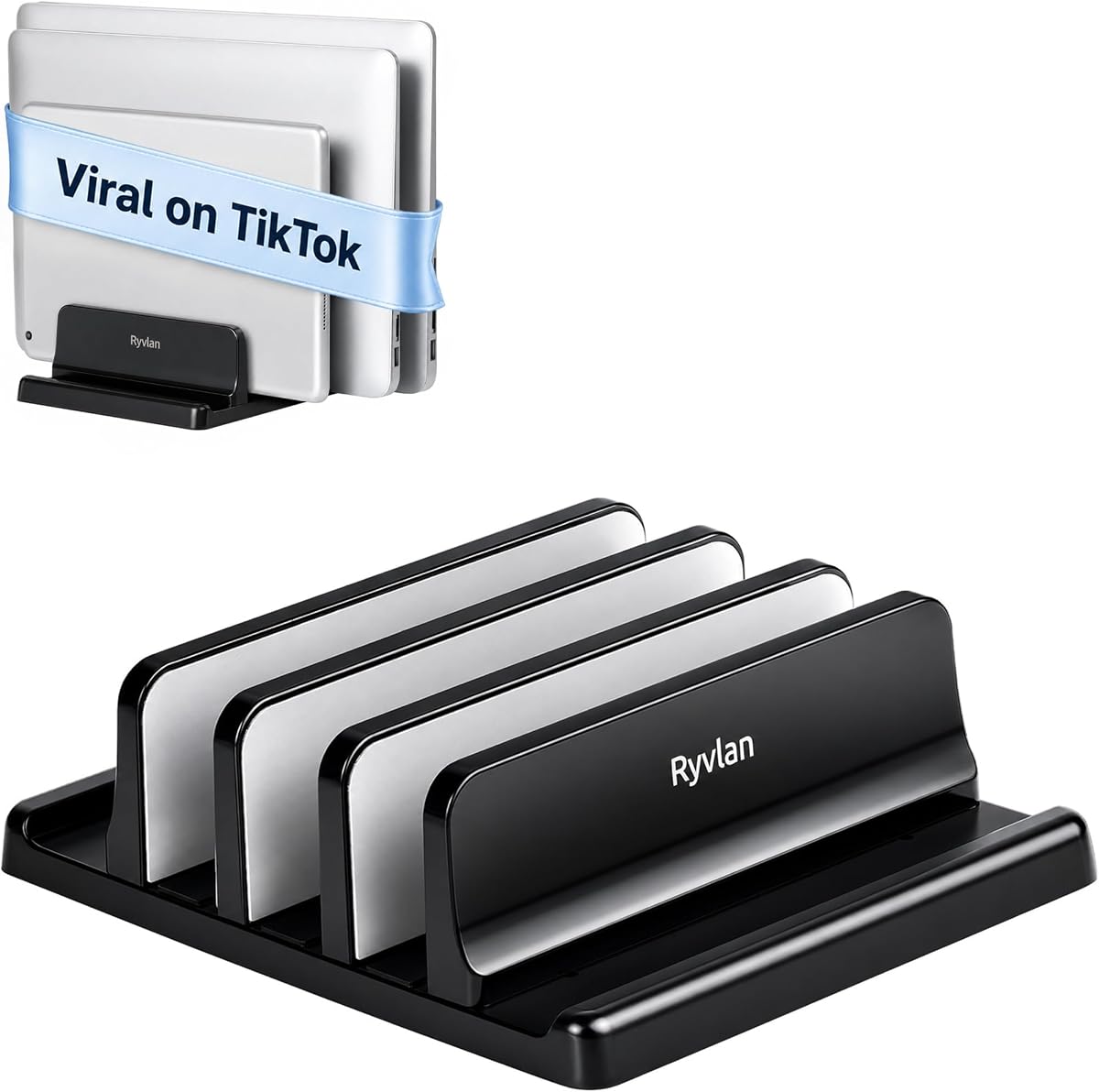
The Ryvlan Vertical Laptop Stand is designed for high density storage holding up to three laptops and two tablets or phones at once. It is rated 4.6 for its ability to clear the whole desk using a single footprint effectively.
We may earn a commission when you buy through this link, at no additional cost to you.
Each slot adjusts from 0.47 to 1.2 inches allowing you to fit thin notebooks and thicker gaming machines snugly without wobble. The impact-resistant ABS build with silicone padding across walls keeps devices safe from scratches and sliding.
Its smooth polished black finish fits well in home offices and classrooms where space is limited. The compact size of roughly 7.3 by 5.9 inches makes it easy to place on even smaller desk surfaces.
This stand is best for teams or families who need to store multiple devices in one place. While you need a wrench to adjust slots the secure grip it provides ensures your devices remain organized and stable.
Keeping multiple devices vertical in one unit maximizes desk real estate allowing you to have more room for work essentials like notebooks and pens.
The silicone padding on all walls cushions each device preventing accidental bumps from causing damage during daily storage and retrieval.
We may earn a commission when you buy through this link, at no additional cost to you.
The Vaydeer Vertical Laptop Stand Holder Organizer is a practical tool for building up a neat and organized space on your desk. It holds a 4.6 rating for its effective 3 in 1 design that cradles laptops and phones vertically.
We may earn a commission when you buy through this link, at no additional cost to you.
The adjustable width accommodates laptops from 0.55 to 1.69 inches thick making it suitable for all types of laptops from ultrabooks to larger models. The polished smooth surface feels nice to the touch and soft silicone mats protect devices from scratches.
Made of high-quality ABS plastic this stand is lighter than metal but still provides strong stability to prevent devices from falling down. It also works for storing books and other items making it a versatile storage tool.
This organizer is best for users who want a simple and effective way to declutter their desk surface. While it is not as heavy-duty as aluminum stands it offers good value for daily home or office use.
The ability to store books and phones alongside laptops makes it a multi-purpose solution for organizing your entire desktop ecosystem neatly.
The repeated polishing gives the stand a refined look that matches modern desks while keeping the surface smooth and easy to wipe clean.
We may earn a commission when you buy through this link, at no additional cost to you.
The Elestoria 5-Slot Vertical Laptop Stand offers a high grade aluminum finish and the capacity to dock up to four laptops and one tablet securely. It is rated 4.6 for its heavy-duty construction and advanced airflow design.
We may earn a commission when you buy through this link, at no additional cost to you.
The closed stand is crafted from solid aluminum alloy with a heavy and stable base that prevents tipping. Tool free adjustment allows you to fine-tune the width for each slot independently to secure various laptop thicknesses.
360 degree airflow ensures your devices stay cool even when stored vertically. Polished edges and soft silicone padding protect devices from scratches while maintaining a premium look in your workspace.
This stand is best for professionals or tech enthusiasts with multiple devices who want a premium organizational solution. While it is more expensive the build quality and capacity justify the investment for long-term use.
Solid aluminum construction ensures the stand remains robust and elegant over time resisting wear and tear better than plastic options.
The unique design allows air to circulate around devices preventing heat buildup which is crucial when storing electronics in a confined vertical space.
We may earn a commission when you buy through this link, at no additional cost to you.
The WALI Computer Monitor Stand for Desk is a robust platform that can hold both a monitor and laptop together saving space. It holds a 4.7 rating for its large metal shelf and adjustable height features for ergonomic setup.
We may earn a commission when you buy through this link, at no additional cost to you.
With a maximum support weight of up to 44 lbs this stand is sturdy enough for heavy displays and laptops. The vented holes prevent overheating and the rubber pads prevent slipping or damage to your work surface.
The height-adjustable riser can raise devices to 3.9 4.7 or 5.5 inches to create a comfortable viewing position. Open space beneath the stand allows you to store keyboards and other desk accessories reducing desktop clutter.
This stand is best for users with dual monitor setups or those needing a stable base for heavy equipment. While it takes up more space the extra storage and support it provides are valuable for organized workspaces.
Adjusting the riser to different heights lets you find the perfect eye level reducing strain and promoting healthier work posture.
Keeping your keyboard and mouse under the stand clears your surface for paperwork and notes keeping the workspace tidy and efficient.
We may earn a commission when you buy through this link, at no additional cost to you.
Selecting the right laptop rack depends on several factors including your desk size device weight and storage needs.
Consider how much room you have on your desk before choosing a vertical stand versus an under desk mount. If your desktop is limited vertical organizers save surface space while under desk mounts remove the device entirely from view.
Measure your desk width and depth to ensure the rack fits securely without obstructing other tools.
Metal stands made from aluminum or carbon steel offer better durability and stability than plastic options. They are less likely to wobble when you type directly on your laptop.
Look for anodized aluminum or powder-coated finishes that resist scratches and match your existing desk style.
Decide whether you need to store just one laptop or multiple devices at once. Some models have single slots while others offer two to five slots for tablets and phones.
Ensure the rack can handle the total weight and dimensions of all devices you plan to store on it.
A good rack should include non-slip pads or silicone mats to prevent devices from sliding or getting scratched. Check if the base is wide enough to prevent tipping when the laptop is inserted.
Models with adjustable width brackets provide a tighter fit for different laptop thicknesses.
For risers and stands used during work look for adjustable height and angle options. Elevating your screen to eye level reduces neck and shoulder strain significantly.
Some models allow you to set the angle to match your natural line of sight for better posture.
If you travel frequently choose a foldable or lightweight model that fits in a backpack. Some stands collapse flat for easy storage in tight spaces.
Consider the overall weight of the stand itself if you plan to move it between office and home regularly.
Look for racks with openings or hooks that let you route charging cables neatly. This prevents cords from dangling or getting tangled behind the stand.
Some under desk mounts include specific trays or cutouts for cable organization to keep your work area clean.
Choose between freestanding and mounting options. Freestanding models are easier to install while under desk mounts may require specific desk thickness or clamping mechanisms.
Check if your desk has crossbars or edge types that might interfere with mounting hardware.
To use a laptop rack effectively place it on a flat stable surface and ensure all adjustable parts are tightened securely. Insert your device carefully into the slots or on the platform making sure it sits evenly.
Clean the rack regularly with a dry microfiber cloth to remove dust and debris that could scratch your device. Avoid using chemical cleaners that might damage protective coatings or rubber pads.
If the stand is adjustable check the tightness of knobs or screws periodically to maintain stability. Do not overload the stand beyond its rated weight capacity to avoid tipping or structural damage.
Most modern racks include protective silicone mats that prevent scratches. However always ensure the width is adjusted to fit your device snugly so it does not slide and cause wear.
Yes many models support gaming laptops up to 17.3 inches. Check the weight limit and slot width to ensure your specific model fits securely.
Choose vertical stands for easy access and space saving while under desk mounts are better if you want to clear your surface completely.
Not all stands have adjustable height. Many vertical organizers are fixed size so look for models labeled adjustable if height customization is important.
Stands with open designs and ventilation holes allow better airflow around the device which helps prevent overheating during use.
Aluminum and carbon steel are most durable and stable. Plastic is lighter and cheaper but may be less sturdy over time.
Many racks with multiple slots can accommodate tablets and phones if the slots are adjustable wide enough.
Under desk mounts usually clip onto the table edge. Ensure your desk thickness meets the manufacturer requirements before installation.
We have reviewed ten diverse options including the OMOTON Dual Vertical Stand and the BESIGN LS03 which offer excellent value and stability.
When choosing prioritize build material and capacity to match your specific desk environment. A stable stand protects your investment and improves your daily workflow efficiency.
Remember that specific details and availability may change so verify the current listing before buying to ensure you get the right product.