
Integral Crypto-197
4.1Editor score
FIPS 197 Certified
Waterproof Double Layer Design
Hardware 256-Bit Encryption
This guide compares the top encrypted USB flash drives for 2026, evaluating hardware security, FIPS ratings, durability, and performance to help you choose the
Secure data storage is more critical than ever in today's digital landscape. An encrypted USB flash drive provides a robust layer of protection for sensitive files, ensuring that unauthorized users cannot access your information even if the device is lost or stolen. Hardware-based encryption is the gold standard for these devices, offering performance and security that software solutions simply cannot match on their own. Whether you are a corporate professional, a government contractor, or a privacy-conscious individual, choosing the right drive is essential for maintaining confidentiality and complying with data protection regulations.
We have carefully evaluated the leading options on the market to bring you this comprehensive roundup. Our comparison focuses on critical security standards such as FIPS 140-2 and 140-3, encryption algorithms like AES 256-bit, and physical durability features. We also consider user experience factors including authentication methods, transfer speeds, and compatibility across different operating systems. This list covers a wide range of capacities and price points, ensuring that you can find a solution that fits your specific needs without compromising on safety or reliability.
Each pick in this guide highlights unique strengths, from ruggedized designs suitable for field work to high-speed models optimized for large file transfers. We detail the specific security features, authentication protocols, and build quality that set these drives apart. Keep in mind that pricing and availability can change frequently, so always verify the latest details before making a purchase. Our goal is to provide you with the clarity and confidence needed to select an encrypted USB flash drive that will protect your digital assets effectively for years to come.
4.1Editor score
4.6Editor score

4.6Editor score
The following table provides a side-by-side comparison of all ten selected drives. It highlights key specifications including encryption standards, interface types, and unique security features to help you quickly identify the model that best aligns with your requirements.


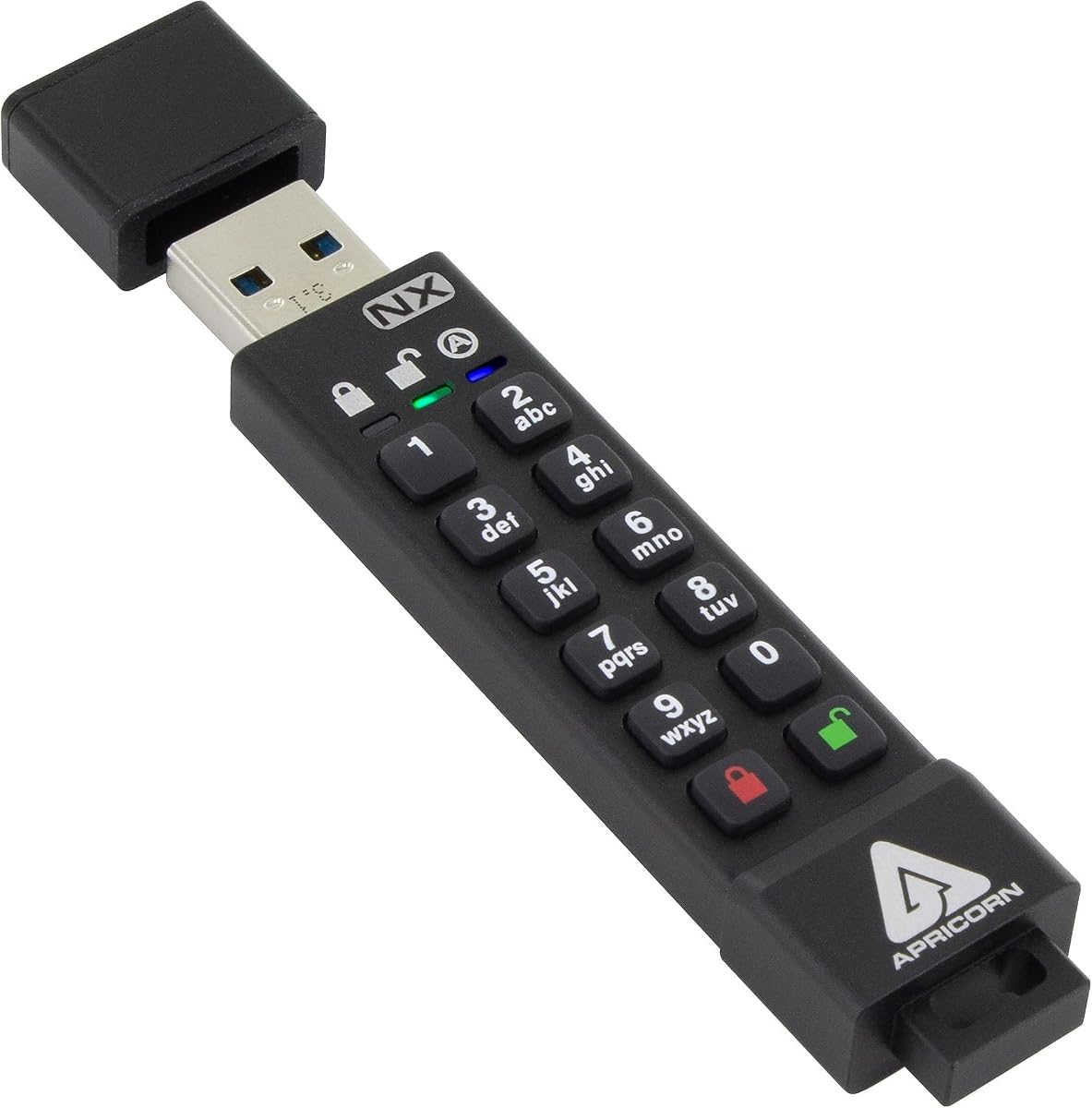
The Apricorn Aegis Secure Key 3 NX stands out as a top-tier choice for users requiring verified security. It holds FIPS 140-2 Level 3 validation, which is a critical certification for government and enterprise use. The drive features hardware-based 256-bit AES encryption, ensuring that data is protected independently of the host system. Its robust design and reliable performance make it a trusted option for professionals who cannot afford security compromises.
We may earn a commission when you buy through this link, at no additional cost to you.
One of its key strengths is the separation of admin and user modes, allowing for granular control over who can manage the drive versus who can simply access data. The Aegis Configurator software provides additional flexibility for configuring security settings and policies. Furthermore, the inclusion of data recovery PINs offers a safety net if credentials are lost, preventing permanent data loss. The two read-only modes add another layer of protection against accidental modification or malware infection.
While the drive excels in security, it does come at a higher price point compared to basic USB drives. The 8GB capacity might be limiting for users needing to store large media files or extensive backups. However, for critical documents and sensitive data, the security features justify the investment. The trade-off is acceptable for those prioritizing protection over raw storage space.
This drive is ideal for government contractors, corporate IT departments, and anyone handling highly sensitive information. If you need a device that meets strict compliance standards and offers reliable hardware encryption, the Apricorn Aegis Secure Key 3 NX is a strong recommendation. It delivers peace of mind through verified security protocols and user-friendly management features.
The FIPS 140-2 Level 3 validation ensures the drive meets rigorous federal security standards, making it suitable for secure government and military applications.
Separate admin and user modes allow administrators to set policies while users can access files, creating a balanced approach to data management.
We may earn a commission when you buy through this link, at no additional cost to you.
The Kingston IronKey Vault Privacy 50 offers a blend of high capacity and robust security suitable for enterprise environments. With FIPS 197 certification and XTS-AES 256-bit encryption, it provides business-grade protection for sensitive data. The drive includes advanced features like brute force and BadUSB attack protection, safeguarding against unauthorized access attempts and malicious USB attacks. Its TAA compliance makes it a viable option for government procurement standards.
We may earn a commission when you buy through this link, at no additional cost to you.
Security is further enhanced by the multi-password option and complex passphrase modes, allowing users to create stronger credentials. The new passphrase mode enables longer, more memorable password phrases without compromising protection. Dual read-only settings prevent accidental data modification or deletion, adding a layer of integrity to stored files. These features collectively create a secure environment for critical business data.
The main drawback is the premium pricing associated with enterprise-grade features. Additionally, the setup process and configuration may require a higher level of technical knowledge compared to simpler drives. However, for organizations that need rigorous security and compliance, these trade-offs are often necessary. The drive offers substantial protection for those willing to invest in it.
This drive is best suited for IT professionals, government agencies, and businesses that handle sensitive corporate data. If you require TAA compliance and advanced threat protection like BadUSB defense, this model is an excellent choice. It balances capacity with security, making it a reliable tool for protecting valuable information.
Advanced protections against brute force and BadUSB attacks ensure that the drive remains secure even when plugged into compromised systems.
TAA compliance ensures the drive meets specific government procurement requirements, simplifying the approval process for public sector projects.
We may earn a commission when you buy through this link, at no additional cost to you.
The Apricorn Aegis Secure Key 3 NXC is designed for modern devices with USB-C connectivity while maintaining top-tier security. It features FIPS 140-2 Level 3 validation and 256-bit AES hardware encryption, ensuring robust protection for your data. The USB 3.2 interface offers fast transfer speeds, making it practical for large files. Its software-free authentication simplifies the user experience, allowing immediate access without complex driver installations.
We may earn a commission when you buy through this link, at no additional cost to you.
One of the standout features is the separation of admin and user modes, giving administrators control over security settings while users enjoy seamless access. The drive's ability to operate without software installation enhances compatibility across different systems, from Windows to macOS and Linux. This makes it a versatile choice for users who frequently switch between devices or operating systems. The Type-C connector ensures future-proofing as more devices move away from traditional USB-A ports.
The drive's reliance on USB-C might be a limitation for older hardware that lacks these ports, requiring an adapter. Additionally, the cost is higher compared to standard USB-A encrypted drives. However, the convenience of USB-C and the strong security credentials often justify the extra expense. For those with newer laptops and mobile devices, this drive offers a seamless and secure experience.
Ideal for tech-savvy users, professionals with modern laptops, and anyone needing secure storage for mobile devices, this drive is a great fit. If you value fast transfer speeds and modern connectivity without compromising on security, the Apricorn Aegis Secure Key 3 NXC is highly recommended. It bridges the gap between legacy security standards and contemporary hardware needs.
The USB-C connector ensures compatibility with the latest laptops, tablets, and smartphones, making data transfer seamless across modern devices.
Software-free authentication means no drivers are needed, allowing you to plug in and start using the drive immediately on any OS.
We may earn a commission when you buy through this link, at no additional cost to you.
The Integral Crypto-197 offers an affordable entry point into secure USB storage without sacrificing essential protection. It is certified to FIPS 197, ensuring high-level information security standards are met. The drive includes brute force password attack protection, automatically erasing data after unsuccessful access attempts. Its waterproof double-layer design adds physical durability, making it suitable for use in various environments where standard drives might fail.
We may earn a commission when you buy through this link, at no additional cost to you.
The drive features auto-lock functionality, encrypting data and locking when removed from a computer or when screen protection is enabled. This adds an extra layer of convenience and security for users who might forget to manually lock the drive. The zero-footprint design means no software installation is required, simplifying setup and usage across different devices. Despite its low cost, it maintains the core requirements for secure data storage.
The 4GB capacity is a significant limitation for storing large files or backups, making it best suited for text documents and small data sets. Additionally, the security features, while adequate for personal use, may not meet stricter enterprise requirements. However, for budget-conscious users needing basic protection, these trade-offs are acceptable. It provides a reliable option for casual users who value security but do not need high capacity.
This drive is perfect for students, freelancers, or anyone needing secure storage for small files without breaking the bank. If you need a certified encrypted drive at a low price point and can work with limited capacity, the Integral Crypto-197 is a solid choice. It balances affordability with essential security features effectively.
The waterproof double-layer design protects the drive from water and drops, ensuring that data remains safe even in harsh conditions.
Zero footprint design means no drivers or software are needed, allowing for plug-and-play usage on any computer without extra steps.
We may earn a commission when you buy through this link, at no additional cost to you.
The iStorage datAshur PRO is a rugged and reliable secure USB drive designed for demanding environments. It holds FIPS 140-2 Level 3 certification, ensuring robust encryption and compliance with strict security regulations. The PIN-authenticated hardware encryption allows users to access data by entering a PIN, eliminating the need for software. Its IP57 rating means it is resistant to dust and water, making it durable for field use or rough conditions.
We may earn a commission when you buy through this link, at no additional cost to you.
The drive's compatibility across various operating systems, including Windows, macOS, and Linux, ensures versatility. Transfer speeds are decent, with read speeds up to 169MB/s, allowing for efficient file management. The physical keypad is intuitive, providing a tactile way to enter credentials without relying on a host device. This design is particularly useful for users who frequently work on shared or untrusted computers.
The limited storage capacity of 4GB restricts the drive to essential documents rather than large media files. Additionally, the physical keypad components may be prone to wear over time, though the rugged casing helps mitigate this. For those who prioritize durability and compliance over storage space, these limitations are often acceptable. The drive offers a high level of security in a compact form factor.
This drive is suitable for professionals who work in rugged environments, such as field engineers or military personnel. If you need a certified encrypted drive that can withstand water and dust while maintaining data security, the iStorage datAshur PRO is an excellent option. It combines compliance, durability, and ease of use effectively.
IP57 certification ensures the drive can withstand immersion in water and exposure to dust, making it reliable for outdoor or industrial use.
The physical keypad allows users to authenticate without software, protecting credentials from keyloggers or compromised operating systems.
We may earn a commission when you buy through this link, at no additional cost to you.
This generic encrypted USB drive offers a high capacity of 64GB with advanced hardware encryption at a competitive price. It utilizes an independent chip with AES256-bit encryption to protect data from brute force attacks. The key unlock design ensures no password trace, and after ten incorrect inputs, the drive resets and erases data. Its automatic lock feature activates when disconnected, adding a layer of security for portable use.
We may earn a commission when you buy through this link, at no additional cost to you.
The USB 3.0 interface provides fast transfer speeds, suitable for backing up large files or media. The aluminum alloy shell not only looks sleek but also aids in heat dissipation during transfers. The compact, portable design allows for easy transport on key rings or in pockets. For users needing significant storage with basic hardware encryption, this drive presents a practical solution.
The lack of formal FIPS certification means it may not be suitable for government or highly regulated enterprise environments. Additionally, the aluminum body can get warm during extended use, which may be uncomfortable for some users. However, for general privacy and consumer use, these issues are minor. The drive offers a good balance of capacity and basic security features.
This drive is ideal for users who need a large amount of encrypted storage for personal or business use without strict compliance requirements. If you want 64GB of space with hardware encryption and automatic locking features at a reasonable price, this model is worth considering. It serves well for protecting personal data on the go.
With 64GB of space, this drive can hold thousands of documents, photos, and videos, offering ample room for diverse file types.
The drive automatically locks when unplugged, ensuring that data is never left exposed on a computer or in transit.
We may earn a commission when you buy through this link, at no additional cost to you.
The Lexar JumpDrive F35 PRO combines high-speed performance with biometric security. It features fingerprint authentication that allows for quick access, saving up to 10 different fingerprints for flexibility. The recognition speed is ultra-fast, taking less than one second. The drive also includes 256-bit AES encryption to protect files, ensuring that data remains secure even if accessed physically. With read speeds up to 400MB/s, it is excellent for transferring large files efficiently.
We may earn a commission when you buy through this link, at no additional cost to you.
This drive is designed for users who prioritize convenience and speed alongside security. The fingerprint authentication eliminates the need to remember complex passwords, streamlining the login process. The high read and write speeds make it suitable for professionals who work with large datasets or media files. It bridges the gap between traditional encrypted drives and modern usability features.
The reliance on software for initial setup may be a hurdle for some users who prefer plug-and-play solutions. Additionally, biometric systems can occasionally fail, requiring a fallback password method. However, these issues are generally manageable. The drive offers a modern approach to security that is both fast and intuitive for daily use.
Ideal for content creators, photographers, and professionals who need quick access to large files securely, this drive is a great choice. If you value speed and biometric convenience over traditional PIN entry, the Lexar JumpDrive F35 PRO is highly recommended. It provides a user-friendly security experience.
Fingerprint authentication allows for secure, password-free access, making it easier to unlock the drive quickly without typing codes.
Read speeds up to 400MB/s ensure that large files like videos and backups are transferred rapidly, saving valuable time.
We may earn a commission when you buy through this link, at no additional cost to you.
The iStorage datAshur PRO2 builds on the success of the PRO with enhanced durability and compliance. It holds FIPS 140-2 Level 3 certification, ensuring strong encryption and regulatory compliance. The IP68 rating offers superior dust and water resistance compared to its predecessor, making it ideal for extreme environments. PIN-authenticated hardware encryption keeps data secure without requiring software, providing a consistent experience across all devices.
We may earn a commission when you buy through this link, at no additional cost to you.
This drive is perfect for users who need robust physical protection alongside strong data security. The transfer speeds are fast enough for general use, with read speeds up to 168MB/s. The rugged casing protects against impacts and rough handling, ensuring the drive survives where others might fail. It is a reliable choice for professionals working in hazardous or unpredictable conditions.
The 32GB capacity is moderate, sufficient for documents but limited for large media. The price is higher than standard drives, reflecting the enterprise-grade features and durability. However, for those who need certified security and extreme durability, this cost is justified. The drive offers a high level of confidence in data safety.
This drive is suitable for military personnel, field researchers, and corporate IT who need certified, durable security. If you require an encrypted drive that can withstand immersion in water and harsh environments, the iStorage datAshur PRO2 is an excellent choice. It combines compliance, durability, and secure access effectively.
IP68 certification allows the drive to withstand prolonged immersion in water and dust, making it suitable for extreme outdoor and industrial conditions.
FIPS 140-2 Level 3 certification ensures the drive meets government security standards for secure data handling in regulated industries.
We may earn a commission when you buy through this link, at no additional cost to you.
The Kingston IronKey D500S represents the pinnacle of USB security features and military-grade protection. It is pending FIPS 140-3 Level 3 certification, offering advanced security that surpasses many competitors. The dual hidden partition option allows for discreet storage of sensitive files, adding a layer of privacy. With brute force and BadUSB attack protection, the drive safeguards against sophisticated threats. The rugged zinc casing provides penetration attack protection, ensuring physical security.
We may earn a commission when you buy through this link, at no additional cost to you.
This drive offers a user-friendly interface with customizable features and attributes, allowing administrators to tailor security settings to specific needs. The multi-password option with complex or passphrase modes gives users flexibility in creating credentials. The crypto-erase password feature provides a secure way to wipe data in emergencies. These features make it ideal for high-security environments where threats are complex.
The high price point and advanced features may be overkill for casual users who only need basic encryption. Additionally, the 16GB capacity is modest compared to the cost. However, for organizations that need the highest level of security and physical durability, these trade-offs are acceptable. The drive provides peace of mind through its robust engineering and certification.
This drive is ideal for government agencies, defense contractors, and enterprises that handle classified information. If you require military-grade security, dual partitions, and top-tier threat protection, the Kingston IronKey D500S is the best choice. It sets a new standard for secure portable storage.
Pending FIPS 140-3 Level 3 certification ensures the drive meets the highest federal standards for cryptographic modules and secure data handling.
The rugged zinc casing protects the drive from physical penetration attempts, ensuring that even if stolen, the drive remains intact and secure.
We may earn a commission when you buy through this link, at no additional cost to you.
The Kingston D300S is a compact USB drive that offers reliable hardware-based encryption in a small form factor. It uses AES 256 XTS encryption, which is considered industry standard for high-security applications. The hardware encryption ensures that data is protected independently of the host system. Its password protection adds a straightforward layer of security for everyday users. With 8GB capacity, it is suitable for essential documents and smaller files.
We may earn a commission when you buy through this link, at no additional cost to you.
This drive is simple to use, requiring no software installation. It is compatible with major operating systems, allowing for cross-platform use without complications. The compact design makes it easy to carry on a keychain or in a pocket. For those who need a simple, no-fuss encrypted solution, the D300S delivers on its promise of basic security.
The limited capacity makes it impractical for storing large media files or extensive backups. Additionally, the feature set is basic compared to more advanced models, lacking extra modes or physical keypads. However, for users who prioritize simplicity and portability, these trade-offs are minor. The drive provides essential protection without complexity.
This drive is ideal for individuals needing to securely store small amounts of sensitive data without advanced features. If you want a simple encrypted drive that is easy to carry and use, the Kingston D300S is a reliable choice. It offers peace of mind for personal data protection.
No software installation is required, making the drive easy to set up and use on any computer immediately after purchase.
AES 256 XTS encryption ensures that data remains secure against brute-force attacks and unauthorized access attempts.
We may earn a commission when you buy through this link, at no additional cost to you.
Selecting the right encrypted USB flash drive requires evaluating several key factors to ensure your data remains secure while meeting your performance needs.
Look for drives that use AES 256-bit encryption, which is the industry standard for secure data protection. Higher standards like FIPS 140-2 Level 3 ensure that the drive meets federal security requirements for government and enterprise use. These certifications provide confidence that the encryption is robust and has been independently validated against common attack vectors.
Hardware encryption encrypts data on the drive itself using a dedicated chip, making it more secure and faster than software solutions. Software encryption relies on the host system and can be vulnerable to malware or operating system flaws. For maximum security, always prioritize drives with hardware-based encryption, especially if you plan to use the device on multiple or untrusted computers.
Different drives offer various authentication methods including PINs entered via a physical keypad, software-based passwords, or biometric options like fingerprints. A physical keypad is often more secure because credentials are not exposed to the host OS. Biometric options provide convenience but may be less robust in high-security environments. Choose a method that balances security with ease of use.
Determine how much storage you need based on the types of files you plan to keep. While security drives range from 8GB to 256GB or more, higher capacity options often come with higher costs. For sensitive documents, 32GB or 64GB is often sufficient. However, if you store media files or large backups, consider a larger capacity drive to avoid space constraints.
Encrypted drives are often carried in pockets or bags, so physical durability is essential. Look for models with waterproof and dust-resistant ratings, such as IP67 or IP68. Ruggedized designs with metal casings can also protect against drops and impacts. A durable drive ensures that your data remains accessible even if the device is exposed to harsh environments.
Ensure the drive has the right connector for your devices. USB-A is still common, but many modern laptops and tablets use USB-C. Some drives come with dual connectors or adapters for better flexibility. Check that the drive supports your operating system, as some encrypted models may have specific software requirements or limitations on older systems.
Recoverable PINs or recovery keys are crucial features to prevent permanent data loss if you forget your credentials. Some drives offer admin modes that allow resetting the user PIN, which is vital for enterprise use. Avoid drives that lack any recovery mechanism, as this could lead to losing access to all stored data permanently in the event of a mistake.
Look for extra protections such as auto-lock, brute force attack mitigation, and read-only modes. These features enhance security by preventing unauthorized access or accidental data modification. Some high-end models offer dual partitions for hiding sensitive files or crypto-erase capabilities for emergencies. These features add layers of protection that are valuable for specific use cases.
To get started, insert the encrypted USB flash drive into your computer's USB port. If the drive requires a PIN, enter it using the onboard keypad if available, or through the software prompt if using software-based authentication. Ensure that you have created a strong password or PIN during the initial setup process to maximize security.
Hardware encryption is generally better because it encrypts data directly on the drive using a dedicated chip, making it faster and more secure. Software encryption relies on the host computer and can be vulnerable to malware or operating system vulnerabilities.
FIPS 140-2 Level 3 is a US government standard that validates the security of cryptographic modules. It ensures that the drive has physical security mechanisms and tamper resistance, making it suitable for secure government and enterprise applications.
Yes, most encrypted USB drives are compatible with both Mac and Windows systems. However, some software-based drives may require specific drivers or have limitations on older OS versions, so always check the manufacturer's compatibility list before purchasing.
If you forget the password, many drives offer recovery options like admin PINs or recovery keys. However, without these, data loss can occur. It is crucial to set up recovery options during initial setup to prevent permanent loss of access.
Biometric USB drives offer convenient access using fingerprints, but they are generally considered less secure than PINs. Some biometric systems can be spoofed, and if the fingerprint data is compromised, it is harder to reset compared to a password.
Hardware-encrypted drives usually maintain high transfer speeds because the encryption happens in parallel with data transfer. However, some software-based drives may show slightly slower performance due to the overhead of managing encryption through the host system.
Yes, many hardware-encrypted drives offer software-free authentication, using PINs entered via an onboard keypad. These drives work as plug-and-play on any operating system without needing to install additional drivers or applications.
Choosing the right encrypted USB flash drive depends on your specific security needs, capacity requirements, and usage environment. The Apricorn Aegis Secure Key 3 NX offers an excellent balance of security and usability for general professionals. The Kingston IronKey D500S stands out for those requiring military-grade protection and advanced features like dual partitions.