
AMBIR ID Card Scanner with Software
5.0Editor score
No subscription fees required
USB powered simplicity
Local data storage
Choosing the right Id Scanners for Dispensaries is critical for maintaining compliance and ensuring customer safety. The best devices offer fast scanning, accurate age verification, and robust customer management tools to streamline your daily operations.
We have evaluated ten leading models based on scanning speed, software features, durability, and user feedback. Our analysis focuses on how each unit handles diverse ID formats and integrates with your existing security protocols effectively.
Each pick below highlights key strengths and potential limitations to guide your decision. Prices and availability change frequently, so verify current details before purchasing to ensure you get the best value for your investment today.
5.0Editor score

4.8Editor score

4.2Editor score
As an Amazon Associate we earn from qualifying purchases.
The following table provides a side-by-side comparison of all ten top-rated Id Scanners for Dispensaries available this month. Review the specifications to find the model that aligns with your operational requirements and security standards.




The IDVisor Smart V2 stands out as a top performer for age verification. With a 4.8 rating, it delivers reliable performance for busy dispensary environments requiring quick and accurate checks.
We may earn a commission when you buy through this link, at no additional cost to you.
Its one second scan speed ensures minimal wait times for customers. The device tracks visits and flags banned patrons effectively. GPS locate features add a layer of security for expensive hardware.
While the initial cost is higher than basic models, the lifetime software updates justify the investment. The spare battery ensures continuous operation during long shifts without interruption to service.
Ideal for dispensary managers prioritizing speed and security. This scanner offers the best balance of features for high-volume locations needing robust customer tracking and reliable verification capabilities.
Highlights new versus repeating clients and tracks venue occupancy for better insights into customer behavior and safety.
FIND MY DEVICE feature allows you to locate your scanner via GPS or lock data remotely if the unit is misplaced.
We may earn a commission when you buy through this link, at no additional cost to you.
This model offers a touchless scanning solution ideal for health-conscious environments. It verifies US state and Canada IDs efficiently with a dedicated software suite for visitor management.
We may earn a commission when you buy through this link, at no additional cost to you.
The included software adds significant value to the purchase. Accessories like a screen protector and case protect the device from daily wear in busy dispensary settings.
However, the software is basic and might lack advanced features found in premium models. The lower rating suggests some users may find limitations in its functionality over time.
Best suited for smaller dispensaries needing simple verification. If you require basic ID checks without complex CRM needs, this unit provides a solid entry-level solution.
Includes one year of Veriscan Basic Software worth three hundred fifty dollars to enhance age verification capabilities immediately.
The handheld design with hand strap allows staff to move freely around the dispensary to verify IDs at any station.
We may earn a commission when you buy through this link, at no additional cost to you.
The AgeVisor Mini offers a compact solution for verification tasks. Its quick setup allows immediate use without additional equipment or complex configuration steps for staff.
We may earn a commission when you buy through this link, at no additional cost to you.
Motion-activated scanning facilitates one-handed operation for efficiency. The anti-passback feature prevents duplicate scans and ensures security compliance across different locations easily.
Some users report issues with reliability compared to higher-rated models. The countertop-only design limits flexibility if you need to verify IDs away from a fixed station.
Good for fixed stations where space is limited. Choose this if you need a basic device for high-speed scanning at a single entry point in your facility.
Just plug it in to verify IDs in minutes. Motion activated scanning allows one handed operation without pressing any buttons.
Includes a free subscription to Barcode Detective which uses hidden barcode data to detect fake IDs effectively.
We may earn a commission when you buy through this link, at no additional cost to you.
This model features an extra large screen that simplifies data viewing for staff. It includes robust customer management tools like VIP tagging and banned lists for better security control.
We may earn a commission when you buy through this link, at no additional cost to you.
Cloud networking allows multiple devices to sync records easily. This is useful for larger teams or multi-location setups needing real-time data access and shared information.
The voice warnings and vibration alerts provide clear feedback on scan results. However, the reliance on a cradle for charging may limit portability compared to standalone battery options.
Recommended for managers needing advanced data sharing. The large screen and cloud sync features make it a top choice for complex verification workflows in large dispensaries.
Highlights new versus repeating clients and tracks venue occupancy to identify frequent visitors and manage crowd control.
Upload and download records from a cloud database through WiFi to keep data synchronized across multiple devices.
We may earn a commission when you buy through this link, at no additional cost to you.
This scanner is designed specifically for compliance with state laws. It provides clear Go/No-Go results to help staff make quick decisions on sales without confusion or delay.
We may earn a commission when you buy through this link, at no additional cost to you.
Data logging is flexible and exportable to meet audit needs. You can configure scan data to align with specific business or compliance requirements effectively and easily.
Since it lacks a battery, it must remain connected to a power source. This limits its use to fixed locations but ensures continuous operation without power concerns.
Great for stationary checkout areas. If your priority is strict regulatory compliance and reliable performance at a single point of sale, this model is a strong candidate.
Complies with key ID verification laws including Pennsylvania SB 688, Utah Code 32B-1-407, and Oregon OLCC.
No photos are taken or stored to protect privacy while still maintaining necessary compliance logs and records.
We may earn a commission when you buy through this link, at no additional cost to you.
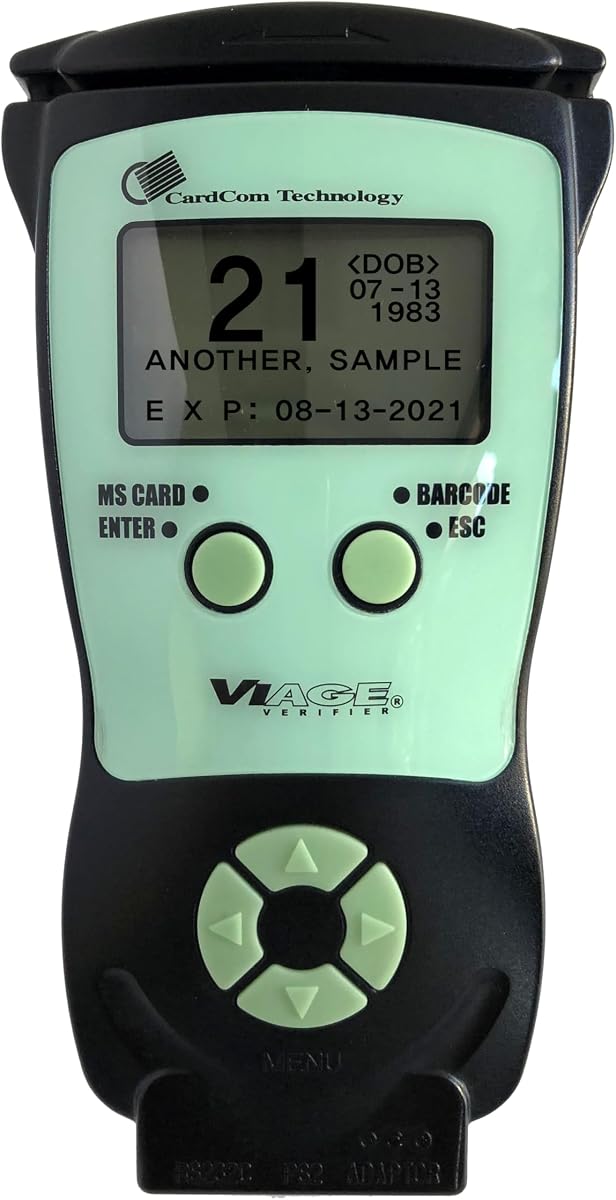
This scanner supports both magnetic stripe and 2D barcode scanning. This dual technology ensures compatibility with various ID formats across the United States and Canada reliably.
We may earn a commission when you buy through this link, at no additional cost to you.
It operates independently without needing external devices for basic verification. The compliance reporting feature helps maintain due diligence records without requiring additional software purchases or subscriptions.
While it lacks advanced CRM features, it covers all fundamental needs effectively. Free ID updates ensure the device remains accurate as new ID formats are introduced annually.
Best for businesses wanting cost-effective coverage. If you need reliable verification without hidden fees or complex setups, this standalone unit offers excellent value and performance.
Features both magnetic stripe and 2D barcode scanning capabilities for comprehensive ID verification across different card formats.
Comes standard with all accessories and compliance software with no hidden fees or subscriptions for the life of the device.
We may earn a commission when you buy through this link, at no additional cost to you.
The Quantum Edge V3 is built to withstand wet or dusty environments. Its water and dust seal protects the unit from spills or rain, making it suitable for outdoor events.
We may earn a commission when you buy through this link, at no additional cost to you.
Wi-Fi connectivity allows easy data transfer and multi-device connections. The handheld design with case ensures portability and protection when moving around the venue frequently.
The audible and vibration alerts make status clear even in noisy settings. However, PC software updates might not be free, which could add to long-term costs slightly.
Ideal for venues prone to spills or outdoor use. If durability in challenging conditions is your top priority, this scanner offers the ruggedness needed to keep working.
Designed with a water and dust seal so small quantities of dust cannot even enter the enclosure.
Uses Wi-Fi for easy connection with multiple devices and includes PC software for optional data transfer.
We may earn a commission when you buy through this link, at no additional cost to you.
This scanner extracts data automatically from barcodes without manual entry. All information is stored locally on your system, ensuring maximum privacy and control over sensitive customer data.
We may earn a commission when you buy through this link, at no additional cost to you.
It supports duplex scanning to capture both sides of an ID in one pass. Anti-passback security prevents duplicate scans and ensures compliance with entry rules effectively.
Since it relies on a PC connection, it lacks standalone mobility. However, the one-time purchase model eliminates recurring costs and simplifies budget planning for small businesses.
Perfect for small shops prioritizing data privacy. If you want secure verification without cloud dependencies or subscription fees, this turnkey solution offers reliable performance.
All scanned information is stored locally on your system without requiring cloud storage or internet connectivity for maximum privacy.
Prevents card sharing by detecting duplicate scans within a specified timeframe to ensure the same ID cannot be used multiple times.
We may earn a commission when you buy through this link, at no additional cost to you.
This device captures front and back images at high resolution. The near-infrared image capture helps detect security features that standard optical sensors might miss in an ID.
We may earn a commission when you buy through this link, at no additional cost to you.
It supports ISO magnetic stripes for additional data verification. The simple USB connection makes setup easy for Windows PCs without complex installation processes or requirements.
Note that software licenses must be purchased separately for full functionality. This hardware-focused approach allows integration with your preferred software ecosystem and existing workflows.
Best for advanced verification workflows. If you need high-resolution image capture for detailed checks and already have trusted software, this unit adds powerful hardware to your setup.
Captures front and back of ID cards at six hundred dpi for detailed authentication workflows.
Works with AssureID or AcuFill software to integrate seamlessly with your existing systems and needs.
We may earn a commission when you buy through this link, at no additional cost to you.
This model offers a complete solution in a single purchase. It includes age verification and customer management tools to help you track visits and maintain ban lists easily.
We may earn a commission when you buy through this link, at no additional cost to you.
It is USB-powered, eliminating the need for an external power supply. Local data storage ensures your customer information stays secure on your own system without cloud risks.
While it lacks the mobility of handheld scanners, it is very affordable for fixed locations. Perfect for small businesses looking for a simple start to ID verification.
Highly recommended for tight budgets. This unit provides essential features without hidden costs, making it the most economical choice for professional age verification in 2026.
Hardware and software included in a single purchase with no subscription fees or ongoing costs to start scanning right out of the box.
Track customer visits and maintain ban lists to instantly identify previously banned individuals and export data for marketing campaigns.
We may earn a commission when you buy through this link, at no additional cost to you.
Selecting the right scanner requires weighing speed, security features, and long-term costs. This guide explains the essential factors to consider for your dispensary operations.
Speed is critical for customer throughput. A scanner that processes IDs in under one second reduces queues and improves the customer experience. Ensure the device accurately reads barcodes from all state IDs.
Prioritize models with high-speed scanning capabilities. This minimizes wait times and ensures staff can focus on service rather than technical errors.
Software quality determines how well the scanner integrates with your workflow. Look for features like cloud sync, CRM tools, and real-time updates. A good system tracks customers and flags banned individuals automatically.
Evaluate whether the software supports cloud databases or local storage. Choose based on your data privacy needs and whether you operate a single location or multiple sites.
Decide between handheld and countertop units. Handheld models offer flexibility to verify IDs anywhere on the floor. Countertop scanners are stationary and often more durable for heavy use at a front desk.
Consider your venue layout. If staff need to move around, a handheld unit with a long battery life is essential. For fixed checkpoints, a countertop model may be more stable and cost-effective.
Advanced security tools like anti-passback and fake ID detection are vital. Anti-passback prevents duplicate scans within a set time. Fake ID detection uses barcode analysis to spot inconsistencies that indicate a forged document.
Look for devices that offer GPS tracking or remote locking. These features protect your investment if the scanner is lost or stolen from your premises.
For handheld units, long battery life ensures uninterrupted operation. A device with a spare battery or easy swapping mechanism is ideal for shifts lasting more than eight hours.
If you choose a countertop unit, ensure it has a reliable power adapter. Continuous power is essential for fixed stations to avoid interruptions during peak business hours.
Dispensaries and bars can be tough environments. Look for scanners with water and dust seals if they will be used near drinks or outdoor events. A rugged case protects the device from accidental drops.
Invest in a unit with a solid warranty and support. High build quality reduces maintenance costs and ensures the scanner lasts longer under daily use.
Check the total cost of ownership. Some devices have hidden fees for software updates or fake ID checks. Prefer models with lifetime updates or one-time purchase options to avoid recurring charges.
Balance the initial price with long-term value. A higher upfront cost might save money over time if it includes free features like software updates or comprehensive customer tracking tools.
Reliable support is essential when technical issues arise. Choose a brand that offers US-based phone or email support. Regular software updates ensure compatibility with new ID formats.
Confirm the update policy. Some vendors offer free lifetime updates, while others may charge for new features. Always verify the update terms before purchasing the device.
Connect the scanner to your network or computer as directed. For handheld models, charge the device fully before first use. Place the unit on a stable surface or in its cradle to ensure consistent power.
Position IDs clearly for scanning. Hold driver’s licenses flat and align the barcode with the sensor. If using an automated scanner, simply slide the ID through or hold it near the sensor for a quick read.
Keep the scanner clean and dry. Wipe the lens and housing with a soft cloth regularly. Avoid exposing the device to excessive moisture or dust to maintain longevity and optimal performance.
Most recommended models read barcodes from all fifty states and Canadian provinces. Some also support military IDs and passports. Always verify compatibility with your specific jurisdiction before purchasing.
Many models come with no ongoing subscription fees. Some basic plans offer free updates while advanced fake ID checks may require credits. Check the specific software terms for your device.
Yes, many scanners include CRM features to track visits. You can flag VIPs or banned patrons and export customer data. This helps maintain security and manage loyalty programs.
Standalone models can operate offline for basic age checks. Cloud models may need a connection for advanced features. Always check offline capabilities if your venue has unstable internet.
Use a soft dry cloth to wipe the device. Avoid harsh chemicals or excessive moisture that could damage electronics. Keep the scanning lens clear for accurate reads.
These scanners are versatile for any age-restricted business. Bars, liquor stores, and clubs can all benefit from the verification features. The tools are adaptable to various compliance needs.
Handheld batteries often last twelve hours or more on a single charge. Some devices include spare batteries for extended shifts. Always keep a charging station available.
Some units store data locally while others use cloud databases. Local storage offers higher privacy. Ensure your device complies with local privacy laws regarding data retention.
We have reviewed ten top scanners offering diverse features and price points. Whether you need advanced CRM or simple compliance tools, there is a suitable model for your needs.
Prioritize reliability and customer tracking to enhance security. Choose a device that aligns with your workflow and budget to ensure efficient operations at all times.
Verify the latest pricing and availability before purchasing. Product details may change, so checking current options ensures you secure the best value for your dispensary.