
ACEMAGICIAN S3A Gaming Mini PC
4.6Editor score
Ryzen 7 H 255
Radeon 780M Graphics
Triple 4K Support
This guide compares the top 10 gaming mini PCs for Cyberpunk 2077 performance, focusing on GPU power, cooling efficiency, and compact designs for immersive
Finding a compact gaming rig that handles heavy titles like Cyberpunk 2077 requires careful consideration of hardware specs. Mini PCs have evolved to offer desktop-class performance in small form factors, making them ideal for tight setups or portable stations.
We evaluated ten leading models based on processor power, graphics capabilities, thermal management, and connectivity options. Our analysis focuses on systems capable of sustaining high frame rates while maintaining quiet operation during extended gaming sessions.
Each selection highlights specific strengths such as ray tracing support, fast memory speeds, and expandable storage. Keep in mind that availability and specific configurations may vary, so verify current specs before purchasing your next compact gaming system.
4.6Editor score

4.6Editor score

3.5Editor score
This side-by-side comparison examines the core specifications of each model to help you identify the best fit for your performance needs and spatial constraints.


This unit stands out as the most powerful option available, delivering desktop-grade graphics in a compact chassis. Its high score reflects exceptional capability for demanding AAA titles like Cyberpunk 2077.
We may earn a commission when you buy through this link, at no additional cost to you.
The NVIDIA GeForce RTX 5060 with 8GB memory ensures smooth ray tracing and high frame rates. Combined with the Ryzen 9 8945HX processor, it handles multitasking without compromise.
While the cost is higher than integrated solutions, the performance gain justifies the investment for serious gamers. The advanced cooling keeps thermals manageable under load.
Buy this if you prioritize maximum visual fidelity and frame stability. It is the top recommendation for users seeking a true desktop replacement in a small form factor.
The full-power GPU delivers significantly higher performance than mobile variants, ensuring consistent 4K gaming experiences without thermal throttling.
With over 600 TOPS of AI performance, this system excels at generative AI tasks and creative workflows beyond just gaming.
We may earn a commission when you buy through this link, at no additional cost to you.
Offering robust performance at an accessible entry point, this model is ideal for casual gamers. It balances cost and capability effectively for modern gaming needs.
We may earn a commission when you buy through this link, at no additional cost to you.
The Radeon 780M integrated graphics handle well-optimized titles smoothly. The system includes three performance modes to adjust power usage based on your specific needs.
While not suitable for heavy ray tracing, it excels in standard gaming and productivity. The quiet cooling system ensures it remains unobtrusive in any room.
Choose this if you need a versatile mini PC that handles games and work without breaking the bank. It is the smart pick for budget-conscious buyers.
Customizable power settings let you prioritize silence during work or maximum power for gaming sessions.
Tool-free removable design allows easy storage expansion up to 4TB for your game library and files.
We may earn a commission when you buy through this link, at no additional cost to you.
This unit represents the pinnacle of compact gaming design with a sleek chassis and advanced cooling. It offers high-end components tailored for enthusiast users.
We may earn a commission when you buy through this link, at no additional cost to you.
The RTX 5070 Mobile GPU combined with Intel Core Ultra 9 provides impressive graphics power. The triple-fan cooling system ensures stable performance during long sessions.
While performance is strong, the high cost may deter average buyers. Users seeking premium aesthetics and top-tier specs will find it worthwhile.
This model is best for those who value brand reputation and maximum hardware potential. It is a luxury choice for serious gaming setups.
Three fans and a dual vapor chamber ensure effective cooling and quiet operation, letting you truly hear the game.
Personalize with Aura Sync RGB lighting and enjoy a sleek design with convenient top-mounted power button.
We may earn a commission when you buy through this link, at no additional cost to you.
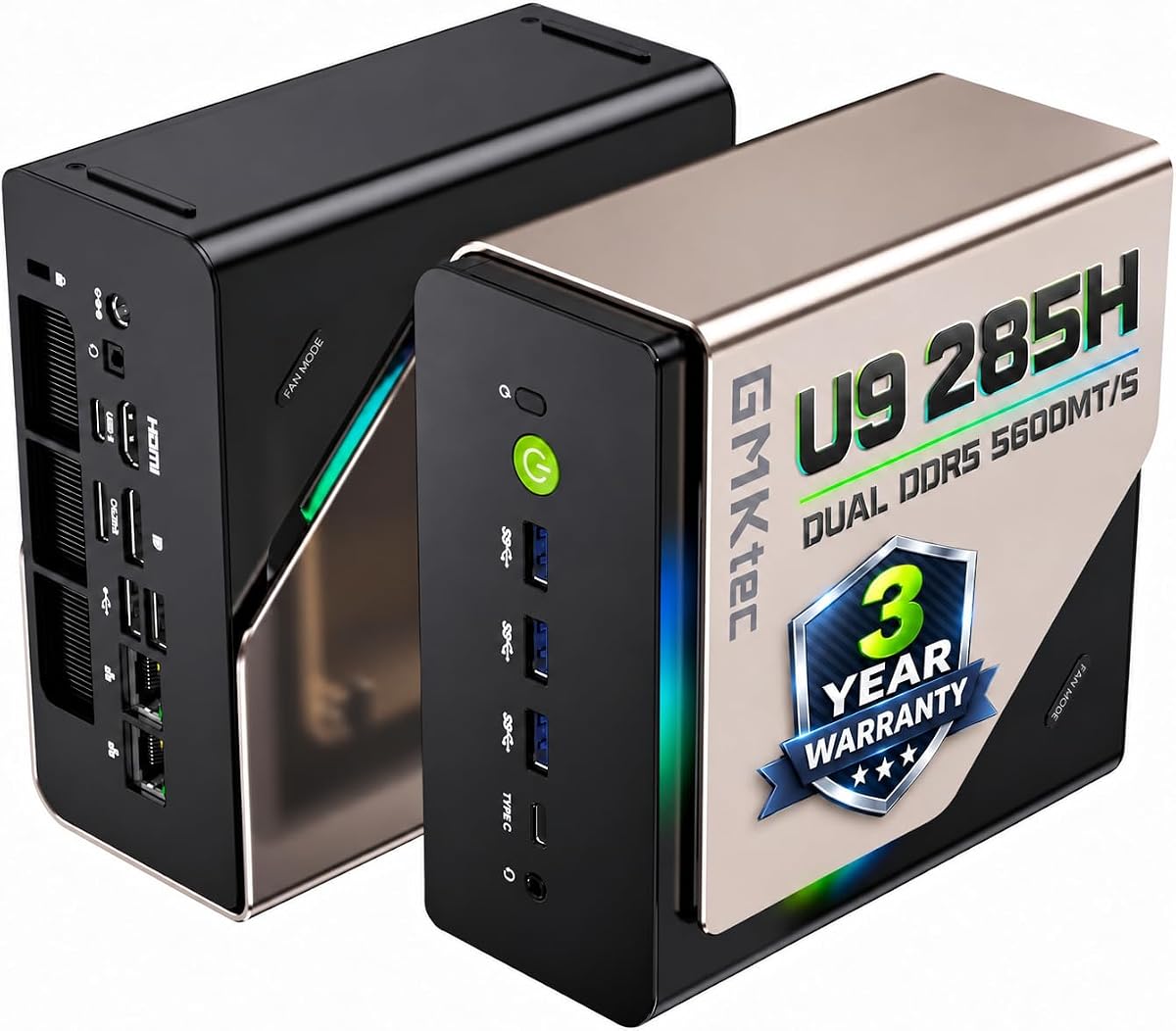
This PC focuses on AI acceleration and multi-monitor productivity. It brings next-gen NPU capabilities to a compact gaming environment.
We may earn a commission when you buy through this link, at no additional cost to you.
The Core Ultra 9 285H handles demanding tasks efficiently. Oculink connectivity allows for future external GPU upgrades, extending the system lifespan.
Gaming performance is decent but not top-tier compared to discrete GPUs. It suits users who need AI features alongside standard gaming.
Ideal for creators who want integrated AI tools. This model bridges the gap between workstations and gaming mini PCs.
The AI Boost NPU accelerates INT8 calculations for generative AI and creative workflows directly on the device.
Oculink port offers higher bandwidth than Thunderbolt for better eGPU setup performance with lower lag.
We may earn a commission when you buy through this link, at no additional cost to you.
A balanced choice for gamers needing extensive connectivity. It supports high-speed networking and multi-display setups for enhanced productivity.
We may earn a commission when you buy through this link, at no additional cost to you.
The 32GB DDR5 memory ensures smooth multitasking. Three storage slots allow for massive internal expansion without external drives.
Integrated graphics limit ultra-high resolution gaming but handle standard tasks well. The dual cooling fans keep noise minimal during typical use.
Recommended for network enthusiasts and streamers. This unit offers professional features in a compact gaming chassis.
Dual 2.5GbE LAN ports provide high-speed networking suitable for home servers and data-intensive tasks.
Advanced heatpipes maintain a frosty environment under heavy loads keeping noise low during quiet modes.
We may earn a commission when you buy through this link, at no additional cost to you.
This unit offers elite gaming power in a silver-hued compact chassis. It focuses on low latency and high frame rates for competitive play.
We may earn a commission when you buy through this link, at no additional cost to you.
The RTX 5070 mobile GPU ensures smooth gameplay. Wi-Fi 7 connectivity reduces lag during online matches significantly.
Design prioritizes aesthetics and raw speed over expansion. It is tailored for users who value minimal setup footprint.
Choose this for pure gaming performance and modern connectivity. It is a top contender for portable enthusiast builds.
Wi-Fi 7 with Bluetooth 5.4 eliminates bottlenecks keeping you ahead during sync or boot.
Custom cooling system keeps temperatures down and acoustics low even under intense gaming loads.
We may earn a commission when you buy through this link, at no additional cost to you.
Designed for diverse scenarios including work and light gaming. This model offers consistent performance at a competitive price.
We may earn a commission when you buy through this link, at no additional cost to you.
The Ryzen 9 7940HS ensures responsive multitasking. Oculink port allows for future external GPU expansion options.
It handles office tasks and casual games well. Not a top-tier gaming rig but reliable for daily use.
Ideal for home offices needing extra power. This unit balances cost and capability for general consumers.
This fast and smooth mini PC consumes less power while maintaining high performance for daily tasks.
Built-in Bluetooth 5.2 and WiFi 6E improve network performance and connect to wireless accessories reliably.
We may earn a commission when you buy through this link, at no additional cost to you.
Targeted at remote workers and students needing powerful hardware. It excels in multitasking and network performance.
We may earn a commission when you buy through this link, at no additional cost to you.
Dual 2.5GbE LAN supports fast data transfers. USB4 ports enable high-resolution displays for creative work.
Casual gaming is possible but not optimal for heavy titles. Stability and connectivity are its main strengths.
Best for professional setups in compact spaces. This unit delivers productivity power in a small desktop.
Two 2.5GbE RJ45 ports deliver faster and more flexible wired connections than standard 1G Ethernet.
USB4 supports up to 8K 60Hz output high-speed data transfer and versatile device connection.
We may earn a commission when you buy through this link, at no additional cost to you.
This model features 64GB RAM making it ideal for memory-heavy applications. It supports up to four 8K displays for ultimate productivity.
We may earn a commission when you buy through this link, at no additional cost to you.
The Core Ultra 9 285H ensures fast processing speeds. Oculink port enables potential external GPU expansion.
Gaming is secondary to professional workstation tasks. The architecture focuses on stability and multi-display workflows.
Recommended for content creators needing high memory. It is a powerhouse for data analysis and rendering.
Equipped with 64GB DDR5 memory to handle heavy multitasking and large datasets smoothly.
Supports four 4K or 8K displays for expansive and crisp multi-display setups in gaming or work.
We may earn a commission when you buy through this link, at no additional cost to you.
A reliable choice for general gaming and productivity needs. It offers solid performance with ample memory for modern titles.
We may earn a commission when you buy through this link, at no additional cost to you.
The 32GB DDR5 ensures smooth background tasks. RGB lighting adds a personal touch to your workspace setup.
Performance is consistent with integrated graphics but not for hardcore gaming. It balances power and cost effectively.
Choose this for a versatile desktop replacement. It works well for casual gaming and home office setups.
Thirteen dazzling RGB lighting modes let you personalize your rig's vibe easily.
Dual cooling fans ensure silent operation keeping performance steady during everyday use.
We may earn a commission when you buy through this link, at no additional cost to you.
Selecting the right mini PC requires evaluating hardware performance against your specific gaming and productivity goals.
For demanding titles like Cyberpunk 2077, discrete GPUs offer significantly better frame rates than integrated solutions. Look for models with NVIDIA RTX 50-series or equivalent AMD Radeon cards for high-fidelity visuals.
Prioritize dedicated graphics to ensure smooth gameplay at high resolutions.
Modern games rely heavily on CPU power for physics and AI calculations. Aim for Ryzen 7 or Core Ultra 9 processors with high clock speeds to avoid bottlenecks.
High-frequency CPUs ensure consistent performance during complex game scenarios.
Games and background apps consume large amounts of RAM. 32GB is recommended for future-proofing and multitasking while gaming.
Ample memory prevents lag and stuttering during heavy system loads.
Compact chassis can trap heat leading to performance throttling. Look for advanced cooling systems with multiple fans or vapor chambers.
Effective cooling maintains stable frame rates and protects hardware longevity.
Solid State Drives significantly reduce load times compared to traditional hard drives. PCIe 4.0 NVMe SSDs offer the fastest read/write speeds available.
Fast storage ensures quick boot times and instant access to large game files.
Ensure the PC has enough HDMI or DisplayPort outputs for your monitors. High-speed Ethernet and Wi-Fi 7 are essential for seamless online gaming.
Versatile connectivity simplifies setup with multiple displays and peripherals.
Some mini PCs offer slots for additional storage or Oculink ports for external GPUs. This adds flexibility for future upgrades without replacing the whole unit.
Expandable systems adapt to your changing hardware needs over time.
Efficient power usage reduces electricity costs and heat generation. Models with adjustable power modes allow you to balance performance with energy savings.
Efficiency helps maintain a cool and quiet gaming environment.
Place the unit in a well-ventilated area to prevent overheating. Avoid enclosing it in tight cabinets without airflow space around the intake vents.
Regularly clean dust from fans using compressed air to maintain cooling efficiency. Dust buildup can restrict airflow leading to thermal throttling during intense gaming.
Update drivers frequently to ensure compatibility with the latest game patches. Keeping the BIOS current helps stabilize performance and fix potential bugs.
Yes, high-end models with dedicated RTX graphics can run Cyberpunk at high settings with good frame rates. Lower-end integrated graphics may require reduced settings for smooth play.
Mini PCs save significant desk space while offering comparable performance. They are easier to move and often use less power than traditional towers.
Some models allow RAM and storage upgrades but GPUs are usually soldered. Look for expansion ports like Oculink for future external GPU additions.
Modern units have efficient cooling systems to manage heat. However, they still need proper airflow to maintain peak performance during long sessions.
While not strictly required, Wi-Fi 7 reduces latency and bandwidth issues significantly. It ensures the best online gaming experience without lag spikes.
16GB is a minimum but 32GB is ideal for multitasking while playing. More RAM ensures no performance drops when background apps are active.
We have reviewed the top ten gaming mini PCs ranging from budget-friendly to high-end premium options. Each offers distinct advantages depending on your needs.
Prioritize GPU power and cooling efficiency for the smoothest gaming experience. Memory and storage speed also play key roles in overall system responsiveness.
Prices and availability change often so verify current specs before buying. Choosing the right fit ensures years of immersive gaming and productivity.