
MSTJRY Charging Station
4.3Editor score
5 USB-A ports included
7 short cables provided
Affordable family organizer
This guide compares the top 10 charging stations for multiple devices to help you choose the best organizer for your home office or travel setup.
Modern households often contain dozens of electronic devices that need power daily. A reliable charging station for multiple devices keeps your space organized and ensures everything stays powered up without clutter.
We evaluated ten leading models based on port count, charging speed, build quality, and safety features. Our analysis focuses on how well each unit handles mixed device types like laptops and phones simultaneously.
Each pick highlights specific strengths such as GaN efficiency or cable management. Keep in mind that availability and specifications may change, so verify details before purchasing your next desk organizer.
4.3Editor score

4.6Editor score

4.6Editor score
The following table provides a side-by-side overview of the key specifications and features for each of the ten charging stations reviewed in this guide.




The Anker Prime Charging Station stands out as the top pick for users needing high power density. With 200W output across six ports, it handles laptops and phones efficiently. Its GaN design keeps it compact while delivering serious speed.
We may earn a commission when you buy through this link, at no additional cost to you.
Key strengths include the ability to deliver 100W on two USB-C ports simultaneously. This allows charging two large laptops at full speed. The proprietary safety system monitors temperature continuously to protect devices during long charging sessions.
Trade-offs include a lower port count compared to family organizers. If you need to charge ten devices at once, this unit may fall short. However, for power users who prioritize speed and efficiency, these limitations are acceptable.
This station is ideal for professionals with high-end devices. It ensures your MacBook Pro and phone are ready quickly. We recommend this for those who value performance over maximum port quantity.
The 100W USB-C capability ensures laptops charge at full throttle.
Its compact width saves valuable desk space while powering multiple devices.
We may earn a commission when you buy through this link, at no additional cost to you.
The Zobirez 750W Charging Station offers unmatched power for large setups. It supports ten devices with a total of 750W. The five USB-C ports can each deliver 120W for fast laptop charging.
We may earn a commission when you buy through this link, at no additional cost to you.
Its robust construction uses flame-retardant ABS for safety. The wide slots accommodate devices with thick cases securely. The included cable set ensures you have the right connectors for most gear.
The size is a consideration for smaller desks. This unit is built for capacity rather than minimalism. If your priority is powering a whole family or office at once, it is a great choice.
We recommend this for shared environments or power users. It eliminates the need for multiple wall adapters completely. Ensure you have space to accommodate its dimensions before buying.
The 750W total output allows for heavy simultaneous device usage without slowdowns.
Flame-retardant materials provide long-term safety and structural integrity.
We may earn a commission when you buy through this link, at no additional cost to you.
The MSTJRY Charging Station is an excellent entry-level option for basic needs. It features five USB-A ports and comes with seven cables to start using it immediately. It works well for phones and tablets without high power demands.
We may earn a commission when you buy through this link, at no additional cost to you.
Its main strength is convenience and cost. You do not need to buy extra cables for standard devices. The removable dividers help organize larger tablets on the rack easily.
The lack of USB-C is a limitation for modern laptops. Charging speeds are slower than newer GaN options. However, for everyday mobile device charging, it is a reliable and budget-friendly choice.
This station is perfect for guests or kids rooms. It keeps cords contained and the area tidy. We suggest this for those who need a simple solution without complex features.
Included cables make it ready to charge devices right out of the box.
Five ports keep your desk clear of tangled wires and adapters.
We may earn a commission when you buy through this link, at no additional cost to you.
The Zobirez 420W 10-Port offers a great balance of capacity and performance. It provides ten ports for devices with a total output of 420W. The wide slots in the middle securely hold laptops or tablets.
We may earn a commission when you buy through this link, at no additional cost to you.
It includes eight cables for immediate use which is a nice touch. The one-piece design prevents dividers from breaking over time. Safety features protect against overcurrent and overheating effectively.
While not as powerful as the 750W model, it is sufficient for most. The price is reasonable for the number of ports provided. It is a solid middle ground for mixed households.
We recommend this for offices needing multiple connections. It keeps your workspace neat and functional. Check the slot dimensions to ensure your larger devices fit comfortably.
Included cables reduce the need for extra purchases upon setup.
Solid ABS material ensures the slots stay secure during daily use.
We may earn a commission when you buy through this link, at no additional cost to you.
The Lcssio 300W 8-Port delivers strong performance in a solid package. It offers eight ports with dual 65W outputs suitable for laptops. The design avoids removable dividers for better longevity.
We may earn a commission when you buy through this link, at no additional cost to you.
It focuses on quality connections with GaN technology. The anti-slip pads keep it stable on any surface. The included cables cover basic needs for phones and tablets efficiently.
The total port count is lower than top-tier models but sufficient for small groups. The housing is durable but fixed which limits customization. It is a good choice for focused power needs.
We suggest this for users who want stability. It works well for bedside or desk use. Verify the slot sizes match your specific device dimensions before purchase.
Non-slip pads prevent movement and protect surfaces from scratches.
Integrated housing increases durability and prevents parts from falling.
We may earn a commission when you buy through this link, at no additional cost to you.
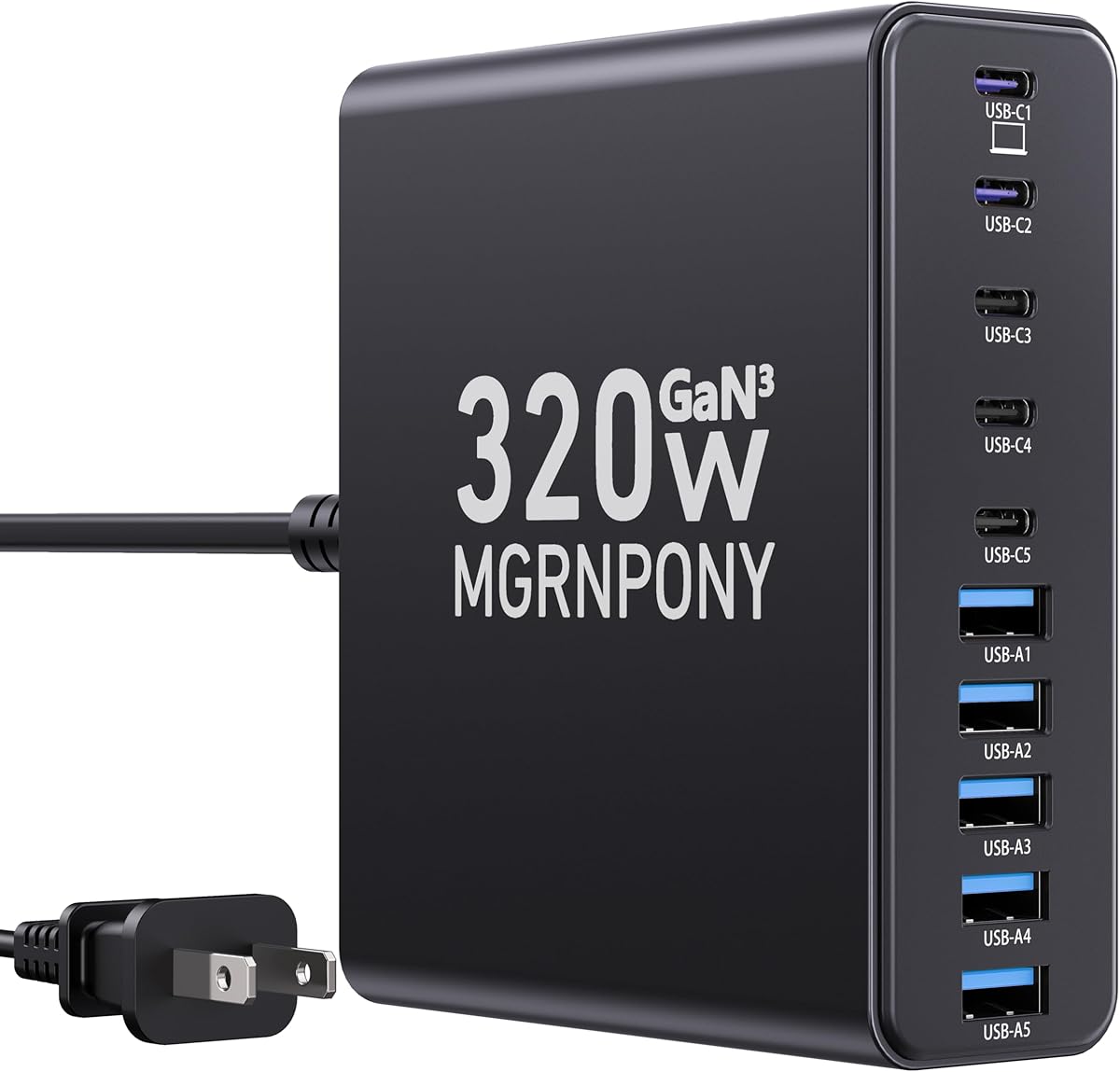
The MGRNPONY 320W 10-Port is a versatile GaN charger for modern needs. It supports ten devices with a mix of USB-C and USB-A ports. The GaN III technology keeps it cool and efficient.
We may earn a commission when you buy through this link, at no additional cost to you.
Safety features include continuous temperature checks for reliability. The compact design allows it to fit in travel bags easily. It is a robust option for those needing both speed and portability.
The power distribution is balanced for mixed use cases. It handles multiple phones and a laptop simultaneously well. However, the cables may be short for some setups depending on location.
We recommend this for frequent travelers. It replaces multiple chargers with one reliable unit. Ensure your outlets can support the total wattage draw for best performance.
Lightweight and compact enough for carrying in daily commute bags.
GaN III provides superior efficiency compared to older silicon chargers.
We may earn a commission when you buy through this link, at no additional cost to you.
The Anker Desktop Charger 9-in-1 acts as a full power strip hub. It offers three AC outlets and six USB ports for versatile connectivity. The 100W USB-C port handles laptops while AC ports take larger adapters.
We may earn a commission when you buy through this link, at no additional cost to you.
Its surge protection safeguards your gear from power spikes. The 8-point safety system ensures continuous operation without risks. It is a premium solution for comprehensive desktop power management.
The unit is heavier and requires more desk space. It is not portable like smaller blocks. However, for a central command station, its combination of features is unmatched in the category.
We suggest this for heavy desktop setups. It organizes power sources into one safe unit. Check your total plug needs before placing it on a crowded desk.
300J energy rating protects devices from dangerous electrical spikes.
Both AC outlets and USB ports cover all device types easily.
We may earn a commission when you buy through this link, at no additional cost to you.
The 8-in-1 Retractable Charger solves cable clutter with a unique mechanism. It offers eight devices with retractable cords that extend to 80cm. The GaN tech supports fast charging speeds on most phones.
We may earn a commission when you buy through this link, at no additional cost to you.
The convenience of retractable cords is high for travel. You avoid the need to carry separate loose cables for each device. It is a tidy solution for hotel nights or workspaces.
Retractable cables can wear out faster than fixed ones. Noise during retraction is also a minor trade-off. For those prioritizing a clean look, these issues are often manageable.
We recommend this for frequent travelers. It keeps your gear organized in transit. Ensure you handle the mechanism gently to maintain longevity over time.
Retractable cords eliminate tangled wires for a neat appearance.
80cm extension allows charging even when outlets are slightly distant.
We may earn a commission when you buy through this link, at no additional cost to you.
The Anker MagSafe Charger 3-in-1 focuses on wireless efficiency for Apple users. It charges phones, watches, and earbuds simultaneously with official certification. The stand angle allows for landscape viewing modes.
We may earn a commission when you buy through this link, at no additional cost to you.
Its 15W wireless power ensures fast top-ups for iPhones. The Qi2 standard ensures compatibility with recent models. It is a premium desk accessory for those with an Apple ecosystem.
It lacks USB cables so you cannot plug in wired devices. It is strictly for wireless charging devices. If your setup relies on wired connections, this may not fit.
We suggest this for Apple users wanting style. It looks clean and charges fast. Ensure your devices are Qi2 compatible for the best experience.
Verified to work safely with Apple devices for optimal charging.
Adjustable angle supports video viewing while your phone charges.
We may earn a commission when you buy through this link, at no additional cost to you.
The USB Fast Charger Block 100W is a portable solution for on the go. It fits easily in pockets and bags with minimal bulk. The 6 ports allow charging phones and small accessories together.
We may earn a commission when you buy through this link, at no additional cost to you.
Its GaN design keeps it small despite offering multiple connections. The included extension cord helps reach outlets in tight spots. It is a great backup option for travel or emergencies.
The total wattage is lower than larger stations. It may not charge laptops as fast. However, it is perfect for keeping phones and tablets topped up during trips.
We recommend this for travelers needing mobility. It takes up less space in your suitcase. Verify cable types before buying if you need specific connectors.
Small dimensions make it easy to slip into any travel bag.
Included cord adds flexibility for reaching hard to access outlets.
We may earn a commission when you buy through this link, at no additional cost to you.
Selecting the right charging station requires evaluating power output, port types, and build quality to ensure it meets your daily needs.
Total power output determines how many high-power devices you can charge simultaneously. Look for stations with at least 100W if you need to power a laptop along with phones.
Prioritize higher wattage if you plan to charge multiple laptops or tablets at once.
Modern devices increasingly rely on USB-C ports for fast data and power transfer. Ensure the station has enough USB-C ports for your main devices like laptops and newer phones.
Choose a mix of USB-A and USB-C ports to accommodate older accessories and cables.
Gallium Nitride (GaN) technology allows for smaller and more efficient chargers that run cooler. This feature is crucial for travel and saving desk space without sacrificing speed.
Look for GaN certification to ensure better efficiency and longevity in your charging hardware.
Sturdy slots and flame-retardant materials protect your devices from physical damage and fire risks. Solid construction prevents the station from sliding or tipping during heavy use.
Check for anti-slip pads and a one-piece design to ensure stability on your desk.
Effective cable management reduces clutter and prevents tangling of cords on your surface. Some units include built-in cables while others have slots to organize separate wires neatly.
Consider if included cables match your devices to avoid extra purchases upon setup.
Advanced safety protections such as overvoltage and short circuit protection are essential for device longevity. These systems monitor temperature and current to prevent damage during charging.
Always choose units with multi-point safety systems to protect your expensive electronics.
Determine if you need a desktop unit or a portable travel charger. Desktop models often have more ports and power, while travel models prioritize compact size.
Match the physical dimensions to your available space for the best user experience.
Verify that the power distribution supports your specific device models simultaneously. Some stations reduce speed when multiple ports are in use so check the manual for limits.
Ensure the voltage and amperage meet the requirements of your high-demand devices.
Connect the charging station to a wall outlet using the provided power cord. Ensure the cord is fully inserted to maintain a stable power connection during use.
Place your devices into the designated slots or connect them using the provided USB cables. Align them neatly to prevent strain on the ports and cables.
Keep the station in a dry and cool place away from direct sunlight. Dust it occasionally with a soft dry cloth to maintain performance and safety.
Yes, most modern charging stations support simultaneous charging for laptops and phones. Look for models with multiple USB-C ports that deliver high wattage like 65W or 100W to ensure both devices charge efficiently.
USB-C ports generally offer faster charging speeds due to Power Delivery technology. They support higher wattage which allows laptops and modern phones to charge more quickly than with USB-A ports.
GaN stands for Gallium Nitride and is a material used in chargers for higher efficiency. It allows the charging station to be smaller and cooler while delivering the same power as older silicon models.
Check for built-in safety features such as overvoltage and temperature monitoring. Reputable brands use flame-retardant materials and multiple protection circuits to ensure safe operation for your devices.
Most stations come with a US plug and require an adapter for other regions. Always verify the voltage compatibility before using the charging station abroad to avoid damaging the unit or your devices.
Yes, you can add extra cables to expand the capacity of your charging station. Just ensure the cables match the port types and are rated for fast charging to maintain performance.
Charging speed may slow down when all ports are in use due to power sharing. To avoid this, charge high-power devices like laptops on ports designed for high wattage only.
Yes, portable charging stations are excellent for hotel stays to save wall outlets. Choose compact models that include cables to ensure you have everything needed to charge all your travel devices.
We have reviewed ten top charging stations ranging from compact travel blocks to high-power desktop hubs. Each model offers unique benefits depending on whether you need portability or maximum power.
Prioritize total power output and port types based on your device ecosystem. A station with GaN technology and multiple USB-C ports will serve modern needs best over time.
Remember that prices and availability can change so verify current stock before buying. Select the unit that fits your desk and budget for a clean and efficient charging setup.