
MSI H270 Gaming PRO Carbon
4.0Editor score
Supports 7th/6th Gen Intel Core
Mystic Light RGB Sync
Gaming LAN with Protection
This guide compares the top H270 Motherboards for performance and value, helping you choose the right board for your 6th and 7th Gen Intel build needs.
Choosing the right motherboard is crucial for any PC build, especially when working with specific chipsets like the H270. These boards offer a balance of features and cost, making them ideal for mid-range systems that need reliability and decent connectivity without the premium price tag of higher-end options.
We have carefully evaluated ten different H270 motherboards based on their specifications, user ratings, and overall feature sets. This comparison looks at everything from expansion slots and memory support to cooling solutions and brand reputation to ensure you get the most value for your investment in this specific socket type.
Each pick in this list highlights unique strengths, whether it is robust audio, extensive USB connectivity, or superior build quality. Please note that product availability and pricing can fluctuate frequently, so we recommend checking current listings before making your final purchase decision for your custom PC build.
4.0Editor score

4.2Editor score

4.4Editor score
This table provides a side-by-side look at the key specifications and features of all ten H270 motherboards considered in this guide, helping you quickly identify which model fits your specific requirements for CPU support, memory, and expansion.




The ASUS ROG Strix H270F Gaming is a standout option for gamers who need reliable performance without sacrificing aesthetics. With a solid 4.2 rating from users, it is clear that this board delivers on its promises of connectivity and thermal management. The standout qualities include its robust audio system and unique lighting capabilities.
We may earn a commission when you buy through this link, at no additional cost to you.
One of the key strengths is the inclusion of dual M.2 slots which allows for faster storage configurations and Intel Optane Memory compatibility. The Safe Slot feature ensures your graphics cards stay secure even during intense gaming sessions. Additionally, the SupremeFX audio driven by Japanese capacitors provides crystal clear sound for immersive gameplay.
While the board offers many premium features, there are trade-offs to consider. The price is higher than some competitors, which might be a barrier for budget builders. Also, the number of standard USB ports is somewhat limited compared to other options in this comparison, so you may need a hub.
This motherboard is best suited for enthusiasts who want a balance of gaming features and reliability. If you are building a mid-range rig with a focus on audio and visual customization, this is a strong recommendation. We suggest checking current availability before purchase.
The ROG exclusive SupremeFX S1220A codec ensures high-fidelity audio output that enhances your gaming and media consumption experience significantly.
With front panel USB 3.1 and dual M.2 slots, you get future-proof connectivity for fast data transfer and storage expansion.
We may earn a commission when you buy through this link, at no additional cost to you.
The ASUS Prime H270-PLUS earns the top premium spot with an impressive 4.4 rating from satisfied users. This board focuses on durability and reliability, offering hardware-level safeguards that ensure component longevity. Its dual M.2 slots are integrated for speed, making it a great choice for those who need fast storage options.
We may earn a commission when you buy through this link, at no additional cost to you.
The 5X Protection III technology provides advanced hardware safeguards that protect your investment from electrical spikes and other issues. FanXpert 2 PLUS delivers dynamic cooling to keep your system stable under load. The inclusion of 3D-printing mounts allows for unique customization, adding a personal touch to your build.
Despite its strengths, the board comes at a higher price point compared to some alternatives. The design is functional but not as flashy as gaming-specific models. However, for users prioritizing stability and longevity, these trade-offs are acceptable given the level of protection offered.
If you are building a workstation or a system that needs to run reliably for years, this motherboard is an excellent pick. It balances premium features with everyday usability. We recommend verifying the current stock status before ordering to ensure you get the latest revision.
The 5X Protection III suite safeguards your components against harsh conditions and extends the overall life of your PC system.
FanXpert 2 PLUS allows for precise control over fan speeds, ensuring your system stays cool and quiet during operation.
We may earn a commission when you buy through this link, at no additional cost to you.
The MSI H270 Gaming PRO Carbon is an excellent budget-friendly option that does not skimp on gaming essentials. With a 4.0 rating, it delivers solid performance for those looking to save money without compromising too much on features. Its Mystic Light Sync allows for aesthetic customization that appeals to many builders.
We may earn a commission when you buy through this link, at no additional cost to you.
This board supports the 7th and 6th Gen Intel processors and includes DDR4 Boost for memory stability. The Audio Boost 4 with Nahimic 2 enhances sound quality, while Gaming LAN with protection ensures stable online connections. These features make it a versatile choice for entry to mid-level gaming rigs.
While it is cost-effective, it lacks some of the premium connectivity found in higher-end boards. The build materials are good but not exceptional. However, given the price point, these compromises are reasonable for budget-conscious users who still want a gaming-oriented platform.
We recommend this board for anyone looking to build a cost-effective PC with decent RGB and gaming features. It is a smart choice if you want to spend more on a GPU rather than the motherboard. Always check for firmware updates upon setup to ensure peak performance.
Gaming LAN with LAN protect helps prevent lag and disconnections, ensuring a smoother online gaming experience for you.
Mystic Light Sync gives you control over the motherboard lighting, letting you match it with your other PC components easily.
We may earn a commission when you buy through this link, at no additional cost to you.
The ASRock H270 PRO4 offers a straightforward and reliable platform for 6th generation Intel Core processors. Rated at 4.2 by users, it is known for its stable operation and generous connectivity options. The inclusion of an Ultra M.2 slot provides a modern storage interface for faster boot times.
We may earn a commission when you buy through this link, at no additional cost to you.
One of its strongest points is the presence of six SATA3 ports which is helpful for users with multiple drives. It also supports dual channel DDR4 memory for improved performance. The PCIe layout allows for expansion cards and storage devices without significant bottlenecks for most users.
On the downside, it lacks some of the newer USB standards like USB 3.1 which might limit connectivity for modern peripherals. The feature set is more basic compared to gaming-focused boards. However, for users needing raw utility and storage capacity, this is a practical solution.
This board is a good fit for budget builders who need multiple storage connections and do not require advanced gaming features. It provides a solid foundation for office or media center builds. We suggest checking the BIOS version for compatibility with your specific CPU model.
With six SATA3 ports and an Ultra M.2 slot, you have plenty of room to connect multiple SSDs and HDDs easily.
The board supports two PCIe 3.0 x16 slots allowing for multi-GPU setups or expansion cards if needed.
We may earn a commission when you buy through this link, at no additional cost to you.
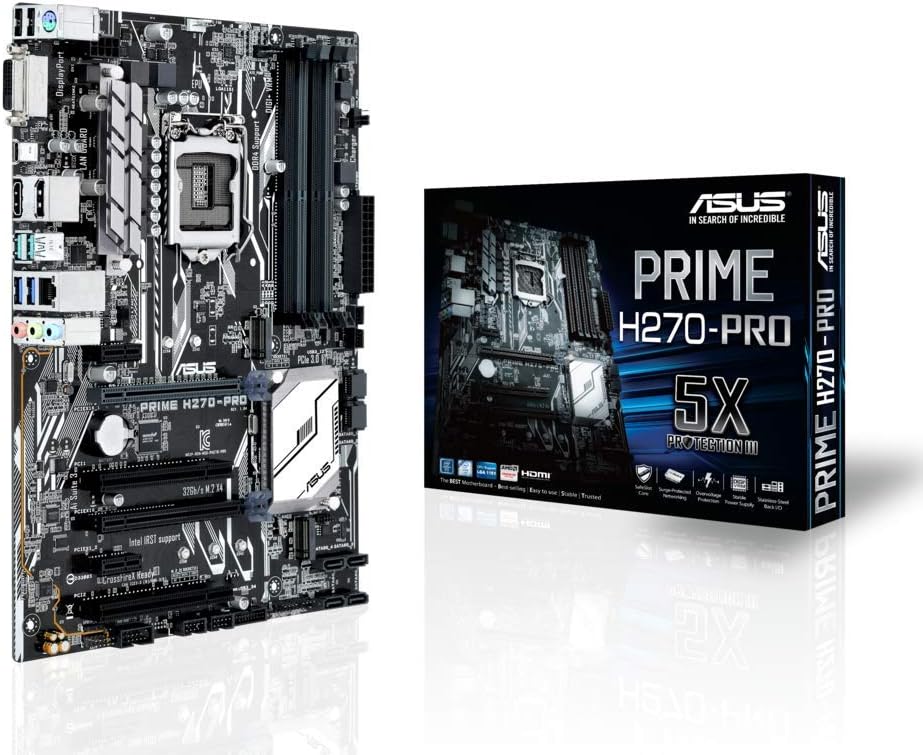
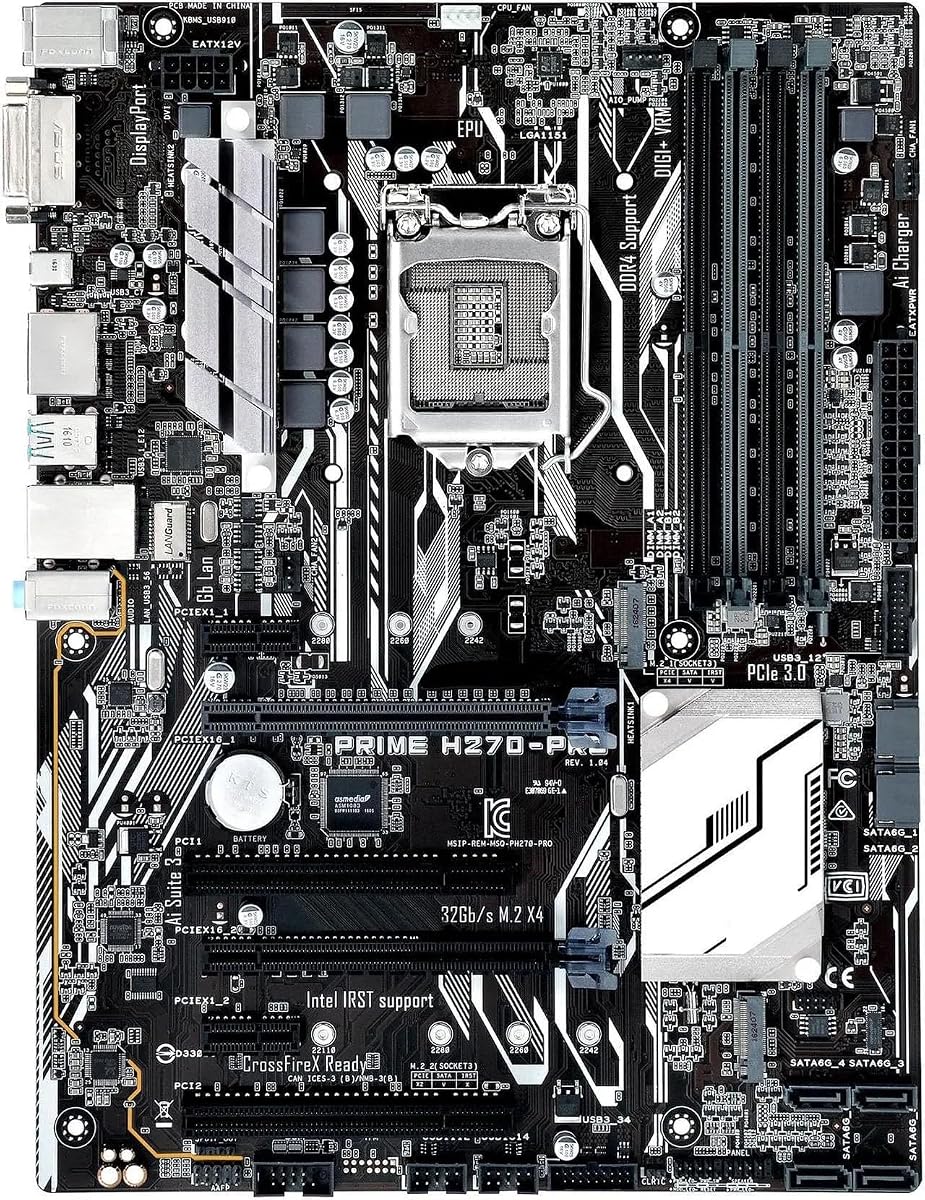
The Asus Prime H270-PRO is a robust choice for users seeking a high-capacity memory solution. With support for up to 64GB of DDR4 RAM, it is well-suited for multitasking and demanding workloads. The inclusion of a USB 3.1 Type C port offers modern connectivity for newer devices.
We may earn a commission when you buy through this link, at no additional cost to you.
It includes the 5X Protection III safeguard which protects against electrical issues and ensures longevity. The ATX form factor provides ample space for installation and component layout. This makes it a solid option for users who want a reliable foundation for a powerful system.
The main trade-off is the higher cost relative to budget options like the ASRock model. The design is practical rather than flashy which might not appeal to all users. However, the reliability and feature set justify the price for those prioritizing performance and safety.
We recommend this motherboard for users who need significant memory capacity and modern ports. It is a strong choice for productivity machines. Always verify the compatibility list on the ASUS website before purchasing to ensure your CPU is supported.
Supporting up to 64GB of dual channel DDR4 allows you to run multiple applications smoothly without performance bottlenecks.
The USB 3.1 Type C port provides fast data transfer and compatibility with the latest peripherals and charging standards.
We may earn a commission when you buy through this link, at no additional cost to you.
The GIGABYTE GA-H270-Gaming 3 stands out with its strong networking capabilities and Crossfire support. Rated at 4.3 by users, it is a popular choice for gamers who want multi-GPU options without moving to a high-end chipset. The Killer E2500 network card ensures low latency for online gaming.
We may earn a commission when you buy through this link, at no additional cost to you.
It features four DIMM slots which allows for flexible memory upgrades. The USB3.1 Type-C connector provides high-speed data transfer for external drives and other peripherals. These features combine to offer a balanced experience for both gaming and general computing tasks.
One downside is that it may not have as many standard USB 3.0 ports as some competitors. The pricing is competitive but not as low as budget models. Still, the specific features like Killer LAN justify the cost for serious gamers.
We recommend this board for users who prioritize network performance and multi-GPU setups. It is a great choice for a dedicated gaming machine. Ensure you have a compatible power supply if you plan on utilizing the Crossfire feature.
The Killer E2500 network card is optimized for gaming traffic, helping to reduce ping and lag during competitive matches.
With support for 2-Way Crossfire, you can link two AMD graphics cards to boost graphical performance in supported games.
We may earn a commission when you buy through this link, at no additional cost to you.
This replacement motherboard is designed to fix common issues found in older boards such as contact damage or burnouts. While there are no user ratings yet, the product description highlights optimized power design and advanced heatsinks for better thermal management. It serves as a practical solution for extending the life of an existing build.
We may earn a commission when you buy through this link, at no additional cost to you.
The design focuses on resolving contact issues and ensuring the system operates normally. It supports multi-core processors to boost overall performance. The advanced heatsink design helps dissipate heat effectively even under heavy loads making it suitable for long-term use.
The main limitation is that it is a replacement part rather than a brand new consumer board with full warranty features. There is limited data on real-world performance compared to established brands. However, it offers a cost-effective fix for damaged systems.
We suggest this for users who need to replace a faulty board quickly and efficiently. It is a niche product for repairs rather than new builds. Always ensure the replacement matches your specific case and CPU requirements before installation.
This board is engineered to resolve contact issues and short circuits that often occur in older or damaged motherboards.
The advanced heatsink increases heat dissipation area ensuring professional-grade stability during heavy computational tasks.
We may earn a commission when you buy through this link, at no additional cost to you.
This H270 Performance Motherboard offers a straightforward specification list aimed at budget builders. It supports popular CPUs like the i5-7400 and i3-7300 which are common choices for entry-level systems. The inclusion of M.2 support and 64GB DDR4 capacity ensures it is not obsolete immediately upon purchase.
We may earn a commission when you buy through this link, at no additional cost to you.
As it is a generic performance board there is very little public data on its stability or features beyond the basic specs. It is likely designed for simple office or basic gaming tasks. The ATX form factor ensures compatibility with standard cases.
The lack of reviews is a significant drawback as it makes it harder to trust the build quality. You may not get the same level of support or software as major brands. However, if price is the primary driver it offers a functional alternative.
We recommend this board only if you are confident in your assembly skills and have a tight budget. For critical systems a major brand might be safer. Check the seller rating and return policy carefully before buying.
Supporting both 6th and 7th Gen Intel processors gives you flexibility in choosing a CPU that fits your budget needs.
With 64GB DDR4 capacity you can upgrade your system over time without needing to replace the motherboard again soon.
We may earn a commission when you buy through this link, at no additional cost to you.
The H270 Motherboard 64GB is a basic option intended for those seeking a simple solution. It provides support for standard DDR4 memory up to 64GB which is ample for most everyday tasks. The LGA 1151 socket makes it compatible with a wide range of Intel processors.
We may earn a commission when you buy through this link, at no additional cost to you.
There is limited detailed information available beyond the core compatibility specs. It likely lacks advanced features like RGB lighting or multiple M.2 slots found in premium models. The design is functional and straightforward for basic computing needs.
Without user reviews it is difficult to assess the build quality or reliability. This makes it a risky choice for users who need guaranteed performance. The low price is the main attraction here but it comes with uncertainty.
We recommend this for non-critical projects where budget is the absolute priority. For gaming or workstations investing in a reviewed board is safer. Always check the return window in case of compatibility issues.
This motherboard provides the essential functions needed to run a standard PC without extra bells and whistles.
Supporting up to 64GB of DDR4 memory allows for future upgrades as your software needs become more demanding.
We may earn a commission when you buy through this link, at no additional cost to you.
This H270-PLUS Motherboard lists support for a range of processors including the i7-6700. It includes an M.2 slot which is a nice feature for this price point. The ATX size ensures it fits standard cases while the DDR4 compatibility keeps it modern.
We may earn a commission when you buy through this link, at no additional cost to you.
It is marketed as a simple board for users who need basic functionality without complex features. The listing is sparse on details suggesting it may be a budget OEM or third-party option. The lack of reviews means you are buying without community feedback.
The trade-off for the low price is likely simpler power delivery and fewer features like extra USB ports. It might not be the most stable option for heavy overclocking or demanding tasks. However for standard use it could suffice.
We recommend this only if you have confirmed compatibility with your specific CPU and case. It is a budget pick for those willing to take a risk on an unproven board. Consider buying from a seller with a good return policy.
Supporting i3 to i7 CPUs gives you flexibility to choose the performance level that matches your budget.
The M.2 slot allows for fast NVMe SSDs which improve boot times and application loading significantly.
We may earn a commission when you buy through this link, at no additional cost to you.
Choosing the right H270 motherboard requires balancing your budget with the features you need for your build.
Ensure the motherboard supports your specific generation of Intel Core processor such as 6th or 7th Gen for LGA 1151 sockets.
Check the manufacturer support list to confirm compatibility before purchasing.
Look for boards that support up to 64GB of DDR4 RAM if you plan on running memory-intensive applications.
Verify the number of DIMM slots to ensure you can upgrade your memory in the future.
Check for M.2 slots which offer much faster data transfer speeds than traditional SATA ports.
Ensure there are enough SATA ports for your current and future hard drive needs.
If you plan on using a high-end GPU or multiple cards check for available PCIe x16 slots.
Ensure the board has enough physical space for your graphics card and cooling solutions.
Make sure there are enough USB ports on the rear I/O panel for your peripherals.
Look for USB 3.1 or Type-C ports if you need fast transfer speeds for external drives.
Check the audio codec and if it supports high fidelity output for gaming or music production.
Look for features like SupremeFX or Audio Boost if sound quality is a priority for you.
Invest in a motherboard with good protection features like 5X Protection III to safeguard your system.
Consider the layout and cooling options to ensure the board runs cool under load.
Compare the price against the features offered to ensure you are getting good value for your money.
Decide if you are willing to pay extra for RGB lighting or gaming specific features.
When installing the motherboard ensure you work on a non-conductive surface and ground yourself to prevent static discharge from damaging components.
Keep the system free of dust by using compressed air regularly to maintain cooling efficiency and prevent overheating.
Update the BIOS to the latest version to ensure maximum stability and CPU compatibility for your specific build.
Yes most H270 motherboards are designed to support both 6th and 7th generation Intel Core processors on the LGA 1151 socket. Always verify the specific CPU support list on the manufacturer's website before buying to ensure compatibility with your exact model.
Not necessarily a mid-range H270 board provides enough features for most gaming needs without the cost of a premium Z-series board. Focus on allocating your budget to the GPU and CPU for the best performance gains in games.
Some boards like the GIGABYTE GA-H270-Gaming 3 support 2-Way Crossfire for AMD GPUs. However NVIDIA SLI is typically not supported on H270 chipsets. Check the specific manual for your model to confirm multi-GPU capabilities.
M.2 slots allow for the use of NVMe SSDs which offer significantly faster data transfer speeds compared to standard SATA SSDs. This results in quicker boot times and faster application loading for a better overall user experience.
Most standard H270 motherboards do not include built-in WiFi but rely on Ethernet for network connections. If you need wireless connectivity you will likely need to purchase a separate USB or PCIe WiFi adapter.
Many of these boards support up to 64GB of DDR4 RAM which is plenty for most users including gamers and content creators. Check the number of DIMM slots and the maximum capacity listed in the product specs for confirmation.
RGB lighting is a cosmetic feature that enhances the look of your PC but does not improve performance. If aesthetics are important to you a board with Mystic Light or Aura Sync can be worth the extra cost for a cohesive build look.
Overclocking is generally not supported on H270 chipsets as they are designed for stability rather than tuning. To overclock a CPU you typically need a Z-series chipset motherboard which offers unlocked multipliers and enhanced power delivery.
We found the ASUS ROG Strix H270F Gaming to be the best overall pick due to its superior audio and connectivity features. For budget builders the MSI H270 Gaming PRO Carbon offers excellent value without sacrificing essential gaming traits.
When prioritizing your next build look for boards that offer robust protection and memory expansion options to future-proof your system. Choosing the right H270 motherboard ensures your 6th or 7th Gen CPU performs at its peak for years to come.
Please remember that prices and availability can change quickly so always check current listings for the latest deals. We hope this guide helps you find the perfect motherboard for your specific needs.