
TP-Link ER605
4.4Editor score
Five Gigabit Ports
Mobile broadband backup
Advanced security suite
This guide compares the top 10 load balancing routers for 2026 to help you choose the best device for reliable internet failover and optimized bandwidth.
Finding a reliable load balancing router is essential for businesses and power users who cannot afford internet downtime. These devices manage multiple WAN connections to ensure continuous uptime and optimized speed.
We have evaluated ten top models based on port flexibility, security features, and ease of management. Our analysis covers everything from budget-friendly options to enterprise-grade solutions.
Each pick highlights specific strengths like VPN support or cloud control. Prices and availability may change, so verify details on the retailer site before purchasing.
4.4Editor score

4.5Editor score

4.0Editor score
The table below summarizes key specifications and features across all ten models to help you compare them at a glance.




The TP-Link ER7206 stands out as a top choice for professional environments needing robust multi-WAN capabilities. It offers impressive client capacity and seamless integration with the Omada SDN platform.
We may earn a commission when you buy through this link, at no additional cost to you.
Key strengths include up to four WAN ports for optimized bandwidth and advanced security features like DoS defense and extensive VPN support. The device handles significant client loads efficiently.
While it requires the Omada ecosystem for full functionality and comes with a higher price tag, the scalability and control justify the investment for growing networks.
This router is ideal for businesses and tech-savvy users needing centralized management and reliable failover. It is a powerful addition to any serious network setup.
The ER7206 integrates into the Omada Software Defined Networking platform for unified control of gateways, access points, and switches.
Protection features include advanced firewall policies, DoS defense, and comprehensive VPN support for secure remote access.
We may earn a commission when you buy through this link, at no additional cost to you.
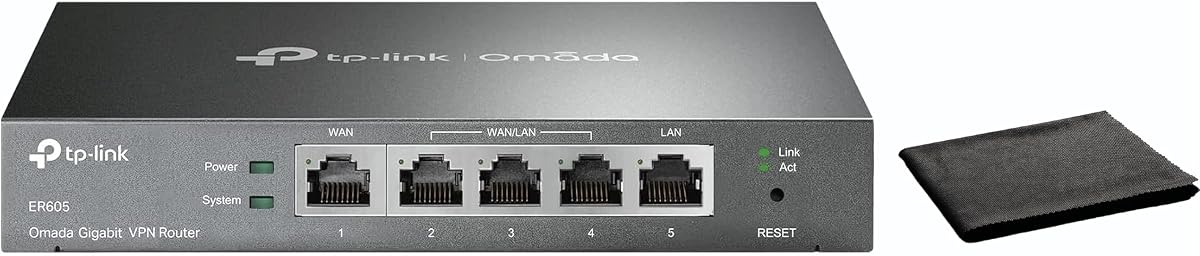
The TP-Link ER605 is an excellent entry point for users needing load balancing without breaking the bank. It provides five Gigabit ports and versatile WAN options for small businesses.
We may earn a commission when you buy through this link, at no additional cost to you.
It supports mobile broadband backup via USB and includes robust security features like SPI firewall and extensive VPN protocols. The setup is straightforward for quick deployment.
While the web interface is basic and advanced routing options are limited compared to higher-end models, it remains highly reliable for its price class.
This device suits small offices or home labs looking for reliable failover and basic security. It delivers solid performance for essential connectivity needs.
Connect up to three WAN ports including mobile broadband via USB for reliable internet failover.
Includes SPI firewall, DoS defense, and extensive VPN support to protect your network.
We may earn a commission when you buy through this link, at no additional cost to you.
The Cudy R700 brings OpenWRT-ready flexibility to budget-conscious network administrators seeking granular control. It supports up to five ISPs for reliable automatic failover and load balancing.
We may earn a commission when you buy through this link, at no additional cost to you.
It features a complete VPN gateway suite with multiple protocols and a professional security stack including SPI firewall and DMZ hosting. Cloud management is available via web GUI.
While OpenWRT requires technical expertise and the web interface is basic, the level of control provided is unmatched in this price range.
Tech-savvy users and homelab enthusiasts will appreciate the customization. It is a powerful tool for those willing to tweak settings.
Full OpenWRT support unlocks VLAN segmentation and custom QoS policies for professional management.
Automatic failover ensures your business stays online if one connection drops.
We may earn a commission when you buy through this link, at no additional cost to you.
The Alta Labs Route10 is a powerhouse designed for users demanding 10Gbps speeds and hardware-accelerated performance. It supports advanced routing and offers real-time traffic visibility.
We may earn a commission when you buy through this link, at no additional cost to you.
It features a Quad-Core Qualcomm processor and integrated PoE+ output to power access points directly. Multi-WAN failover ensures uptime for critical business applications.
While it lacks Wi-Fi broadcasting and comes at a high price, the sheer performance and enterprise features justify the cost for advanced setups.
Network enthusiasts and businesses needing high throughput will find this router ideal. Pair with access points for full network coverage.
Powered by a Quad-Core Qualcomm processor for fast packet processing and low latency.
Includes real-time stats and real-time monitoring for optimal network management.
We may earn a commission when you buy through this link, at no additional cost to you.
The Omada ER7412-M2 offers exceptional speed with its mix of 2.5G and Gigabit ports. It is tailored for high-performance environments needing secure and fast connections.
We may earn a commission when you buy through this link, at no additional cost to you.
It supports high-security SSL/IPSec/WireGuard and offers advanced protection like DPI and IPS/IDS. The load balancing ensures optimal bandwidth utilization across multiple lines.
While the premium price and requirement for the Omada ecosystem can be barriers, the performance and security features are top-tier.
This model is perfect for high-speed offices needing reliable failover. It ensures your network runs at top efficiency.
2.5G WAN/LAN ports provide outstanding speed for high-performance networks.
Supports multiple secure protocols including WireGuard and IPSec for remote access.
We may earn a commission when you buy through this link, at no additional cost to you.
The TP-Link TL-R470T+ offers a cost-effective solution for basic load balancing needs. It provides up to four WAN ports for reliable bandwidth management.
We may earn a commission when you buy through this link, at no additional cost to you.
It includes extensive client account management and powerful DoS protection. The design is compact, making it suitable for small offices or internet cafes.
However, the slower 10/100M ports make it less suitable for modern high-speed internet connections. It is best for legacy or low-bandwidth setups.
This router is a solid choice for budget-conscious users. It ensures reliable connectivity where high speeds are not critical.
Guarantees maximum bandwidth and backup capabilities with up to four WAN ports.
Safeguards your network from DoS attacks ensuring consistent uptime.
We may earn a commission when you buy through this link, at no additional cost to you.
The TP-Link TL-R480T+ provides a simple 5-port setup for basic load balancing. It allows flexible WAN/LAN configurations for small networks.
We may earn a commission when you buy through this link, at no additional cost to you.
It delivers reliable performance with load balance features for bandwidth optimization. The compact design fits easily into various installation environments.
However, it relies on older hardware and lacks modern advanced features. It is best for basic setups where simplicity is key.
This router is a practical choice for small offices. It ensures consistent connectivity without complexity.
Five ports with configurable WAN/LAN options for versatile deployment.
Ensures balanced traffic distribution for stable network performance.
We may earn a commission when you buy through this link, at no additional cost to you.
The TP-Link ER-605 offers reliable dual-WAN load balancing with user-friendly cloud monitoring. It ensures optimal performance for critical applications in businesses.
We may earn a commission when you buy through this link, at no additional cost to you.
It includes robust security with SPI firewall and various VPN protocols. The intuitive web interface simplifies network management significantly.
With only dual WAN ports, it may limit redundancy for larger setups. The basic interface lacks deep customization options.
This router is ideal for small businesses needing easy setup. It ensures reliable wired connections for various environments.
Centralized cloud monitoring provides real-time network status and configuration.
Intelligent bandwidth management ensures optimal performance for applications.
We may earn a commission when you buy through this link, at no additional cost to you.
The Ubiquiti EdgeRouter 4 offers a fanless, reliable design for professional environments. It includes an SFP port for fiber connectivity options.
We may earn a commission when you buy through this link, at no additional cost to you.
Its high reliability and compact design make it suitable for rack or desk mounting. The EdgeOS offers extensive customization for network admins.
The limited port count and complex interface may challenge casual users. It demands technical knowledge to fully utilize its potential.
This router is best for skilled network administrators. It provides a robust and reliable hub for professional networks.
Fanless design ensures quiet operation suitable for various environments.
Desk, wall, and rack mount options offer flexible installation choices.
We may earn a commission when you buy through this link, at no additional cost to you.
The Omada Fusion brings high-speed 2.5G performance with a convenient touchscreen interface. It features easy Bluetooth setup for rapid deployment.
We may earn a commission when you buy through this link, at no additional cost to you.
It delivers rock-solid connectivity with auto failover and real-time monitoring via the touchscreen. Cloud access is license-free for remote management.
Dependency on the Omada ecosystem limits flexibility outside their product line. It is wired only without built-in Wi-Fi broadcasting.
This router is perfect for modern high-speed offices. It ensures stable connectivity and easy deployment.
Set up via Bluetooth using the Omada App for rapid deployment.
2.51-inch touchscreen provides instant insights and quick troubleshooting.
We may earn a commission when you buy through this link, at no additional cost to you.
Selecting the right router requires considering your internet speeds and the number of connections.
The number of WAN ports determines how many ISPs you can connect. For redundancy, look for at least two.
Choose a model with enough ports for your current and future ISP needs.
Ensure the router supports at least Gigabit speeds to match modern internet plans.
Higher-end models may offer 2.5G or 10G ports for future-proofing.
If remote access is needed, verify support for protocols like IPSec or OpenVPN.
Look for models with hardware acceleration to maintain speed during VPN use.
Consider if you prefer a simple web interface or a cloud-based management system.
Cloud options often allow remote monitoring which simplifies maintenance.
Robust security features like DoS protection and firewalls are critical for business networks.
Check for support of advanced protection like intrusion detection.
Entry-level routers are cheaper but may lack advanced features.
Determine a budget that allows for the reliability needed for your operations.
A stronger CPU ensures the router handles multiple connections without lag.
Look for hardware acceleration in specifications to maintain high throughput.
Connect your ISPs to the designated WAN ports and configure the load balancing rules in the web interface.
Regularly check firmware updates in the settings to ensure optimal security and performance.
Ensure the device is placed in a well-ventilated area to prevent overheating and ensure longevity.
Yes, most routers support any ISP connection type as long as they provide standard Ethernet outputs. You simply plug in the modem into the WAN port.
It does not increase individual ISP speeds, but it can combine bandwidth from multiple connections. This is ideal for handling high traffic loads.
The router detects the failure and automatically routes traffic to the remaining active connection. This ensures your devices stay online seamlessly.
No, standard modems with Ethernet ports are compatible. Ensure your modem is in bridge mode if possible for best results.
Yes, many models support home use. They are particularly useful for home offices or gamers needing low latency and backup internet.
Many are wired-only to focus on routing performance. You can pair them with separate Wi-Fi access points for complete coverage.
Whether you choose the TP-Link ER7206 for professional control or the ER605 for budget reliability, there is a model for every need.
Prioritize features like port speeds and security based on your specific business or home requirements.
Always verify the latest prices and availability before purchasing to ensure you get the best deal.