
Brother DS-640
4.3Editor score
Compact fit in pocket
USB powered operation
Multi-destination scanning
Find the best document scanner for iPhone 18 with our expert guide comparing top portable mobile scanners for high-quality digitization and cloud sync.
Choosing the right document scanner for iPhone 18 requires careful consideration of portability and compatibility. Modern workflows demand seamless integration with mobile devices to ensure efficiency. This guide explores top models that deliver crisp scans and reliable performance.
We evaluated each product based on scanning speed, connectivity options, and software capabilities. Our analysis focuses on devices that offer robust features for both personal and professional use. By comparing key specifications we highlight the most effective tools for digitizing papers today.
Each pick includes detailed insights into performance strengths and potential limitations for users. You will find expert reviews that help you make an informed decision quickly. Please note that product availability and pricing may change over time so check current listings.
4.3Editor score

4.3Editor score
4.4Editor score
This side-by-side comparison highlights key specifications across all ten selected scanners to help you identify the best fit for your mobile workflow needs.





The Epson Workforce ES-50 stands out as a top-tier mobile scanning solution for professionals on the move. With a rating of 4.3 stars it delivers reliable performance for digitizing documents quickly. Its compact design ensures you can slip it into a laptop bag effortlessly without adding bulk.
We may earn a commission when you buy through this link, at no additional cost to you.
This device shines in speed scanning a single page in as little as 5.5 seconds. The included Nuance OCR software transforms scanned images into editable Word and Excel files enhancing productivity significantly. You can also send files directly to cloud storage accounts simplifying your workflow further.
While it lacks wireless capabilities the USB power requirement is a minor trade-off given the speed and portability. The automatic feeding mode allows for multi-page scans in one file reducing manual intervention. It is an excellent choice for those needing consistent high-quality scans.
If you prioritize speed and ease of use this scanner is highly recommended for daily document management. It handles various paper types including receipts and ID cards with precision. This model ensures your digital archive stays organized and accessible wherever you work.
Its lightweight build makes it ideal for travelers who need to digitize contracts or receipts on the go.
The Epson ScanSmart software allows for seamless review and saving of documents directly to your preferred cloud account.
We may earn a commission when you buy through this link, at no additional cost to you.
The Brother DS-640 offers exceptional value for users seeking a compact scanner without breaking the budget. It earns a solid 4.3 rating by providing robust features in a small package. Weighing less than 1.5 lbs it is one of the most portable options available.
We may earn a commission when you buy through this link, at no additional cost to you.
Speed is a key strength here with color scans matching black and white performance at up to 16ppm. The micro USB 3.0 cable powers the device directly from your computer eliminating the need for bulky wall adapters. This makes it ready whenever you are in any location.
You can scan to PC network cloud services or email using the free iPrint&Scan app. The software suite includes optimization tools like automatic color detection and text enhancement. While it requires manual feeding it handles various media types well.
This model is perfect for students or freelancers needing a reliable yet affordable scanner. It balances performance and portability effectively for everyday tasks. Choose this for efficient document digitization that fits into your existing setup.
By drawing power from your PC you avoid carrying extra chargers which is great for travel and remote work.
The ability to send scans directly to multiple destinations streamlines your workflow and keeps digital files organized.
We may earn a commission when you buy through this link, at no additional cost to you.
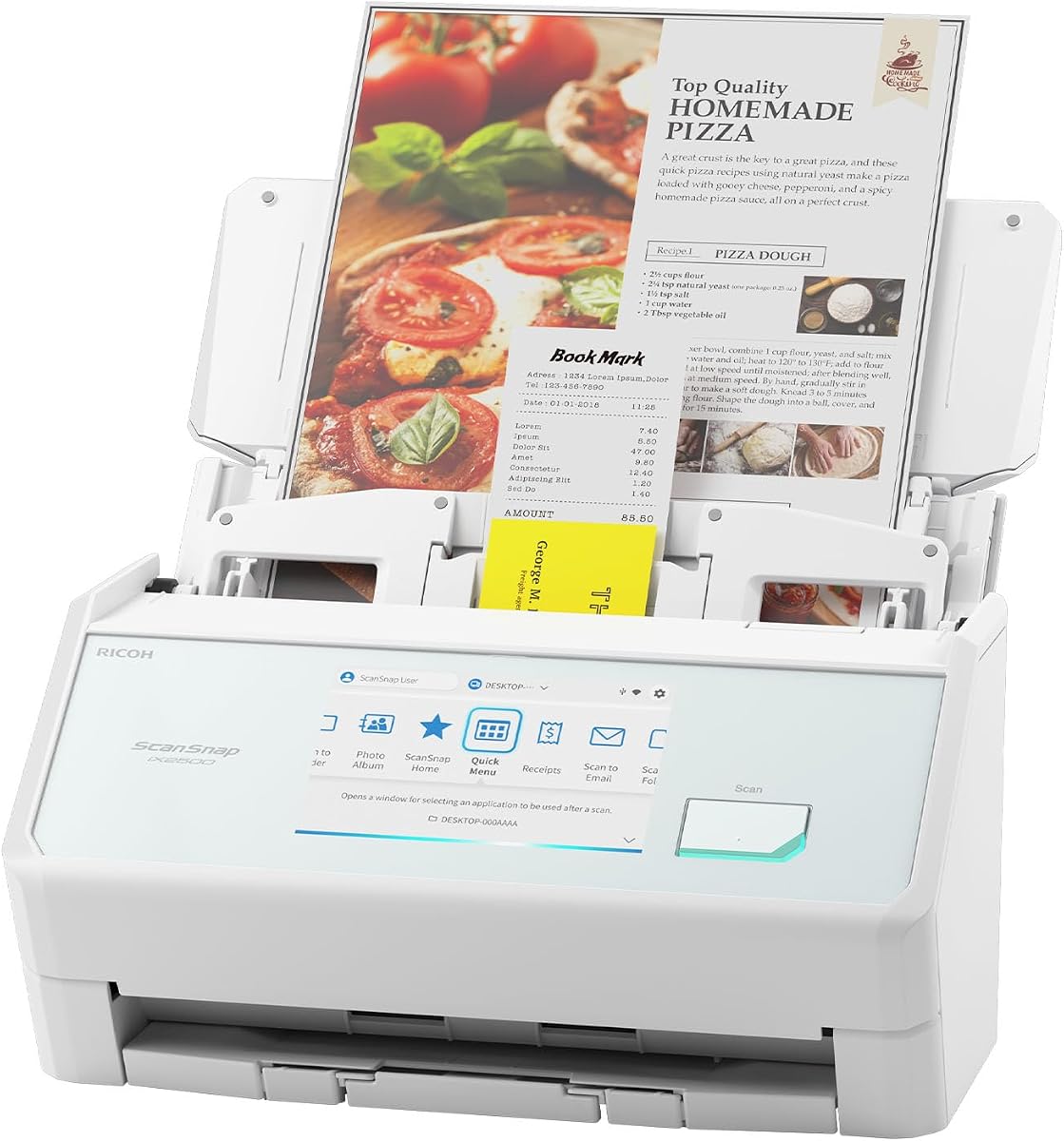
The ScanSnap iX2500 represents the pinnacle of home office scanning technology with advanced features for heavy users. Boasting a 4.4 rating it delivers unmatched speed and convenience. Its Wi-Fi 6 connectivity ensures fast stable connections to smart devices without a computer nearby.
We may earn a commission when you buy through this link, at no additional cost to you.
With a 100-sheet document feeder and 45ppm double-sided speed it handles large batches effortlessly. The large touchscreen allows you to select personalized profiles for different tasks. This level of customization saves time and reduces repetitive setup steps for common workflows.
The brake roller system prevents paper jams and damage ensuring smooth operation over time. Files are automatically named and sorted which simplifies digital organization significantly. While the price is higher the productivity gains justify the investment for professionals.
Choose this model if you need a powerful scanner that can handle high volume and integrate seamlessly with cloud storage. It is an upgrade that brings efficiency to your document management routine. This scanner stands out as a premium choice for modern offices.
Connect directly to smart devices or cloud services without needing a computer to initiate scans.
Built-in software optimizes images names and sorts files automatically saving you from manual editing tasks.
We may earn a commission when you buy through this link, at no additional cost to you.
The CZUR Shine Ultra is a specialized tool designed for digitizing books and large documents. It earns a 4.2 rating by offering unique patented technology for curved page flattening. Its 13MP CMOS camera ensures high-quality images for detailed document capture.
We may earn a commission when you buy through this link, at no additional cost to you.
You can scan a page in about one second which is incredibly fast for overhead scanning. The device works as both a document camera for remote learning and a traditional scanner. It supports A3 and A4 sizes making it versatile for various document types.
While it does not support iOS devices it integrates well with Windows and Mac systems. The OCR supports over 180 languages though some specific scripts are currently excluded. This makes it a strong option for international document digitization needs.
Opt for this scanner if you frequently work with thick books or require high-resolution images. Its foldable design allows for easy storage when not in use. This tool excels in scenarios where traditional feeders cannot handle book formats.
Patented pixel transformation flattens curved surfaces automatically allowing for clear scans of book pages.
Use it as a document camera during Zoom or Google Meet sessions for interactive online teaching.
We may earn a commission when you buy through this link, at no additional cost to you.
The Brother DS-740D provides efficient duplex scanning in a compact form factor. With a 4.3 rating it ensures high-quality scans of both document sides in a single pass. This saves time and doubles the effective speed compared to single-sided devices.
We may earn a commission when you buy through this link, at no additional cost to you.
Its Desk Saving Design feature reduces the desk footprint making it ideal for smaller workspaces. The device is powered via micro USB allowing use anywhere without an outlet. It supports various scanning destinations including network cloud services and email.
Automatic color detection and image rotation optimize scans without manual editing. The included software suite supports document management and OCR for searchable PDFs. While it requires manual feeding it remains a reliable tool for frequent document handling.
This scanner is suitable for business users needing reliable duplex scanning in a portable package. It handles various media types and supports Linux Mac and Windows. Choose this for consistent high-speed digitization that fits any office environment.
The design reduces required desk space by 11 inches helping you maintain a tidy workspace.
Built-in text enhancement and bleed prevention ensure clear readable outputs every time.
We may earn a commission when you buy through this link, at no additional cost to you.
The Canon imageFORMULA R10 offers a seamless scanning experience for mobile users on the go. It earns a 4.1 rating for its ease of use and reliable performance. The device is small and lightweight allowing you to take it to classrooms or remote offices.
We may earn a commission when you buy through this link, at no additional cost to you.
It features a 20-sheet automatic feeder which simplifies batch scanning compared to manual feeders. USB power eliminates the need for extra cables or adapters. The built-in software allows for easy setup and preview of files before finalizing them.
You can digitize receipts business cards and plastic cards easily with its broad media handling. Scanning speeds reach up to 12 pages per minute ensuring efficiency. The high-quality imaging leverages Canon camera technology for clear outputs.
This model is ideal for users who need a simple plug-and-play solution without complex software. It supports both Windows and Mac devices making it versatile for different environments. Choose it for convenient efficient scanning that fits your daily routine.
Digitize receipts business cards and plastic cards effortlessly expanding beyond standard paper documents.
Built-in software requires no installation and updates automatically for a hassle-free experience.
We may earn a commission when you buy through this link, at no additional cost to you.
The Epson Perfection V19 II is designed specifically for scanning photos and documents with high detail. It holds a 3.9 rating and offers 4800 dpi optical resolution ideal for photo enlargements. The flatbed design allows for scanning books and photo albums easily.
We may earn a commission when you buy through this link, at no additional cost to you.
One-touch scanning simplifies the process while Easy Photo Fix restores color to faded images. The removable lid enables scanning of thicker items like books or framed art. It also includes OCR to create editable Office documents from scans.
Its compact design includes a kickstand for vertical placement saving desk space. USB power makes it portable for home office use. While slower than automatic feeders it excels in preserving image quality for precious memories.
Choose this scanner if you need to digitize photos or thick items frequently. It is a reliable tool for hobbyists and families wanting to preserve documents. This model ensures your valuable photos are saved with clarity and detail.
Easy Photo Fix technology brings faded photos back to life with a single click.
The built-in kickstand allows for vertical storage helping you keep your desk organized.
We may earn a commission when you buy through this link, at no additional cost to you.
The Epson Workforce ES-60W offers the freedom of wireless scanning for mobile users. With a 4.1 rating it allows you to scan directly to iOS or Android devices. Its speed is among the fastest with single pages scanned in as little as 4 seconds.
We may earn a commission when you buy through this link, at no additional cost to you.
It switches automatically between USB and battery-powered wireless without user intervention. The LCD display keeps you informed about battery and wireless status. You can scan directly to cloud storage accounts without needing a computer.
Included software allows for easy review and organization of scanned files. The automatic feeding mode combines multi-page scans into one file for convenience. It handles various document sizes including receipts and ID cards effectively.
This model is perfect for users needing true wireless mobility for their scanning tasks. It balances speed and connectivity to suit modern workflows. Choose this for efficient on-the-go scanning without cables.
Scan directly to mobile devices and cloud services without needing a computer connection.
Automatic switching between USB and battery ensures you always have a working power source available.
We may earn a commission when you buy through this link, at no additional cost to you.
This handheld scanner offers a unique approach to digitizing documents with its wand design. It earns a 3.9 rating for its simplicity and portability. Weighing only 0.31 lbs it is easy to carry anywhere. The 900dpi resolution ensures crisp text and vivid color photos.
We may earn a commission when you buy through this link, at no additional cost to you.
You can store scans on a Micro SD card up to 32GB capacity. Plug and play functionality means no pre-installed software is required. It works with various operating systems and supports both JPG and PDF formats.
Operation is simple with long press power and button press scanning. It auto-shuts off after minutes of inactivity to save battery. While it requires steady hands it is excellent for quick on-the-go scans.
Choose this if you need an ultra-portable option for occasional scanning tasks. It is affordable and simple for students or travelers. This scanner delivers quick results without complex setup requirements.
Its compact size allows it to fit easily in a bag or pocket for instant scanning anywhere.
Support for up to 32GB Micro SD cards ensures ample space for travel documents.
We may earn a commission when you buy through this link, at no additional cost to you.
The Silver version of this handheld scanner provides the same reliable functionality in a different color. It holds a 3.9 rating and shares all technical features with the blue model. This makes it an accessible option for basic document digitization needs.
We may earn a commission when you buy through this link, at no additional cost to you.
It offers 900dpi resolution options for clear image capture. The 32GB Micro SD card support provides ample storage for travel and daily use. Plug and play functionality ensures you can start scanning immediately.
Battery operation using two AA batteries means no extra cables are needed. Simple controls and auto-shutoff features make it user friendly for students. While slower than larger devices it offers convenience for quick tasks.
Choose this model for its affordability and ease of use for small jobs. It fits well for occasional needs without complex setups. This scanner ensures your documents stay accessible digitally without hassle.
Battery operation ensures you can scan without needing a constant power source or USB connection.
Up to 900dpi resolution modes allow for detailed scans suitable for photos and documents.
We may earn a commission when you buy through this link, at no additional cost to you.
Selecting the right scanner involves evaluating several factors to match your specific workflow needs.
Connectivity determines how easily you can link the scanner to your iPhone 18. Look for models with Wi-Fi or USB-C support for seamless integration. Wireless scanners allow direct transfers to mobile apps without cables.
Prioritize devices offering cloud connectivity for instant access across your devices.
Speed impacts productivity especially if you handle large volumes of documents. High-speed scanners reduce wait time and allow quicker workflow. Aim for models capable of scanning multiple pages per minute.
Faster speeds save time and keep your digital workflow efficient.
Portability is key for mobile users carrying scanners in bags or purses. Compact devices with lightweight designs ensure easy transport without burden. Check dimensions to confirm it fits comfortably in your travel gear.
Choose slim and lightweight scanners to maintain mobility during travel.
Automatic document feeders allow you to scan stacks without manual feeding. Models with higher capacities reduce repetitive tasks for large batches. Consider how often you scan multi-page documents when selecting.
Opt for automatic feeders if you frequently process multi-page documents.
OCR software converts scanned text into editable formats like Word or Excel. This feature is essential for editing and searching documents efficiently. Check supported languages and accuracy of the OCR tool.
Select scanners with robust OCR to enable editable digital documents.
Software quality affects ease of use and scanning flexibility. Ensure the included apps are compatible with your iPhone OS and desktop systems. Intuitive interfaces simplify scanning and file management tasks.
Verify software supports iOS for smooth scanning integration.
Resolution determines how clear and detailed your scanned documents will appear. Higher DPI ensures crisp text and photos suitable for printing. Consider your needs for archival quality versus basic digitization.
Prioritize high resolution for clear and sharp document images.
Power options dictate where you can use the scanner without outlets. USB-powered devices require a connected computer while battery models offer freedom. Choose based on how often you scan away from power sources.
Select battery or USB options depending on your power availability.
To begin use ensure your scanner is properly connected to your iPhone via Wi-Fi or cable. Install the corresponding mobile app on your device to enable direct scanning. Align your documents on the feeder or flatbed before initiating the scan process.
Maintain optimal performance by cleaning the glass or feed rollers regularly with a soft cloth. Avoid using harsh chemicals that may damage the sensitive optical components. Store the device in a dry place to prevent moisture-related issues.
Update the firmware and software periodically to access the latest features and fixes. Proper care ensures your scanner remains reliable for all your digitization needs. Regular maintenance helps extend the lifespan of your valuable equipment.
The best scanner depends on your specific needs but models with Wi-Fi and fast speeds are ideal. Devices offering seamless cloud integration and OCR software enhance workflow efficiency. Check compatibility and portability before purchasing.
Many modern scanners offer dedicated iOS apps for direct mobile scanning. Ensure the model supports Wi-Fi or USB connectivity with your iPhone. Compatibility ensures smooth file transfers and scanning management.
Keep your scanner clean by gently wiping the glass and rollers regularly. Store it in a dust-free dry environment to protect internal parts. Updates help maintain performance and compatibility with new OS versions.
Scanners with automatic feeders and high ppm ratings provide the fastest speeds. Look for devices rated above 15ppm for efficient batch processing. High-speed scanners save time when digitizing large volumes.
Portable scanners are excellent for office use due to their flexibility and speed. They allow easy transfer between desks or remote locations. Models with cloud integration streamline document sharing in offices.
Some mobile scanners support photos but flatbed models offer better quality. Check resolution and paper handling capabilities before choosing. High-resolution scanners ensure sharp detailed image outputs.
This guide highlights top scanners suited for iPhone users with diverse needs. Whether you need speed portability or advanced features options exist for every scenario. Focus on connectivity and speed for a smooth experience.
Prioritize models with reliable software and seamless integration to avoid workflow interruptions. The right choice depends on your budget and specific document types. Invest wisely for long-term efficiency and clarity.
Always check current availability and offers before making a purchase decision. Prices and stock may change over time so verify details at checkout. Your perfect scanner will help you stay organized digitally.