
WD 2TB My Passport
4.6Editor score
Slim durable design
Password protection included
Ransomware defense software
This guide compares the top encrypted secure external hard drives for 2026, evaluating hardware encryption, rugged design, and compliance standards.
Secure data storage is critical in today's digital landscape. An encrypted secure external hard drive ensures your sensitive information remains protected from unauthorized access and physical theft while you travel or work remotely.
We analyzed ten top-rated models based on encryption standards, build quality, and user feedback. Our comparison focuses on hardware-based security features that do not rely on vulnerable software solutions for protecting your valuable files.
Each pick highlights specific strengths like FIPS validation or rugged durability. Note that availability and pricing vary by region and retailer, so check current stock before making your final decision on security hardware.
4.6Editor score

4.5Editor score

4.0Editor score
Below is a side-by-side comparison of the ten leading encrypted secure external hard drives available this year. Review each model's key specifications to find the right balance of speed, capacity, and security for your needs.


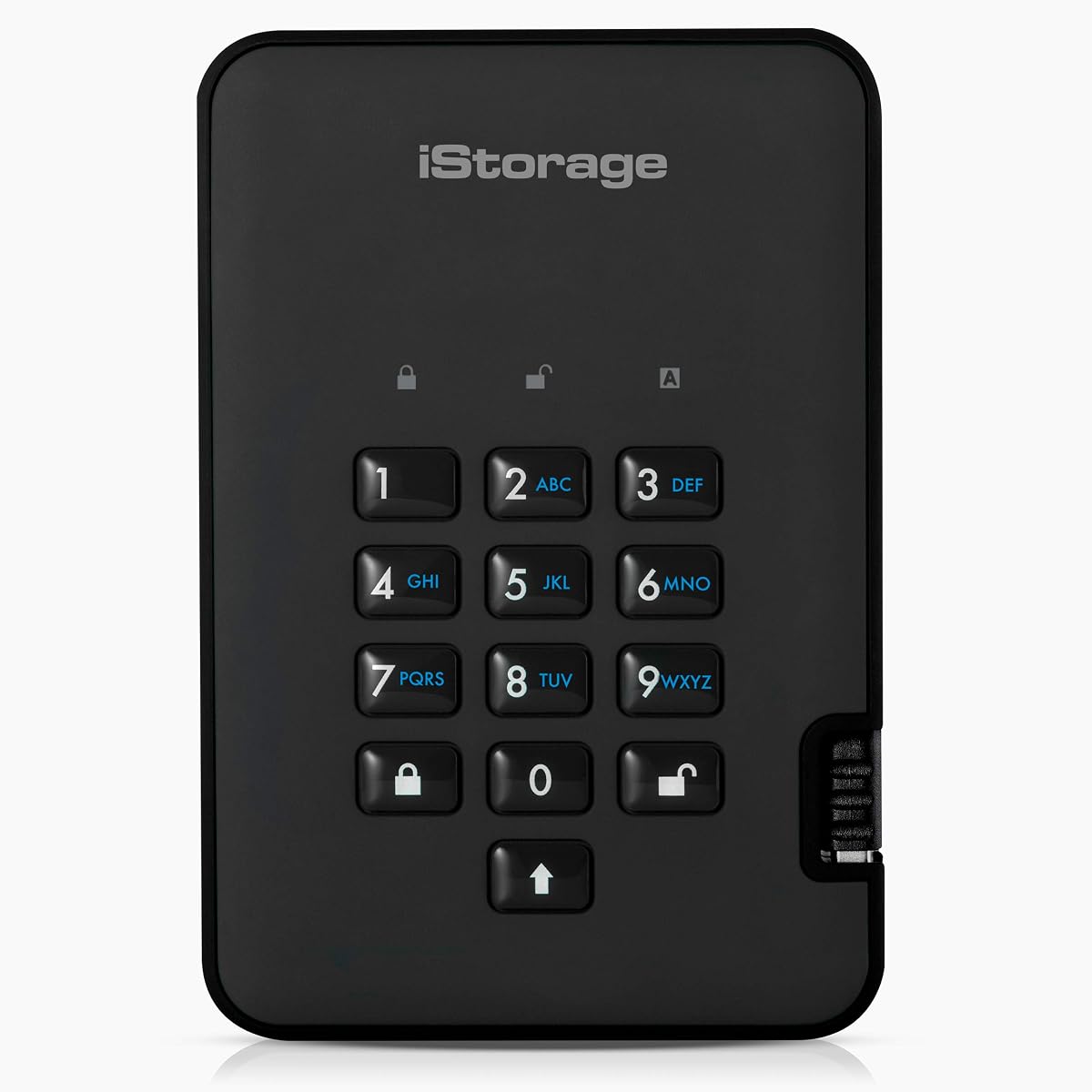

This drive is a top choice for users requiring robust hardware encryption without complex software dependencies. It holds a strong 4.5-star rating from verified buyers who value its reliability and security features.
We may earn a commission when you buy through this link, at no additional cost to you.
Its standout quality is the FIPS PUB 197 validated algorithm combined with a physical keypad. This ensures that data remains inaccessible even if the drive is stolen or lost during travel.
The epoxy coating offers excellent resistance against physical attacks like drilling or prying. While the price is higher than standard drives, the security level justifies the investment for professionals.
Buy this if you need a portable drive that meets strict compliance standards. It is ideal for corporate users handling sensitive client data who cannot rely on software passwords alone.
The tough epoxy coating seals the electronics against physical tampering attempts. This design prevents unauthorized access through hardware manipulation or forced entry.
Setting up access involves using the integrated keypad directly on the device. This eliminates the need for driver installations and works across all operating systems seamlessly.
We may earn a commission when you buy through this link, at no additional cost to you.
This model offers Level 2 validation which is often required for government and defense contracting work. It builds on the standard Padlock design with added physical security features for high-risk environments.
We may earn a commission when you buy through this link, at no additional cost to you.
The integrated USB cable reduces the risk of losing connections while traveling. Users appreciate the convenience and the consistent performance provided by the secure hardware encryption.
Its bulkier design accommodates the additional security mechanisms inside the casing. While less pocket-friendly, the extra protection ensures data integrity during harsh handling conditions.
Select this drive if your organization mandates FIPS 140-2 compliance. It is suitable for field agents or researchers who need verified security standards for data storage.
FIPS 140-2 Level 2 validation ensures the device meets federal security requirements. This makes it a trusted choice for handling classified or sensitive government data.
An integrated cable ensures you always have the right connection available. This design choice minimizes the risk of leaving essential accessories behind during travel.
We may earn a commission when you buy through this link, at no additional cost to you.
This drive stands out for offering Level 3 validation alongside massive storage capacity. It is designed for organizations that need both high security and substantial space for large datasets or backups.
We may earn a commission when you buy through this link, at no additional cost to you.
The separate admin and user modes allow for granular control over who can modify or view data. This feature adds a layer of internal security often missing from standard consumer drives.
While the price is significant, the security level and capacity justify it for enterprise use. It ensures that sensitive data is not only encrypted but also accessible only by authorized personnel.
Opt for this if you need the highest level of physical tamper evidence available. It is best suited for data centers or secure facilities requiring verified encryption hardware.
Level 3 validation includes robust tamper evident and response mechanisms. This ensures any physical intrusion attempt is detected and data is protected accordingly.
With 5TB of space, it handles large video or backup files efficiently. The USB 3.0 interface maintains fast transfer speeds even with large volumes of data.
We may earn a commission when you buy through this link, at no additional cost to you.
This model is an excellent entry-level choice for those needing basic protection without breaking the bank. Its high 4.6-star rating reflects user satisfaction with its balance of features and cost.
We may earn a commission when you buy through this link, at no additional cost to you.
The included software offers defense against ransomware which is a critical feature for home users. Password protection adds a necessary layer of privacy against casual access to your files.
While it lacks hardware encryption found in premium models, it provides strong software safeguards. Users looking for a general-purpose drive will find its performance and reliability impressive.
Choose this if you need a reliable drive for daily backups on a budget. It is perfect for students or home office users prioritizing portability and ease of use.
The included management software helps defend against modern ransomware threats. This proactive approach adds value beyond simple data storage capabilities.
A slim durable design ensures it fits easily in laptop bags or pockets. This convenience makes it ideal for users who carry their drive daily.
We may earn a commission when you buy through this link, at no additional cost to you.
This larger capacity model is perfect for users with extensive media libraries or heavy backup needs. It maintains the same protective features as the 2TB version but offers more space.
We may earn a commission when you buy through this link, at no additional cost to you.
Password protection ensures that only authorized users can access the stored content. Combined with ransomware defense, it provides a solid safety net for personal data.
The software-based encryption means security relies on the integrity of the management tool. While convenient, it is not as secure as hardware-locked options for high-risk users.
Opt for this if you need affordable high-capacity storage with basic security. It is well-suited for home entertainment systems or local document backups.
Integrated backup software simplifies the process of scheduling automatic backups. This ensures your data is regularly saved without manual intervention or effort.
The slim design allows for easy stacking or storage in tight spaces. Despite the high capacity, the footprint remains manageable for desktop use.
We may earn a commission when you buy through this link, at no additional cost to you.
This drive offers distinct Admin and User modes which are vital for business environments. It allows administrators to enforce security policies and manage user access centrally.
We may earn a commission when you buy through this link, at no additional cost to you.
The Aegis Configurator compatibility gives IT departments detailed control over device settings. This feature ensures that security protocols are standardized across all deployed drives.
Setup may require more time than consumer drives due to the advanced configuration options. However, the resulting security posture is much stronger for organizational use cases.
Select this if you are an IT manager needing enforceable security policies. It is best for businesses that want to track and control device usage actively.
Admin mode allows setting policies that users cannot bypass easily. This ensures consistent security compliance across all users and devices.
Built-in recovery PINs help restore access if main credentials are lost. This safety feature prevents permanent data loss due to human error.
We may earn a commission when you buy through this link, at no additional cost to you.
Designed for desktop use, this model provides heavy-duty security in a stationary enclosure. It meets FIPS 140-2 Level 2 standards ensuring robust data protection for office environments.
We may earn a commission when you buy through this link, at no additional cost to you.
The solid aluminum enclosure adds physical durability and helps with heat dissipation during operation. This build quality ensures the drive lasts longer under continuous usage conditions.
Being TAA compliant makes it a viable option for government procurement programs. This certification simplifies the purchase process for federal agencies and contractors needing secure drives.
Buy this if you need secure storage for a shared office desktop. It is ideal for environments where physical theft is a concern but mobility is not required.
TAA compliance ensures the product meets US government procurement regulations. This simplifies purchasing for agencies that require domestic sourcing and security.
The solid aluminum enclosure protects the internal components from physical impact. This ensures reliability even in busy office environments with frequent handling.
We may earn a commission when you buy through this link, at no additional cost to you.
This drive is unique for its environmental rating which protects against dust and water. It is built for users who work in harsh or unpredictable environments like construction or field research.
We may earn a commission when you buy through this link, at no additional cost to you.
The Common Criteria EAL 5+ certification validates its robust security architecture. This ensures that the encryption and authentication mechanisms are thoroughly tested and trusted.
While the setup involves a PIN which may take time to memorize, the security benefits are clear. It offers a secure solution without needing software installation on every host machine.
Choose this if you need a drive that can survive water splashes and dust. It is perfect for field engineers or outdoor professionals needing portable secure storage.
IP56 certification ensures the drive resists dust and water jets. This durability allows safe use in environments where standard drives might fail.
Compatible with Windows, Linux, and macOS without extra software. This flexibility makes it easy to switch between different devices seamlessly.
We may earn a commission when you buy through this link, at no additional cost to you.
This SSD features a modern touchscreen interface that simplifies security setup for users. It brings high-speed storage and top-tier security together in a sleek package.
We may earn a commission when you buy through this link, at no additional cost to you.
Supporting both USB-C and USB-A makes it versatile for newer laptops and older systems alike. This dual compatibility ensures you are not locked into one specific connector type.
FIPS 140-3 Validated certification represents the latest standard for cryptographic modules. It provides confidence that the device meets the highest available security benchmarks for encryption.
Select this if you need the fastest storage with the latest security standards. It is ideal for tech-savvy professionals using modern devices like tablets or ultrabooks.
FIPS 140-3 validation is the latest federal standard for cryptographic modules. This ensures your data is protected by the most current security algorithms.
The touchscreen interface allows intuitive PIN entry without external software. This enhances user experience while maintaining high security levels during access.
We may earn a commission when you buy through this link, at no additional cost to you.
This drive combines high-speed SSD performance with the trusted security of the Aegis lineup. It is designed for users who cannot compromise on speed or data protection.
We may earn a commission when you buy through this link, at no additional cost to you.
With read and write speeds up to 350MBPS, it handles large files efficiently. This performance level significantly outpaces traditional mechanical drives found in similar security categories.
The price reflects the premium components and rigorous security testing involved in its build. It is a long-term investment for those prioritizing reliability and high throughput.
Opt for this if speed is critical for your workflow alongside security needs. It is best for video editors or data scientists moving terabytes of sensitive files daily.
SSD technology ensures fast data access and write speeds. This reduces wait times when working with large files on the go.
Hardware encryption maintains high speeds without bottlenecks. The dedicated processor ensures security does not slow down your workflow.
We may earn a commission when you buy through this link, at no additional cost to you.
Choosing the right drive requires evaluating encryption standards and build quality. Consider the following factors to find a device that fits your security requirements.
Look for devices with FIPS validated encryption algorithms such as AES 256-bit. These standards ensure the data is scrambled in a way that is practically impossible to decode without the key.
Prioritize models that explicitly state their validation levels to ensure regulatory compliance.
Hardware encryption processes data on the drive itself making it more secure than software methods. This reduces reliance on the host computer which may be vulnerable to malware or attacks.
Choose hardware-based drives for any sensitive data to ensure maximum protection.
Many secure drives use physical keypads or biometric sensors for access. These methods prevent unauthorized entry even if the drive is plugged into another machine.
Select a method that balances ease of use with physical security needs.
Rugged enclosures made of metal or rubber protect the drive from drops or water. Look for IP ratings if you plan to use the drive in outdoor environments.
Ensure the casing is durable enough to withstand daily travel conditions.
If you work for government or healthcare, check for specific validations like FIPS 140-2 or HIPAA compliance. These certifications are often mandatory for handling regulated data.
Verify compliance needs before purchasing to avoid legal or organizational issues.
Determine how much data you need to store by reviewing your current backup needs. Higher capacity drives often cost more but reduce the need for multiple devices.
Choose a size that fits your long-term storage planning.
USB 3.0 or newer interfaces ensure faster data transfers which save time. While encryption adds overhead, a faster connection helps maintain good performance.
Match the interface speed to your computer ports to avoid bottlenecks.
A long warranty period indicates confidence in the product build quality. Also consider the manufacturer's reputation for customer support in case of issues.
Look for warranties of at least three years to protect your investment.
Connect the drive to a secure computer and enter your PIN or password to unlock it. Always verify that the access LED indicates it is ready before transferring files.
Safely eject the drive before unplugging it to prevent data corruption. This step ensures that all background processes are finished and data is written correctly.
Store the drive in a cool dry place when not in use. Avoid leaving it in extreme temperatures or direct sunlight to maintain the health of the internal components.
Most models support both Mac and Windows operating systems natively. Check the product page to ensure cross-platform compatibility for your specific use case. Some require specific tools for advanced configuration but basic access is universal.
Many secure drives have a recovery PIN feature that allows admin resets. If you lose access, check the manual for recovery options as data may be at risk. Contact the manufacturer immediately if the recovery PIN is also lost.
Modern drives with dedicated encryption processors rarely impact speed significantly. You might see a small difference compared to an unprotected drive but it is usually negligible. The security benefits outweigh minor speed reductions for most users.
Some models have specific IP ratings for water resistance while others do not. Always check the specifications for IP56 or similar ratings before using in wet environments. Standard drives should not be exposed to liquids.
Hardware encrypted drives typically do not require any software installation. They work like standard storage once unlocked. Software only manages features like password policies or remote auditing if supported.
It is a federal standard validating security features for cryptographic modules. Level 2 adds requirements for role-based authentication and physical tamper evidence. It ensures the device meets strict security criteria for government use.
Use a secure erasure tool to wipe all data before recycling. Physical destruction or degaussing is recommended for high-security devices. This ensures data cannot be recovered by anyone handling the discarded drive.
Yes most secure drives work perfectly for backup software like Time Machine or Acronis. Ensure your backup software supports the file system on the drive. Encryption adds a layer of safety to your backup routine.
We reviewed ten excellent models ranging from budget-friendly options to enterprise-grade SSDs. Each pick offers a different balance of capacity and compliance depending on your needs.
Prioritize hardware encryption and validated standards to ensure your data remains safe against physical theft. The investment in a secure drive pays off in peace of mind and protection.
Always verify current prices and availability before purchasing to ensure you get the best deal. Security features evolve so checking the latest specs is always a good practice.