
Nettbe 60 PCS 6 Inches Reusable Cable Ties
4.8Editor score
Reusable nylon adhesive material
60 pieces per pack
Adjustable strap design
A clean gaming setup starts with organized cables. Poor management leads to clutter, dust buildup, and potential safety hazards. Choosing the right solutions keeps your space tidy and your hardware protected from accidental damage or pets.
We evaluated ten top-rated cable management products based on durability, ease of installation, capacity, and design. Each item was selected to address specific needs like under-desk routing, cable sleeving, or clip-based organization for gaming stations.
Each pick highlights key strengths and ideal use cases to help you decide quickly. Prices and availability change frequently, so verify current details before purchasing. This guide ensures you find the perfect match for your unique gaming desk configuration.
4.8Editor score

4.7Editor score
4.6Editor score
As an Amazon Associate we earn from qualifying purchases.
Below is a side-by-side comparison of all ten products featured in this guide. Review their key specifications to find the best fit for your gaming desk needs.




The Nettbe 60 PCS Reusable Cable Ties offer an affordable way to bundle cords. With a 4.8 rating, users appreciate the flexibility and ease of adjustment.
We may earn a commission when you buy through this link, at no additional cost to you.
These hook loop straps work great for temporary setups or quick adjustments. The 60-piece count ensures you have enough ties for an entire gaming desk.
While they lack rigid structure, their reusability makes them practical. They are not ideal for securing heavy power bricks long-term.
Buy this if you need flexible ties for light to medium cable bundling. It is an excellent budget option for gamers needing quick organization.
Works well in home, office, or garage to organize loose cords efficiently without wasting materials.
Unlike disposable zip ties, these straps can be removed and reattached multiple times reducing waste.
We may earn a commission when you buy through this link, at no additional cost to you.
The Alex Tech 10ft Cord Protector is a top choice for protecting cables from damage. It features a split loom that makes installation simple.
We may earn a commission when you buy through this link, at no additional cost to you.
Its UL recognition ensures safety for audio and video cables. The material insulates wires effectively against wear and tear from pets.
While it does not hide cables behind a desk, it shields exposed cords. It requires cutting to fit precise lengths which may be minor work.
Buy this for protecting sensitive cables along the floor or desk edge. It is ideal for households with curious pets or high foot traffic.
The durable tubing prevents cats and dogs from chewing on exposed wires safely.
The split design allows loading wires without disconnecting existing setups instantly.
We may earn a commission when you buy through this link, at no additional cost to you.
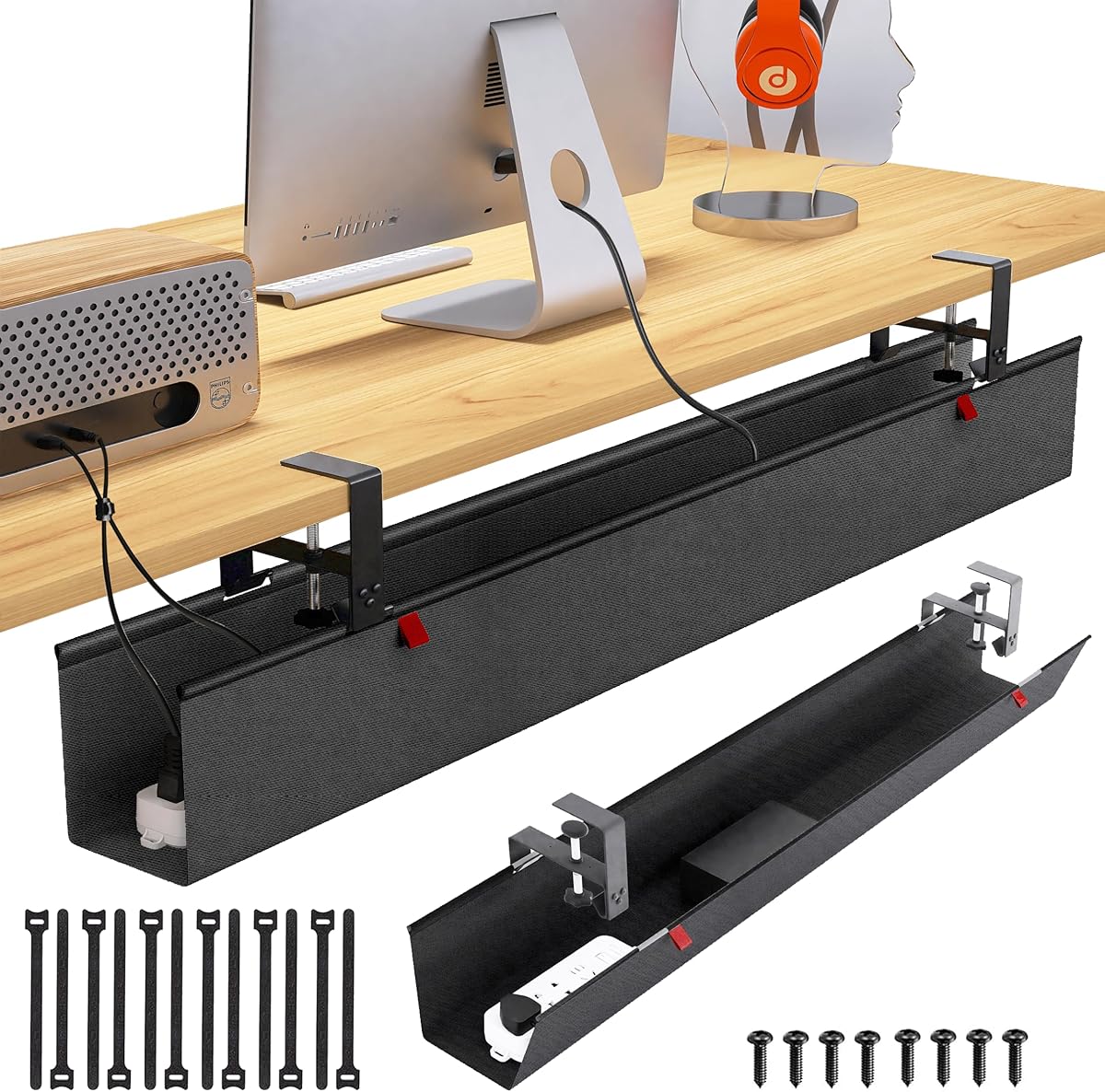
This 48-inch gaming tray offers a complete solution for hiding power bricks and surge protectors. Its stealth design blends into dark gaming setups.
We may earn a commission when you buy through this link, at no additional cost to you.
The reinforced base supports heavy equipment without sagging. The black Oxford fabric blocks visibility of messy cables completely.
While it requires clamping space under the desk, the result is professional. It may cost more than basic clips but offers total concealment.
Buy this if you want a clean under-desk look for streaming or gaming. It is the best choice for serious battlestations needing full wire hiding.
The all-black design ensures cables do not distract from RGB lights or monitor visuals.
Breathable fabric prevents overheating while blocking dust from settling on power supplies.
We may earn a commission when you buy through this link, at no additional cost to you.
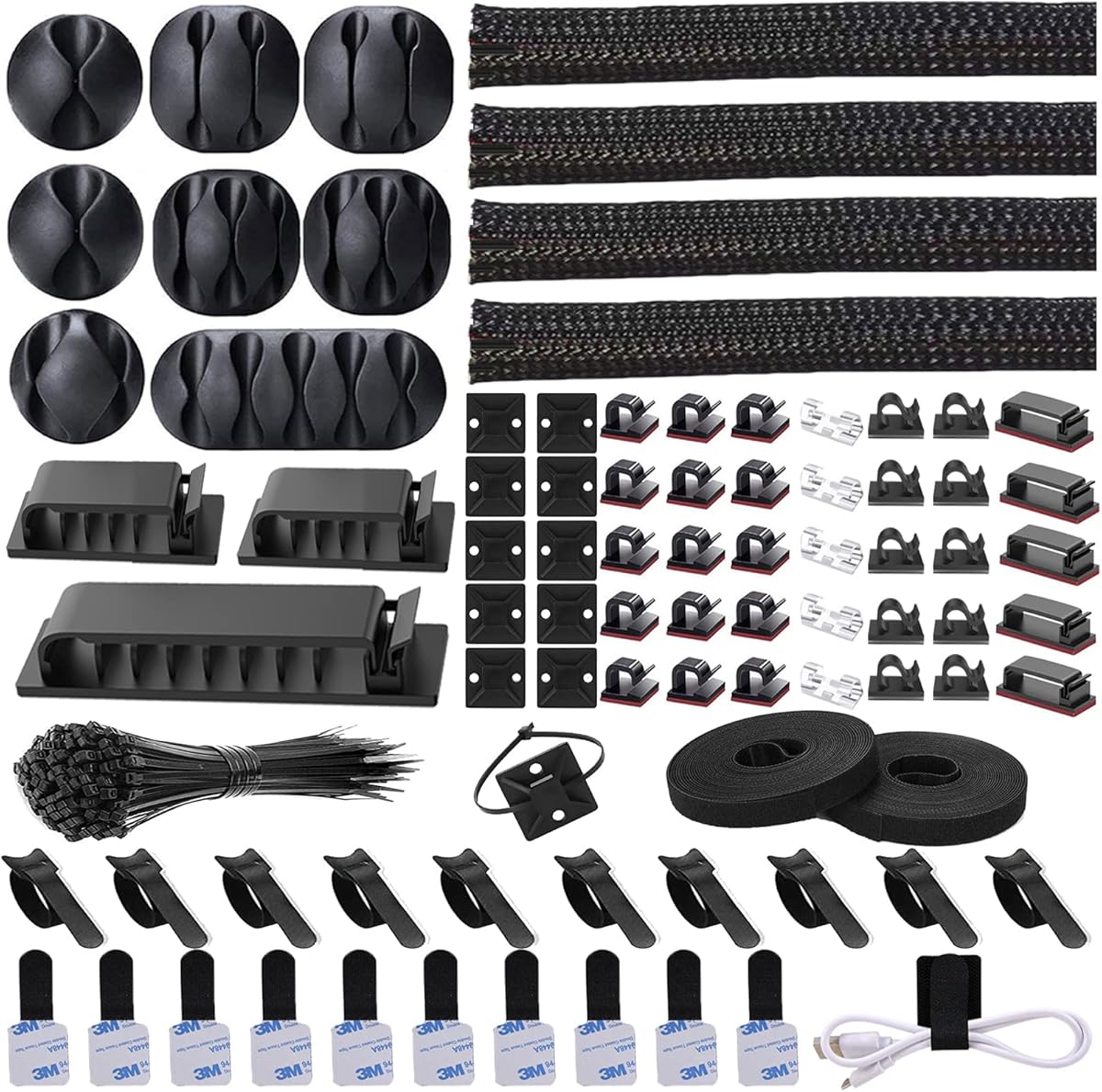
The NOROCME 192 PCS kit provides a wide range of tools for cable organization. It includes sleeves, ties, and clips to handle any setup.
We may earn a commission when you buy through this link, at no additional cost to you.
Its eco-friendly polyamide clips work on multiple surfaces. The kit ensures you have enough materials for complex gaming desk wiring.
The sheer number of items may be overwhelming. Some components might not be used depending on your specific needs.
Buy this if you want a one-stop solution for various wiring tasks. It suits those managing multiple rooms or extensive gaming hardware setups.
Having all necessary tools in one box saves time searching for different products.
Self-adhesive cable tie rolls allow for quick mounting on clean surfaces easily.
We may earn a commission when you buy through this link, at no additional cost to you.
This kit focuses on split sleeves for easy wire loading. It combines protective sleeves with a high volume of ties for bulk management.
We may earn a commission when you buy through this link, at no additional cost to you.
Users find the split design prevents disconnecting wires during installation. The braided sleeves close securely on their own.
The fixed length of sleeves might not fit very long cables. Ensure your cables match dimensions before buying.
Buy this for protecting cords and bundling them efficiently. It is best for desks with many cables needing grouping.
The split loom lets you add wires without unplugging devices permanently.
Strong materials ensure long-term organization without fraying or breaking easily.
We may earn a commission when you buy through this link, at no additional cost to you.
The YECAYE 6 Pack uses J channels to hide cables under desks. They are made of flame-retardant PVC for safety.
We may earn a commission when you buy through this link, at no additional cost to you.
Their outward-facing opening makes placing or removing cables effortless. The adhesive backing sticks well to smooth surfaces.
Removing them may require heat if not done carefully. Rough surfaces can reduce adhesion effectiveness significantly.
Buy this for hiding long runs of cables along desks. It suits office desks needing a tidy appearance without exposed wires.
PVC material resists ignition, adding safety protection near power outlets.
Each channel holds up to ten cables for major clutter reduction.
We may earn a commission when you buy through this link, at no additional cost to you.
Scanfield offers a 17-inch tray available in a two-pack. It uses strong adhesive backing to hold cables without drilling.
We may earn a commission when you buy through this link, at no additional cost to you.
Users report it makes desks look clean by hiding excess wiring. The trays are spacious enough for power strips and adapters.
Its shorter length may not suit larger desks. Proper surface cleaning is vital for adhesive success.
Buy this for small desks needing quick under-surface storage. It is great for simple setups with moderate cable volume.
Peel and stick design means no tools are needed to mount the tray.
Trays stay solid and do not bend under typical cable weights.
We may earn a commission when you buy through this link, at no additional cost to you.
This 36-inch tray offers ample space for complex setups. It supports both clamp-on and screw installations for versatility.
We may earn a commission when you buy through this link, at no additional cost to you.
The fabric tray hides everything neatly while allowing airflow. It holds heavy power bricks without sagging over time.
Ensure you have at least 5.3 inches of edge space. Missing this space prevents proper mounting entirely.
Buy this for large desks needing extensive under-mount storage. It is ideal for multi-monitor setups with heavy equipment.
Choose between clamping or screwing to match your desk structure needs.
600D Oxford fabric blocks views and adds style to your setup.
We may earn a commission when you buy through this link, at no additional cost to you.
The 25-inch tray uses metal mesh for strong ventilation. This prevents overheating of power supplies under desks.
We may earn a commission when you buy through this link, at no additional cost to you.
Its non-slip rubber pads protect desk surfaces from scratches. The open design allows easy cable routing through the side.
Mesh construction means wires remain visible though organized. Assembly takes minutes with included screws.
Buy this if airflow is a priority for your hardware. It suits users who prefer metal over fabric solutions.
Mesh structure reduces dust accumulation and heat build-up under your desk.
Clamps fit desks from 0.4 to 2 inches thick securely.
We may earn a commission when you buy through this link, at no additional cost to you.
These clips offer an elastic loop that holds cables securely. They can be mounted via adhesive, screws, or zip ties.
We may earn a commission when you buy through this link, at no additional cost to you.
The silicone loop provides flexibility and UV resistance. The design allows easy swapping of chargers without tools.
They are best for smaller cables like chargers or HDMI. Large bundles may strain the loop over time.
Buy this for flexible mounting on various surfaces. It suits bedside tables or desks needing quick-access cable holders.
New white silicone ensures lasting strength and grip on cables.
Three mounting options adapt to different surfaces and needs.
We may earn a commission when you buy through this link, at no additional cost to you.
Choosing the right cable management depends on your desk setup and cable volume. Consider these factors to select the best solution.
Measure your desk depth and available under-desk space. Trays need clearance to fit without touching walls or drawers.
Always check product dimensions before buying to ensure a proper fit.
Heavy power cords require stronger supports than thin HDMI cables. Consider the total number of wires you need to organize.
Choose high-capacity trays or multiple clips based on your cable count.
Some products need drilling while others use adhesives or clamps. Clamps avoid damage but need specific desk thickness.
Select adhesive or clamp methods for rent-friendly installations.
Metal mesh offers ventilation while fabric hides wires. Check if materials are flame-retardant for safety.
Invest in robust materials for long-term use near electronics.
Gaming setups often favor black or transparent solutions that blend in. Visible cables can ruin visual appeal.
Pick colors matching your desk to maintain a clean look.
Trays with side openings make adding new cables easy. Fixed sleeves require cutting or removal to modify.
Prioritize accessible designs if you frequently change hardware.
Basic clips cost less than full under-desk trays. Determine how much you can spend before searching options.
Budget solutions work for simple needs while premium ones offer full concealment.
Pets often chew on exposed cables. Use protective sleeves or trays to hide wires from animals.
Protective tubing adds a vital layer of safety for pets.
Start by unplugging all devices before moving cables. Plan a routing path from power sources to your gaming PC to avoid crossing power.
Use sleeves or trays to bundle cables running along the desk edge. Secure heavy wires with ties to prevent dragging on the floor.
Clean adhesive surfaces with alcohol before mounting. Check straps occasionally to ensure they remain tight over time.
Use under-desk trays to hide power strips and adapters. Mount adhesive clips on desk undersides to route cables cleanly. Ensure the tray fits your desk depth.
Nylon braided sleeves are durable and flexible. Split designs allow easier installation without disconnecting wires. Look for UL-recognized safety for added protection.
Many trays use adhesive or clamps requiring no tools. Some models need screws for extra stability. Always check the installation requirements before buying.
Mesh trays allow airflow under desks preventing heat build-up. Avoid overcrowding power strips in enclosed trays. Proper ventilation ensures safe operation.
Use a hairdryer to warm the adhesive before peeling. Gently pull the clip away from the surface. Clean residue with a mild solvent.
Hook loop straps are reusable and adjustable. Plastic zip ties are single-use. Choose reusables for setups needing frequent changes.
Most trays hold multiple cables plus power strips. Check product dimensions for exact capacity. Heavy-duty models support more equipment safely.
Use split sleeves or enclosed trays to hide cables. Keep cords off the floor when possible. Protective tubing adds a barrier against chewing.
We reviewed ten top products offering unique solutions for cable organization. From budget ties to premium trays, each has strengths for specific setups.
Prioritize safety and ease of access when choosing a solution. Match the product to your desk type and cable volume.
Check current prices and availability before purchasing. This guide helps you make an informed decision for your gaming desk.