
Inwa Computer Speakers for Desktop PC
4.2Editor score
Ten watts of power output
Spring clip for easy mounting
Three-button top control panel
Discover the top clip on speakers for laptop and desktop monitors with USB connectivity, rich bass, and space-saving designs for enhanced audio experience.
Finding the right clip on speakers for laptop setups can transform your audio experience without cluttering your desk. These compact devices offer powerful sound while attaching securely to your monitor, keeping your workspace organized and efficient for daily tasks.
We compared ten top models based on sound quality, connectivity options, ease of installation, and user feedback. Our guide highlights products that deliver clear audio, reliable USB or USB-C connections, and sturdy clamping mechanisms suitable for various monitor thicknesses.
Each pick shows key features, pros, and cons to help you choose confidently. Prices and availability may change over time, so verify current details on the product pages before making your final decision for your specific needs and setup requirements.
4.2Editor score

4.5Editor score

4.2Editor score
This side-by-side comparison highlights key specifications and features across all ten models to help you identify the best fit for your workspace audio needs and budget constraints.
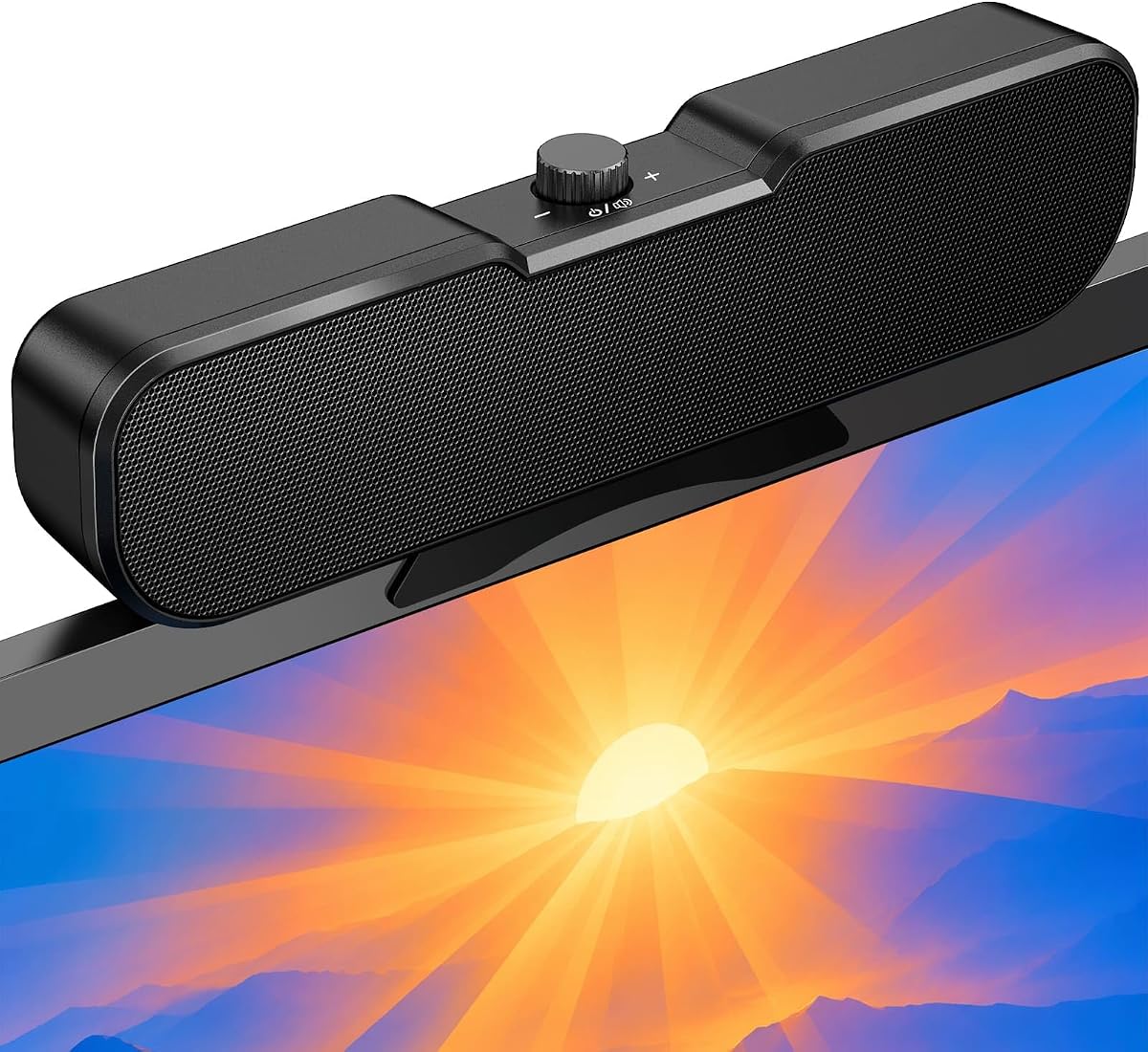


This clip on speakers for laptop model delivers robust audio performance with adaptive channel switching technology. It earns a solid rating for its reliable USB connectivity and powerful sound output suitable for desktop and laptop setups.
We may earn a commission when you buy through this link, at no additional cost to you.
The dual ultra-magnetic drivers and passive radiators provide deep bass and loud sound that enhances multimedia experiences. The built-in G-sensor ensures left and right channels stay correct regardless of whether the speaker is clipped to the top or bottom of your monitor.
Trade-offs include the lack of wireless Bluetooth connectivity and reliance on correct computer audio settings for optimal performance. Users should verify their USB ports and audio drivers work properly before installation to avoid common setup issues.
This product is ideal for users prioritizing wired stability and powerful sound over wireless features. It suits office environments and home setups where desk space is limited and clear audio is essential for calls or media.
The G-sensor automatically adjusts audio channels based on clamp position ensuring balanced stereo sound in any orientation.
Included USB-C adapter supports modern laptops and tablets while maintaining compatibility with traditional USB ports on desktops.
We may earn a commission when you buy through this link, at no additional cost to you.
This premium clip on speakers for laptop option stands out with Bluetooth 5.3 support and a built-in microphone for clear calls. It receives high praise for its dual-mode flexibility and immersive RGB lighting that syncs with audio.
We may earn a commission when you buy through this link, at no additional cost to you.
With sixteen watts maximum output and dual magnetic drivers, it produces loud balanced sound suitable for gaming and streaming. The G-sensor switches channels in under half a second maintaining accurate stereo imaging while the volume roller offers precise control from zero to one hundred percent.
Users note it should not be installed on ultra-thin laptop screens due to potential instability. USB power is required even in Bluetooth mode which limits portability compared to battery-powered alternatives.
Ideal for gamers and streamers wanting both wired reliability and wireless convenience. The RGB customization adds a visual element that enhances gaming setups while the microphone keeps communication clear during meetings.
Switch seamlessly between Bluetooth and PC modes with a single button press for flexible usage across different devices.
Five RGB modes include audio-sync lighting that creates dynamic visual effects matching your music rhythm in real time.
We may earn a commission when you buy through this link, at no additional cost to you.
This budget-friendly clip on speakers for laptop model focuses on simplicity with an innovative volume knob that controls power and volume in one place. It delivers clear loud sound at a competitive price point for everyday use.
We may earn a commission when you buy through this link, at no additional cost to you.
The sturdy clamp fits screens from point one to point nine eight inches thick securely without slipping. Its compact slim profile saves desk space and includes a fifty-one-inch cable with tie to keep connections tidy.
While it lacks advanced features like RGB or Bluetooth, it offers plug-and-play ease without needing drivers. Sound quality is good for daily office tasks but may not satisfy audiophiles seeking deep bass or immersive soundscapes.
Best for users who want a no-fuss solution for basic audio needs. The single-knob interface reduces clutter while the included USB-C adapter ensures compatibility with modern devices without extra adapters.
One knob handles power and volume adjustments making it easy to access from any mounted position on your monitor.
High-quality USB-C adapter supports Windows Mac Android and Linux devices for broad usability across different systems.
We may earn a commission when you buy through this link, at no additional cost to you.
This clip on speakers for laptop variant emphasizes deep bass and loud sound through dual super-magnetic drivers and a passive radiator. It rates well for its simple design that eliminates extra buttons on the speaker itself.
We may earn a commission when you buy through this link, at no additional cost to you.
The patented clamp design allows smooth placement on your desk or secure clamping to monitor edges. Since volume is controlled directly on the computer system users avoid needing to adjust both device and speaker settings.
Some may find controlling volume via the computer interface less convenient than physical buttons. The absence of a mute button means users must rely on system settings for quick silence during calls.
Great for minimalists who want clean aesthetics and reliable audio. The USB-C adapter extends compatibility to modern laptops while the compact soundbar style keeps your workspace organized and clutter-free.
Adjust volume directly on your computer system simplifying the user experience without extra hardware controls on the speaker.
Fits monitor thicknesses from zero point one to one inch ensuring secure attachment on most standard displays without slipping.
We may earn a commission when you buy through this link, at no additional cost to you.
This listing currently shows insufficient product details for a thorough review. More information about specifications and performance is needed to provide accurate guidance on this option.
We may earn a commission when you buy through this link, at no additional cost to you.
Without clear data on connectivity sound quality or mounting features it is difficult to compare against other models. Users should verify current availability and updated product descriptions before considering purchase.
The lack of specs prevents meaningful assessment of pros and cons. Check manufacturer listings for complete information to ensure it meets your specific audio and setup requirements.
Not recommended until full details are available. Focus on models with verified specs and user feedback to avoid potential issues with compatibility or performance.
Current data is incomplete so please refer to the manufacturer site for the latest product specifications and compatibility details.
We may earn a commission when you buy through this link, at no additional cost to you.
This product entry lacks sufficient information for a detailed evaluation. Without specs or user feedback it remains unclear how it compares to other clip on speakers for laptop.
We may earn a commission when you buy through this link, at no additional cost to you.
Key details such as connectivity type sound quality and mounting options are missing from current records. Potential buyers should seek updated product pages or contact sellers for clarification before ordering.
Inability to assess features makes recommending this model unreliable. Prioritize options with verified information to ensure they match your needs and avoid unexpected issues during setup or use.
Exercise caution when considering products with limited public data. Wait for more reviews or specs to become available to make an informed decision on your audio upgrade.
Verify current product details and compatibility before purchase to ensure the speaker meets your specific workspace requirements and expectations.
We may earn a commission when you buy through this link, at no additional cost to you.
This clip on speakers for laptop model offers premium control with a tactile volume wheel and dedicated one-touch mute button. It stands out for universal connectivity supporting both USB and Type-C ports across various devices.
We may earn a commission when you buy through this link, at no additional cost to you.
The spring-loaded clip includes soft silicone protection to prevent monitor damage while accommodating screens up to one point two six inches thick. Dual high-performance drivers and a passive radiator deliver immersive loud stereo sound with enhanced bass.
Although feature-rich it does not offer wireless Bluetooth options. The price is higher than basic models but justifies the advanced controls and broad device compatibility including iPhones and iPads without extra adapters.
Ideal for power users needing precise control and broad connectivity. The intuitive M-Button and volume wheel streamline workflow while the clean design keeps your desk organized during intensive work sessions.
Unique M-Button combines one-touch mute with volume wheel for faster adjustments without breaking your workflow or focus.
Works with Windows Mac iPhone iPad and Android devices making it versatile for mixed device environments and mobile users.
We may earn a commission when you buy through this link, at no additional cost to you.
This product entry currently shows insufficient details for meaningful review or comparison. More information is necessary to evaluate its suitability as a clip on speakers for laptop option.
We may earn a commission when you buy through this link, at no additional cost to you.
Without access to specs on connectivity audio performance or mounting compatibility it cannot be recommended with confidence. Check with the retailer for updated product descriptions and availability status before considering purchase.
Lack of transparency in specifications hinders fair comparison against better-documented models. Users should prioritize products with full public specs and verified user feedback to ensure compatibility and performance.
Hold off until complete data is available to avoid disappointment. Focus on established models with clear features to guarantee your audio setup meets expectations and needs.
Request full product specifications from the seller to confirm compatibility and features before committing to a purchase decision.
We may earn a commission when you buy through this link, at no additional cost to you.
This clip on speakers for laptop model delivers ten watts of power for loud HD stereo sound that projects forward. It rates well for its straightforward controls and lifetime technical support promise.
We may earn a commission when you buy through this link, at no additional cost to you.
The spring clip design attaches easily to monitor tops sides or bottoms up to 1.18 inches thick with silicone pads for protection. Controls include volume up down and mute buttons positioned on top for convenient access during use.
While sound quality is clear for calls and media the bass response may not satisfy users seeking deep immersive audio. The single USB cable eliminates messy connections but requires a working USB port for power and audio.
Suitable for general office and home use where clear audio matters more than deep bass. The lifetime support offer adds peace of mind for buyers concerned about long-term reliability and troubleshooting.
Ten watts of power ensures speakers produce loud sound quality that lifts and projects audio forward for stereo experience.
Lifetime product technical support with twenty-four-hour response time ensures help is available if issues arise after purchase.
We may earn a commission when you buy through this link, at no additional cost to you.
This clip on speakers for laptop variant features ultra-narrow clipping that stays out of your screen's way while delivering balanced sound. Dual five-watt drivers provide surprisingly clear audio that upgrades built-in laptop speakers.
We may earn a commission when you buy through this link, at no additional cost to you.
The adjustable angle lets you direct sound exactly where you need it for better listening focus. Simple one-touch controls for power volume and mute are within easy reach on the top panel to interrupt your workflow.
Users note it requires correct computer sound card drivers for best performance. The slim profile may lack deep bass but excels at clarity for voice calls and general media playback in compact spaces.
Perfect for users wanting minimal footprint with clear audio. The included USB-A to USB-C adapter ensures it works with modern Macs tablets and tablets without extra hardware costs or setup complexity.
Ultra-narrow clip stays out of screen way ensuring clear visuals while you enjoy enhanced audio without obstructing your view.
Adjustable angle allows you to direct sound toward your ears for better audio focus and reduced listening fatigue.
We may earn a commission when you buy through this link, at no additional cost to you.
Selecting the right clip on speakers for laptop involves evaluating connectivity audio quality mounting options and control convenience to match your workspace needs.
Most models use USB or USB-C connections for both power and audio which eliminates the need for separate audio cables. Some premium options include Bluetooth for wireless streaming but still require USB for power so check if your laptop has enough ports before buying.
Choose USB-C if you use modern MacBooks or tablets and ensure your desktop has working USB ports for plug-and-play functionality without extra drivers.
Look for speakers with dual drivers and passive radiators to achieve deeper bass and louder volume than built-in laptop speakers. Power output ranges from five to sixteen watts so higher numbers typically mean stronger sound suitable for gaming or media.
Prioritize models with clear high-definition audio profiles if you take many calls while bass-heavy designs suit music and entertainment needs more effectively.
Check the clamp thickness range as most fit monitors between zero point one and one inch thick but ultra-thin laptop screens may not support secure clamping. Some models include spring-loaded clips with silicone pads to protect your display from scratches or pressure.
Ensure the speaker weight is light enough to avoid tipping over your monitor and test the clamp stability on your specific device before finalizing installation.
Controls vary from basic mute and volume buttons to advanced volume wheels or one-touch mute keys that streamline adjustments during meetings. Touch controls offer a modern look while physical knobs provide precise feedback especially when wearing gloves or working quickly.
If you prefer minimal hardware controls some models rely on system volume settings but this can interrupt your workflow when you need quick silence.
Premium models include customizable RGB lighting modes that sync with audio rhythm to enhance your gaming or streaming setup visually. While attractive these lights add minimal power consumption and typically do not affect sound quality or speaker performance during normal use.
Decide if visual flair matters to your workspace since these features may increase cost without improving actual audio output or connectivity performance.
Some clip-on speakers include a built-in microphone for clearer voice pickup during virtual meetings and calls which reduces reliance on your laptop's internal mic. Range typically covers up to one point five meters ensuring your voice is captured effectively from a seated position.
Confirm if the microphone is required for your use case since models without mics depend on headset or built-in microphone options for audio input during calls.
Reliable brands offer lifetime technical support and responsive customer service to resolve setup issues or hardware faults quickly without hassle. Reading recent reviews helps identify consistent quality and post-purchase support availability across different user scenarios and locations.
Prioritize manufacturers with clear warranty terms and contact options to protect your investment if you encounter unexpected problems during use or installation.
Prices vary widely based on features so establish a budget that balances your audio needs with available spending. Basic models provide clear sound at lower cost while premium options add wireless connectivity RGB lighting or better materials for enhanced experiences.
Compare what each price tier includes to ensure you pay only for features you will use regularly without overspending on unnecessary extras.
Start by connecting the USB cable to your computer ensuring it powers on and is recognized by your system audio settings. Verify playback devices match the speaker model to avoid silent output issues during initial setup.
Attach the speaker to the monitor edge using the provided clamp ensuring it sits firmly without wobbling. Adjust the position if needed and secure loose cables with ties to prevent tripping hazards or accidental disconnections during daily use.
Clean the speaker regularly with a soft dry cloth to remove dust and avoid using liquids that could damage internal components. Store the unit safely when not in use to maintain its clamp mechanism and prolong overall lifespan over time.
Most clip-on speakers work with any laptop having USB or USB-C ports for power and audio. Check compatibility with your specific model and monitor thickness before purchasing to ensure proper fit and functionality.
Ensure the USB port is functioning and audio driver is updated. Select the correct playback device in system settings and adjust volume on both computer and speaker if applicable for proper audio output.
Many models include a USB-C to USB adapter for compatibility with modern devices. Confirm this detail in product specifications before buying since not all speakers come with this accessory standard with purchase.
Ultra-thin laptop screens may not support secure clamping due to weight and structural limitations. It is safer to place the speaker on a desk or verify manufacturer guidelines before attempting to attach it to delicate surfaces.
Only select models feature Bluetooth 5.3 or wireless capabilities. Others rely solely on wired USB connections so check product details for dual-mode support if you want flexibility between wired and wireless use scenarios.
Some models rely on your computer system volume settings rather than physical speaker controls. Adjust volume through your OS mixer or keyboard shortcuts instead of using the speaker panel when dedicated buttons are absent.
Most clip-on speakers support monitor thicknesses from zero point one to one inch. Exceeding this range may cause unstable clamping so measure your monitor edges before purchasing to ensure secure attachment without risks.
Yes many models deliver clear stereo sound and deep bass ideal for gaming experiences. Look for higher wattage outputs and passive radiators to enhance audio immersion without cluttering your gaming desk with large speakers.
Our top picks include the OHAYO model for premium dual-mode features the Cirqon option for budget simplicity and the Computer Speakers for Desktop PC Monitor for adaptive channel switching. Each offers reliable USB connectivity and space-saving designs to enhance your laptop audio experience.
Prioritize sound quality connectivity options and mounting compatibility based on your specific workspace needs and budget constraints. Features like RGB lighting and microphones add value only if they align with your daily tasks and setup preferences.
Prices and availability change frequently so verify current details on product pages before buying. Regularly check customer reviews and specifications updates to ensure your chosen model continues to meet evolving audio and workspace requirements over time.
