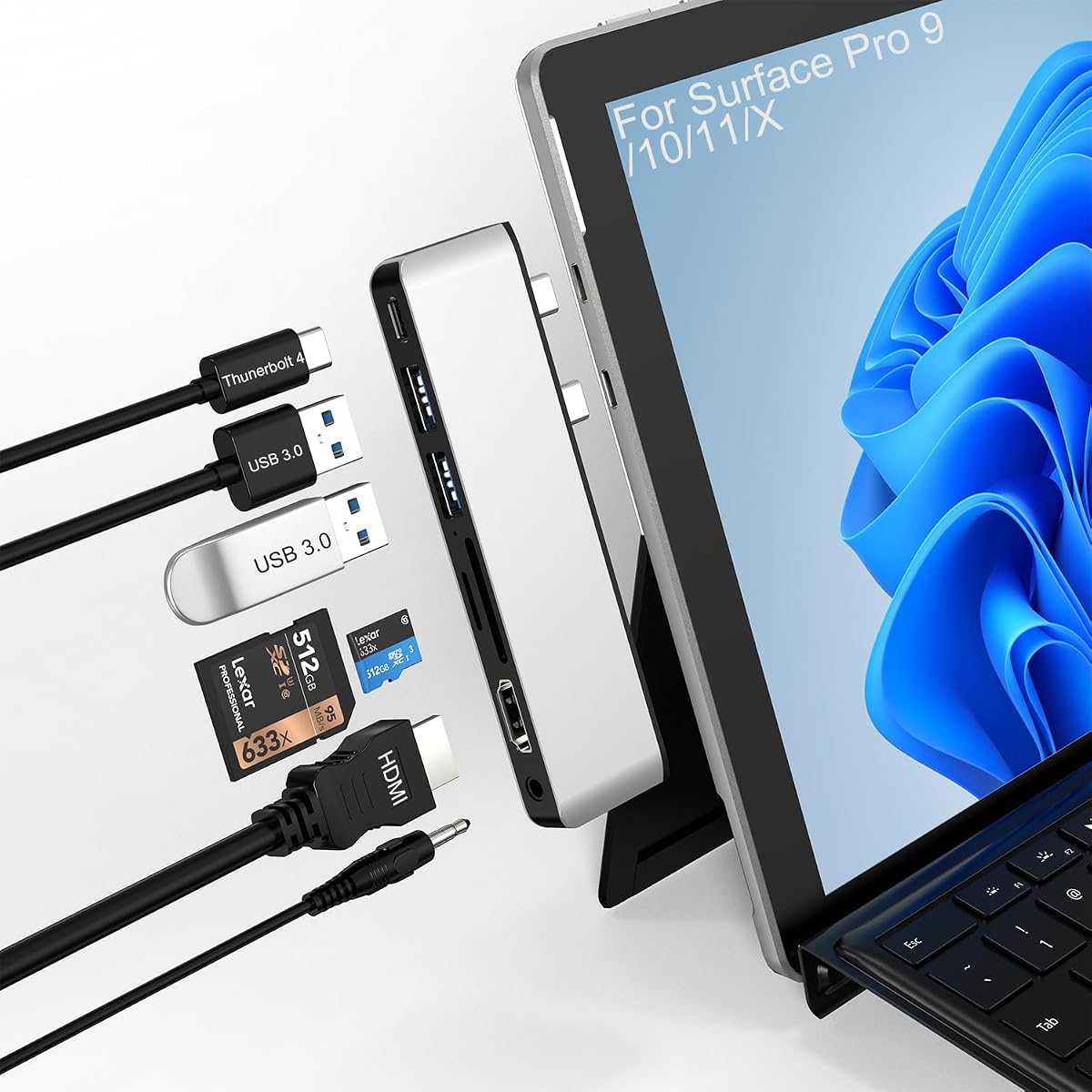
Surface Pro 2026 Docking Station
4.2Editor score
Thunderbolt 4 USB-C port
Compact aluminum design
4K HDMI and audio jack
Compare the top 10 docking stations for Surface Pro 11 featuring triple display support fast charging and USB C connectivity for enhanced productivity.
Finding the right docking station for your Surface Pro 11 is essential for maximizing productivity and expanding connectivity. A high quality dock transforms your tablet into a powerful desktop workstation allowing you to connect multiple monitors peripherals and storage devices seamlessly without cluttering your desk.
We evaluated ten top rated docking stations based on port variety video output capabilities data transfer speeds and build quality. Each product was analyzed for compatibility with the Surface Pro 11 and other Surface devices ensuring you find a reliable solution for home office or mobile professional setups.
This guide highlights the best options available today with detailed reviews and comparison tables to help you choose wisely. Please note that prices and availability may change frequently so we recommend checking the latest details directly on the retailer site before making your final purchase decision.
4.2Editor score
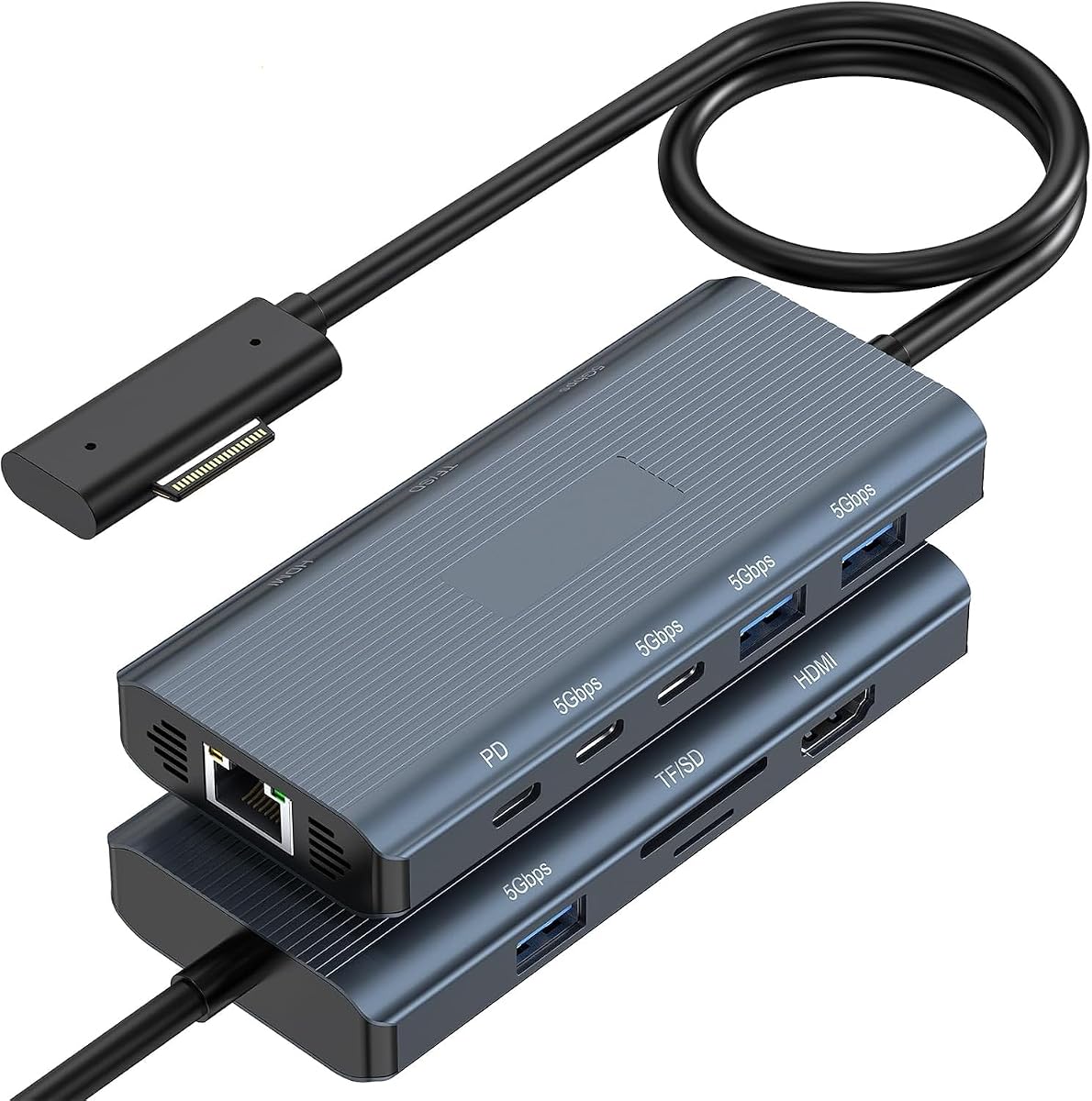
4.8Editor score

4.3Editor score
The following comparison table outlines the key specifications and features of the top ten docking stations available for the Surface Pro 11 allowing you to quickly identify the model that best fits your specific workflow and connectivity needs.



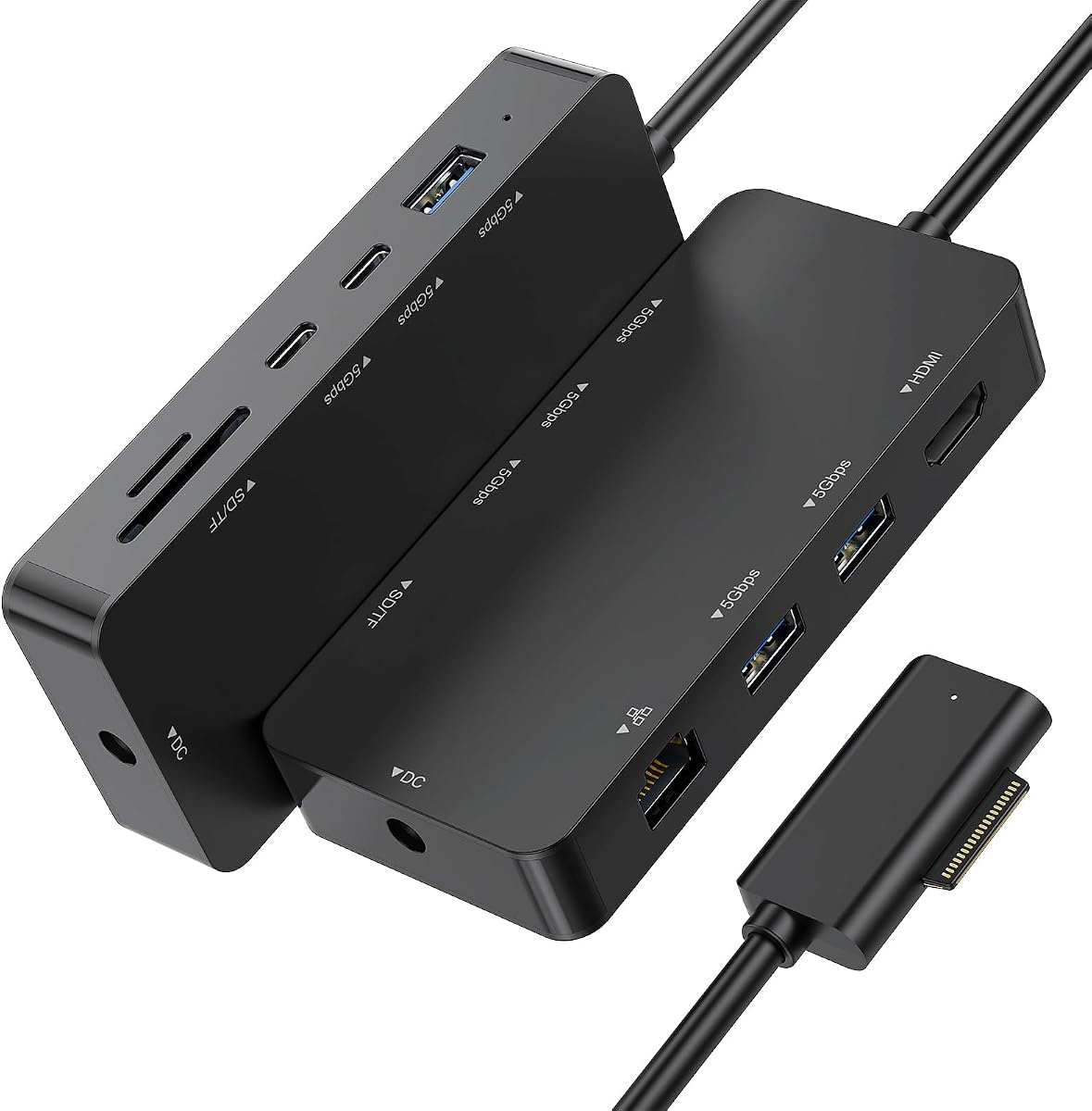
This 11-in-1 docking station stands out as the top choice for Surface Pro 11 users needing robust connectivity. With a 4.8 rating it delivers exceptional performance for both work and entertainment scenarios. Its standout qualities include true 4K at 60Hz HDMI output which ensures smooth visuals without flicker or lag.
We may earn a commission when you buy through this link, at no additional cost to you.
The dock excels in providing a complete desktop replacement experience. It features a dedicated Gigabit Ethernet port which guarantees stable network connections crucial for video calls and large file transfers. Additionally the three USB 3.0 ports and two USB C data ports allow you to connect keyboards mice and external drives simultaneously without bottlenecking bandwidth.
While the device requires an external power adapter which adds to cable clutter it ensures consistent power delivery for all connected devices. This trade-off is acceptable given the reliability and speed benefits it offers over bus powered alternatives that might struggle with multiple high draw peripherals.
Ideal for professionals and hybrid workers this dock transforms your Surface Pro into a full workstation. If you value video quality and network stability this model is the clear recommendation for a long term setup that handles daily multitasking with ease.
The 4K at 60Hz HDMI support allows for crystal clear extended displays perfect for detailed design work or watching high resolution content.
Built-in Gigabit Ethernet ensures you maintain a fast and stable internet connection even in environments with weak Wi-Fi signals.
We may earn a commission when you buy through this link, at no additional cost to you.
This docking station is designed for users who need maximum screen real estate. It allows for triple display setups combining HDMI and VGA outputs. While the rating is slightly lower it remains a viable option for those requiring older monitor connections.
We may earn a commission when you buy through this link, at no additional cost to you.
The device offers a range of connectivity options including USB C and USB A ports for various peripherals. It also includes an SD TF card reader which is useful for photographers and content creators who need quick access to memory cards.
One limitation is the Ethernet port which supports up to 100Mbps rather than Gigabit speeds. This might be a drawback for heavy download users but is sufficient for standard web browsing and streaming needs.
If you need to connect three screens and have a mix of modern and legacy monitors this dock provides the flexibility to do so without complex cabling solutions.
By connecting three external monitors you can significantly boost your workflow efficiency by having more space for applications and documents.
The inclusion of a VGA port allows you to connect older projectors or monitors that do not have HDMI inputs.
We may earn a commission when you buy through this link, at no additional cost to you.
This docking station offers an affordable entry point for Surface Pro 11 users. It features a Thunderbolt 4 port which provides high speed data transfer and power delivery. The aluminum case helps with heat dissipation keeping the device cool during extended use.
We may earn a commission when you buy through this link, at no additional cost to you.
It supports 4K HDMI output allowing for high resolution external displays. The compact design makes it ideal for travel or users with limited desk space. However it is important to note that a protective case on your Surface may interfere with the connection.
While the SD and TF card slots cannot be used at the same time this is a minor inconvenience for most users. The 100W power delivery ensures your Surface stays charged while connected to the dock.
For budget conscious buyers this hub provides essential connectivity features without a high cost. It is a solid choice for students or home office users who need reliable performance at a lower price.
The Thunderbolt 4 port supports up to 40Gbps data transfer ensuring fast file movements and efficient peripheral connections.
Its compact and lightweight design makes it easy to carry in a laptop bag for work or business trips.
We may earn a commission when you buy through this link, at no additional cost to you.
This docking station is engineered to boost multitasking capabilities with support for three external displays. The dual HDMI ports support 4K resolution while the VGA port offers additional connectivity for older monitors. It comes with a 72W power adapter to keep your Surface charged during operation.
We may earn a commission when you buy through this link, at no additional cost to you.
The USB-C ports on this model are for data transfer only which limits their utility for charging or video output. Despite this the five USB 3.0 ports provide ample room for connecting peripherals like printers and hard drives.
SD and TF card slots allow simultaneous access for quick photo transfers. The design is streamlined to reduce desk clutter while maximizing functionality for office work.
If you need multiple screens for coding or data analysis this dock offers the necessary versatility. Just ensure you are comfortable with the limitation on the USB-C ports.
The SD and TF card readers can be accessed at the same time speeds up workflow for photographers handling multiple card types.
The included 72W adapter provides enough power to run connected accessories without draining your Surface battery.
We may earn a commission when you buy through this link, at no additional cost to you.
This model is tailored for professional presentations with features that support seamless connectivity in conference rooms. The dual HDMI and VGA ports allow you to connect multiple projectors or monitors for a robust setup. A 72W power supply ensures all devices stay operational.
We may earn a commission when you buy through this link, at no additional cost to you.
The 3.5mm audio jack provides an easy way to connect external speakers or headphones for clear sound during meetings. Data transfer speeds are high allowing you to move large presentation files quickly between devices.
While the Ethernet speed is limited it remains stable for standard business internet needs. The design is compact and fits well on professional desks without taking up too much space.
If you frequently present to clients or teams this dock provides the reliability needed to ensure your visual aids display correctly. It simplifies your setup process significantly.
The dedicated audio jack lets you connect sound systems directly for better audio quality during video conferences or presentations.
A minimalist design blends seamlessly into modern office environments reducing visual clutter on your desk.
We may earn a commission when you buy through this link, at no additional cost to you.
This premium docking station delivers high end performance for professional workflows. The dual 4K at 60Hz HDMI ports ensure smooth visuals for creative tasks. It includes a 100W DC adapter to keep your Surface charged and connected.
We may earn a commission when you buy through this link, at no additional cost to you.
With support for triple displays it offers exceptional screen real estate for multitasking. The Gigabit Ethernet port ensures your network connection is fast and reliable. USB 3.0 ports provide rapid data transfer for external drives.
The build quality is robust ensuring longevity in demanding environments. While it is larger than some models the features justify the footprint for a desktop setup.
Investors in this dock get a future proof solution that handles high resolution video and heavy data loads. It is the best choice for those who prioritize performance above all.
The 4K at 60Hz HDMI output ensures detailed visuals for graphic design or video editing without motion blur.
The 100W DC input supports high power requirements ensuring your Surface and all accessories run without interruption.
We may earn a commission when you buy through this link, at no additional cost to you.
This mid range docking station offers a balanced feature set for everyday use. The 4K HDMI output supports clear visuals for external monitors. It includes a 65W PD adapter to keep your device charged during work.
We may earn a commission when you buy through this link, at no additional cost to you.
The Gigabit Ethernet port ensures a stable network connection for streaming and conferencing. Multiple USB ports allow you to connect essential peripherals without issues. It is compatible with a wide range of Surface devices.
While it only has one HDMI port it is sufficient for single monitor setups. The design is functional and easy to set up right out of the box.
For users who need reliable connectivity without complex video setups this model is a practical choice. It provides good value for the price.
The 65W Power Delivery adapter ensures your Surface stays powered up while connected to the dock.
Gigabit Ethernet provides a stable high speed connection ideal for video calls and online tasks.
We may earn a commission when you buy through this link, at no additional cost to you.
This 12-in-1 dock is designed for users who need flexibility in different environments. It supports dual HDMI and VGA for extended display setups. The compact form factor makes it easy to carry for business travel.
We may earn a commission when you buy through this link, at no additional cost to you.
With a 72W power input it ensures your Surface stays charged even when connected to multiple monitors. The USB ports support fast data transfer for peripherals. It is compatible with many Surface Laptop and Pro models.
While the Ethernet is not Gigabit it remains reliable for most internet tasks. The included power adapter helps avoid the need to carry multiple chargers.
If you are a frequent traveler who needs multiple screens this dock simplifies your setup. It provides robust connectivity in a portable package.
Its lightweight build allows you to slip it into your bag for work on the go.
Two HDMI ports allow you to connect two modern monitors easily.
We may earn a commission when you buy through this link, at no additional cost to you.
This dock is built for high performance workflows needing maximum power and video output. The 120W adapter supports charging fast while powering connected devices. Triple display support with 4K at 60Hz ensures excellent visuals.
We may earn a commission when you buy through this link, at no additional cost to you.
The inclusion of HDMI DP and Thunderbolt ports offers versatile connection options. Gigabit Ethernet provides stable network connectivity. It is suitable for professional environments requiring reliable connections.
While the power adapter is large it delivers consistent performance for demanding setups. The design allows for multiple high resolution screens which boosts productivity.
If you need to connect multiple 4K displays and require high wattage charging this dock is ideal. It handles complex workloads with ease.
HDMI DP and Thunderbolt ports allow you to mix and match display types for your specific setup needs.
The 120W adapter ensures your device stays powered even when running multiple high resolution displays.
We may earn a commission when you buy through this link, at no additional cost to you.
This docking station features a magnetic Surface Connect cable that ensures a secure and stable connection. The 4K at 60Hz HDMI supports high quality visuals. A 50cm cable allows flexible positioning on your desk.
We may earn a commission when you buy through this link, at no additional cost to you.
Multiple USB C and USB 3.0 ports provide fast data transfer for all your peripherals. SD TF card slots offer convenient access to photos and files. Gigabit Ethernet ensures stable internet connections.
The magnetic connection makes it easy to dock and undock without worrying about ports. The design is modern and fits well with the Surface ecosystem.
For users who value convenience and connection stability this model is a great choice. It simplifies your daily workflow significantly.
The magnetic connector ensures a secure fit and makes attaching the dock quick and easy.
The 50cm magnetic cable allows you to position your dock where it fits best on your desk.
We may earn a commission when you buy through this link, at no additional cost to you.
Choosing the right docking station requires evaluating your specific needs regarding video output connectivity and power requirements to ensure your setup supports your daily workflow efficiently.
When selecting a docking station for your Surface Pro 11 check the supported video output types such as HDMI DisplayPort or VGA. Look for models that support at least 4K resolution at 60Hz to ensure smooth visuals if you plan to connect high resolution monitors. Some docks allow for triple display setups which can significantly boost productivity for multitasking but ensure your device supports external streams properly.
Power Delivery is a critical factor as your dock must provide enough wattage to charge your Surface while connected to peripherals. Most high quality docks offer 65W to 100W PD charging which allows you to leave your original charger at home. Verify if the dock includes a dedicated power adapter because bus powered hubs may struggle to deliver sufficient power for demanding workflows.
Evaluate the types and speeds of USB ports available on the dock. USB 3.0 and USB-C ports supporting data transfer speeds of 5Gbps or more are essential for connecting external hard drives and fast peripherals. Having enough ports for your keyboard mouse and storage devices ensures you do not need additional adapters.
If you require a stable internet connection for video conferencing or large file transfers look for a docking station with a Gigabit Ethernet port. Some models only offer 100Mbps Ethernet which is sufficient for browsing but may not support high speed network tasks. A wired connection is generally more reliable than Wi-Fi for critical work tasks.
Photographers and content creators should check if the dock includes SD or TF card slots. These slots allow you to transfer photos and videos directly from camera memory cards without needing an external reader. Some docks support simultaneous access to multiple card types which can speed up your workflow.
Consider whether you need a portable solution for travel or a fixed setup for your office. Compact aluminum docks often dissipate heat better and are easier to carry. A sturdy build ensures durability especially if you move your dock frequently between locations.
Ensure the dock connects using a compatible interface such as Surface Connect or USB-C. Magnetic connectors offer secure attachment but verify the cable length is suitable for your desk setup. Proper cable management prevents clutter and ensures your device is easily accessible.
To set up your docking station start by connecting the power adapter to the dock and plugging it into a power outlet. Connect your Surface Pro 11 to the dock using the appropriate magnetic or USB-C cable ensuring the connection is secure and aligned correctly.
Once connected attach your external monitors via HDMI or DisplayPort ports and connect any USB peripherals like keyboards or hard drives. Ensure all cables are seated firmly to prevent connection issues and check your display settings to extend or mirror your screen as needed.
To maintain your docking station keep it in a cool and dry environment to prevent overheating. Avoid moving the device while in use and regularly clean the ports with compressed air to remove dust and debris that may affect connectivity.
For triple display support look for docking stations that offer two HDMI ports and one VGA port. Models like the Surface Docking Station Triple Displays are designed specifically to enable three external monitors. Ensure you turn off the Surface screen if connecting three external displays to avoid bandwidth issues.
Yes many premium docking stations support 4K resolution at 60Hz via HDMI or DisplayPort. Check the product specifications to confirm the refresh rate supported for your monitors. This ensures smooth video playback and precise cursor movement for creative work.
Most docking stations require a dedicated power adapter ranging from 65W to 120W. Using the included adapter ensures stable power delivery for your Surface and all connected peripherals. Avoid using a lower wattage adapter as it may result in slow charging or connectivity issues.
Some docking stations allow simultaneous access to SD and TF card slots while others do not. Check the product description or manual to confirm this feature if you frequently switch between different card types. Simultaneous access saves time when managing media files.
Most modern docking stations are compatible with Surface Pro 11 and other recent Surface models including Surface Laptop and Surface Go. Always verify compatibility with your specific device model before purchasing to ensure a proper fit and connection functionality.
Gigabit Ethernet is recommended for stable high speed internet connections especially for streaming and large file transfers. Some budget models offer 100Mbps which is sufficient for basic tasks but Gigabit is better for performance. A wired connection also reduces latency during video calls.
If you experience display issues try unplugging the cables and reconnecting them securely. Ensure your drivers are up to date and check your display settings to enable extended modes. Using high quality cables often resolves connection problems quickly.
Docking stations for Surface Pro are designed primarily for Windows based Surface devices using Surface Connect or USB-C protocols. They may not function with macOS as expected due to driver and connection differences. Always check compatibility details if you plan to switch operating systems.
Choosing the right docking station for your Surface Pro 11 involves balancing your connectivity needs with port performance and budget constraints. The top picks reviewed offer a range of solutions from affordable hubs to high end workstations that support triple displays and fast charging.
Prioritize video output quality and power delivery if you plan to use your Surface for professional tasks. Reliable Ethernet connections and multiple USB ports ensure your peripherals stay connected without interruption. Always consider your specific workflow when selecting a model.
Remember that prices and availability can change so always check the latest details before making a purchase. Investing in a quality dock now will enhance your productivity and extend the versatility of your Surface Pro 11 for years to come.