
ARCTIC P9 PWM PST
4.5Editor score
Wide RPM range
High static pressure
Includes cable splitter
This guide compares the top 92mm case fans for quiet cooling and high performance. We evaluate specs, noise, and value to help you choose the best fan for your
Finding the right cooling solution for your PC is essential for maintaining peak performance. The 92mm case fan category offers a wide range of options designed to fit compact chassis and high-density cooling setups. Whether you are building a small form factor system or replacing an aging unit, selecting the correct fan ensures your hardware stays cool and operates quietly.
To compile this list, we analyzed technical specifications, user feedback, and manufacturer data across leading brands. We focused on airflow capacity, static pressure capabilities, bearing technology, and noise levels. Our goal was to identify fans that deliver reliable performance without compromising on acoustics or durability in demanding thermal environments.
Each pick in this roundup highlights specific strengths such as premium build quality, exceptional value, or specialized design features. You will find detailed breakdowns of what makes each fan stand out. Please note that pricing and availability can fluctuate over time, so check current listings before making your final purchase decision.
4.5Editor score

4.8Editor score

4.8Editor score
Below is a side-by-side comparison of the top 92mm case fans available. This table summarizes key specifications to help you quickly identify which model meets your specific thermal and acoustic needs.


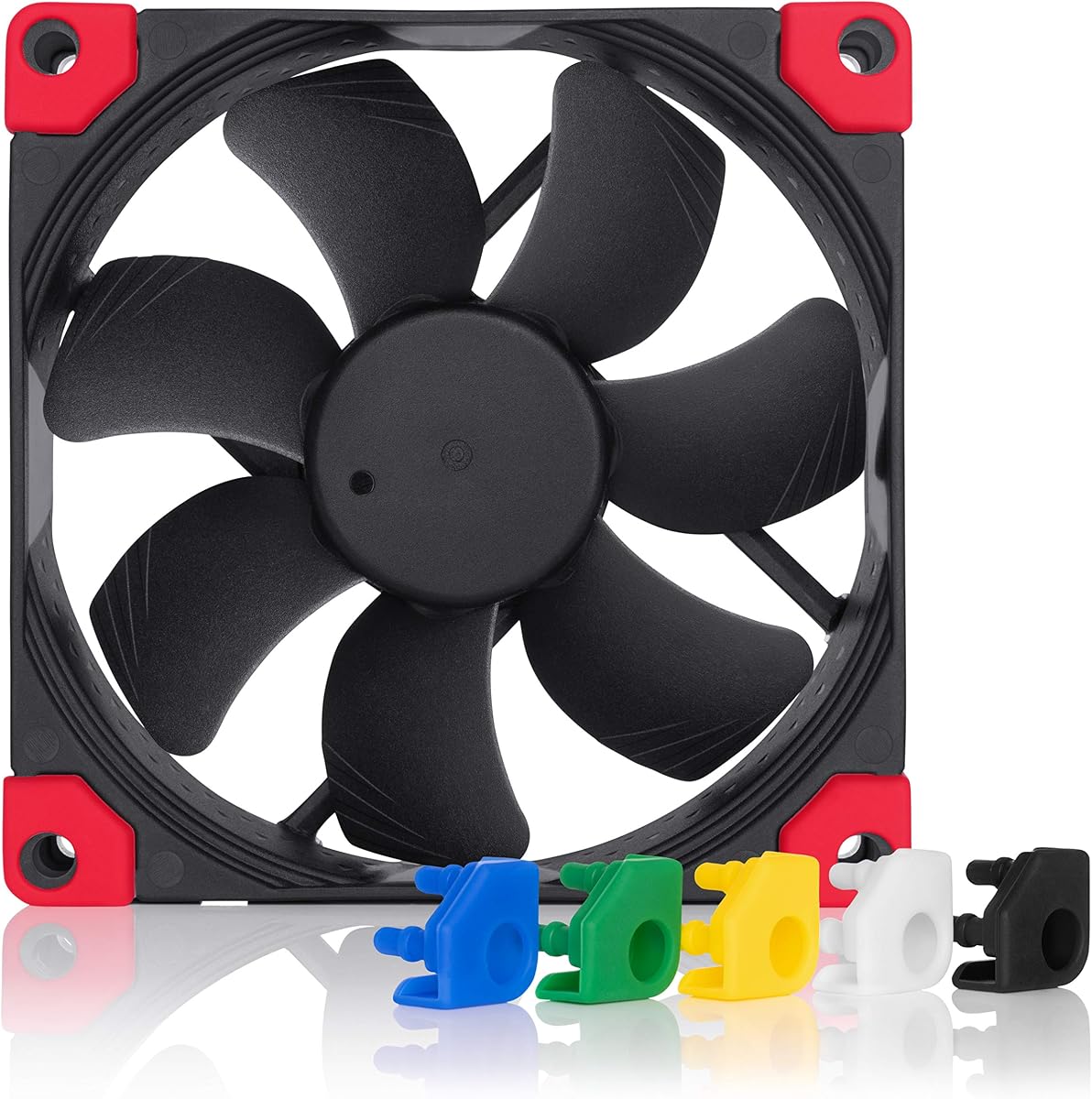


The Noctua NF-A9 PWM stands out as the top choice for anyone seeking premium cooling without sacrificing silence. Boasting a 4.8 rating, this fan is engineered for users who value acoustics as much as thermal performance. Its Flow Acceleration Channels and Advanced Acoustic Optimisation frame work together to reduce turbulence and noise.
We may earn a commission when you buy through this link, at no additional cost to you.
Key strengths include its robust build quality and the inclusion of anti-vibration mounts that further dampen operational sound. The 4-pin PWM interface allows for precise speed control, ensuring the fan runs quietly during light loads and ramps up only when necessary. The included Low-Noise Adaptor offers even more flexibility for silent environments.
While the price point is higher than budget alternatives, the trade-off is justified by the exceptional reliability and quiet operation. The MTTF rating of over 150,000 hours speaks to its durability. Some users may find the signature brown color less appealing than all-black options, but the performance remains unmatched.
This fan is ideal for builders of high-end compact PCs or NAS systems where noise levels matter. If you prioritize a silent and reliable cooling solution, the NF-A9 PWM is the definitive recommendation. It balances performance and silence better than any other option in this category.
The AAO frame and Flow Acceleration Channels minimize noise by optimizing airflow efficiency and reducing turbulence at the blade tips.
With a wide 400-2000rpm range and included Low-Noise Adaptor, you can fine-tune the fan to suit your specific noise tolerance needs.
We may earn a commission when you buy through this link, at no additional cost to you.
For those seeking value without compromising on essential cooling capabilities, the ARCTIC P9 PWM PST is a strong contender. It holds a solid 4.5 rating, reflecting its ability to deliver high performance at an accessible price point. This fan excels in static pressure scenarios, making it suitable for radiators and heat sinks.
We may earn a commission when you buy through this link, at no additional cost to you.
The standout feature is the inclusion of a PWM cable splitter, which simplifies wiring in compact builds. The 4-pin connector allows for infinite speed control between 200 and 3000 RPM. The 0dB Mode is particularly useful for idle states, ensuring the fan stops completely to eliminate background noise.
While it performs admirably, the build quality does not match premium competitors like Noctua. At maximum speeds, noise levels can increase noticeably. However, for budget-conscious builders who need reliable airflow and silence at idle, this fan offers a compelling balance of features and cost.
We recommend this fan for mid-range builds or as an addition to radiators where static pressure is key. Its affordability and included accessories make it a practical choice for cost-effective system cooling. If you need a dependable fan that fits a tight budget, this is a top pick.
The bundle includes a 4-pin socket splitter, allowing you to connect multiple fans to a single motherboard header easily.
Below 5% PWM signal, the fan stands still completely, providing true silence during low-load operations or idle states.
We may earn a commission when you buy through this link, at no additional cost to you.
The Noctua NF-A9x14 HS-PWM chromax.Black.swap represents the pinnacle of low-profile cooling technology. With a 4.8 rating, this fan is specifically designed for tight spaces where standard 25mm fans will not fit. Its 14mm thin design makes it ideal for low-profile CPU coolers and compact ITX cases.
We may earn a commission when you buy through this link, at no additional cost to you.
Key strengths include the premium chromax.black.swap aesthetic which allows for color customization via swappable anti-vibration pads. The HS-PWM version supports semi-passive operation, meaning it stops completely at 0% PWM. This feature ensures silence during light workloads while maintaining high performance when needed.
Because of its slim profile, airflow is naturally lower than 25mm alternatives, which is a trade-off for space savings. However, the build quality and acoustic performance remain excellent. It is a specialized product that solves a specific problem for compact PC builders without compromising on reliability or silence.
This fan is the top choice for enthusiasts building SFF systems with limited clearance. If you need to fit a high-quality fan under a low-profile cooler, this is the definitive solution. Its combination of design flexibility and premium performance justifies its higher price tag.
The chromax.black.swap edition includes self-adhesive anti-vibration pads in six colors, allowing you to match your system's look.
At only 14mm thick, this fan fits in tight clearances where standard fans would interfere with other components or coolers.
We may earn a commission when you buy through this link, at no additional cost to you.
Similar to the chromax version, the standard Noctua NF-A9x14 PWM offers premium performance in a compact form factor. It holds a 4.8 rating due to its consistent delivery of quiet cooling. This fan is designed to fit low-profile CPU coolers without taking up too much internal chassis space.
We may earn a commission when you buy through this link, at no additional cost to you.
Its strengths lie in its robust SSO2 bearing technology and the standard Noctua build quality that ensures longevity. The 14mm design is perfect for SFF builds where every millimeter counts. While it lacks the swappable pads of the chromax edition, it delivers the same acoustic performance.
The main trade-off is the lack of customization options compared to the chromax variant. Additionally, the higher price point compared to generic thin fans can be a barrier. However, if reliability and silent operation are your top priorities, this fan provides a solid foundation for any compact build.
We recommend this fan for builders who prefer a classic look and need a reliable low-profile option. It is excellent for high-end ITX systems where thermal performance and silence are non-negotiable. If you need a standard 14mm fan, this is a top-tier choice.
The SSO2 bearing technology ensures stable performance and quiet operation even at high speeds, extending the fan's lifespan.
Designed specifically for tight spaces, this fan provides high static pressure despite its thin 14mm frame.
We may earn a commission when you buy through this link, at no additional cost to you.
The Thermalright TL-P9 is a budget-friendly option that focuses on silent operation. With a 4.7 rating, it appeals to users who want quiet cooling without spending a premium. It features a noise-reducing 7-blade design and S-FDB bearings that minimize vibration.
We may earn a commission when you buy through this link, at no additional cost to you.
Key strengths include the four soft silicone feet that reduce vibration transmission to the chassis. This helps keep noise levels low even at higher speeds. The automatic speed control via PWM allows it to adjust based on motherboard temperature efficiently.
While it offers great value, the build materials are not as premium as high-end brands. The aesthetics are simple compared to more colorful options. However, for functional cooling that does not disturb your work environment, it offers an excellent performance-to-price ratio.
We recommend this fan for general case cooling or budget builds where silence is a priority. It works well as a replacement for loud stock fans. If you need a quiet, affordable fan, this is a strong candidate.
Four vibration damping pads around the fan reduce friction and noise caused by rotation.
The optimized blade design improves airflow and heat dissipation while keeping noise levels low.
We may earn a commission when you buy through this link, at no additional cost to you.
The ARCTIC P9 Silent is optimized for quiet airflow. It has a 4.6 rating reflecting its ability to balance cooling and silence. Unlike fully variable PWM fans, this model runs at a fixed 1900 RPM. This can provide consistent cooling without aggressive ramping.
We may earn a commission when you buy through this link, at no additional cost to you.
Its strengths include high static pressure for efficient cooling even with resistance. The alloy/lubricant bearing combination reduces friction effectively. The fan is designed to be nearly inaudible at lower speeds, making it suitable for quiet office or home setups.
The trade-off is the fixed speed; while you can control it via voltage, it lacks the full PWM range of other models. Some users may prefer the ability to ramp up to higher speeds for bursts of cooling. However, for stable, low-noise operation, it performs well.
We recommend this fan for setups where consistent quiet cooling is needed. It is ideal for cases with good airflow that just need a little extra help. If you prefer stable operation without complex control, this is a reliable option.
Running at 1900 RPM ensures steady cooling performance without frequent speed fluctuations.
Optimized bearings and blade geometry ensure the fan remains quiet even at maximum operating speed.
We may earn a commission when you buy through this link, at no additional cost to you.
For users who want Noctua performance in a modern all-black design, this chromax version is the perfect choice. It retains the 4.8 rating of its brown counterpart. The fan uses the same A-series technology for superior quiet cooling performance.
We may earn a commission when you buy through this link, at no additional cost to you.
The main advantage is the black design combined with swappable anti-vibration pads. This allows for customization without sacrificing acoustic quality. The fan includes 4 pads of each color, offering flexibility to match any build theme.
While the price is higher than standard options, the aesthetic upgrade justifies it for many enthusiasts. The performance remains identical to the brown version, ensuring top-tier reliability. The semi-passive operation feature stops the fan at idle for silence.
This fan is ideal for modern, black-themed builds where you cannot compromise on cooling. It offers the best of both worlds: premium thermal performance and customizable aesthetics. If you want a black Noctua fan, this is the top choice.
The chromax.black.swap edition features an all-black design to blend seamlessly with modern black PC builds.
You can customize the look of your setup by swapping the included red, white, blue, and green pads.
We may earn a commission when you buy through this link, at no additional cost to you.
The TL-9015B stands out with a slim 15mm design and high RPM capability. It has a 5.0 rating reflecting excellent user satisfaction for its price. The fan provides a balance of thin profile and high speed, which is rare at this budget tier.
We may earn a commission when you buy through this link, at no additional cost to you.
Key strengths include soft silicone feet that reduce vibration. The 2700 RPM maximum speed ensures strong airflow for cooling demanding CPUs. It works well in tight spaces where clearance is limited. The PWM interface allows for automatic speed control based on system load.
The trade-off is the simpler build compared to premium brands. While it is reliable, the plastic quality may not be as robust. However, for the price, it delivers exceptional value. The slim design makes it perfect for compact coolers.
We recommend this fan for budget SFF builds needing thin fans. It is a solid choice for cases with limited space. If you need high speed in a thin frame, this fan is a top pick.
The 15mm thickness allows for installation in cases where standard fans do not fit.
With speeds up to 2700 RPM, it delivers strong cooling power for its compact size.
We may earn a commission when you buy through this link, at no additional cost to you.
The NF-A9 FLX is designed for users who prefer 3-pin connections. It retains the 4.7 rating and premium build quality of Noctua. Instead of PWM, it uses a 3-pin interface with adapters to tune speed settings manually.
We may earn a commission when you buy through this link, at no additional cost to you.
Strengths include the inclusion of Low-Noise and Ultra-Low-Noise Adaptors. These allow you to choose between 1600/1250/1050 RPM. This manual tuning is useful for users who want guaranteed silence without motherboard BIOS control.
The trade-off is the lack of dynamic speed control; you cannot vary speeds automatically with system load. Also, the max speed is lower than PWM versions. However, for static setups requiring silence, this offers a simple and reliable solution.
We recommend this fan for older systems or users who prefer fixed speeds. It is a quiet, reliable choice for simple builds. If you need a 3-pin fan with premium quality, this is the best option.
Use the included adaptors to select from three fixed speed settings tailored for your noise needs.
Compatible with standard 3-pin headers, making it easy to install without specific PWM support.
We may earn a commission when you buy through this link, at no additional cost to you.
The ARCTIC P9 Max is built for raw performance. With a 4.6 rating, it targets users who need maximum airflow. It reaches up to 4300 RPM and provides 58.25 cfm. This is significantly higher than typical case fans.
We may earn a commission when you buy through this link, at no additional cost to you.
Strengths include its high static pressure design and Fluid Dynamic Bearing. This ensures long service life even under extreme speeds. The 0dB Mode allows it to stop completely at idle, balancing performance and silence when possible.
The trade-off is noise at maximum speeds. It is not ideal for quiet setups. However, for high-performance cooling where silence is secondary to heat removal, it is unmatched in this category.
We recommend this fan for heavy-duty cooling or overclocked systems. If you need raw cooling power and can tolerate noise, this is the top choice.
With 4300 RPM, it delivers extreme cooling power for demanding thermal scenarios.
The fan can stop completely at idle to ensure silence during low-load conditions.
We may earn a commission when you buy through this link, at no additional cost to you.
Choosing the right 92mm case fan involves considering size, speed, and noise. This guide explains the key factors to help you make an informed decision for your build.
92mm fans come in standard 25mm thickness or slim variants like 14mm and 15mm. Always check clearance for your case or cooler to ensure a proper fit.
Measure your available space before buying to avoid compatibility issues.
Higher RPM means more airflow but also more noise. Decide whether you prioritize cooling power or silence for your specific needs.
Look for fans with adjustable speeds to balance performance and noise.
Static pressure matters for cooling radiators or heatsinks. Higher pressure ensures airflow moves through restrictive spaces effectively.
Choose high static pressure fans for CPU coolers and radiators.
Bearing quality affects noise and lifespan. Fluid dynamic or SSO2 bearings offer better longevity and quietness than sleeve bearings.
Prioritize quality bearings for long-term reliability.
PWM fans adjust speed based on system load via the motherboard. This ensures silence at idle and cooling under load.
Select 4-pin PWM fans for automatic speed control.
Noise is measured in dB. Lower dB values mean quieter operation. Check reviews for real-world noise performance beyond specs.
Opt for low-decibel fans for silent builds.
Anti-vibration pads reduce mechanical noise. Ensure the fan includes rubber mounts to prevent vibrations from transferring to your case.
Look for included vibration mounts for quieter operation.
A longer warranty period indicates manufacturer confidence. Check if the brand offers reliable support for replacement parts.
Choose brands with strong warranties for peace of mind.
Install the fan with the correct airflow direction. Most fans have arrows on the frame indicating where air flows. Ensure it pushes air into or out of the case as intended.
Use anti-vibration mounts to secure the fan. This reduces noise and protects the fan frame from stress. Always use the included screws or rubber grommets for installation.
Periodically clean dust from the blades and frame. Dust buildup can reduce airflow and increase noise. Use compressed air to keep the fan running smoothly.
A standard 92mm fan with 25mm thickness is best for most coolers. However, slim options are needed for low-profile systems with limited clearance.
Yes, with an adapter. Many PWM fans include a 3-pin adapter to connect to older headers, though speed control may be limited.
Static pressure is the ability to move air against resistance. Higher pressure is better for radiators or dense heatsinks where airflow is restricted.
Colors help match your build aesthetics. Some fans offer swappable pads for customization to fit your preferred theme or case color.
Not always. Higher RPM means more noise. Choose based on your balance between cooling needs and acoustic preferences.
Check the dB(A) rating. Lower values indicate quieter operation. User reviews can also provide real-world insights into noise levels.
Yes, 92mm fans are suitable for case intakes or exhausts, especially in compact builds or as spot cooling for hotspots.
Quality fans often exceed 150,000 hours. Bearings and build quality determine longevity, so choosing reputable brands ensures reliability over time.
In this roundup, we highlighted top performers like the Noctua NF-A9 PWM and ARCTIC P9 PWM PST. Each fan offers unique strengths for different build requirements.
Prioritize silent operation or raw airflow depending on your system needs. Consider dimensions and mounting options before making your final selection.
Prices and availability change frequently, so verify current listings on Amazon before purchasing. Your optimal fan choice depends on your specific thermal and acoustic goals.