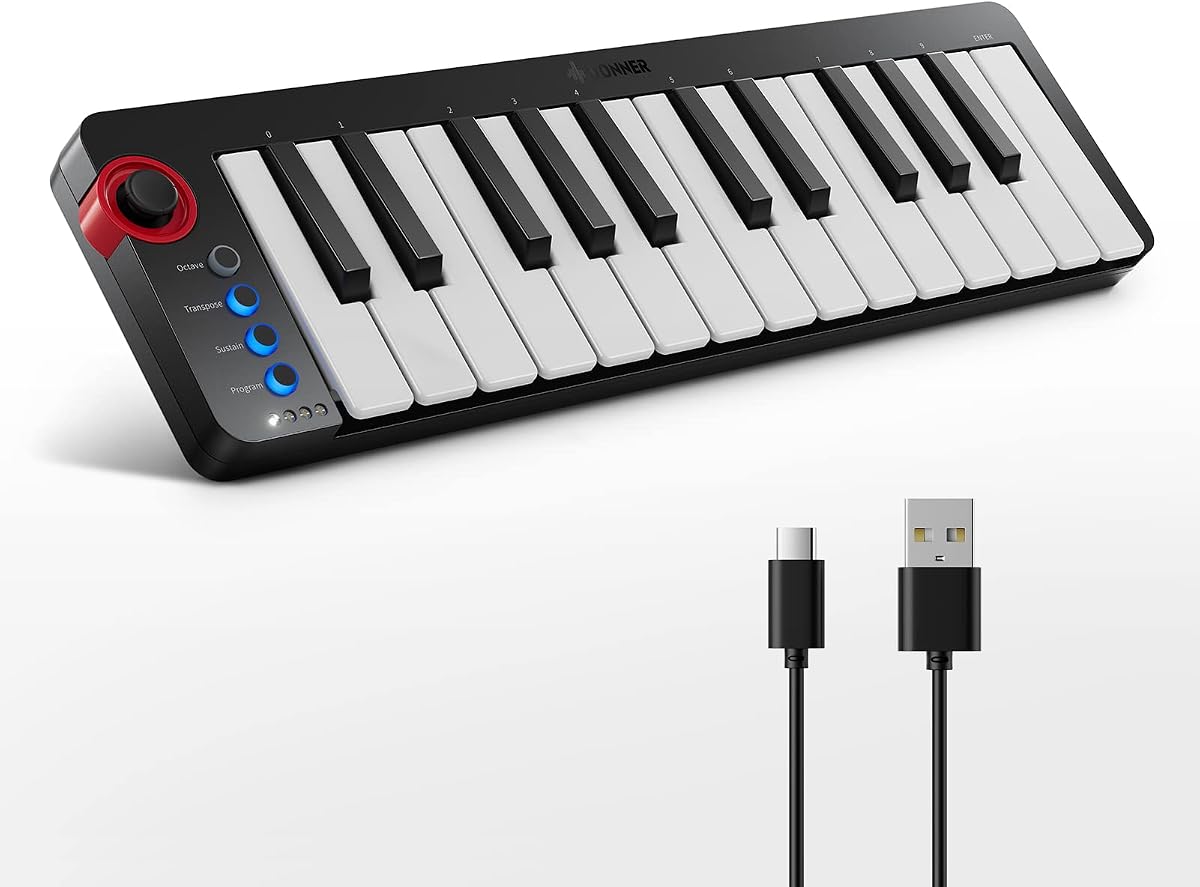
Donner Mini MIDI Keyboard N-25
4.1Editor score
25 velocity-sensitive mini keys
40 teaching courses included
Light-up rocker buttons
This guide compares the top 25 key MIDI controllers for producers and performers in 2026, evaluating features, portability, DAW integration, and value for
Finding the right 25 key MIDI controller can transform your music production workflow significantly. These compact devices offer a perfect balance between portability and functionality, allowing you to play melodies, trigger samples, and control software instruments anywhere. Whether you are a beginner starting your journey or a professional needing a travel companion, choosing the right model matters.
We evaluated ten top-rated models based on key quality, control layout, software bundling, and compatibility with major digital audio workstations. Our analysis focuses on real-world usability, build quality, and the specific features that matter most for songwriting, beat making, and live performance. This list covers options across various price points to suit every budget.
Each pick below highlights specific strengths, trade-offs, and ideal use cases to help you decide quickly. We include detailed specifications, pros, and cons for every model so you can compare them side by side. Please note that prices and availability change frequently, so verify current details before making your final purchase decision.
4.1Editor score

4.7Editor score

4.6Editor score
This table provides a side-by-side overview of all ten controllers, highlighting key specifications like connectivity, control elements, and software bundles to help you compare them efficiently.


The Arturia MiniLab 3 stands out as the top pick for its balanced feature set and high build quality. With a 4.7 rating from users, it delivers a professional experience in a compact form. The controller adapts to your style, making it versatile for both beginners and seasoned producers.
We may earn a commission when you buy through this link, at no additional cost to you.
Its standout quality is the fluid workflow enabled by the four assignable faders and eight drum pads. These controls let you manipulate volume, mute tracks, or trigger samples without reaching for your mouse. The premium velocity-sensitive keys respond accurately to your playing dynamics, enhancing expression significantly.
While it lacks a battery option for untethered use, the USB power makes it reliable for studio setups. The software bundle adds value, providing access to virtual instruments that expand your sonic palette immediately. These trade-offs are acceptable given the overall performance.
You should buy this if you want a controller that grows with your skills. It is perfect for those who prioritize tactile control and seamless DAW integration. This model is a solid investment for serious music creation.
The layout ensures you can focus on creativity rather than navigating menus during sessions.
Premium velocity-sensitive keys provide a natural playing feel that inspires better performances.
We may earn a commission when you buy through this link, at no additional cost to you.
The Donner N-25 is an excellent entry-level option designed for beginners who need guidance. With a 4.1 rating, it offers a straightforward interface that reduces intimidation for new users. Its compact design fits easily on small desks or laptop bags.
We may earn a commission when you buy through this link, at no additional cost to you.
The key strength lies in the included 40 entertaining keyboard-teaching courses. These lessons help you learn arrangement essentials and music theory basics while using the hardware. The light-up buttons provide visual cues, making practice sessions more engaging and less abstract.
However, the build quality is basic compared to higher-end models, and advanced controls like pitch wheels are simple. The limited programmability means it may not suit complex workflows later. These limitations are expected at this price point.
Choose this if you are starting out and want an all-in-one learning tool. It is ideal for students or hobbyists who prioritize ease of use over advanced features. This makes it a great gift for aspiring musicians.
The integrated lessons help novices build confidence without needing external teachers or resources.
Light-up buttons guide your fingers during play, reducing errors and increasing fun.
We may earn a commission when you buy through this link, at no additional cost to you.
The Novation Launchkey Mini 25 MK4 is a powerhouse for producers who need deep control. Its 4.6 rating reflects satisfaction with its premium features and reliability. This controller bridges the gap between portable keyboards and full studio workstations effectively.
We may earn a commission when you buy through this link, at no additional cost to you.
Key strengths include the sixteen FSR pads that support polyphonic aftertouch and step sequencing. You can launch clips, trigger chords, or drum patterns with precision. The Scale Mode ensures you never hit a wrong note, allowing for spontaneous musical exploration.
The higher price and complexity might deter casual users, but it justifies the cost with professional tools. The included software like Ableton Live Lite adds significant value for recording and mixing. These factors make it a long-term investment.
Buy this if you are serious about production and need creative flexibility. It suits those who want to control parameters like volume or filters directly. This model empowers you to craft unique sounds effortlessly.
Scale Mode and chord triggers let you experiment with complex harmonies without music theory knowledge.
The pads and knobs offer tactile access to studio functions, speeding up your workflow.
We may earn a commission when you buy through this link, at no additional cost to you.
The MPK Mini Play MK3 offers unique standalone functionality, allowing you to create without a computer. With a 4.5 rating, users appreciate its versatility as a portable composition tool. It combines keyboard and drum pad features seamlessly for on-the-go use.
We may earn a commission when you buy through this link, at no additional cost to you.
Its standout feature is the built-in speaker and internal sounds, enabling instant playback. You can use batteries or USB power, making it ideal for travel. The OLED display provides clear feedback on settings and selected sounds.
The weight is slightly higher due to internal components, and the speaker is meant for monitoring rather than performance. These trade-offs are necessary for the standalone capability. Most users find the convenience outweighs the size.
Choose this if you want a self-contained music creation station. It is perfect for traveling musicians or those who lack space for a full rig. This device ensures you can make music anywhere.
The internal engine and speaker allow you to record and playback ideas without a PC.
Battery power options let you take your ideas outside the studio effortlessly.
We may earn a commission when you buy through this link, at no additional cost to you.
The MPK Mini MK3 is an industry standard for beat makers and producers. Its 4.6 rating reflects widespread adoption and reliability. The design focuses on workflow efficiency with classic MPC-style pads that many users prefer for drum programming.
We may earn a commission when you buy through this link, at no additional cost to you.
Key strengths include the eight backlit velocity-sensitive pads and the innovative 4-way thumbstick. The thumbstick offers dynamic pitch and modulation control, adding expressiveness. Native Kontrol Standard support allows seamless integration with Native Instruments software.
The mini keys can feel cramped for players with large hands, and the lack of battery limits mobility. However, the software bundle and editor tools provide extensive customization options. These cons are minor given the overall utility.
Buy this if you want a proven tool trusted by professionals. It suits those who value pad responsiveness and NKS features. This model is a safe choice for studio production.
The MPC-style pads deliver a familiar feel for those used to Akai hardware workflows.
The thumbstick and editor allow deep tweaking of parameters for precise sound design.
We may earn a commission when you buy through this link, at no additional cost to you.
The LPK25 prioritizes pure portability above all else. With a 4.7 rating, users love its ability to fit in tight spaces without sacrificing key sensitivity. It is designed as a minimalist tool for melody input.
We may earn a commission when you buy through this link, at no additional cost to you.
Its slim profile ensures it travels easily in laptop bags. The dedicated octave buttons and sustain button offer essential control without clutter. The built-in arpeggiator adds creative potential for generating patterns quickly.
The lack of drum pads and knobs limits its use for performance. You must rely on your software for these controls. However, for simple composition, this simplicity is often preferred.
Choose this if you need a travel companion for inputting notes. It is ideal for laptop users with limited desk space. This model keeps your setup clean and focused.
The minimal design ensures you can create music anywhere without carrying bulk.
Plug-and-play compatibility means no drivers are needed to start producing music immediately.
We may earn a commission when you buy through this link, at no additional cost to you.
The APC Key 25 MK2 is built specifically for Ableton Live users. Its 4.4 rating highlights satisfaction within that ecosystem. The controller transforms your workflow by mapping keys to clips and parameters directly.
We may earn a commission when you buy through this link, at no additional cost to you.
The 5×8 RGB pad matrix is the standout feature for launching clips. The lights provide color feedback, helping you track which clips are active. This visual setup is crucial for live performance and electronic music production.
While excellent for Ableton, its utility decreases with other DAWs. The controls are pre-mapped, reducing customization for other software. Users should ensure they use Ableton before buying.
Buy this if you live in Ableton Live and want seamless control. It suits performers who need quick clip launching. This controller turns your laptop into a live instrument.
Pre-mapped controls mean you can start using it instantly with Ableton Live.
RGB lights on pads help you manage tracks and scenes during a performance visually.
We may earn a commission when you buy through this link, at no additional cost to you.
The M-VAVE controller introduces Bluetooth MIDI support, adding flexibility. With a 4.5 rating, it is popular for its wireless features. This connectivity lets you pair with tablets or phones without cables.
We may earn a commission when you buy through this link, at no additional cost to you.
The 2000 mAh battery supports about sixteen hours of use, extending sessions. The touch strips offer unique pitch bend control. Eight backlit pads enhance visibility during low-light conditions.
Bluetooth can introduce slight latency compared to USB. This may affect tight rhythmic work. Users should test for their needs. However, the battery life compensates for this issue.
Choose this if you need wireless freedom for mobile projects. It is great for iPad producers or those who hate cable clutter. This model offers modern connectivity.
Bluetooth MIDI lets you work without cables, freeing your workspace significantly.
The long-lasting battery ensures you can work through long creative sessions without recharging.
We may earn a commission when you buy through this link, at no additional cost to you.
The Rhymo controller focuses on simplicity and beat making. It offers a 4.1 rating from users seeking value. The USB-C port ensures modern connectivity and efficient charging.
We may earn a commission when you buy through this link, at no additional cost to you.
Key features include a loop function and tap tempo, which are vital for hip-hop production. The sustain pedal jack adds expressiveness. The X-Y joystick provides modulation control.
The build feels lighter than premium units. Some controls may be less durable. However, for beginners or casual users, it offers solid entry-level tools.
Buy this if you need a simple tool for loops and beats. It is ideal for those wanting quick setup without complexity. This model keeps production simple.
Loop and tap tempo features make crafting drum patterns faster and intuitive.
USB-C support aligns with modern devices, making cable management easier.
We may earn a commission when you buy through this link, at no additional cost to you.
The black variant of the MPK Mini MK3 offers the same functionality in a darker finish. With a 4.6 rating, it matches the performance of other versions. It suits studio environments that prefer matte aesthetics.
We may earn a commission when you buy through this link, at no additional cost to you.
It includes eight velocity-sensitive pads and 360-degree knobs for mixing. The NKS support ensures compatibility with Native Instruments. The bundle adds virtual instruments.
Dust shows on the black surface but this does not affect performance. Otherwise, it is identical to the white version. You should choose based on your color preference.
Choose this if you want the proven MPK workflow in black. It suits those who prefer dark equipment. This model offers reliability.
The black finish blends well with dark studio setups and equipment racks.
Identical specs to the white model ensure consistent workflow and control.
We may earn a commission when you buy through this link, at no additional cost to you.
Choosing the right controller requires balancing your specific needs with available features. This section breaks down the critical factors to consider.
Velocity-sensitive keys are essential for expressive playing. Look for semi-weighted or high-quality mini keys that respond to touch. Avoid plastic keys that feel cheap or unresponsive during fast runs.
If you make beats, pads must be responsive. FSR or velocity-sensitive pads provide better control. Ensure they are backlit for visibility. Test them for latency issues.
Check if the controller has pre-mapped controls for your DAW. Some controllers focus heavily on Ableton or Logic. Universal compatibility ensures broader software use without extra mapping.
Consider if you need battery power for travel. USB-only controllers save weight but limit mobility. A slim profile fits better in laptop bags. Evaluate your travel needs carefully.
Many controllers include free software like DAWs or synths. This adds significant value for beginners. Ensure the software is compatible with your system. These inclusions can save money on plugins.
USB-C is becoming standard. Some controllers offer MIDI or or Bluetooth. Ensure it matches your device. Future-proofing your connection is essential for upgrades.
Prices range significantly. Entry-level options lack advanced features but suffice for basics. Higher costs buy better build and customization. Define your budget limits clearly.
Connect your controller to your computer via USB. Ensure it is recognized by your operating system. Most modern systems support class-compliant devices without drivers.
Open your DAW and assign MIDI inputs. If the controller has preset mappings, load the specific script. Otherwise, use MIDI learn to assign knobs and pads manually.
Clean the surface regularly with a dry cloth. Avoid liquids on the keybed. Store it in a safe place to prevent physical damage during transport.
Most 25 key controllers require a computer to function as MIDI inputs. However, standalone models like the MPK Mini Play MK3 have built-in sounds and speakers, allowing you to play and record without a PC.
Mini keys are more compact and can feel crowded for players with large hands. While they take some adjustment, their lightweight nature allows for rapid playing. They are designed to balance portability with playability.
Yes, many 25 key controllers support iOS or Android via USB or Bluetooth. You may need a USB adapter for wired connections. Check the manufacturer's device compatibility before buying.
Most modern 25 key controllers are class-compliant and work plug-and-play without drivers. Some brands like Akai provide specific editors for customization. Always check the specific model's requirements.
These controllers typically work well with all major DAWs like Ableton, FL Studio, and Logic. Some have pre-mapped workflows for specific software. Ensure your DAW supports MIDI input.
Controllers with a sustain jack accept standard 1/4 inch pedals. You can plug it in directly. If your model lacks a jack, you may need a separate MIDI pedal interface.
We have reviewed ten options, from the Arturia MiniLab 3 to the Akai LPK25. Each model offers unique strengths depending on your workflow. Your choice should align with your production goals and DAW usage.
Prioritize key feel and control layout over aesthetic features. If you make beats, ensure high-quality pads. If you prioritize melody, focus on key response. These elements impact your creative output most.
Prices and availability fluctuate. Check current stock before buying. Ensure you verify software compatibility. This will save you time and frustration in your music production journey.