
TP-Link Nano AC600
4.5Editor score
Nano size design
Dual band support
Easy plug and play
Explore our expert comparison of the top 5GHz WiFi dongles for desktop and laptop PCs, evaluating speed, range, and reliability for seamless connectivity.
Finding a reliable 5GHz WiFi dongle can transform your desktop or laptop experience by offering faster speeds and reduced interference compared to older wireless standards.
We compared ten top-rated adapters based on real-world performance, antenna design, compatibility, and user feedback to identify the most trustworthy options available today.
Each pick highlights specific strengths like budget value or high-speed gaming support while noting that prices fluctuate frequently so verify current listings before purchasing.
4.5Editor score

4.4Editor score

4.1Editor score
This table provides a quick overview of the key specifications for each adapter to help you decide which fits your specific networking needs and budget constraints.


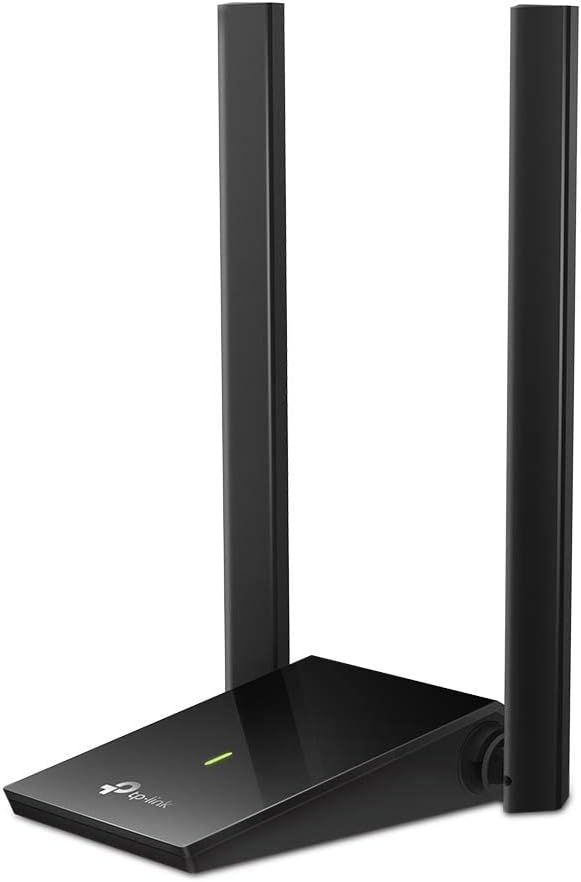


The TP-Link AC1300 USB adapter stands out as a top choice for users needing dependable wireless connectivity without breaking the bank.
We may earn a commission when you buy through this link, at no additional cost to you.
Its AC1300 dual band capability ensures you get up to 867Mbps on the 5GHz band which is ideal for streaming and online tasks.
While it lacks external antennas the MU-MIMO and beamforming features help maintain a stable connection even when your device is far from the router.
This adapter is perfect for desktop owners upgrading from Ethernet or older wireless cards who value speed and ease of use above all else.
The USB 3.0 interface ensures the adapter can handle high throughput speeds without bottlenecks common in older USB 2.0 connections.
Dual band support allows you to switch between 2.4GHz for range and 5GHz for speed depending on your current network load.
We may earn a commission when you buy through this link, at no additional cost to you.
For users seeking a simple and affordable solution the TP-Link Nano AC600 offers essential dual band capabilities in a tiny package.
We may earn a commission when you buy through this link, at no additional cost to you.
Its small size means you can leave it plugged into your laptop or desktop without obstructing other ports or looking bulky.
While it is not the fastest adapter on the market it handles everyday web browsing and streaming tasks with impressive reliability and consistency.
This model is best suited for travelers or casual users who need a spare adapter without spending much money on advanced features.
The miniature design allows you to carry it in a pocket or bag making it perfect for business trips or studying on the go.
Even with lower specs the dual band support helps avoid congestion on crowded 2.4GHz networks in apartments or offices.
We may earn a commission when you buy through this link, at no additional cost to you.
The BrosTrend AX1800 leverages the latest WiFi 6 technology to deliver significantly faster speeds and better efficiency in crowded networks.
We may earn a commission when you buy through this link, at no additional cost to you.
Its dual high gain antennas are designed to push signals through walls and floors ensuring you stay connected even in large homes.
Although it costs more than standard adapters the performance boost for gaming and 4K streaming justifies the investment for power users.
Buy this if you have a modern router and want future-proof connectivity that handles multiple devices simultaneously without slowing down.
WiFi 6 standards ensure your adapter remains relevant as more devices connect to your network and bandwidth demands increase over time.
The external antennas and extension cable let you place the adapter near a window for better reception without moving your computer.
We may earn a commission when you buy through this link, at no additional cost to you.
The TP-Link AC600 USB adapter focuses on range providing a reliable connection for users who are far from their wireless router.
We may earn a commission when you buy through this link, at no additional cost to you.
Its high gain antenna can be rotated to face your router directly optimizing signal strength where it matters most for stability.
While it adheres to older AC600 standards the long range performance makes it a great choice for older PCs needing a wireless upgrade.
Choose this adapter if you struggle with weak signals in bedrooms or offices and need a budget friendly way to extend coverage.
Being able to physically adjust the antenna allows you to tailor the connection to your specific room layout and router placement.
The focus on lag-free connections ensures that even basic tasks like video calls work smoothly without sudden dropouts or delays.
We may earn a commission when you buy through this link, at no additional cost to you.
The Nineplus Wireless USB adapter offers a robust combination of speed and antenna power making it a strong contender for desktop users.
We may earn a commission when you buy through this link, at no additional cost to you.
Its dual 5dBi antennas ensure that signal reception remains strong even in areas with significant interference or physical obstructions.
While it requires a bit of setup for drivers the online support team helps ensure you get up and running quickly without frustration.
This is an excellent pick for those who need a balance of performance and affordability without sacrificing critical features like external antennas.
The dual antenna setup helps capture weak signals more effectively allowing you to use your internet connection in previously dead zones.
Support for Windows 11 ensures that your system can leverage the latest networking standards and security protocols effectively.
We may earn a commission when you buy through this link, at no additional cost to you.
The UGREEN AX900 simplifies the connection process by including built-in drivers that work instantly with modern Windows operating systems.
We may earn a commission when you buy through this link, at no additional cost to you.
It delivers WiFi 6 speeds that are significantly faster than older adapters ensuring your video calls and streams run without interruptions.
While it lacks Mac or Linux support the ease of setup makes it a top choice for Windows users who want immediate connectivity.
Consider this adapter if you value convenience and want to enjoy the benefits of next generation WiFi without dealing with driver files.
The integrated drivers eliminate the need to visit websites or wait for downloads allowing you to get online in under a minute.
Support for WPA3 encryption ensures your data remains protected against modern threats while browsing or transferring sensitive files.
We may earn a commission when you buy through this link, at no additional cost to you.
The Tenda AX900 stands out with its high gain 6dBi antenna which helps capture weak signals more effectively than standard built-in models.
We may earn a commission when you buy through this link, at no additional cost to you.
Its WiFi 6 technology provides a notable speed boost making it suitable for 4K streaming and gaming sessions that demand low latency.
Preloaded drivers make installation fast and straightforward so you can start using your network almost immediately after plugging it in.
This adapter is a great option for users who need strong signal coverage and want the added flexibility of turning their PC into a hotspot.
The external high gain antenna improves your ability to connect to distant routers ensuring stable speeds even when far from the source.
AP mode allows you to share your wired or wireless internet with other devices making it useful for sharing connectivity in a small office.
We may earn a commission when you buy through this link, at no additional cost to you.
The TP-Link AC1300 Dual adapter is specifically designed for desktop PCs offering dual high gain antennas for maximum signal quality.
We may earn a commission when you buy through this link, at no additional cost to you.
Its flexible design allows you to adjust the antennas to face your router directly which helps eliminate dead zones in your home.
While it is larger than portable models the stability and speed it provides make it an excellent choice for fixed office or home setups.
Buy this if you need a powerful connection that supports high bandwidth tasks and you have room on your desk for an external adapter.
The multi-directional antennas let you tweak the orientation to find the sweet spot for the strongest possible signal in your room.
Support for USB 3.0 ensures the adapter can handle the high throughput required for AC1300 speeds without any bottlenecks or slowdowns.
We may earn a commission when you buy through this link, at no additional cost to you.
The UGREEN AX1800 brings top-tier security with WPA3 encryption ensuring your wireless connections are protected against modern hacking attempts.
We may earn a commission when you buy through this link, at no additional cost to you.
It supports high AX1800 speeds which helps reduce latency and improves efficiency when multiple devices are using your network simultaneously.
Built-in ventilation holes prevent overheating during long sessions so performance remains consistent even when streaming or gaming for hours.
This model is ideal for security conscious users who want the latest WiFi features and a reliable desktop connection that stays cool.
WPA3 offers stronger protection against password guessing and data interception making your browsing history safe from prying eyes.
The cooling design ensures the adapter does not throttle performance due to heat keeping your connection stable during heavy usage.
We may earn a commission when you buy through this link, at no additional cost to you.
The BrosTrend AX900 Mini offers a tiny form factor that fits easily into laptops or small form factor desktops without cluttering your workspace.
We may earn a commission when you buy through this link, at no additional cost to you.
Despite its size it supports WiFi 6 technology providing faster speeds and better efficiency than older AC adapters for modern networks.
While it uses USB 2.0 which limits max throughput it is sufficient for most general browsing and streaming needs without needing extra power.
Choose this adapter if portability is your main goal and you want a reliable connection that stays out of the way while working.
The mini size means it won't block adjacent USB ports or stick out awkwardly keeping your setup clean and organized.
Support for OFDMA and MU-MIMO helps manage network traffic better ensuring smoother performance when using multiple apps at once.
We may earn a commission when you buy through this link, at no additional cost to you.
Selecting the right adapter requires understanding your specific needs regarding speed, range, and compatibility to ensure optimal performance.
Modern networks benefit greatly from WiFi 6 adapters which offer faster speeds and better handling of multiple devices compared to older AC standards. Check your current router capabilities to decide if investing in a new WiFi 6 dongle is necessary for your use case.
If you have an older router an AC1300 adapter may provide sufficient speed for streaming and browsing without the need for newer technology.
Adapters with external high gain antennas typically provide better range and signal stability than compact models with built-in antennas. This is especially important if your computer is located far from your router or separated by thick walls.
For smaller rooms or close proximity to the router a nano size adapter without external antennas can save space while still delivering adequate performance.
Using a USB 3.0 port ensures the adapter can handle high data transfer speeds without bottlenecks that often occur with USB 2.0 interfaces. Always check your PC ports to ensure compatibility with the adapter you choose for maximum throughput.
If your desktop only has USB 2.0 ports you may be limited to lower speeds which could impact high bandwidth activities like 4K streaming.
Most modern adapters support Windows 10 and 11 but compatibility with macOS or Linux varies significantly between brands and models. Verify the driver support for your specific operating system before purchasing to avoid setup issues.
Some models like the TP-Link Nano offer broader support including Mac which makes them a safer choice if you use multiple types of devices.
Look for adapters that support WPA3 encryption to ensure your connection is protected against the latest security threats and vulnerabilities. This is particularly important for users who handle sensitive data or work from home regularly.
Even older adapters support WPA2 but upgrading to WPA3 ensures your network remains secure as threats evolve over time.
Adapters with built-in drivers or plug and play support simplify the installation process saving you time and technical frustration. This feature is ideal for users who want to get online quickly without downloading files from websites.
Check if the product includes a physical driver disc or a dedicated app for setup to streamline the process for your specific operating system.
Nano adapters are excellent for travelers and those with limited desk space but they may sacrifice range compared to models with external antennas. Consider how often you move your device and whether you need maximum signal strength.
A balance can be found in compact desktop models that offer high gain antennas without taking up too much room near your computer.
Prices for 5GHz dongles vary widely so determine how much you are willing to spend based on your specific speed and range requirements. Higher prices often reflect better build quality and advanced features like WiFi 6 support.
Entry level models provide solid performance for basic needs so you do not need to overspend unless you have demanding gaming or streaming usage.
To install your new adapter simply plug it into an available USB 3.0 port if possible and wait for your system to recognize it automatically.
Ensure you download the latest drivers from the manufacturer website if your operating system does not find them immediately for best performance.
Keep the adapter clean by occasionally wiping dust off the metal contacts and ensure it has enough ventilation to prevent overheating during heavy use.
Yes a 5GHz adapter reduces latency and interference significantly compared to older 2.4GHz bands. This leads to smoother online gaming with fewer lag spikes and dropped packets during critical moments.
You can use it but you will not get the full speed benefits unless your router also supports 5GHz. It is better to upgrade both the router and dongle for optimal performance.
Many modern adapters include built-in drivers that work instantly with Windows 11 but some may still require a download. Always check the product specifications before buying to confirm driver support.
AX1800 adapters use WiFi 6 technology which provides faster speeds and better efficiency in crowded networks. AC1300 adapters use the older WiFi 5 standard which is still good but less advanced.
Yes most adapters are compact enough to plug into laptops directly but be careful they do not block other USB ports. Nano models are specifically designed for portable use on laptops.
You can reset the adapter by unplugging it and plugging it back into a different USB port. If issues persist check the manufacturer website for driver updates or support guides.
If you have a WiFi 6 router and stream or game frequently it is worth the investment for better speed and reliability. For basic browsing older AC adapters are usually sufficient.
Weak signals often result from physical obstructions or router distance. Try positioning your adapter closer to the window or use a USB extension cable to find a better spot.
We identified ten strong options ranging from budget friendly models to high end WiFi 6 adapters to suit various user needs and technical requirements.
Prioritize speed and range if you game or stream heavily while focusing on compact size and ease of use for general daily tasks and portability.
Verify current prices and stock availability since these details can change quickly so you can secure the best deal when you are ready to buy.