
Thermalright TL-B6B
4.6Editor score
Low cost option
Silent operation
Good airflow
Discover the top 60mm cooling fans for 2026. Our expert guide compares performance, noise, and reliability to help you find the ideal airflow solution.
Finding the right cooling solution for small enclosures often comes down to selecting a high-quality 60mm cooling fan. These compact units are essential for maintaining optimal temperatures in network gear, 3D printers, and custom PC builds. Choosing the correct model ensures longevity and quiet operation.
We evaluated ten leading models based on airflow efficiency, noise levels, bearing technology, and build quality. Each product was analyzed for its specific use case, whether it requires PWM control or operates on direct AC voltage. This list covers the best options available right now.
Every pick below highlights key strengths and real-world performance metrics to guide your decision. Note that availability and pricing can shift frequently due to market demand and seasonal promotions. Always verify the latest details before making your final purchase decision online.
4.6Editor score

4.8Editor score
4.9Editor score
This side-by-side comparison details the core specifications of every selected model to help you quickly identify the best fit for your specific cooling requirements.


The Noctua NF-A6x25 PWM stands out as the premier choice for users needing reliable 60mm cooling. With a rating near perfection, this fan delivers exceptional performance while maintaining near-silent operation even under load.
We may earn a commission when you buy through this link, at no additional cost to you.
Its Flow Acceleration Channels and Advanced Acoustic Optimisation frame reduce noise significantly. The 4-pin PWM interface allows precise speed control via motherboard headers, ensuring efficient thermal management without unnecessary noise pollution in your workspace.
While it costs more than generic alternatives, the included anti-vibration mounts and Low-Noise Adaptor justify the investment. The long lifespan guarantees consistent performance over years of continuous operation in critical environments like NAS units or 3D printers.
Buyers seeking top-tier cooling for sensitive electronics should prioritize this model. It balances airflow and silence better than any other 60mm unit available today, making it the definitive choice for professional and hobbyist applications alike.
The advanced frame design minimizes vibration and turbulence, resulting in a smoother and quieter airflow experience.
Automatic speed adjustment adapts cooling to real-time temperature needs, optimizing power usage and noise levels.
We may earn a commission when you buy through this link, at no additional cost to you.
The NF-A6x25 FLX offers similar acoustic benefits to the PWM version but targets systems with 3-pin headers. It maintains Noctua's reputation for quiet cooling while providing manual speed reduction options for ultra-quiet environments.
We may earn a commission when you buy through this link, at no additional cost to you.
With three distinct speed settings adjustable via Low-Noise Adaptors, users can tune performance for maximum airflow or near-silent operation. This flexibility makes it ideal for legacy hardware or simpler power setups lacking PWM support.
Though it lacks automatic speed adjustment, the included adaptors allow physical tuning of RPM to suit specific needs. The anti-vibration mounts ensure stable mounting even at lower speeds where resonance might otherwise become an issue.
Recommend this for users with older motherboards or power supplies. It delivers the same high-quality construction as the PWM model while ensuring compatibility with a broader range of standard fan headers available in the market.
Adjustable speed settings via adaptors let you customize noise and airflow without complex wiring.
Designed for 3-pin Molex connections, expanding its utility beyond modern PWM-only systems.
We may earn a commission when you buy through this link, at no additional cost to you.
This EC AC axial fan is perfect for projects requiring direct AC power without DC conversion. Its brushless design offers high efficiency and a robust lifespan ideal for continuous industrial or DIY ventilation tasks.
We may earn a commission when you buy through this link, at no additional cost to you.
Rated for 4800 RPM and delivering 24.8 CFM of airflow, it provides strong cooling power despite its small footprint. The dual ball bearings support long-term reliability whether mounted vertically or horizontally in tight enclosures.
Note that the wiring requires manual assembly as the plug is separate from the fan. This allows for customized cable lengths and integration into existing custom circuits without restrictive pre-made connectors.
Buyers needing reliable AC ventilation for cabinets or small appliances will find this model effective. Just ensure you have the technical skill to connect the wires properly for safe and efficient operation.
EC technology consumes less power than standard AC fans while delivering superior airflow performance.
Dual ball bearings allow flexible orientation without compromising bearing life or stability.
We may earn a commission when you buy through this link, at no additional cost to you.
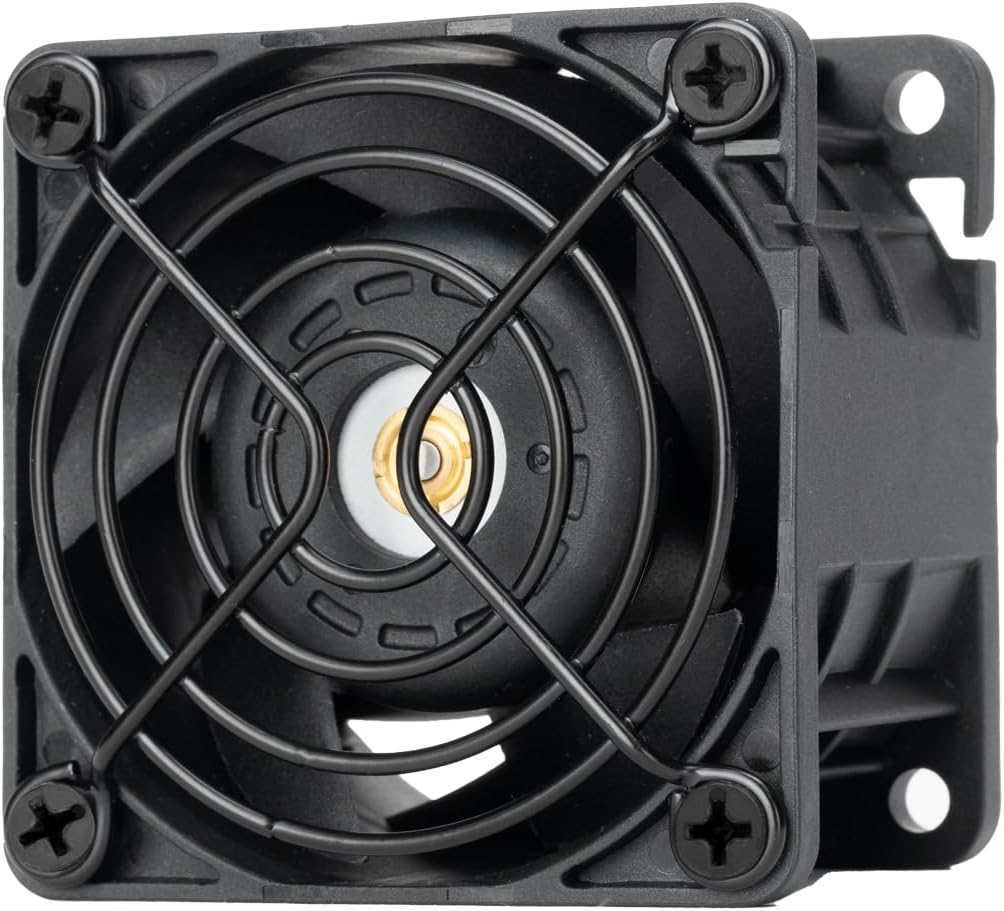
The Thermalright TL-B6B proves that excellent cooling does not require a premium price tag. It offers silent operation with a low noise level making it suitable for quiet office PCs or home theater systems.
We may earn a commission when you buy through this link, at no additional cost to you.
The S-FDB V2 bearing technology prevents shaking during operation and extends service life significantly. With 7 optimized blades, it moves air efficiently to prevent overheating without creating disruptive noise levels for users.
Double-sided silicone pads help dampen vibration during installation. While the screw holes are not threaded requiring some force to secure, the included hardware ensures a stable fit within most standard computer chassis setups.
Recommend this for budget-conscious builders needing reliable case cooling. It balances cost and performance effectively, providing quiet air movement that protects sensitive components without straining your wallet or budget constraints.
Silicone pads and optimized blades minimize noise for a serene computing experience.
High-quality bearing technology ensures long-lasting performance at a fraction of the cost.
We may earn a commission when you buy through this link, at no additional cost to you.
Buying two fans in one package offers great value for projects requiring multiple cooling points. These slim 15mm units fit into shallow spaces where thicker fans simply cannot physically fit inside the enclosure.
We may earn a commission when you buy through this link, at no additional cost to you.
Each fan runs at 4000 RPM delivering decent airflow for such a compact size. The dual ball bearings support reliable operation even in environments where dust or humidity might be present over long periods.
The 2-pin connector is standard but may require extension cables for some setups. However, having two units available means you can cool multiple zones simultaneously without purchasing separate components individually.
Ideal for 3D printer cooling or small cabinet ventilation where space is limited. The low profile design allows installation in tight gaps while still moving sufficient air to manage heat effectively.
The slim 15mm thickness allows installation in tight spaces where standard fans won't fit.
Getting two units ensures redundancy or multi-zone cooling at a lower unit price.
We may earn a commission when you buy through this link, at no additional cost to you.
This pack of three fans provides excellent quantity for builders needing to cool multiple components at once. Each unit is lightweight and compact, designed specifically for applications like 3D printer extruder cooling.
We may earn a commission when you buy through this link, at no additional cost to you.
Operating at 3600 RPM, these fans offer solid airflow for their tiny size. They are best suited for light-duty tasks where extreme durability is not the primary concern compared to airflow volume needed.
The plastic construction keeps weight down which is crucial for moving parts on a 3D printer. However, sleeve bearings may not last as long as ball bearings in harsh industrial environments or harsh conditions.
Buy this for budget projects needing multiple small fans. It offers the best price per unit, making it ideal for large projects where you need several cooling units without breaking the bank.
Lightweight design suits moving heads on 3D printers without adding unnecessary mass or stress.
Three units for a single price makes this an economical bulk option for large scale projects.
We may earn a commission when you buy through this link, at no additional cost to you.
This kit offers two reliable fans that work on standard household voltage making them versatile for indoor ventilation. They are built for small space air exchange in devices like modems or small project enclosures.
We may earn a commission when you buy through this link, at no additional cost to you.
With speeds reaching 4800 RPM and dual ball bearings, these fans deliver consistent high airflow. The wide voltage range means you can use them globally without needing special power adapters for different regions.
Installation requires basic wiring skills as the power plug is separate. This modular design allows you to customize the connection length or type to fit specific enclosure mounting or space requirements perfectly.
Best for DIY ventilation projects needing two units. The high performance and dual ball bearings ensure long service life while keeping your projects cool and well-ventilated over extended periods of operation.
Works with 110V to 240V AC ensuring global compatibility for international projects and travelers.
Two high-performance fans provide backup or double coverage for larger or redundant setups.
We may earn a commission when you buy through this link, at no additional cost to you.
This ultra-slim fan offers the same legendary Noctua quality in a 15mm form factor perfect for tight spaces. It maintains high performance while keeping noise levels extremely low even at top speeds.
We may earn a commission when you buy through this link, at no additional cost to you.
With a maximum speed of 3500 RPM and PWM control, it adapts smoothly to thermal demands. The Flow Acceleration Channels ensure smooth air movement that reduces turbulence and acoustic noise effectively.
Ideal for small PCs or electronics where vertical space is strictly limited. It fits where standard 25mm fans cannot go while still delivering reliable cooling for sensitive components without noise issues.
Buy this when space is your primary constraint. It provides premium reliability and quiet operation in a compact package ensuring your build remains cool and silent regardless of tight internal clearances.
The 15mm thickness allows installation in shallow enclosures where standard fans fail to fit.
PWM support ensures efficient speed adjustment without manual intervention or external switches.
We may earn a commission when you buy through this link, at no additional cost to you.
This industrial fan delivers unmatched performance for high-performance server or workstation cooling. With speeds reaching 15000 RPM, it offers aggressive airflow that standard consumer fans cannot match in small 60mm packages.
We may earn a commission when you buy through this link, at no additional cost to you.
The thick 38mm frame and dual ball bearings support the extreme mechanical stress of high rotation speeds. A metal fan grille protects blades from damage, making it suitable for rugged environments with potential debris.
Note that maximum speed generates significant noise. Use PWM control to manage RPM levels based on actual cooling needs to avoid constant high-noise operation in residential or quiet office spaces.
Buy this for industrial applications needing extreme cooling. It provides exceptional heat dissipation for powerful electronics where silence is secondary to raw cooling power and mechanical durability.
Massive airflow ensures rapid heat dissipation even for heavily loaded CPUs or GPUs in servers.
Included metal grille prevents accidental blade contact and adds to the industrial durability.
We may earn a commission when you buy through this link, at no additional cost to you.
This specialized fan operates on 5V making it perfect for USB-powered or low-voltage applications. It brings Noctua's quiet engineering to systems that cannot supply standard 12V power safely.
We may earn a commission when you buy through this link, at no additional cost to you.
It includes an OmniJoin adaptor set for connection to proprietary headers allowing versatile integration. Polarity protection ensures safe operation even if connected incorrectly, reducing risk of damage to components.
Ideal for routers, switches, or small storage devices running on 5V rails. It delivers the same quiet performance as the 12V version but matches the specific electrical requirements of modern low-power electronics.
Choose this for low-voltage cooling needs. It ensures compatibility where other fans would fail, maintaining efficient airflow without overloading your power supply or risking electrical compatibility issues.
Specifically tuned for 5V rails ensuring safety and performance in low-power network gear.
Includes adaptors for custom connection types common in specialized network and storage hardware.
We may earn a commission when you buy through this link, at no additional cost to you.
Selecting the right fan requires understanding voltage, control, and airflow needs. This guide covers the key factors to ensure optimal performance and longevity.
Fans operate on 5V, 12V, or AC voltage. Verify your power source matches the fan rating to prevent damage. Most PC and network gear use 12V DC. Industrial or household projects often use 110V or 220V AC.
Always check the voltage label before purchasing to ensure electrical compatibility with your system's power supply.
PWM fans allow automatic speed control via motherboard headers while fixed speed fans run at constant RPM. PWM is ideal for dynamic thermal management. Fixed speed is better for simple constant airflow needs without control complexity.
Choose PWM if you need smart speed adjustment. Choose fixed speed for simpler setups without automatic control requirements.
Sleeve bearings are cheaper but wear faster especially in vertical positions. Ball bearings last longer and support varied mounting angles. Fluid dynamic bearings offer the best balance of life and performance for continuous use.
Prefer ball or fluid dynamic bearings for high reliability. Sleeve bearings suit temporary or light usage applications.
Standard 60mm fans are 25mm thick but 15mm and 38mm options exist. Thinner fans fit in tight spaces but move less air. Thicker fans push more air but require deeper mounting space inside the enclosure.
Measure your available depth carefully. Select thickness based on your physical clearance and required cooling performance.
Noise is measured in dBA. Lower values mean quieter operation. High speed fans often produce more noise. Acoustic optimization features help reduce noise without sacrificing airflow performance in premium models.
Check the max dBA rating if noise matters. Balance speed and quietness based on your environment.
Fans use 2-pin, 3-pin, or 4-pin connectors. 4-pin allows PWM control. 3-pin is common for basic fans. 2-pin is used for low-cost models. Ensure your header supports the fan's connector or use an adapter.
Match the connector to your header type. Adapters are available if pin counts differ slightly.
CFM indicates how much air moves per minute. Higher CFM means better cooling but often higher noise. Match airflow to your component heat output. High heat needs high CFM. Standard electronics need moderate airflow.
Prioritize high CFM for hot components. Lower CFM suffices for cooling low-power devices or ventilation.
Premium brands offer longer warranties and better materials. Check for MTTF ratings indicating expected lifespan. Quality mounts and blades reduce vibration. Longer warranties ensure better protection against manufacturing defects.
Invest in quality for critical systems. Look for warranties and MTTF ratings when comparing brands.
Mount the fan securely using the provided screws or vibration pads. Ensure airflow direction is correct as indicated by arrows on the frame. Incorrect orientation blocks cooling rather than enhancing heat dissipation.
Clean the blades and frame regularly using compressed air to remove dust. Dust accumulation reduces airflow and increases noise levels significantly over time. Do this every few months for continuous operation.
Monitor operating noise and vibration levels during use. Sudden changes may indicate bearing wear or mechanical obstruction. Replacing worn fans promptly prevents overheating and protects connected equipment from damage.
Most 60mm fans for electronics use 12V DC. Some specialized models use 5V DC for USB-powered gear. Industrial fans often use 110V or 220V AC directly from mains power. Always check the label before connecting power.
Look for arrows printed on the fan frame or side panel. One arrow points the direction of airflow. Another shows the blade rotation. The air usually blows from the side with the plastic frame to the side with the motor hub.
No it will run very slowly or not start at all. A 12V fan needs 12V power. If you have only 5V available use a fan designed specifically for 5V like Noctua's 5V models to avoid performance issues.
Yes especially if you want automatic speed control. PWM fans adjust speed based on temperature reducing noise when cooling is not critical. This saves power and keeps environments quieter compared to constant speed fans.
It is thickness. 25mm fans are standard. 15mm fans are thinner to fit tight spaces. Thinner fans move less air but fit where others cannot. Choose based on your available mounting depth inside the enclosure.
Use anti-vibration mounts to reduce shaking noise. Lower the RPM if using PWM. Clean dust from blades regularly. Consider high-quality fans designed for acoustic performance like those from premium brands for quieter operation.
The Noctua NF-A6x25 PWM stands out as the overall winner for its balanced performance and quiet operation. For budget options the Thermalright TL-B6B delivers reliable cooling at a lower price point.
Prioritize voltage compatibility and bearing type to ensure long-term reliability. Match the fan dimensions to your enclosure space and consider PWM for intelligent thermal control.
Remember that prices fluctuate so verify current availability before purchase. The right choice ensures your equipment runs cool and efficient for years of reliable daily operation.