
ASUS ProArt PA32QCV
3.9Editor score
6K DCI-P3 Display
Thunderbolt 4 Connectivity
Factory Calibrated Accuracy
Compare the top 6K monitors for professionals and creators. This guide reviews resolution, color accuracy, and connectivity to help you choose the right
Finding the right high-resolution display is crucial for modern creative work. A 6K monitor offers exceptional clarity and screen real estate for professionals who need precision in their daily tasks and projects.
We have evaluated ten leading models based on panel quality, color accuracy, connectivity options, and overall value. Our analysis focuses on features that matter most to designers, editors, and power users seeking top-tier performance.
Each pick highlights specific strengths and ideal use cases to simplify your decision. Please note that pricing and availability can fluctuate frequently, so check current listings before making your final purchase decision today.
3.9Editor score

4.6Editor score

4.5Editor score
This side-by-side comparison highlights key specifications across all ten models to help you identify the best fit for your workspace needs and budget constraints.




The ASUS ProArt PA32QCV stands out as an accessible entry point into the 6K monitor category. With a strong focus on color accuracy and professional workflows, it delivers reliable performance for creatives who need precision without breaking the bank.
We may earn a commission when you buy through this link, at no additional cost to you.
Its factory calibration ensures Delta E values under two, making it suitable for print and digital media work right away. The inclusion of dual Thunderbolt 4 ports allows for versatile connection setups including daisy chaining to expand your workspace efficiently.
While it lacks some advanced HDR features found in premium models, its consistent color reproduction and ergonomic design make up for these trade-offs. Users appreciate the ability to switch between devices seamlessly via the built-in KVM switch.
This monitor is ideal for Mac users and professionals seeking a reliable workhorse. If you prioritize color fidelity and connectivity over gaming features, this model offers compelling value in the crowded high-resolution display market today.
Calman Verified calibration ensures consistent color performance across your workflow.
Thunderbolt 4 ports support high power delivery and daisy chaining for efficient setups.
We may earn a commission when you buy through this link, at no additional cost to you.
Dell delivers an expansive experience with this 52-inch curved monitor designed for immersive productivity. The wide aspect ratio and high pixel density provide exceptional detail for multitasking and content creation tasks requiring broad visual space.
We may earn a commission when you buy through this link, at no additional cost to you.
Its IPS Black panel technology enhances contrast significantly compared to standard IPS screens, resulting in deeper blacks and more vivid colors. The 120Hz refresh rate adds fluidity to scrolling and motion, benefiting both video editing and general use.
Eye comfort features like hardware low blue light and ambient light sensors make long sessions more manageable. However, the physical size demands a spacious desk and careful cable management to maintain a clean workspace environment.
Ideal for power users who need maximum screen space, this monitor bridges the gap between professional workstation and cinematic experience. It serves well for architects, editors, and multitaskers seeking premium visual fidelity and comfort.
The 52-inch curved design wraps around your vision for enhanced focus and depth.
TÜV certified features reduce strain during extended work hours automatically.
We may earn a commission when you buy through this link, at no additional cost to you.
The G32P earns its top rating through a combination of sharp visuals and robust connectivity. Its high pixel density ensures text and graphics appear incredibly crisp, making it a favorite for developers and designers who demand fine detail.
We may earn a commission when you buy through this link, at no additional cost to you.
Color accuracy is a standout feature with 99 percent DCI-P3 coverage and Delta E under two, ensuring visuals match professional standards. The aluminum honeycomb build adds durability while keeping the aesthetic sleek and premium for modern offices.
While the glossy finish might show reflections in bright rooms, it enhances contrast and vibrancy in controlled environments. The 100W power delivery simplifies laptop connections, reducing cable clutter on your desk significantly.
This monitor is perfect for creators who want reliability and visual excellence without overspending on ultra-premium brands. Its balance of performance, design, and practical features makes it a versatile choice for diverse workflows.
223 pixels per inch deliver ultra-sharp text and image detail for precision work.
CNC-machined aluminum body ensures longevity and a sophisticated desk appearance.
We may earn a commission when you buy through this link, at no additional cost to you.
Samsung breaks new ground by introducing the first 6K gaming monitor designed for next-level gameplay and visual fidelity. The Dual Mode feature allows users to switch between high resolution and high refresh rates based on their immediate needs.
We may earn a commission when you buy through this link, at no additional cost to you.
Its Fast IPS panel ensures quick response times and vibrant colors across wide viewing angles, making it suitable for fast-paced competitive gaming. NVIDIA G-SYNC compatibility further smooths out gameplay by eliminating screen tearing and stuttering effectively.
However, the emphasis on gaming performance means some creative features may take a backseat compared to dedicated work monitors. Users seeking pure productivity might find the gaming-centric design less optimal for daily office tasks.
For gamers who also need high resolution for media consumption or light editing, this is a versatile choice. It balances speed and detail uniquely in a market often separated into distinct gaming and professional categories.
Switch between 6K visuals and 3K speeds instantly to match your activity.
Adaptive sync technologies ensure fluid motion during intense gameplay sessions.
We may earn a commission when you buy through this link, at no additional cost to you.
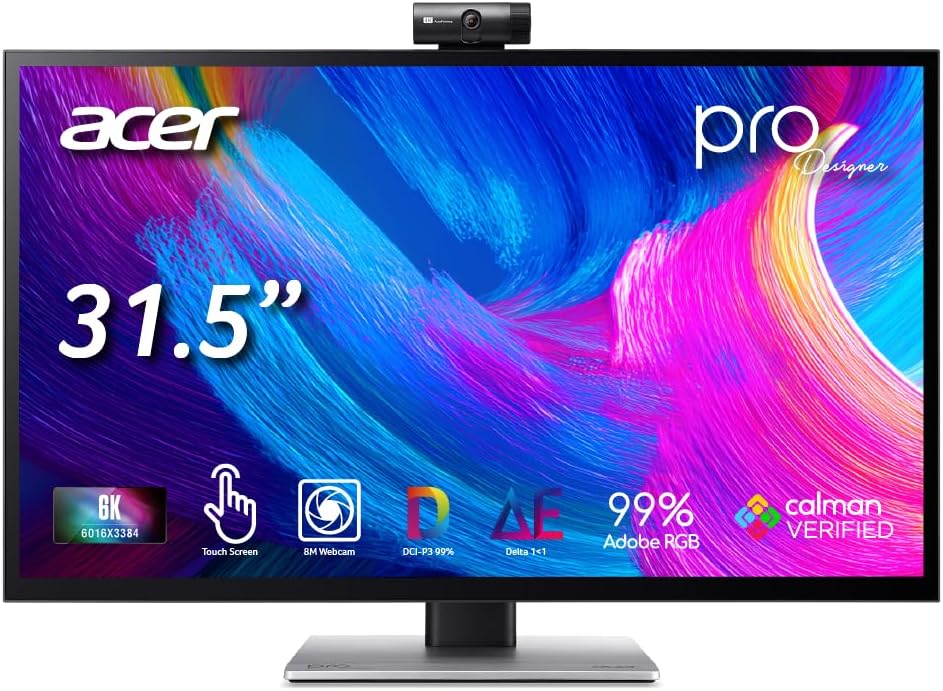
This monitor transforms the traditional viewing experience by allowing direct interaction through its high-fidelity touch interface. Professionals can sketch, annotate, and navigate directly on the screen, eliminating the need for a separate drawing tablet.
We may earn a commission when you buy through this link, at no additional cost to you.
Color accuracy is ensured with factory calibration and Delta E less than one, guaranteeing that what you see matches your final output. The integrated webcam and microphone simplify remote collaboration without cluttering your desk with extra hardware.
While touch functionality is a major advantage for designers, it may attract fingerprints and require regular cleaning to maintain clarity. The single USB-C cable solution simplifies setup but requires compatible devices for full functionality.
Ideal for illustrators and architects who value tactile control, this model offers a streamlined workflow. It bridges the gap between hardware and software, creating an intuitive environment for digital creation and review sessions.
Touch support allows natural sketching and annotating without extra peripherals.
Built-in cameras and mics reduce setup complexity for remote meetings.
We may earn a commission when you buy through this link, at no additional cost to you.
The G32X delivers a clean and straightforward user experience with a focus on essential high-resolution capabilities. Its minimalist design blends seamlessly into modern offices while providing powerful specs for productivity and creative tasks.
We may earn a commission when you buy through this link, at no additional cost to you.
With a perfect user rating, this model satisfies diverse needs through reliable performance and eye-care features. The aluminum body ensures durability, and the anti-glare coating helps reduce distractions during long working hours in varied lighting.
While it lacks some advanced features like HDR or touch input, its core display quality remains excellent for most users. It is an ideal choice for those who prefer simplicity and value consistent performance over complex functionalities.
Suitable for general professionals and home office setups, this monitor balances aesthetics and function well. If you seek a dependable display that enhances your workspace without unnecessary complexity, it stands out as a strong contender.
Minimalist design focuses on pure performance without unnecessary distractions or clutter.
Adjustable stand options allow customized positioning for maximum comfort during work.
We may earn a commission when you buy through this link, at no additional cost to you.
Dell offers significant connectivity power with this large format hub designed to centralize your workspace connections. The ability to deliver up to 140 watts via Thunderbolt 4 makes it suitable for charging high-performance laptops efficiently.
We may earn a commission when you buy through this link, at no additional cost to you.
Its 52-inch size provides an expansive canvas for multitasking, supported by a 120Hz refresh rate for smooth visuals. The integrated hub and KVM features simplify managing multiple computers from a single keyboard and mouse setup effectively.
Despite the high specs, user ratings suggest potential setup complexities or value concerns relative to the price point. Potential buyers should weigh the power delivery benefits against the overall cost and desktop space requirements carefully.
This unit is best suited for enterprise environments or power users needing robust docking capabilities. If you require high wattage delivery and massive real estate, it remains a functional albeit premium solution.
High wattage delivery supports fast charging for demanding mobile workstations.
Built-in KVM allows seamless control of multiple PCs with one interface.
We may earn a commission when you buy through this link, at no additional cost to you.
LG pushes boundaries with Thunderbolt 5 support, offering ultra-fast data transfer and charging speeds for next-gen devices. This future-ready connectivity ensures your setup remains compatible with emerging hardware standards for years to come.
We may earn a commission when you buy through this link, at no additional cost to you.
The Nano IPS Black panel delivers impressive contrast and color depth, making it ideal for critical viewing tasks. With 98 percent DCI-P3 coverage and HDR 600 certification, it ensures content looks vibrant and true to life.
While the price is higher than average, the technology investment pays off in performance and longevity. Users appreciate the KVM support and ergonomic stand for versatile and comfortable daily use across multiple devices easily.
Best for professionals who demand cutting-edge specs and reliability, this monitor justifies its cost. It is an excellent choice for studios and power users who need top-tier performance without compromising on future compatibility.
Thunderbolt 5 support ensures high-speed data and power for future devices.
Nano IPS Black technology enhances contrast for deeper blacks and vivid colors.
We may earn a commission when you buy through this link, at no additional cost to you.
Dell positions this model as a reliable workhorse for daily office tasks with an added value protection plan. The high resolution ensures text remains sharp and readable, reducing eye strain during extended document editing sessions.
We may earn a commission when you buy through this link, at no additional cost to you.
USB Type-C support simplifies connectivity for modern laptops, allowing for both data and power over a single cable. The inclusion of an enhanced protection pack adds peace of mind for businesses concerned about long-term reliability.
While some users find the ergonomics basic compared to higher-end models, the core functionality remains strong for general use. It serves as a practical choice for environments where durability and support are key decision factors.
Ideal for office managers seeking a secure and efficient display solution, this bundle offers practical value. It balances essential features with long-term support to meet the needs of professional teams effectively.
Extended protection coverage ensures peace of mind for long-term operational stability.
High-speed USB-C ports enable quick file access and streamlined device connectivity.
We may earn a commission when you buy through this link, at no additional cost to you.
This renewed option offers a way to access a massive 52-inch screen at a more accessible price point. The curved design enhances immersion and productivity, making it suitable for those who want big display real estate without premium costs.
We may earn a commission when you buy through this link, at no additional cost to you.
Excluding the stand allows for flexible VESA mounting options to fit specific workstation layouts. The 120Hz refresh rate ensures smooth visuals for both general productivity and media consumption tasks effectively.
However, buyers must consider the lack of included accessories and potential warranty limitations compared to new units. It is best for users comfortable with third-party mounting solutions who prioritize screen size over full package support.
A practical choice for cost-conscious buyers seeking large scale visuals, this model balances value and utility well. Ensure your desk setup supports the required mounting hardware before proceeding with purchase planning.
Renewed certification provides a cost-effective entry into large-scale professional displays.
VESA mount support allows customization for specific workspace configurations and needs.
We may earn a commission when you buy through this link, at no additional cost to you.
Selecting the right monitor requires weighing several technical and practical factors to ensure it aligns with your specific workflow and spatial needs.
6K resolution provides exceptional clarity with over 20 million pixels. Look for higher PPI (Pixels Per Inch) to ensure text and details remain sharp without scaling issues.
IPS panels offer better color accuracy and viewing angles. IPS Black panels enhance contrast significantly for deeper blacks and richer colors in dark scenes.
For professional work, ensure coverage of 98%+ DCI-P3 and Adobe RGB. Look for Delta E ratings under two for reliable color fidelity out of the box.
Thunderbolt 4 or 5 support is crucial for high bandwidth and single cable connectivity. USB-C ports with high power delivery simplify desk setups by charging laptops directly.
Higher refresh rates like 120Hz improve motion smoothness and reduce eye strain during scrolling. Fast response times are vital for gaming or fast-paced video editing workflows.
Look for stands with height, tilt, and pivot adjustments to maintain comfort. VESA mounting compatibility allows flexibility if you plan to use third-party monitor arms.
Hardware low blue light and flicker-free technologies reduce eye strain during long sessions. Ambient light sensors can adjust brightness automatically to match room conditions.
Sturdy aluminum bodies ensure durability and stability. Extended warranty coverage provides peace of mind for long-term investment in expensive hardware.
Always use a high-quality cable like certified Thunderbolt to ensure full resolution and data transfer speeds. Cheap cables may limit performance or fail to deliver sufficient power to connected devices effectively.
Yes, it offers significantly more screen real estate and sharpness. It reduces the need for constant zooming and panning when managing multiple documents or complex layouts efficiently.
Generally yes, especially for gaming or video editing. Ensure your GPU supports the resolution and your CPU handles the graphics workload without lag or frame drops.
Most modern 6K monitors support USB-C with power delivery. Check the port specifications to ensure it supports the required bandwidth for 6K at 60Hz or higher.
32 inches is ideal for 6K resolution to maintain a high pixel density. Larger sizes like 52 inches often use lower PPI but offer wider aspect ratios for multitasking.
Many professional models include Mac-specific presets. However, always check compatibility for full color accuracy and system settings integration with your specific operating system version.
Use a soft microfiber cloth and distilled water. Avoid harsh chemicals that can damage anti-glare or anti-reflective coatings on the display surface effectively.
Choosing the right display depends heavily on your specific workflow needs and budget. Models like the G32P offer excellent value while others provide specialized features like touch or ultra-high refresh rates.