
TP-Link AC1900 Smart WiFi Router Dual Band Router for Wireless Internet
4.5Editor score
OneMesh Compatible
MU-MIMO technology
Simple setup via App
Compare the top AC1900 wireless routers for speed, range, and security. This guide reviews ten models to help you choose the best router for your home network
Finding a reliable wireless router is essential for modern connectivity. AC1900 routers offer dual-band speeds ideal for streaming and gaming. These devices balance performance with coverage to handle multiple devices simultaneously without lag.
This guide compares ten top-rated AC1900 models based on features and user feedback. We examine speed capabilities, security tools, and ease of setup for each option. Our goal is to help you find the right fit for your specific household.
Each pick highlights key strengths and potential drawbacks to inform your decision. We focus on real-world performance metrics and user experience data. Please note that availability and pricing may change frequently on retailer sites.
4.5Editor score

4.5Editor score

4.3Editor score
This table provides a side-by-side overview of the ten AC1900 routers reviewed in this guide. Use it to quickly compare key specifications and features across all models.

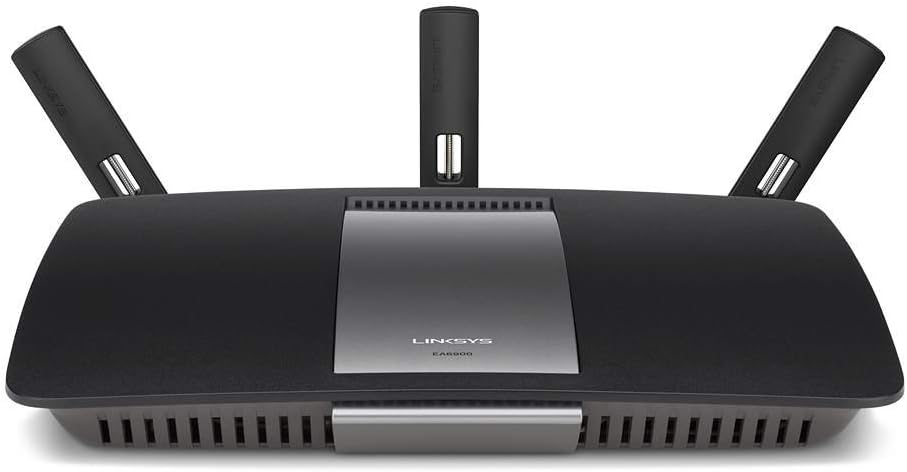

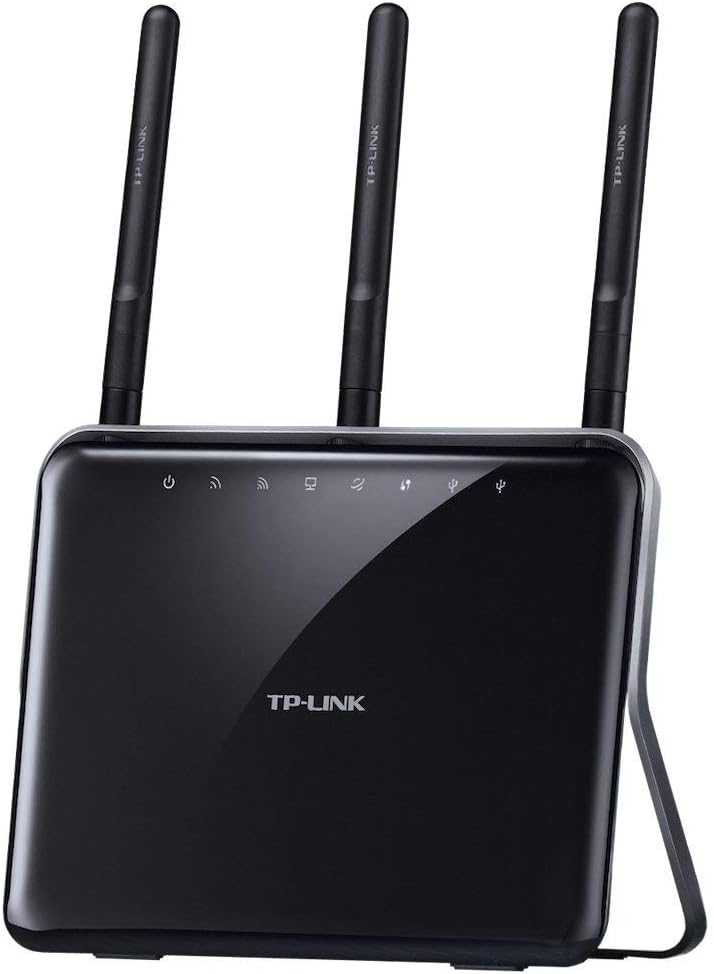


The TP-Link AC1900 Smart WiFi Router stands out as a highly accessible option for home networks. It achieves up to 1900 Mbps total speed across dual bands, ensuring smooth streaming and browsing. With a strong rating of 4.5 stars, it is a favorite for budget-conscious users seeking reliability.
We may earn a commission when you buy through this link, at no additional cost to you.
Its Wave 2 design allows for simultaneous data streams via MU-MIMO, which helps devices communicate efficiently. The router covers up to 1200 square feet using beamforming technology to direct signals. You can manage everything easily through the free Tether App, which keeps firmware updated and controls parental settings.
One trade-off is the lack of a USB port for file sharing or printer connections. However, the included Gigabit LAN ports provide fast wired connections for PCs and consoles. The parental controls are effective for setting daily limits and blocking inappropriate content for children.
This router is ideal for small to medium homes needing solid performance without extra cost. It works with all major ISPs and supports OneMesh for future expansion. For those prioritizing value and ease of use, the Archer A8 is a top recommendation.
The router delivers 600 Mbps on 2.4GHz and 1300 Mbps on 5GHz. This separation prevents congestion when multiple users are online at once.
You can add TP-Link OneMesh extenders later to cover larger areas. This creates a seamless WiFi network without needing a new router.
We may earn a commission when you buy through this link, at no additional cost to you.
The ASUS AC1900 RT-AC68U is a powerful dual-band router known for its high-speed performance and advanced security. It offers combined speeds up to 1900 Mbps with 802.11ac technology. The 4.5-star rating reflects its reliability for demanding networks and gaming setups.
We may earn a commission when you buy through this link, at no additional cost to you.
It features AiProtection powered by Trend Micro, which blocks malicious sites and detects infected devices. The 1GHz dual-core CPU handles multitasking well, keeping WiFi and USB data separate. Five Gigabit LAN ports provide ample wired connectivity for multiple desktops and consoles.
Setup is effortless via the ASUSWRT web-based interface or the Asus router app on mobile devices. While it is more expensive than basic models, the extra security and ports justify the cost. It supports various internet types including PPPoE and PPTP for flexibility.
This model is best for users who prioritize network security and want extensive wired options. It supports Guest networks for both bands and includes DDNS for remote access. Choose this router for a secure and fast home network experience.
AiProtection offers multi-stage protection from vulnerability detection to data protection. It includes Two-Way IPS and infected device prevention.
Broadcom TurboQAM accelerates WiFi performance significantly. The dual-core CPU ensures smooth multitasking for all connected devices.
We may earn a commission when you buy through this link, at no additional cost to you.
The NETGEAR Nighthawk R7000 is a premium router designed for large homes and heavy usage. It delivers AC1900 speeds and covers up to 1800 square feet comfortably. With a 4.3-star rating, it supports around 30 devices for streaming and gaming without interruption.
We may earn a commission when you buy through this link, at no additional cost to you.
Its 1GHz dual-core processor and 3 amplified antennas ensure strong signal strength. You can share storage or printers via the USB 3.0 and 2.0 ports. Smart parental controls let you pause internet access and view site history effectively.
Armor security by BitDefender protects against malware and data theft with a free trial. However, advanced features like parental controls require a monthly subscription after the first month. Despite this, the performance and range are exceptional for the price.
This router suits families needing extensive coverage and advanced security features. It includes Guest WiFi and DoS protection for safety. If you need a high-end router for a large home, the R7000 is a reliable choice.
The router reaches up to 1800 square feet using beamforming. It connects up to 30 devices reliably without lag.
Use USB ports to create a personal cloud storage. Armor security blocks viruses across all connected home devices.
We may earn a commission when you buy through this link, at no additional cost to you.
The NETGEAR Nighthawk R6900P offers strong performance for medium to large homes. It provides up to 1900 Mbps speed and covers up to 1800 square feet. With a 4.3-star rating, it supports 30 devices for smooth streaming and web surfing.
We may earn a commission when you buy through this link, at no additional cost to you.
Features include Dynamic QoS and Smart Connect to manage traffic efficiently. The 1 USB 3.0 port allows sharing drives or printers easily. Smart Parental Controls promote healthy habits with usage tracking and time limits included.
Armor security shields connected devices from threats with a free trial. While the router is robust, full parental control features require a subscription. It includes Guest WiFi and firewall protections for safety.
Choose this router for reliable coverage and modern traffic management. It works well with Alexa for voice commands. For households needing a balance of speed and security, the R6900P is a strong contender.
Dynamic QoS prioritizes video streaming and gaming. Smart Connect optimizes band usage automatically.
Alexa voice control simplifies network management. USB sharing makes accessing files easy.
We may earn a commission when you buy through this link, at no additional cost to you.
The Linksys AC1900 EA6900 provides a balanced mix of speed and usability. It offers combined speeds up to 1900 Mbps across dual bands. With a 4.3-star rating, it is known for its Smart Wi-Fi App that allows remote network control.
We may earn a commission when you buy through this link, at no additional cost to you.
Beamforming technology follows your devices to ensure a great connection as you move. The Dual Core 800Mhz CPU handles data processing quickly. Two USB ports let you print or share content effortlessly.
While it lacks modern bells and whistles, it supports DLNA for media management. The app enables parental controls and remote management effectively. It connects up to 30 devices smoothly without dropping signal.
This router is ideal for users valuing simplicity and media sharing. It works with multiple operating systems including Windows and Mac. For a dependable router with app control, the EA6900 is a solid pick.
The Smart Wi-Fi App manages traffic from anywhere. Remote network management keeps your home online safely.
DLNA certification supports home media management. Two USB ports allow for easy content storage.
We may earn a commission when you buy through this link, at no additional cost to you.
The TP-Link Archer C80 renewed router offers excellent value with top-tier speed. It reaches up to 1900 Mbps total across dual bands. With a 4.5-star rating, it supports MU-MIMO for better efficiency with multiple devices.
We may earn a commission when you buy through this link, at no additional cost to you.
Beamforming concentrates signals towards clients to expand range significantly. The 1.2 GHz CPU ensures fast data processing. You can manage settings via the Tether App for OTA upgrades and monitoring.
Security includes WPA3 and a SPI Firewall for protection against intrusions. Guest networks allow separate access for visitors to protect your main data. It supports both IPv4 and IPv6 protocols for modern compatibility.
This router is great for households needing reliable speed on a budget. It supports OneMesh for seamless roaming. Choose this renewed model for high performance without the premium price.
3×3 MU-MIMO communicates with multiple clients at once. Airtime Fairness limits excessive occupation for fairness.
WPA3 encryption secures your connection robustly. SPI Firewall stops unauthorized access attempts.
We may earn a commission when you buy through this link, at no additional cost to you.
The TP-Link Archer C1900 is optimized for gaming and high-speed streaming. It offers up to 1900 Mbps total bandwidth for fast connections. With a 4.4-star rating, it uses high-powered amplifiers to ensure coverage throughout your home.
We may earn a commission when you buy through this link, at no additional cost to you.
Simultaneous 2.4GHz and 5GHz bands prevent lag during online play. The 1GHz dual-core processor handles wired and wireless connections without interruption. Four Gigabit Ethernet ports provide lightning-fast connections for consoles.
Three dual-band antennas with amplifiers boost range significantly. It supports multiple devices without dropping performance. However, it lacks advanced features like USB ports or parental controls.
This router suits gamers and streamers needing raw speed and range. It is reliable for heavy data tasks. If performance is your main priority, the Archer C1900 is an excellent choice.
900mW amplifiers boost signal strength effectively. Three antennas cover large areas without dead zones.
Dual-core CPU prevents interruptions. Wired ports offer stable low-latency connections.
We may earn a commission when you buy through this link, at no additional cost to you.
The ASUS RT-AC68P offers fast data rates and stable connectivity. It delivers combined speeds up to 1900 Mbps for three times faster performance. With a 4.2-star rating, it includes AiRadar beamforming for better signal stability.
We may earn a commission when you buy through this link, at no additional cost to you.
Five Gigabit ports provide fast connections for wired devices. USB 3.0 support allows ten times faster data transfer than 2.0. The dual-core processor ensures responsive performance for all traffic.
ASUSWRT interface simplifies setup in 30 seconds. It includes cloud services for syncing data across devices. While older, it remains a robust option for reliable internet.
This router works well for users wanting multiple wired ports. The cloud service helps families share data easily. For stable home networks, the RT-AC68P remains a reliable option.
USB 3.0 ports support quick data transfer. Dual-core CPU handles Ethernet and USB devices well.
ASUS cloud service allows syncing and streaming anywhere. Connect compatible routers for a private server.
We may earn a commission when you buy through this link, at no additional cost to you.
The ASUS RT-AC67P is a versatile router known for its extensive coverage. It delivers speeds up to 1900 Mbps across dual bands. With a 4.2-star rating, it supports 4K streaming without lagging or jumping.
We may earn a commission when you buy through this link, at no additional cost to you.
AiRadar Beamforming extends coverage up to 3000 square feet. Six layers of security keep your network safe from threats. MU-MIMO allows multiple devices to connect simultaneously without slowing down.
Setup is effortless in three steps using a web browser. The ASUS Router App manages traffic and updates firmware remotely. It supports VPN and parental controls for safety.
This router suits large homes needing wide signal reach. The app allows managing settings from anywhere. For easy setup and extended range, the RT-AC67P is a great fit.
AiRadar extends coverage up to 3000 Sq Ft. High power amplification ensures dynamic speed.
Three steps get you online in 30 seconds. Mobile app helps diagnose issues easily.
We may earn a commission when you buy through this link, at no additional cost to you.
The ASUS RT-AC1900P delivers powerful speeds and flexible networking. It achieves combined dual-band speeds up to 1900 Mbps. With a 4.4-star rating, it offers lifetime internet security for all connected devices.
We may earn a commission when you buy through this link, at no additional cost to you.
Five Gigabit ports ensure stable connections for multiple devices. It supports AiMesh for whole-home WiFi expansion. The USB 3.1 port provides ultrafast data transfer capabilities.
AiProtection blocks security threats automatically without extra fees. It supports Guest Networks and WPA/WPA2 encryption. The router is ideal for gaming and streaming with high throughput.
Choose this router for maximum performance and flexibility. It creates a whole-home network via AiMesh. For reliable high-speed internet, the RT-AC1900P is a top-tier option.
Connect compatible routers to create a whole-home network. Five Ethernet ports ensure stable connections.
Commercial-grade security blocks threats for free. AiProtection neutralizes risks automatically.
We may earn a commission when you buy through this link, at no additional cost to you.
Selecting the right AC1900 router involves balancing speed, coverage, and features. Here are the key factors to consider before making a purchase decision.
AC1900 routers provide combined speeds of up to 1900 Mbps across 2.4GHz and 5GHz bands. Ensure the router supports simultaneous dual bands for best performance. This helps prevent lag when streaming or gaming.
Look for routers offering 802.11ac technology to maximize speed potential.
Coverage ranges from 1200 to 3000 square feet depending on antenna design. Beamforming and amplifiers help direct signals to devices effectively. Larger homes need stronger amplifiers or mesh support.
Check the listed coverage area to ensure it fits your home size.
Modern routers support multiple devices simultaneously. MU-MIMO technology allows multiple clients to communicate without bandwidth sharing. Choose a router rated for 30 or more devices.
MU-MIMO compatibility is essential for busy households with many smart devices.
Advanced security features like AI protection guard against malware and threats. Parental controls allow you to manage access times and block inappropriate content. Check if these features require subscriptions.
Ensure the router includes firewall and WPA3 encryption for safety.
Gigabit LAN ports provide fast wired connections for consoles and PCs. Look for routers offering four or five Ethernet ports. Some models include extra USB ports for storage or printers.
More Gigabit ports ensure your desktops and consoles stay connected reliably.
User-friendly interfaces simplify router setup and configuration. Web-based interfaces or mobile apps allow easy management of settings. Automatic updates keep your router running securely.
Check for companion apps that support remote network control.
Ensure the router supports IPv6 and common protocols like WPA/WPA2. Compatibility with your ISP and existing modem is critical. Check supported standards for best performance.
Look for universal compatibility with all major internet service providers.
Some routers allow expansion via mesh technology. OneMesh or AiMesh support helps add extenders for larger homes. This avoids replacing your router when expanding network coverage.
Choose a model supporting mesh if you plan to add extenders later.
Place your router in a central elevated location for best signal distribution. Avoid obstructions like walls and metal objects. Ensure ventilation to prevent overheating and maintain performance.
Regularly update your router firmware to patch security vulnerabilities. Use the manufacturer app for OTA updates. Enable automatic updates if available for seamless maintenance.
Monitor connected devices via your router app to manage traffic. Use parental controls to limit screen time. Reboot the router periodically to clear cached data and boost speed.
AC1900 indicates combined wireless speeds of up to 1900 Mbps. It means the router supports dual-band speeds of 600 Mbps on 2.4GHz and 1300 Mbps on 5GHz. This helps handle multiple devices without lag.
Yes, a separate modem is required to connect to your ISP. The router creates the WiFi network but does not connect directly to the internet line. Ensure your modem is compatible with your internet service.
Yes, most AC1900 routers support 30 or more devices simultaneously. MU-MIMO technology allows multiple devices to communicate without sharing bandwidth. This keeps performance stable during heavy usage.
Use the companion app or web interface to enable parental controls. You can set time limits and block websites easily. Some models include subscription-based advanced controls for more features.
USB ports allow sharing printers or storage over the network. You can create personal cloud storage easily. Check if the router has USB 3.0 for faster transfer speeds.
Look for WPA/WPA2 encryption and firewall protection. Advanced routers include AI protection to block malware. Guest WiFi allows visitors to connect safely without accessing your main network.
We reviewed ten top AC1900 routers offering varied features for different needs. The ASUS RT-AC68U and TP-Link A8 lead in speed and security. Choose based on your home size and usage priorities.
Prioritize MU-MIMO and beamforming technology for better coverage. Security features like AI protection ensure safe browsing. Ensure you have enough Ethernet ports for your devices.
Remember to check current availability and model variations online. Prices and offers may change frequently. Pick the router that fits your home setup best.