
HP Smart Tank 5003
4.1Editor score
Three years ink included
Mess-free refill
Cartridge-free design
Discover the top AI printers for 2026. We compare smart features, speed, and quality to help you choose the best device for your home or office needs.
Modern printing has evolved beyond simple ink and paper. Today, AI printers integrate smart technology to optimize layouts, detect errors, and streamline workflows. These devices save time and reduce waste for professionals and families alike.
We evaluated ten leading models based on connectivity, automation features, and overall performance. Our analysis focuses on how artificial intelligence enhances the printing experience. This list covers options for home offices, creative projects, and high-volume tasks.
Each pick highlights unique strengths like auto-cutting, multi-color printing, or cost efficiency. Prices and availability change frequently, so verify details before purchasing. Use this guide to find the perfect AI printer for your specific requirements and budget.
4.1Editor score

3.9Editor score

4.7Editor score
The following table provides a side-by-side comparison of all ten AI printers. It highlights key specifications and unique capabilities to help you quickly identify the right model for your workflow.



The HP OfficeJet Pro 8125 stands out for its intelligent formatting capabilities. With a 3.9 rating, it balances performance and affordability well. The standout feature is HP AI, which removes unwanted content from web pages to save ink and paper.
We may earn a commission when you buy through this link, at no additional cost to you.
Its speed reaches up to 20 ppm for black documents. The dual-band Wi-Fi ensures reliable connectivity for all your devices. The touchscreen interface is intuitive, resembling a phone app for easy navigation.
While the ink system uses proprietary chips, the Instant Ink trial helps manage costs initially. The security features protect your network from threats. Trade-offs include occasional connectivity resets that the software resolves automatically.
This printer is ideal for home offices needing professional results. It handles reports, flyers, and business documents efficiently. If you prioritize smart features and speed, this model is a top recommendation.
HP AI scans web pages to remove ads and headers before printing. This ensures only relevant content appears on paper, reducing waste.
The dual-band Wi-Fi automatically detects and resolves connection issues. This keeps your printing workflow smooth without manual intervention.
We may earn a commission when you buy through this link, at no additional cost to you.
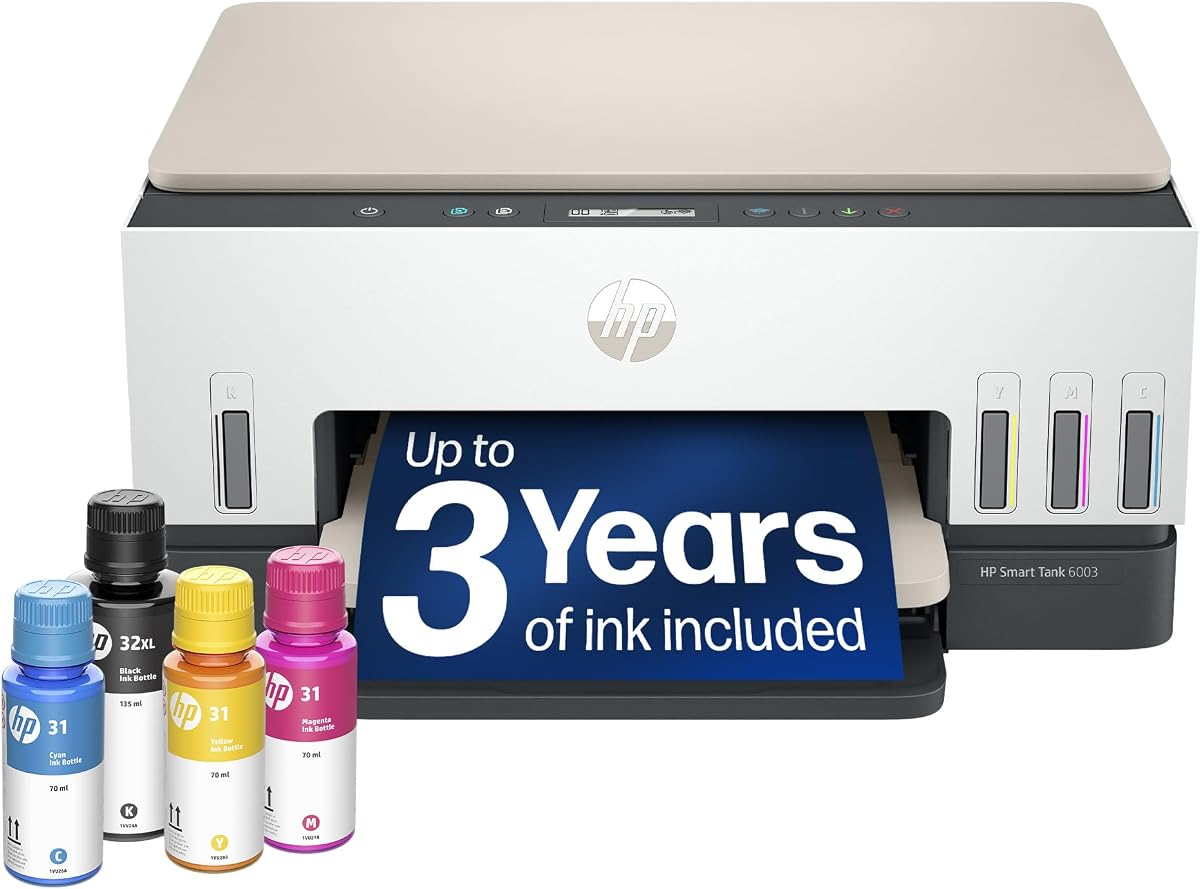
The HP Smart Tank 5003 offers incredible value with up to three years of ink included. It carries a 4.1 rating for reliability and ease of use. The cartridge-free design eliminates the hassle of buying small ink cartridges frequently.
We may earn a commission when you buy through this link, at no additional cost to you.
Refilling the tanks is mess-free, simply plug the bottles and let them drain. This makes maintenance easy for households with high printing needs. The borderless printing feature adds versatility for photos and creative projects.
Speed is moderate compared to laser printers, but the savings offset this. The system is designed for convenience, with AI capabilities enhancing document formatting. The bulkier frame fits better on dedicated desks.
This model suits families and small offices needing high volume. It minimizes ongoing costs significantly compared to cartridge models. If budget and ink supply are priorities, this is the best choice.
With up to 6,000 pages included, the cost per page is exceptionally low. This makes it ideal for students and high-volume users.
The ink bottles connect directly to the tank and drain automatically. There is no squeezing or spilling involved in the process.
We may earn a commission when you buy through this link, at no additional cost to you.
The HP Envy 6155 excels at producing high-quality color documents and photos. Its 4.2 rating reflects strong user satisfaction with print quality. True-to-Screen technology ensures what you see matches what prints.
We may earn a commission when you buy through this link, at no additional cost to you.
It includes AI to optimize formatting for web pages and emails. The 2.4-inch touchscreen is smooth and easy to navigate. The sustainable design uses over 60% recycled plastic content.
The 100-sheet tray is smaller than business models but sufficient for homes. Mobile printing via the HP app is seamless. Some users note the Instant Ink trial ends after three months.
This printer is best for households creating visual content. It balances quality and sustainability well. If you need vibrant photos and a compact footprint, this is a great option.
True-to-Screen tech uses P3 color technology for vibrant results. This ensures photos look rich and accurate.
The touchscreen offers a phone-like interface for quick navigation. It makes setting up print jobs very simple.
We may earn a commission when you buy through this link, at no additional cost to you.
The Bambu Lab P2S Combo brings professional-grade 3D printing with AI assistance. It has a 4.7 rating for precision and speed. The AI failure detection and automatic calibration make it accessible even for beginners.
We may earn a commission when you buy through this link, at no additional cost to you.
It prints up to 600 mm/s while maintaining exceptional accuracy. The AMS 2 Pro enables seamless multi-color printing with up to 65 degrees C filament drying. Adaptive airflow ensures crisp overhangs and safe air.
The cost is higher, but the workflow efficiency justifies it for serious projects. Bambu Studio and Handy apps streamline design to print. It sets a new standard for home 3D printing technology.
This printer is best for makers and hobbyists wanting speed. It handles engineering-grade materials well. If you need high throughput and quality, this premium choice is unmatched.
The PMSM Servo Extruder and Active Flowrate Compensation ensure sharp corners. This keeps every layer smooth and precise.
The AMS 2 Pro allows seamless multi-material printing. Filament drying keeps spools ready for flawless results.
We may earn a commission when you buy through this link, at no additional cost to you.
The HP OfficeJet Pro 9135 is designed for offices needing professional results. It rates 4.0 and supports fast printing up to 25 ppm. Wolf Pro Security keeps your network protected from cyber threats.
We may earn a commission when you buy through this link, at no additional cost to you.
It includes fax and a large 4.3-inch touchscreen. Dual trays hold 250 sheets each, reducing refilling time. AI optimizes formatting to save ink and maintain professional layouts.
The speed supports business demands effectively. Security features are robust for sensitive documents. Costs are higher than home models, but performance justifies it.
This printer fits small offices with moderate volume. It handles presentations, brochures, and flyers efficiently. Prioritize this if speed and security are critical.
Wolf Pro Security bolsters your network against threats. This keeps your data safe during print jobs.
Two 250-sheet trays reduce downtime for refills. Single-pass scanning saves time on multi-page docs.
We may earn a commission when you buy through this link, at no additional cost to you.
The HP Smart Tank 7603 offers massive capacity with up to 8,000 color pages. It rates 3.9 for reliability and long-term value. The magic touch control panel simplifies operation.
We may earn a commission when you buy through this link, at no additional cost to you.
It includes fax and an auto document feeder. The mess-free refill system ensures you stay productive. Ink lasts up to three years, reducing long-term costs significantly.
While not the fastest, it supports high-volume tasks well. The design fits home offices needing extra capacity. Users appreciate the borderless printing for creative projects.
This model suits high-volume users prioritizing supply. It reduces interruptions caused by running out of ink. If cost efficiency and capacity are key, this is a strong contender.
With 8,000 color pages included, supply lasts years. This minimizes the need for frequent ink orders.
The magic touch panel provides easy access to functions. It simplifies navigating settings and jobs.
We may earn a commission when you buy through this link, at no additional cost to you.
The HP OfficeJet Pro 8139 stands out with a one-year Instant Ink trial. It rates 4.0 and suits home offices well. Security and AI features ensure safe and efficient printing.
We may earn a commission when you buy through this link, at no additional cost to you.
It prints up to 20 ppm for black. The touchscreen and dual-band Wi-Fi ensure smooth operation. AI removes unwanted content to optimize layouts.
The extended trial saves money initially. The design is robust for daily professional documents. Some users prefer cartridge flexibility, but convenience is high.
This is ideal for offices wanting long-term savings. The security protects your network. If you want a trial that lasts a year, choose this model.
A one-year Instant Ink trial offers significant savings. This reduces initial costs for home offices.
Wolf Essential Security keeps your network protected. This prevents cyber threats during print jobs.
We may earn a commission when you buy through this link, at no additional cost to you.
This HP Smart Tank 7603 variant mirrors the previous model with high capacity. It rates 4.0 for consistent performance. The magic touch panel simplifies operation for users.
We may earn a commission when you buy through this link, at no additional cost to you.
It includes fax and supports wireless printing. The refill system prevents mess. Ink provides up to 8,000 color pages right out of the box.
While speed is standard, the capacity supports busy workloads. It offers great value for home offices needing bulk printing. The design is sturdy and reliable.
This model suits those needing bulk supplies. It reduces maintenance frequency significantly. Choose this if capacity and fax functions are priorities.
Up to 8,000 color pages ensure long uptime. This supports high-volume printing without frequent refills.
The easy-access system allows mess-free refilling. No squeezing is required to add ink.
We may earn a commission when you buy through this link, at no additional cost to you.
The HP Smart Tank 6003 offers long ink supply without a fax. It rates 3.8 for reliability and cost efficiency. The refill system is mess-free and simple.
We may earn a commission when you buy through this link, at no additional cost to you.
It supports borderless printing and wireless connectivity. Ink provides up to 8,000 color pages. The design is clean and user-friendly for home use.
Lacking fax, it focuses on core printing needs. The tank system ensures low costs over time. It is a strong value for standard document printing.
This suits home users needing simple, long-term printing. The setup is quick and maintenance minimal. Choose this if fax isn't required.
Ink included lasts up to three years. This offers peace of mind for high-volume use.
The mess-free refill system is easy to use. Simply plug bottles and let them drain.
We may earn a commission when you buy through this link, at no additional cost to you.
The Liene PixCut S1 integrates printing and cutting for crafts. It rates 4.2 for creative users. AI image extraction and precision cutting streamline workflows.
We may earn a commission when you buy through this link, at no additional cost to you.
Thermal dye-sub produces 300 dpi vivid prints. The stickers are waterproof and scratch-resistant. The app offers thousands of templates without subscription fees.
Bluetooth allows easy mobile printing and cutting. It saves time for DIY projects. The AI Lab brings imagination to life instantly.
This is best for creatives needing custom stickers. It handles small format needs efficiently. If you want seamless print-and-cut, this is a top pick.
AI recognizes subjects from photos automatically. This makes creating custom stickers effortless.
Thermal dye-sub creates vibrant, true-to-life colors. Stickers stay durable and vibrant over time.
We may earn a commission when you buy through this link, at no additional cost to you.
Choosing the right AI printer requires balancing features, cost, and capacity. Use these factors to narrow down options based on your workflow and requirements.
Modern AI printers support dual-band Wi-Fi and mobile apps. Look for features like layout optimization or error detection. These tools save time and improve print quality automatically.
Ensure the device supports your operating system. Seamless integration prevents workflow disruptions and keeps printing efficient.
Speed matters for productivity. Business models offer higher pages per minute. Home users may prioritize capacity over raw speed.
Match speed to your needs. High volume requires faster devices to avoid bottlenecks.
Ink costs can exceed device prices. Tank systems offer lower costs per page. Cartridge models may have higher upfront costs but flexible options.
Consider the total cost of ownership. Long-term savings often outweigh initial savings.
Input tray capacity reduces refilling frequency. Larger trays suit busy offices. Borderless printing supports creative projects.
Check tray size and paper types supported. Ensure compatibility with your most used media.
Business printers often include security suites. These protect networks from threats. Home models may offer basic encryption.
Secure your data during print jobs. Look for hardware-based security features.
Some devices include fax and document feeders. These enhance utility for office tasks. Consider all-in-one needs.
Prioritize functions you actually use. Extra features add value if utilized.
Desktop models save space. Industrial units need more room. Sustainable design reflects environmental values.
Measure your workspace before purchasing. Ensure the device fits your environment comfortably.
AI extraction or auto-cutting are unique. These enable specialized projects. Check app support and templates.
Useful for specific niches. General users may not need advanced tools.
Connect your device to Wi-Fi and install the manufacturer's app. This enables mobile printing and AI features like layout optimization. Update firmware regularly to ensure security patches are active.
For tank systems, refill ink when low. Use original bottles to avoid clogs. Clean print heads via settings if quality drops. This prevents streaks and wasted paper.
Keep the device in a dry area away from direct sunlight. Dust can affect sensors and performance. Regularly run cleaning cycles to maintain optimal function.
An AI printer uses software to optimize print settings. Features include auto-layout for web pages or image extraction. These reduce waste and simplify complex jobs.
Yes, tank systems offer lower costs per page. They come with large ink supplies. This is ideal for printing many pages regularly.
Most brands recommend original ink for best results. Some models block third-party cartridges. This ensures print quality and warranty validity.
Check for debris in the feed path. Use the app or menu to reset the feed mechanism. Avoid forcing paper through the device.
Yes, most AI printers support mobile printing. Install the manufacturer app for control. You can scan or print directly from devices.
Yes, internet connectivity enables cloud AI features. Some settings work offline but advanced tools need connection. Ensure strong signal for best results.
Most devices offer one year limited warranty. Check manufacturer details for specifics. Some extended plans are available separately.
We reviewed ten AI printers for 2026. Top picks include the OfficeJet Pro 8125 for home offices and Smart Tank 5003 for budget users. These balance smart features with reliability.
Prioritize ink costs, speed, and connectivity. Security matters for businesses and home offices alike. Choose a model that fits your daily printing needs.
Verify prices and current availability. Models evolve quickly with new features. Use this guide to ensure a confident purchase decision.