
Air Mouse Remote MX3 Pro
3.8Editor score
Plug and Play 2.4G Connection
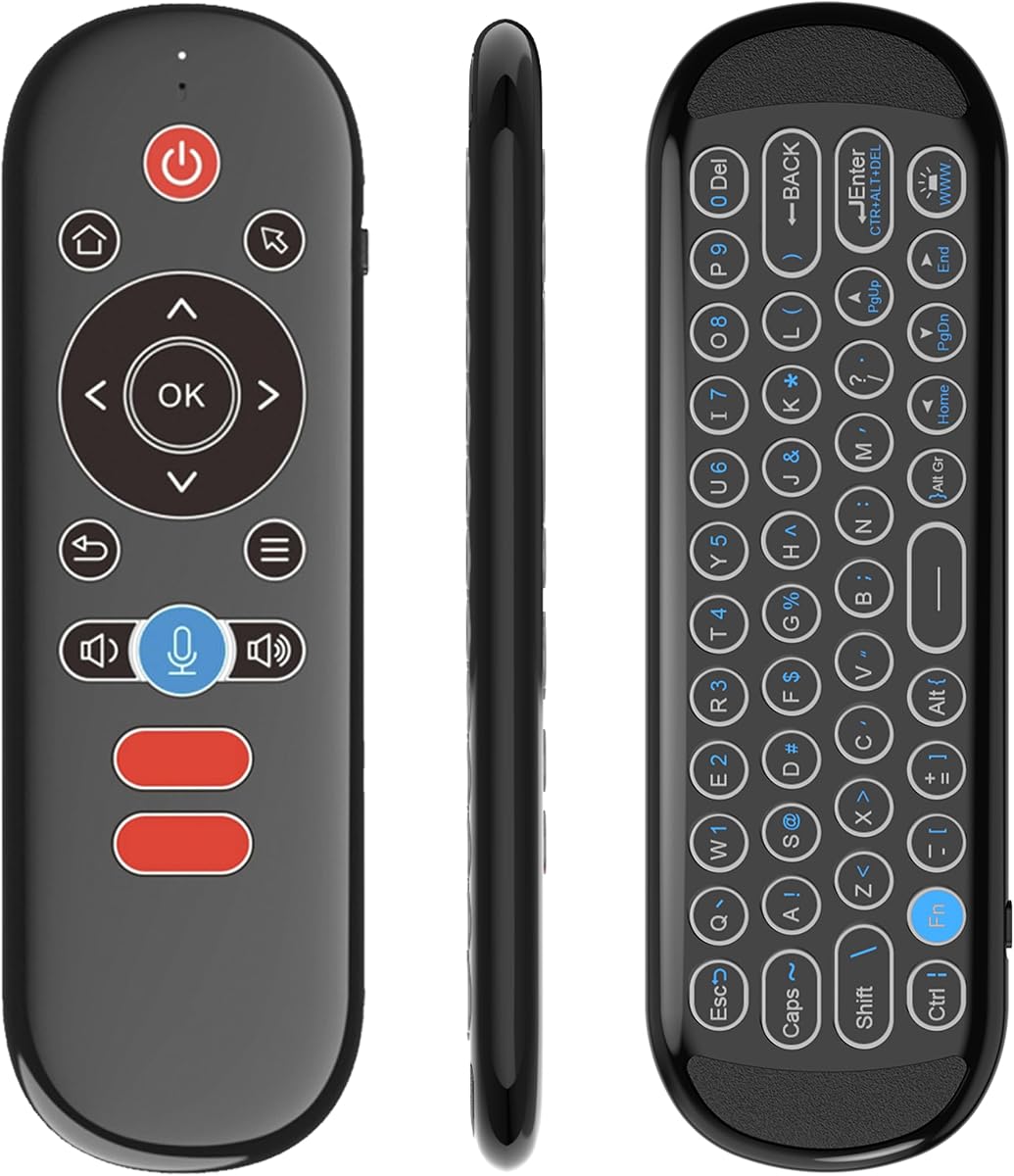
Mini Keyboard on Back
Affordable Universal Control
Discover the top air mouse for Android TV Box options with voice control and backlit keyboards for seamless navigation and smart home integration.
Transform your living room into a smart command center with an air mouse for Android TV Box. These devices combine wireless freedom with intuitive motion control, allowing you to navigate menus and type search queries effortlessly from the comfort of your couch.
We evaluated ten top-rated models based on connectivity stability, ergonomic design, and compatibility with various streaming devices. Our analysis focused on features like voice input, infrared learning capabilities, and the responsiveness of the built-in gyroscopes to ensure a smooth user experience.
Each selection highlights specific strengths such as battery life, keyboard layout, or dual-mode connectivity options. Keep in mind that availability and specific feature sets may vary over time, so checking the latest product details before purchasing is always recommended for the best fit.
3.8Editor score

4.5Editor score
4.3Editor score
This side-by-side comparison highlights the key specifications and unique features of each top-rated air mouse for Android TV Box to help you make an informed decision.


This top-rated air mouse for Android TV Box stands out with a high user rating and versatile connectivity options. It combines precise motion control with traditional IR functions to replace multiple remotes in your entertainment setup.
We may earn a commission when you buy through this link, at no additional cost to you.
The built-in 6-axis gyroscope ensures that cursor movement feels natural and responsive. You can switch between Bluetooth and 2.4G wireless modes to maximize compatibility across different smart devices and media players.
While the universal learning feature is powerful, it may require initial configuration time to map all your desired keys correctly. This setup investment is worth the long-term convenience of controlling both your TV and box from one device.
Ideal for power users who want a single remote to manage their entire smart home ecosystem. Its balance of features and ease of use makes it the top recommendation for most households.
The dual-mode capability ensures you can connect via Bluetooth for voice features or 2.4G for stable streaming control without interference.
IR learning allows you to consolidate your setup by programming this remote to handle volume and power for your television as well.
We may earn a commission when you buy through this link, at no additional cost to you.
Affordability meets functionality with this compact air mouse for Android TV Box. It is an excellent choice for users seeking a simple remote with basic typing capabilities without breaking the bank.
We may earn a commission when you buy through this link, at no additional cost to you.
The mini keyboard on the back is a practical addition for entering search terms quickly. The 2.4G USB connection ensures a stable link to your device, making browsing the web or apps straightforward.
Users may find the motion sensor slightly less sensitive than higher-end models, which can impact precision. Additionally, the limited IR learning keys might not cover all TV functions you wish to automate.
Perfect for budget-conscious shoppers or as a secondary remote for guests. It offers essential features that cover 90 percent of daily streaming needs effectively.
The integrated keyboard allows you to type search queries without needing a full physical keyboard, speeding up your content discovery process.
Setup is as simple as plugging the USB receiver into your TV box, requiring no driver installation or complex pairing procedures to start using.
We may earn a commission when you buy through this link, at no additional cost to you.
This premium air mouse for Android TV Box brings advanced features like a full QWERTY keyboard and rechargeable power to the living room. It is designed for users who demand the best in comfort and utility.
We may earn a commission when you buy through this link, at no additional cost to you.
The backlit keys are a standout feature for night viewing, providing clear visibility in dark rooms. The rechargeable battery eliminates the hassle of constant battery replacements, adding to the long-term value.
The weight is a bit higher than plastic models, which some may find less comfortable for extended use. Also, the lack of a charging cable in the box might be an inconvenience for immediate setup.
Ideal for users who prioritize build quality and advanced typing features. It is a solid investment for those who frequently interact with text-heavy apps or smart home systems.
The multi-color backlight allows you to adjust the remote to match your room lighting or personal preference, ensuring comfort during late-night movie nights.
Using a rechargeable battery reduces waste and cost over time, making this a more eco-friendly choice compared to disposable battery alternatives.
We may earn a commission when you buy through this link, at no additional cost to you.
The BPR1S Plus offers a robust solution for those needing a replacement remote with modern features like voice input and IR learning. Its performance is reliable and consistent across various Android devices.
We may earn a commission when you buy through this link, at no additional cost to you.
The priority logic for the power button ensures you can turn on your TV without needing to toggle modes. This thoughtful design detail simplifies daily usage significantly for the average user.
Compatibility limitations with devices like Roku or Fire Stick may restrict its appeal for some users. The voice function also requires specific app support to function correctly, which can be confusing.
Recommended for users with AOSP-based boxes or smart TVs. The combination of traditional and modern controls makes it a versatile tool for a wide range of entertainment needs.
Once IR learning is set, the power button prioritizes IR signals, allowing you to control both the box and TV with one simple press.
Built-in voice assistant integration lets you search for content hands-free, though it works best with compatible apps and devices in 2.4G mode.
We may earn a commission when you buy through this link, at no additional cost to you.
EASYTONE delivers a straightforward air mouse for Android TV Box that works across multiple operating systems including Windows and Mac. It provides a basic but effective way to navigate your media center.
We may earn a commission when you buy through this link, at no additional cost to you.
The 17-key layout is sufficient for most essential functions like volume and menu navigation. The microphone allows for basic voice input, which is useful for search queries without a keyboard.
Voice functionality is limited to built-in search boxes and may not work within third-party apps. This restriction can hinder a fully hands-free experience depending on your specific usage habits.
Suitable for users who want a simple and cheap solution for navigating their TV box. It is a reliable backup option for those who do not need advanced programmable features.
This remote supports Android, Windows, and Mac systems, making it a versatile choice for users who switch between different devices frequently.
Its small size makes it easy to store in a coffee table drawer or take with you if you have multiple entertainment setups.
We may earn a commission when you buy through this link, at no additional cost to you.
The iPazzPort model stands out with its vibrant backlighting and rechargeable power source. It is a great option for those who prioritize aesthetics and convenience over extensive programmable buttons.
We may earn a commission when you buy through this link, at no additional cost to you.
The one-handed design is ergonomic and easy to hold for long sessions. The Type-C charging port ensures modern connectivity for power, reducing the need for disposable batteries.
The single IR learning key is restrictive compared to multi-key systems found on other remotes. Additionally, compatibility with proprietary systems like LG requires testing with a wired keyboard first.
Perfect for users who want a stylish remote with a keyboard for quick text entry. It is a strong contender for tech-savvy individuals who value charging convenience.
The 7-color backlight can be cycled or turned off, providing a cool visual effect that helps you find the keys in the dark.
Type-C charging means you can use the same cable as your phone or other devices, streamlining your power management needs.
We may earn a commission when you buy through this link, at no additional cost to you.
Rii MX3 is a classic choice known for its robust construction and reliable performance. It has been a popular air mouse for Android TV Box for years due to its consistent functionality.
We may earn a commission when you buy through this link, at no additional cost to you.
The 3-axis gyro and 3-axis sensor provide smooth movement for navigating menus. The long wireless range allows you to sit far back from your entertainment unit while maintaining full control.
Pairing can sometimes be tricky if the initial connection fails, requiring a specific key combination. Also, the IR learning function depends on your TV remote using the NEC protocol.
Ideal for users looking for a proven, no-frills device that gets the job done. It is a safe buy for those who prefer traditional control methods.
With a range of up to 10 meters, you can control your device from anywhere in the living room without worrying about line-of-sight issues.
The sensor supports both horizontal and vertical modes, giving you flexibility in how you hold the remote depending on your seating position.
We may earn a commission when you buy through this link, at no additional cost to you.
This variant of the MX3 Pro features a backlight that makes typing in the dark much easier. It is a practical choice for those who need a full keyboard layout in a compact form.
We may earn a commission when you buy through this link, at no additional cost to you.
The 38 keys cover most character inputs needed for browsing and searching. The motion sensing feature is responsive, allowing for game control or fluid menu navigation.
It may not work with specific smart TV brands like Samsung or TCL as a direct replacement. Users should verify compatibility before purchasing to ensure it fits their specific device setup.
Best for users who need a reliable remote with a keyboard for frequent text entry. The backlit feature adds significant value for night-time usage scenarios.
The LED backlight illuminates the keys clearly, allowing you to type search terms accurately without turning on other lights.
With 38 keys, this remote covers most characters and functions, making it a versatile tool for general computer and TV interaction.
We may earn a commission when you buy through this link, at no additional cost to you.
The G20S PRO is designed for simplicity and durability. It is an excellent choice for those who want a straightforward interface without cluttered buttons.
We may earn a commission when you buy through this link, at no additional cost to you.
The gyroscope compensation algorithm helps prevent accidental cursor movement, ensuring a stable experience. The anti-tremor technology is particularly useful for users with shaky hands.
Pairing the Bluetooth mode requires disconnecting the USB receiver and holding specific keys, which can be confusing initially. The Bluetooth mode is also limited to Android system usage.
Ideal for users who value a clean design and stable control. It is a great option for those who do not need extensive keyboard features.
The anti-tremor tech filters out hand shakes, ensuring that your cursor moves only when you intend it to, for precision control.
The single-sided design reduces clutter, making it easy for seniors or less tech-savvy users to find the right buttons quickly.
We may earn a commission when you buy through this link, at no additional cost to you.
Rock&Rown offers a solid performance with a focus on usability. This air mouse for Android TV Box is perfect for those who want a standard remote with keyboard backup.
We may earn a commission when you buy through this link, at no additional cost to you.
The 5-key learning function allows you to map essential TV controls like volume. The sensor array ensures smooth navigation for both searching and selecting media content.
You must manually learn the power key to turn on or off the TV, which adds a step to setup. This limitation is common but might be inconvenient for some users.
Best for general users looking for a versatile and cheap solution. It works well for a wide range of devices and provides reliable everyday performance.
Compatible with Windows, Linux, and Mac, this remote offers broad utility if you use your TV box with different operating systems.
The ability to learn five keys makes it easy to control basic TV functions without needing extra remotes for volume or power.
We may earn a commission when you buy through this link, at no additional cost to you.
Selecting the right air mouse for Android TV Box involves understanding key features that impact usability and compatibility with your specific entertainment setup.
Most modern air mice offer Bluetooth and 2.4G RF connectivity. Bluetooth allows for voice commands on compatible devices, while 2.4G ensures a stable connection with minimal interference.
Check which mode works best with your specific TV box to avoid compatibility issues during daily use.
A good air mouse relies on a 6-axis gyroscope and accelerometer for precise cursor movement. This technology detects wrist orientation and tilt for smooth navigation.
Look for models with high-quality sensors to ensure the cursor responds instantly to your hand movements.
IR learning allows you to program the remote to mimic your existing TV remote functions. This feature is essential for consolidating multiple devices into one control unit.
Verify the number of programmable keys and whether they support NEC protocol for broad compatibility with different TV brands.
Many models include a mini keyboard for typing search queries without a physical keyboard. Some offer QWERTY layouts while others are simplified for quick text input.
Choose a layout that matches your typing habits and the complexity of the content you search for regularly.
Air mice may use replaceable batteries or rechargeable packs. Rechargeable models often have a Type-C port for convenient charging without buying disposable batteries.
Consider the battery life and charging speed if you plan to use the remote for extended periods each day.
Backlit keys are helpful for navigating in the dark without turning on bright room lights. Some models offer multi-color RGB lighting for added style.
Ensure the backlight is adjustable or dimmable to prevent eye strain during night viewing sessions.
Voice search is a convenient feature supported by many Android devices. It allows you to find content hands-free using natural language.
Confirm that the remote supports the specific voice assistants integrated with your TV box for optimal functionality.
Not all remotes work with every streaming device. Ensure the model you choose is explicitly compatible with your specific TV box model or brand.
Check product details for any exclusions such as Fire Stick or Roku devices to avoid purchase errors.
Start by plugging the USB receiver into your Android TV box and powering on the remote. Follow the on-screen pairing instructions to ensure the device recognizes the connection.
Use the top of the remote like a magic wand to move the cursor, tilting your wrist to navigate menus. The side buttons handle standard commands like volume and playback control.
Clean the surface regularly with a dry cloth to prevent dust buildup on the sensors. If the remote is rechargeable, keep it plugged in or charged to maintain optimal performance.
While most air mice are designed for Android TV boxes, compatibility varies by specific model and firmware. Always check the manufacturer list for your box model to avoid connectivity issues.
Hold the remote near your original TV remote and press the key you want to learn. Then press the corresponding button on your old remote to map the function.
Many models support Windows and Mac systems allowing you to use the cursor and keyboard features for PC navigation. Check the system requirements on the product page for details.
Lag can be caused by interference or a weak battery. Ensure the receiver is close to the TV box and replace or recharge the batteries if needed.
Voice control depends on the specific Android version and app support. It typically works best on supported smart TVs and specific media players.
The remote will disconnect from your TV box but will remain powered on if it has a battery. Reconnect by pressing the power or setup button once power is restored.
We hope this guide helps you find the ideal air mouse for Android TV Box to enhance your streaming experience. Each of the ten options offers unique benefits to suit different user preferences and budgets.
Prioritize features like motion accuracy and connectivity modes based on your daily habits. A good remote should feel natural and require minimal effort to navigate your favorite content.
Remember to check the latest product details and prices before purchasing to ensure you get the best value. Enjoy your upgraded entertainment setup with seamless control at your fingertips.