
GuileKeys GK-18 Leverless Arcade Stick
4.3Editor score
Eighteen key button layout
Hot-swappable switches
RGB lighting effects
Discover the best Arcade Stick for PS5 in this comprehensive guide comparing top fightsticks for performance, customization, and value across all major brands.
Finding the right Arcade Stick for PS5 can transform your fighting game experience. A quality stick offers precision, durability, and comfort essential for competitive play.
We compared ten top models based on build quality, button response, and platform compatibility. Each selection aims to meet the needs of casual and pro gamers alike.
Every pick highlights unique features and trade-offs to help you decide. Prices and availability may vary, so check current listings before purchasing your ideal controller.
4.3Editor score

4.6Editor score
4.5Editor score
This side-by-side comparison reviews all ten selected models. Each entry highlights key specs to help you compare features quickly and find the perfect match for your setup.


The HORI PlayStation 5 Fighting Stick Alpha stands out as a top choice for serious gamers. With a 4.6 rating, it delivers professional-grade performance for PS5 and PC users.
We may earn a commission when you buy through this link, at no additional cost to you.
Its standout feature is the use of Hayabusa buttons and joystick which provide responsive inputs. The stick opens easily for maintenance and customization allowing players to tailor their experience.
While the price is higher than generic options the build quality justifies the cost. The official licensing ensures full compatibility and support for PS5 exclusive fighting titles.
This stick is ideal for players seeking a reliable and long-term investment. Whether you compete locally or play online the Alpha offers the precision needed to excel.
The inclusion of Hayabusa components ensures that every input is registered accurately. This reduces missed moves during intense matches and helps maintain consistent performance over time.
Being officially licensed by Sony means this stick works seamlessly with all PS5 fighting games. You avoid compatibility issues that can plague unofficial third-party controllers on the console.
We may earn a commission when you buy through this link, at no additional cost to you.
The Nacon Daija Arcade Fight Stick offers impressive customization options for players who want to tweak their setup. It holds a 4.2 rating and is built for top-tier fighting games on PS5.
We may earn a commission when you buy through this link, at no additional cost to you.
Key strengths include full button mapping via dedicated software and Sanwa action buttons. The textured palm rest ensures comfort during long sessions while the included tools make repairs easy.
One trade-off is the reliance on software for configuration which might be complex for some. However the flexibility allows for unique control schemes that can give you a competitive edge.
Buy this if you value adjustability and premium parts. The inclusion of extra joystick heads and a headset jack makes it a versatile all-in-one solution for competitive gamers.
The Nacon software allows you to create game-specific profiles easily. This means you can map inputs differently for Street Fighter versus Tekken without changing physical components.
With a 3.5mm audio jack you can plug your headset directly into the stick. This keeps your audio organized and reduces cable clutter on your gaming desk.
We may earn a commission when you buy through this link, at no additional cost to you.
The MAYFLASH Arcade Stick F700 is a versatile option that connects via Bluetooth 2.4G or wired USB. It has a 4.5 rating and supports PS5 along with Switch and PC for fighting games.
We may earn a commission when you buy through this link, at no additional cost to you.
Its main advantage is the ability to switch between multiple platforms without buying separate sticks. The included receiver has a hidden compartment which helps keep your setup tidy and organized.
You must ensure you update the firmware to support newer Switch systems. Also it does not work for non-fighting titles on PS5 limiting its use to specific genres.
This stick is perfect for gamers with multiple consoles who want one central controller. The cost effective design and Sanwa compatibility make it a smart choice for value seekers.
The Bluetooth and 2.4G options let you play wirelessly which reduces cable clutter. This is great for console setups where you sit further from the TV or monitor.
Updating the firmware unlocks support for newer systems like Switch 2. This ensures your stick remains compatible as new consoles and games are released over time.
We may earn a commission when you buy through this link, at no additional cost to you.
The Qanba N3 Drone 2 provides an officially licensed experience at a competitive price point. With a 4.5 rating it delivers reliable performance for PS5 and PC fighting game enthusiasts.
We may earn a commission when you buy through this link, at no additional cost to you.
It features authentic Qanba buttons and a switch OV7 joystick which are known for durability. The control panel includes a touch pad adding extra functionality for modern game controls.
Since it is wired you avoid wireless latency but might find cables restrictive. The fixed internal parts mean less customization but ensure stability during intense gameplay.
Choose this if you want a Sony approved stick without breaking the bank. It balances cost and quality well for players focused on performance and compatibility.
Being an official Sony peripheral guarantees full system support. This means you get regular driver updates and guaranteed functionality across all PS5 fighting titles.
The touch pad offers additional input methods for games that require it. This feature is often missing in other sticks and adds versatility to your controller setup.
We may earn a commission when you buy through this link, at no additional cost to you.
The MAYFLASH F700 Elite upgrades the standard model with premium Sanwa components. It holds a 4.6 rating and targets players who need maximum responsiveness and reliability.
We may earn a commission when you buy through this link, at no additional cost to you.
Key strengths include highly responsive buttons and a precision joystick. The full-size anti-slip rubber mat ensures the stick stays firmly in place even during aggressive inputs.
You may find the price slightly higher than the standard model but the parts justify it. The wired headset output remains useful for audio needs during online matches.
This is the best choice for MAYFLASH fans wanting the highest quality. If you prioritize peak performance and stability the Elite delivers on both fronts.
The use of premium Sanwa buttons and joystick ensures consistent tactile feedback. This reduces wear over time and maintains the feel of the stick through years of play.
The included rubber mat prevents the stick from sliding on your desk. This is crucial for players who apply force to the joystick during combos and special moves.
We may earn a commission when you buy through this link, at no additional cost to you.
The MAYFLASH F500 Bundle comes with Magic Boots that allow direct use on PS5. With a 4.0 rating it is a practical choice for players owning multiple consoles.
We may earn a commission when you buy through this link, at no additional cost to you.
Its main strength is the broad compatibility including Xbox and Switch. The plug and play design using the boots makes setup simple without needing extra controller hardware.
On Xbox consoles you still need a controller for input which is a trade-off. The build is functional but not as premium as higher-end sticks.
Buy this if you need one stick that works across all systems. The Magic Boots are a key feature that save you from needing to plug in another controller.
The Magic Boots trick the PS5 into recognizing the stick as a standard controller. This allows direct plug and play functionality without additional software or dongles.
This stick works on Xbox Series X and legacy consoles too. It is a rare find for players who do not want to buy separate controllers for each system.
We may earn a commission when you buy through this link, at no additional cost to you.
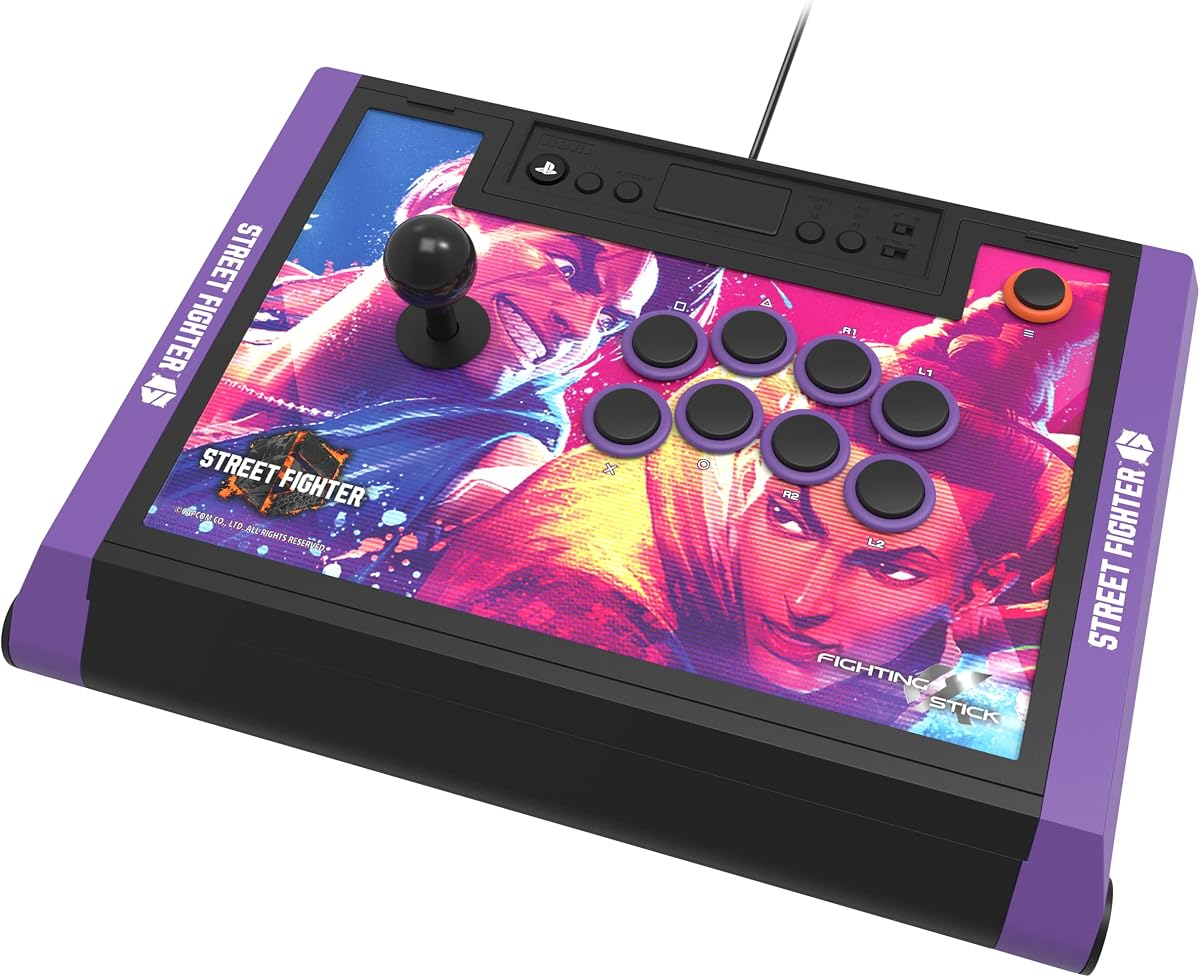
The HORI SF6 Edition Alpha features exclusive artwork and remains a tournament-grade option. It holds a 4.5 rating and appeals to fans of Street Fighter 6 specifically.
We may earn a commission when you buy through this link, at no additional cost to you.
Its standout feature is the collaboration with Capcom for unique artwork and branding. The internal components match the standard Alpha with Hayabusa parts ensuring top performance.
While it costs more the visual appeal and licensing make it worth it for collectors. You still get the same durability and customization as other models.
This is the pick for fans who want to show their game loyalty. It delivers the same high performance while looking distinct on your desk.
The artwork is officially licensed by Capcom adding authenticity to the design. This means the characters and style match the game exactly for a cohesive setup.
You can download high-resolution images to customize the top panel. This lets you keep the stick looking fresh without buying new parts.
We may earn a commission when you buy through this link, at no additional cost to you.
The Qanba Q7 Obsidian 2 features a switch to change between PS5 PC4 and PC. With a 4.3 rating it offers reliable connectivity and performance for fighting games.
We may earn a commission when you buy through this link, at no additional cost to you.
Its key feature is the physical switch allowing quick mode changes. The Sanwa JLF joystick top provides smooth inputs which is preferred by many tournament players.
You must connect via cable so wireless play is not supported. The mic input helps with communication during online matches without extra dongles.
Buy this if you switch between platforms often. The ease of changing modes saves time and keeps your setup streamlined.
The dedicated switch lets you toggle modes instantly without software. This reduces friction when testing different platforms during game sessions.
The JLF top is standard among pro players for its smooth tracking. This ensures your directional inputs are precise and consistent across all games.
We may earn a commission when you buy through this link, at no additional cost to you.
The HORI TEKKEN 8 Edition Alpha showcases Bandai Namco licensing with high-end specs. It holds a 4.6 rating and is tailored for fans of the Tekken series.
We may earn a commission when you buy through this link, at no additional cost to you.
Its main strength is the custom top panel artwork that honors Tekken 8. The internal Hayabusa joystick and buttons ensure the performance meets tournament standards.
While it costs more the official support and quality parts ensure longevity. It is a great choice for those who want to show off their favorite game.
This stick is perfect for Tekken enthusiasts seeking quality. The combination of style and function makes it a standout option on the market.
The top panel artwork is exclusive to this edition adding unique flair. It resonates with fans who want their gear to match their favorite game.
You get the same Hayabusa parts as other Alpha models. This ensures you get the reliability you need without compromising on performance.
We may earn a commission when you buy through this link, at no additional cost to you.
The GuileKeys GK-18 offers a leverless layout for unique control. It has a 4.3 rating and is one of the most affordable options that include RGB and customization.
We may earn a commission when you buy through this link, at no additional cost to you.
Its standout feature is the 18 key layout which reduces input errors. The hot-swappable switches let you change the feel without soldering.
You need an adapter for PS5 compatibility which is a trade-off. Also switching from a lever takes time to adjust to new muscle memory.
Buy this if you want to try leverless play without a big investment. The low latency and RGB features add value for the price.
The leverless design replaces the joystick with buttons for movement. This can improve speed and reduce accidental inputs during rapid sequences.
The OLED screen shows your current mode while RGB lights customize the look. These features enhance the visual experience and let you track inputs at a glance.
We may earn a commission when you buy through this link, at no additional cost to you.
Selecting the right stick depends on your play style and needs. This guide breaks down the key factors to consider before buying.
Ensure the stick supports PS5 for fighting games. Some models also need adapters or specific firmware updates to work correctly.
Check that it lists PS5 compatibility before buying to avoid extra steps later.
Look for Sanwa or Hayabusa parts for durability and response. Lower quality parts may wear out faster or feel less precise.
Premium components ensure your stick lasts and feels great over time.
Some sticks allow you to swap buttons or artwork easily. If you want to personalize your setup consider models with access panels.
Easy customization saves money and keeps your stick fresh.
Decide between wired and wireless. Wired offers stability while wireless reduces cable clutter.
Wired is often preferred for tournament play to avoid any latency issues.
Check if you can map buttons via software or hardware. This is vital for players who switch games often.
Good mapping tools let you create profiles for different titles quickly.
Consider the size and weight of the stick. It should fit comfortably on your desk and in your hands.
A comfortable stick reduces fatigue during long gaming sessions.
Look for audio jacks or turbo functions. These features can add utility for chat and game settings.
Extra features like headphone ports keep your setup organized.
Set a realistic budget for your purchase. Higher prices often bring better build quality and support.
Choose a model that balances cost with the features you need.
Connect the stick to your PS5 using the USB cable or Bluetooth if supported. Ensure your console recognizes it in the accessory settings before playing.
Keep the surface clean by wiping it down after sessions. Dust and sweat can accumulate and affect button performance over time.
Update the firmware regularly to maintain compatibility with new games. This ensures your stick remains functional as the system updates.
Most sticks need a Magic Boot or adapter to work directly on PS5. Check the product details to see if it is included or sold separately. This ensures plug-and-play functionality without needing an extra controller.
Sanwa parts are industry standard for their durability and tactile feel. Many pros prefer them for consistency. Other brands work well too but Sanwa remains a top choice for competitive play.
Most sticks are designed specifically for fighting games. They may not work for standard titles like racing or action games. Always check compatibility lists to be sure before buying.
Use a soft dry cloth to wipe the surface and buttons. Avoid harsh chemicals that could damage the plastic. For deep cleaning open the panel if possible to remove dust from switches.
Wireless offers convenience but wired provides more stable input. For competitive play wired is often preferred to avoid any potential latency. Choose based on your priority.
Many models allow you to swap joystick tops easily. Look for sticks with accessible panels if you want to customize the feel. This can improve comfort and performance for your style.
Updates ensure compatibility with new consoles and games. Always check the manufacturer site for updates. This step is often required to use the stick properly on PS5.
Prices vary from affordable to premium. Basic models are lower while pro models cost more. Aim for a balance that meets your needs without overspending.
We reviewed ten top models for the best Arcade Stick for PS5. Each offers unique strengths for different player types and budgets.
Prioritize build quality and compatibility to get the most out of your games. Choose a stick that fits your play style and comfort needs.
Prices and stock change so verify current listings before buying. With the right choice you will enjoy a superior fighting game experience.