
UGREEN Power Bank 25,000mAh 145W Laptop Portable Charger
4.3Editor score
Ultra fast 145W charging
Massive 25000mAh capacity
Wide device compatibility
This guide compares ten top-rated battery backup solutions for Dell laptops including power banks UPS systems and chargers to help you choose the right one.
Finding a reliable power source keeps your Dell laptop running during outages or while traveling. Modern users need versatile options ranging from portable power banks to full UPS systems that ensure uninterrupted workflow and data safety.
We evaluated ten highly rated products based on capacity, compatibility, charging speed, and build quality. Each item was chosen for its ability to deliver stable power to Dell devices across various models and usage scenarios.
Each pick highlights key strengths and ideal use cases so you can decide quickly. Note that availability and pricing may shift over time so verify details before purchasing to ensure you get the best current deal.
4.3Editor score

4.4Editor score

4.2Editor score
The following table offers a side-by-side look at all ten featured products. Compare specifications and key features to find the solution that matches your specific Dell model and power needs.




The CyberPower EC850LCD stands out as the most comprehensive solution for keeping Dell laptops and peripherals safe from power issues. Its high rating reflects strong performance in real-world usage scenarios.
We may earn a commission when you buy through this link, at no additional cost to you.
It offers twelve outlets split between battery backup and surge protection ensuring you can plug in a laptop monitor and other devices simultaneously. The multifunction LCD panel provides instant clarity on power conditions and battery life which helps users react quickly during an outage.
One trade-off is its size making it less suitable for frequent travelers but ideal for home offices. The ECO mode is a smart addition reducing energy waste by cutting power to peripherals when the computer is off.
This unit is perfect for remote workers or home offices needing reliable protection. With its equipment guarantee and software management features it delivers peace of mind alongside functional power management.
The ECO mode automatically shuts off power to connected peripherals when your computer sleeps saving energy and extending component life.
Beyond just backup it protects against surges and provides a guarantee for connected equipment which safeguards your valuable data and hardware.
We may earn a commission when you buy through this link, at no additional cost to you.
When your original charger fails this Ostrich adapter offers a dependable third-party alternative for many Dell Inspiron XPS and Vostro models. Its high rating points to consistent quality and safety in daily use.
We may earn a commission when you buy through this link, at no additional cost to you.
The adapter supports both 65W and 45W output which covers a broad range of entry to mid-range Dell laptops. Safety mechanisms protect against overvoltage and overheating ensuring your device remains safe even with a non-OEM part.
Some users may prefer the exact fit of an original charger but this option provides excellent value and flexibility. The included converter cable adds versatility allowing use with different connector sizes found on older models.
Choose this if you need a cost-effective replacement without sacrificing safety. It is an ideal backup charger to keep in your bag for travel or as a spare at home.
Independent safety testing confirms this adapter meets rigorous standards protecting your laptop from electrical faults during charging cycles.
With a lifetime exchange policy you get long-term peace of mind ensuring any defects are replaced quickly without extra cost.
We may earn a commission when you buy through this link, at no additional cost to you.
The UGREEN Power Bank delivers impressive performance for travelers needing serious power on the go. It ranks high due to its ability to fully recharge multiple laptops and devices in one go.
We may earn a commission when you buy through this link, at no additional cost to you.
With 145W of total output it can power demanding 16 inch laptops quickly using USB-C PD. The 25000mAh capacity ensures multiple charges for phones or even a full recharge for a laptop making it perfect for long flights.
The main downside is the weight which might be noticeable in a light backpack. However the digital display helps you manage power efficiently without guessing how much energy remains in the bank.
This is the best budget high-capacity option for users who prioritize power over portability. It transforms any USB-C laptop into a truly mobile workstation without relying on wall outlets.
Using PD3.1 technology it can charge a 16 inch laptop from zero to over half in just thirty minutes for quick power boosts.
The power bank itself recharges in about two hours with a 65W adapter ensuring it is ready for your next trip quickly.
We may earn a commission when you buy through this link, at no additional cost to you.
The Omni 20C+ is designed for professionals who need a complete power and connectivity solution. It offers unique features like a USB hub and wireless charging that set it apart from standard power banks.
We may earn a commission when you buy through this link, at no additional cost to you.
It delivers 100W through USB-C which is sufficient for most modern laptops and high-end devices. The added USB hub mode lets you connect peripherals like mice or drives directly to the power bank which adds functional versatility.
One limitation is the need to purchase a wall charger separately to recharge the unit which might be inconvenient for some users. However the pass-through charging allows you to charge devices and the bank simultaneously.
Buy this if you want a single device to replace multiple accessories on your desk or in your bag. Its premium features justify the cost for users needing robust connectivity and power.
You can connect USB devices to the power bank to extend your laptop's ports reducing the need for a separate dongle adapter.
A built-in wireless charging zone allows you to top up your phone without cables keeping your workspace clean and organized.
We may earn a commission when you buy through this link, at no additional cost to you.
This genuine Dell charger offers a straightforward solution for models equipped with USB-C charging. Authentic OEM parts ensure compatibility and optimal charging curves for Dell Latitude XPS and other USB-C devices.
We may earn a commission when you buy through this link, at no additional cost to you.
It supports multiple output voltages which adapts to different power needs while maintaining efficiency. The USB Type C tip ensures a universal connection that is becoming standard across modern laptops and accessories.
Users with older round-pin models cannot use this adapter so check your port type first. While the cord is relatively short it provides a reliable connection for desk setups or short range charging.
Choose this original adapter to ensure maximum compatibility and safety for your Dell laptop. It is a solid choice for those who prefer official accessories over third-party alternatives.
As a genuine OEM part this charger matches the exact electrical specs of your laptop ensuring safe and efficient charging cycles.
The USB-C interface means you can often use the same cable for data and power streamlining your travel gear significantly.
We may earn a commission when you buy through this link, at no additional cost to you.
While not a battery backup this external drive helps keep your laptop functional when installing software from discs. It is a useful accessory for legacy workflows requiring optical media access on modern thin laptops.
We may earn a commission when you buy through this link, at no additional cost to you.
The drive is powered entirely by the laptop's USB port removing the need for extra cables or power adapters. Its slim design makes it easy to slip into a laptop sleeve for travel or storage.
It might not seem directly related to power backup but having all your tools ready ensures smooth operation during any scenario. The pre-loaded software makes it ready to use right out of the box without hassle.
Include this if you still rely on physical media for installations or backups. It is a reliable add-on that expands your laptop's capabilities without adding significant bulk.
Because it draws power from the laptop it simplifies your workspace setup by reducing the number of cables on your desk.
The included Media Suite lets you play or burn discs immediately without needing to download additional software drivers first.
We may earn a commission when you buy through this link, at no additional cost to you.
This charger covers a wide array of Inspiron models making it a versatile choice for households with multiple Dell laptops. Its high rating suggests consistent performance across different models.
We may earn a commission when you buy through this link, at no additional cost to you.
The long cord offers flexibility in positioning your laptop on a desk or couch which adds comfort during use. It supports both 4.5×3.0mm and 7.4×5.0mm sockets broadening its appeal to various laptop generations.
It may be slightly bulkier than the original but the convenience of a long cord often outweighs this minor drawback. Safety certifications provide assurance that the device meets standard electrical safety requirements.
This is a practical replacement for owners of common Inspiron models. It delivers reliable power without the premium price of an official OEM adapter.
An 8.8 foot cord allows you to charge from further away ensuring you can use your laptop comfortably across the room.
Compatible with many Inspiron series this single adapter can serve as a spare for different machines in your family.
We may earn a commission when you buy through this link, at no additional cost to you.
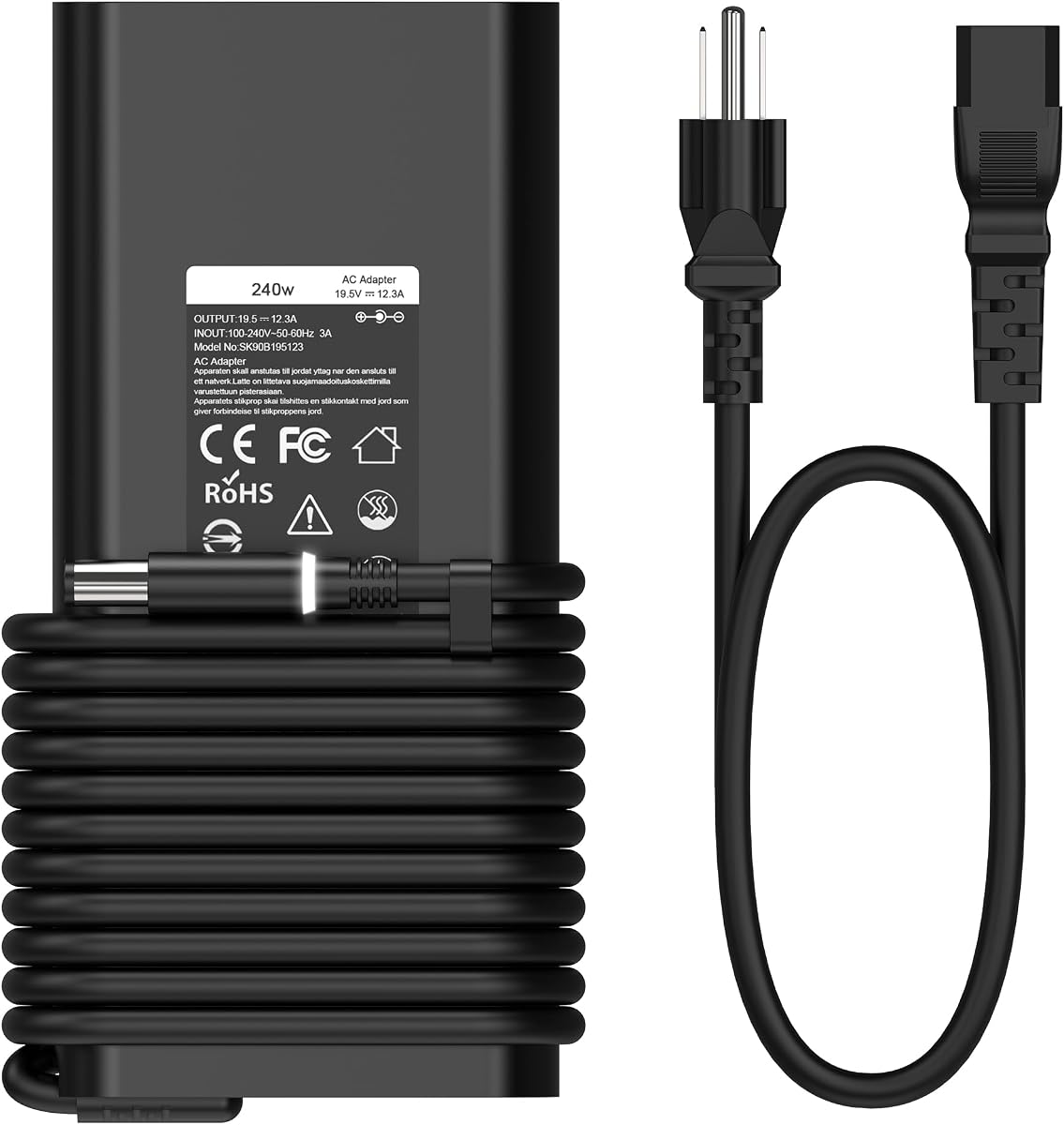
Gaming laptops require significantly more power than standard ultrabooks. This charger delivers the high wattage needed to keep Alienware machines running and charging efficiently even under heavy load.
We may earn a commission when you buy through this link, at no additional cost to you.
It supports models needing 180W or 240W ensuring broad compatibility within the Alienware lineup. The slim profile helps with portability which is rare for high wattage chargers that are often bulky.
While it is powerful it may not fit lower wattage laptops due to connector size and output specifics. Users must verify their specific model needs to ensure this adapter matches their requirements exactly.
Ideal for gamers needing a spare or replacement charger that handles high performance demands. It ensures your machine gets enough power to run without throttling during intense sessions.
The 240W output ensures your GPU and CPU have the power needed for maximum performance while the system charges simultaneously.
Despite the high power rating the charger remains thin making it easier to pack in a gaming backpack compared to bulkier units.
We may earn a commission when you buy through this link, at no additional cost to you.
For top tier Alienware models this charger provides the maximum power output available in the third-party market. Its high rating suggests users appreciate its ability to maintain performance under stress.
We may earn a commission when you buy through this link, at no additional cost to you.
Delivering 330W it prevents thermal throttling which can occur with lower wattage adapters during rendering or gaming. It is also safe for devices designed for lower wattages ensuring a safe fallback for older models.
The physical size of the brick is substantial which might be a drawback for frequent travelers. However the performance benefit for desktop replacements or high-end gaming rigs is significant and worthwhile.
Choose this if you own a high performance machine that demands peak power. It ensures your system runs at full speed without power-related interruptions or slowdowns.
By providing ample power headroom the adapter keeps the system running cool and fast even during intensive tasks like video editing.
It is safe to use on lower wattage devices giving you a versatile solution that adapts to different machine requirements.
We may earn a commission when you buy through this link, at no additional cost to you.
This kit offers a flexible solution for users with a USB-C power bank who need to charge older laptops with round tips. It bridges the gap between modern PD chargers and legacy connectors.
We may earn a commission when you buy through this link, at no additional cost to you.
With fifteen different connector tips it covers most common laptop models including Dell HP and Lenovo. The USB-C input ensures compatibility with modern high wattage power banks and chargers.
It is not a standalone power source but rather an adapter that expands what your existing power bank can charge. Proper fit is critical so matching the tip to your laptop port is essential for safety.
This kit is perfect for travelers carrying one power bank for multiple devices. It eliminates the need to carry many separate chargers by adapting a single source to different laptops.
The inclusion of fifteen tips means you can likely find a match for your specific laptop or even those of friends and family.
Built-in chips ensure the right current and voltage are delivered protecting your laptop from potential electrical mismatches.
We may earn a commission when you buy through this link, at no additional cost to you.
Selecting the right battery backup involves understanding your laptop's power requirements and your usage habits. This guide breaks down the essential factors to consider.
Check your laptop's charger for wattage output such as 65W or 180W. A backup must match or exceed this to charge effectively under load. Insufficient wattage leads to slow charging or discharge during use.
Always choose a backup with output equal to or higher than your original adapter to ensure stable performance.
Dell laptops use USB-C barrel connectors. Ensure your backup matches the physical connector. adapters are available for barrel tips if your model is older.
Verify the connector size matches your laptop's port before purchasing to avoid incompatibility issues.
Look at battery capacity measured in mAh or Wh. Higher numbers mean longer runtime. A 20000mAh pack can provide one full charge for many laptops.
Estimate how many hours you need to run your laptop without a wall outlet and choose a capacity that fits.
Select products with safety certifications and robust build quality. Protect against overvoltage and overheating to keep your laptop safe during charging.
Prioritize reputable brands that include safety protections for peace of mind.
Higher capacity often means more weight. Balance the need for long runtime with the convenience of carrying the device in your bag.
If you travel frequently opt for a lighter option even if it offers slightly less runtime.
Some backups recharge themselves quickly while others take hours. If you often need the backup topped up fast look for models with fast input charging support.
Fast recharge capability ensures your backup is ready for the next trip with minimal downtime.
Features like USB hubs wireless charging or LCD screens add value. Consider if these extra functions will simplify your setup or are unnecessary for your needs.
Focus on features that solve real problems rather than just adding cost.
A solid warranty indicates confidence in product quality. Look for brands offering reasonable replacement or repair policies in case of defects.
Choose sellers with clear support channels to ensure you get help if the product fails.
Always check the wattage of your Dell laptop before connecting it to a backup. Ensure the output matches your requirements to prevent underpowering. Use a direct USB-C connection when possible for the most efficient transfer.
Store your backup in a cool dry place to maintain battery health. Avoid leaving it in extreme temperatures which can degrade the battery faster. Charge the device fully before storing it for long periods to prevent deep discharge.
Regularly inspect the cable and connectors for wear or damage. Frayed cables can lead to safety hazards or inconsistent charging. Replace damaged accessories immediately to ensure safe and reliable power delivery for your device.
Not every USB-C power bank supports the wattage required by Dell laptops. You need a power bank that supports Power Delivery (PD) and provides at least 65W output to charge most modern Dell models effectively. Check the specific wattage on the power bank before buying.
You cannot plug a barrel connector into a USB-C port. If your Dell laptop has a barrel jack you need a backup with a barrel tip. If it has USB-C you must use a USB-C compatible power bank or adapter.
Most high-capacity power banks take several hours to recharge fully. Models with fast input charging can be replenished in two to three hours with a compatible charger. Always check the input wattage to know the expected recharge time.
A UPS is better for stationary home offices because it protects against surges and offers automatic switching during outages. Power banks are more portable but do not offer surge protection. Choose a UPS if you rarely move your setup.
If the backup stops working it may be due to a dead battery or connector issue. Check warranty terms for replacement options. Some units offer long warranties while others may need professional replacement.
Many modern power banks support multi-device charging. Ensure the total output across all ports meets the combined wattage of your devices. If you use a laptop and phone together check that the power bank supports simultaneous charging.
We covered ten top options ranging from desktop UPS units to portable power banks. The CyberPower EC850LCD stands out for home use while UGREEN offers excellent capacity for travelers.
Prioritize wattage compatibility and capacity based on your specific Dell model. A high-quality backup ensures you stay productive during outages or while on the move without interruption.
Prices and availability change quickly so verify details before making a purchase. Check current listings to ensure you get the best value for your power needs today.