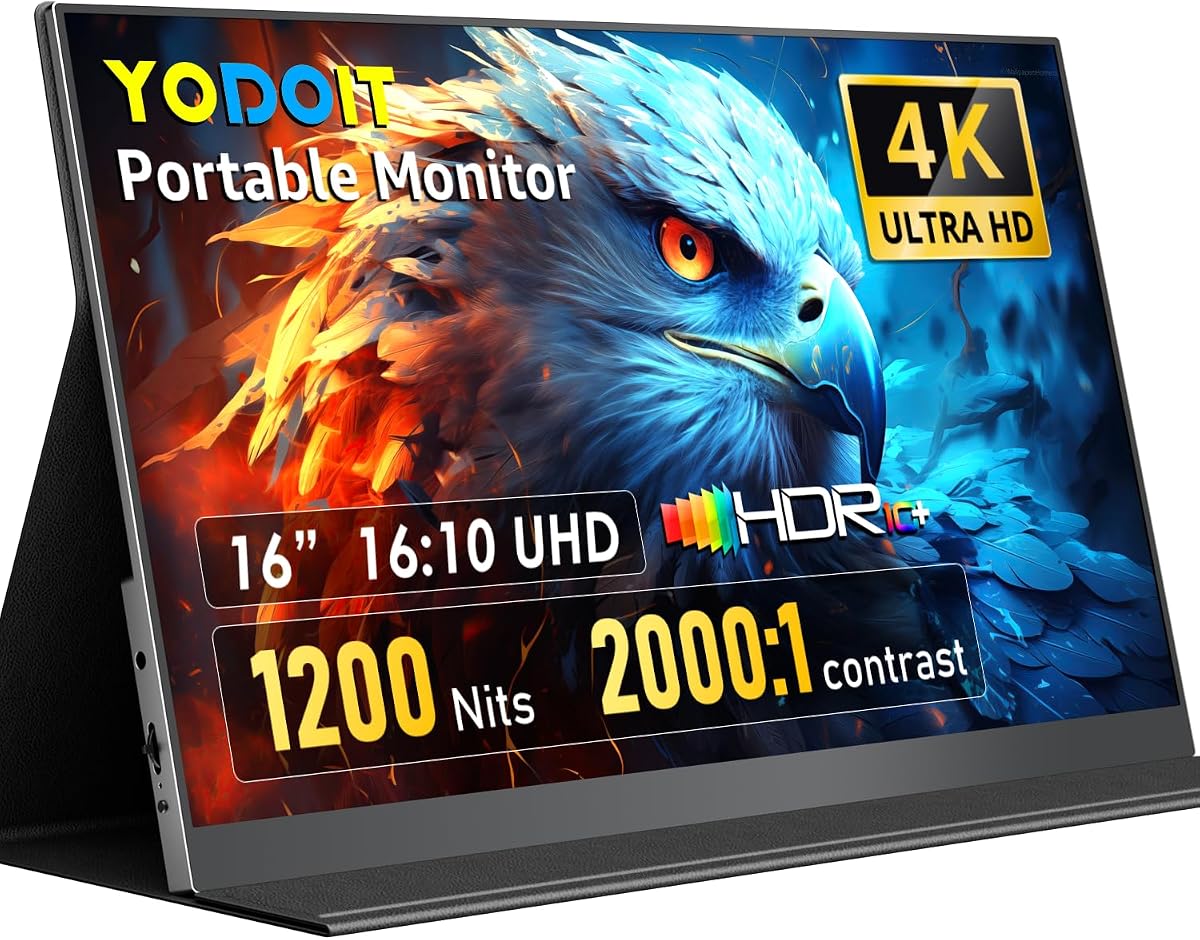
Yodoit 4K Portable Monitor
4.8Editor score
1200 nits peak brightness
True 4K 3840×2400 resolution
145% sRGB color gamut
Finding a monitor that remains visible in direct sunlight is essential for outdoor professionals and mobile workers. Standard screens often become unreadable when exposed to bright ambient light, hindering productivity and creativity. Specialized displays with high brightness levels and anti-glare coatings solve this critical problem effectively.
We evaluated ten top-rated monitors based on brightness, resolution, color accuracy, and build quality. Each product was analyzed for its suitability in sunny environments, ensuring they meet the demands of fieldwork, travel, and outdoor gaming. Our comparison highlights the best options across various budgets and use cases.
Each selection in this list includes detailed specifications, pros, cons, and expert insights to help you choose wisely. Whether you need a portable travel screen or a fixed desktop display, these picks offer reliable performance under challenging lighting conditions. Remember to verify current availability and pricing before purchasing.
4.8Editor score

4.4Editor score

4.5Editor score
As an Amazon Associate we earn from qualifying purchases.
This side-by-side comparison details the key specifications of all ten monitors to help you find the perfect fit for your specific needs in bright environments.


The Yodoit 4K Portable Monitor stands out as the top choice for professionals who need a display that remains visible under intense sunlight. With a peak brightness of 1200 nits, it easily outshines typical portable monitors that struggle in outdoor conditions. This device is designed for outdoor photographers, field inspectors, and digital nomads who require reliable performance anywhere.
We may earn a commission when you buy through this link, at no additional cost to you.
Its true 4K resolution of 3840×2400 combined with a 16:10 aspect ratio provides significantly more vertical workspace compared to standard 16:9 screens. This extra space is invaluable for editing timelines and viewing full-resolution photos without constant scrolling. The IPS panel ensures consistent color accuracy across a 178-degree viewing angle, making it ideal for collaborative work.
While the monitor offers exceptional performance, it does require an external power adapter to maintain peak brightness levels, which adds a small bulk to your setup. Additionally, the higher price reflects its professional-grade build and features, so it may be more than some casual users need. However, for those working in challenging environments, the investment pays off quickly.
If you are a professional who frequently works outdoors or travels with high-end equipment, the Yodoit 4K Portable Monitor is the perfect partner. It delivers the brightness and color fidelity needed to trust your edits on the go. We highly recommend this monitor for anyone who refuses to be tethered to indoor lighting.
The 1200 nits brightness ensures content remains clear and readable even in direct sunlight, eliminating the need to seek shade.
With 145% sRGB coverage, the monitor delivers rich and accurate colors essential for photo retouching and print-proofing on location.
We may earn a commission when you buy through this link, at no additional cost to you.
The Dell 24 Monitor SE2426H offers a balanced mix of performance and affordability for general office use. Its 144Hz refresh rate and 1ms response time deliver fluid visuals that reduce eye strain during long work sessions or casual gaming. While not designed specifically for direct sunlight, its IPS panel provides consistent viewing angles that help in brightly lit rooms.
We may earn a commission when you buy through this link, at no additional cost to you.
This monitor features TÜV Rheinland 3-Star certification, which effectively reduces harmful blue light without compromising color quality. This is a significant benefit for users who spend extended hours in front of the screen. The ultra-thin bezels create a modern look and maximize the viewing area, making it a great choice for dual-monitor setups.
The main limitation is its standard brightness level, which may not be sufficient for direct outdoor sunlight exposure. Additionally, the stand offers tilt adjustments but lacks height or pivot options, which might affect ergonomics for some users. However, for indoor office environments or shaded outdoor areas, it performs very well.
For users seeking a reliable and affordable monitor that balances performance and eye comfort, the Dell 24 Monitor SE2426H is an excellent choice. It is best suited for indoor office work or situations where direct sunlight is not a primary concern.
The 144Hz refresh rate ensures smooth transitions and tear-free motion, perfect for multitasking and light gaming.
Certified by TÜV Rheinland to reduce blue light, this monitor helps maintain visual comfort during extended daily use.
We may earn a commission when you buy through this link, at no additional cost to you.
The Dell 27 Monitor S2725QS is selected as the Editor's Choice for its outstanding combination of resolution and color accuracy. The 4K UHD display with IPS technology delivers vibrant and precise colors, making it ideal for creative professionals who need reliable visuals. Its 120Hz refresh rate adds a layer of smoothness that enhances both work and entertainment experiences.
We may earn a commission when you buy through this link, at no additional cost to you.
ComfortView Plus technology significantly reduces harmful blue light emissions to 35% without sacrificing color accuracy, ensuring all-day comfort. The re-engineered sound system provides detailed audio with greater output power, which is a pleasant surprise for a monitor. The ash white finish and ultra-thin bezels contribute to a modern aesthetic that fits any workspace.
While the display is excellent, its brightness may need to be maxed out to handle direct sunlight effectively. The 27-inch size also requires a substantial amount of desk space, which could be a constraint for smaller workstations. Despite these minor issues, its visual quality makes it a top contender for creatives.
If you prioritize color accuracy and resolution for graphic design or photo editing, the Dell 27 Monitor S2725QS is a fantastic option. It provides the visual fidelity needed to trust your creative work while offering features that protect your eyes during long sessions.
The 4K UHD resolution ensures sharp images and fine detail, crucial for high-end creative and professional tasks.
ComfortView Plus reduces blue light significantly, allowing for comfortable viewing throughout the day without color shifts.
We may earn a commission when you buy through this link, at no additional cost to you.
The Dell 24 Plus Monitor S2425HSM distinguishes itself with a fully adjustable stand that supports height tilt pivot and swivel movements. This level of ergonomics is rare at this price point and helps users maintain a healthy posture throughout the day. The 144Hz refresh rate and 1ms response time ensure smooth visuals for both work and casual gaming.
We may earn a commission when you buy through this link, at no additional cost to you.
Integrated dual 3W speakers add convenience by eliminating the need for external audio devices during presentations or media consumption. The TÜV 4-Star certification for eye comfort ensures that harmful blue light is reduced while maintaining image quality. The sleek ash white finish offers a fresh aesthetic that stands out from typical black monitors.
However, the display is rated for standard brightness, which limits its effectiveness in direct sunlight environments. Additionally, the Full HD resolution may not be sufficient for users who need to see fine details in their work. These limitations are acceptable for general office use but less ideal for specialized tasks.
For users who prioritize ergonomics and a modern design, the Dell 24 Plus Monitor S2425HSM is a strong choice. Its flexible stand and comfortable viewing features make it suitable for long office hours where setup comfort is key.
Full adjustability allows users to customize the screen position perfectly, reducing strain during extended work periods.
Built-in speakers provide clear audio for meetings and media, keeping your desk setup clean and clutter-free.
We may earn a commission when you buy through this link, at no additional cost to you.
The LG 24U411A-B is an excellent budget option that brings high refresh rates and good color performance to the affordable segment. Its 120Hz refresh rate and 1ms Motion Blur Reduction ensure smooth visuals, making it a great pick for casual gaming and fast-paced work. The HDR10 support adds depth to compatible content, enhancing the viewing experience.
We may earn a commission when you buy through this link, at no additional cost to you.
Visually, the monitor features a slim stand and a 3-side borderless design that gives it a clean and modern appearance. The panel covers 99% of the sRGB color gamut, delivering vivid colors that look great for everyday tasks. Reader Mode and Flicker Safe technologies help reduce eye strain during long usage sessions.
The stand is basic and only offers tilt adjustments, which might be a drawback for users needing precise positioning. Additionally, the brightness levels are typical for indoor monitors and do not support direct sunlight usage. Despite these minor limitations, its performance and value make it highly recommended.
If you are looking for an affordable monitor that delivers smooth visuals and decent colors for gaming and general use, the LG 24U411A-B is a top contender. It strikes a great balance between cost and performance for budget-conscious buyers.
With 120Hz refresh rate and Motion Blur Reduction, fast moving content stays sharp and clear without stuttering.
HDR10 and 99% sRGB coverage provide rich and accurate colors that enhance both work and entertainment visuals.
We may earn a commission when you buy through this link, at no additional cost to you.
The Acer SB273 G0bi offers a spacious 27-inch Full HD display at a competitive price point, making it suitable for office tasks. The 120Hz refresh rate ensures smooth motion which is beneficial for multitasking and light gaming. Its zero-frame design provides maximum visibility and contributes to a clean and modern aesthetic on your desk.
We may earn a commission when you buy through this link, at no additional cost to you.
Adaptive-Sync support matches the refresh rate with your graphics card to deliver a smooth tear-free experience. The 1ms VRB response time helps minimize motion blur ensuring that fast moving elements remain sharp. This makes the monitor versatile for both work and entertainment purposes in standard indoor environments.
The main drawback is that Full HD resolution on a 27-inch screen results in lower pixel density compared to QHD or 4K options. Additionally, the stand does not offer height adjustments which can limit ergonomic setup for some users. However, for those needing a large screen without a high price, it is a solid choice.
For users who need a large screen for productivity and general use at an affordable price, the Acer SB273 G0bi is a great option. Its smooth performance and wide design make it a versatile addition to any office setup.
Adaptive-Sync technology synchronizes the monitor with your GPU for smooth and tear-free gaming and video playback.
The thin bezels allow for edge-to-edge visibility and easier multi-monitor setups without distracting borders.
We may earn a commission when you buy through this link, at no additional cost to you.
The LG 32-inch QHD monitor delivers a large and immersive display with crisp 2560×1440 resolution ideal for multitasking. The 100Hz refresh rate provides smooth motion which is beneficial for both work and entertainment. Its USB Type-C port allows for video transmission and device charging with a single cable simplifying your desktop setup.
We may earn a commission when you buy through this link, at no additional cost to you.
Color performance is strong with 99% sRGB coverage and HDR10 support that enhances contrast and vividness. The Reader Mode and Flicker Safe features help reduce eye strain allowing for comfortable extended viewing. The sleek bezel-less design creates a clean look that enhances screen immersion and aesthetics.
The stand is limited to tilt adjustments which may not suit users who need full ergonomic customization. Additionally, the brightness levels are sufficient for indoor use but not for direct sunlight exposure. Despite this, its combination of size resolution and connectivity makes it a standout option for professionals.
For those needing a large workspace with high resolution and modern connectivity, the LG 32-inch QHD monitor is an excellent investment. It is particularly well-suited for productivity tasks and media consumption on a desktop setup.
USB Type-C support allows for video and charging with a single cable, keeping your desk organized and efficient.
The 32-inch QHD panel delivers vibrant and sharp images that stay clear even at wide viewing angles.
We may earn a commission when you buy through this link, at no additional cost to you.
The Dell 27 Plus QHD Monitor S2725DSM combines a high resolution QHD display with excellent ergonomics for a premium experience. The 144Hz refresh rate and 1ms response time ensure smooth and crisp visuals for both work and gaming. Its stand supports height tilt pivot and swivel adjustments allowing users to find the perfect viewing angle.
We may earn a commission when you buy through this link, at no additional cost to you.
Integrated dual 3W speakers provide convenient audio without the need for external devices. The TÜV 4-Star certification ensures eye comfort by reducing harmful blue light while maintaining color quality. The ash white finish offers a stylish aesthetic that looks great in modern office environments.
While the monitor performs well, its brightness is standard for indoor use and may not handle direct sunlight. Also, to achieve the 144Hz refresh rate you may need to use a DisplayPort connection which some users might not have readily available. These are minor trade-offs for its overall quality.
For users seeking a high resolution display with full ergonomic adjustments and modern features, this Dell monitor is a strong choice. It is ideal for professionals who need a reliable and comfortable setup for long work hours.
144Hz refresh rate and 1ms response time deliver tear-free motion ensuring a seamless experience during intense sessions.
TÜV certified eye comfort features protect your vision while maintaining stunning image quality throughout the day.
We may earn a commission when you buy through this link, at no additional cost to you.
The Acer KB242Y G0bi is a compact monitor that offers smooth performance and a clean design at an affordable price. The 120Hz refresh rate ensures fluid visuals making it suitable for both work and light gaming. Its zero-frame design maximizes visibility and contributes to a modern look that fits well in any workspace.
We may earn a commission when you buy through this link, at no additional cost to you.
Adaptive-Sync support helps match the refresh rate with your graphics card for a smooth tear-free experience. The 1ms VRB response time minimizes motion blur ensuring that fast moving content stays clear. This makes it a versatile option for various tasks without breaking the bank.
The stand offers tilt adjustments but lacks height or swivel options which could limit ergonomic setups for some users. Additionally, the brightness is typical for indoor monitors and is not suitable for direct sunlight use. These limitations are manageable given the price and performance balance.
If you need a compact and affordable monitor that delivers smooth visuals and a modern design, this Acer model is a great choice. It is ideal for small desks or secondary screens where cost and performance are important.
1ms VRB response time reduces ghosting and smearing ensuring smooth transitions in fast-paced applications.
The zero-frame design provides edge-to-edge visibility and a clean look that enhances any desk setup.
We may earn a commission when you buy through this link, at no additional cost to you.
The Newsoul 4K Portable Monitor offers a competitive alternative for users needing high brightness on the go. With a peak brightness of 1200 nits and a matte screen, it handles bright conditions well. The 4K resolution provides sharp visuals that are great for productivity and media consumption in various environments.
We may earn a commission when you buy through this link, at no additional cost to you.
It features a 145% sRGB color gamut for accurate colors and includes a protective magnetic case that doubles as a stand. The VESA mountable design allows for flexible positioning on walls or arms. Its aluminum alloy shell provides better heat dissipation and durability compared to standard plastic shells.
To achieve peak brightness an external power connection is required which is standard for high-performance portable monitors. The build quality while functional may feel slightly less premium than high-end alternatives. However, its value for money and performance make it an attractive option for travelers.
For travelers or professionals who need a portable 4K display that works in sunlight at a reasonable price, this Newsoul monitor is a solid pick. It balances brightness and resolution effectively for on-the-go work and play.
1200 nits peak brightness ensures content remains visible even under strong light conditions for outdoor use.
Lightweight and compact with a protective case, it is easy to carry and set up anywhere.
We may earn a commission when you buy through this link, at no additional cost to you.
Choosing a monitor for bright sunlight requires careful evaluation of brightness, contrast, and viewing angles to ensure readability and accuracy.
Brightness is measured in nits and determines how well a screen can be seen in bright environments. For outdoor sunlight, you need a monitor with at least 1000 nits or higher to ensure text and images remain visible without glare. Standard office monitors typically range from 250 to 350 nits which are not enough for direct sunlight exposure.
Prioritize displays with peak brightness ratings specifically tested for sunlight conditions to avoid washed-out images.
Anti-glare coatings reduce reflections from windows and overhead lights which is critical for outdoor or bright indoor use. Matte finishes scatter light rather than reflecting it directly into your eyes improving visibility in challenging lighting. Glossy screens may look sharper but reflect more light making them harder to use outdoors.
Select monitors with dedicated matte anti-glare treatments for the best visibility in sunlit areas.
IPS panels are preferred for their wide viewing angles and consistent color accuracy at any angle. TN or VA panels might have faster response times but often suffer from color shifting or reduced brightness when viewed from the side. IPS technology ensures that colors remain true even when the monitor is positioned at different angles.
Choose IPS panels to maintain color accuracy and brightness consistency across different viewing positions.
Higher resolution like 4K ensures text and details remain sharp even when viewed from distances or with sunlight glare. While brightness helps with visibility clarity is key for readability and eye comfort during long sessions. Ensure the pixel density is sufficient for your workspace size and task requirements.
Opt for 4K or QHD resolution to keep text crisp and reduce strain when working in bright conditions.
A high contrast ratio helps distinguish details in both bright highlights and deep shadows which is vital for HDR content. Monitors with 2000:1 contrast or higher provide more depth and realism than standard 1000:1 panels. This feature supports better image fidelity when working with photography or video in varying light.
Look for contrast ratios above 1500:1 for better dynamic range and detail visibility.
USB-C with power delivery allows for single-cable connections which simplify portable setups in the field. HDMI and DisplayPort are essential for gaming consoles or desktop PCs and ensure compatibility with your devices. Check for multiple ports if you plan to switch between different sources regularly.
Ensure your monitor supports USB-C or HDMI/DP for versatile connections to laptops and consoles.
For portable monitors weight and durability are critical as you may carry them daily to outdoor locations. A sturdy build and protective case prevent damage during travel while keeping the device light enough to carry. Ergonomic stands with height and tilt adjustments are vital for desktop units to prevent neck strain.
Balance portability with build quality and ergonomics based on whether you need a fixed or mobile setup.
For professional work like photo editing accurate color representation is essential and relies on sRGB or Adobe RGB coverage. High-quality IPS panels often offer 99% sRGB or higher ensuring your work looks true to life on screen. This is particularly important when your output will be used in print or web publishing.
Verify sRGB or color gamut coverage to ensure reliable results for creative professional work.
Always connect to power adapter when maximum brightness is required for outdoor visibility to avoid performance drops.
Use the included protective case for portable monitors to prevent scratches and damage when traveling or storing in a bag.
Clean the screen with a microfiber cloth and avoid harsh chemicals to protect the anti-glare coating and matte finish.
Yes, portable monitors with 1000+ nits brightness are essential for outdoor professionals who need visibility in direct sunlight. They are more expensive than standard portable displays but provide better reliability and readability for field work and mobile use.
Standard office monitors with 250 to 350 nits brightness are usually not bright enough for direct sunlight. They may work in shaded areas but will struggle to provide clear images under direct sun exposure.
Nits measure brightness per square meter while lumens measure total light output. For monitors brightness is expressed in nits to indicate how bright the screen looks from a specific distance.
A matte screen slightly diffuses the image but significantly reduces glare and reflections. This trade-off is acceptable for outdoor use as it makes the image clearer in bright conditions.
Yes, portable monitors usually require external power to reach peak brightness levels. Battery power alone is often insufficient to drive the high nits needed for direct sunlight visibility.
Use a dry microfiber cloth to gently wipe the screen. Avoid using paper towels or abrasive chemicals that can scratch or damage the anti-glare coating.
Some portable monitors support VESA mounts with the right adapter. Check the product details for VESA compatibility before purchasing wall mounts.
A refresh rate of 60Hz or higher is ideal for smooth motion and reduced eye strain. While refresh rate does not impact brightness, higher rates improve the overall viewing experience.
Our top picks offer a range of options from premium portable displays to large desktop monitors suitable for various work scenarios.
Prioritize brightness and anti-glare features when choosing a monitor for sunny environments to ensure clear and comfortable viewing.
Always check current availability and verify specs before purchasing to ensure the model meets your specific brightness and connectivity needs.