
Lenovo 100E Chromebook 2ND Gen
4.0Editor score
Affordable price point
Lightweight portable design
Long battery life
Finding a reliable laptop on a budget can be challenging, but cheap Chromebooks offer an excellent balance of performance and affordability. These devices are designed for everyday tasks like browsing, streaming, and light productivity without breaking the bank.
We have evaluated ten top-rated models based on processor speed, display quality, storage options, and overall user satisfaction. Our analysis focuses on real-world usability to ensure you get the most value for your investment in this competitive market.
Each pick highlights key strengths and potential limitations to help you make an informed decision. Prices and availability can change frequently, so be sure to check the latest details before making your final purchase decision online.
4.0Editor score

4.5Editor score
4.4Editor score
As an Amazon Associate we earn from qualifying purchases.
Here is a side-by-side comparison of all ten models to help you quickly identify which features matter most for your specific needs and budget constraints.





This HP Chromebook stands out as a top choice for users seeking a reliable device without overspending. With a rating of 4.5 stars, it delivers solid performance for everyday tasks like browsing and streaming.
We may earn a commission when you buy through this link, at no additional cost to you.
The Intel N4000 processor ensures smooth multitasking while the 14-inch HD display provides clear visuals. The backlit keyboard and multi-touch trackpad enhance usability, making it comfortable for extended work sessions.
While the 32GB storage might feel tight for heavy media users, cloud storage options mitigate this limitation. The battery life supports all-day use, which is crucial for students and professionals on the go.
It is an ideal pick for anyone prioritizing portability and battery longevity over raw power. The sleek design and robust build quality make it a trustworthy companion for daily computing needs.
Its lightweight form factor allows easy transport between classes or work locations without adding bulk to your bag.
B&O tuned speakers deliver rich sound quality that enhances media consumption and video calls significantly.
We may earn a commission when you buy through this link, at no additional cost to you.
For those on a tight budget, this Lenovo Chromebook offers incredible value. Its low price point makes it accessible for students or families needing multiple devices without financial strain.
We may earn a commission when you buy through this link, at no additional cost to you.
The MediaTek processor handles web browsing and document editing efficiently. Despite its small 11.6-inch screen, the display remains clear enough for standard productivity tasks and online learning.
Storage is minimal at 16GB, but reliance on cloud services keeps this manageable. The renewed condition ensures functionality while keeping costs down, though cosmetic imperfections might occur.
This device is best suited for basic users who prioritize affordability over advanced features. It serves well as a secondary machine or a dedicated tool for simple internet access.
Its low cost removes financial barriers, making it an excellent entry point for first-time Chromebook users.
The compact dimensions allow effortless carrying in small backpacks or handbags for on-the-go use.
We may earn a commission when you buy through this link, at no additional cost to you.
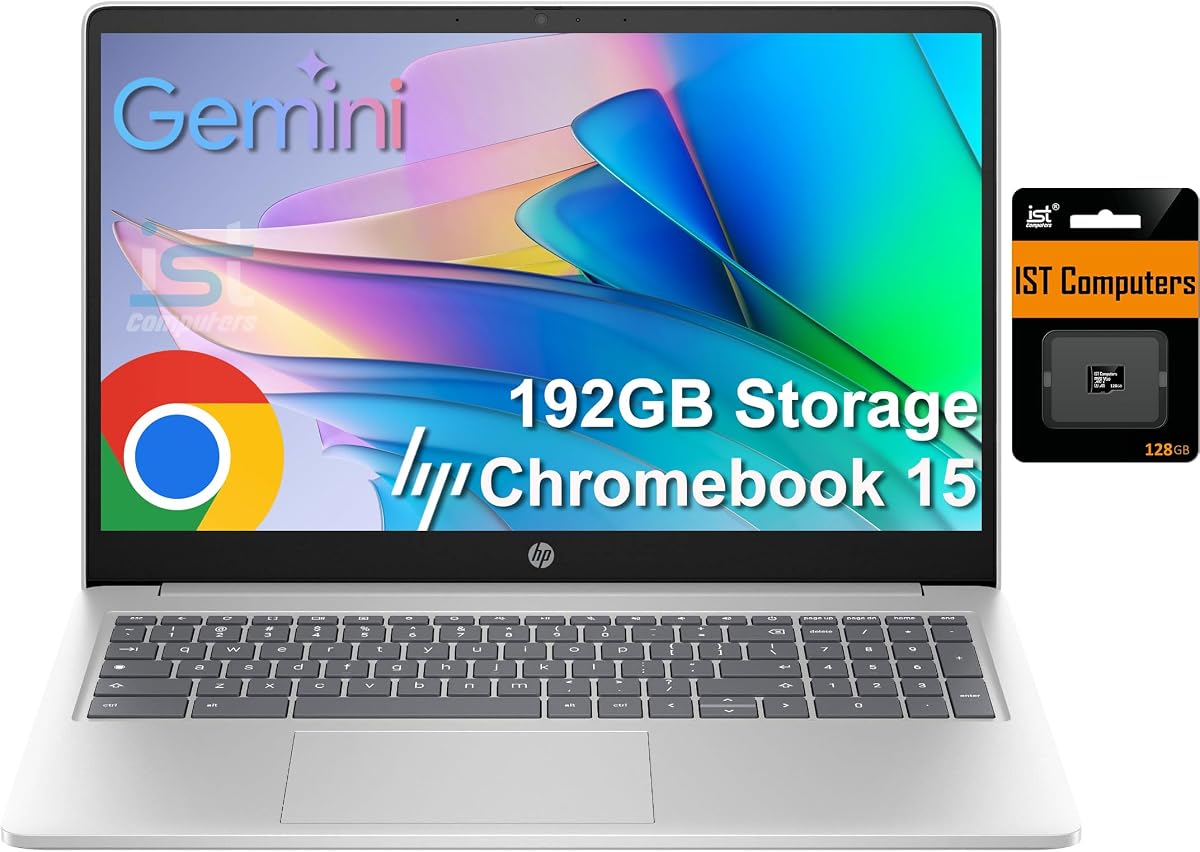
This HP model elevates the typical Chromebook experience with premium specs like 8GB DDR5 RAM and ample storage. It is designed for users who need more power for multitasking and media management.
We may earn a commission when you buy through this link, at no additional cost to you.
The Intel N200 processor paired with DDR5 memory ensures swift boot times and smooth application switching. The 15.6-inch display provides a spacious workspace, ideal for split-screen productivity and detailed work.
With 192GB of storage, you have room for offline files without constant cloud reliance. The included three-year warranty adds peace of mind, making it a reliable long-term investment.
It stands out as the best option for power users who still want Chrome OS simplicity. If you need performance close to a traditional laptop, this model delivers significantly more headroom.
The combination of DDR5 RAM and a modern processor handles heavy browsing and multiple tabs effortlessly.
Ample storage reduces dependency on internet connectivity for accessing personal files and media libraries.
We may earn a commission when you buy through this link, at no additional cost to you.
This HP Chromebook is tailored specifically for students with a focus on connectivity and portability. The quad-core processor handles online classes and research tasks without lag.
We may earn a commission when you buy through this link, at no additional cost to you.
The 14-hour battery life ensures you can attend lectures all day without hunting for outlets. Included accessories like a mouse and HDMI cable enhance immediate usability right out of the box.
While the screen resolution is standard HD, it suffices for text and video conferencing. The mix of USB-A and USB-C ports offers flexibility for connecting older and newer peripherals.
It is an excellent choice for academic environments where reliability and battery duration are paramount. The value proposition is strong given the included bundle and solid performance metrics.
Optimized for Zoom and online platforms, ensuring stable video calls and smooth virtual classroom experiences.
Multiple USB types and HDMI support allow easy connection to projectors and external displays for presentations.
We may earn a commission when you buy through this link, at no additional cost to you.
This model emphasizes portability with a thin chassis that slips easily into any bag. Despite its size, it maintains robust performance for daily computing tasks like web browsing and document editing.
We may earn a commission when you buy through this link, at no additional cost to you.
The Intel N4120 processor supports 4K video streaming, making it great for entertainment. Battery life lasts through a full workday, reducing the need to carry a charger everywhere you go.
While it lacks a touchscreen, the precise multi-touch trackpad compensates with smooth navigation. The build uses sustainable materials, appealing to environmentally conscious consumers without sacrificing durability.
It is best suited for users who prioritize mobility and screen size over heavy lifting. The balance of thinness and battery life makes it a versatile travel companion.
Its slim profile reduces bulk, making it ideal for commuters and students who need a portable workstation.
Support for 4K content ensures high-quality viewing experiences for movies and online media consumption.
We may earn a commission when you buy through this link, at no additional cost to you.
This Dell Chromebook offers a flexible 2-in-1 design that adapts to various usage scenarios. The touchscreen allows for intuitive interaction, which is beneficial for younger users or creative tasks.
We may earn a commission when you buy through this link, at no additional cost to you.
The Intel N4020 processor handles basic apps smoothly, while the compact 11.6-inch screen makes it easy to carry. The renewed status ensures you get a functional device at a significantly reduced cost.
Storage is limited to 32GB, but this is sufficient for cloud-based workflows. The ability to fold the screen back makes it comfortable for media viewing in tent mode.
It is a strong choice for those needing a versatile secondary device. The hybrid form factor adds value by offering both laptop and tablet functionalities in one package.
Convertible hinges allow the device to function as a tablet or tent, enhancing interaction options.
Direct touch input simplifies navigation and selection, making it more engaging for interactive learning.
We may earn a commission when you buy through this link, at no additional cost to you.
This Lenovo model stands out with its Full HD touchscreen, providing sharper visuals and precise input. The MediaTek Kompanio 520 processor ensures smooth performance across various apps and web tasks.
We may earn a commission when you buy through this link, at no additional cost to you.
The inclusion of Wi-Fi 6 guarantees faster internet speeds and better connectivity in crowded networks. The slim chassis and privacy shutter add layers of convenience and security for users on the move.
While battery life is average, the performance-to-value ratio remains competitive. The responsive touch input makes navigating Chrome OS intuitive and enjoyable for daily use.
It is ideal for users who prioritize display quality and connectivity. The combination of FHD resolution and modern Wi-Fi standards keeps it relevant for future-proofing your setup.
The FHD resolution delivers crisp text and vibrant colors, enhancing readability and media quality.
Wi-Fi 6 support ensures stable, high-speed internet connections even in congested environments.
We may earn a commission when you buy through this link, at no additional cost to you.
Acer delivers a spacious computing experience with a 15.6-inch display that maximizes workspace. The anti-glare coating reduces eye strain, making it suitable for long work or study sessions.
We may earn a commission when you buy through this link, at no additional cost to you.
It comes with a bundle including a wireless mouse and earbuds, adding immediate value. The Intel N4020 handles standard tasks efficiently while keeping energy consumption low for extended battery use.
While the weight is slightly higher, the screen size justifies the trade-off for home use. The included accessories save money and time, ensuring you have everything needed to start working immediately.
This device is perfect for users who prefer a larger screen for productivity. Its balance of size, accessories, and portability makes it a compelling choice for home offices.
The larger display provides more screen real estate for multitasking and viewing detailed content comfortably.
Included accessories like headphones and mice offer cost savings and convenience right out of the box.
We may earn a commission when you buy through this link, at no additional cost to you.
This ASUS Chromebook combines a quality IPS display with generous storage options in a refreshed model. The FHD IPS panel ensures wide viewing angles and accurate colors for media and work.
We may earn a commission when you buy through this link, at no additional cost to you.
With 128GB of storage, you have ample room for apps and files without frequent cloud checks. The renewed status allows access to higher specs at a lower price point than buying new.
Internet performance is bolstered by super-fast WiFi capabilities, ensuring smooth streaming and browsing. The pastel blue aesthetic adds a unique touch that stands out from standard laptop colors.
It is an excellent choice for budget-conscious users seeking modern specs. The balance of storage and display quality makes it a practical pick for everyday digital needs.
IPS technology delivers vibrant colors and wide viewing angles, enhancing visual experiences across all apps.
128GB of space reduces reliance on external drives or cloud services for everyday file storage.
We may earn a commission when you buy through this link, at no additional cost to you.
This Acer model brings modern features like DDR5 RAM and WiFi 6 to an affordable package. The 15-inch FHD IPS display ensures sharp visuals for media consumption and detailed work tasks.
We may earn a commission when you buy through this link, at no additional cost to you.
The inclusion of DDR5 RAM improves performance efficiency and multitasking capabilities. Ultra-fast WiFi 6 connectivity ensures stable connections in busy environments, making it reliable for remote work.
Although storage is moderate, cloud integration keeps things manageable for most users. The distinctive Dale Purple finish adds a personal touch to the device's appearance.
It is suitable for users needing modern connectivity and speed. The combination of newer RAM and WiFi tech makes it a forward-looking choice for daily computing.
DDR5 RAM enhances data transfer speeds and power efficiency for smoother application performance.
WiFi 6 ensures faster internet speeds and lower latency for seamless online interactions and streaming.
We may earn a commission when you buy through this link, at no additional cost to you.
Selecting the right Chromebook involves balancing performance, display quality, and portability to suit your specific needs.
A faster processor ensures smooth multitasking and quicker load times for applications. Look for Intel Celeron N4000 series or better for general productivity tasks.
Prioritize quad-core processors over dual-core for better performance when running multiple browser tabs.
At least 4GB of RAM is recommended for seamless web browsing and app switching. More RAM allows you to keep more windows open without slowdowns.
Consider models with 8GB RAM if you plan on using demanding web apps or video editing tools.
Chromebooks rely heavily on cloud storage, but local storage is useful for offline files. eMMC storage is standard, but SSDs offer faster boot times.
Ensure you have at least 64GB of local storage if you plan to download media or work offline frequently.
A Full HD display (1920×1080) provides sharper text and better colors than standard HD screens. IPS panels offer better viewing angles for shared use.
Opt for touchscreen displays if you prefer intuitive navigation or plan to use drawing apps.
Long battery life is essential for students and professionals on the move. Aim for at least 10 hours of real-world usage to last through a workday.
Check for fast charging capabilities to quickly top up power during breaks or transitions between locations.
A variety of USB-A and USB-C ports ensures compatibility with peripherals and accessories. HDMI output is crucial for connecting to external monitors or projectors.
Ensure the device has enough ports to meet your connectivity needs without requiring dongles constantly.
Durable materials and solid hinges extend the device's lifespan and protect against accidental drops. Lightweight designs improve portability for daily transport.
Choose models with spill-resistant keyboards or reinforced hinges if you are using it in schools or offices.
Chromebooks receive automatic updates and security patches from Google. Check the Auto Update Expiration date to ensure long-term support.
Select a model with an AUE date at least two years away to avoid purchasing a device with limited software updates.
Keep your Chromebook updated to ensure you have the latest security features and performance improvements. Automatic updates usually happen in the background, but check for any pending restarts regularly.
Store your files in the cloud or external drives since internal storage is limited. This habit prevents data loss and ensures you have enough space for new applications.
Protect your device from dust and liquids by using a protective sleeve when carrying it. Regularly clean the screen with a soft cloth to maintain visibility and touch responsiveness.
No, Chromebooks run Chrome OS which does not support native Windows applications. However, you can use web versions of most apps or Android apps available in the Play Store for similar functionality.
For most users, 64GB is sufficient because Chrome OS relies heavily on cloud storage. If you store many large media files locally, consider a model with 128GB or more.
Yes, certified refurbished models are tested for functionality and often come with warranties. They offer significant savings while providing reliable performance for daily tasks.
Most models offer between 10 to 14 hours of battery life depending on usage. Brightness levels and running heavy apps can reduce this duration slightly.
Yes, most Chromebooks have HDMI or USB-C ports that support external displays. This feature is useful for presentations or expanding your workspace at home.
Yes, Chrome OS includes built-in security features like sandboxing and regular updates that protect against malware. Always ensure you connect through secure networks when handling sensitive data.
These top picks offer a range of options suited for students, professionals, and casual users seeking value without compromising essential features. The HP and Lenovo models stand out for their balanced performance and portability.
When making your choice, prioritize battery life and display quality since these factors directly impact daily usability. Ensure the processor and RAM meet your multitasking needs to avoid frustration later.
Prices and availability fluctuate frequently so be sure to check current listings before purchasing. Taking a moment to compare specs against your specific needs will help you find the perfect fit.