
Memory Card Reader, BENFEI 4in1 USB 3.0 and USB-C
4.5Editor score
Reads 4 cards simultaneously
USB-C and USB 3.0 ports
Compatible with many devices
This guide compares the top 10 compact flash card reader models for speed, compatibility, and build quality to help you choose the right adapter for your
Finding the right compact flash card reader is essential for photographers and videographers who need reliable data access. A good reader offers high-speed transfer, robust build quality, and compatibility with various card formats to streamline your workflow.
We have evaluated ten top-rated models based on their transfer speeds, port options, and durability. This list covers multi-card readers that support CF, SD, and microSD formats to meet diverse professional needs.
Each pick highlights key features and performance metrics to help you make an informed decision. Prices and availability change frequently so verify the latest details before purchasing your preferred adapter.
4.5Editor score

4.7Editor score

4.4Editor score
This side-by-side comparison outlines the key specifications and capabilities of each top-rated compact flash card reader to help you identify the best fit for your specific storage needs.



The Lexar Multi-Card 3-in-1 SD/Micro SD/CF Card Reader stands out as a top choice for users seeking high performance. With a rating of 4.7 stars it delivers reliable data access across multiple formats. Its standout quality is the ability to reach speeds up to 312MB/s for SD and microSD cards.
We may earn a commission when you buy through this link, at no additional cost to you.
This model excels in transfer efficiency which is critical for professionals handling large media files. The USB 3.1 interface ensures that files move quickly between your camera card and computer. It also maintains compatibility with older USB 2.0 ports allowing for versatile connectivity.
While it supports three card types this may be fewer than some all-in-one hubs. However the dedicated slots ensure stable connections during reading and writing. The build quality reflects Lexar reputation for durability making it suitable for frequent use.
Photographers and videographers who prioritize speed will find this reader an excellent investment. It offers the best balance of performance and reliability in this category. For those who need fast transfers for CF and SD cards this is the recommended choice.
The reader supports transfer speeds up to 312MB/s for SD and microSD cards ensuring quick file access.
It works with SD microSD and CompactFlash cards and is backwards compatible with USB 3.0 and 2.0 ports.
We may earn a commission when you buy through this link, at no additional cost to you.
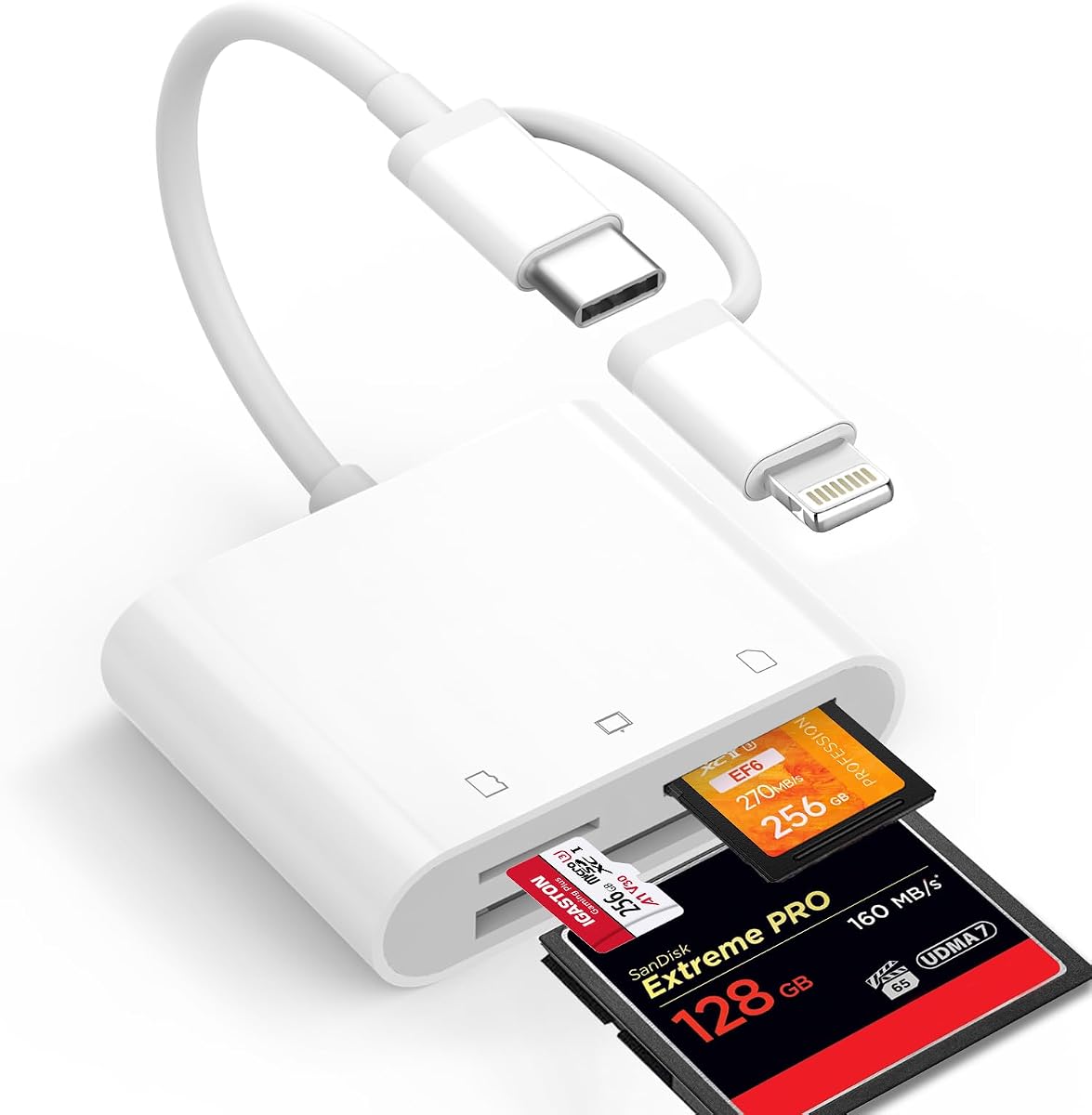
The BENFEI 4in1 USB 3.0 and USB-C card reader offers exceptional value for budget-conscious users. It receives a 4.5 star rating for its integrated design and versatility. This model allows simultaneous reading of four different card types including SD Micro SD MS and CF.
We may earn a commission when you buy through this link, at no additional cost to you.
Its integrated design provides both USB-C and USB 3.0 ports making it adaptable to modern and older devices. The transfer rates reach up to 160MB/sec in UHS-I mode which is sufficient for most everyday tasks. The built-in IC chip ensures stable data transfers even for HD movies.
While the housing is plastic rather than aluminum it remains durable for regular use. The 18-month warranty provides added peace of mind for buyers. However users should note that it is incompatible with Memory Stick Standard and CF Type I cards.
This reader is ideal for students or casual creators who need multi-format support without spending much. It balances cost and functionality effectively. For those needing a versatile adapter for multiple cards the BENFEI model is a top budget pick.
The reader features a 2in1 USB-C and USB 3.0 design for broad compatibility with computers and laptops.
Users can read and write to four cards at the same time improving workflow efficiency.
We may earn a commission when you buy through this link, at no additional cost to you.
The CFast 2.0 Card Reader is designed for professionals who require top-tier performance. With a rating of 4.4 it delivers blazing-fast data transfers at up to 5Gbps. Its standout feature is the dedicated slot for CFast 2.0 cards which are essential for high-end video work.
We may earn a commission when you buy through this link, at no additional cost to you.
This all-in-one reader supports SD Micro SD XD-Picture and CF cards alongside CFast. The aluminum housing dissipates heat effectively during large transfers ensuring consistent performance. It is plug and play on Windows Mac and Chrome OS requiring no drivers.
While the premium price reflects its advanced capabilities it may be more than casual users need. The size is compact but slightly larger than single-slot readers. The included dual USB-A to USB-C cable adds to its connectivity convenience.
Videographers and photographers using CFast cards will find this reader indispensable. It streamlines workflows by allowing simultaneous access to multiple card types. For those seeking a robust solution for professional gear this is the best premium choice.
Features a dedicated slot for CFast 2.0 cards to support professional-grade speed and data transfer.
Constructed with a sleek solid aluminum housing that dissipates heat and provides superior durability.
We may earn a commission when you buy through this link, at no additional cost to you.
The 6-in-1 CF/SD/TF/MS/XD/CFast Adapter offers unparalleled versatility for multi-camera workflows. Rated 4.3 stars it allows users to read and transfer data from up to six different cards at once. This includes CFast CF SD Micro SD MS and xD-Picture Card.
We may earn a commission when you buy through this link, at no additional cost to you.
Its aluminum alloy chassis ensures durability and heat dissipation during extended use. The dual USB connectors let you plug into iPhone 15/16/17 or Android via USB-C and into PCs via USB-A. Transfer speeds reach up to 5Gbps making it very efficient.
Users should consider that managing six slots might be overkill for some. However the comprehensive compatibility ensures no card goes obsolete. The robust build justifies the price for professional use cases.
Photographers using various legacy and modern cameras will benefit most from this adapter. It eliminates the need for multiple readers and simplifies data management. If you need the widest format support this is the best option available.
Supports CFast CF SD Micro SD MS and xD-Picture Card allowing access to six different formats.
Includes both USB-C and USB-A connectors for seamless connectivity across mobile and desktop devices.
We may earn a commission when you buy through this link, at no additional cost to you.
This CF Card Reader by ZIYUETEK supports high performance with USB 3.0 technology. It receives a 4.5 rating for its ability to read up to five cards simultaneously. The aluminum alloy cover enhances durability and helps dissipate heat during transfers.
We may earn a commission when you buy through this link, at no additional cost to you.
The reader allows hot swapping meaning you can remove or insert cards without uninstalling drivers. Transfer rates reach up to 5Gbps which is fast for most storage needs. It is compatible with Windows Mac and Linux systems for broad use.
It does not include a USB-C port which may limit use with newer MacBooks. The grey finish can show dust over time. However these are minor issues given the robust connectivity and speed.
Users who need reliable mid-range performance will appreciate this model. It balances cost with solid functionality. For those needing five card slots and fast speeds without a premium price this is a strong contender.
Built-in chip enables reading two or more cards simultaneously and transfer speeds up to 5Gbps.
The aluminum alloy cover makes the device delicate and durable while maintaining a compact size.
We may earn a commission when you buy through this link, at no additional cost to you.
The UGREEN USB C SD Card Reader 4-in-1 is designed for users with modern USB-C devices. With a 4.5 rating it supports SD Micro SD CF and MS slots efficiently. It enables simultaneous access to all connected cards for easy browsing.
We may earn a commission when you buy through this link, at no additional cost to you.
It reaches transfer speeds up to 5Gbps allowing you to move 1GB files in seconds. The reader is compatible with iPhone 18 and various Android phones and MacBooks. It requires no drivers and works across Windows Mac Linux and Chrome OS.
Users with older laptops using USB-A may need an adapter. The focus on USB-C is ideal for new devices. The compact form factor makes it easy to carry in a laptop bag.
For those with latest Macs and phones this reader is perfect. It simplifies workflow by reducing adapter needs. If you prioritize USB-C compatibility and speed this is the top choice.
Compatible with iPhone 18 Macbooks and Android phones with USB-C for seamless integration.
Supports transfer speeds up to 5Gbps to quickly offload photos and videos.
We may earn a commission when you buy through this link, at no additional cost to you.
The SmartQ C368 USB 3.0 Card Reader offers reliable performance with a high rating of 4.6 stars. It supports four card types including Micro SD SD MS and CF. The device is ideal for plug and play mobile use during travel.
We may earn a commission when you buy through this link, at no additional cost to you.
It supports transfer speeds up to 5GB per second at USB 3.0. A blue LED light indicates power status clearly. The kit includes a cable organizer to keep wires tidy during use.
The cable is shorter than some competitors which may limit flexibility. However the simplicity makes it easy to use. It is compatible with Windows Mac and Linux systems.
Users who value simplicity and indicators will like this reader. It handles multiple formats well without complexity. For travel and basic use this model is highly recommended.
Supports data transfer speed up to 5GB per second compatible with USB 3.0 and 2.0 ports.
A blue LED light indicator lights up when powered on to show the device status clearly.
We may earn a commission when you buy through this link, at no additional cost to you.
The UGREEN SD Card Reader USB 3.0 offers excellent value with a 4.6 star rating. It supports SD Micro SD CF and MS slots. The reader allows simultaneous access to four different memory cards at the same time.
We may earn a commission when you buy through this link, at no additional cost to you.
It achieves transfer rates of up to 5Gbps which speeds up file movement. It supports up to 2TB cards providing future-proof storage capacity. The compact design includes a 1.7ft cable for easy portability.
The absence of USB-C means older devices are supported but new ones may need adapters. The build is plastic but functional. It works with Windows Mac Linux and Chrome OS.
Users seeking a reliable multi-card hub will find this useful. It balances speed and compatibility well. For general use this model is a great addition for workers on the go.
Supports reading and writing 4 different memory cards at the same time eliminating the need to plug and unplug.
Handles up to 2TB cards and supports UHS-I SDXC SDHC Micro SDXC Micro SDHC MS and CF formats.
We may earn a commission when you buy through this link, at no additional cost to you.
This Denlane upgraded SD card reader features Lightning and USB-C connectors for broad device support. Rated 4.3 it supports CF SD and MicroSD slots. It is designed for viewing photos on devices with different interfaces.
We may earn a commission when you buy through this link, at no additional cost to you.
The reader is Apple MiFi certified ensuring fast and stable transmission. It supports bi-directional transfer allowing you to move photos from phone to card to free space. The fixed connectors prevent loss and ensure durability.
The two connectors cannot be used simultaneously which is a minor constraint. The short cable makes transmission stable but limits distance. It requires no network or driver.
Travelers and creators with both iPhone and Android devices will benefit. It simplifies photo transfers significantly. For mobile users this reader solves key interface challenges.
Includes Lightning and USB-C connectors for compatibility with iPhone 5-14 and newer USB-C devices.
Supports transferring photos from cell phone to memory card to free up storage space.
We may earn a commission when you buy through this link, at no additional cost to you.
The ChiaoPio USB C SD Card Reader is designed with a built-in USB-C cord that avoids blocking other ports. It earns a 4.5 rating for its simplicity and functionality. It supports CF SD and MicroSD cards for versatile access.
We may earn a commission when you buy through this link, at no additional cost to you.
It is plug and play with no drivers required for Mac or Windows devices. The design is ideal for users with USB-C iPads or iPhones. It allows instant viewing of photos and videos from camera memory cards.
The lack of Lightning support limits older iOS device compatibility. It only provides one connector. However this simplicity is convenient for modern USB-C users.
Photographers with USB-C devices will find this reader easy to use. It keeps your workflow straightforward. For basic card reading on Macs and iPads this is a recommended choice.
The reader is designed with a built-in USB-C cord that does not block your other ports.
Compatible with iPhone 15 iPad Pro MacBook Air and other USB-C devices for instant access.
We may earn a commission when you buy through this link, at no additional cost to you.
Selecting the right compact flash card reader requires evaluating several key factors to ensure compatibility and performance for your workflow.
Ensure the reader supports the specific card formats you use such as CF SD microSD or CFast. Multi-slot models offer flexibility if you work with multiple cameras or card types.
Check the product data carefully to confirm compatibility with legacy cards like XD or Memory Stick if you need to archive older media.
Look for USB 3.0 or 3.1 support which offers speeds up to 5Gbps. Higher speeds reduce waiting times when offloading large video files or high-resolution photos.
Verify the maximum rated speed matches your card capabilities to avoid bottlenecks during data transfers.
Choose between USB-A USB-C or dual connectors based on your devices. Modern laptops often favor USB-C while older computers use USB-A ports.
Dual port options provide greater versatility but may come at a higher cost than single interface models.
Aluminum alloy housings offer better heat dissipation and durability compared to plastic. This is important for frequent use or high data transfers.
Consider the weight and size if you travel often as compact readers are easier to carry in a camera bag.
Some readers allow multiple cards to be read or written at once which streamlines workflow. This feature is valuable for multi-camera shoots.
Ensure the software or system you use supports concurrent card mounting to take full advantage of this capability.
Verify that the reader works with your OS such as Windows Mac or Linux. Most modern readers are plug and play without driver installation.
Check for any specific OS requirements especially for older systems like Windows XP or early Mac OS versions.
Look for models that come with at least a one-year warranty to protect against defects. Reputable brands often provide responsive customer service.
Extended warranty periods add value and ensure long-term satisfaction with your purchase.
Entry-level readers offer basic functionality at lower costs while premium models provide advanced features. Determine your needs before choosing between budget and high-end options.
Investing in a reliable model can save time and frustration in the long run compared to cheaper less durable alternatives.
Start by connecting the card reader to an available USB port on your computer or device. If using a USB-C reader plug it into the corresponding slot for optimal speed.
Insert your memory card into the correct slot ensuring it aligns with the direction markings. Wait a few seconds for your system to recognize the device and mount the drive.
Safely eject the card after transferring files to prevent data corruption. Store the reader in a dry place and avoid bending cables excessively to extend its lifespan.
Readers supporting USB 3.1 or CFast 2.0 typically offer the highest speeds up to 5Gbps or more. Models from Lexar or CFast 2.0-specific readers lead in performance for high data throughput.
Yes many modern multi-slot readers allow simultaneous reading and writing to multiple cards. This feature improves efficiency by eliminating the need to swap cards between transfers.
Readers with USB-C connectors are compatible with iPhone 15 and newer iPad models. Dual connector models may also support older iPhones via Lightning connections.
Ensure the card is inserted correctly and the reader is connected to a working port. Try a different USB port or restart your computer to resolve detection issues.
Most USB 3.0 and USB-C card readers work plug and play on Windows and Mac without needing extra drivers. Some older systems may require specific software updates.
Yes CFast cards require a dedicated CFast 2.0 reader to access their full speed. Standard SD or CF readers will not accept CFast cards.
Store the reader in a protective case when not in use and avoid exposing it to extreme temperatures. Handle connectors carefully to prevent bending or wear.
Most card readers are compatible with Linux as they use standard USB mass storage protocols. Plug the reader in and mount the card through your file manager.
We have reviewed ten top compact flash card readers offering speeds reliability and format support. The Lexar Multi-Card 3-in-1 leads in performance while the BENFEI 4in1 provides excellent budget value.
Prioritize transfer speed and connector type based on your workflow needs. Users with modern devices should favor USB-C models while legacy camera owners might need multi-format support.
Prices and availability fluctuate so check current listings before purchasing. Investing in the right adapter ensures you can access your data quickly and reliably.