
Amazon Basics Height Adjustable Monitor Stand
4.6Editor score
3-level stackable design
Lightweight ABS plastic
Compact dimensions
This guide compares the top desktop monitor riser options for ergonomics, storage, and durability to help you choose the perfect desk organizer for your
Finding the right desktop monitor riser can transform your workspace by improving ergonomics and reducing clutter. A good riser elevates your screen to eye level, which helps prevent neck strain during long work hours. It also creates valuable storage space underneath for keyboards and accessories.
We compared ten highly rated products based on build quality, adjustability, weight capacity, and storage features. Our analysis focuses on models that offer real value for home offices and professional setups. Each option provides unique benefits to suit different desk sizes and monitor configurations.
Each pick below highlights key features, pros, and cons to help you make an informed decision. Note that availability and pricing may change over time so check current listings before purchasing. This guide ensures you find a solution that fits your specific needs and budget.
4.6Editor score

4.7Editor score

4.6Editor score
This side-by-side comparison highlights the key specifications and features of each top-rated monitor riser to help you quickly identify the best fit for your desk setup.



The WALI Computer Monitor Stand is a top choice for those seeking durability and versatility. With a 4.7 rating from users, it offers a robust metal shelf capable of holding up to 44 lbs. This makes it suitable for heavy monitors and printers alike.
We may earn a commission when you buy through this link, at no additional cost to you.
Its standout feature is the height adjustment mechanism, which provides three distinct levels to suit different ergonomic needs. The vented design ensures airflow beneath devices, preventing overheating during extended use. Rubber pads protect your desk surface from scratches and slipping.
While the metal build is strong, it may not appeal to users preferring wood aesthetics. Assembly is straightforward but requires tools, which might be a minor inconvenience. However, the stability and storage benefits outweigh these small drawbacks for most offices.
Ideal for professionals needing a reliable setup, this riser balances function and form. It reduces neck strain effectively and keeps desk accessories organized. We recommend it for anyone prioritizing longevity and weight capacity in a monitor stand.
Raising your monitor to eye level reduces neck strain and promotes better posture during long work sessions.
The open space underneath allows you to store keyboards and notebooks, keeping your desktop clutter-free.
We may earn a commission when you buy through this link, at no additional cost to you.
The TEAMIX 20 Inch Monitor Stand combines style with strength using high-quality MDF wood. It holds up to 80 lbs, making it one of the most durable options in this list. Its minimalist design blends well with modern home decor.
We may earn a commission when you buy through this link, at no additional cost to you.
This stand provides a solid platform for monitors under 50 inches. The width accommodates dual setups or large laptops comfortably. Users appreciate its stability and the ample space beneath for organizing office essentials like notebooks.
A limitation is the fixed height, which may not suit everyone's ergonomic preferences. Assembly involves screws and tools, though instructions are clear. Despite this, the build quality ensures long-term use without wobbling or damage.
Best for users who value aesthetics and capacity, this stand elevates your workspace. It reduces eye strain by lifting screens to a better viewing angle. Choose this if you need a heavy-duty stand that looks elegant.
The black wood finish matches various office styles, adding a professional touch to your desk.
Constructed from strong MDF wood, it resists bending and supports heavy devices securely over time.
We may earn a commission when you buy through this link, at no additional cost to you.
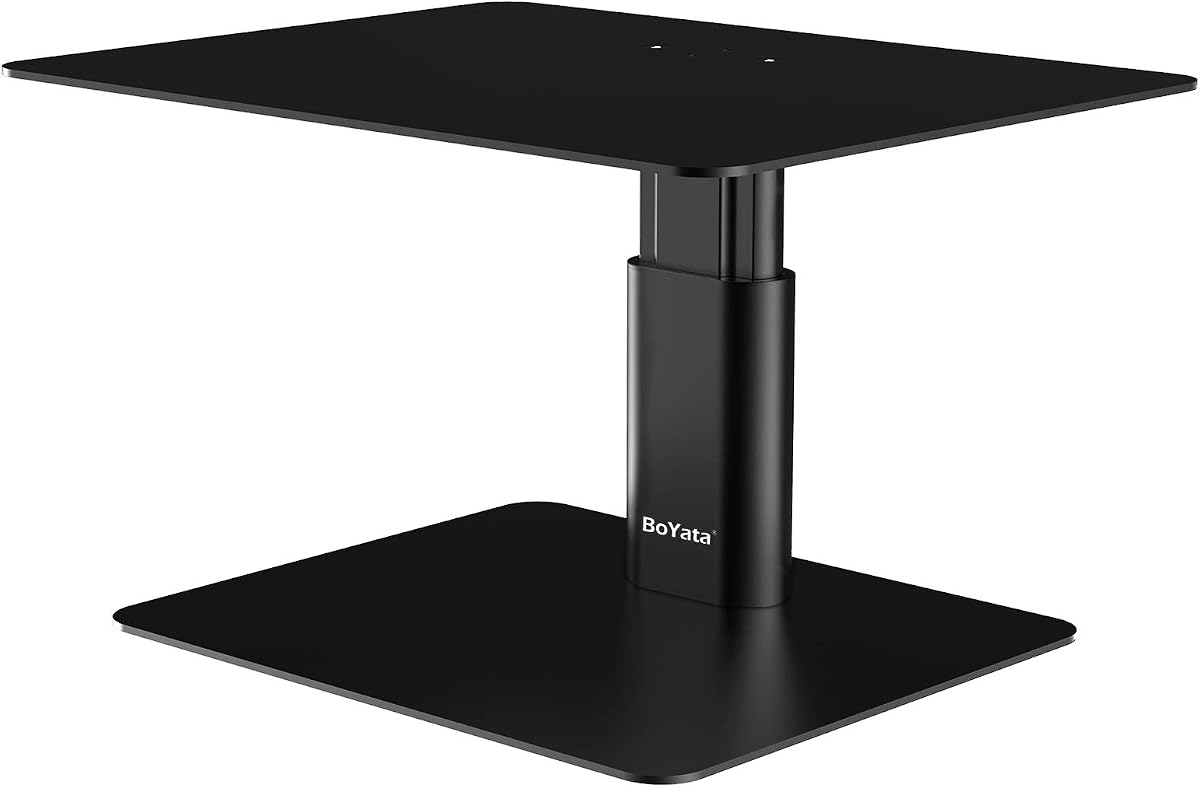
The BoYata Monitor Stand stands out for its twist knob adjustment feature, allowing precise height control. Made of metal, it offers robust support for monitors up to 33 lbs. This flexibility helps tailor the setup to individual comfort levels.
We may earn a commission when you buy through this link, at no additional cost to you.
Its design focuses on ergonomics, ensuring your eyes align with the screen top to reduce strain. The skidproof pads prevent sliding, providing stability on various surfaces. Assembly is simple, requiring only a screwdriver included in the package.
While the weight capacity is lower than some competitors, it suits most standard monitors. The metal plates may show scratches over time, but this does not affect function. It is a practical choice for those needing adjustable height without complex mechanisms.
Perfect for home offices, this riser improves posture effectively. It creates extra space under the stand for keyboards and accessories. Recommend this for users prioritizing ergonomic customization and straightforward assembly.
The twist knob lets you fine-tune the height to match your specific seating position and comfort.
Anti-slip pads at the base keep the stand firmly in place during daily use and adjustments.
We may earn a commission when you buy through this link, at no additional cost to you.
The Amazon Basics monitor stand offers exceptional value for budget-conscious shoppers. Made from ABS plastic, it is lightweight yet durable for everyday use. The 3-level stackable design allows height customization without permanent modifications.
We may earn a commission when you buy through this link, at no additional cost to you.
Users find it easy to set up with detachable legs for stable positioning. The tapered design fits well on smaller desks while providing storage for small items. It supports monitors up to 22 lbs, ideal for laptops and standard screens.
Some may prefer heavier materials like metal for a premium feel, but this model delivers reliability. The anti-slip feet ensure it stays put on smooth surfaces. Its simplicity makes it a versatile choice for various environments.
Great for students or temporary setups, this stand balances cost and function. It elevates screens to reduce neck strain effectively. Choose this if you need an affordable solution with basic height adjustment features.
The lightweight plastic construction makes it easy to move between desks or rooms as needed.
Three distinct levels let you adjust the view without needing complex mechanical parts.
We may earn a commission when you buy through this link, at no additional cost to you.
The YAOHUOO Dual Monitor Stand is designed for multitaskers needing wide support. At 39 inches, it accommodates two monitors or a TV easily. The steel legs provide heavy-duty stability up to 100 lbs, ensuring no shaking during use.
We may earn a commission when you buy through this link, at no additional cost to you.
Its ergonomic height improves posture, reducing neck pain during long work sessions. The wooden surface adds a polished look to office spaces. Assembly takes about ten minutes with included tools, making it user-friendly.
While it demands more desk space, the benefits for dual setups are significant. Non-slip pads protect your desk from scratches. This model suits professionals who need a robust, spacious platform for multiple devices.
Ideal for creative professionals or traders with dual screens, this stand delivers performance. It organizes the workspace efficiently while keeping essentials accessible. Invest in this for a premium, stable solution.
The wide span allows side-by-side monitors without wobble, enhancing productivity and workflow.
Steel legs support up to 100 lbs, ensuring stability even with the heaviest monitors.
We may earn a commission when you buy through this link, at no additional cost to you.
This two-pack offers significant value for families or offices with multiple desks. Each unit features three height settings and a phone holder for added convenience. The metal construction supports up to 44 lbs with anti-rust coating for durability.
We may earn a commission when you buy through this link, at no additional cost to you.
The vented holes prevent overheating, keeping devices cool. You can stack them to double storage space if needed. Assembly requires no tools, simply screwing legs onto the platform in seconds. This ease of setup is a major plus.
Users appreciate the versatility to use on floors or carpets too. The rubber pads protect surfaces from scratches. While basic in design, the functionality covers diverse needs from monitors to kitchen storage.
Perfect for bulk buyers or shared spaces, this set ensures everyone has a stand. It improves posture and organization cost-effectively. Choose this for a practical, tool-free solution with extra storage options.
Heat dissipation holes actively cool devices, extending their lifespan during heavy usage.
The ability to use on various surfaces makes it adaptable beyond just traditional desks.
We may earn a commission when you buy through this link, at no additional cost to you.
The Klearlook stand offers unique flexibility with its foldable structure. You can adjust widths to fit mechanical keyboards or narrow spaces. The built-in drawer and phone holder keep essentials organized without extra accessories.
We may earn a commission when you buy through this link, at no additional cost to you.
It supports up to 55 lbs with a metal plate for stability. No assembly is required, ready to use right out of the box. Rubberized legs prevent slipping, ensuring safety for heavy ultrawide monitors.
While the white finish looks clean, it may require frequent cleaning. Once unfolded, the height is fixed, limiting adjustability. However, the convenience of foldability makes it ideal for temporary or shared workspaces.
Best for those needing portability and organization, this stand saves desk space. It reduces strain by elevating screens to eye level. Choose this if you want a ready-to-use option with smart storage features.
Fold the legs to store the stand easily when not in use, freeing up valuable desk area.
The hidden drawer and holder keep your desk tidy by storing small tools and phones securely.
We may earn a commission when you buy through this link, at no additional cost to you.
The OPNICE stand focuses on maximizing organization with its drawer and pen holders. It elevates monitors to eye level, reducing fatigue during long workdays. The metal construction ensures rock-solid stability for heavy daily use.
We may earn a commission when you buy through this link, at no additional cost to you.
No installation is needed, allowing instant workspace optimization. You can store files and printers underneath to free up desk space. This sleek design blends functionality with style for professional environments.
The drawer offers handy access to essentials like pens and notes. However, space is limited for bulkier items. Despite this, the immediate organizational benefits are valuable for clutter-prone users.
Perfect for those seeking a tidy desk, this stand streamlines office workflows. It improves posture and keeps tools close at hand. Choose this if organization is your top priority for a monitor stand.
The drawer and pen slots keep essentials visible and accessible, reducing time searching for items.
Unbox and use instantly without tools, making setup effortless for busy professionals.
We may earn a commission when you buy through this link, at no additional cost to you.
The WESTREE stand features a patented design with a rustic brown wood finish and black steel. It supports two monitors comfortably, ideal for dual setups. Thick steel legs ensure strong load-bearing capacity without sliding.
We may earn a commission when you buy through this link, at no additional cost to you.
Anti-slip pads are optional, allowing you to choose protection levels. Assembly takes two minutes with pre-drilled holes and included tools. Its ergonomic design reduces eye strain by raising screens to a comfortable level.
The multi-purpose nature allows it to hold printers or TVs too. While the look is distinctive, it may not fit every office style. However, the robust build ensures longevity and stability.
Best for users wanting style and strength, this stand enhances workspace aesthetics. It organizes supplies and supports heavy devices well. Choose this if you value a unique, durable dual-monitor solution.
The rustic wood finish adds character to your desk, setting it apart from standard plastic stands.
Thick steel legs provide the support needed for heavy monitors without wobbling or leaning.
We may earn a commission when you buy through this link, at no additional cost to you.
The gianotter stand offers convenience with no assembly required. It features magnetic pen holders and a drawer for easy desk organization. Made from high-strength metal, it supports dual monitors while elevating them to eye level.
We may earn a commission when you buy through this link, at no additional cost to you.
This setup saves time by transforming cluttered areas instantly. You can store mice and keyboards underneath to maximize desktop space. The patented product aims for exceptional support performance.
While the drawer is handy, it may not fit larger items. The magnetic holders work well for standard pens. It is a streamlined solution for those avoiding tools entirely.
Ideal for quick setup needs, this stand prioritizes ease and efficiency. It reduces eye strain and keeps essentials accessible. Choose this if you want a ready-to-use dual monitor solution.
Skip assembly hassles by unboxing and placing the stand immediately to transform your workspace.
Magnetic pen holders ensure small tools stay secure and within easy reach during work.
We may earn a commission when you buy through this link, at no additional cost to you.
Selecting the right monitor riser involves considering several key factors to ensure ergonomics, stability, and functionality.
Weight capacity determines how much load the stand can support. Check if it exceeds your monitor and accessories weight to avoid accidents.
Always choose a stand with a higher weight limit than your heaviest device for safety and longevity.
Look for stands offering multiple height or width adjustments. Flexibility helps tailor the view to your seating position and needs.
Adjustable models provide better ergonomic value by adapting to different tasks or users over time.
Metal and wood offer superior stability compared to plastic. Consider the material based on your weight requirements and aesthetic preferences.
Higher quality materials ensure the stand remains wobble-free and durable during daily use.
Drawers or under-stand space allow for organizing keyboards and accessories. This keeps the desktop tidy and reduces clutter.
Choose a model with storage if minimizing desk surface items is a priority for your workspace.
Ensure the stand fits your desk space and monitor size. Dual monitor stands require wider dimensions to accommodate multiple screens.
Measure your desk area to confirm the stand provides enough surface without obstructing legroom.
Some stands require tools and time to assemble while others are ready out of the box. Consider your comfort with assembly tasks.
Tool-free options save time for those who want immediate setup without hassle.
The riser should elevate your screen to eye level to reduce neck strain. Proper alignment promotes better posture during work.
Select a height that aligns your eyes with the top third of your monitor.
Prices vary based on features and build quality. Determine what features are essential versus nice to have within your budget.
Balancing cost with necessary functionalities ensures you get value without overspending.
Place the stand on a flat, stable surface to prevent wobbling. Ensure the feet are clean and free of debris for maximum grip.
Regularly wipe the surface with a damp cloth to remove dust and spills. Avoid harsh chemicals that might damage finishes or coatings.
Periodically check bolts and joints for tightness to maintain stability. Adjust height settings as needed to keep ergonomic alignment correct.
Yes, elevating your monitor to eye level reduces neck strain by promoting better posture. This helps prevent discomfort during long working hours significantly.
Not all stands support dual monitors. Check the width and weight capacity specifications to ensure compatibility with multiple devices.
Ideally, the top of the monitor should be at or slightly below eye level. A stand raising it 4 to 6 inches often works well.
Yes if the stand supports the printer's weight. Ensure the platform is wide enough to hold it securely.
Vented designs allow air to circulate beneath devices, preventing overheating. This can extend the lifespan of your electronics.
Metal stands generally offer more stability and higher weight capacity. Plastic is lighter but may feel less sturdy for heavy loads.
Many modern stands require basic tools like screwdrivers included in the package. Some newer models are tool-free for quick setup.
Use a microfiber cloth with mild soap and water. Dry immediately to prevent water spots or damage to materials.
We reviewed ten top-rated risers offering diverse features for different needs. The WALI stand stands out for adjustability while the YAOHUOO excels for dual setups.
Prioritize ergonomics and stability to protect your health over time. Choose a material that fits your workspace aesthetics and budget.
Prices and availability may change so always check current listings before purchasing. Investing in the right stand improves productivity and comfort effectively.