
RREAKA TV Dock
4.4Editor score
Aluminium Alloy Build
100W PD Charging
Multi Port Expansion
Discover the top portable docks for Nintendo Switch to play on TV anywhere. This guide compares features, compatibility, and charging power for every traveler.
Finding the right dock for Nintendo Switch portable play can transform your gaming experience from handheld to home theater quality. Travelers and commuters need reliable adapters that support video output while charging your console securely.
We have evaluated ten leading options based on port selection, video resolution support, and build quality. Our analysis focuses on models that offer genuine compatibility with Switch 1, OLED, and upcoming Switch 2 hardware.
Each pick highlights specific strengths like 4K output or lightweight design to help you decide. Please note that prices fluctuate frequently so verify current offers before making your final purchase decision today.
4.4Editor score

4.2Editor score
4.4Editor score
The following table provides a side-by-side comparison of all ten selected models to help you quickly identify the best fit for your specific gaming and travel requirements.


The pdobq Switch Dock stands out as a top contender for portable gaming needs with its robust feature set and reliable performance. It earns an Editor's Choice badge due to its ability to handle high resolution video output while maintaining a small footprint for travel.
We may earn a commission when you buy through this link, at no additional cost to you.
This dock offers a versatile range of ports including USB 3.0 and HDMI 2.0 which allows for connecting peripherals and monitors simultaneously. The support for 4K 60Hz ensures that when used with capable devices like the Steam Deck you get smooth and detailed visuals.
While it is an excellent adapter users should note that it does not come with an HDMI cable or power supply which means you must source these separately. Additionally it requires a specific 15V 2.6A or 20V 3A PD charger to activate TV mode correctly.
If you need a reliable travel companion that supports both Switch and other USB C gadgets this model is highly recommended. It delivers on performance and portability making it a smart choice for anyone looking to upgrade their portable setup.
Experience crisp 4K 60Hz visuals on compatible TVs and monitors for an immersive gaming experience.
Connect keyboards mice or flash drives via the USB 3.0 port while streaming to the big screen.
We may earn a commission when you buy through this link, at no additional cost to you.
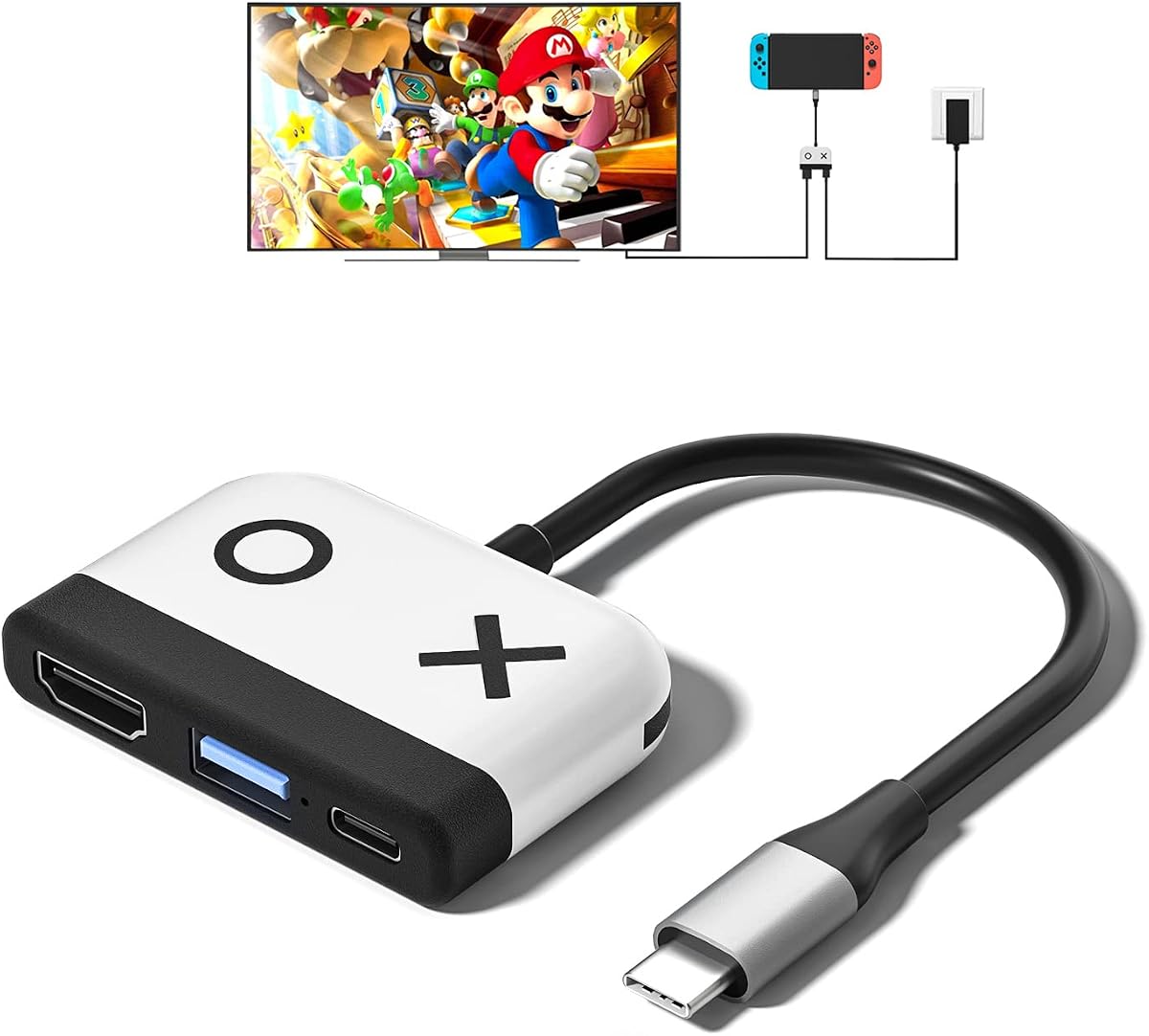
The RREAKA TV Dock offers incredible value for gamers seeking a budget friendly solution without sacrificing essential features. It is designed with an aluminium alloy body that keeps weight down to 1.5 ounces making it incredibly easy to slip into any pocket.
We may earn a commission when you buy through this link, at no additional cost to you.
This dock supports 4K at 60Hz which is a standout feature for this price range ensuring sharp visuals on modern displays. It also includes a USB 3.0 port for data transfer and a 100W PD port that allows simultaneous charging and gameplay.
Users should be aware that no HDMI cable or power adapter is included so you will need to use existing accessories. The compact design is great for travel but the simple construction might not feel as durable as higher end models over long term use.
For those prioritizing cost and portability this dock is a top recommendation that handles daily gaming needs effectively. It provides the necessary connectivity for big screen play while keeping your pack light for on the go adventures.
The lightweight metal casing ensures durability while keeping the dock easy to carry during travel.
Utilize the 100W PD port to charge your console rapidly even while playing demanding games.
We may earn a commission when you buy through this link, at no additional cost to you.
The Switch Dock by Kstkry distinguishes itself with a unique silicone construction that offers excellent scratch resistance and a soft grip. It carries the Best Premium badge for its thoughtful design choices that prioritize user convenience and device protection during transit.
We may earn a commission when you buy through this link, at no additional cost to you.
This model supports 4K video output and features a USB 3.0 port capable of 5Gbps speeds which is ideal for connecting peripherals without lag. The compact dimensions allow it to fit comfortably in a pocket making it perfect for spontaneous gaming sessions anywhere.
While the silicone material is durable it may not provide the same rigid protection as metal docks against heavy impacts. Additionally it has fewer ports than some multi hub models which might limit connectivity options for users needing multiple USB devices.
If you value a durable yet portable design that protects your console from scratches this dock is an excellent choice. It balances performance and comfort well making it a reliable option for travelers who want a premium feel in a small package.
The wear-resistant silicone material prevents scratches and adds grip for easier handling on the go.
Connect external drives via USB 3.0 for quick file transfers without interrupting your game.
We may earn a commission when you buy through this link, at no additional cost to you.
The iPLYGAM Switch Dock provides a convenient solution for users who want quick toggling between handheld and TV modes with a single press. It features a smart chip for overheat protection which adds a layer of safety during extended gaming sessions.
We may earn a commission when you buy through this link, at no additional cost to you.
This docking station includes a variety of ports including two USB 2.0 ports and an HDMI 2.0 output allowing for versatile connectivity options. The design is compact enough for travel yet sturdy enough to support the console securely during use.
Users must note that it does not include cables so you will need to bring your own HDMI and power adapters. The reliance on an official charger for power stability means you should always carry the original Nintendo adapter when traveling.
This dock is ideal for gamers who appreciate straightforward controls and robust safety features. It delivers solid performance for home and travel use making it a practical choice for those who want ease of use without complex setup.
Use the dedicated button on the back to instantly switch between TV and tabletop modes easily.
Built-in circuitry protects against overheating and overcharging to ensure safe operation.
We may earn a commission when you buy through this link, at no additional cost to you.
The Travel Portable Switch 2 Dock is specifically designed to work seamlessly with the upcoming Switch 2 hardware while maintaining compatibility with older models. It earns a high rating for its forward looking design that ensures you are ready for the next generation of gaming.
We may earn a commission when you buy through this link, at no additional cost to you.
This dock supports 4K at 60Hz and includes a 100W PD port for fast charging which keeps your device powered during long sessions. It comes with an HDMI cable included which adds value by reducing the number of extra items you need to pack.
Users should be aware that a power adapter is not included and you must use a specific 15V 3A PD charger for activation. The compact size is excellent for travel but the requirement for a specific charger means you must plan your accessories carefully.
If you are preparing for the Switch 2 launch this dock offers a solid foundation for portable play. It balances future readiness with current utility making it a smart investment for gamers looking ahead to the next console release.
Designed to work seamlessly with the new Switch 2 console for a smooth transition.
Get started right away with an included cable reducing the need for extra accessories.
We may earn a commission when you buy through this link, at no additional cost to you.
The Switch Dock Portable is a straightforward solution that eliminates setup complexity by offering a plug and play experience. It works instantly with compatible devices without requiring additional software or drivers which is ideal for on the go gaming.
We may earn a commission when you buy through this link, at no additional cost to you.
Featuring a 100W PD input port it ensures your console stays powered while docked for uninterrupted play. The slim design makes it easy to stash in a backpack and the support for various devices like Steam Deck adds versatility to your travel kit.
Users must note that no cables or power adapters are included so you need to carry your own to make it functional. The minimalist build keeps weight down but might lack the ruggedness needed for rough handling in heavy duty travel scenarios.
For simplicity and ease of use this dock is a great pick for casual travelers. It delivers essential functionality without fuss allowing you to focus on playing games rather than troubleshooting connectivity issues.
Connect instantly without installing drivers or configuring settings for immediate playback.
Compatible with multiple handheld consoles ensuring flexibility across different gaming devices.
We may earn a commission when you buy through this link, at no additional cost to you.
The BIYTC Switch Dock is a compact adapter designed for simplicity and ease of carry during travel. It offers a basic but effective layout with HDMI and USB ports that allows you to connect easily without unnecessary bulk.
We may earn a commission when you buy through this link, at no additional cost to you.
Supporting 1080P at 30Hz this dock provides clear video for standard gameplay though it may not suit high frame rate needs. The pocket sized design makes it easy to stash in a small bag or even a large pocket for quick access.
Users should expect basic video resolution limits compared to higher end docks that support 4K at 60Hz. Also there are no included cables or chargers so you must bring your own to complete the connection setup.
This dock is a practical choice for those who want a barebones solution without extra features. It serves the core purpose well and is a good budget friendly option for occasional travelers.
A streamlined three port layout keeps the adapter small and easy to manage in your bag.
Enjoy a cost effective solution for basic TV mode connectivity without premium features.
We may earn a commission when you buy through this link, at no additional cost to you.
The Switch 2 Dock Upgrade is designed to offer extensive connectivity with multiple ports and high resolution video support. It stands out for its ability to handle 4K at 60Hz making it a strong choice for users seeking sharper visuals on larger screens.
We may earn a commission when you buy through this link, at no additional cost to you.
This dock includes a 100W PD charging port which allows you to charge your device while playing without interruption. The USB 3.0 port enables fast data transfer for peripherals ensuring smooth operation during your gaming sessions.
Users must note that no HDMI cable or power adapter is included so you need to source these separately. The compact design is great for travel but the specific power requirements mean you must ensure your charger meets the needed output specs.
For those who want a versatile hub that supports multiple needs this dock is a solid option. It balances power and portability well making it a useful tool for both home and travel gaming setups.
Experience stunning 4K 60Hz visuals on compatible screens for immersive gaming quality.
The 100W PD port keeps your device powered up during long and intense play sessions.
We may earn a commission when you buy through this link, at no additional cost to you.
The Switch 2 Dock HDMI features a classic design with an aluminium alloy build that offers durability and a premium look. It supports 4K at 60Hz which is excellent for high quality display output on modern TVs and monitors.
We may earn a commission when you buy through this link, at no additional cost to you.
This dock includes a USB 3.0 port for data transfer and a 100W PD port for efficient charging during gameplay. The compact size ensures it fits easily into storage bags making it ideal for travel or moving between different rooms.
Users should note that no cables or chargers are included so you must bring your own HDMI and power adapters. The aluminium body is sturdy but the limited port count may restrict connectivity for those needing multiple connections.
For gamers looking for a durable and stylish travel dock this model offers great value. It provides the essentials for big screen gaming with a build quality that stands out among similar budget options.
The metal casing provides durability and a premium feel while remaining lightweight for travel.
Enjoy smooth 4K 60Hz visuals for a more immersive and detailed gaming experience.
We may earn a commission when you buy through this link, at no additional cost to you.
The Portable Dock Station is designed with a unique focus on thermal management featuring multiple ventilation openings to keep your console cool. This design choice helps prevent overheating during extended gaming sessions which is crucial for maintaining consistent performance.
We may earn a commission when you buy through this link, at no additional cost to you.
It includes a button to switch between console display and TV output modes making it easy to control playback directly from the dock. The flexible spring stand supports the Type-C connector reducing stress on the charging port during insertion and removal.
Users should be aware that it has a lower rating than some competitors which might indicate variability in performance or build quality. The specific port layout may also limit flexibility for those needing multiple USB connections simultaneously.
For those concerned about heat management during long plays this dock offers a specialized solution. It provides practical features like easy mode switching and physical protection for your console making it a viable choice for dedicated gamers.
Multiple vents and openings help dissipate heat effectively to prevent performance throttling.
The spring stand reduces strain on your console's charging port for longer cable life.
We may earn a commission when you buy through this link, at no additional cost to you.
Selecting the right dock involves understanding compatibility video output capabilities and port selection to match your specific needs.
Ensure the dock is explicitly listed as compatible with your console model such as Switch 1 OLED or Switch 2. Some models may not support the Lite version or require specific firmware updates to function correctly.
Always check manufacturer details for supported devices to avoid connectivity issues or mode failures when you need it most.
Look for docks that support 4K at 60Hz if you plan to use high end TVs or monitors for gaming. Standard 1080P at 60Hz is sufficient for most users but higher resolution ensures future proofing.
Verify that your TV also supports the same resolution standards to avoid mismatched output quality during gameplay.
Choose a dock that supports pass-through charging via a PD port to keep your console powered while playing. Ideally look for at least 60W or higher to ensure stable power delivery during demanding games.
Check if the dock requires a specific voltage or charger as some models need a dedicated power adapter to activate TV mode.
Consider how many USB ports you need for controllers keyboards or flash drives while playing on the TV. A USB 3.0 port is preferred for fast data transfer if you plan to connect storage devices.
Some docks offer additional USB 2.0 ports which are useful for low bandwidth peripherals but may not support high speed transfers.
Opt for docks made with durable materials like aluminium or high grade silicone that can withstand travel conditions. A rugged build helps prevent damage from bumps or drops during transit.
Check user reviews for long term durability feedback to ensure the dock will last through regular use over time.
Check if the dock comes with an HDMI cable or power adapter to avoid purchasing extras separately. Most travel docks exclude these items so you must carry your own cables.
If you plan to travel often ensure you have the necessary accessories packed to make the dock functional immediately upon arrival.
Docks with ventilation openings or cooling designs are crucial for preventing overheating during long gaming sessions. Look for models with smart chips that monitor temperature to ensure safety.
Good heat dissipation ensures consistent performance without thermal throttling that could lead to lag or unexpected shutdowns.
Choose a product with a clear warranty policy to protect against manufacturing defects or connectivity issues. Most reputable brands offer at least an 18-month warranty for added peace of mind.
Verify the customer service process to ensure you can get support quickly if the dock fails during regular use.
Start by connecting the official power adapter to the dock ensuring the voltage matches the requirements. This step is critical to activate TV mode and ensure your console receives stable power.
Plug your HDMI cable into the dock and connect the other end to your TV before connecting the console to the dock. This order helps prevent signal handshake issues that can occur with improper connection sequences.
Regularly inspect the ports for dust or debris and clean them gently with a soft brush to maintain connectivity. Keeping the dock cool and dry will extend its lifespan and prevent overheating during gameplay.
Most portable docks listed are not compatible with the Nintendo Switch Lite because the Lite lacks video output capabilities. You can only use these docks with standard Switch OLED or Switch 2 models that support TV mode output directly.
Yes most of these docks do not include HDMI cables or power adapters so you must provide your own. Always ensure you have a compatible charger that meets the voltage requirements of your specific dock model.
Yes almost all models support simultaneous charging and gameplay provided you use the correct power adapter. The dock will pass power to your console through the USB-C port while outputting video to your TV.
Most of these docks support up to 4K at 60Hz output though your console may limit this to 1080P. Check your specific device capabilities and TV settings to maximize your visual experience.
Yes they are designed to be lightweight and compact with materials like aluminium or silicone to withstand travel. However it is still recommended to keep them in a protective case to avoid physical damage during transit.
No these docks operate as plug and play devices requiring no additional software or drivers on your console. Simply connect the cables and power source and your console will detect the display automatically.
Ensure your power adapter meets the voltage requirements and try using the original Nintendo charger for stability. If issues persist check the connection order and restart the console to reset the video signal handshake.
Most manufacturers offer at least an 18-month warranty for defects but this varies by brand and seller. Always review the product details to confirm the warranty terms before making your purchase decision.
We have reviewed ten top options that cover a range of needs from basic budget solutions to premium multi port hubs. Each model offers unique strengths like 4K support or lightweight designs to enhance your portable gaming experience.
Prioritize your specific needs such as resolution support charging speed and build quality to find the dock that fits your lifestyle. The right dock ensures your console stays powered and displays sharp visuals wherever you choose to play.
Remember that prices change frequently so verify current offers before buying to get the best deal available. We hope this guide helps you select a reliable dock for your travel adventures or home setup today.