
Kayoubi LCD Writing Tablet
4.6Editor score
14.5 Inch Drawing Space
One-Click Erase Feature
No Mess Paperless Design
Electronic sketch pads have revolutionized how artists and students capture ideas on the go. These devices combine the tactile feel of paper with the versatility of digital tools. Finding the right model depends on your specific workflow and creative goals.
We evaluated ten top-rated devices based on pressure sensitivity, screen quality, and portability. Our analysis includes standalone tablets, writing boards, and traditional graphic tablets. Each option offers unique advantages for different types of users and applications.
Every pick highlights key features, pros, and cons to help you decide quickly. Prices and availability change frequently so verify current details before purchasing. This list covers everything from budget-friendly doodle boards to professional-grade drawing displays.
4.6Editor score

4.4Editor score

4.4Editor score
As an Amazon Associate we earn from qualifying purchases.
The following table provides a side-by-side comparison of all ten electronic sketch pad models reviewed in this guide. Check key specifications to quickly identify which device matches your requirements.




The HUION Note Digital Notebook stands out as a unique hybrid solution for creatives who miss traditional paper. It captures handwritten notes in real time while preserving the tactile experience of writing on real paper. With a rating of 4.2 stars, users appreciate its balance between analog comfort and digital utility.
We may earn a commission when you buy through this link, at no additional cost to you.
Key strengths include its battery-free pen that pairs via Bluetooth 5.0 for instant connectivity. The companion app transforms physical scribbles into vector lines that can be edited or shared instantly. Audio recording syncs with your handwriting so you never lose context during meetings or lectures.
Trade-offs involve relying on physical paper refills which adds recurring costs over time. The app works best on mobile devices rather than desktop environments limiting some workflow integration. These are minor issues considering the unique value proposition for note takers.
Ideal for students professionals or artists who want digital organization without sacrificing pen on paper feel. This device bridges the gap beautifully making it a top choice for hybrid work environments.
Write on regular paper while the smart pen captures every stroke digitally for easy editing later.
Record audio while writing and replay it with your handwriting timeline to recall full meeting context.
We may earn a commission when you buy through this link, at no additional cost to you.
The XPPen Magic Note Pad delivers a professional-grade standalone experience unmatched in this category. Its 10.95-inch display combines vibrant colors with a textured surface that mimics real paper friction. A 4.4 star rating reflects strong satisfaction among digital artists and professional note takers.
We may earn a commission when you buy through this link, at no additional cost to you.
Strengths include 16K pressure sensitivity for nuanced strokes and a 90Hz refresh rate that eliminates lag. The three color modes allow switching between sketching annotation and reading modes seamlessly. Built-in apps and Android 14 support provide endless customization without external devices.
While the price is higher than basic LCD pads the standalone functionality justifies the cost for serious users. Android navigation may take getting used to compared to traditional operating systems. However the creative tools available make this learning curve worthwhile.
This tablet is perfect for artists students and professionals needing portability without compromise. Its combination of color versatility and paper-like feel makes it a top contender in the electronic sketch pad market.
AG nano-etching technology provides natural pencil friction for authentic sketching experiences on glass.
TUV certified low blue light and anti-glare coating reduce strain during long creative sessions.
We may earn a commission when you buy through this link, at no additional cost to you.
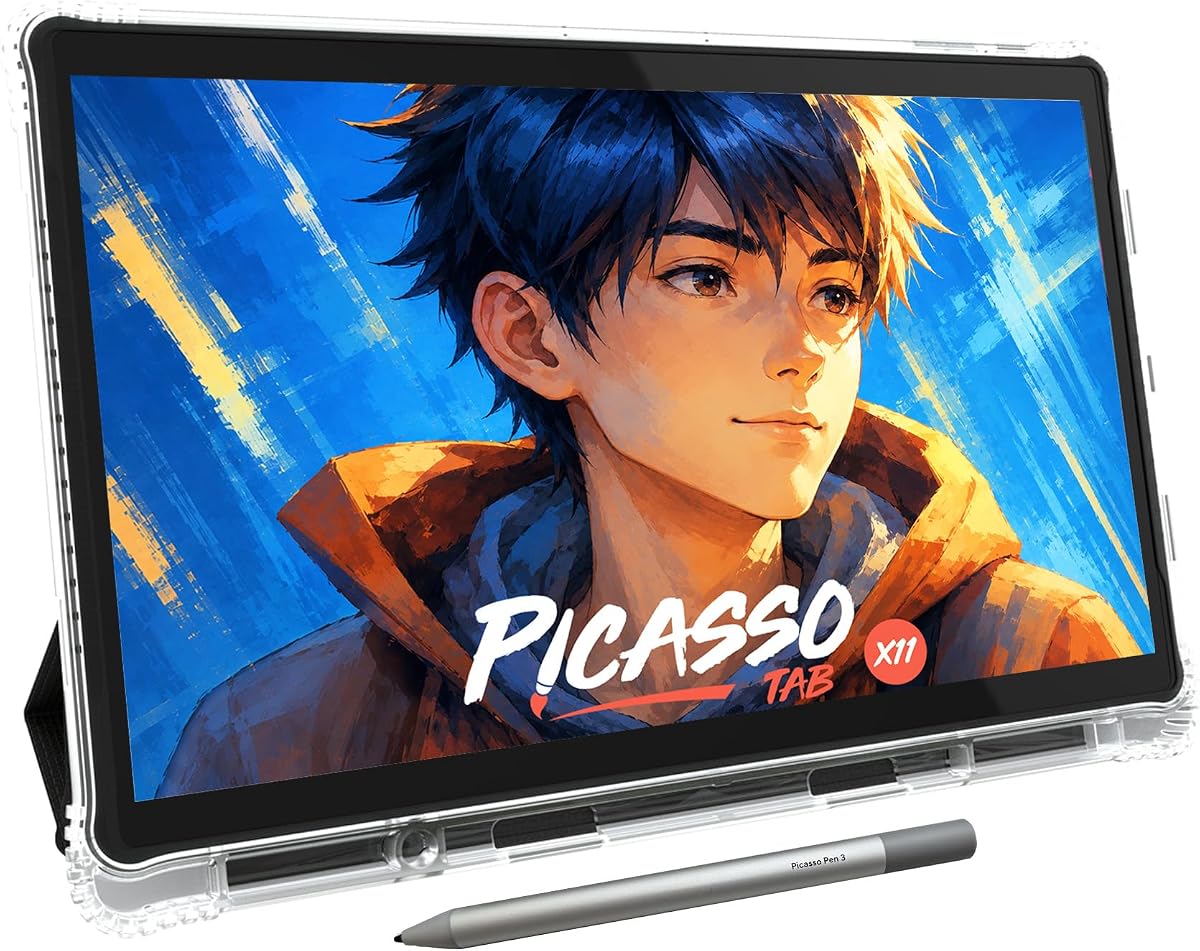
The PicassoTab X11 targets beginners and hobbyists with a complete creative kit ready out of the box. Its fully laminated 11-inch screen offers a realistic paper-like drawing experience without needing a computer connection. A 4.2 star rating indicates solid performance for entry-level users.
We may earn a commission when you buy through this link, at no additional cost to you.
Highlights include a lifetime VIP tutorial subscription and bonus accessories like a case and screen protector. The octa-core processor with 6GB RAM handles multitasking smoothly for schoolwork and streaming alongside drawing apps. Expandable storage ensures you never run out of space for projects.
Performance can vary during heavy multitasking compared to premium flagship tablets. The preloaded apps are great for learning but may lack depth for advanced workflows. These trade-offs are acceptable given the competitive price and beginner focus.
Recommended for aspiring artists students or families wanting an affordable standalone creative device. The included tutorials make it exceptionally easy to start creating immediately without prior experience.
Step-by-step lessons and guided exercises help beginners build skills progressively over time.
Save thousands of sketches and videos with expandable storage up to a full terabyte.
We may earn a commission when you buy through this link, at no additional cost to you.
The Kayoubi LCD Writing Tablet offers the largest screen size in the budget category making it ideal for kids. Its 14.5-inch canvas allows free expression without the mess of traditional paper and crayons. A 4.6 star rating shows high satisfaction among parents and educators.
We may earn a commission when you buy through this link, at no additional cost to you.
Key benefits include zero blue light protection and a simple erase lock mechanism to save masterpieces. The battery-free design ensures no charging is needed and the device is lightweight for travel. It encourages creativity while reducing waste from discarded paper.
Limitations involve the lack of digital save or share functions which may frustrate older users. The screen only displays basic lines without color or pressure sensitivity features. For young children however these constraints are minimal and acceptable.
This pad is perfect for toddlers young kids or anyone wanting a low-cost reusable writing surface. Its size and simplicity make it an excellent gift for birthdays holidays or classroom use.
Designed with zero glare and blue light to prevent eye strain during extended creative play.
Eliminate paper waste by erasing and redrawing thousands of times without refills or ink.
We may earn a commission when you buy through this link, at no additional cost to you.
Bravokids brings vibrant color to the electronic sketch pad category with this 10-inch model. The colorful screen stimulates creativity for young children aged three to eight without harming their eyes. A 4.6 star rating confirms its reliability as a safe and engaging toy.
We may earn a commission when you buy through this link, at no additional cost to you.
Strengths include a robust plastic build with rounded corners to survive drops and the weight of only 150 grams. The 100000 rewrite cycles mean long-term use without battery changes until the coin cell expires. It promotes environmental awareness by cutting down on paper waste.
Colors may look slightly washed out compared to newer high-tech LCD models. The size is smaller than some competitors which could limit complex drawings for older kids. These are minor issues for the intended age group and price point.
Best suited for preschoolers and early elementary kids needing a travel or classroom toy. Its durability and color make it a standout choice for birthday gifts or educational tools.
Lightweight design and shock-resistant build ensure it survives backpacks and long car rides.
Helps develop fine motor skills and creativity through safe repetitive drawing practice.
We may earn a commission when you buy through this link, at no additional cost to you.
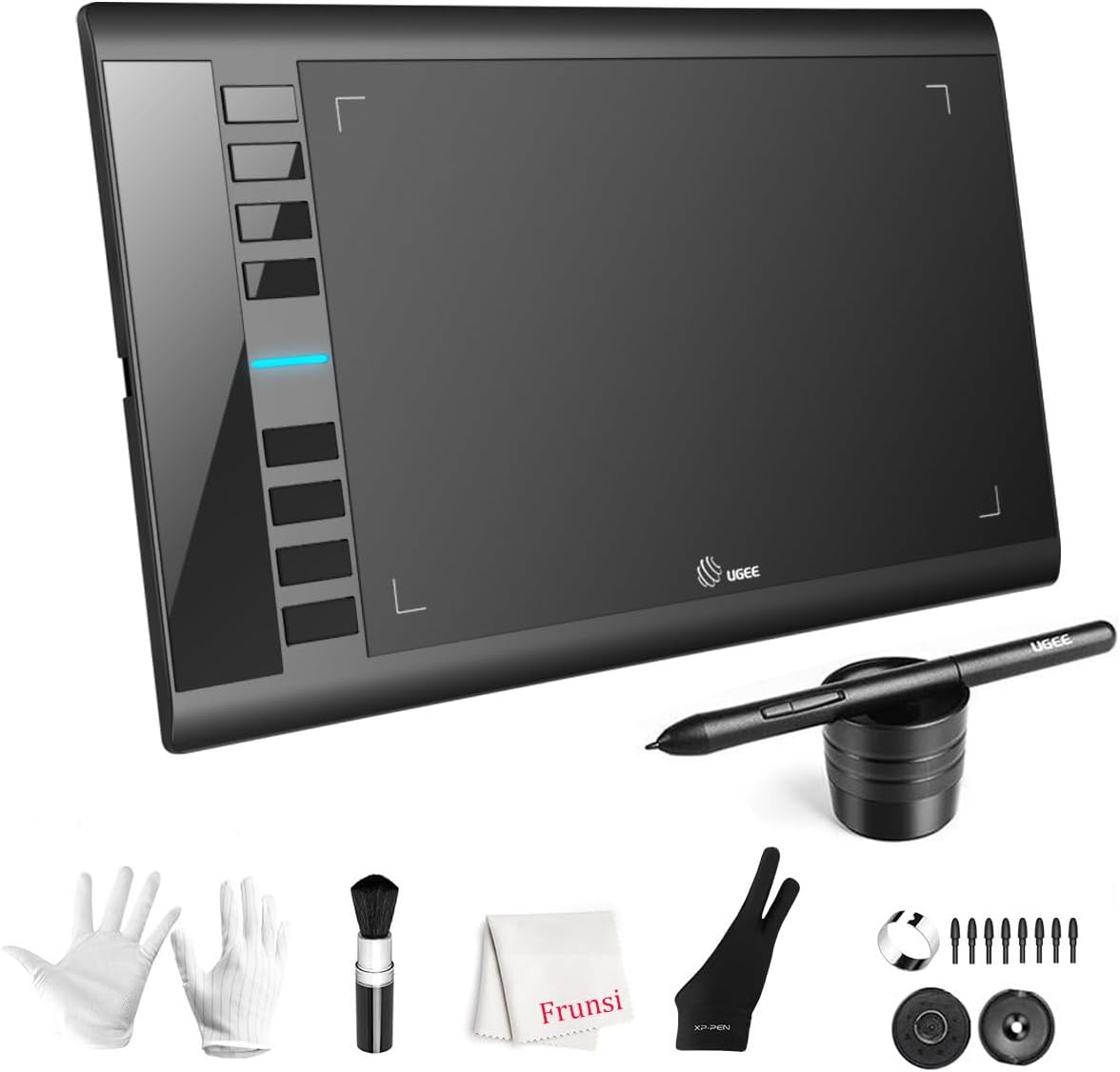
The UGEE M708 provides a large workspace for digital artists transitioning from traditional media. With a 10 by 6-inch active area and 16K pressure levels it offers precise control for shading and detailing. A 4.4 star rating suggests reliable performance for hobbyists and beginners.
We may earn a commission when you buy through this link, at no additional cost to you.
Key features include eight customizable express keys that streamline workflows in software like Photoshop. The passive stylus means no charging is needed and the tablet works across Windows Mac Android and Linux systems. Driverless connectivity simplifies setup for new users.
Unlike standalone pads this device relies on a computer which reduces portability for on-the-go use. Occasional driver updates may be required to maintain compatibility with new software versions. These factors are acceptable trade-offs for desktop users.
Ideal for beginners wanting professional features without the cost of a full display monitor. It is an excellent stepping stone for those starting their digital art journey on a budget.
Eight programmable keys reduce reliance on the keyboard for faster workflow management.
Works seamlessly with major creative suites like Illustrator Clip Studio and ZBrush.
We may earn a commission when you buy through this link, at no additional cost to you.
Mafiti offers a compact solution for quick notes and sketches with its 8.5-inch design. The ultra-lightweight build and kick-stand feature make it versatile for desks or travel. A 4.2 star rating reflects satisfaction with its simplicity and utility.
We may earn a commission when you buy through this link, at no additional cost to you.
The writing quality is improved with thicker lines for better visibility on the monochrome screen. Its replaceable battery ensures longevity without complex maintenance or charging cycles. The included stylus can lock messages in place to prevent accidental erasure.
Adults may find the screen too small for detailed drawing projects. The lack of color limits its appeal for artistic color work. However for quick memos and to-do lists it performs excellently.
Recommended for office workers teachers or travelers needing a quick reusable writing surface. Its portability and ease of use make it a practical addition to any daily carry.
The built-in stylus can prop up the tablet to display messages to friends or colleagues.
Simple coin-cell replacement extends device life indefinitely without needing new units.
We may earn a commission when you buy through this link, at no additional cost to you.
The TEKFUN LCD Writing Tablet focuses on durability making it ideal for active children. Its waterproof and anti-fall construction ensures it withstands drops and spills during travel. A 4.5 star rating indicates parents trust it for long road trips and airplane rides.
We may earn a commission when you buy through this link, at no additional cost to you.
Strengths include a six-month battery life and a reliable lock switch to prevent accidental erasures. The 10-inch screen offers ample space for coloring and storytelling. Lightweight at 150 grams it slips easily into backpacks or carry-on luggage.
The battery is not user-replaceable which means eventual device replacement when it dies. Color options are limited compared to more advanced LCD models. However these issues are minor for the intended young user demographic.
Best for families needing a rugged mess-free entertainment solution for kids. Its resilience and ease of use make it a top choice for vacations and daily play.
High-quality plastic materials resist drops and liquids to survive rough handling.
Extended battery performance ensures weeks of play without needing frequent power changes.
We may earn a commission when you buy through this link, at no additional cost to you.
Wacom remains the industry leader for professional graphic tablets with this small model. Its EMR battery-free pen technology provides an unmatched natural feel for digital drawing. A 4.6 star rating reflects trust from professionals and serious hobbyists alike.
We may earn a commission when you buy through this link, at no additional cost to you.
Key advantages include included creative software and online training resources that help beginners start quickly. The compact size fits on any desk while maintaining precise control for detailed work. It connects seamlessly to most computer systems for immediate use.
The small active area may feel restrictive for large hand movements. Wired connectivity requires a USB port and limits mobility during presentations. These are common trade-offs for entry-level professional tablets.
Recommended for designers artists or students starting with professional tools. Its reliability and brand backing make it a safe long-term investment for creative growth.
Over 40 years of pen display expertise ensures consistent performance and control.
Comes with creative apps and tutorials so you can start creating right away.
We may earn a commission when you buy through this link, at no additional cost to you.
The XP-PEN Artist12 delivers a premium pen display experience for serious digital artists. Its 11.6-inch HD screen allows you to draw directly on the image for intuitive control. A 4.4 star rating highlights its appeal for both professionals and educators.
We may earn a commission when you buy through this link, at no additional cost to you.
Features include 8192 pressure levels and a unique hexagonal pen design for ergonomic comfort. The built-in touch bar and six shortcut keys provide quick access to zoom and brush sizes. Pre-installed anti-reflective screen protector ensures clear visibility in bright rooms.
Setup requires HDMI and USB ports which may need adapters for laptops without these inputs. The cabling can feel restrictive compared to wireless alternatives. However for desktop users the benefits outweigh these minor inconveniences.
Perfect for professionals students and teachers needing a high-fidelity display for detailed work. Its color accuracy and pen precision make it a top-tier choice in the electronic sketch pad market.
Draw directly on the screen for a natural and intuitive artistic experience.
Includes a multi-function pen holder and glove for comfortable long-term use.
We may earn a commission when you buy through this link, at no additional cost to you.
Choosing the right electronic sketch pad involves balancing features portability and budget. This guide outlines key factors to consider before making a purchase decision.
Electronic sketch pads range from simple LCD writing boards to full-color standalone displays. LCD models are budget-friendly and ideal for kids but lack color and save features. Standalone tablets with IPS screens offer vibrant visuals and touch interaction for professional art.
Consider screen size based on your workspace and portability needs. Larger screens provide more drawing real estate but increase bulk. Smaller sizes fit easily in bags for travel but may limit detailed work.
Pressure sensitivity determines how well the pen reacts to varying stroke intensity. Higher levels like 16K allow for natural shading and line weight changes. Basic models may lack this feature entirely limiting them to simple line drawings.
If you plan to do shading or professional illustration look for at least 2048 pressure levels. Beginners may find lower sensitivity sufficient for basic doodling and note-taking.
Standalone devices run their own operating systems like Android and require no computer. They offer total portability but may have limited app ecosystems. Connected tablets must link to a PC or Mac via USB or HDMI for full functionality.
Choose standalone if you work on the go or want simplicity. Connected tablets are better for desktop workflows and high-end software integration.
Battery life varies widely between models. Standalone tablets often need daily or weekly charging while LCD doodle boards may last months on a coin cell. Pen technology also differs with some being battery-free and others requiring chargeable styluses.
For heavy users prioritize long battery life and battery-free pens to avoid interruptions. Casual users may not mind occasional charging for added convenience.
Built-in apps determine what you can create out of the box. Android devices allow downloading third-party apps like Procreate or Adobe. Some models come bundled with creative software and tutorials which adds value for beginners.
Check compatibility with your preferred creative software if you plan to use it for professional work. Ensure the device supports file exports in formats like PNG PDF or SVG.
Weight and thickness matter if you carry your device in a backpack. Lightweight plastic models are durable but may feel cheap. Aluminum-bodied tablets offer premium build quality but add weight.
Look for features like kick-stands or magnetic covers that enhance usability during travel. Durability is key for kids or active use cases.
Modern tablets support Bluetooth Wi-Fi and USB-C connections. Wireless syncing allows easy transfer of sketches to phones or computers. Some professional models require HDMI cables which may need adapters for modern laptops.
Verify the ports available on your host devices before purchasing a connected tablet. Bluetooth pairing simplifies workflow for hybrid note-taking devices.
Prices range from under twenty dollars for basic LCD boards to hundreds for professional pen displays. Budget options are great for kids or simple notes but lack advanced features. Mid-range tablets offer a balance of color and portability.
Invest in higher-end models only if you need color accuracy and professional software support. Evaluate what features you actually need before spending more.
Start by charging your device fully before first use to ensure optimal battery health. For standalone tablets install necessary apps from the respective app store. Connect to Wi-Fi for syncing sketches to cloud services if available.
Clean the screen regularly using a microfiber cloth to avoid scratches. Avoid using harsh chemicals that could damage anti-glare coatings. For tablets with replaceable batteries check the manufacturer guidelines for safe handling.
Store your device in a protective case when traveling to prevent drops. Keep the stylus in its dedicated slot or sleeve to prevent loss. Regular software updates will maintain performance and security for longer use.
Yes many modern standalone tablets like XPPen and PicassoTab run their own operating systems. These devices allow you to draw and save files directly without needing a PC. Traditional graphic tablets however require a computer connection to function.
LCD doodle boards use simple LCD technology to show basic lines without color. They are great for kids and notes but lack save features. Drawing tablets use IPS screens with color pressure sensitivity and storage capabilities for professional art.
Many advanced tablets like Wacom and XPPen use EMR technology for battery-free pens. This means the pen is powered by electromagnetic resonance from the tablet. Some basic models or budget pens may still need charged batteries though.
Standalone tablets usually offer Bluetooth or Wi-Fi syncing through dedicated apps. You can export sketches as images or PDFs to share via email or social media. Connected tablets require file transfers through a host computer to reach mobile devices.
Yes LCD doodle boards are designed specifically for kids with eye-safe screens. They have no radiation or harsh glare making them suitable for prolonged use. Ensure the device meets safety standards and has rounded edges to prevent accidents.
Some basic LCD tablets are pressure sensitive enough to register fingernail strokes. However professional tablets require specific styluses for accurate pressure control. Using your finger on professional devices will not register input correctly.
This guide covered ten top models ranging from budget-friendly doodle boards to professional pen displays. The XPPen 10.95 Standalone offers the best all-around experience for creatives needing portability. For families looking for affordability the Kayoubi and Bravokids provide excellent value.
Consider your primary use case before deciding. Students may prefer hybrid note-taking devices while artists need pressure sensitivity and color accuracy. Beginners should prioritize ease of use and included tutorials to build confidence.
Prices and availability fluctuate so verify current deals on the linked Amazon pages before buying. Always check return policies and warranty terms to ensure your purchase is protected. Happy creating with your new digital tool!