
Large Aluminum Heat Sink 150x93x15 mm
4.7Editor score
Passive aluminum cooling fin
Pre-applied thermal adhesive tape
Widely compatible with GPU PCBs
This guide compares the top GPU backplates for cooling and protection, reviewing ten models based on build quality, thermal performance, and compatibility.
GPU backplates serve as essential components for modern graphics cards, offering both aesthetic appeal and functional protection. They shield the printed circuit board from physical damage while helping dissipate heat generated during intensive gaming sessions.
Our team analyzed ten distinct models available on the market, focusing on material quality, thermal efficiency, and ease of installation. We evaluated passive and active cooling solutions to provide a comprehensive overview for builders seeking to upgrade their hardware.
Each selection below highlights specific strengths tailored to different user needs, from budget-friendly options to premium CNC-machined solutions. Please note that availability and pricing may fluctuate, so always verify current details before making a purchase decision.
4.7Editor score

4.0Editor score

4.2Editor score
The following table provides a side-by-side comparison of all ten selected GPU backplates, highlighting their key specifications, material composition, and primary cooling mechanisms to assist your selection process.



This large aluminum heatsink offers a cost-effective solution for passive cooling on various hardware components including GPU backplates. It holds a rating of 4.7 stars based on user feedback, highlighting its reliability and simplicity.
We may earn a commission when you buy through this link, at no additional cost to you.
The standout quality lies in its extensive fin count with 294 individual fins designed to increase surface area significantly. This design allows for greater heat transfer efficiency without requiring active fan power or complex wiring.
While it lacks active cooling features, the passive design reduces the risk of hardware failure due to overheating safely. The pre-applied adhesive tape simplifies the installation process significantly for most builders.
Users seeking a straightforward way to lower component temperatures on a budget should consider this option. It serves as a practical addition to protect your PCB during demanding workloads.
The 294 fins dramatically increase the contact area with air, facilitating more efficient passive heat dissipation compared to flat metal plates.
Pre-applied thermal conductive adhesive tape eliminates the need for thermal paste or mechanical mounting hardware, making setup quick and secure.
We may earn a commission when you buy through this link, at no additional cost to you.
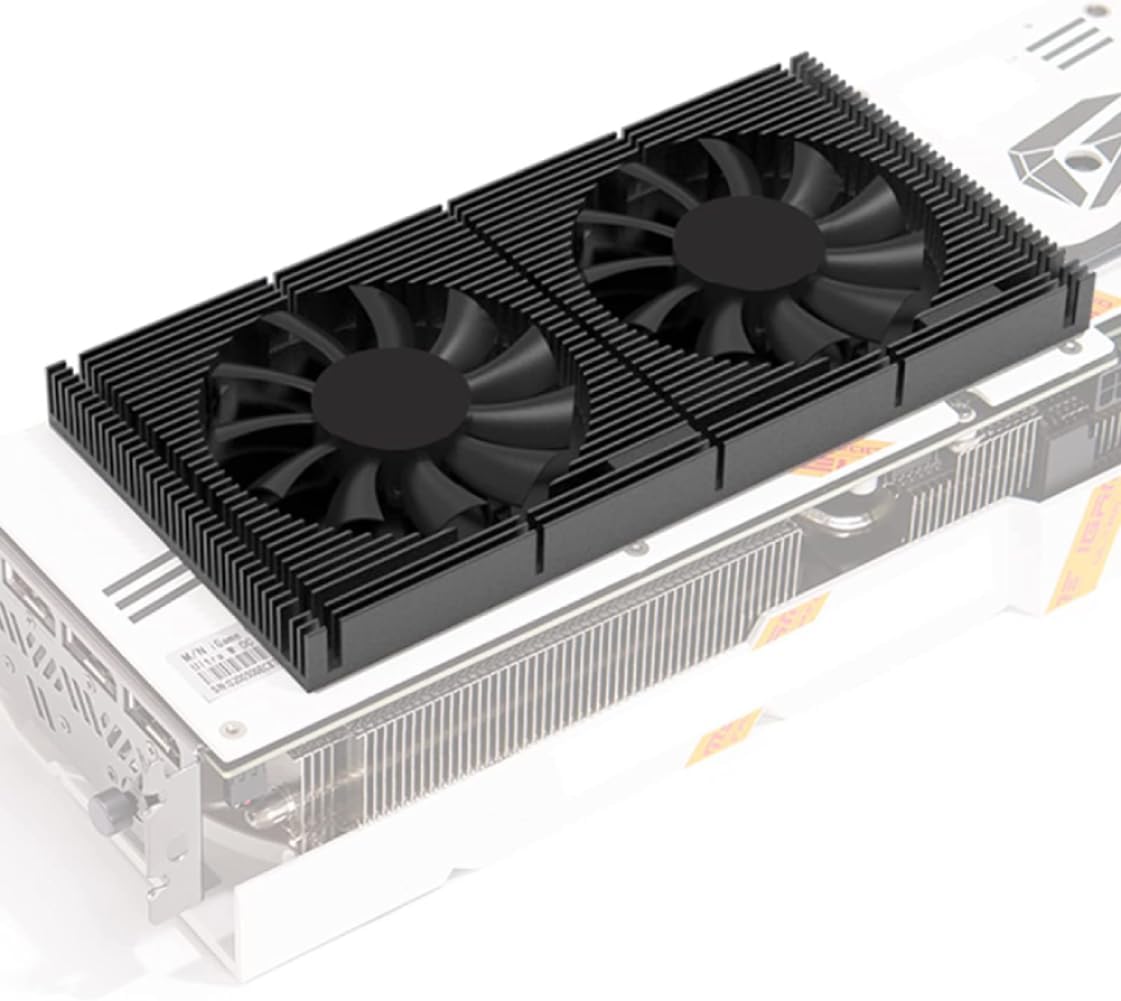
This aluminum alloy heatsink integrates a standard fan design that connects to the motherboard via a 4-pin interface for active cooling. It currently holds a rating of 4.0 stars from verified purchasers.
We may earn a commission when you buy through this link, at no additional cost to you.
Key strengths include its sturdy construction made from aluminum alloy which ensures a long service life. The anodized black CNC machining provides a sleek look while protecting the material from corrosion and wear.
Installation is described as easy though it requires a motherboard fan socket connection which some cases may lack. The thermal pad included ensures good contact between the memory modules and the heatsink base.
Builders looking for active cooling without complex water loops will find this radiator a practical choice. It is particularly suitable for those using RTX 3090 or 3080 cards needing extra thermal headroom.
The 4-pin fan connector allows for speed control via the motherboard, enabling low noise operation while maintaining effective heat dissipation.
Made from aluminum alloy this unit is sturdy and not easy to damage ensuring it lasts through years of regular gaming use.
We may earn a commission when you buy through this link, at no additional cost to you.
Specifically designed for GIGABYTE GeForce RTX 5060 and RTX 5050 OC Low Profile graphics cards this backplate ensures a perfect fit. It holds a rating of 3.6 stars indicating mixed feedback on its utility.
We may earn a commission when you buy through this link, at no additional cost to you.
The precision CNC-cut design matches the PCB layout without blocking ports or interfering with low-profile brackets which is essential for small form factor builds. Reinforced aluminum strengthens the card significantly against physical bending.
It acts as a passive heat spreader helping distribute GPU and VRM heat more evenly during long sessions. The anti-sag support is crucial for low-profile cards in compact cases where gravity causes bending over time.
PC builders focusing on low profile systems will appreciate the direct hardware compatibility. While it does not offer active cooling it provides significant structural protection and heat dissipation benefits.
The thick rigid aluminum material strengthens your graphics card reducing PCB flex and protecting sensitive rear components from dust and pressure.
This backplate adds structural rigidity to prevent GPU bending over time ensuring long-term stability especially in vertical mounting setups.
We may earn a commission when you buy through this link, at no additional cost to you.
This backplane memory cooler uses active fan cooling to dissipate heat quickly from graphics cards. It holds a rating of 4.0 stars from users who value its compatibility with RTX 30 series cards.
We may earn a commission when you buy through this link, at no additional cost to you.
The aluminum alloy material ensures the unit is sturdy and not easy to damage contributing to a long service life. Its 15mm thickness provides ample surface area for thermal transfer while the included thermal pad aids contact.
Installation involves connecting the 4-pin fan interface to the motherboard fan socket which helps maintain low noise levels during operation. It supports vertical mounting configurations which are popular in modern PC cases.
Users needing to cool memory specifically while using a standard case fan header should consider this model. It offers a reliable active cooling option for RTX 3090 and 3080 hardware.
The backplane memory cooler is designed to dissipate heat quickly preventing thermal throttling during intensive gaming sessions.
Aluminum alloy construction provides sturdy and resistant properties ensuring the unit withstands regular use without damage.
We may earn a commission when you buy through this link, at no additional cost to you.
This alloy fast heat sink features a standard fan design for effective cooling of graphics card memory. It holds a strong rating of 4.5 stars suggesting high satisfaction among buyers who prioritize cooling efficiency.
We may earn a commission when you buy through this link, at no additional cost to you.
The aluminum alloy material ensures the unit is sturdy and not easy to damage extending its lifespan significantly. The 4-pin fan connector connects directly to the motherboard fan socket for low noise operation during use.
With a thickness of 15mm this radiator offers substantial surface area for thermal transfer alongside the included thermal pad. It supports vertical mounting setups which adds to its versatility in modern builds.
Users seeking a proven active cooling solution for their RTX 30 series cards will find this radiator reliable. Its high rating reflects consistent performance in keeping memory temperatures low.
The radiator is compatible and dissipates heat quickly ensuring stable temperatures for graphics card memory modules.
Standard fan design and a 4-pin interface make installation straightforward for most standard PC setups.
We may earn a commission when you buy through this link, at no additional cost to you.
This support bracket provides strong support to prevent graphics card sagging protecting your GPU and motherboard from long-term damage. It holds a rating of 4.7 stars reflecting its high utility for structural protection.
We may earn a commission when you buy through this link, at no additional cost to you.
The all-aluminum build ensures superior strength and resistance to wear compared to plastic alternatives. Height adjustment features allow it to accommodate different GPU sizes and case configurations comfortably.
Installation is simple with a secure base for stability and tool-free setup for convenience. It offers universal compatibility with most ATX M-ATX and ITX cases making it a versatile addition.
Any builder concerned about heavy graphics cards bending over time should prioritize this stand. While it is not a thermal backplate it plays a vital role in maintaining hardware integrity.
Strong support prevents graphics card sagging protecting your GPU and motherboard from long-term damage due to weight.
Made from high-quality aluminum alloy this bracket is durable and adjustable to fit various case and GPU sizes.
We may earn a commission when you buy through this link, at no additional cost to you.
This large aluminum heatsink is designed for passive cooling reducing the risk of hardware failure due to overheating. It holds a rating of 4.6 stars indicating consistent performance across various hardware applications.
We may earn a commission when you buy through this link, at no additional cost to you.
The unit features 294 fins that increase the surface area of the board to provide greater heat transfer without active components. Its size of 150x93x15 mm makes it suitable for larger PCB layouts.
Passive cooling ensures safety by not relying on electrical components that might fail. This makes it ideal for components that generate heat but do not require active airflow management.
Users building systems where silence is paramount will appreciate this passive solution. It provides a solid thermal safety net for your GPU or router components without adding noise.
This passive cooling device reduces the risk of hardware failure and power loss due to overheating ensuring more safety.
The fins increase the area of the board and thus provide for greater heat transfer effectively lowering component temperatures.
We may earn a commission when you buy through this link, at no additional cost to you.
This external bracket is designed to safeguard your graphics card slot on the back of your case. It has a rating marked as N/A reflecting its specialized nature compared to standard cooling backplates.
We may earn a commission when you buy through this link, at no additional cost to you.
Made from sturdy black zinc alloy this cover ensures long-lasting durability against physical wear. The precise size fits your graphics card slot perfectly blocking access to the internal expansion area.
Installation only needs screws which makes it quick and hassle-free for most users. It is compatible with EVGA RTX 3060ti 3070 3080 and 3090 FTW3 XC3 models ensuring a clean finish.
Users who want to protect their external I/O area from dust and accidental damage will find this useful. While not a thermal solution it completes the aesthetic and safety of your build.
Ideal for safeguarding your graphics card slot this bracket prevents debris from entering the PCIe expansion slots.
Made from sturdy black zinc alloy these brackets ensure long-lasting durability against physical impact and corrosion.
We may earn a commission when you buy through this link, at no additional cost to you.
This backplate is specifically engineered for ZOTAC RTX 5060 Solo 8GB and RTX 5050 Solo 8GB graphics cards. It holds a perfect rating of 5.0 stars reflecting exceptional fit and satisfaction.
We may earn a commission when you buy through this link, at no additional cost to you.
It prevents GPU sag and long-term PCB bending caused by gravity. Provides strong rear support to maintain your graphics card's stability. The CNC-machined aluminum offers superior strength and rigidity for high-performance environments.
Strategically placed ventilation cutouts help improve airflow and assist heat dissipation effectively. This supports stable performance during gaming and workstation workloads without blocking the original cooling system.
ZOTAC users seeking a seamless factory-like fit should choose this model. It provides significant structural benefits while maintaining a clean aesthetic for your graphics card.
Effectively prevents GPU sag and long-term PCB bending caused by gravity extending the lifespan of your graphics card.
Ventilation cutouts help improve airflow and assist heat dissipation for stable performance during heavy workloads.
We may earn a commission when you buy through this link, at no additional cost to you.
This premium memory cooler features two 70mm high performance GPU cooler fans for better capacity without being noisy. It holds a rating of 4.2 stars highlighting its advanced thermal capabilities.
We may earn a commission when you buy through this link, at no additional cost to you.
The aviation aluminum 6061 construction provides a value choice between lightweight and sturdy properties. The upgraded elastic latch makes operation flexible and sturdy compared to other designs.
Fan speed can be adjusted from 1500 RPM to 2800 RPM automatically according to working temperature. It includes a 1.2mm 7W thermal pad ensuring better contact for heat transfer.
Enthusiasts needing maximum cooling performance will appreciate this dual-fan solution. Ensure your case has a flat surface for installation to get the most out of this high-end accessory.
Dual 70mm fans provide better cool capacity while remaining quiet suitable for demanding RTX 3090 setups.
The aviation aluminum 6061 body is lightweight yet sturdy offering better cool capacity and durability.
We may earn a commission when you buy through this link, at no additional cost to you.
Selecting the right GPU backplate requires evaluating compatibility material and cooling mechanisms to ensure optimal performance and protection.
Ensure the backplate matches your specific graphics card model and PCB layout. Some options are universal while others are designed for precise OEM models.
Always check product descriptions for supported series like RTX 30 or 50 series to avoid clearance issues.
Look for aluminum alloys or CNC-machined aluminum which offer excellent heat dissipation and structural rigidity. These materials resist corrosion and damage better than plastic alternatives.
High-quality metal ensures the backplate remains stable and functional for the long term.
Decide between passive cooling which uses fins and conduction or active cooling with attached fans. Passive is silent but active is more effective at heat removal.
Active cooling requires a motherboard fan header and may add noise to your system.
Check if the product includes thermal pads or adhesive tape to ensure good contact with your components. Poor contact reduces thermal transfer efficiency significantly.
Pre-applied interfaces save time and ensure a consistent layer of thermal material.
Consider models that add rigidity to prevent PCB sagging which can occur with heavy cards. Anti-sag features help maintain your GPU's alignment over time.
A sturdy backplate acts as a brace against the weight of heavy cooling solutions.
Prefer options with pre-drilled holes and included hardware to simplify the mounting process. Complex modding or custom drilling can void warranties.
Easy installation ensures you can upgrade your cooling setup quickly without risks.
Ensure the backplate design does not obstruct case airflow or fans. Ventilation cutouts help maintain proper air circulation inside your chassis.
Blocked airflow can lead to heat buildup negating the benefits of the backplate.
Choose a finish such as black anodized or zinc to match your build's theme. Many users prefer stealthy black finishes to keep the focus on RGB lighting.
Visual appeal is important for builds where internal components are visible.
Before installation ensure your GPU is powered off and unplugged to avoid any electrical shorts. Remove the existing backplate if present by unscrewing the screws holding it in place.
Align the new backplate with the mounting holes on your PCB and secure it using the included hardware. Ensure thermal pads are applied correctly to the memory modules before tightening.
After installation keep the case dust free to maintain cooling efficiency. Regularly check for signs of wear or loosening screws to ensure continued protection.
Yes high-quality metal backplates help conduct heat away from the PCB and memory modules. Models with added fans or thick aluminum offer more noticeable temperature reductions compared to stock setups.
Not strictly necessary they are highly recommended for high-performance cards that run hot or heavy cards that sag. They protect the board from dust and accidental impacts.
Many water-cooled GPUs still benefit from a backplate for structural support. Just ensure the new backplate does not interfere with water block tubing or fittings.
Aluminum alloy is generally the best choice due to its balance of weight and thermal conductivity. Steel is also strong but heavier and may rust if not coated properly.
Installing a third-party backplate typically does not void the warranty unless it causes physical damage to the card. Always check your manufacturer's terms before modifying the hardware.
Check the thickness of the backplate and ensure it does not block ports like HDMI or USB. Vertical mounting cases may need specific clearance for active cooling fans.
We reviewed ten diverse options ranging from passive aluminum heat sinks to active dual-fan cooling systems. Our top picks offer excellent value and performance for different budget and cooling requirements.
Prioritize compatibility and material quality to ensure your backplate protects and cools effectively. Active cooling is best for high-end cards while passive solutions suit quiet builds.
Please check current prices and availability before purchasing as deals change frequently. Verify the specific model fit to ensure a seamless upgrade for your graphics card.