
ASUS Dual GeForce RTX 5060 Ti 16GB GDDR7 OC Edition Gaming Graphics Card
4.7Editor score
16GB GDDR7 memory
Blackwell architecture support
Dual BIOS profiles
This guide compares the top GPUs for DaVinci Resolve to help professionals and enthusiasts choose the right card for rendering, editing, and color grading
Choosing the right graphics card is crucial for smooth video editing. A powerful GPU accelerates rendering, color grading, and effects processing in DaVinci Resolve.
We evaluated ten top GPUs based on performance, memory, architecture, and compatibility. Each product offers unique strengths for different editing needs and budgets.
Our picks highlight key features, pros, and cons to guide your decision. Prices fluctuate frequently, so verify current costs before purchasing your next GPU.
4.7Editor score
4.9Editor score

4.3Editor score
This table provides a side-by-side comparison of the ten leading GPUs. Review key specifications to find the best match for your DaVinci Resolve projects.




This GIGABYTE RTX 5080 delivers exceptional performance with its Blackwell architecture and 16GB GDDR7 memory. It scores highly for smooth playback and rendering speeds in DaVinci Resolve.
We may earn a commission when you buy through this link, at no additional cost to you.
Key strengths include the WINDFORCE cooling system that maintains low temperatures during long exports. The PCIe 5.0 interface ensures future-proof bandwidth for demanding workloads.
While powerful, this card demands a spacious case and robust power supply. The price reflects its high-end capabilities but may be steep for casual editors.
Editors needing reliable 8K timelines and heavy effects will benefit most. Its balance of speed and cooling makes it a top recommendation for professionals.
The latest Blackwell architecture provides faster compute and AI acceleration, reducing wait times during color grading and effects processing.
GDDR7 memory offers significantly higher bandwidth than previous generations, allowing for smoother playback of high-resolution footage and complex nodes.
We may earn a commission when you buy through this link, at no additional cost to you.
The PNY Quadro RTX 4000 introduces professional-grade ray tracing capabilities. With 36 RT cores, it excels in rendering realistic lighting for creative projects.
We may earn a commission when you buy through this link, at no additional cost to you.
Its Turing architecture remains reliable for many professional applications. Users appreciate the stability provided by optimized professional drivers for creative software.
However, older architecture means lower raw performance compared to newer models. Memory limits may restrict very large timelines or complex scenes.
Ideal for users needing certified stability over raw speed. It remains a solid choice for studios prioritizing reliability in production pipelines.
RTX technology enables real-time ray tracing, allowing creators to see accurate lighting effects instantly without lengthy preview renders.
Quadro drivers are optimized for creative software, reducing crashes and ensuring consistent performance during critical editing sessions.
We may earn a commission when you buy through this link, at no additional cost to you.
The NVIDIA Titan RTX combines gaming and professional features. Its 4609 CUDA cores and 577 Tensor Cores deliver powerful performance for AI and rendering.
We may earn a commission when you buy through this link, at no additional cost to you.
Turing architecture supports advanced ray tracing and AI tasks. This card is popular for users needing high compute power without workstation certifications.
Power requirements and heat output are significant concerns. Users need a robust cooling solution and high-wattage PSU to run this card effectively.
Best for power users handling heavy computational tasks. It bridges the gap between gaming GPUs and professional workstations effectively.
Tensor Cores accelerate AI-based tools, making tasks like noise reduction and upscaling faster and more efficient during editing.
High CUDA core counts enable faster GPU rendering in effects and compositing, saving valuable time on production deadlines.
We may earn a commission when you buy through this link, at no additional cost to you.
This ASRock card offers massive 32GB GDDR6 memory, ideal for large projects and high-resolution textures. Built for AI development and professional content creation.
We may earn a commission when you buy through this link, at no additional cost to you.
Advanced RDNA 4 features include dedicated AI accelerators and Ray Tracing. The PCIe 5.0 interface ensures maximum data transfer speeds for demanding workloads.
A blower cooler keeps heat manageable in tight server racks but can be noisy. Users should verify driver compatibility with specific creative software.
Perfect for workstation builds needing high memory capacity. It supports complex 3D rendering and AI tasks efficiently.
The 32GB GDDR6 allows handling of massive datasets and 8K video edits without frequent memory swaps or stuttering.
Second-generation AI accelerators speed up machine learning tasks, benefiting creative workflows involving generative tools.
We may earn a commission when you buy through this link, at no additional cost to you.
The Radeon RX 9070 XT offers strong value with 16GB GDDR6 memory. It delivers high frame rates and smooth playback suitable for many editing workflows.
We may earn a commission when you buy through this link, at no additional cost to you.
WINDFORCE cooling keeps temperatures low even under load. PCIe 5.0 support ensures compatibility with future systems and faster data transfer.
Gaming drivers may lack some professional optimizations found in workstation cards. However, performance remains competitive for most creative tasks.
Recommended for users seeking powerful performance at a lower cost. It balances gaming capabilities with editing needs effectively.
Competitive pricing with high memory and clock speeds make this card attractive for budget-conscious editors needing raw power.
Server-grade thermal gel and Hawk fans ensure sustained performance without thermal throttling during long export sessions.
We may earn a commission when you buy through this link, at no additional cost to you.
The RTX PRO 6000 Blackwell stands as the ultimate workstation GPU. Its 96GB DDR7 ECC memory supports massive, multi-application workflows without limits.
We may earn a commission when you buy through this link, at no additional cost to you.
Fifth-generation Tensor Cores and fourth-generation RT cores provide cutting-edge AI and rendering performance. PCIe Gen 5 doubles bandwidth for faster data flow.
This card is priced for enterprise use, which may be excessive for individual creators. It requires careful hardware setup and compliance considerations.
Best for large studios and research environments needing maximum compute power. It ensures future-proof capabilities for the most demanding tasks.
96GB of VRAM handles multiple 8K timelines and complex AI models simultaneously, eliminating memory bottlenecks completely.
FP4 precision support accelerates AI model fine-tuning, enabling faster iteration on generative workflows locally.
We may earn a commission when you buy through this link, at no additional cost to you.
The ASUS TUF RTX 5080 blends durability with high performance. Blackwell architecture and 16GB GDDR7 memory ensure smooth handling of complex editing tasks.
We may earn a commission when you buy through this link, at no additional cost to you.
Phase-change thermal pads and Axial-tech fans maintain optimal temperatures during intensive workloads. Auto-Extreme manufacturing improves overall reliability and longevity.
Its large size requires ample case clearance. High power consumption also necessitates a robust power supply unit for stability.
Ideal for users wanting rugged performance in creative applications. It delivers professional-grade speeds with gaming aesthetics.
Advanced thermal pads ensure efficient heat dissipation, keeping boost clocks high even during prolonged rendering sessions.
Military-grade components and PCB coating protect against environmental factors, extending the lifespan of the card.
We may earn a commission when you buy through this link, at no additional cost to you.
This Intel Arc card provides 24GB GDDR6 memory and Xe2-HPG architecture. ISV-certified drivers offer stability for professional design and AI work.
We may earn a commission when you buy through this link, at no additional cost to you.
Twin Media Transcoders support AV1 and HEVC, speeding up exports significantly. The blower design suits multi-GPU setups in tight enclosures.
As a newer platform, driver maturity is still evolving. Users should verify software support before relying on it for production.
Good for multi-monitor workflows and those interested in modern Intel graphics. It offers competitive features at reasonable pricing.
Dual-encode engines support multiple formats efficiently, reducing time spent exporting high-resolution video projects.
Four DisplayPort 2.1 outputs allow connecting multiple 8K displays for expansive professional editing setups.
We may earn a commission when you buy through this link, at no additional cost to you.
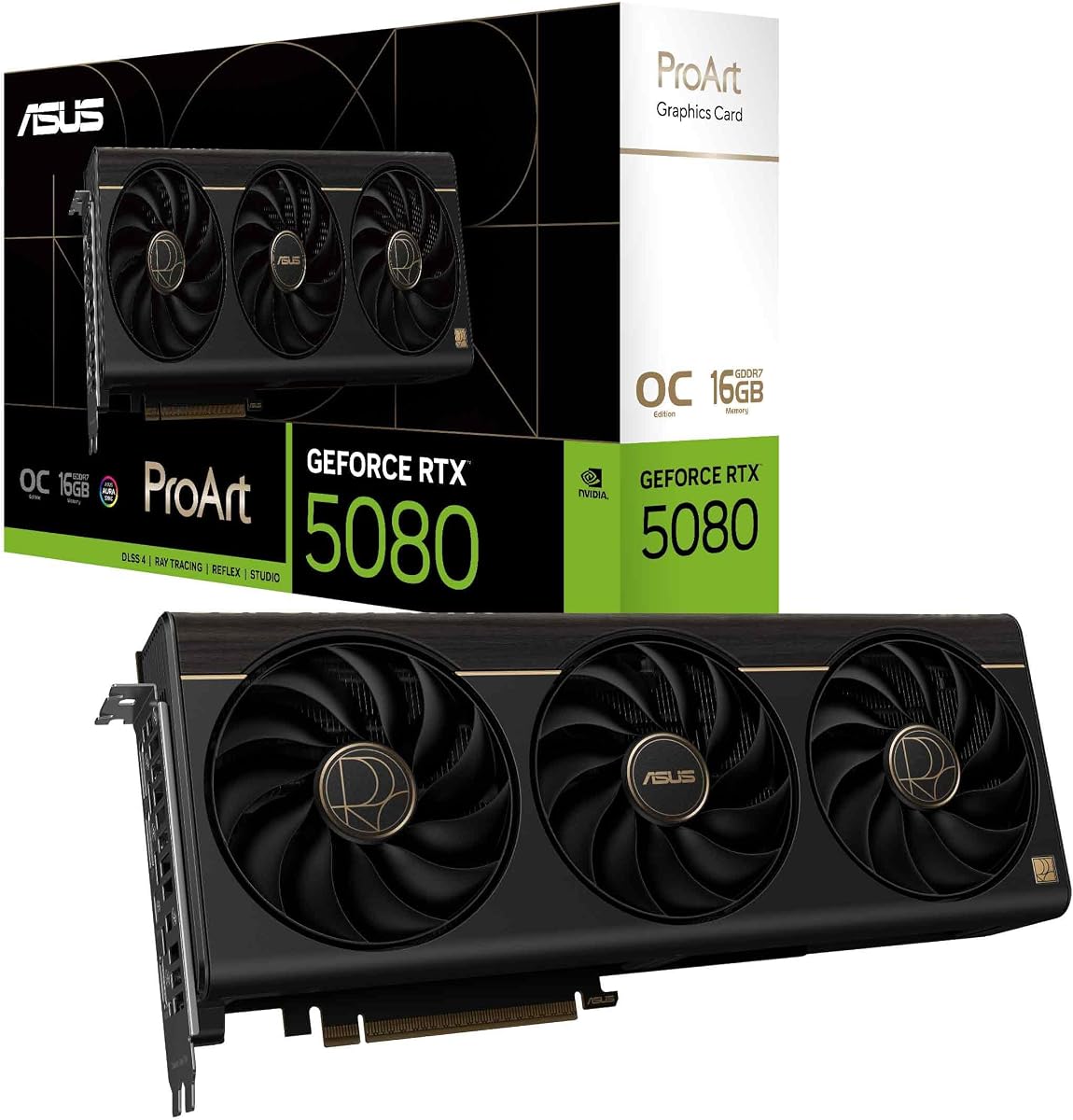
The ASUS ProArt RTX 5080 delivers top-tier performance for content creators. It includes specialized features like USB Type-C connectivity for versatile workflows.
We may earn a commission when you buy through this link, at no additional cost to you.
Vapor chamber cooling and phase-change thermal pads ensure stability. The minimalist design fits aesthetic professional environments while maintaining powerful specs.
High performance comes at a premium cost. While excellent for work, it prioritizes reliability over gaming features compared to TUF series.
Perfect for artists needing precision and connectivity. It balances professional-grade performance with thoughtful design elements.
Integrated USB Type-C ports simplify connecting high-resolution displays or capture cards directly to the card.
MaxContact heatsink design spreads heat effectively, ensuring consistent performance under sustained professional loads.
We may earn a commission when you buy through this link, at no additional cost to you.
The ASUS Dual RTX 5060 Ti offers excellent value with 16GB GDDR7 memory. Blackwell architecture ensures modern performance at a budget-friendly price.
We may earn a commission when you buy through this link, at no additional cost to you.
Dual BIOS lets users toggle between Quiet and Performance modes for flexible operation. Axial-tech fans provide adequate cooling in smaller chassis.
While not as powerful as higher-tier cards, it handles mainstream editing smoothly. Lower core counts mean longer export times on complex projects.
Ideal for students and hobbyists entering professional editing. It balances price, memory, and performance effectively.
High VRAM at low cost makes this card perfect for users needing capacity without breaking the bank.
2.5-slot design maximizes compatibility with smaller cases, allowing high performance in limited physical space.
We may earn a commission when you buy through this link, at no additional cost to you.
Selecting the ideal GPU involves balancing performance, memory, and budget. Understanding these factors ensures you get the right card for your workflow.
Video editing software like DaVinci Resolve relies heavily on video memory (VRAM) to store textures, effects, and high-resolution footage. Higher VRAM allows for smoother playback and rendering of complex timelines without stuttering. If you work with 4K or 8K footage, aim for at least 16GB of VRAM to avoid performance bottlenecks.
Prioritize cards with 16GB or more VRAM for professional editing. Lower amounts may suffice for 1080p work but limit future scalability.
Modern GPU architectures offer improved efficiency, AI acceleration, and ray tracing support. Newer generations like NVIDIA Blackwell or AMD RDNA provide faster compute speeds and better power efficiency. These advancements directly impact how quickly your system processes effects and exports video files.
Choose the latest supported architecture for your software version. Newer chips often include features that enhance AI-driven editing tools.
CUDA cores are parallel processing units that handle rendering tasks. Higher core counts generally translate to faster rendering and playback speeds. DaVinci Resolve utilizes these cores extensively for decoding, decoding, and applying GPU-accelerated effects.
Look for cards with high CUDA core counts if rendering speed is a priority. More cores mean more parallel processing capability for complex nodes.
The PCIe interface determines data transfer speeds between your GPU and CPU. Newer standards like PCIe 5.0 offer double the bandwidth of previous generations, reducing bottlenecks in data-intensive workflows. This is crucial for handling large files and multi-camera projects efficiently.
Ensure your motherboard supports the latest PCIe standard for optimal performance. Older interfaces may limit the potential of newer, high-bandwidth GPUs.
Effective cooling prevents thermal throttling, ensuring consistent performance during long export sessions. High-quality fans, heatsinks, and thermal pads help dissipate heat efficiently. Good thermal design also extends the lifespan of the card by reducing strain on internal components.
Check reviews for cooling performance before purchasing. Cards with advanced cooling solutions often maintain higher boost clocks under sustained loads.
Gaming GPUs offer high raw performance at lower prices but may lack ISV certifications. Professional cards include drivers optimized for stability in creative apps, reducing crashes. Your choice depends on whether you prioritize cost or stability in production environments.
Choose professional cards for mission-critical workloads. Gaming cards are suitable for enthusiasts or users on tighter budgets.
High-performance GPUs require robust power supplies. Check the card's TDP (Thermal Design Power) and ensure your PSU can handle the load with headroom. Inadequate power can cause crashes or unstable performance during intensive tasks.
Invest in a high-quality PSU with sufficient wattage. Follow manufacturer recommendations for connector types and power rails.
Many editors use multiple screens for timelines and monitoring. Ensure the card has enough video outputs and supports your desired resolutions and refresh rates. Modern cards offer multiple DisplayPort or HDMI ports for flexible setups.
Verify output ports match your display requirements. Support for high resolutions like 4K and 8K is essential for detailed grading work.
Install your GPU carefully, ensuring it is seated firmly in the PCIe slot. Connect all required power cables securely before powering on your system to avoid instability or hardware damage during use.
Keep your graphics drivers updated regularly. Manufacturers release updates that improve compatibility with creative software and optimize performance for specific features like AI tools or codecs.
Maintain proper airflow inside your case to prevent overheating. Clean dust filters and fans every few months to ensure cooling systems function efficiently during long editing sessions.
For basic editing at 1080p, 8GB VRAM is acceptable but not ideal. For 4K and higher resolutions, at least 16GB is recommended to handle timelines and effects smoothly.
Yes, DaVinci Resolve supports AMD and Intel GPUs through OpenCL. However, NVIDIA CUDA is generally preferred for better performance in rendering and effects processing.
Professional GPUs offer ISV certification and stability for creative software. Gaming GPUs often provide higher raw performance at lower prices, making them a good value for many users.
PCIe 5.0 doubles bandwidth compared to PCIe 4.0, reducing bottlenecks. While not strictly necessary now, it ensures future-proofing for high-speed storage and multi-GPU workflows.
Yes, GPU upgrades usually do not require a CPU change. Ensure your motherboard has a compatible PCIe slot and your power supply meets the card's wattage requirements.
DLSS 4 is NVIDIA technology that uses AI to upscale images efficiently. In creative software, it helps render high resolutions faster by leveraging AI acceleration.
Use compressed air to blow dust from fans and heatsinks while the system is off. Avoid touching components directly to prevent static discharge damage.
Yes, Studio drivers from NVIDIA or AMD are optimized for creative applications. These offer better stability and performance than Game Ready drivers for video editing tasks.
Our top picks highlight a range of options from budget-friendly models to high-end workstations. The ASUS ProArt RTX 5080 leads for creators, while the RTX 5060 Ti offers great value.
Prioritize VRAM capacity and cooling efficiency when making your decision. These factors significantly impact smooth playback and export speeds in DaVinci Resolve.
Prices fluctuate frequently across retailers. Always check current pricing and availability before purchasing to ensure you get the best deal on your new GPU.