
VPFET HDMI Audio Extractor 4K HDMI to Optical
4.1Editor score
Affordable entry level option
4K@30Hz resolution support
Optical and 3.5mm outputs
This comprehensive guide compares the top HDMI Audio Extractor models available in October 2026, evaluating performance, compatibility, and value for home
Finding the right HDMI Audio Extractor can significantly enhance your home theater experience by allowing you to separate audio from video signals efficiently. These devices are essential for connecting modern source devices to legacy audio systems or specialized soundbars that lack direct HDMI inputs.
We have carefully evaluated ten leading models based on their video resolution support, audio format compatibility, and overall build quality. Our analysis focuses on how well each extractor handles high bandwidth signals like 4K and 8K while maintaining stable audio output for your speakers.
Each product in this list includes detailed specifications and pros and cons to help you make an informed decision for your specific setup. Please note that product availability and pricing can change frequently, so we recommend checking the current listings before making a final purchase.
4.1Editor score

4.2Editor score

4.4Editor score
This side-by-side comparison highlights the key specifications and capabilities of each HDMI Audio Extractor to help you quickly identify the best fit for your audio and video needs.






The VPFET HDMI Audio Extractor is a solid entry-level solution for users looking to separate audio from video without spending a fortune. With a rating of 4.1 stars, it offers reliable performance for standard home theater setups that do not require the highest refresh rates or advanced ARC capabilities.
We may earn a commission when you buy through this link, at no additional cost to you.
This device supports 4K resolution at 30Hz and includes both optical and 3.5mm outputs to connect to various audio systems. It handles audio formats like DTS 5.1 and PCM 2.0 efficiently, making it suitable for Blu-ray players, game consoles, and streaming devices that lack dedicated audio outputs.
While it lacks support for ARC and eARC, which limits its use with modern TV audio return scenarios, the pass mode ensures video and audio signals can still be transmitted when needed. The low energy consumption and compact design make it easy to integrate into existing entertainment centers without adding bulk.
If you are looking for a cost-effective way to connect older audio receivers to new HDMI sources, this extractor is a practical choice. Just ensure your source device supports 4K@30Hz and that you have a power source available for the USB port to ensure stable operation.
This model provides an excellent balance of cost and functionality for users who do not need the latest HDMI 2.1 features or high refresh rate support.
Having both optical and analog outputs allows you to connect to a wide range of legacy speakers and receivers that may not support HDMI audio directly.
We may earn a commission when you buy through this link, at no additional cost to you.
The OREI HDMI Audio Extractor ARC stands out as a top choice for home theater enthusiasts who need reliable 4K@60Hz performance along with ARC capabilities. Its 4.4 rating reflects strong performance in handling modern video standards and providing versatile audio extraction options for soundbars and receivers.
We may earn a commission when you buy through this link, at no additional cost to you.
This device supports high bandwidth HDMI 2.0b standards with 18Gbps throughput, allowing for HDR10 and Dolby Vision pass-through without compromising picture quality. The ability to extract audio from ARC-enabled TVs and downmix surround sound to stereo ensures compatibility with a wide array of audio systems and speaker setups.
Although it does not support eARC which limits the highest fidelity audio formats, the CEC pass-through simplifies remote control integration between your TV and source devices. The package includes a power adapter and manual, making setup straightforward for most users without needing additional accessories or technical expertise.
For users seeking a robust extractor that balances performance and features, this OREI model is highly recommended. It is particularly well-suited for setups involving streaming devices, consoles, and TV audio return where reliable audio separation is critical for an immersive viewing experience.
The inclusion of ARC support allows you to route audio directly from your TV to an external sound system without additional cables or complex wiring setups.
With support for HDR10 and Dolby Vision, this extractor ensures that your high dynamic range content retains its visual quality when split for audio processing.
We may earn a commission when you buy through this link, at no additional cost to you.
The OREI 4K@60Hz HDMI Audio Converter is a premium option designed for users who demand high fidelity audio and robust video performance. With a 4.2 rating, it is known for its ability to pass high bitrate audio formats like Dolby TrueHD and DTS-HD Master Audio without degradation or signal loss.
We may earn a commission when you buy through this link, at no additional cost to you.
This device supports HDMI 2.0b standards and 18Gbps bandwidth to ensure full 4K resolution with HDR pass-through is maintained during audio extraction. The metal housing provides durability and heat dissipation, which is essential for maintaining stable performance during extended viewing sessions with high resolution content.
While it does not support ARC, making it less ideal for TV audio return scenarios, it excels when used with external source devices like Blu-ray players and game consoles. The dual voltage supply ensures it can be used internationally, broadening its appeal to users with diverse regional power standards.
If you are building a high-end home theater system and need reliable audio extraction for surround sound formats, this converter is an excellent investment. Its compatibility with a wide range of devices and formats ensures it remains a versatile component in your entertainment setup for years to come.
Support for Dolby Atmos and DTS:X means you can enjoy immersive 3D audio effects when connected to a compatible receiver or sound system.
The robust metal enclosure helps dissipate heat effectively, ensuring consistent performance even during long periods of high-bandwidth video streaming.
We may earn a commission when you buy through this link, at no additional cost to you.
The eSynic Professional eARC & ARC Audio Extractor is designed specifically for users who want to extract high fidelity audio from TVs that support eARC or ARC interfaces. With a strong 4.5 rating, it focuses on delivering clean PCM audio through analog outputs, making it ideal for connecting to stereo systems or headphones.
We may earn a commission when you buy through this link, at no additional cost to you.
This device supports sampling rates up to 24-bit/192KHz, ensuring that high resolution audio streams are reproduced with clarity and detail. It is built to work exclusively with TV ARC or eARC ports, which simplifies the setup for modern smart TVs that lack other dedicated audio outputs for external devices.
However, the lack of optical output and support for PCM formats only means it may not suit users needing Dolby Digital or DTS bitstream passthrough. The USB power supply makes it easy to integrate without needing a separate wall adapter, but it does require the TV to support ARC functions to operate correctly.
If your primary goal is to listen to TV audio through high quality analog speakers or headphones, this extractor offers a clean and efficient solution. Just ensure your TV supports ARC or eARC before purchasing to guarantee compatibility and optimal performance with your specific display model.
The support for 192KHz sampling rates allows for extremely detailed audio playback that captures nuances often lost in standard compression.
Using the TV's existing ARC port means you do not need extra HDMI cables or switches to route audio to external analog systems.
We may earn a commission when you buy through this link, at no additional cost to you.
The J-Tech Digital HDMI Audio Extractor provides a reliable middle ground for users who need high refresh rates for gaming and HDR10 support for streaming content. With a 4.1 rating, it delivers consistent performance for 1080p signals up to 144Hz and handles Dolby Digital and DTS passthrough effectively.
We may earn a commission when you buy through this link, at no additional cost to you.
This extractor supports HDMI 2.0 standards and includes CEC pass-through to maintain control over source devices without additional remotes. It is designed to work with a variety of devices including consoles, PCs, and streaming boxes, making it a versatile addition to any setup that needs audio separation.
One limitation is that the analog output does not decode Dolby Digital or DTS, requiring the source device to output PCM for stereo speakers. Additionally, it is not compatible with Apple TV 3rd Generation or older HDMI sources, so checking device compatibility is essential before purchase.
For gamers and streamers who prioritize high frame rates and HDR support over ARC capabilities, this model is a strong contender. Its ability to maintain video quality while separating audio makes it a useful tool for enhancing the viewing experience on external speaker systems.
Support for 1080p@144Hz ensures that competitive gamers can enjoy smooth visuals while still routing audio to their preferred headset or speaker setup.
The CEC pass-through feature allows you to use your TV remote to control connected devices, reducing the need for multiple remotes.
We may earn a commission when you buy through this link, at no additional cost to you.
The VPFET HDMI eARC Audio Extractor is designed for users who need to extract high fidelity audio from TVs that lack traditional optical or coaxial outputs. With a 4.1 rating, it supports up to 24-bit/192kHz sampling rates to ensure that every audio detail is accurately reproduced in your listening environment.
We may earn a commission when you buy through this link, at no additional cost to you.
This device specifically targets TVs with ARC or eARC ports, converting those signals into both optical and coaxial outputs for maximum compatibility with modern soundbars and audio systems. The dedicated interface ensures that the higher bandwidth of eARC is utilized effectively for lossless multi-channel audio transmission.
While it offers broad connectivity options, users should note that it does not support CEC pass-through, meaning volume control may need to be adjusted on the audio device rather than the TV remote. Additionally, using an HDMI cable that meets the 19+1 high-pin standard is recommended to ensure stable signal transmission.
If you are upgrading an older audio system to work with a modern TV that only has eARC, this converter is a practical solution. It allows you to maintain high resolution audio quality while expanding your connectivity options for headphones or external amplifiers without needing extra cabling.
Having both optical and coaxial outputs means you can connect to a wider range of audio equipment regardless of the specific input types they support.
Support for 192kHz ensures that high definition audio streams are not compressed or downsampled, preserving the original audio fidelity.
We may earn a commission when you buy through this link, at no additional cost to you.
The OREI 8K HDMI Audio Extractor is built for forward-thinking users who want to future-proof their home theater setups with support for the latest HDMI 2.1 standards. With a 4.2 rating, it delivers exceptional performance for 8K video pass-through while reliably extracting high fidelity audio for external systems.
We may earn a commission when you buy through this link, at no additional cost to you.
This device supports 48Gbps FRL bandwidth and handles protocols like ALLM and QFT to ensure smooth gaming and streaming experiences. It includes ARC output for TV audio return and is compliant with HDCP 2.3 to protect content when connecting with modern high resolution sources like next-gen consoles or media players.
The heavy-duty metal enclosure ensures efficient heat dissipation, which is critical when processing high bandwidth signals like 8K. While it does not support eARC, its capability to handle 8K resolutions and HDMI 2.1 features makes it a robust choice for high-end entertainment systems that prioritize video and audio quality.
If you are investing in 8K displays or plan to upgrade soon, this extractor ensures you won't need to replace your audio separation hardware. It strikes a solid balance between future technology and current reliability, making it a valuable component for demanding home entertainment needs.
Supporting 8K@60Hz ensures that your video signal remains untouched while audio is separated, maintaining the highest visual fidelity available.
Features like ALLM and QFT support provide a better gaming experience by ensuring variable refresh rates and quick frame transitions.
We may earn a commission when you buy through this link, at no additional cost to you.
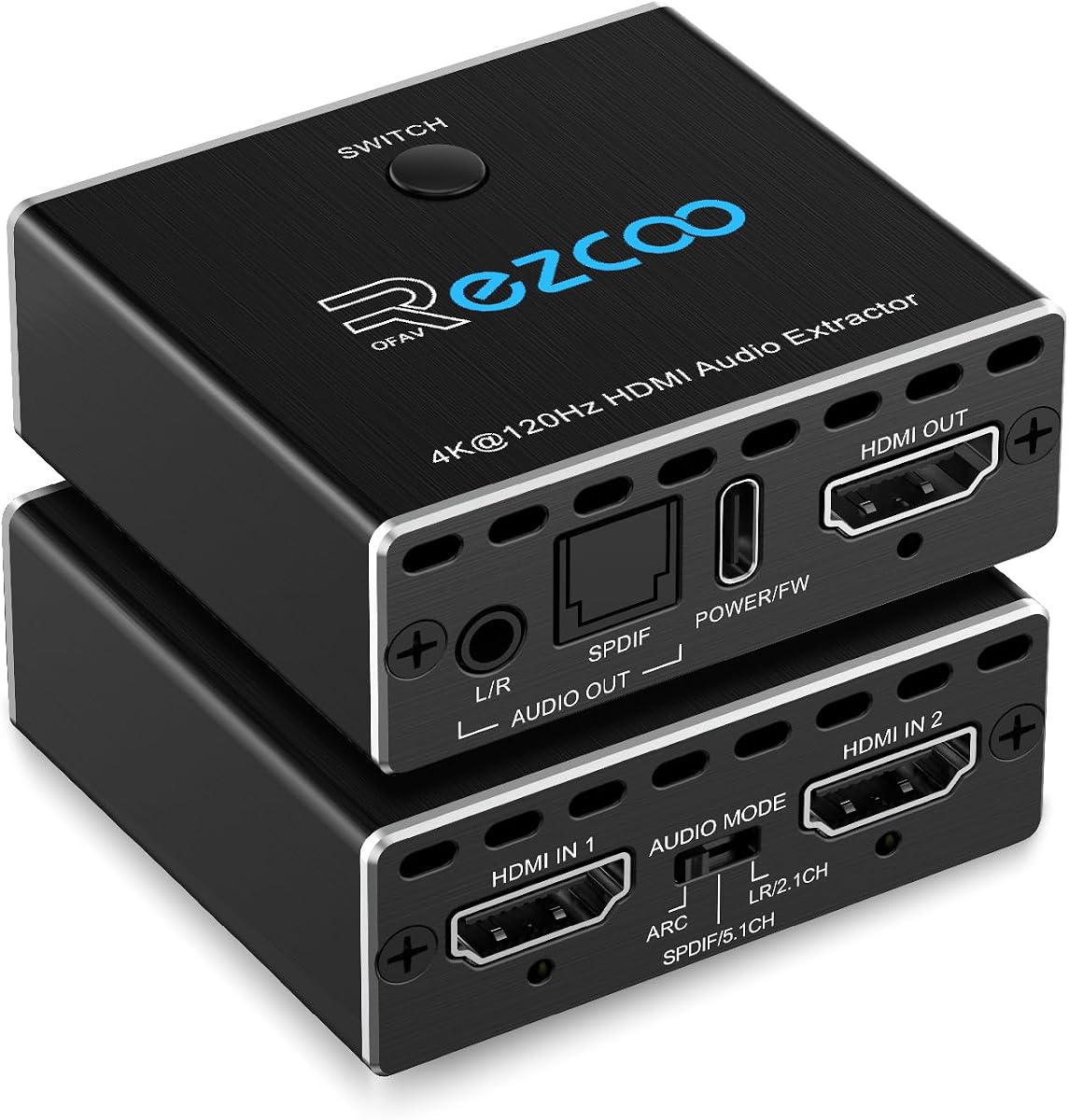
The 4K 120Hz HDMI 2.1 Audio Extractor Switch is a unique hybrid device that combines audio extraction with a two-port HDMI switch, allowing you to connect multiple sources easily. With a perfect 5.0 rating, it excels in supporting high resolution and refresh rates without compromising on audio quality or signal stability.
We may earn a commission when you buy through this link, at no additional cost to you.
This device supports 8K@60Hz and 4K@120Hz video formats, making it ideal for gaming consoles and high-end PCs that need variable refresh rates and HDR10 support. It extracts audio via SPDIF or 3.5mm outputs to connect to soundbars or receivers while simultaneously outputting video to your display for a unified setup.
Although it does not support ARC or eARC, its automatic switching capability simplifies the experience when toggling between different input sources like a console and a PC. Just ensure you use qualified HDMI 2.1 cables to maintain stable image transmission, as subpar cables can lead to signal loss or flickering.
If you need to manage two HDMI sources and require audio separation, this combined device saves space and reduces cabling clutter. It is particularly useful for gamers who want to switch between devices quickly while maintaining high fidelity audio routing to their preferred sound system.
By integrating a switch and an extractor, this device reduces the number of cables needed to connect multiple game consoles or media players.
Support for 120Hz ensures that fast-paced gaming content is displayed smoothly while audio remains synchronized and free of latency.
We may earn a commission when you buy through this link, at no additional cost to you.
The HDMI Audio Extractor 8K eARC offers advanced flexibility with three operating modes tailored to different audio routing needs. With a 4.2 rating, it supports both eARC and ARC inputs from TVs to extract high quality audio while pass through video to displays without signal degradation or loss of resolution.
We may earn a commission when you buy through this link, at no additional cost to you.
This device allows you to choose between pass mode for mirroring TV audio, R/L mode for downmixing surround sound, or SPDIF mode for dedicated multi-channel audio. It supports high resolution video up to 8K@60Hz and 4K@120Hz, ensuring that your visual content remains sharp and detailed while audio is processed.
While the flexibility is excellent, the analog outputs only support 2.0 PCM, so users with complex surround setups should rely on the optical output for full multi-channel formats. The DIP switch settings require some configuration, but they provide robust control over how audio is handled for different source scenarios.
If you need a versatile extractor that can adapt to various audio scenarios from stereo headphones to surround sound, this model is a strong choice. Its support for 8K and high refresh rates ensures it remains relevant as your entertainment system continues to evolve over time.
The ability to switch between downmix and bitstream modes ensures that both stereo and surround systems can be used with the same device.
Support for 8K and 4K@120Hz means that future content can be connected without worrying about bandwidth limitations or signal issues.
We may earn a commission when you buy through this link, at no additional cost to you.
The HDMI Audio Extractor Splitter is an ultra-affordable solution for users who need basic audio separation without advanced features like ARC or high refresh rates. With a 4.2 rating, it supports 4Kx2K at 30Hz and includes 3D stereo imaging technology, making it suitable for older displays and budget-friendly setups.
We may earn a commission when you buy through this link, at no additional cost to you.
This device is lightweight and small, making it easy to mount or hide within an entertainment cabinet. It includes a USB power cable, but some low-power HDMI ports may require an additional adapter to ensure stable operation with certain game consoles or media players.
While it lacks ARC support and is limited to 30Hz, it still handles standard 1080p and 4K content effectively for most casual viewers. The included accessories like an HDMI cable and audio cable make it ready to use out of the box without needing additional purchases or setup tools.
If you need a simple, no-frills way to connect a sound system to a basic HDMI source, this splitter offers great value for the price. It is an excellent option for secondary TVs or setups where high-end performance is not a primary requirement.
Its small footprint allows it to fit in tight spaces, making it ideal for portable setups or limited entertainment center space.
Support for 3D stereo imaging ensures that legacy 3D content can still be enjoyed with proper audio separation and visual fidelity.
We may earn a commission when you buy through this link, at no additional cost to you.
Selecting the right HDMI Audio Extractor requires understanding your specific audio and video needs to ensure compatibility and optimal performance.
Check if the extractor supports your source device's maximum output resolution. Models range from 1080p to 8K, so matching this spec ensures you do not lose video quality when splitting the signal.
Prioritize extractors that support 4K@60Hz or higher if you plan to use 4K streaming or gaming devices for a smooth viewing experience.
Ensure the device supports the audio formats your receiver or soundbar uses. Some models only output PCM stereo, while others handle Dolby Digital, DTS, or even Atmos and DTS:X.
If you have a surround system, choose an extractor that supports optical bitstream outputs to maintain multi-channel audio fidelity.
If you need to extract audio from a TV rather than a separate source, verify ARC or eARC compatibility. Not all extractors support audio return channels, which limits their use with modern TVs.
eARC support is essential if you want lossless audio from your TV to a high-end soundbar or receiver without additional cables.
Gamers and video enthusiasts should look for extractors that support high refresh rates like 120Hz or 144Hz. Lower refresh rate support may cause screen tearing or input lag.
For standard movies and streaming, 60Hz support is usually sufficient to maintain smooth motion without visual artifacts.
HDMI versions dictate bandwidth capabilities. HDMI 2.0 extractors support up to 18Gbps while HDMI 2.1 models can handle up to 48Gbps for future-proofing.
Matching the HDMI version to your source devices ensures that HDCP and high-speed protocols are correctly interpreted without errors.
Determine whether you need optical, coaxial, or analog 3.5mm outputs based on your audio system's inputs. Some devices offer multiple outputs for greater flexibility.
Choose an extractor with the exact ports your speakers use to avoid needing extra adapters or converters.
Most extractors require external power via a USB port or wall adapter. Verify if your source device can supply enough power or if you need a separate outlet.
Extractors with dedicated power adapters generally offer more stable performance than those relying solely on the HDMI source for power.
Metal enclosures help dissipate heat during extended use, preventing overheating and signal loss. Look for durable materials if the device will be in constant operation.
A longer warranty period indicates confidence in product durability and provides peace of mind if technical issues arise during use.
Connect the HDMI cable from your source device like a game console or Blu-ray player into the IN port of the extractor. Then connect another HDMI cable from the OUT port to your TV or monitor to ensure video signal pass-through.
Plug your speakers or receiver into the audio output ports such as optical or analog. Ensure the device is powered on via USB or AC adapter to activate the signal conversion process.
Clean the device regularly with a dry cloth to prevent dust buildup inside the ports. Avoid bending cables excessively to maintain stable connections and extend the lifespan of the extractor.
Most extractors work with external sources like consoles or players rather than directly with TV inputs. If you need audio from a TV you need a model that supports ARC or eARC input specifically.
Check your device settings to ensure audio output is set to the correct mode such as PCM or Bitstream. Also verify that all HDMI connections are secure and the device is powered correctly.
Yes most extractors are compatible with Apple TV but you may need to adjust the audio settings to PCM for analog outputs. Some older models may not support specific box versions.
Only models with optical outputs that support bitstream pass-through can carry Dolby Atmos. Check the product specifications to confirm which audio formats are supported for your setup.
High speed HDMI cables are recommended to support 4K and higher resolutions. Ensure your cable meets the HDMI version requirements of your source device and the extractor.
ARC stands for Audio Return Channel while eARC stands for Enhanced Audio Return Channel. eARC supports higher bandwidth and more audio formats compared to standard ARC.
Some extractors allow simultaneous output on both optical and analog ports while others require you to select one mode. Check the device manual to see if parallel output is supported.
Most modern extractors process audio in real time without noticeable latency. However if you use analog conversion for 5.1 channels you may experience slight downmix delay.
We have explored ten top HDMI Audio Extractors ranging from budget options to high-end models with 8K support. Each device offers unique features tailored to different audio and video requirements.
When choosing prioritize resolution support and audio format compatibility to ensure the extractor meets your current setup needs. Also consider future-proofing with HDMI 2.1 compliance if you plan to upgrade devices.
Remember to check current pricing and availability before making a purchase since these details can change frequently. A well-chosen extractor will significantly enhance your home theater audio experience.