
HDMI Extender Over Ethernet, 1080P 60Hz, 164FT, PoC, EDID -HT202P
4.4Editor score
1080P at 60Hz support
Power over cable included
EDID copy for compatibility
This guide compares the top HDMI over Ethernet extenders for 4K video, long cable runs, and reliable home or office installations.
Finding the right HDMI over Ethernet solution helps you extend high-quality video signals far beyond standard cable limits. These devices use network cabling to deliver crisp visuals to remote screens without signal loss or clutter.
We evaluated ten top-rated extenders based on resolution support, cable distance, and extra features like IR control or loop output. Each product was chosen for real-world reliability in homes, offices, and professional setups.
Every pick below shows key specs, pros, cons, and ideal use cases to help you match a system to your needs. Prices and stock may vary, so check current listings before purchasing your preferred model.
4.4Editor score

4.6Editor score
4.2Editor score
This side-by-side table compares all ten HDMI over Ethernet products by key specifications so you can quickly identify which model fits your distance and resolution needs.


This OREI HDMI extender supports 4K at 30Hz over 165 feet, making it ideal for medium-sized rooms. With a rating of 4.6 stars, it is trusted for stable performance in home and office setups.
We may earn a commission when you buy through this link, at no additional cost to you.
It includes HDMI loop-out for local monitoring and IR control to operate source devices from afar. PoC technology reduces cable clutter, and EDID ensures the correct resolution for your display.
While it does not support 4K at 60Hz or HDMI ARC, it handles most standard media sources well. Users note reliable performance over Cat5e to Cat7 cables without needing extra hardware.
Buy this if you need 4K video over mid-distance cables without spending on premium 60Hz models. It works well for gaming, presentations, and streaming in spaces under 170 feet.
The HDMI loop-out port lets you connect a local display to the transmitter, which is useful for real-time monitoring while sending the main signal remotely.
Included IR cables forward commands to source devices, allowing control of players or boxes from remote viewing locations without moving the hardware.
We may earn a commission when you buy through this link, at no additional cost to you.
This HDMI extender focuses on 1080P at 60Hz over up to 164 feet, offering a budget-friendly option for full HD setups. It has a 4.4-star rating for reliable home and office use.
We may earn a commission when you buy through this link, at no additional cost to you.
It uses uncompressed HDMI transmission over Cat5e to Cat7 cables without converting to streaming. Power over cable technology means only one adapter is needed, reducing clutter.
While it lacks 4K support, it delivers stable Full HD video with EDID copy for display compatibility. It works well for classrooms or small offices needing extended cable runs.
Buy this if you need affordable full HD extension without needing 4K. It is simple to set up and works with most PCs, laptops, and media players directly.
The built-in EDID copy function helps the transmitter recognize display information to ensure the correct resolution is delivered to the remote screen.
Unlike streaming devices, this extender sends uncompressed HDMI signals over network cables for stable video without conversion or quality loss.
We may earn a commission when you buy through this link, at no additional cost to you.
This OREI extender delivers 4K at 60Hz over 230 feet with HDR and Dolby audio support, making it ideal for premium home theaters. It holds a 4.6-star rating for professional quality.
We may earn a commission when you buy through this link, at no additional cost to you.
It supports HDMI 2.0a, HDCP 2.2, and 18 Gbps bandwidth for vivid video. The metal housing aids heat dissipation, and PoC simplifies wiring by powering only through the transmitter.
While the price is higher than 30Hz options, it ensures smooth playback for gaming and movies. One-way IR is sufficient for most users needing remote control of source devices.
Buy this if you need 4K at 60Hz and HDR for large distances. It is a top choice for home theaters or offices needing reliable 4K performance over long cables.
With HDR10, HLG, and 18 Gbps bandwidth, this extender delivers high dynamic range video and smooth 60Hz refresh for detailed visuals.
The rugged metal housing protects internal components and aids heat dissipation, ensuring stable performance in continuous use setups.
We may earn a commission when you buy through this link, at no additional cost to you.
This 1×4 HDMI splitter extender distributes one source to four displays over 230 feet, perfect for meeting rooms or bars. It holds a 4.6-star rating for professional installations.
We may earn a commission when you buy through this link, at no additional cost to you.
Each receiver runs without extra power thanks to PoC, and the transmitter includes a loop-out for local monitoring. It supports IR commands to control sources remotely.
While it tops out at 4K at 30Hz, it ensures stable visuals across four screens without needing complex networking. The single power adapter simplifies setup for multiple displays.
Buy this if you need to show one source on four screens over long distances. It is ideal for conferences or retail spaces needing synchronized displays.
The 1×4 design distributes one HDMI source to four displays simultaneously, making it ideal for multi-screen installations.
A loop-out port on the transmitter allows connection to a local display for real-time monitoring of the source signal.
We may earn a commission when you buy through this link, at no additional cost to you.
This OREI balun delivers 4K at 60Hz with 18 Gbps bandwidth, making it excellent for high-fidelity home theater setups over 165 feet. It has a 4.2-star rating.
We may earn a commission when you buy through this link, at no additional cost to you.
It supports HDMI 2.1, HDR, and rich audio formats like TrueHD and DTS-HD. The loop-out port helps monitor locally, while IR allows remote control from the receiver.
While it is limited to 165 feet, it ensures stable 60Hz performance without compression. It requires a direct Cat6 connection, which helps maintain signal integrity.
Buy this if you want 4K at 60Hz for a home theater or gaming room. It works well for immersive setups needing high bandwidth and reliable audio.
With 18 Gbps bandwidth and HDMI 2.1 support, this unit delivers crisp video and rich audio for immersive home theater setups.
One-way IR pass-through allows you to control streaming devices or media players from the receiver side remotely.
We may earn a commission when you buy through this link, at no additional cost to you.
This 4K HDMI extender delivers 1080P at 60Hz over 230 feet and 4K at 30Hz up to 131 feet, perfect for large rooms. It has a 4.4-star rating.
We may earn a commission when you buy through this link, at no additional cost to you.
EDID management ensures stable resolution selection, and uncompressed transmission keeps audio and video synchronized. It works for presentations or monitoring.
While 4K is limited to 30Hz, it handles long distances reliably. PoC reduces cable clutter, and loop output helps monitor locally.
Buy this if you need long-range 4K extension for large rooms. It suits churches, security, or conference rooms needing reliable 4K over 230 feet.
EDID management helps the source recognize the connected display to select compatible resolutions for stable video transmission.
Real-time uncompressed signal transmission ensures audio and video remain synchronized for presentations and monitoring.
We may earn a commission when you buy through this link, at no additional cost to you.
This OREI KVM extender adds keyboard and mouse control to 4K HDMI over Ethernet, ideal for remote PC management. It supports 4K at 60Hz over 230 feet.
We may earn a commission when you buy through this link, at no additional cost to you.
USB KVM extension lets you control a PC remotely, while 3.5mm audio output connects to speakers. HDCP 2.2 ensures compatibility with protected content.
It requires specific pairing for best results. It is useful for offices needing remote computer control with high-resolution video.
Buy this if you need PC control alongside video extension. It suits offices needing remote access to desktops with 4K display support.
USB KVM extension lets you control your PC remotely using keyboard and mouse at the receiver end for secure access.
A 3.5mm stereo audio output lets you extract audio to analog speakers at the receiver for flexible audio setups.
We may earn a commission when you buy through this link, at no additional cost to you.
This extender delivers 4K at 30Hz over 230 feet, ideal for offices or outdoor screens. It has a 4.3-star rating for versatile use.
We may earn a commission when you buy through this link, at no additional cost to you.
Mounting holes allow wall installation, and EDID cloning ensures display compatibility. PoC and dual voltages support international use.
While it uses compression, it maintains clear visuals over long runs. It supports extended display modes for dual screens.
Buy this if you need flexible installation and 4K over 230 feet. It suits outdoor screens, offices, or venues needing flexible mounting options.
Patented mounting holes in the case facilitate easy installation on walls or racks for fixed displays.
This extender supports mirroring and extended display modes for flexible dual-screen setups in offices or classrooms.
We may earn a commission when you buy through this link, at no additional cost to you.
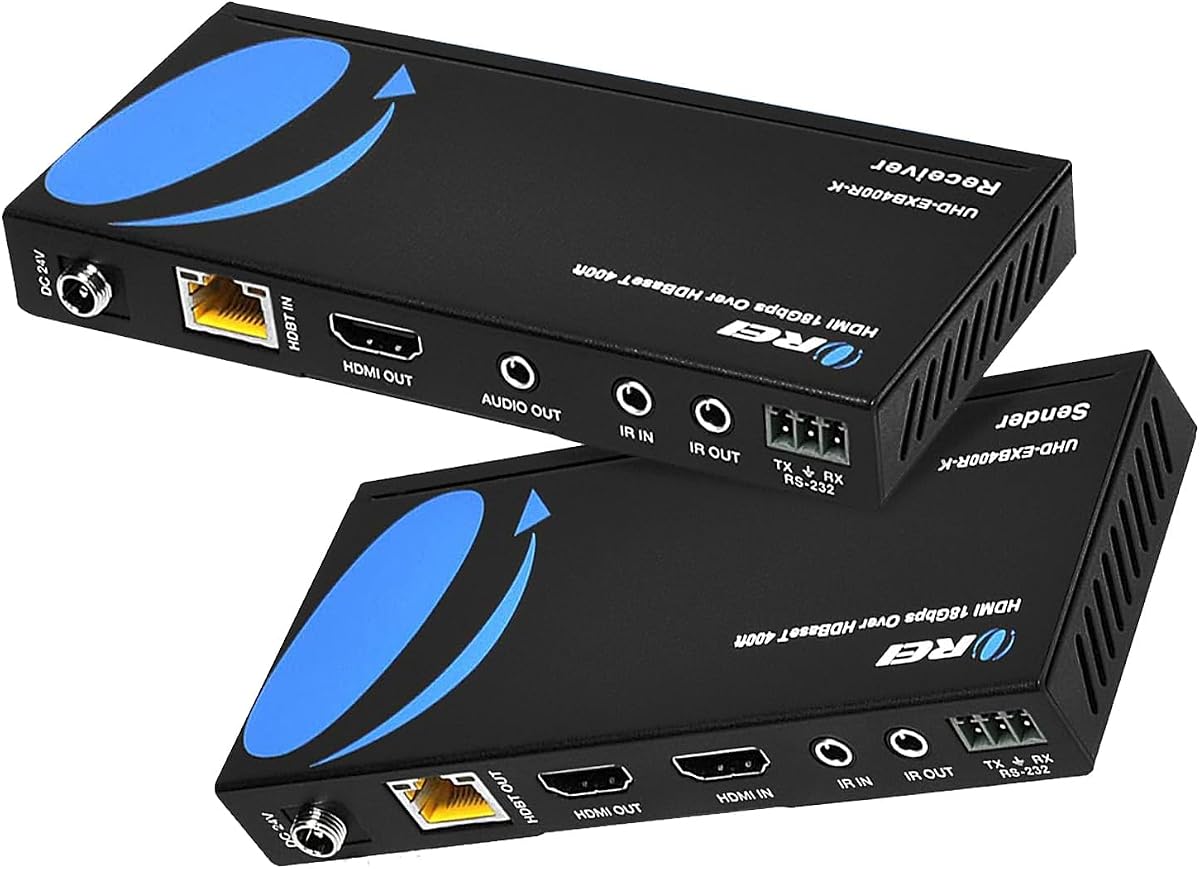
This HDBaseT extender reaches 400 feet with 4K at 60Hz, making it ideal for large venues. It has a 4.2-star rating for professional long-range use.
We may earn a commission when you buy through this link, at no additional cost to you.
Two-way IR allows remote control from display or source, and RS-232 adds command control for advanced setups. HDBaseT ensures lossless transmission.
It requires pairing with matching units from the same brand. It is best for venues needing maximum range without signal loss.
Buy this if you need 400 feet range with 60Hz support. It suits churches, stadiums, or conference centers needing advanced control.
The RS-232 command control port supports advanced automation or integration with control systems for professional installs.
Bi-directional IR control enables source device recognition of remote commands and allows control of the remote display.
We may earn a commission when you buy through this link, at no additional cost to you.
This PWAY extender delivers 4K at 30Hz over 230 feet, perfect for home offices. It has a 4.6-star rating for reliable performance.
We may earn a commission when you buy through this link, at no additional cost to you.
It includes mounting holes and loop output for local monitoring. IR remote control helps operate sources remotely without moving devices.
While it lacks 60Hz, it provides stable extended display modes for dual screens. It offers good value for home setups.
Buy this if you need affordable 4K extension for home offices. It works for presentations or streaming with reliable 230 feet range.
Supports mirror and extended display modes for flexible dual-screen setups without delay or signal loss.
The unit includes mounting holes for easy installation on walls or racks in fixed positions.
We may earn a commission when you buy through this link, at no additional cost to you.
Choosing the right HDMI over Ethernet extender depends on resolution, distance, and extra features. This guide helps you match a model to your needs.
Check if the extender supports 4K at 60Hz or 30Hz. For smooth gaming or video, 60Hz is preferred. If 1080P is enough, 30Hz models save money.
Choose 60Hz for motion-heavy content. If your display and source support 4K, prioritize models that handle 60Hz.
Models range from 164 feet to 400 feet. Match the range to your room size. Use Cat6 or Cat7 cables for best signal quality over long runs.
Select a model that exceeds your required distance by 10 percent. Longer runs may need higher-quality cables to avoid dropouts.
PoC powers the receiver through the Ethernet cable, reducing adapters. This simplifies wiring and lowers clutter, especially with wall-mounted displays.
Prefer models with PoC if you want fewer power outlets. It ensures stable operation without extra cables.
IR pass-through lets you control source devices from the remote location. This is useful for media players or cable boxes hidden in closets.
Look for one-way or two-way IR based on your needs. Two-way offers more flexibility for control systems.
A loop-out port on the transmitter allows local monitoring while sending signal remotely. This helps verify the source display works.
Choose models with loop-out if you need to preview content. It supports dual setups without extra hardware.
EDID ensures the source device sends compatible resolution to the display. Look for EDID copy or pass-through for reliable operation.
Select models with EDID to avoid black screens. This helps maintain stable video across different displays.
Some extenders have mounting holes for wall installation. This is helpful for fixed setups like conference rooms or outdoor screens.
Prefer models with mounting holes for permanent installs. It keeps units secure and neat.
Check warranty length and manufacturer support. One-year coverage is common. Brands with good support help resolve setup issues quickly.
Choose models with warranty and support. This reduces risk and ensures help if needed.
Connect the transmitter to your source device via HDMI, then connect the receiver to your display. Run a Cat6 or Cat7 cable between the two units for best performance.
Use the included IR cables to connect your source device to the transmitter. Place the receiver IR cable near your display or remote location for control.
Keep cables dry and avoid sharp bends. Ensure the power adapter is connected to the transmitter if using PoC. Restart the system if video drops out.
HDMI over Ethernet extends HDMI signals using network cables like Cat6. It allows you to send video and audio over long distances without signal loss. This is useful for remote displays in large spaces.
Yes, Cat5e can carry 4K at 30Hz up to 130 feet. For 4K at 60Hz, use Cat6 or Cat7 for stable performance. Avoid older cables for long runs.
No, they do not use internet. They send uncompressed HDMI signals over the cable. You can use them with local devices without Wi-Fi.
PoC means Power over Cable. It powers the receiver through the Ethernet cable, reducing the need for extra adapters. This simplifies wiring for remote displays.
Yes, with IR cables included in the kit. They forward commands from the receiver to the source device. This helps control media players or boxes remotely.
EDID copy lets the extender read display info and send it to the source. This ensures the correct resolution is used. It prevents black screens or mismatch.
No, most extenders work with direct cable connections. Avoid switches unless specified. Direct links reduce latency and improve stability.
Yes, many support HDR. Check the product specs for HDR10 or Dolby Vision. For best HDR, use Cat6 cables and ensure source and display support HDR.
The best HDMI over Ethernet extender depends on your distance and resolution needs. For budget full HD, the 1080P model works well. For 4K, choose the 60Hz options.
Prioritize PoC and IR support for easier setups. Long-distance needs benefit from HDBaseT models. Use Cat6 cables for best results.
Prices and availability change, so check listings before buying. Match the model to your room size and video needs for best results.