
CENMATE Aluminum 4 Bay
4.3Editor score
Aluminum alloy construction
Supports 2.5 and 3.5 inch
USB A and C connectivity
Finding the right JBOD enclosure is essential for anyone needing to expand storage without the complexity of a full NAS system. These direct attached storage solutions allow you to connect multiple drives easily for backups or media servers.
We compared ten top models based on transfer speeds, drive capacity limits, build quality, and compatibility across different operating systems. Our analysis focuses on real-world performance and reliability for both home and office environments.
Each pick highlights key strengths and potential trade-offs to help you match a device to your specific workflow needs. Please note that prices and availability change frequently so verify current details before purchasing online.
4.3Editor score

4.2Editor score
4.1Editor score
As an Amazon Associate we earn from qualifying purchases.
This side-by-side comparison highlights the key specifications of each model to help you quickly identify the right fit for your storage expansion needs.




The TERRAMASTER D4-320 stands out as a top choice for users needing fast and reliable direct attached storage without RAID complexity. With a strong user rating and robust build quality, it delivers consistent performance for data transfer tasks.
We may earn a commission when you buy through this link, at no additional cost to you.
Its USB 3.2 Gen2 interface supports speeds up to 10Gbps which is significantly faster than older USB standards. The tool-free trays and hot swap capability make managing drives easy even during active work sessions.
While it lacks RAID functionality which might be a downside for redundancy seekers, the speed and capacity make up for it in many workflows. The cooling fan is well managed to keep noise low during operation.
This enclosure is ideal for creative professionals or IT admins who need quick access to large media files or backups. It balances performance and usability better than most competitors in this price range.
The 10Gbps USB 3.2 Gen2 protocol ensures quick file movements for large video or photo libraries.
Tool-free trays and hot swap support let you swap drives without shutting down the system.
We may earn a commission when you buy through this link, at no additional cost to you.
The CENMATE Aluminum 4 Bay offers an excellent entry point for those needing expandable storage without breaking the budget. It balances cost and performance well with decent speed and sturdy construction.
We may earn a commission when you buy through this link, at no additional cost to you.
Its aluminum alloy case helps dissipate heat effectively while supporting both 2.5 and 3.5 inch drives. The included USB A and C cables ensure compatibility with most modern computers without extra adapters.
While the fan can be slightly noisy compared to premium models it keeps drives cool under load. The speed is adequate for general file transfers and backup tasks where maximum throughput is not critical.
This model works well for home offices or students needing reliable external storage. It provides great value for the price with straightforward setup and broad compatibility.
The aluminum housing offers durability and helps keep internal temperatures stable during use.
Both USB A and C ports mean you can connect to various devices without adapters.
We may earn a commission when you buy through this link, at no additional cost to you.
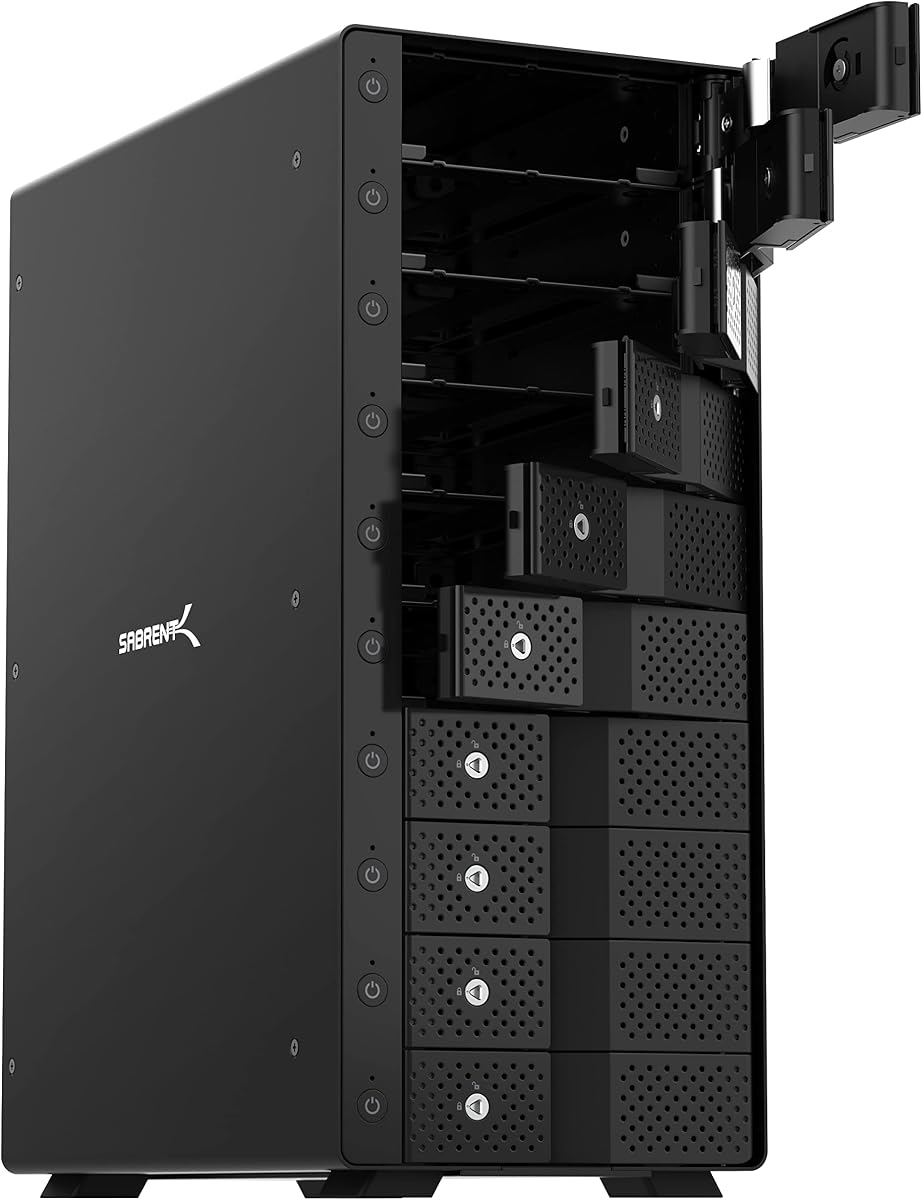
The SABRENT 10-Bay DS-UCTB is designed for users who need maximum capacity and flexibility without RAID complexity. Its high rating reflects strong performance and ease of use for large storage needs.
We may earn a commission when you buy through this link, at no additional cost to you.
With ten bays supporting up to 200TB total you can scale your storage as data grows. The tray-less design allows quick drive access while individual switches let you power only active drives to save energy.
The dual 120mm fans ensure drives stay cool even under heavy workloads which is critical for long-term reliability. While pricey and larger than smaller units it offers unmatched capacity for the price.
This enclosure is perfect for media servers or archives where drive count and heat management matter. It combines power and convenience for professional storage expansion.
Ten bays supporting up to 20TB each allow for massive total storage in one unit.
Each bay has its own power switch so you can manage energy and access per drive.
We may earn a commission when you buy through this link, at no additional cost to you.
The IO CREST 8-Bay enclosure offers a solid middle ground for users needing more drives than a 4-bay unit provides. It is rated well for reliability and offers useful features like independent power control.
We may earn a commission when you buy through this link, at no additional cost to you.
Each drive can be turned on or off individually which helps reduce power use and heat. The smart fan adjusts speed based on temperature to balance cooling and noise levels during operation.
While the USB 3.0 speed is slower than newer standards it remains sufficient for many backup workflows. The steel case adds durability but makes the unit heavier than aluminum alternatives.
This model suits small businesses or power users needing expandable storage without RAID features. It delivers practical capacity and control for growing data needs.
Each drive has its own switch so you can control power and access per drive easily.
The smart fan adjusts speed based on temperature to keep drives cool without excess noise.
We may earn a commission when you buy through this link, at no additional cost to you.
The QNAP TR-004 stands out by offering hardware RAID support in a direct attached storage device. It is highly rated for users who want redundancy without a full NAS system.
We may earn a commission when you buy through this link, at no additional cost to you.
Its USB Type-C interface ensures fast data transfers and modern connectivity. The lockable drive bays add a layer of physical security which is useful for office environments.
While it can expand QNAP NAS capacity it works as standalone storage too. The RAID modes allow flexible data protection but add complexity compared to simple JBOD units.
This enclosure is best for those already invested in the QNAP ecosystem or needing data protection. It offers versatility and reliability for demanding storage scenarios.
Built-in RAID capabilities allow data redundancy and performance options without external software.
Lockable bays protect drives from unauthorized removal in shared or public workspaces.
We may earn a commission when you buy through this link, at no additional cost to you.
The QNAP TL-R1200C-RP is a robust rackmount enclosure designed for data centers or servers needing expansion. It earns strong ratings for reliability and redundancy features like dual power supplies.
We may earn a commission when you buy through this link, at no additional cost to you.
Twelve drive bays provide massive capacity and the redundant power ensures uptime during hardware failures. The USB 3.2 Gen 2 port supports fast data movement when connected to modern hosts.
Its rackmount design limits home use but suits professional environments perfectly. The build quality and support make it a solid choice for business storage needs.
This unit is ideal for IT admins managing large scale storage. It prioritizes reliability and capacity over affordability.
Dual power supplies ensure continuous operation even if one fails during critical tasks.
Twelve bays allow large storage growth without needing multiple units or complex setups.
We may earn a commission when you buy through this link, at no additional cost to you.
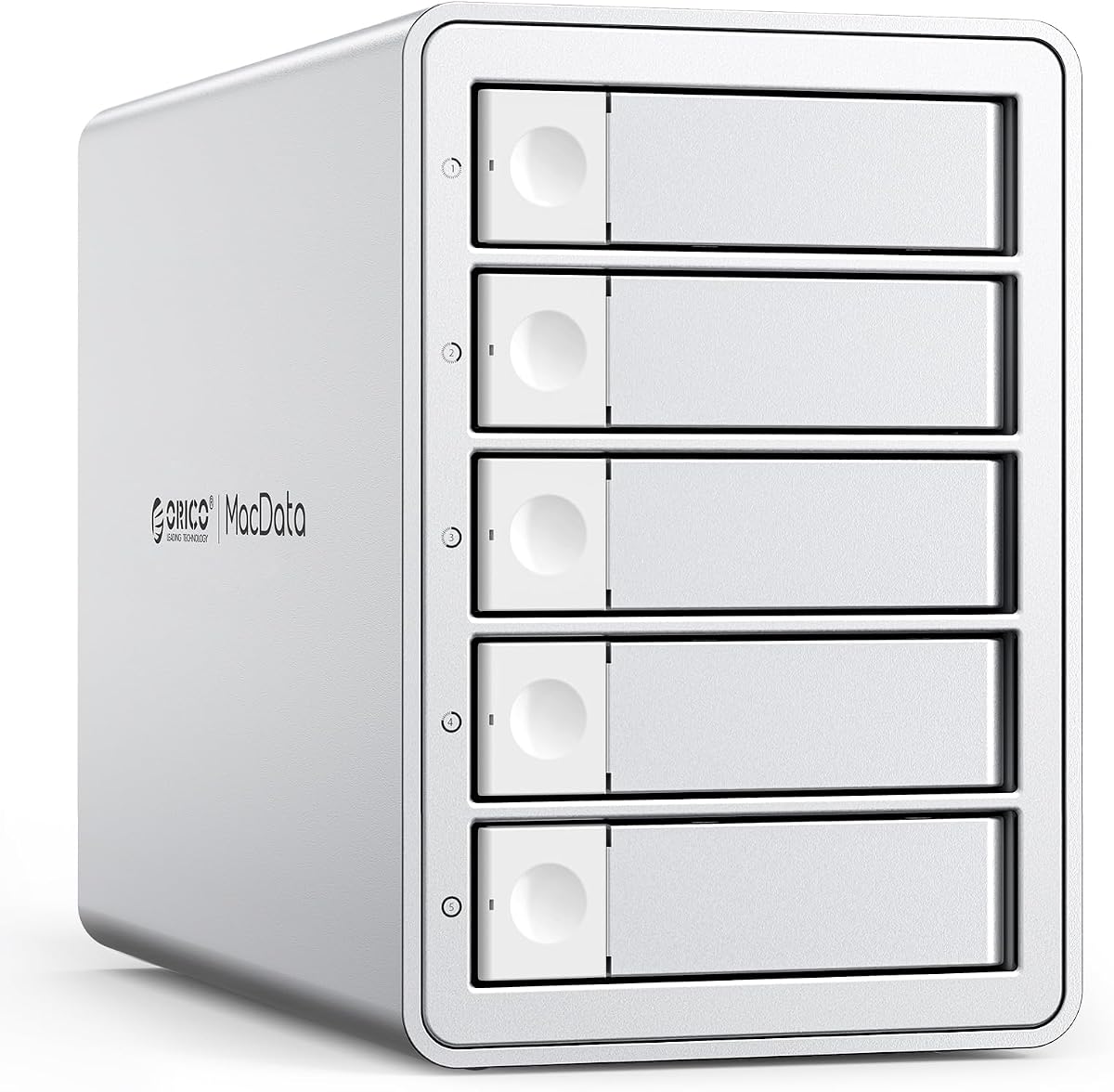
The ORICO 5 Bay RAID offers extensive configuration options for users needing speed or redundancy. Its high rating reflects strong user satisfaction with performance and reliability.
We may earn a commission when you buy through this link, at no additional cost to you.
Eight RAID modes allow flexible setups from speed focused RAID 0 to redundant RAID 5. The built-in power supply eliminates extra adapters and keeps the workspace tidy during use.
While USB 3.0 is not the fastest available it remains adequate for many file transfer tasks. The cooling system works quietly to maintain drive health under heavy loads.
This model suits creators and businesses wanting RAID flexibility without full NAS complexity. It combines features and usability effectively for its price.
Multiple RAID modes let you choose between speed, redundancy, or single drive access easily.
Built-in power removes the need for bulky external adapters keeping desks clutter free.
We may earn a commission when you buy through this link, at no additional cost to you.
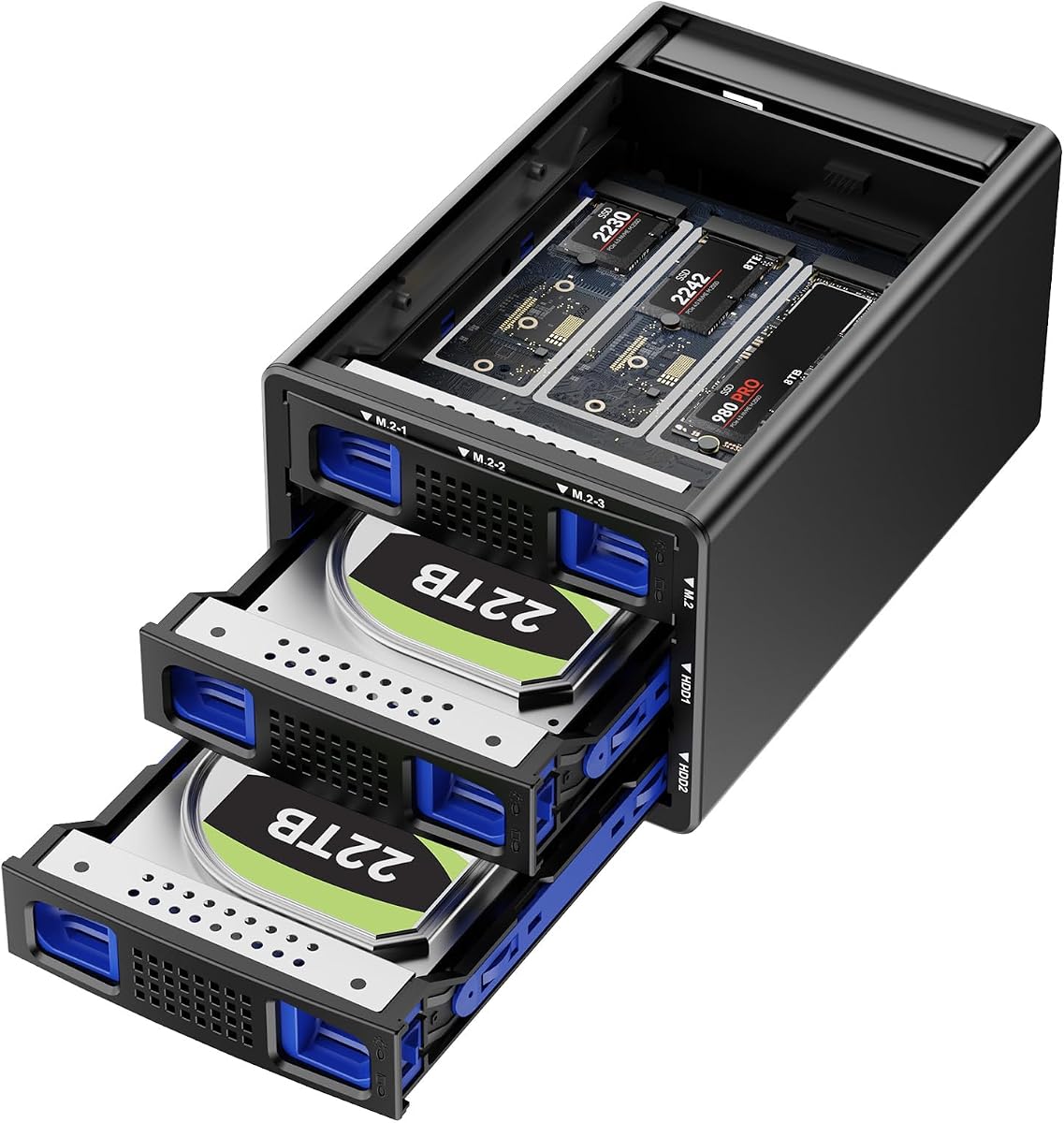
This unique enclosure combines traditional SATA drives with M.2 NVMe SSDs in one device. It stands out for offering hybrid storage flexibility with strong user ratings for performance.
We may earn a commission when you buy through this link, at no additional cost to you.
Users can mix HDDs for capacity and NVMe for speed depending on workflow needs. The USB 3.2 Gen 2 interface supports fast data transfers across both drive types.
Setup can be slightly complex due to multiple modes and slot types. However the tool-free design and included cables make installation manageable for most users.
Ideal for advanced users needing a blend of speed and volume without separate devices. It bridges the gap between standard enclosures and high-performance SSD solutions.
Combines SATA HDDs and NVMe SSDs to balance capacity and speed in one unit.
USB 3.2 Gen 2 delivers quick transfers across both traditional and modern drive types.
We may earn a commission when you buy through this link, at no additional cost to you.
The ORICO 4 Bay Raid 9848RU3 offers RAID features in a compact design for desk setups. It is well rated for ease of use and reliable performance in typical office conditions.
We may earn a commission when you buy through this link, at no additional cost to you.
Eight RAID modes give flexibility for speed or redundancy. The built-in power keeps cabling simple and the aluminum case helps manage heat during long sessions.
Safety locks protect drives from accidental ejection which adds peace of mind. While not the fastest it suits general backup and storage expansion needs well.
This model works for users needing RAID without a full NAS. It balances features and space efficiently for smaller environments.
Four bays fit easily on desks without taking up excessive space in tight work areas.
Safety locks prevent unexpected drive ejection ensuring data stays secure during use.
We may earn a commission when you buy through this link, at no additional cost to you.
The OWC Mercury Elite Pro Quad targets professionals needing fast and reliable storage. It has solid hardware but mixed ratings due to software expectations from some users.
We may earn a commission when you buy through this link, at no additional cost to you.
USB-C 10Gb/s offers high-speed transfers and Thunderbolt 3 compatibility for Mac and Windows. The universal bays fit both 2.5 and 3.5 inch drives for flexible storage.
While speeds are impressive performance depends on host setup and drive quality. The build remains sturdy but users should note software RAID is not included.
This unit suits pros prioritizing speed and brand reliability over RAID features. It delivers strong hardware performance for demanding workflows.
Compatible with Thunderbolt 3 ports for extremely fast data movement on modern systems.
Accommodates both 2.5 and 3.5 drives in each bay for maximum flexibility.
We may earn a commission when you buy through this link, at no additional cost to you.
Selecting the right JBOD enclosure requires evaluating several factors to match your workflow and data needs.
Consider how many drives you need now and in the future. More bays allow greater total capacity but increase size and cost. A 4-bay unit suits home users while 8 or more are for power users.
Choose a bay count that fits your immediate storage needs with room for growth.
Transfer speeds depend on USB type. USB 3.0 offers 5Gbps while USB 3.2 Gen 2 reaches 10Gbps. Faster interfaces matter for large file transfers like video or backups.
Select an interface that matches your host port capabilities to avoid bottlenecks.
Check if the enclosure supports 2.5, 3.5 or both drive sizes. Most support both but some may have size limits per bay. SSDs and HDDs should both fit properly.
Ensure the enclosure accepts all drives you plan to use for maximum flexibility.
Some units include built-in power supplies while others use external bricks. Built-in power reduces cable clutter but can increase size and heat. External adapters may be simpler to replace.
Choose based on desk space and desire for a cleaner setup.
Multiple drives generate heat so a good fan is critical. Look for adjustable or silent fans to balance cooling with noise. Overheating can reduce drive lifespan significantly.
Prioritize enclosures with effective thermal management for long-term reliability.
Hot swap lets you change drives without power off which aids maintenance. Tool-free trays simplify installation and removal without extra hardware. These features save time and improve workflow.
Look for these conveniences if you plan frequent drive changes or upgrades.
Metal cases like aluminum dissipate heat better than plastic and resist damage. A sturdy build protects drives during transport or daily use. Durability matters for professional or office environments.
Invest in solid materials for longer device life and drive safety.
Budget models offer basic features while premium ones add speed or build quality. Determine which features are essential for your needs to avoid overspending. Balance cost with performance needs.
Pick a unit that meets core requirements without paying for unused extra features.
Connect the enclosure to your computer using the provided USB cable and plug in power before installing drives. Most systems recognize the device automatically without driver installation needed.
Insert drives firmly into the tool-free trays ensuring they click into place before powering on. The order of installation may affect mounting order depending on your operating system.
Keep the unit in a well-ventilated area away from dust sources to maintain cooling efficiency. Regularly check fan performance and clean air vents to prevent overheating issues.
A JBOD enclosure connects multiple drives as independent volumes without combining them. Unlike RAID it does not offer redundancy or performance pooling. Each drive appears separately to the operating system.
Most enclosures support both 2.5 and 3.5 inch drives in the same bays. Check the specific product specs to confirm size limits per bay. Mixing capacities is usually allowed.
No most JBOD enclosures work plug and play on Windows, Mac, and Linux. The operating system detects the drives automatically without extra software. Some tools may help with RAID features if supported.
Capacity limits depend on the enclosure's controller and firmware. Most modern units support drives up to 18TB or 20TB each. Verify current support before purchasing large capacity drives.
Yes SATA SSDs work in most JBOD enclosures alongside HDDs. Ensure the interface matches your drive type such as SATA III. Using SSDs can increase transfer speeds significantly.
Hot swapping is safe when the enclosure explicitly supports it. Always eject the drive properly in the operating system before removal. Not all models allow this feature without risking data loss.
The top picks like the TERRAMASTER D4-320 and SABRENT 10-Bay provide excellent balance of speed and capacity for different needs. Each model brings unique strengths for varied workflows and budgets.
Prioritize connection speed and cooling if you handle large files daily. For casual use a budget model offers sufficient performance with lower cost.
Check current prices and availability since models change often. Verify specs match your drives before ordering to ensure compatibility and satisfaction.