
Hikig 2 Set Desk Mount
4.1Editor score
Wide adaptability for most devices
Adjustable height and position
Solid clamp force stability
This guide compares the best Joystick Hotas Mounts for flight sim enthusiasts, evaluating stability, compatibility, and adjustability to enhance your cockpit
Flight simulation enthusiasts know that a stable control setup is essential for immersive gameplay. Joystick Hotas Mounts secure your hardware to the desk, eliminating wobble and freeing up space for a realistic cockpit experience.
We evaluated ten top-rated mounts based on build quality, compatibility with popular systems, and ease of installation. Each product offers unique features like foldable designs, adjustable heights, and robust clamping mechanisms for diverse setups.
Our selections highlight the best options for budget and premium seekers. Note that pricing fluctuates regularly, so check current listings before purchasing to ensure you get the best value for your specific hardware needs.
4.1Editor score

4.4Editor score

4.6Editor score
This table provides a side-by-side comparison of the top ten Joystick Hotas Mounts, highlighting key specifications, compatibility, and unique features to help you choose the right mount for your flight simulator.


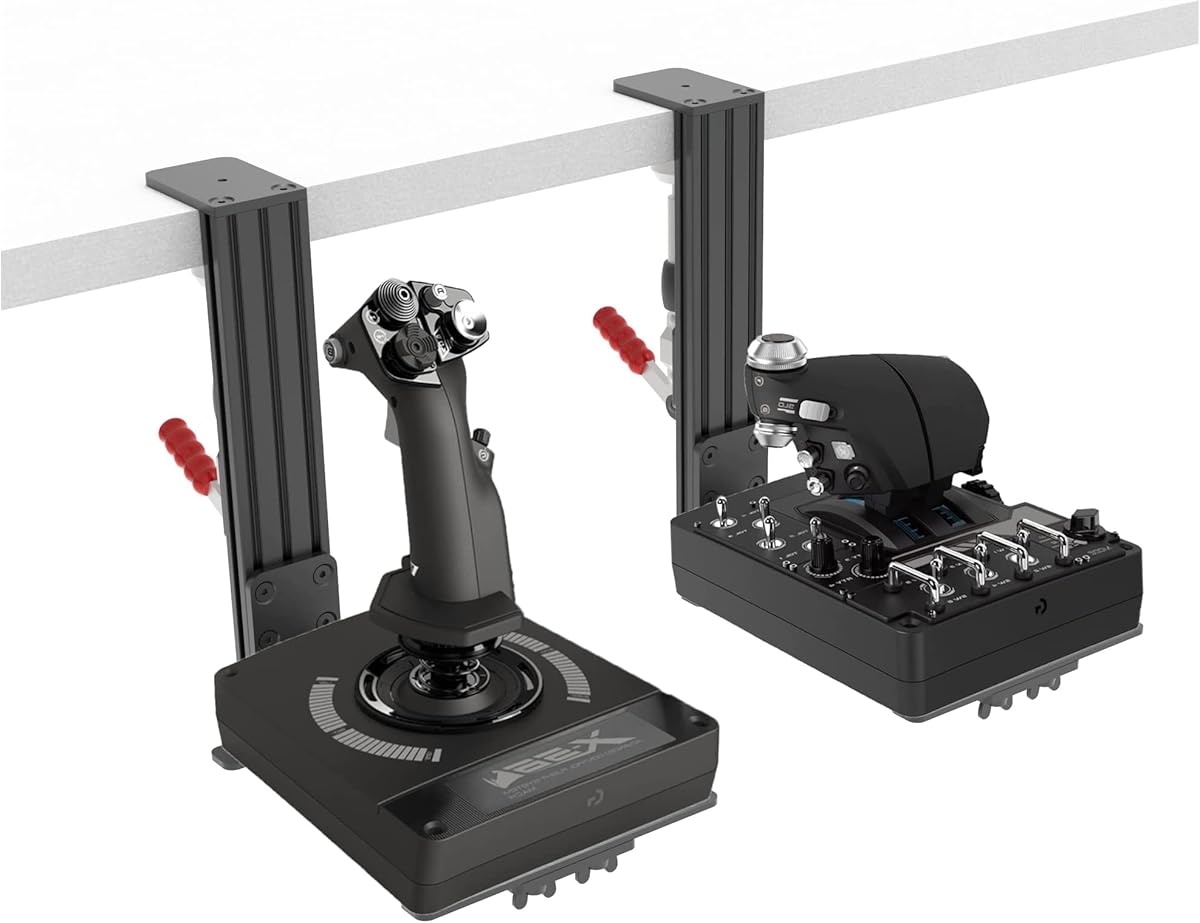
The Hikig 2 Set Desk Mount is a versatile option designed for flight simulation enthusiasts seeking reliable stability. It offers wide adaptability, supporting nearly all flight game hand-control devices including popular models from Logitech and Thrustmaster.
We may earn a commission when you buy through this link, at no additional cost to you.
This mount features an adjustable height range from -175mm to +175mm and a positional range of 80mm to 300mm. The 91N.m force clamp ensures your equipment stays secure during intense maneuvers, providing a stable platform for precise control.
While the mount is robust, users should note that assembly might require some technical effort. The design allows for quick removal if you need to clear your desk space, making it a practical choice for shared workspaces.
If you are looking for a budget-friendly solution that does not compromise on compatibility, the Hikig mount is a strong contender. It transforms your desk into a ready cockpit setup, enhancing your immersion in flight simulation games.
The mount supports almost all flight game hand-control devices, ensuring seamless integration with your existing hardware.
Adjustable height and position allow you to customize the setup for comfort during long gaming sessions.
We may earn a commission when you buy through this link, at no additional cost to you.
The RACGTING 2-Pack Foldable HOTAS Desk Mount stands out for its secure and adjustable design. It positions your joystick in a natural hands-down layout, which is crucial for realistic flight sim control and immersion.
We may earn a commission when you buy through this link, at no additional cost to you.
Constructed with a durable aluminum clamp system, this mount locks firmly onto your desk to provide near-zero-wobble stability. It supports desk thickness from 0.2 to 5.7 inches, allowing you to customize the setup for long-session comfort.
Transitioning from cockpit to desk is quick thanks to the foldable design. You can remove the mounts in seconds and keep your space organized. The installation takes under five minutes, making it convenient for frequent setups.
Ideal for users who value ease of use and high stability, this mount is compatible with leading systems like Logitech X52/X56 and Thrustmaster T16000M. It ensures seamless integration with your existing gear for a superior gaming experience.
The aluminum clamp system ensures rock-solid stability with near-zero wobble during intense flight sessions.
Quick installation and a foldable design allow you to transition from cockpit to a clean desk in seconds.
We may earn a commission when you buy through this link, at no additional cost to you.
The DIWANGUS Foldable HOTAS Desk Mount offers a unique two-pack design that lets you give your joystick and throttle separate positions at the desk edge. This layout helps reduce clutter and provides a more realistic cockpit feel.
We may earn a commission when you buy through this link, at no additional cost to you.
With a broad compatibility range, this mount fits Logitech X52 and VKB Gladiator systems. It accommodates desk edges from 0.4 inches to 7 inches thick, making it versatile for various home office setups. You can adjust each mount independently to find a natural reach.
After your flight session, you can remove the mounts and fold them for storage. This feature is ideal for shared desks or smaller rooms where space is at a premium. Each mount arrives 90% preassembled to speed up the process.
If you want to reclaim your desk space after flying while maintaining full control over your setup, this DIWANGUS option is a great choice. It helps you spend less time building and more time flying in your simulations.
After each session, remove the mounts and fold them for storage to save space in smaller rooms.
The mount arrives 90% preassembled, saving you time and effort during the initial setup.
We may earn a commission when you buy through this link, at no additional cost to you.
The Reashy Hotas Mount combines lightweight aluminum with exquisite craftsmanship to create a sturdy and durable solution. It is designed to fit desktop thicknesses within 0.2 inches to 5.7 inches, making it suitable for most standard desks.
We may earn a commission when you buy through this link, at no additional cost to you.
This mount features a well-designed adjustment range that allows you to position your joystick at the proper height and distance. The high pitch clamp design makes installation, disassembly, and folding storage easy for everyday use.
Installation is simplified as the mount comes pre-assembly. You do not need to perform tedious work; simply unfold the mount and install the bar type bracket to start using it. The included anti-slip pads ensure your desk remains protected.
If you want a reliable mount that balances durability and ease of use, the Reashy option is an excellent choice. It supports most popular joysticks, ensuring seamless integration with your existing flight simulator hardware.
The combination of lightweight aluminum and exquisite craftsmanship makes the mount sturdy and durable for long-term use.
The high pitch clamp design allows for easy installation and disassembly, saving you time during setup.
We may earn a commission when you buy through this link, at no additional cost to you.
The SILVIP 2 Set HOTAS Desk Mount is designed to create a comfortable operating environment for flight simulation enthusiasts. This 2-pack desk clamp allows you to mount both your joystick and throttle on separate sides of your desk.
We may earn a commission when you buy through this link, at no additional cost to you.
It supports a wide range of platforms including PC, Windows, Xbox, and PlayStation. The mount is compatible with Logitech X52, VKB Gladiator, and VPC Mongoos systems. It improves your gaming experience by removing the need to place the joystick directly on the desktop.
While the design is efficient, assembly is required to set up the clamp properly. The package includes necessary hardware to help you secure your equipment. The mounts are versatile enough to support various throttle systems as well.
If you are building a home cockpit and need reliable mounts for your control surfaces, the SILVIP set is a solid investment. It helps improve your gaming experience by offering a stable base for your hardware during gameplay.
The mount is compatible with multiple platforms including PC, Xbox, and PlayStation for versatile use.
Mounting your controls on the desk edge reduces clutter and provides a better gaming experience.
We may earn a commission when you buy through this link, at no additional cost to you.
The Meza Mount-HOTAS Desk Mount Set of 2 is designed for serious flight sim setups using Thrustmaster Warthog and WinWing Orion 2 systems. It provides a sturdy solution for those who need high load-bearing capacity.
We may earn a commission when you buy through this link, at no additional cost to you.
Constructed with a heavy-duty metal structure, the mount includes aluminum profile support columns for robust stability. The mounting brackets allow for height and position adjustment, helping you place your controls at a comfortable operating level.
This mount is built to support heavy HOTAS systems, ensuring your flight controls remain stable during takeoff and combat maneuvers. The rigid design helps reduce desktop clutter and improves access to controls during long sessions.
If you are building a home cockpit and demand maximum stability for premium hardware, the Meza mount is the right choice. It ensures your setup remains rigid even under the stress of intense flight simulation maneuvers.
The reinforced structure made of metal mounting plates ensures strong load-bearing performance for heavy systems.
The set includes two mounts for a left and right layout, ideal for cockpit-style control layouts.
We may earn a commission when you buy through this link, at no additional cost to you.
The Quick Release Desk Mount is a single mount designed to work seamlessly with various popular joysticks including Thrustmaster T.Flight HOTAS ONE. It features a quick-release mechanism that ensures a stable and convenient installation.
We may earn a commission when you buy through this link, at no additional cost to you.
Constructed with all metal materials, this mount offers an aluminum alloy main body and high-strength metal accessory parts. It clamps desks with thicknesses ranging from 0 to 2.36 inches, ensuring you can operate without worrying about shaking during use.
The mount comes with silicone anti-slip protective stickers and includes all necessary screws and a screwdriver for tool-free installation. This makes it easy to set up and adjust the position for a comfortable gaming experience.
If you want a reliable single mount that saves desktop space and enhances immersion, this Quick Release option is perfect. Its ergonomic design helps reduce shaking and provides a stable base for your joystick during gameplay.
The quick-release design allows for easy installation and removal, making it versatile for various desks.
Crafted from all metal materials, the mount offers durability and stability for long-term use.
We may earn a commission when you buy through this link, at no additional cost to you.
The 2PCS Hotas Mount features an upgraded dual-clamp design that secures the stand from the top for outstanding stability during gameplay. It is designed to fit models like Logitech X52 and Thrustmaster T.16000M.
We may earn a commission when you buy through this link, at no additional cost to you.
Vertical height adjustment allows you to customize the mount to your desk setup. The product supports tables with an edge thickness of up to 6 cm or 2.36 inches. You can add optional anti-slip pads for an even better grip.
The dual clamp system ensures the stand is firmly secured, reducing movement during use. While assembly is required, the design ensures you can get your setup ready quickly. The included hardware makes the process straightforward.
If you need a stable solution for your flight simulator and are aware of your desk's thickness, this mount offers excellent stability. The dual clamp design ensures your hardware stays put while you control your virtual aircraft.
The upgraded dual-clamp design ensures the stand is firmly secured from the top for better stability.
The stand supports vertical height adjustment to help you find the perfect angle for your controls.
We may earn a commission when you buy through this link, at no additional cost to you.
The Hikig 2 Pack Desk Mount is fully supported with almost all flight game hand-control devices. It features a push-pull quick clamp that provides a strong holding capacity up to 386kg for stable equipment security.
We may earn a commission when you buy through this link, at no additional cost to you.
The ergonomic design allows you to adjust the bracket vertically according to your desktop thickness from 0.2 inches to 5.3 inches. The system includes non-slip feet to protect your desk surface and ensure a better grip during use.
This mount allows for dual-handed positioning so both left and right-handed users can set it up as needed. If you do not use it for flight simulation, it is easy to remove so it does not stand in the way.
If you want a mount that offers excellent stability and adaptability for various devices, the Hikig set is a solid choice. It provides the best position to make you feel like you are in a real cockpit situation.
The push-pull quick clamp provides a holding capacity up to 386kg for excellent stability during use.
The bracket can be adjusted vertically to fit your desktop thickness and provide comfortable ergonomics.
We may earn a commission when you buy through this link, at no additional cost to you.
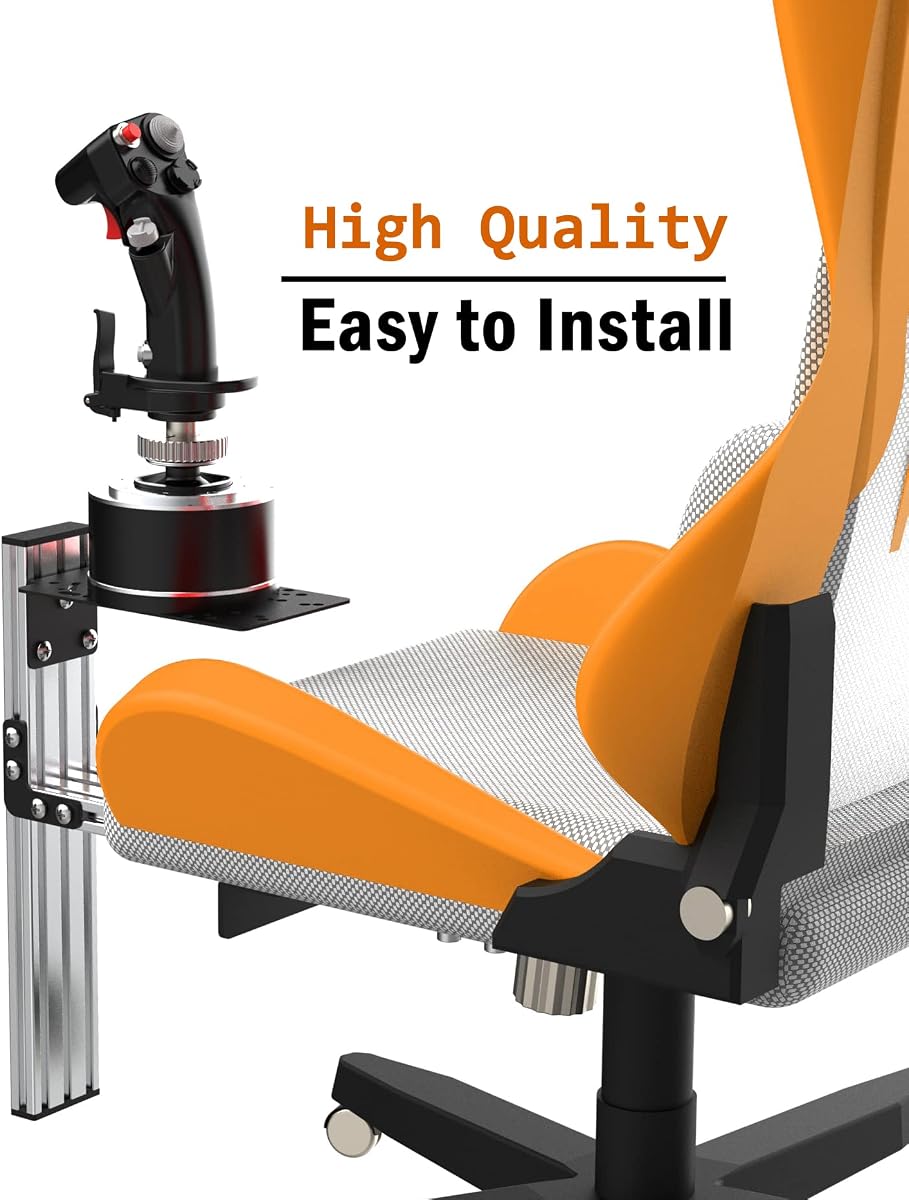
The Fosiya SIM Fighting Joystick Center Chair Mount is designed for users who prefer mounting their stick directly to their chair. It supports devices like T16000M FCS and VKB Gunfighter Pro MK III for a secure and stable setup.
We may earn a commission when you buy through this link, at no additional cost to you.
This mount uses M8 heavy duty screws to fix your equipment, providing a strong clamping force with a holding capacity up to 300kg. You can adjust the stand vertical height and left and right banners according to your habits.
The non-slip flange nut fixing system ensures better grip without changing the chair appearance. It is easy to disassemble if you do not use it for flight simulation. The installation is straightforward following the manual steps.
If you want a chair-mounted solution that offers stable and adjustable control, the Fosiya mount is a great option. It allows you to upgrade your original design and maintain a high level of stability during simulation sessions.
M8 heavy duty screws fix the equipment with a holding capacity up to 300kg for stable control.
The stand can be adjusted vertically and horizontally to match your personal habits and comfort preferences.
We may earn a commission when you buy through this link, at no additional cost to you.
Choosing the right Joystick Hotas Mounts involves evaluating several key factors to ensure your simulation setup is stable and ergonomic.
Ensure the mount supports your specific joystick and throttle models. Popular brands like Logitech and Thrustmaster have specific mounting requirements that the bracket must accommodate.
Check the product description to confirm your device model is listed to avoid compatibility issues.
Look for mounts with robust clamping mechanisms and heavy-duty construction. Stability is crucial to prevent wobble during intense maneuvering.
Choose options with metal construction and strong clamping force for the best performance.
The mount should allow you to adjust height and position to fit your desk and body posture. This reduces fatigue during long flights.
Verify the range of adjustment meets your ergonomic needs before purchasing.
Some mounts come pre-assembled or with tool-free designs which save time. Others may require drilling or specific tools.
Choose a design that matches your technical comfort level to ensure a smooth setup.
Materials like aluminum and reinforced steel are preferred for durability. Check reviews for long-term reliability claims.
Invest in a mount that is built to last and withstand daily use without failure.
Consider the desk thickness limits and the physical space the mount will occupy. Some designs fold away for storage which helps in shared spaces.
Measure your desk edge thickness to ensure the mount fits properly.
Determine if you need a desk mount or a chair mount based on your preference. Desk mounts offer stability while chair mounts offer mobility.
Select the design type that fits your cockpit style best.
Budget options can offer good value while premium models provide higher stability. Balance your cost with the features you require.
Read reviews to ensure the price matches the performance level provided.
First, ensure your desk edge is clean and free of debris before attaching the clamp. Place the mount on the edge and tighten the clamp until it feels secure without damaging the surface.
Second, connect your joystick and throttle to the mount brackets using the provided hardware. Make sure all bolts are tightened to prevent any movement during use.
Third, regularly check the clamping force and hardware for wear. Clean the mount with a dry cloth and avoid using harsh chemicals that might damage the material.
Not all mounts fit every joystick. You should verify your specific model like Thrustmaster T.16000M is listed in the compatibility section. Most premium mounts support a wide range of popular flight sticks.
Desk thickness capabilities vary by model. Some support 0.2 inches to 5.7 inches while others may have different limits. Always check the product specs before buying to ensure a proper fit.
Some mounts come with pre-assembled parts or tool-free kits for easy setup. Others may require basic tools like screwdrivers. Review the package contents to be prepared.
Many products are sold as 2-packs allowing separate mounting of joystick and throttle. This provides a more realistic cockpit layout. Check if the package includes two units.
Yes, heavy-duty metal mounts are designed to handle intense movements during combat simulations. Look for models with high holding capacity and robust clamping systems.
Most clamp-style mounts do not require drilling. They use a screw clamp mechanism. However, some setups might need permanent attachment for extra stability.
Use a soft dry cloth to wipe down the mount. Avoid harsh chemicals that might damage the metal or rubber pads. Regular dusting keeps the mount in good condition.
Foldable designs are available for those who need to save space. These can be folded flat when not in use. Check the product features for foldable options.
We reviewed ten top Joystick Hotas Mounts ranging from budget options to premium heavy-duty designs. The RACGTING and Hikig options offer excellent value for most users.
Prioritize stability and compatibility with your specific joystick models when making a purchase. Adjustability is also key to ensuring long gaming sessions remain comfortable.
Remember that prices change frequently so check the current listings for the best deals. Investing in a quality mount will significantly enhance your flight simulation experience.