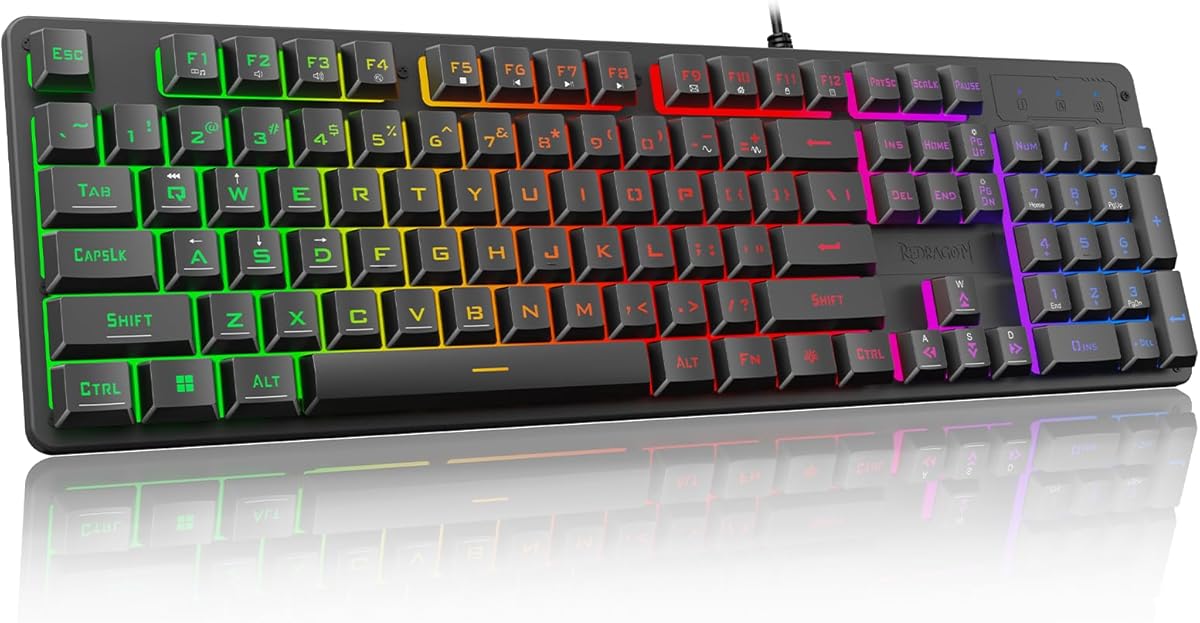
Redragon K521 Upgrade Rainbow LED Gaming Keyboard
4.4Editor score
Mechanical feeling keys
Anti-ghosting support
Rainbow LED backlight
This guide compares the top 10 keyboards for Rainbow Six Siege, evaluating switches, latency, durability, and features to help you find the perfect gaming
Finding the right keyboard for Rainbow Six Siege can significantly impact your performance in intense tactical shooters. A good gaming keyboard offers fast response times, durable switches, and customizable keys that help you execute complex strategies seamlessly during high-pressure moments.
We compared ten top-rated keyboards based on switch type, build quality, lighting, and special features like macro keys and anti-ghosting. Each product was evaluated for its ability to deliver precision, comfort, and reliability across various gaming setups and playstyles.
Each pick in this list highlights unique strengths tailored to different needs and budgets. Keep in mind that prices and availability can change frequently, so verify current details before making your final purchase decision for your Rainbow Six Siege setup.
4.4Editor score

4.6Editor score

4.6Editor score
The following table provides a side-by-side overview of all ten keyboards featured in this guide, highlighting key specifications and features to help you quickly compare options and find the best match for your gaming needs.



The Logitech G413 TKL SE is a tenkeyless mechanical keyboard that offers exceptional performance for competitive gaming. With a rating of 4.6 stars, it is recognized for its reliable tactile switches and durable construction that stands up to intense gaming sessions.
We may earn a commission when you buy through this link, at no additional cost to you.
Its tactile mechanical switches provide clear feedback with every keystroke, ensuring you know exactly when a key is actuated. This is critical for precise aiming and movement in Rainbow Six Siege where split-second reactions matter. The PBT keycaps resist wear and shine over time.
While the lack of dedicated macro keys might limit advanced customization compared to full-size boards, the keyboard focuses on speed and reliability. The 6-key rollover anti-ghosting ensures multiple key presses register simultaneously, preventing missed inputs during complex maneuvers.
This keyboard is ideal for players who value a clean setup and mechanical responsiveness. Its sturdy build and quality materials make it a standout choice for those seeking a professional-grade keyboard without unnecessary bloat.
Tactile switches ensure precise keystrokes without unintended repeats.
PBT keycaps and aluminum top case provide long-lasting resilience.
We may earn a commission when you buy through this link, at no additional cost to you.
The Redragon K521 offers a cost-effective solution for gamers seeking a mechanical feel without the higher price tag. Rated 4.4 stars, it delivers a satisfying typing experience with fast key actuation suitable for rapid gameplay sequences.
We may earn a commission when you buy through this link, at no additional cost to you.
Its mechanical feeling keys allow for quick input registration, which is essential for fast-paced shooters. The rainbow LED backlighting adds visual appeal, while the anti-ghosting feature ensures accurate command execution during high-intensity matches.
Although it lacks true mechanical switches, the design compensates with responsive feedback and a range of multimedia controls. The one-touch lighting adjustment and breathing modes provide customization options that enhance the gaming atmosphere.
For players on a tight budget who still want performance and style, this keyboard is a solid pick. It brings together essential gaming features with affordability, making it accessible to a wide range of users.
Keys trigger quickly to support rapid firing and movement commands.
Rainbow LED lighting creates an immersive gaming environment.
We may earn a commission when you buy through this link, at no additional cost to you.
The ASUS ROG Strix Scope II 96 represents the pinnacle of wireless gaming keyboard technology. With a 4.6 rating, it combines full-size functionality with a compact footprint, offering tri-mode connectivity for seamless device switching.
We may earn a commission when you buy through this link, at no additional cost to you.
Its hot-swappable pre-lubed switches allow for easy customization of typing feel and sound. The integrated sound-dampening foam reduces unwanted noise, delivering a satisfying thocky sound that appeals to enthusiasts who value acoustic quality.
Players benefit from low-latency wireless performance and robust build quality. The PBT keycaps ensure longevity, while the multi-function wheel provides intuitive control over media and lighting settings without interrupting gameplay.
This keyboard is ideal for gamers seeking a premium wireless solution without compromising on features. Its versatility, customization options, and refined aesthetics make it a top-tier investment for serious players.
Tri-mode support ensures flexible connections across multiple devices.
Hot-swappable switches and dampening foam tailor sound and feel.
We may earn a commission when you buy through this link, at no additional cost to you.
The Corsair K55 RGB PRO offers a unique blend of gaming features at an accessible price point. Rated 4.4 stars, it brings macro customization and dynamic lighting to players who prefer the quiet operation of membrane switches.
We may earn a commission when you buy through this link, at no additional cost to you.
Six dedicated macro keys allow for complex command setups essential in tactical shooters. The IP42 rating protects against spills, ensuring durability in casual gaming environments. RGB zones provide vibrant customization to match your setup.
While membrane switches lack the tactile crispness of mechanical alternatives, they offer smooth and silent typing. The detachable palm rest and media keys enhance comfort and convenience during extended play sessions.
This keyboard suits gamers who value macro functionality and durability over raw speed. Its thoughtful design features make it a versatile tool for both gaming and daily productivity tasks.
Dedicated macro keys streamline complex in-game actions.
IP42 resistance safeguards against accidental liquid spills.
We may earn a commission when you buy through this link, at no additional cost to you.
The SteelSeries Apex 3 stands out for its whisper-quiet operation, making it perfect for shared spaces or late-night gaming. With a 4.6 rating, it delivers reliable performance with 10-zone RGB illumination and a water-resistant design.
We may earn a commission when you buy through this link, at no additional cost to you.
Its low-friction switches provide smooth actuation while keeping noise levels minimal. The magnetic wrist rest ensures comfort during long matches, and the multimedia controls allow for easy volume adjustments without leaving the game.
While membrane technology limits precision compared to mechanical options, the keyboard focuses on comfort and durability. Water resistance adds a layer of protection, extending the device's lifespan in active gaming environments.
This keyboard is ideal for users prioritizing quiet operation and ergonomic comfort. Its vibrant lighting and sturdy build make it a practical choice for gamers seeking a balance between performance and subtlety.
Whisper-quiet switches minimize noise for shared environments.
Water-resistant design and magnetic wrist rest enhance longevity.
We may earn a commission when you buy through this link, at no additional cost to you.
The Razer Ornata V3 introduces low-profile keys that reduce hand strain during extended sessions. Rated 4.5 stars, it blends the tactile snap of mechanical switches with the quiet comfort of membrane technology in a sleek package.
We may earn a commission when you buy through this link, at no additional cost to you.
Mecha-membrane switches provide a satisfying clicky feel while remaining quieter than traditional mechanicals. UV-coated keycaps resist fading and wear, maintaining a fresh look over time. Dedicated media keys add convenience without cluttering the layout.
The magnetic wrist rest offers support that aligns with the keyboard's ergonomic design. However, users seeking pure mechanical precision may find the hybrid switches less definitive than full mechanical alternatives.
This keyboard suits gamers who prefer a slim profile and reduced fatigue. Its balanced design and durable materials make it a solid choice for daily gaming and office work alike.
Low-profile keys reduce hand movement and fatigue.
Mecha-membrane tech merges clicky feedback with quiet operation.
We may earn a commission when you buy through this link, at no additional cost to you.
The AULA F75 Pro brings enthusiast-grade customization to wireless gaming keyboards. Rated 4.6 stars, it supports hot-swap switches, allowing users to tailor the typing experience without soldering or advanced tools.
We may earn a commission when you buy through this link, at no additional cost to you.
Its tri-mode connectivity ensures seamless switching between devices, while the RGB lighting offers 16.8 million color options for immersive visuals. The multi-function knob provides intuitive control over media and backlighting settings.
Side-printed PBT keycaps offer a unique aesthetic that stands out among traditional designs. However, achieving full customization requires exploring the driver software, which may take time for new users.
This keyboard is perfect for gamers who enjoy tinkering with hardware. Its blend of wireless freedom and customization flexibility makes it a compelling choice for modern setups.
Tri-mode connectivity supports flexible device switching.
Hot-swap switches and programmable knob enable deep personalization.
We may earn a commission when you buy through this link, at no additional cost to you.
The ASUS ROG Strix Scope II X delivers premium mechanical performance in a full-size form factor. Rated 4.5 stars, it features hot-swappable ROG NX switches and PBT keycaps for long-lasting reliability and consistent feel.
We may earn a commission when you buy through this link, at no additional cost to you.
Integrated sound-dampening foam reduces noise, creating a pleasant acoustic environment. The multi-function wheel and macro programmability allow for extensive customization tailored to individual gaming styles and preferences.
While it lacks wireless flexibility, the wired USB-C connection ensures stable, latency-free performance. The brushed aluminum plate adds to the keyboard's solid and premium aesthetic.
Ideal for gamers who prioritize stability and customization, this keyboard is a robust choice. Its attention to build quality and sound design sets it apart in the wired mechanical category.
Aluminum plate and PBT keycaps ensure durable performance.
Sound-dampening foam creates a quiet and satisfying keystroke.
We may earn a commission when you buy through this link, at no additional cost to you.
The Razer BlackWidow V4 X features yellow mechanical linear switches designed for speed and smoothness. Rated 4.5 stars, it supports rapid-fire inputs with minimal noise, making it ideal for competitive shooters requiring consistent actuation.
We may earn a commission when you buy through this link, at no additional cost to you.
Six dedicated macro keys expand command options for complex strategies. Chroma RGB lighting offers extensive color customization, while double-shot ABS keycaps ensure legends remain visible even after heavy use.
The linear switch design sacrifices tactile feedback for speed, which can be a learning curve for some users. Sound dampeners help keep operation quiet without sacrificing responsiveness during critical moments.
This keyboard suits gamers who prioritize speed and customization. Its refined switch technology and vibrant features make it a strong contender for those seeking a dedicated gaming experience.
Yellow switches deliver smooth, rapid inputs without delay.
Macro keys and Chroma lighting support deep personalization.
We may earn a commission when you buy through this link, at no additional cost to you.
The Aula WIN60 HE utilizes Hall Effect magnetic switches for unmatched precision and speed. Rated 4.5 stars, it supports rapid trigger mode and adjustable actuation, providing a significant advantage in fast-paced gaming scenarios.
We may earn a commission when you buy through this link, at no additional cost to you.
With an 8000 Hz polling rate, key inputs register with minimal delay. The 60% compact design saves desk space, while the web-based driver simplifies customization without bulky software installations.
Users may find the absence of dedicated arrow keys challenging at first. However, the magnetic technology ensures consistent performance without wear, offering a unique and highly responsive experience.
This keyboard is designed for competitive gamers seeking cutting-edge features. Its innovative switches and compact form make it a powerful tool for mastering high-speed tactical games.
Hall Effect switches ensure consistent and precise actuation.
Rapid trigger mode enables lightning-fast key resets.
We may earn a commission when you buy through this link, at no additional cost to you.
Choosing the right keyboard involves balancing performance, durability, and features. Consider these key factors to find the best match for your gaming style and preferences.
Mechanical switches offer tactile or linear feedback, which can enhance precision. Linear switches are smooth and fast, while tactile ones provide clear actuation points. For Rainbow Six Siege, where quick reactions matter, choose based on your preference for feedback versus smoothness.
Match the switch type to your gameplay style to optimize performance and comfort.
A higher polling rate reduces input delay, ensuring commands register instantly. Keyboards with rapid trigger modes or magnetic switches can further enhance speed. This is critical for peeking and shooting scenarios common in tactical shooters.
Prioritize keyboards with high polling rates to minimize latency in competitive play.
Materials like PBT keycaps and aluminum frames resist wear and provide stability. Water-resistant designs protect against spills during intense sessions. A sturdy build ensures the keyboard withstands frequent use over time.
Invest in durable materials to maintain performance and extend the keyboard's lifespan.
Dedicated macro keys or programmable layouts allow for complex commands. Software support enables customization of lighting and key functions. This flexibility can streamline actions like weapon switching or grenade deployment.
Look for robust macro features if you rely on advanced key combinations.
Wired keyboards ensure stable connections, while wireless options offer freedom of movement. Compact layouts like 60% or TKL save desk space. Choose based on your desk setup and whether you need portability.
Select connectivity that fits your space and movement requirements.
RGB lighting enhances visual immersion and can be customized per key. Some keyboards offer unique color schemes or dynamic effects. While not critical for performance, lighting contributes to the overall gaming environment.
Consider lighting features if you value a personalized and vibrant setup.
Wrist rests, adjustable tilt, and key profiles affect long-session comfort. A well-designed keyboard reduces strain during extended gameplay. Comfort features are essential for maintaining focus and reducing fatigue.
Prioritize ergonomic design to ensure comfort during marathon gaming sessions.
Prices range from affordable membrane keyboards to premium mechanical models. Determine which features matter most to balance cost and performance. Higher cost often brings better materials and customization options.
Assess your needs to find the best value within your budget.
To ensure optimal performance, regularly clean the keyboard using compressed air to remove dust from under the keys. For PBT or ABS keycaps, wipe them gently with a microfiber cloth to maintain their texture and prevent dirt buildup.
Utilize customization software to map macros and adjust lighting to your preference. This allows you to create a setup that supports your strategies and enhances visibility during dark gaming sessions.
Store the keyboard in a dry and cool environment when not in use. Protect it from liquid spills and impacts, especially if using mechanical switches that may be sensitive to moisture and debris.
Mechanical keyboards with linear or tactile switches are generally preferred for competitive play due to their responsiveness and durability. For rapid triggers and adjustable actuation, magnetic switch keyboards offer a significant advantage in speed-sensitive games.
Yes, membrane keyboards can be viable for casual gaming, offering quieter operation and lower cost. However, they may lack the precise actuation and durability found in mechanical options, which can affect performance in high-stakes matches.
To reduce input lag, use a keyboard with a high polling rate such as 1000Hz or higher. Wired connections are more stable than wireless, and enabling rapid trigger modes where available can further minimize delays.
While not mandatory, macro keys can simplify complex actions like switching weapons or deploying gadgets. They provide convenience and efficiency, especially for players who rely on repeated command sequences during matches.
Linear switches provide smooth keystrokes without tactile bumps, ideal for rapid inputs. Tactile switches offer a physical bump at actuation, giving feedback on when a key is pressed. Choose based on whether you prefer speed or feedback.
For consistent performance, clean your keyboard every few weeks or whenever visible dust accumulates. Regular maintenance prevents sticky keys and extends the lifespan of the switches and keycaps.
Modern wireless technology with low-latency protocols is reliable for competitive gaming. However, wired connections still offer the lowest possible latency and eliminate concerns about battery life during extended sessions.
Yes, many gaming keyboards support key remapping and software customization. This allows you to optimize key placement for your most-used commands and streamline your interaction with the game interface.
Selecting the right keyboard can enhance your tactical performance and comfort during gameplay. From the Logitech G413 TKL SE for reliable mechanical action to the Aula WIN60 HE for advanced magnetic precision, each option offers unique strengths.
Prioritize features that align with your playstyle such as response time, ergonomics, and customization capabilities. Balancing these factors ensures your keyboard supports your strategies and reduces strain during competitive sessions.
Keep in mind that product availability and pricing may change over time. Check current listings and reviews to confirm that your chosen keyboard meets your needs before finalizing your purchase for the best gaming experience.