
Lenovo V15 Gen 4 – Business Laptop
4.5Editor score
Ryzen 5 7430U CPU
Military-Grade Durability
Full Connectivity Ports
Finding a laptop built to last requires careful attention to build quality, battery health, and repairability. This guide explores machines designed to endure daily wear while maintaining performance over many years.
We compared ten top-rated models based on durability standards, component quality, and user feedback regarding long-term reliability. Our analysis highlights devices that resist physical stress and support software updates effectively.
Each pick shows specific strengths in construction, memory, and storage that contribute to extended usability. Please note that prices fluctuate frequently, so check current listings before purchasing your next durable device.
4.5Editor score

4.2Editor score

4.4Editor score
As an Amazon Associate we earn from qualifying purchases.
The following table provides a side-by-side comparison of all ten laptops featured in this guide. Review the key specifications to determine which model aligns best with your specific needs for durability and performance.






This Lenovo V15 Gen 4 offers exceptional value for users prioritizing build quality over raw specs. Its military-grade testing ensures it can withstand drops, spills, and harsh conditions that might damage standard laptops.
We may earn a commission when you buy through this link, at no additional cost to you.
The AMD Ryzen 5 7430U provides reliable performance for daily office tasks and web browsing. The 512GB SSD ensures fast boot times, while the privacy shutter adds an extra layer of security for remote work.
While 8GB RAM is standard for budget devices, it may limit heavy multitasking. However, the efficient processor helps maintain smooth operation for most standard workflows without excessive battery drain.
Ideal for students and small businesses needing a tough machine that lasts years. This model balances cost and durability effectively, making it a smart investment for longevity-focused buyers.
Tested to MIL-STD-810H standards for resistance to drops and extreme environments.
Includes a full-size keyboard and multiple ports for connecting external devices.
We may earn a commission when you buy through this link, at no additional cost to you.
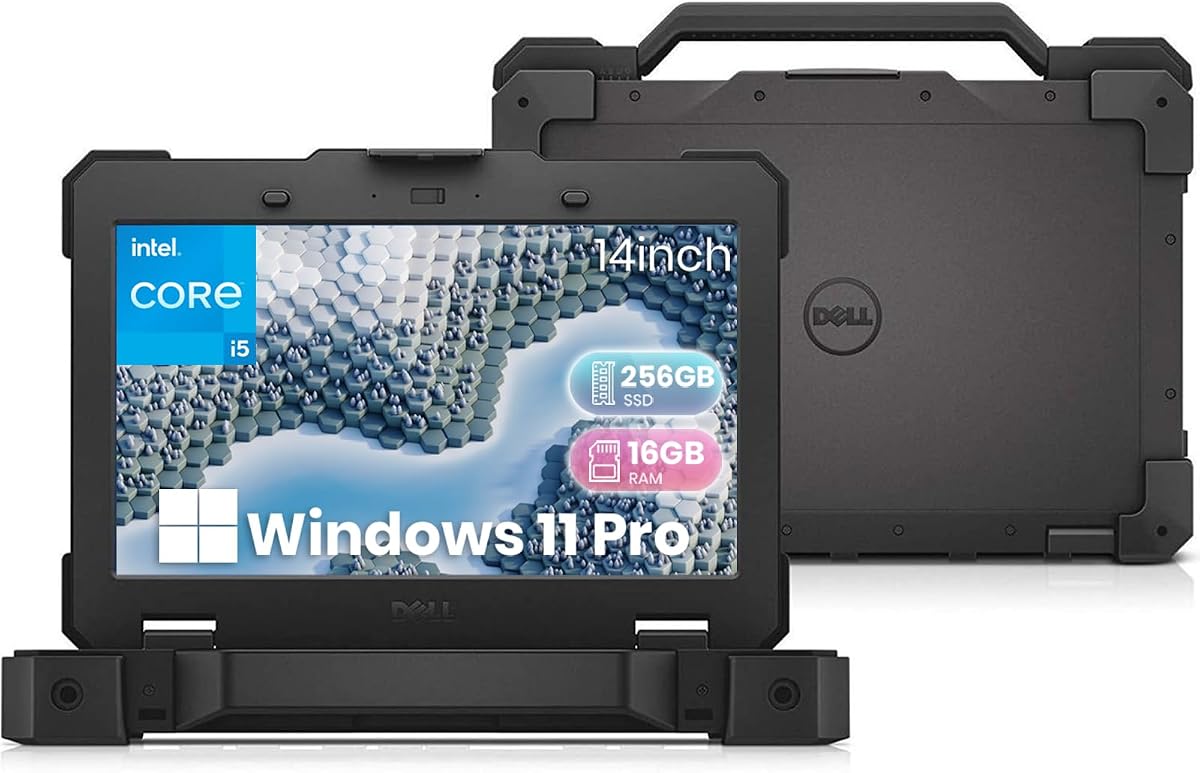
The Dell Latitude Rugged 5420 is built specifically for industrial use where reliability is critical. Its reinforced chassis protects against drops and impacts common in construction or warehouse environments.
We may earn a commission when you buy through this link, at no additional cost to you.
The 14-inch Full HD touchscreen offers outdoor visibility, ensuring clear visuals even in bright sunlight. With 16GB RAM, it handles multiple applications smoothly despite having an older processor architecture.
As a renewed unit, it provides cost savings while maintaining rigorous quality checks. The main trade-off is the smaller 256GB SSD, which may require cloud storage for larger files.
Perfect for field workers needing a device that survives harsh conditions. While not the latest model, its durability features ensure longevity for demanding workloads.
Touchscreen optimized for clear viewing even in bright outdoor environments.
Includes legacy ports like Ethernet and USB 3.1 for industrial tools.
We may earn a commission when you buy through this link, at no additional cost to you.
This Dell Latitude 5414 is engineered to withstand drops, spills, and dust, making it ideal for difficult work environments. Its military-grade certification ensures it survives daily abuse without failure.
We may earn a commission when you buy through this link, at no additional cost to you.
Equipped with 16GB RAM, it handles multitasking efficiently even with an older processor. The 256GB SSD provides quick boot times, while the array of ports supports various legacy industrial equipment.
While the processor is older, its reliability makes up for speed deficits in heavy computing. The renewed condition ensures full functionality at a lower price point for budget-conscious buyers.
A solid choice for organizations requiring durability over cutting-edge performance. This device proves longevity often depends on build quality rather than just raw specifications.
Designed to endure extreme temperatures, vibrations, and physical impacts.
Includes VGA and RS-232 serial interfaces for legacy industrial tools.
We may earn a commission when you buy through this link, at no additional cost to you.
The Lenovo ThinkBook 16 Gen 8 represents a premium investment in long-term productivity. Featuring the latest Intel Core Ultra 7 processor, it delivers AI-enhanced performance that keeps systems responsive for years.
We may earn a commission when you buy through this link, at no additional cost to you.
With 32GB DDR5 RAM, multitasking is seamless even with dozens of browser tabs open. The 1TB SSD offers ample storage for large datasets, ensuring you rarely run out of space as data accumulates.
The aluminum chassis combines durability with a sleek profile suitable for corporate environments. While the price is higher, the component quality supports extended use without performance degradation.
This is the ideal choice for professionals needing robust computing power that remains relevant. Its high-end specs ensure it meets software requirements well into the future.
Intel NPU accelerates AI tasks for efficient power and speed management.
Thunderbolt 4 and WiFi 6E support fast data transfer and networking.
We may earn a commission when you buy through this link, at no additional cost to you.
HP's 17-inch laptop prioritizes workspace with a large display and numeric keypad, perfect for accounting or data entry tasks. The anti-glare screen reduces eye strain during long working hours.
We may earn a commission when you buy through this link, at no additional cost to you.
Powered by AMD Ryzen 5, it offers reliable performance for daily office work and multitasking. With 16GB RAM, it handles multiple applications smoothly, while the 512GB SSD ensures quick boot times.
The device supports Fast Charge technology, which helps maintain productivity throughout the day. Although slightly heavier due to the screen size, it remains portable enough for most office environments.
Best for users who need a screen size larger than standard notebooks. The combination of features ensures comfortable long-term usage without compromising on essential productivity tools.
17.3-inch FHD display provides ample room for split-screen work.
Designed with long battery life and fast charging capabilities for mobility.
We may earn a commission when you buy through this link, at no additional cost to you.
This Lenovo V15 model combines a powerful i5 processor with sufficient RAM for demanding business tasks. The 13420H CPU delivers strong multi-core performance for smooth multitasking and productivity.
We may earn a commission when you buy through this link, at no additional cost to you.
With Windows 11 Pro preinstalled, enterprise users gain access to advanced security features like BitLocker encryption. The 512GB SSD provides quick access to files, ensuring efficient daily workflow.
The inclusion of an RJ45 port ensures stable wired connectivity where Wi-Fi is unreliable. However, build materials prioritize function over form, offering durability at a practical price point.
A balanced option for office workers needing reliable performance and essential ports. Its specifications suggest it will remain useful for several years without needing replacement.
Intel Core i5-13420H outperforms many rivals in multitasking speed.
Windows 11 Pro offers enterprise-grade tools like remote desktop and encryption.
We may earn a commission when you buy through this link, at no additional cost to you.
This Lenovo V15 delivers efficient performance for everyday computing with DDR5 memory support. The Ryzen 5 7520U balances power and battery life, making it suitable for extended work sessions.
We may earn a commission when you buy through this link, at no additional cost to you.
Its 16GB DDR5 RAM ensures smooth operation even with multiple heavy applications open. The anti-glare display reduces eye strain during long hours, while the privacy shutter adds extra security.
The laptop supports up to two external 4K displays, expanding workspace flexibility significantly. Although graphics are integrated, they handle daily tasks effectively without unnecessary power consumption.
Ideal for students and professionals needing a reliable, affordable machine. This configuration ensures longevity through efficient memory and storage technology.
Newer DDR5 memory offers higher speed and better power efficiency than DDR4.
Anti-glare coating and low blue light certification protect eyes during use.
We may earn a commission when you buy through this link, at no additional cost to you.
The Lenovo ThinkPad L16 is an enterprise-ready machine built for reliability. With MIL-STD-810H certification, it withstands demanding fieldwork and travel without risking data or hardware failure.
We may earn a commission when you buy through this link, at no additional cost to you.
Configurable options allow users to select up to 64GB RAM and 2TB SSD, ensuring the device grows with business needs. The 12-core Ultra 5 processor provides powerful performance for complex tasks.
Up to 10 hours of battery life with fast charging ensures productivity on the go. While premium features raise the price, the durability and customization make it a sound long-term investment.
Perfect for professionals needing flexible specifications without compromising quality. This model proves that high-end business laptops can deliver decades of service.
BitLocker encryption and fingerprint readers protect sensitive business data effectively.
80% charge in one hour minimizes downtime during travel or busy schedules.
We may earn a commission when you buy through this link, at no additional cost to you.
This Lenovo V-Series offers an unusual 40GB RAM configuration, ideal for heavy multitasking and large datasets. The Ryzen 7 processor ensures smooth performance even under demanding loads.
We may earn a commission when you buy through this link, at no additional cost to you.
With 1TB SSD storage, users have ample space for extensive files and applications. Windows 11 Pro provides advanced management features, making this suitable for business environments needing security.
The numeric keypad and HDMI port support productivity workflows that require data entry or external displays. While the GPU is integrated, CPU and RAM power compensate for daily professional tasks.
Best for users managing significant data without needing specialized graphics hardware. This configuration supports longevity by minimizing the need for upgrades over time.
40GB RAM allows running numerous virtual machines or applications simultaneously.
1TB SSD provides fast access to large file libraries and project data.
We may earn a commission when you buy through this link, at no additional cost to you.
The Dell 16 Laptop offers a modern computing experience with an immersive screen and eye comfort features. Its 16:10 aspect ratio provides more vertical workspace for documents and web browsing.
We may earn a commission when you buy through this link, at no additional cost to you.
Powered by Intel Core 7, it delivers strong performance for daily tasks. ComfortView Plus reduces harmful blue light emissions, protecting eyes during prolonged screen time effectively.
Adaptive thermals adjust power usage based on surface stability, improving battery efficiency. While it uses plastic build materials, the internal hardware ensures longevity for standard workloads.
Ideal for users prioritizing screen real estate and comfort over ruggedness. This laptop balances modern features with practical specs for years of reliable use.
TUV certified ComfortView Plus reduces blue light without compromising color accuracy.
Sensors detect surface stability to optimize fan speeds and power consumption.
We may earn a commission when you buy through this link, at no additional cost to you.
Selecting a laptop for longevity requires evaluating build quality, component durability, and software support. This guide outlines essential factors to consider for extended device life.
Materials like magnesium alloy or aluminum resist wear and impact better than plastic. Look for MIL-STD-810H certification for proven resistance to drops and environmental stress.
A sturdy chassis ensures internal components remain protected during regular movement or travel.
Laptops with upgradeable RAM and storage allow you to extend usability without replacing the whole unit. Soldered memory limits future performance improvements significantly.
Choose models with accessible slots or high base configurations like 16GB RAM for longevity.
Modern processors with efficient architectures handle software updates and security patches better. Avoid very old chips that may no longer support new operating system versions.
Selecting a current-generation CPU ensures compatibility with future applications and security standards.
Battery longevity depends on thermal management and charge cycles. Features like adaptive charging or thermal sensors preserve battery health over time.
Look for laptops with replaceable batteries or efficient charging protocols to maintain daily usability.
A variety of ports ensures you can connect legacy and modern peripherals without adapters. Limited connectivity can force external hubs that add points of failure.
Prioritize models with USB-C, HDMI, and Ethernet to support diverse external device ecosystems.
Windows 11 Pro offers better enterprise management and security features for long-term stability. Regular security updates are critical for protecting data over many years.
Ensure the device receives promised updates to avoid vulnerabilities in older software versions.
A spill-resistant keyboard with high actuation durability ensures typing remains comfortable and functional. The numeric keypad is essential for data-heavy roles over years of use.
Check for key travel depth and resistance to dust or liquids to maintain productivity.
Extended warranties or onsite service plans protect against hardware failures. A responsive support team resolves issues quickly, preventing prolonged downtime.
Invest in service options that cover accidental damage to maximize the device's functional lifespan.
Keep your laptop on hard, flat surfaces to prevent overheating. Using a cooling stand or hard table allows proper airflow through the vents and protects internal components from heat stress.
Update drivers and firmware regularly through official manufacturer support pages. Keeping software current prevents vulnerabilities and ensures hardware features work correctly throughout the device life.
Avoid leaving your device in extreme temperatures or humid environments. Excessive heat or moisture can degrade the battery and internal circuits over time.
A laptop built for longevity features durable chassis materials, upgradeable components like RAM, and long-term software support. These elements allow the device to remain functional for many years.
Yes, MIL-STD-810H certification indicates the laptop has passed military-grade tests for drop and shock resistance. This ensures the device survives harsh environments and daily wear effectively.
16GB RAM is generally recommended for future-proofing. This capacity supports multitasking and demanding applications without the need for immediate upgrades or replacements.
Many modern laptops have M.2 SSD slots that allow storage upgrades. Always check the manufacturer specifications to confirm if the storage is accessible or soldered before purchasing.
Business laptops typically have better build quality and security features designed for continuous use. They are often engineered with durability standards that consumer models lack.
Avoid extreme heat and deep discharge cycles to maintain battery health. Modern operating systems often include adaptive charging features that optimize battery lifespan automatically.
Certified renewed laptops undergo testing to ensure functionality, but they may have older components. Check warranty terms to verify how long the device is expected to remain supported.
Windows 11 Pro offers long-term enterprise support and security updates. Regular updates protect against vulnerabilities, ensuring the system remains secure over time.
Our top picks highlight the Lenovo ThinkBook 16 Gen 8 and V15 Gen 4 for balancing modern specs with durability. These models offer component quality and features that support extended daily use.
Prioritize build materials and upgradeable memory when selecting a device for longevity. Ensuring the machine can adapt to future software requirements is essential for long-term satisfaction.
Remember that prices fluctuate frequently, so verify current listings before purchasing. Checking recent reviews and warranty terms ensures you invest in a device that truly lasts.