
Mouse Jiggler Mover Wiggler Undetectable Shaker
4.7Editor score
Drive-Free Operation
Compact Tiny Size
Wide Compatibility
Discover the top laptop jiggler devices to keep your computer awake without software. We compare features, detection risks, and performance for remote workers.
Keeping your laptop active during long tasks is essential for remote workers and gamers. A laptop jiggler prevents sleep mode without compromising your workflow or security settings. These devices simulate natural mouse movement to keep status indicators green on communication platforms.
We evaluated ten top-rated models based on usability, undetectability, and design quality. Each product was assessed for compatibility, noise levels, and ease of setup across different operating systems. Our goal is to help you choose the right tool for your specific environment.
Every pick highlights unique strengths like silent motors, USB-C support, or physical movement simulation. Prices and availability change frequently, so verify details before purchasing. Read our detailed breakdown to find the ideal solution for staying active online.
4.7Editor score

4.7Editor score

4.1Editor score
This side-by-side comparison highlights key specifications across all ten selected models. Use this table to quickly identify compatibility, power options, and unique features before making your final decision.


The TECH8 USA Undetectable Mouse Mover Jiggler stands out with its innovative 3D hologram disc and ambient glow ring. It achieves a strong 4.7 rating by combining functionality with style. This device simulates natural movement without requiring software installation or IT permissions.
We may earn a commission when you buy through this link, at no additional cost to you.
Its standout quality lies in the customizable motion levels and auto shut-off timer. Users can choose from low, medium, or high settings to match their specific needs. The built-in power button ensures instant operation without constant plugging and unplugging. The Austin-based support team provides responsive help if issues arise.
Trade-offs include the reliance on mouse placement rather than direct USB input. You must ensure the mouse sensor faces the disc correctly for optimal performance. While the price is slightly higher than basic models, the aesthetic and feature set justify the cost for many professionals.
Buyers seeking a reliable and stylish solution for keeping their PC awake will find this ideal. It works seamlessly with Teams, Zoom, and other platforms. This pick is best for users who value both performance and desk aesthetics.
The glow ring and hologram disc add a modern touch to any workspace setup.
Three motion levels allow precise control over cursor movement frequency.
We may earn a commission when you buy through this link, at no additional cost to you.
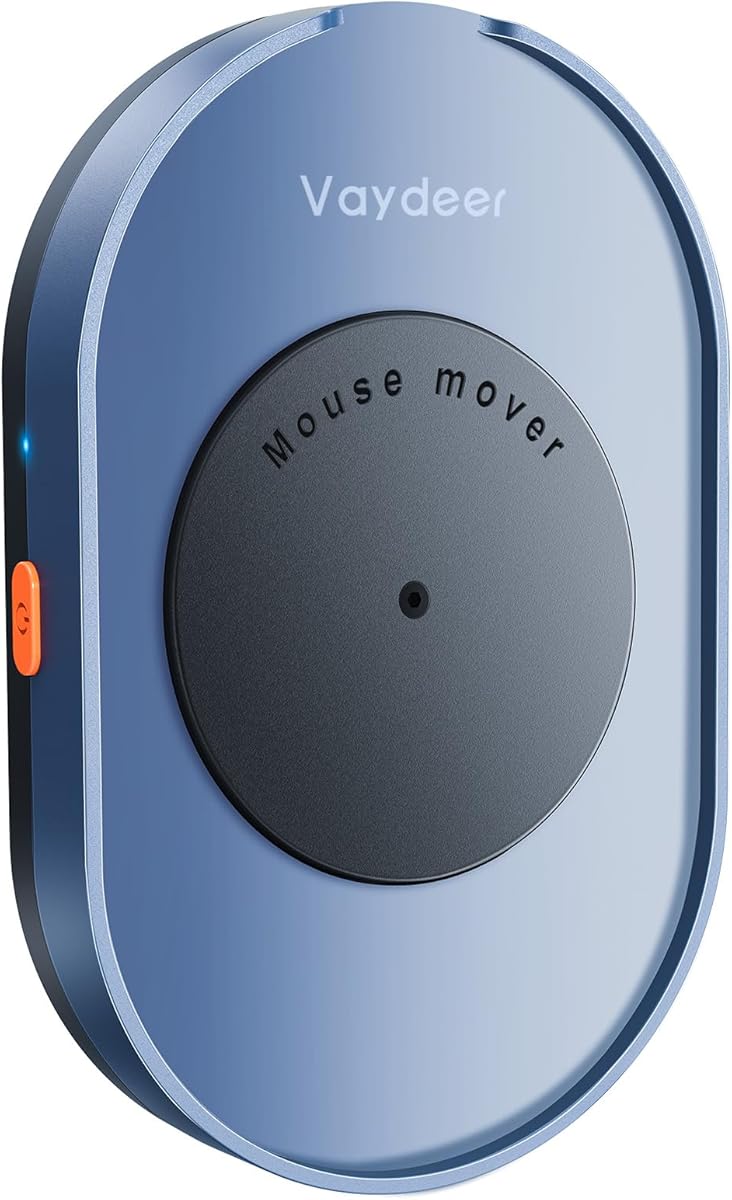
The Vaydeer Undetectable Mouse Jiggler M4 offers exceptional value with its ISO-certified security features. It runs on an ultra-silent motor that operates below 45dB. This makes it perfect for quiet office environments where noise could be distracting.
We may earn a commission when you buy through this link, at no additional cost to you.
It avoids detection by IT departments by simulating physical movement rather than software scripts. The included ON/OFF switch saves time compared to unplugging cables constantly. You can power it via USB or an external adapter for added flexibility.
While the physical design is functional rather than stylish, it gets the job done efficiently. The 6-year R&D background suggests reliable build quality and customer support. Users appreciate the thoughtfulness of gifting this to colleagues.
This model is ideal for budget-conscious buyers who need reliable performance. It suits professionals working in shared spaces who prioritize silence. The ISO certification adds a layer of trust for corporate use.
Noise levels below 45dB ensure no distraction during meetings or focused work.
Passed ISO/IEC27001 standards making it safe for enterprise environments.
We may earn a commission when you buy through this link, at no additional cost to you.
The Trackpad Mouse Jiggler Device Silent Cordless is unique as it works without needing a physical mouse. It uses a silent motor to simulate fingertip movement directly on your laptop touchpad. This eliminates cable clutter entirely from your workspace.
We may earn a commission when you buy through this link, at no additional cost to you.
Its cordless nature makes it highly portable for travel or hot-desking environments. The AA battery can last up to six months with typical use, ensuring long-term reliability. The motor operates quietly so it won't disturb your concentration.
Users must adjust touchpad sensitivity settings to ensure optimal detection of the movement. Without these tweaks, some systems might ignore the subtle physical inputs. Despite this setup requirement, the freedom from cables is a significant benefit.
Buyers wanting a truly wireless solution for touchpad users will love this device. It works great for laptops where external mice aren't practical. The premium price reflects the convenience and specialized functionality it offers.
No cables mean you can use it anywhere without power outlet constraints.
AA battery lasts months reducing the need for frequent replacements.
We may earn a commission when you buy through this link, at no additional cost to you.
The WFB Mouse Jiggler Undetectable 2 Pack provides excellent value with two units for the price. It mimics a standard 2.4G mouse to avoid IT flags. The movement is slight, shifting pixels by only 1-2 to keep apps active.
We may earn a commission when you buy through this link, at no additional cost to you.
Users appreciate that it works without software downloads or driver installations. Compatible with Windows, Mac, and Android systems, it adapts to diverse setups. The simple design means no complicated settings or adjustments are needed.
One trade-off is the physical shaker mechanism which might not suit precision mice. However, for general office tasks, the slight movement is barely noticeable. Having two units allows backup or sharing with team members.
This option suits users who want a no-fuss affordable solution. It is perfect for keeping PCs awake during downloads or meetings. The multi-pack format makes it cost-effective for offices or remote workers.
IT systems see it as a normal peripheral reducing detection risks.
Works across Windows Mac and Android systems seamlessly.
We may earn a commission when you buy through this link, at no additional cost to you.
The AUEDROT Mouse Jiggler Undetectable USB-C offers modern connectivity for newer laptops. It features two jiggle modes: slight for subtle movement and random for varied patterns. The USB-C port aligns with current hardware trends.
We may earn a commission when you buy through this link, at no additional cost to you.
Users can switch modes easily with the built-in button without unplugging. When connected, it powers on automatically ensuring immediate activation. This device is recognized as a trusted USB Composite Device avoiding security warnings.
While the USB-C connector is beneficial for new devices, it may require adapters for older ports. The design is compact and fits well in any workspace. This option is reliable for maintaining green status on Teams or Zoom.
Buyers with USB-C laptops will find this model especially convenient. It delivers straightforward performance without complex configurations. The dual-mode feature adds versatility for different usage scenarios.
USB-C connector supports latest laptop standards without adapters.
Easily toggle between slight and random movement modes.
We may earn a commission when you buy through this link, at no additional cost to you.
The Yonktoo Mouse Jiggler Undetectable features an ultra-slim profile that fits neatly under monitors. It includes a long 4.9 ft cable for flexible placement options. The physical platform ensures continuous movement for your mouse sensor.
We may earn a commission when you buy through this link, at no additional cost to you.
An automatic start feature means it works immediately upon connection. A single button allows you to pause or resume without unplug. The motor runs quietly to avoid disrupting your workspace environment.
While effective, it requires your mouse to rest on the platform during use. This may limit mobility if you need to move your mouse frequently. However, the simple plug-and-play nature makes setup effortless.
Users prioritizing a low-profile solution will appreciate this device. It works reliably across various operating systems. The long cable ensures you can position it optimally on any desk.
4.9 ft cable allows easy routing around desk equipment.
Toggle movement instantly without disconnecting the power.
We may earn a commission when you buy through this link, at no additional cost to you.
The Meatanty Mouse Mover Undetectable offers precise control with an adjustable interval timer. Users can set movements every 5 to 60 seconds to match their needs. The LED display visualizes operations for transparent usage.
We may earn a commission when you buy through this link, at no additional cost to you.
It simulates truly random mouse trajectories avoiding predictable patterns that IT might flag. The motor operates below 20dB ensuring minimal noise during office hours. The turntable size accommodates various mouse sizes without slipping.
Setup may take a moment to ensure proper cursor alignment on the wheel. While larger than USB sticks, it is highly reliable for long-term use. The durability tests suggest a longer lifespan than competitors.
This pick is best for users needing fine-tuned automation without software. The visual display adds a premium feel to the experience. It suits offices where reliability and silence are non-negotiable.
Set movement frequency from 5 to 60 seconds precisely.
LED display confirms active mode and timer status clearly.
We may earn a commission when you buy through this link, at no additional cost to you.
This USB Mouse Mover features a solid aluminum alloy build for superior durability. It supports two modes: slight 1-2 pixel shifts and random irregular moves. The included USB-C adapter ensures compatibility with modern ports.
We may earn a commission when you buy through this link, at no additional cost to you.
The compact design makes it portable enough for laptop bags. Switching modes is done via a physical button allowing quick changes. It is recognized as a trusted USB composite device avoiding detection.
While the metal build adds weight, it provides a sturdy feel on desks. Setup is completely plug-and-play without any software installation needed. It keeps communication apps active during long meetings effortlessly.
Buyers wanting a sturdy and simple tool will prefer this model. It balances quality construction with essential features. Ideal for users needing reliable status maintenance without complexity.
Aluminum body offers sturdiness and premium feel.
Compact size fits easily into bags or pockets.
We may earn a commission when you buy through this link, at no additional cost to you.
The TECKNET Mouse Jiggler Undetectable USB offers exclusive color LED feedback for mode status. It supports three distinct movement modes from slight shifts to variable-speed random patterns. Its compact size ensures it fits in any laptop bag.
We may earn a commission when you buy through this link, at no additional cost to you.
The LED indicator provides discreet visual confirmation of the active mode without being distracting. Switching modes is simple with a single button press. It works instantly across Windows Linux and macOS systems.
While the LED is small, it serves its purpose of confirming operation. The 18-month warranty adds security for your purchase. Users appreciate the simplicity of one-button control for quick changes.
This model suits users who want clear visual status confirmation. It is reliable for maintaining online status across multiple platforms. The warranty and portability make it a strong contender.
Different light colors indicate active mode discreetly.
Multiple patterns ensure flexibility for different scenarios.
We may earn a commission when you buy through this link, at no additional cost to you.
The Mouse Jiggler Mover Wiggler Undetectable Shaker is designed for extreme portability. It registers as a regular mouse upon connection avoiding IT security flags. The tiny size makes it easy to carry anywhere.
We may earn a commission when you buy through this link, at no additional cost to you.
It requires no drivers or downloads to start working immediately. The plug-and-play design ensures instant activation to keep your computer awake. Users can manage tasks freely while the device keeps their status green.
While small, it might be easy to misplace without careful storage. However, the high 4.7 rating suggests users appreciate its reliability. The simple mechanism ensures it rarely fails or malfunctions.
Buyers needing a minimalist solution will love this device. It suits travelers who want a discreet tool for maintaining presence. The warranty provides reassurance for your investment.
Tiny size fits in keys or pockets effortlessly.
No setup needed; works immediately upon plugging in.
We may earn a commission when you buy through this link, at no additional cost to you.
Selecting the right jiggler involves understanding how it operates and interacts with your system. This guide breaks down the most critical factors to consider.
Avoid software-based jigglers that IT departments can easily block. Opt for hardware devices that simulate physical movement or are recognized as standard mouse peripherals. This reduces the chance of your status being flagged as suspicious or inactive.
Always verify that the device operates at the hardware level rather than through background scripts. This ensures your status remains green on all professional communication platforms.
Determine whether the device requires a physical connection or battery power. USB-powered options are convenient but add cable clutter while battery-powered ones offer portability at the cost of replacement or recharging.
Choose based on your workspace layout. Fixed desks benefit from stable USB power while travel setups need cordless options for mobility.
Ensure the jiggler works seamlessly with your specific operating system like Windows Mac or Linux. Some devices may have driver requirements that cause issues on older systems.
Check product listings for explicit OS support notes to avoid compatibility headaches after purchase.
In shared environments noise matters significantly for comfort and discretion. Look for ultra-silent motors that operate below 40dB if your device uses mechanical movement.
Physical shaker devices tend to be louder than USB signal emulators so consider your environment carefully.
Some devices move the cursor significantly while others shift it just a pixel or two. Excessive movement can disrupt your work so opt for models that offer adjustable intensity.
Precision matters if you are working on graphics or editing tasks where even small cursor shifts cause errors.
Many jigglers are purely functional but some offer LED lights or sleek designs. Consider how the device will blend into your workspace decor.
If appearance matters to you pick a model with modern styling rather than plain utilitarian plastic.
Quality varies across brands so check warranty terms before buying. Standard warranties range from one year to eighteen months covering defects.
Responsive customer support can help if you encounter hardware failure or setup issues.
If you travel often look for compact designs that fit in pockets or bags. Large platforms may not suit dynamic environments.
Prioritize lightweight models if you move between offices frequently.
To start using your device plug it into a USB port or power it on if battery-operated. If using a physical platform ensure your mouse sensor faces the movement area directly.
Test the device by opening a communication app like Zoom. Verify your status indicator turns green within minutes of activation.
Clean the device occasionally to prevent dust buildup. Store it safely when not in use to avoid physical damage.
Most physical jigglers are legal as they do not install software on your computer. However check your company policy before using them at work to avoid violations.
Standard USB jigglers do not work with touchpads. You need a specialized cordless device that simulates fingertip movement on the pad surface.
Hardware devices mimicking standard peripherals are generally undetectable. Avoid software tools that leave traces in system logs.
Minimal jigglers move the cursor slightly to avoid disrupting workflows. However high-intensity settings might move your screen unexpectedly.
Most models are plug-and-play requiring no drivers. Check product details to confirm driver-free operation before buying.
Battery-operated models can run for months on a single charge or battery set. Check specifications for specific endurance times.
We reviewed ten excellent models offering unique features from touchpad support to LED indicators. Top picks include the TECH8 USA for style and the Vaydeer for budget-conscious needs.
Prioritize undetectability and compatibility with your specific workflow. Choose hardware-based solutions to avoid software restrictions in corporate environments.
Always verify current pricing and availability as these can fluctuate daily. This guide helps you pick a reliable tool for seamless remote work experiences.