
QUI Presentation Clicker with Volume Control, Wireless Presenter Remote
4.3Editor score
Bright red pointer light
328ft wireless range
Volume control buttons
We review the top laser pointer for presentations models for October 2026, comparing brightness, battery life, range, and compatibility to help you choose.
Presenting effectively requires clear visuals and smooth navigation. A reliable laser pointer for presentations helps you guide your audience through slides without distraction. Choosing the right tool ensures your message lands with impact and professionalism every time you speak.
We compared ten top-rated models based on brightness, range, battery life, and ease of use. Each option offers unique features like green or red lasers, USB-C charging, and wide software support. Our analysis helps you find the perfect clicker for your needs.
Every pick includes detailed specs, pros, cons, and real-world usage notes. Prices and availability may change, so verify current listings before buying. Whether you teach, sell, or present remotely, this guide covers the best tools to elevate your next presentation.
4.3Editor score

4.6Editor score

4.6Editor score
Here is a side-by-side comparison of all ten models reviewed in this guide. Look for key differences in laser type, battery method, range, and extra features like volume control or reprogramming options.


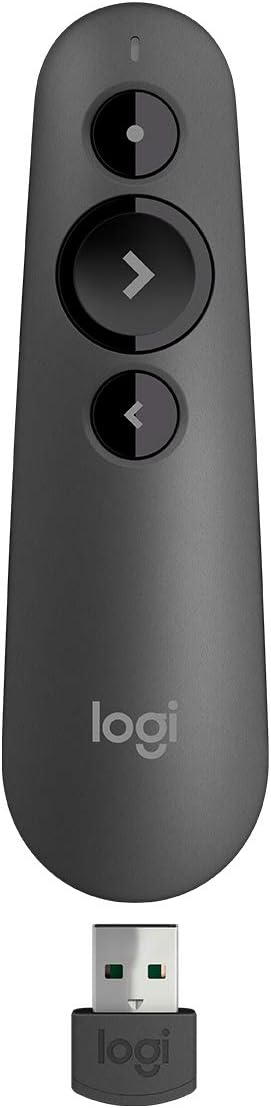


This wireless presenter combines a bright green laser with a rechargeable design, making it ideal for teachers and professionals. With a 4.6 rating, it delivers visibility on projectors and screens that red lasers often struggle with.
We may earn a commission when you buy through this link, at no additional cost to you.
The 532nm green light cuts through ambient light, ensuring your audience sees every highlight. A single hour of USB-C charging powers weeks of daily use, eliminating the hassle of buying AAA batteries constantly.
While it costs more than budget options, the eco-friendly design and premium features justify the investment. The magnetic receiver prevents loss, and intuitive buttons allow quick access to hyperlinks and volume controls.
If you present regularly in classrooms or conference rooms, this clicker offers unmatched reliability and visibility. It works instantly with Mac, Windows, and Chromebooks, so you can focus on your message instead of tech setup.
Green light stays crisp even on bright screens and large projectors.
USB-C charging means no more hunting for spare batteries mid-presentation.
We may earn a commission when you buy through this link, at no additional cost to you.
The Logitech R400 is a classic choice for presenters who want reliability without breaking the bank. Its 4.6 rating reflects years of trust from users worldwide. The red laser is bright enough for most indoor settings.
We may earn a commission when you buy through this link, at no additional cost to you.
Touch-keys make slide control effortless, and the 50-foot range lets you move freely. The receiver docks neatly inside the clicker, so you never lose it. It requires no drivers, just plug in and go.
Battery reliance is a minor drawback compared to modern USB-C options, but AAAs are easy to find. The design is timeless and fits comfortably in most hand sizes.
If you need a proven tool for simple presentations, this model offers excellent performance at a low cost. It works seamlessly with PowerPoint and other standard software.
Straightforward controls mean no learning curve for new users.
Decades of use prove this model holds up well over time.
We may earn a commission when you buy through this link, at no additional cost to you.
This presenter offers advanced features like volume control at a very accessible price. A 4.4 rating shows most users are happy with its performance. The 100-foot range is impressive for such a small device.
We may earn a commission when you buy through this link, at no additional cost to you.
Buttons are soft to the touch and well-spaced for comfort. The magnetic USB slot ensures you won't lose the receiver. Auto-sleep saves power, extending battery life significantly.
The red pointer is bright but may fade on LCD screens in bright rooms. Still, for standard projectors, it performs well. The price makes it great for occasional presenters.
If you need a feature-rich clicker without spending much, this is a solid option. It supports hyperlink navigation and screen toggling, adding flexibility to your talks.
Walk to the back of the room without losing connection.
Auto-sleep mode keeps batteries fresh for weeks of use.
We may earn a commission when you buy through this link, at no additional cost to you.
The R800 stands out with its built-in timer and green laser, ideal for timed talks. Users praise its smooth feel and clear dot. The 4.6 rating reflects high satisfaction among professionals.
We may earn a commission when you buy through this link, at no additional cost to you.
The LCD screen displays time without needing a watch. Vibrating alerts keep you informed silently. The green laser cuts through bright rooms, ensuring visibility even on LCD screens.
While pricier, the time management tools alone make it worth it for keynote speakers. The range and button layout support dynamic presenting styles.
If you often run short on time or present in bright venues, this clicker helps manage both. Its quality construction ensures it lasts through years of frequent use.
Timer alerts help you stay on track without glancing at a clock.
Green laser works well even on modern LCD and plasma displays.
We may earn a commission when you buy through this link, at no additional cost to you.
The R500s offers flexibility with both Bluetooth and USB connectivity. A 4.4 rating suggests users value its adaptability across devices. It supports many software platforms including PowerPoint and Google Slides.
We may earn a commission when you buy through this link, at no additional cost to you.
The Presentation App allows button remapping and timer setup. Battery life lasts up to 12 months on one AAA. The docked receiver keeps storage tidy.
Bluetooth can be useful for laptops without USB ports. However, the app is only for Mac and PC. Red laser visibility varies in bright settings.
If you switch between devices often or need Bluetooth pairing, this model fits well. It balances features and reliability effectively for business users.
Use USB for stability or Bluetooth for portability as needed.
App allows you to tailor buttons to your workflow.
We may earn a commission when you buy through this link, at no additional cost to you.
For the lowest price, this clicker offers a massive 328-foot range. A 4.3 rating shows it delivers basic functions well. It supports volume control and works with Keynote, Excel, and more.
We may earn a commission when you buy through this link, at no additional cost to you.
The built-in clip makes it easy to carry on notebooks. Red light is bright enough for most rooms. Software support is broad, making it versatile for various uses.
Build quality is simple but functional. It works well for quick training sessions or small meetings where budget matters most.
If you need something basic and cheap for occasional use, this is a strong pick. Just check your room size to ensure the red pointer suits your screen.
Roam large halls without fear of signal loss or lag.
Perfect for schools or startups on a tight budget.
We may earn a commission when you buy through this link, at no additional cost to you.
The Norwii N95 supports both USB-A and USB-C receivers, ideal for modern devices. A 4.5 rating reflects satisfaction with its green pointer and rechargeable battery. It works with iPads and mobiles too.
We may earn a commission when you buy through this link, at no additional cost to you.
Button remapping via app allows full customization for unique workflows. The 100-meter range covers huge spaces. USB-C ensures charging is standard and easy.
Charging cable absence is a minor annoyance. Also, green pointer may be too bright for TV screens, so check specs before buying.
For tech-savvy users wanting modern connections and green visibility, this is a top choice. It brings advanced features to a reasonable price point.
Connects to laptops, iPads, and phones with ease.
Remappable buttons let you adapt to specific presentation needs.
We may earn a commission when you buy through this link, at no additional cost to you.
This clicker supports both USB-A and USB-C receivers, fitting new and old devices. A 4.4 rating shows solid performance for its class. It offers red pointing and basic slide control.
We may earn a commission when you buy through this link, at no additional cost to you.
The rubberized grip feels comfortable during long sessions. It works across many OS and software options. Setup requires no drivers beyond basic Mac permissions.
The range is shorter than others at 49 feet. Still, it handles standard conference room sizes well. Battery storage is secure under the cover.
If you need universal compatibility without spending much, this model fits. It's a practical tool for hybrid work environments with mixed hardware.
Handles older PCs and newer Macs with a single receiver.
Soft-touch coating reduces hand fatigue during use.
We may earn a commission when you buy through this link, at no additional cost to you.
This model eliminates dongle hunting with built-in USB-A and USB-C receivers. A 4.4 rating shows good user satisfaction with its features. It supports volume and screen toggles, ideal for media-heavy slides.
We may earn a commission when you buy through this link, at no additional cost to you.
The 100-foot range lets you move freely. Magnetic receiver storage keeps everything tidy. Low power consumption extends battery life over weeks.
Red pointer may fade on bright screens. Two AAA batteries are required, which slightly raises long-term costs. However, the convenience of dual ports is a strong plus.
If you work in mixed-device environments, this clicker adapts easily. Its control range supports dynamic presentations without worrying about signal range.
No need to carry adapters for different machines.
Volume buttons help manage sound during multimedia slides.
We may earn a commission when you buy through this link, at no additional cost to you.
This lightweight model is great for portability with its slim 38g build. A 4.5 rating shows users appreciate its ease of use. It offers a 100-foot range and simple plug-play setup.
We may earn a commission when you buy through this link, at no additional cost to you.
One AAA battery lasts two months. Buttons are well-placed for easy pressing. It works with most software and OS versions.
Lack of advanced features like volume or green laser is expected at this price. For basic slide navigation, it excels in simplicity.
If you want a no-fuss tool for quick talks, this works well. Just remember to remove the battery film before first use to activate.
Straightforward design means minimal setup and confusion.
Fits easily in a pocket or small bag.
We may earn a commission when you buy through this link, at no additional cost to you.
Choosing the right presenter depends on your environment, device compatibility, and feature needs. This guide breaks down the key factors to consider.
Green lasers (532nm) are more visible than red ones, especially on bright screens or in lit rooms. Red pointers work well in dark settings but may fade on LCD or TV screens. If you present in varied lighting, green is safer.
Prioritize green if your talks often involve projectors or daylight. Otherwise, red is sufficient and cheaper.
Rechargeable models with USB-C save money and waste over time. They avoid last-minute battery hunts. Traditional AAA models are easy to swap but cost long-term. Check if cables are included.
For frequent use, rechargeable wins. For occasional use, AAAs are acceptable.
Range affects how far you can walk while presenting. Most offer 50 to 300 feet. Large auditoriums need higher range. Standard rooms work with 100 feet. Verify specs based on venue size.
Choose range matching your largest typical venue.
Ensure the clicker supports your OS (Mac, Windows, Chromebook, Linux) and software (PowerPoint, Google Slides, Keynote). Some models offer Bluetooth or USB-C, which help newer devices. Others use classic USB-A.
Match connectors to your laptop or use a dual-receiver model.
Some clickers include volume control, hyperlinks, timer screens, or button remapping. These add flexibility but raise costs. Decide which features you actually use. Basic slide control may suffice for simple talks.
Only pay for extras you will regularly use.
Comfortable grip and button layout prevent fatigue. Look for soft-touch rubber and intuitive spacing. Receiver storage should be secure. Lightweight designs suit travel better.
Test feel or read reviews to confirm comfort before buying.
Prices vary widely based on features. Budget models cover basics. Mid-range adds volume or green light. Premium tiers offer timers and apps. Balance needs with what you can afford.
Invest more if you present daily or in professional settings.
Most work with standard apps. Some offer customization apps for button remapping or timers, often requiring installation on Mac/PC. Check system requirements before relying on advanced software features.
Ensure your OS supports any required apps.
Plug the receiver into your computer and wait for OS recognition. For Bluetooth models, pair via system settings. Check battery level before starting. Ensure the presenter is on.
Hold the device comfortably and press forward or backward to navigate. Use laser button briefly to highlight key points. Avoid pointing at eyes. If volume control exists, use it to adjust media sound.
Store the receiver inside or in a pocket after use. Clean with dry cloth. Avoid water. If rechargeable, charge fully before storage. Replace batteries when low to prevent leakage.
Green is generally better as it stands out more on bright screens and projectors. Red works in dark rooms. If you present in varied lighting, green offers consistent visibility across environments.
Most clickers are plug and play with no drivers needed. Some advanced models require software for customization. Check if your OS supports required apps before purchasing.
Battery models last weeks to months depending on use. Rechargeable units can last weeks on one charge. Lifespan depends on frequency and battery care. Proper storage helps extend life.
Some models support iOS and Android with USB-C or Bluetooth. Check compatibility before buying. Others work only with PCs and laptops. Verify system specs to ensure mobile support.
Range varies from 50 to 300 feet. Most standard rooms need 100 feet. Large venues need more. Always check specs based on your venue size before purchasing to ensure full coverage.
Connect it via included or standard USB-C cable. Most take 1–3 hours. Indicator lights show status. Avoid overcharging for battery life. Store charged when not in use.
This guide reviewed ten top models with varying features from green lasers to volume control. The Green Light Clicker offers the best balance of visibility and modern charging.
For those on a budget, the QUI or R400 models deliver solid performance at lower costs. If you present professionally, consider premium options with timers or remappable buttons.
Always verify current listings for pricing and availability. Your ideal clicker depends on your device, venue, and how often you present. Choose wisely to enhance every talk.