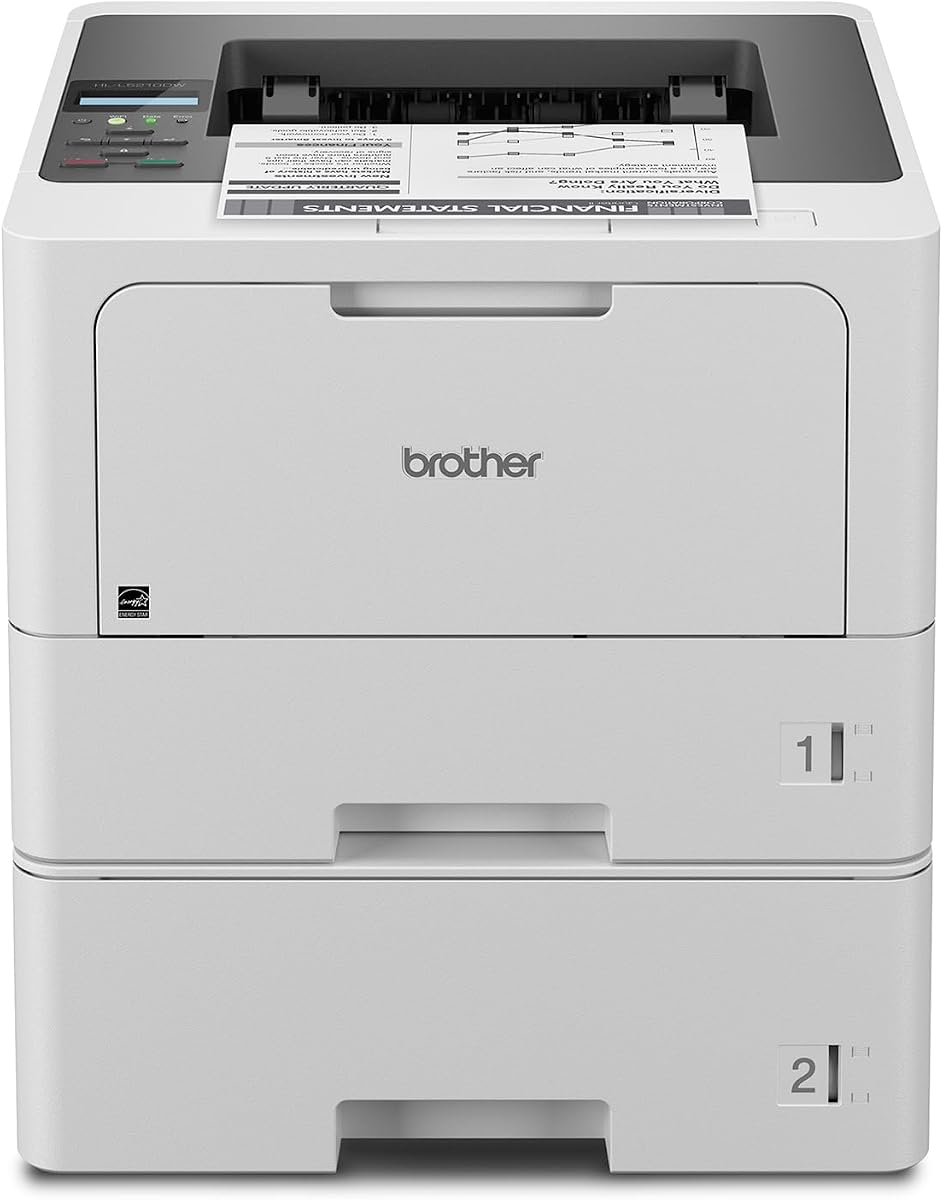
Brother HL-L5210DWT
4.3Editor score
48ppm high speed
Dual paper trays
Cost-efficient toner
Discover the top laser printers for large workgroups by comparing speed capacity security and features to find the perfect office solution for your team.
Choosing the right laser printer for large workgroups is essential for maintaining high productivity and efficient document management in busy office environments. A capable machine must handle high volumes without slowing down operations or requiring constant maintenance interruptions that disrupt daily workflows. The right device ensures that everyone has access to fast reliable printing when it is needed most.
This comprehensive guide evaluates ten leading laser printers designed specifically to meet the demands of large teams and enterprise settings. We compare critical factors such as print speed paper capacity connectivity options and advanced security features to help you make an informed decision. Each model has been selected based on its ability to deliver consistent performance under heavy usage conditions.
Each product pick highlights key strengths and potential trade-offs to give you a clear picture of what to expect from the device. Prices and availability can change frequently so we recommend verifying the latest details before making a purchase decision. Use this guide to identify the printer that aligns best with your specific workgroup requirements.
4.3Editor score

4.4Editor score

4.2Editor score
This side-by-side comparison highlights the core specifications of each printer to help you quickly identify which model fits your specific office needs.


The Brother MFC-L8930CDW stands out as a top choice for large workgroups needing reliable color printing with robust security. It delivers sharp professional results and maintains consistent performance under heavy daily use. The device supports a wide range of connectivity options making it easy to integrate into existing office networks.
We may earn a commission when you buy through this link, at no additional cost to you.
Its speed and efficiency are standout features that help boost productivity across busy teams. The duplex printing and scanning capabilities save paper and time while the multipurpose tray offers flexibility for custom media. The built-in NFC card reader adds a layer of convenience and security for user authentication.
While the upfront investment is higher than some monochrome options the long-term value is excellent. The included toner cartridges and low cost per page help maximize printing budgets. The compact design is 25 percent smaller than previous models saving valuable office space.
This printer is ideal for teams that need color output without sacrificing speed or security. It is a strong recommendation for any business looking to streamline document workflows. The advanced features justify the price for organizations prioritizing reliability and performance.
Flexible connectivity and customized shortcuts on the touchscreen make frequently used tasks easier to access.
Triple Layer Security protects documents in transit and helps safeguard your network from threats.
We may earn a commission when you buy through this link, at no additional cost to you.
The Brother HL-L5210DWT is an excellent budget option for large workgroups focused on high-speed monochrome printing. It delivers professional quality documents quickly and supports expandable paper capacity for uninterrupted workflows. The dual trays reduce refill frequency and keep productivity high throughout the day.
We may earn a commission when you buy through this link, at no additional cost to you.
Cost efficiency is a key strength with super high-yield toner options available to reduce operating expenses. The Gigabit Ethernet and dual-band wireless ensure reliable connectivity for all users. Security features help keep your network and documents safe from potential threats.
While it lacks color capabilities the speed and capacity make it ideal for text-heavy environments. The mobile printing support adds flexibility for remote or hybrid work arrangements. It strikes a great balance between performance and affordability for small to mid-sized businesses.
This model is perfect for teams that prioritize speed and cost savings over color printing. It is a reliable workhorse for everyday business documents. The value proposition is strong for organizations looking to optimize their printing budget.
Print speeds up to 48ppm help ensure fast turnaround times for busy offices.
Built-in networking allows seamless setup and sharing across wired or wireless networks.
We may earn a commission when you buy through this link, at no additional cost to you.
The HP LaserJet Enterprise MFP M634z is a premium powerhouse designed for high-demand enterprise environments. It offers exceptional speed and massive paper handling capabilities that support uninterrupted printing for large teams. The security features are top-tier and protect sensitive business data from threats.
We may earn a commission when you buy through this link, at no additional cost to you.
Workflow acceleration tools like the 150-page ADF and stapler/stacker enhance productivity significantly. The large color touchscreen makes navigation and task management intuitive for all users. Energy efficiency is also considered in its design reducing overall operational costs.
While the cost is high the performance and durability justify the investment for large organizations. The deep security features align with strict corporate compliance requirements. It is built to handle the most demanding printing tasks with ease.
This printer is best suited for enterprises requiring robust performance and advanced security. The high speed and capacity make it ideal for central print services. It represents a long-term solution for growing businesses.
Embedded security features help protect data and stop attacks on your network.
Enhance productivity with features that detect errors and ensure proper scanning.
We may earn a commission when you buy through this link, at no additional cost to you.
The Brother MFC-L6810DW delivers high-quality output and impressive speeds for mid to large workgroups. It combines printing scanning and copying into one efficient unit that handles high volume tasks. The lifetime value is enhanced with included toner and ultra high-yield replacement options.
We may earn a commission when you buy through this link, at no additional cost to you.
Security is a priority with triple layer protection and NFC badge authentication for access control. The auto document feeder supports fast two-sided scanning to streamline digital workflows. A large touchscreen simplifies navigation and task management for all users.
While it does not offer color printing the speed and capacity are excellent for text-heavy needs. The optional trays allow for expandable capacity to match growing office demands. It is a reliable choice for enterprise-level printing requirements.
This model is suitable for teams needing fast monochrome printing with advanced security. The integration with productivity tools adds convenience to daily operations. It balances performance with cost-efficiency for larger work environments.
Single-pass two-sided scanning up to 200ipm speeds up document processing.
Reduce refill time with large trays that can expand to 1660 sheets.
We may earn a commission when you buy through this link, at no additional cost to you.
The Brother HL-6210DW is a professional monochrome printer that handles high-volume printing jobs with precision. It offers fast output speeds and seamless integration with business networks. The security features ensure comprehensive protection for your data and devices.
We may earn a commission when you buy through this link, at no additional cost to you.
Cost efficiency is a key benefit with ultra high-yield toner reducing operational expenses. The expandable capacity helps keep workflows uninterrupted during busy periods. Dual-band wireless and Ethernet provide flexible connectivity options for all users.
It lacks advanced features like scanning or copying but excels at its primary function. The design is focused on delivering reliable and efficient print services. It is a straightforward choice for offices that only need printing.
This printer is ideal for teams prioritizing speed and budget efficiency. The security and connectivity options make it a secure choice for businesses. It delivers consistent performance for daily professional tasks.
Print business documents with robust trays expandable for uninterrupted professional performance.
Advanced features safeguard your printer devices and documents during transmission.
We may earn a commission when you buy through this link, at no additional cost to you.
The Brother MFC-L5915DW ensures fast professional quality documents for busy offices with high speeds. It helps reduce operating costs with low-cost toner options available. The scanning capabilities are fast and efficient for digitizing documents quickly.
We may earn a commission when you buy through this link, at no additional cost to you.
Connectivity is flexible with Gigabit Ethernet and dual-band wireless for seamless sharing. The large document glass supports legal-size documents for versatile scanning needs. It is a reliable choice for small to mid-sized workgroups needing an all-in-one.
While it lacks color printing the speed and cost savings make it a practical option. The ADF speeds up multi-page processing for better efficiency. It is well-suited for teams focused on text and document management.
This model balances speed and affordability for everyday business needs. The wireless options add convenience for remote printing. It is a solid investment for office productivity.
High-quality output and fast speeds ensure productivity for busy offices.
Seamlessly set up and share on your wired or wireless network.
We may earn a commission when you buy through this link, at no additional cost to you.
The HP LaserJet Enterprise M507n redefines long-term business expectations with consistent high-quality documents. Its security features are among the strongest available protecting your information and thwarting malware. Centralized control tools make it easy to manage a fleet of devices.
We may earn a commission when you buy through this link, at no additional cost to you.
Mobile printing is optional and generally requires no setup making it convenient for users. The trusted toner cartridges avoid reprints and wasted supplies. It is designed to keep up with growing business demands reliably.
While it lacks built-in wireless the wired connectivity ensures stable performance. The focus on security and management makes it ideal for corporate environments. It is a dependable workhorse for text printing.
This model is best for enterprises prioritizing security and centralized management. The mobile options add flexibility for users. It is a strong choice for consistent document output.
Over 200 embedded security features protect your printer's information and thwart malware.
Build business efficiency by adding new devices and applying policies easily.
We may earn a commission when you buy through this link, at no additional cost to you.
The HP LaserJet Enterprise MFP M634z combines performance energy efficiency and security for professional-quality documents. It protects your network from attacks with embedded features that detect and stop threats. The high-speed performance keeps business moving with fast first page out times.
We may earn a commission when you buy through this link, at no additional cost to you.
Accelerate workflow with a 150-page auto-document feeder and large touchscreen for easy management. The printer is loaded for productivity with massive paper capacity and stapler stacker options. It uses low amounts of energy thanks to innovative design and toner technology.
While the investment is high it delivers robust performance for large enterprise needs. The deep security aligns with strict corporate requirements for data protection. It is built for high-volume environments requiring reliability.
This model is ideal for organizations needing top-tier security and performance. The workflow tools help enhance productivity significantly. It is a long-term solution for enterprise document management.
Keep business moving with duplex printing and speeds up to 55 ppm.
Enhance productivity with features that detect errors and ensure scanning orientation.
We may earn a commission when you buy through this link, at no additional cost to you.
The Brother HL-L8430CDWT optimizes business productivity with vibrant color and sharp black output. Its durable design ensures reliability to support busy offices and work teams. The dual paper trays offer flexibility for mixed media and higher capacity.
We may earn a commission when you buy through this link, at no additional cost to you.
Maximize printing budgets with built-in value and low-cost toner options available. Flexible connectivity includes a touchscreen for seamless menu navigation and cloud services. Sustainability features like EPEAT Gold certification reduce environmental impact.
While color printing is slower than monochrome the quality and reliability are excellent. The security features help safeguard your network and devices. It is a great choice for teams needing color capabilities.
This model balances performance and sustainability for modern offices. The connectivity options add convenience for all users. It is a solid option for business color printing needs.
Built for dependable performance and professional results in busy offices.
Flexible connectivity and touchscreen enable seamless navigation and direct printing.
We may earn a commission when you buy through this link, at no additional cost to you.
The Brother HL-L6310DW delivers high-quality output and fast speeds for mid to large workgroups. It offers built-in value with included toner and ultra high-yield replacement options. Enterprise-level security features help safeguard your network and protect documents.
We may earn a commission when you buy through this link, at no additional cost to you.
The large expandable paper capacity minimizes refill times and keeps workflows smooth. Device management solutions enable mass distribution of configurations and updates. A user-friendly design allows for easy replacement of paper and toner.
While it lacks color capabilities the speed and security are ideal for text-heavy tasks. The integration with management tools simplifies IT administration significantly. It is a reliable choice for enterprise environments.
This model is well-suited for teams prioritizing efficiency and security. The management features make it easy to deploy and maintain. It is a strong option for enterprise monochrome printing.
Triple Layer Security helps safeguard your network and protect documents in transit.
User friendly design allows for easy replacement of paper and toner.
We may earn a commission when you buy through this link, at no additional cost to you.
When selecting a laser printer for large workgroups you must evaluate several key factors to ensure optimal performance and value.
Print speed is critical for large workgroups as it determines how quickly documents are produced during peak times. Look for models with speeds above 40ppm to handle high volumes without creating bottlenecks that slow down workflows. A high paper capacity ensures the printer can run longer without needing refills which keeps operations running smoothly.
Prioritize models with fast speeds and large paper trays to minimize downtime and interruptions for your team.
Security is a major concern for businesses handling sensitive data and confidential documents. Modern enterprise printers offer advanced features such as encryption NFC authentication and network protection to prevent unauthorized access. Triple Layer Security and similar frameworks help safeguard your network and keep devices secure from potential threats.
Ensure the printer includes robust security protocols to protect your data and maintain compliance with corporate policies.
Flexible connectivity allows seamless integration with your existing network infrastructure and mobile devices. Options like Gigabit Ethernet dual-band Wi-Fi and mobile printing support make it easy for all employees to access the printer. A versatile connectivity setup ensures that remote and on-site workers can print without technical issues.
Choose a printer with both wired and wireless options to support diverse workflows and device types.
Operating costs play a significant role in the total cost of ownership for office printers. Look for models that support high-yield toner cartridges to lower the cost per page and reduce frequent replacements. Included starter toners and energy-efficient designs can further maximize your printing budget over the long term.
Evaluate toner options and energy ratings to ensure the printer remains affordable to run over time.
Large workgroups often require printers with multiple trays to handle different paper sizes and types efficiently. Expandable paper capacities allow you to adjust the printer to match the growing needs of your team. Multipurpose trays are also useful for custom media such as envelopes or labels that may be needed occasionally.
Select a model with expandable trays to avoid constant refills and handle mixed media needs effortlessly.
A user-friendly interface helps employees navigate tasks quickly and reduces the learning curve for new users. Touchscreens and intuitive menus make it easier to access features like scanning and copying without technical support. For IT departments device management solutions allow for centralized updates and configuration of multiple printers.
Look for devices with intuitive interfaces and management tools to simplify daily use and maintenance.
Environmentally friendly features such as EPEAT Gold ratings and ENERGY STAR certification help reduce your office carbon footprint. Low energy consumption modes and recycled material usage are increasingly important for businesses committed to sustainability. These features often correlate with efficient designs that also save money on utility bills.
Consider models with green certifications to align with corporate sustainability goals and reduce energy costs.
Reputable brands like Brother and HP offer reliable products backed by strong warranty and support networks. Good customer service and available resources help resolve issues quickly and minimize downtime for your workgroup. A proven track record of reliability ensures the printer will perform consistently over its lifespan.
Choose a trusted brand with good support options to ensure long-term reliability and peace of mind.
To get the most out of your laser printer start by properly setting it up on a stable surface with enough ventilation. Ensure you connect it to your network securely and install all necessary drivers on your devices for seamless communication.
Regular maintenance such as cleaning the rollers and checking toner levels helps prevent jams and ensures high-quality output. Keep the printer covered when not in use to protect it from dust and debris that could affect its performance over time.
Update the firmware periodically to access the latest features and security patches. Encourage users to use recommended toner cartridges and paper types to avoid hardware issues and maintain the longevity of the device.
A well-maintained laser printer for large workgroups typically lasts between five to ten years. Regular maintenance and using recommended toner cartridges help extend the lifespan of the device significantly.
Wireless printers are safe when equipped with strong security features like encryption and authentication. Look for models with Triple Layer Security to protect your network and data from potential threats effectively.
You can reduce costs by using high-yield toner cartridges and selecting energy-efficient models. Bulk buying supplies and avoiding unnecessary color prints for internal documents also help lower expenses.
Monochrome printers are faster and more cost-effective for black and white text documents. Color printers provide vibrant output for marketing materials and presentations but usually have higher operational costs.
Use printers with advanced security features like NFC authentication and automatic threat detection. Keep firmware updated and restrict access to authorized users to safeguard your network and data.
Mobile printing is useful for teams with remote or flexible work arrangements. It allows employees to print directly from smartphones and tablets without needing to be near a computer.
Enterprise printers should have high speed security and scalable paper capacity. Features like centralized management tools and energy efficiency are also important for large office environments.
It is recommended to clean the rollers and interior every few months depending on usage. Regular cleaning helps prevent paper jams and ensures consistent print quality.
Choosing the right printer involves balancing speed security and cost to match your team needs. The Brother MFC-L8930CDW offers a strong all-in-one solution with color and speed. The Brother HL-L5210DWT is ideal for those seeking a cost-effective monochrome option.
For premium enterprise needs the HP LaserJet Enterprise MFP M634z provides unmatched speed and security. Prioritize features like paper capacity and security based on your specific workflow. Consider the long-term operating costs when making your final decision.
Prices and availability may change so always verify current details before purchasing. Use this guide to confidently select a printer that will support your workgroup for years. Investing in the right device ensures efficient and secure document workflows.